




















How Government Agencies Can Modernise Legacy Workflows With Automation

 Share -



- 01Why Legacy Workflows Are Becoming a Government-Wide Problem
- 02Understanding the Right Approach for Legacy Workflow Modernisation
- 03How Government Agencies Should Approach Legacy Workflow Modernisation?
- 04Which Government Workflows Are Best Suited to Automation?
- 05A Step-by-Step Process for Modernising Legacy Workflows
- 06Common Challenges of Government Workflow Automation and How to Overcome Them?
- 07How Much Does Government Workflow Automation Cost?
- 08What Is the ROI of Automated Government Workflows?
- 09What Does a Modern Government Workflow Look Like?
- 10Why Partner with Appinventiv for Workflow Automation for Government Agencies?
- 11FAQs

Key takeaways:
- Automate high-volume, rules-based workflows before attempting large-scale legacy replacement.
- Use APIs and integration layers to separate new workflow capabilities from ageing core systems.
- Measure processing time, manual effort, errors and service outcomes before scaling automation.
- Modernisation should follow a staged path from automation and integration towards refactoring or replacement.
Government agencies can have modern citizen-facing portals while relying on spreadsheets, email approvals, ageing databases and manual data entry behind the scenes. The result is a workflow that looks digital but still depends heavily on people moving information between disconnected systems.
For Australian agencies, replacing an entire legacy estate is rarely practical. Critical systems may support essential services, contain decades of business rules, or have dependencies that cannot be changed quickly.
A more controlled approach is to automate around those systems first. Integration layers, workflow engines, APIs, rules-based routing and targeted AI can remove repetitive work while keeping critical systems in service.
This approach also aligns with Australia’s broader move towards modern, cloud-based government technology. The Whole-of-Government Cloud Computing Policy, effective from 1 July 2026, sets expectations for agencies transitioning away from legacy technology and planning for the decommissioning of legacy systems.
The practical question is therefore not whether legacy systems should disappear immediately. It is where automation can safely remove operational friction while creating a measured path towards modernisation.
That distinction can turn legacy modernisation from a disruptive replacement programme into a staged, measurable improvement in how government services operate.
Assess your current workflow architecture and identify where automation can deliver measurable operational gains.
Why Legacy Workflows Are Becoming a Government-Wide Problem
Legacy workflow problems rarely come from one outdated application. They emerge when ageing systems, manual processes, fragmented data and institutional knowledge become tightly connected. For government agencies, the resulting cost is operational as well as technical: slower services, higher support overhead, greater cyber exposure and fewer options for change. Businesses must address these bottlenecks to maintain service continuity and meet regulatory expectations.
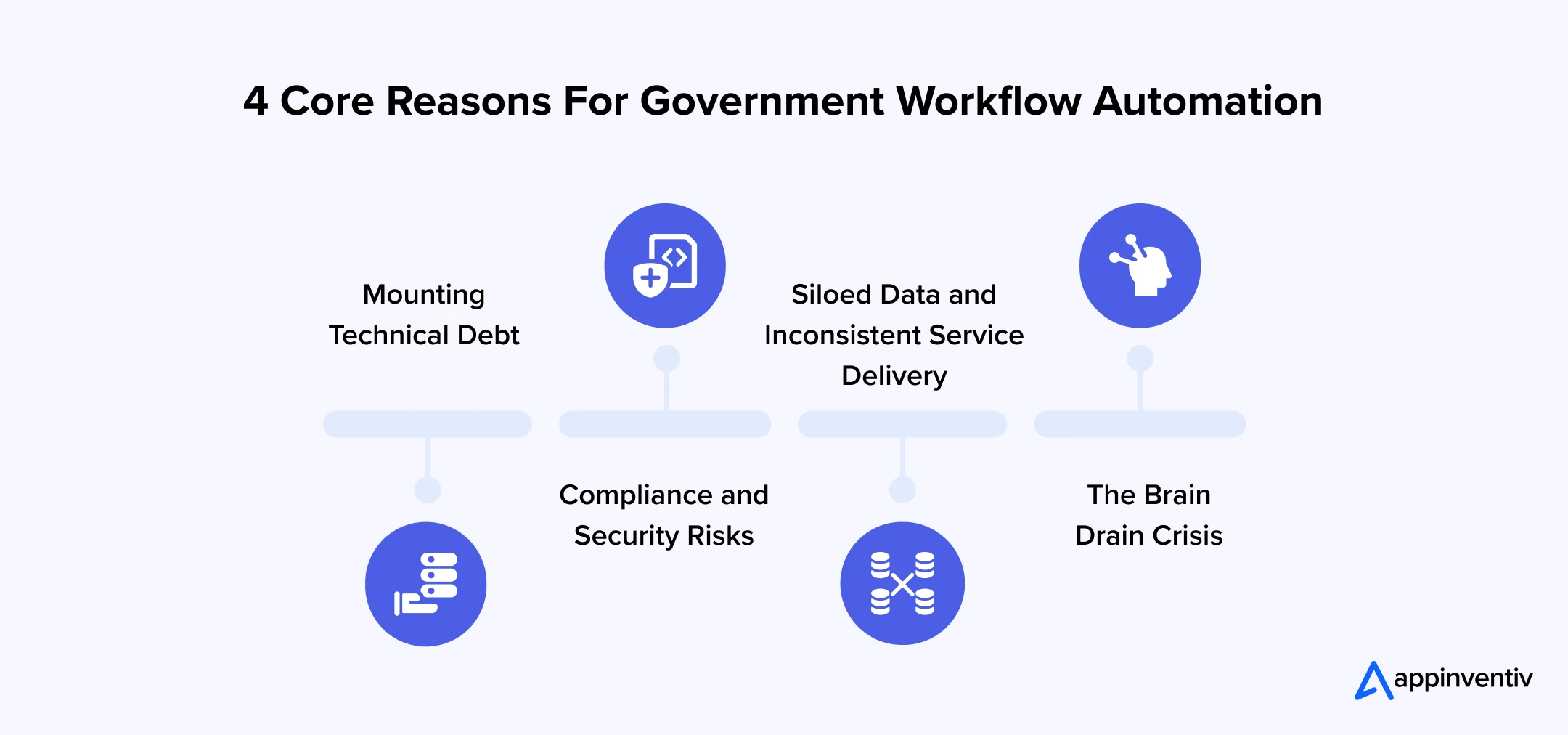
Mounting Technical Debt
A legacy application may still perform its original function reliably. The problem appears when every new requirement needs another workaround.
Teams may depend on custom scripts, spreadsheets, batch files or manual reconciliation because the underlying platform was never designed for today’s service volumes or integration requirements.
Over time, maintenance absorbs budget that could otherwise support modernisation.
Compliance and Security Risks
Ageing systems can make granular access control, contemporary authentication, monitoring and audit logging harder to implement. This is a critical pain point for agencies adhering to strict frameworks like the Essential Eight or ISO 27001.
For Australian agencies, security cannot be separated from modernisation. Cloud adoption, for example, must align with obligations covering information security, privacy and protective security. The Whole-of-Government Cloud Computing Policy explicitly connects cloud adoption with these requirements.
Siloed Data and Inconsistent Service Delivery
When databases cannot communicate, public sector staff must manually extract and re-enter information across multiple platforms. This fragmentation leads to prolonged processing times for citizen requests.
Citizens expect connected services where their information is recognised instantly across different departments. Siloed data prevents agencies from delivering that unified experience.
The Brain Drain Crisis
Some older systems depend on specialised knowledge that exists with only a small number of employees or suppliers. The difficulty created when systems use outdated technologies and the people who understand them retire.
Automation can reduce dependence on manual workarounds while giving agencies time to document, decouple and eventually replace fragile components.
Understanding the Right Approach for Legacy Workflow Modernisation
Legacy workflow modernisation means redesigning and automating processes around ageing systems while progressively introducing modern integration, data and cloud capabilities. The objective is not technology replacement for its own sake. It is to improve service delivery, control and maintainability without unnecessarily disrupting critical government operations.
| Approach | What it does | Best suited for |
|---|---|---|
| Automate | Removes repetitive manual steps | Stable, rules-based processes |
| Integrate | Connects legacy and modern applications | Fragmented workflows |
| Refactor | Restructures application components | Systems with useful business logic |
| Replatform | Moves software to a newer platform | Platforms needing infrastructure change |
| Rehost | Moves workloads with limited code change | Infrastructure modernisation |
| Replace | Introduces a new core application | Unsustainable or high-risk systems |
| Retire | Removes redundant technology | Duplicate or obsolete capabilities |
| Modernise in place | Improves the existing system incrementally | Critical systems requiring continuity |
A practical sequence is often Automate → Integrate → Refactor → Replatform → Replace.
How Government Agencies Should Approach Legacy Workflow Modernisation?
Modernisation should fit the agency’s policy, security and service environment rather than forcing every workload into the same architecture. Government agencies should align cloud decisions with national policy, design around secure data access and interoperability, and establish clear ownership for technology, information and operational risk before automation reaches production.
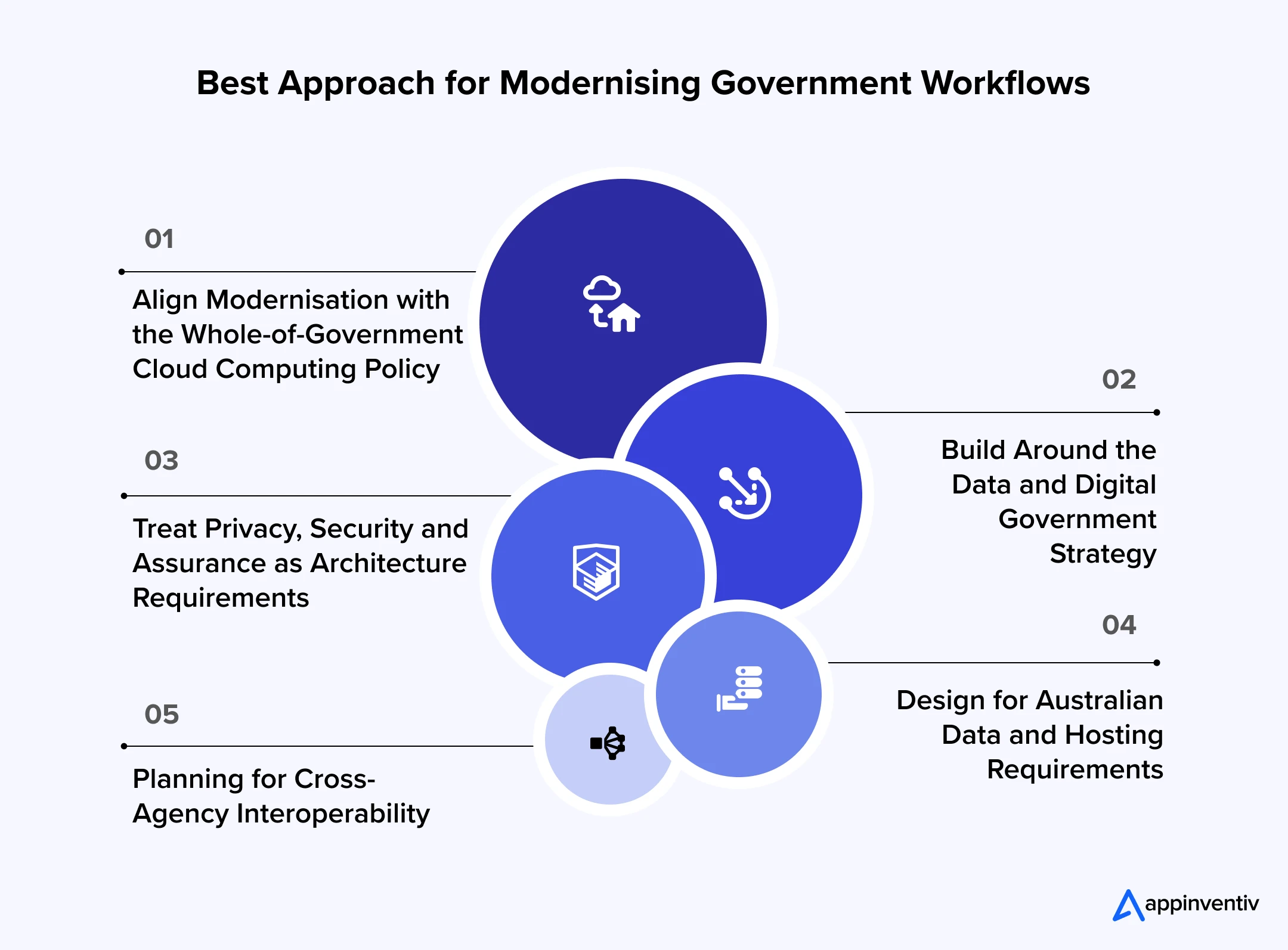
Align Modernisation with the Whole-of-Government Cloud Computing Policy
The Whole-of-Government Cloud Computing Policy requires applicable Commonwealth entities to prioritise cloud for new digital and ICT initiatives and upgrades unless an alternative is justified. It also calls for legacy decommissioning roadmaps and consideration of hybrid or multi-cloud approaches where appropriate.
That makes workflow modernisation an opportunity to remove dependencies gradually rather than simply moving old processes into a new hosting environment.
Build Around the Data and Digital Government Strategy
The Australian Government’s Data and Digital Government Strategy sets a 2030 vision for simple, secure and connected public services, supported by people capability, cyber security, governance and investment.
Workflow automation should therefore contribute to connected services, not create another isolated automation layer.
Treat Privacy, Security and Assurance as Architecture Requirements
Security cannot be a bolt-on feature. Authentication, data encryption at rest and in transit, and immutable logging must be foundational components of any automated workflow. This proactive stance satisfies the stringent requirements of government cybersecurity frameworks.
Design for Data and Hosting Requirements
Where data has sovereignty, residency or protective-security requirements, the architecture should identify where information is stored, processed, transferred and backed up.
The cloud policy specifically requires agencies to account for relevant Australian privacy, security and protective-security obligations
Plan for Cross-Agency Interoperability
Workflows rarely exist in isolation. Modernised systems should be built with API-first architectures that allow secure data exchange between different government departments.
This interoperability eliminates the need for citizens to provide the same information multiple times.
Which Government Workflows Are Best Suited to Automation?
Identifying the right processes to automate ensures rapid return on investment. The best use cases for government workflow automation share common characteristics such as high repetition, frequent delays, high error or rework rates and clear rules. Focusing on these workflows reduces administrative burden and allows public servants to focus on complex, high-value citizen interactions and policy execution.
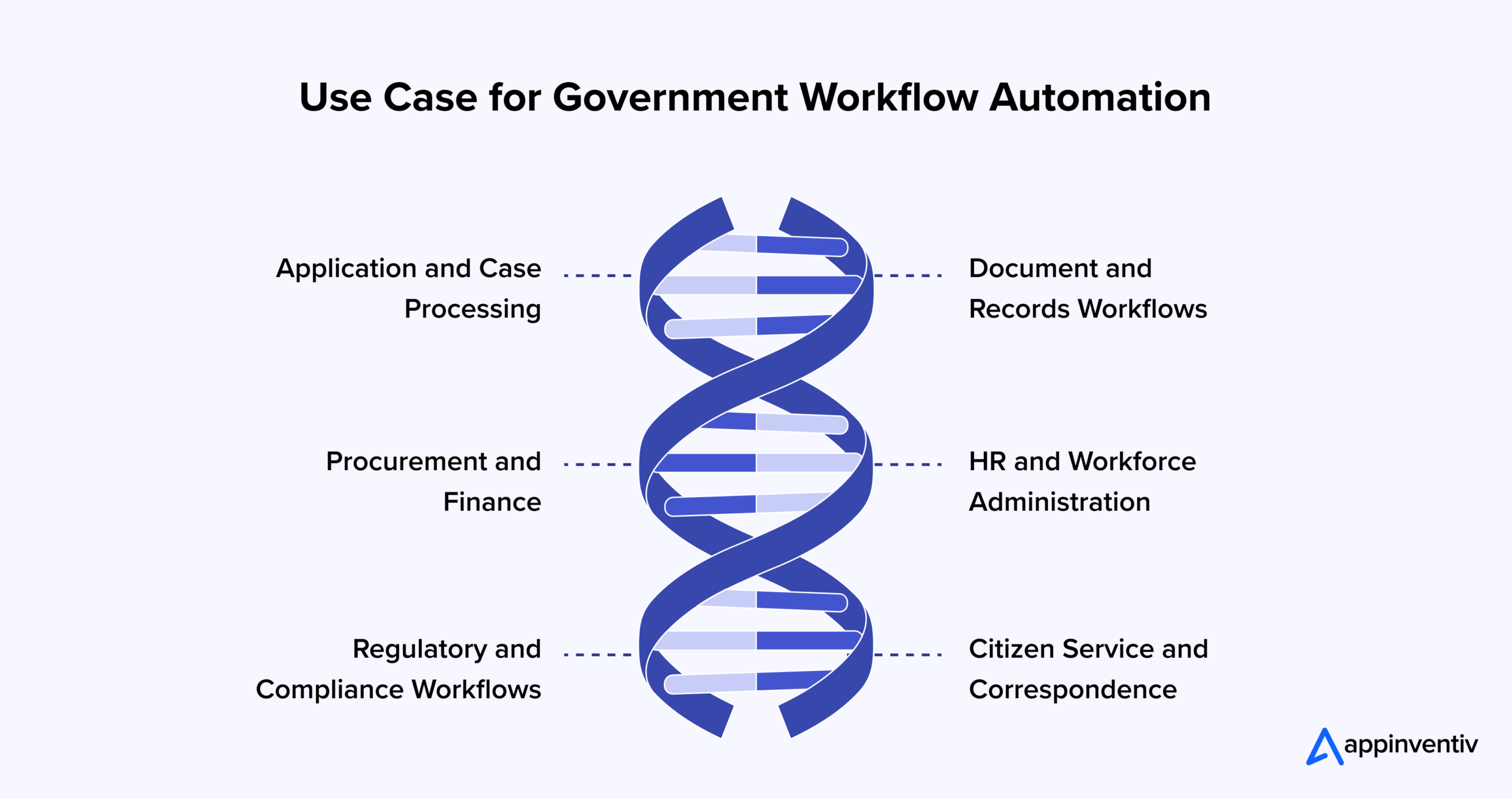
Application and Case Processing
Grant applications, permit requests and licensing renewals follow predictable evaluation paths. Automating the initial data validation and routing ensures that human assessors only review completed, compliant submissions.
Document and Records Workflows
Government agencies manage millions of files. Automated ingestion, classification and secure archiving of citizen documents drastically reduce the time spent on physical and digital record-keeping while ensuring compliance with data retention policies.
Procurement and Finance
Vendor onboarding, invoice matching and purchase order approvals are traditionally burdened by manual email chains. Automation enforces strict financial delegation rules, checks budgets in real time and creates unalterable audit trails for public expenditure.
HR and Workforce Administration
Onboarding new public employees requires coordination across IT, security, payroll and facilities. Workflow automation unifies these triggers, ensuring appropriate access rights are granted securely and equipment is provisioned without endless follow-up emails.
Regulatory and Compliance Workflows
Audits, safety inspections and mandatory reporting require aggregating data from multiple sources. Automated workflows compile this data on schedule, flag anomalies against regulatory thresholds and generate compliance reports for executive review.
Citizen Service and Correspondence
Routing citizen inquiries to the correct department often involves multiple internal transfers. Natural language processing combined with automated routing ensures correspondence is triaged accurately, acknowledged immediately and assigned to the correct resolution queue.
Here is a consolidated view of the most common use case for government workflow automation
| Workflow | Automation opportunity | Technology | Operational outcome |
|---|---|---|---|
| Applications | Validation and routing | Workflow engine, APIs | Faster processing |
| Documents | Extraction and classification | OCR, document AI | Less manual entry |
| Procurement | Approval and matching | Rules engine, ERP Integration APIs | Fewer handoffs |
| Compliance | Evidence and alerts | Workflow, dashboards | Better audit readiness |
| Citizen requests | Triage and correspondence | APIs, workflow engine | Faster response |
Map repetitive workflows, integration gaps and manual bottlenecks before investing in broader modernisation.

A Step-by-Step Process for Modernising Legacy Workflows
Successfully deploying automation requires a structured, phased methodology. Agencies must map existing processes comprehensively before selecting the appropriate technological intervention. Decoupling data, managing change effectively and scaling incrementally ensures that modernisation delivers measurable improvements without destabilising current critical government functions.
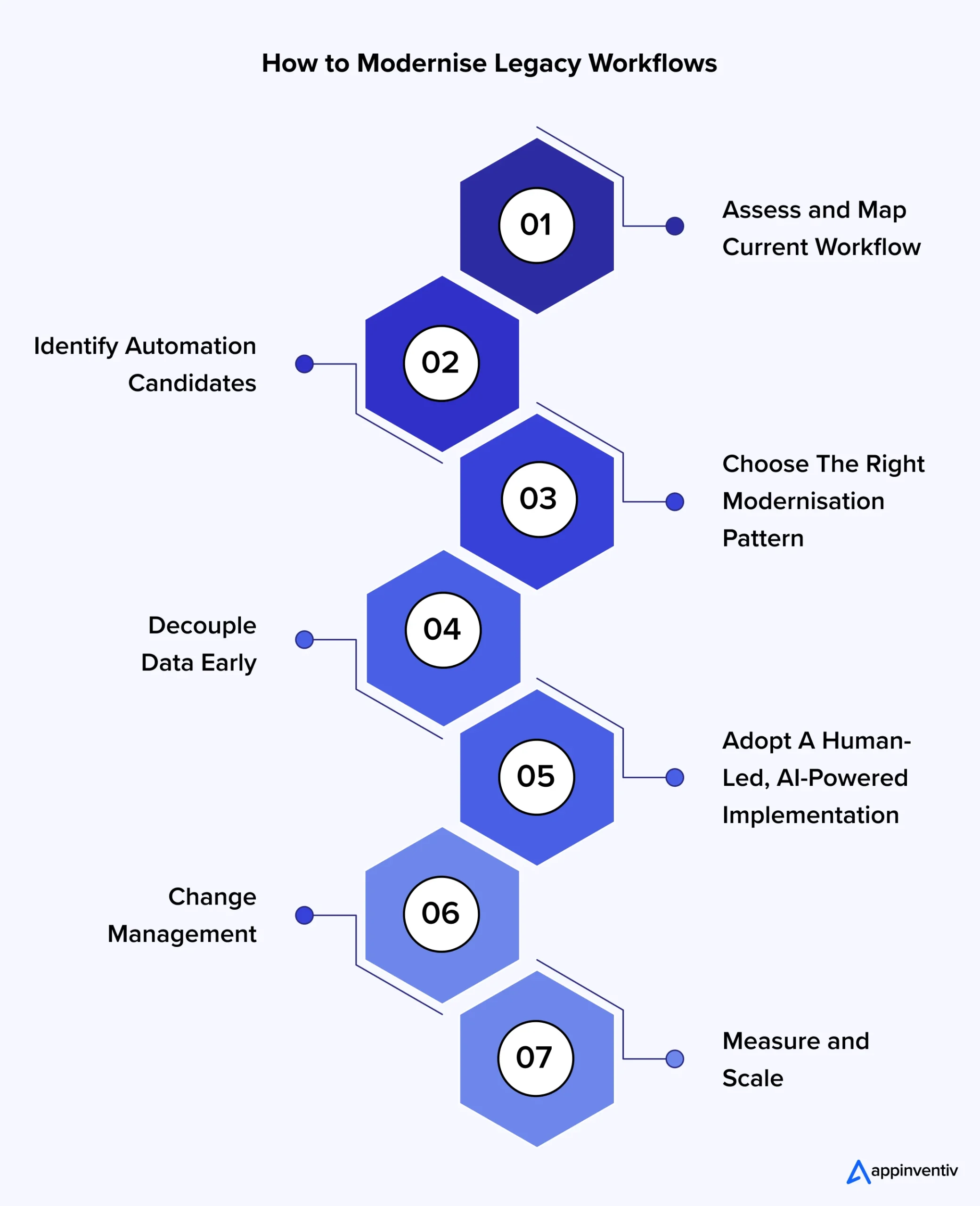
Assess and Map Current Workflow
Start by thoroughly documenting the existing process. Identify the hidden manual steps, shadow IT tools and exact decision points. This baseline mapping highlights the inefficiencies and dictates the boundaries of the automation project.
Choose the Right Modernisation Pattern
Use the lowest-risk intervention that produces meaningful improvement:
Automate → Integrate → Refactor → Replatform → Replace
This prevents a relatively contained workflow problem from becoming a multi-year core-system replacement programme.
Decouple Data Early
Separate the data from the legacy application logic. Using API layers or data lakes allows modern workflow engines to interact with legacy information safely. This decoupling prevents the automation tool from being constrained by the old system’s limitations.
Adopt a Human-Led, AI-Powered Implementation
Technology should augment human decision-making, not operate blindly. Keep humans in the loop for complex edge cases, sensitive approvals and policy interpretations. AI and intelligent automation handle the volume, while public servants handle the nuance.
Focus on Change Management
New workflows fail if staff reject them. As a standard practice, for every dollar spent developing a digital solution, plan to spend at least another dollar on implementing process changes, user training and change-management initiatives.
Measure and Scale
Launch the automated workflow in a controlled environment. Monitor error rates, processing speeds and user feedback. Once the system proves stable and effective, expand its scope to handle higher volumes or roll it out to additional departments.
Common Challenges of Government Workflow Automation and How to Overcome Them?
Most automation programmes stall because of architecture, data, capability or adoption constraints rather than the workflow engine itself. The right response taken at the right stage and at the right time can help you get the most of your digital transformation strategy.
| Challenge | Practical Response |
|---|---|
| “We cannot replace the legacy system yet” | Place an integration and orchestration layer around the system, then automate repeatable processes without changing core functionality. |
| “The process is too complex to automate” | Break the workflow into rules, exceptions and human decisions, then automate stable and measurable components first. |
| “Our data is too fragmented” | Establish common data definitions and API-based exchange before connecting automation to multiple source systems. |
| “Automation could create compliance risk” | Build access controls, audit logs, approval gates, privacy controls and exception handling into the workflow architecture. |
| “Our teams do not have legacy-system expertise” | Document business rules while subject-matter experts remain available and pair them with modern engineering teams. |
| “We have already run pilots but nothing scaled” | Define production ownership, integration standards, KPIs and adoption responsibilities before launching another isolated pilot. |
How Much Does Government Workflow Automation Cost?
Government workflow automation can range from a focused modernisation programme to a major integration and legacy transformation initiative. So, giving a standard quotation for all types of modernisation programmes is not a viable option.
However, to give you an indicative project range, we can say that government workflow automation software development cost typically ranges between AUD 70,000 to AUD 700,000+.
Remember, the actual investment depends on system complexity, data migration, security controls, integrations, workflow scope and delivery model.
| Complexity | Typical scope | Indicative timeline | Estimated cost range |
|---|---|---|---|
| Focused | One workflow, limited integrations | 2–4 months | 70,000 – 150,000 |
| Medium | Multiple workflows and legacy integrations | 4–8 months | 150,000 – 350,000 |
| Complex | Cross-system automation and data work | 8–12 months | 350,000 – 500,000+ |
| Enterprise | Multi-agency or core-system modernisation | 12 – 18 + months | 500,000 – 700,000+ |
These figures should be treated as planning ranges rather than fixed market prices. A proper estimate requires discovery of the current architecture, security requirements, integration landscape, data dependencies and target operating model.
Get a tailored assessment based on workflow complexity, integrations, data requirements and security considerations.
What Is the ROI of Automated Government Workflows?
The true value of modernisation extends beyond simple cost reduction. Government agencies can create value through shorter processing cycles, fewer errors, better use of specialist staff, stronger auditability and more consistent service delivery. The strongest investment cases connect each automation initiative to measurable operational outcomes and public-service objectives.
Lower Operating Effort
Removing repetitive data entry, reconciliation and routing gives officers more capacity for complex cases and service delivery.
Faster Services
Automated validation and routing cut application processing times from weeks to hours. Citizens receive instant confirmations and faster determinations.
Better Auditability and Citizen Satisfaction
A well-designed workflow creates a consistent record of actions, approvals, timestamps and exceptions. This improves citizens’ trust in public institutions.
Greater Operational Resilience
When business knowledge is captured in documented rules and controlled workflows, agencies become less dependent on individual employees remembering manual procedures.
What Does a Modern Government Workflow Look Like?
A modern workflow connects digital services, integration capabilities and core systems through controlled orchestration. Routine cases move automatically, while exceptions are routed to authorised officers. Every significant transaction produces an auditable record, allowing operational teams to monitor performance without manually reconstructing what happened.
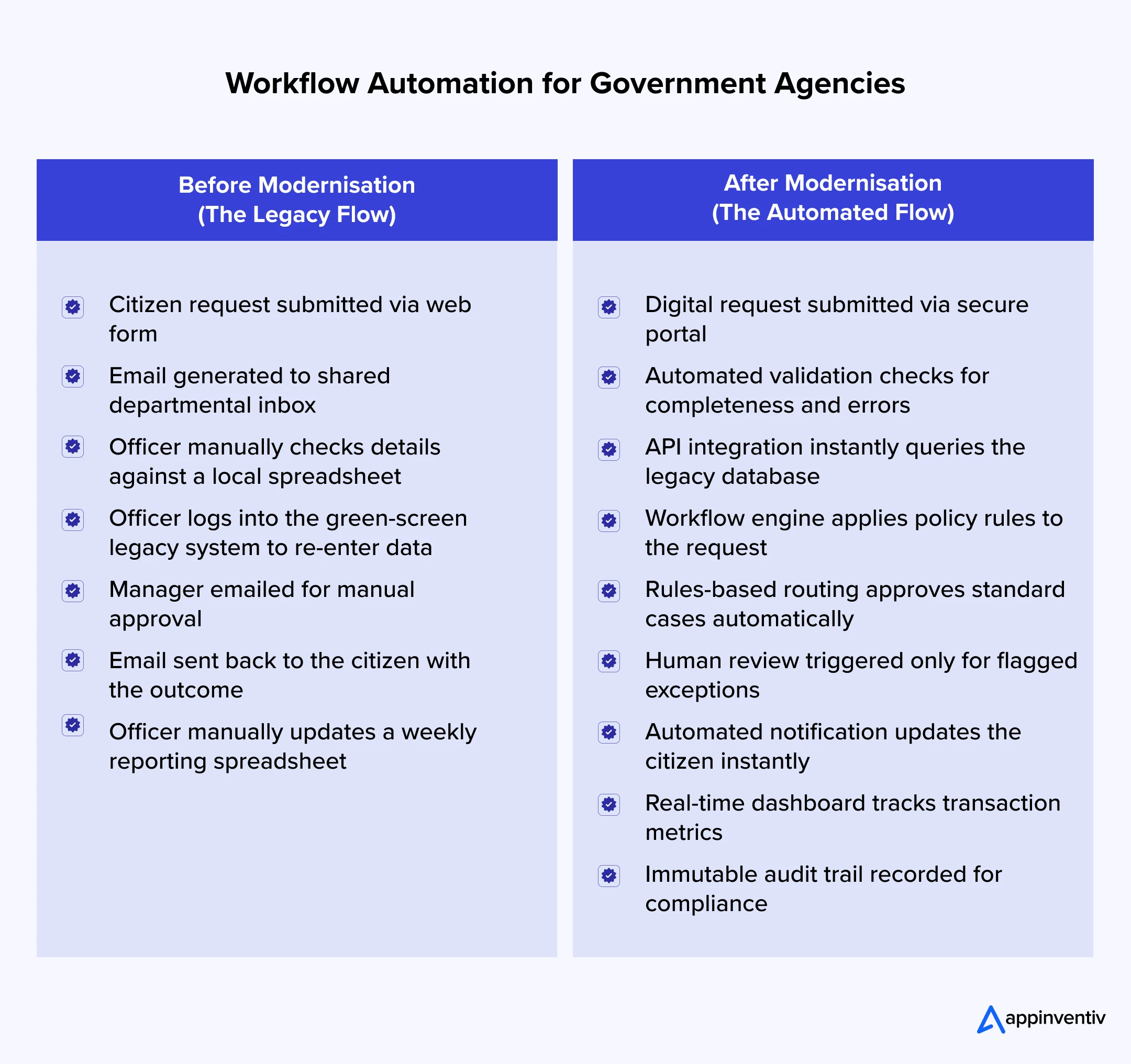
Before and After Analysis of Workflow Automation in Government Agencies
Before
Citizen request → Email → Spreadsheet check → Legacy system entry → Manager approval → Email response → Manual reporting
After
Digital request → Automated validation → API integration → Workflow engine → Rules-based routing → Human review for exceptions → Automated notification → Real-time dashboard → Audit trail
Why Partner with Appinventiv for Workflow Automation for Government Agencies?
Whether it is about modernising workflows or engineering digital assets for the public sector, it demands an experienced tech partner for the government with proven execution capabilities and strict adherence to Australian regulatory requirements.
Appinventiv, with 11+ years of APAC delivery experience, boasts a team of 1700+ tech architects with enterprise architecture expertise to build resilient, compliant automation solutions that scale securely across government departments.
However, modernising legacy systems in government or any highly regulated environments requires more than just technical capability. It demands a deep understanding of data sovereignty, governance and enterprise risk.
As a trusted provider of enterprise digital transformation and custom software development Services in Australia for 35+ industries, we specialise in helping government agencies transition from rigid legacy constraints to agile, automated service delivery.
Our approach does not force a rip-and-replace strategy. Instead, we methodically map your technical debt and deploy intelligent automation layers that deliver immediate value. Our delivery framework follows a strict progression:
Assess → Architect → Integrate → Automate → Modernise → Scale
It means we assess your current architecture, architect a secure data layer, integrate with existing mainframes, automate the high-volume rules, modernise components iteratively and scale the solution across the agency.
Appinventiv is pre-approved across key Australian procurement frameworks, including the Queensland Government ICTSS panel, Local Buy, and the DTA Digital Marketplace. These arrangements make it easier for federal, state and local entities to engage technology services through established procurement pathways.
We also report 99.50% security compliance SLA coverage across ISO and SOC 2 environments and 35% efficiency gains in Australian enterprises.
This certified and phased approach has made us rank among APAC’s high-growth companies by Statista and Financial Times for three consecutive years (2024, 2025 and 2026).
Ready to modernise legacy government workflows?
Connect with our transformation experts to assess technical debt and define a secure automation roadmap.
FAQs
Q. What is government workflow automation?
A. Government workflow automation is the redesign, integration and automation of processes that depend on ageing systems. The goal is to improve efficiency, security and interoperability without necessarily replacing the entire underlying core system in one disruptive event.
Q. What are the benefits of workflow automation in government?
A. The benefits of workflow automation for government agencies include faster processing, fewer manual errors, lower administrative effort, better auditability and more consistent service delivery. It can automate repetitive tasks such as data entry, validation, approvals, document processing and notifications, while allowing government employees to focus on complex cases and decisions that require human judgement.
Q. Can government agencies automate workflows without replacing legacy systems?
A. Yes. APIs, integration layers, workflow engines and controlled automation can connect modern services with existing applications. This approach can reduce manual work while allowing the legacy system to remain operational during a staged transformation.
Q. How can agencies modernise legacy workflows while maintaining compliance?
A. Compliance is maintained by embedding regulatory rules directly into the workflow logic. Modernisation platforms must be configured to generate immutable audit logs, enforce strict identity access management and adhere to Australian data sovereignty and hosting certification standards.
Q. How long does government workflow automation software development take?
A. Government workflow automation software development process typically takes 2 to 18 months or more, depending on your unique project requirements. For instance, a focused workflow may take 2 – 4 months, while programmes involving multiple legacy systems, complex integrations or significant data migration can take 6 – 18 months or longer. The timeline depends on scope, dependencies, assurance requirements and the chosen modernisation pattern.
Q. What should agencies consider before automating a legacy workflow?
A. Agencies must evaluate transaction volume, data quality and existing process logic. Automating a broken process simply executes a bad workflow faster. It is critical to map, clean and optimise the business rules before applying the technological automation layer.
Q. How does the Australian government use automated decision-making?
A. The Australian Government uses automated decision-making to support or, in some cases, make administrative decisions such as assessing applications, determining eligibility and identifying cases that require further review. These systems can improve processing efficiency, but decisions affecting people require appropriate transparency, accountability, privacy and human oversight.


Fast 2-minute response, fully NDA-protected.

Beyond Customer Portal Development: Building Connected Digital Services
Key takeaways: A portal without CRM, ERP and billing integration leaves your staff doing the connecting. Start with customer tasks, then integrate only the systems those tasks actually need. Name one system of record for each data type before choosing APIs or middleware. Plan integration, security and privacy obligations at the start, not after the…
CRM Software for Local Government: From Community Requests to Better Service Delivery
Key takeaways: A council CRM should sit around existing systems as a service layer, not replace them. Integration with ERP, rates, property and GIS systems prevents another data silo and duplicate entry. Start with one high-volume service, pilot it with residents, then scale on measured results. Track resolution time, SLA compliance, self-service rates and cost…

The Ultimate Guide to CRM for Insurance: Features, Cost, Top Platforms, Integration & More
Key takeaways: CRM for insurance connects sales, service, and claims into one governed system, distinct from the policy administration system. Core features span pipeline management, policy visibility, claims tracking, commission management, AI analytics, and compliance controls. Cost ranges from roughly USD 15,000 for configuration to USD 150,000 and beyond for custom development at enterprise scale.…