






























Beyond Customer Portal Development: Building Connected Digital Services

 Share -



- 01Why Businesses Need Customer Portal Development
- 02Why Customer Portals Need CRM, ERP and Other System Integrations
- 03Which Business Systems Should a Customer Portal Integrate With?
- 04What Are Customer Portal Integration Use Cases for Different Industries?
- 05How to Implement Customer Portals with the Existing Systems?
- 06What Are the Must-Have Features of A Connected Customer Portal?
- 07What Are Some Common Customer Portal Integration Challenges and How to Solve Them?
- 08How Much Does Custom Customer Portal Development Cost?
- 09Measuring the ROI of Customer Portal Integration
- 10How Appinventiv Approaches Customer Portal Integration?
- 11FAQs

Key takeaways:
- A portal without CRM, ERP and billing integration leaves your staff doing the connecting.
- Start with customer tasks, then integrate only the systems those tasks actually need.
- Name one system of record for each data type before choosing APIs or middleware.
- Plan integration, security and privacy obligations at the start, not after the interface.
- Measure success by faster processing and fewer status calls, not just portal logins.
Submitting a digital request is simple. Getting it actually resolved? That’s where the real headache begins for most Australians.
A customer submits a request through a polished portal and receives a confirmation. Then nothing visible happens. Behind the screen, a staff member copies the details into the CRM, forwards a document to finance and answers the inevitable “where is my request?” call. The front end looks digital. The service is still manual.
For customers, this creates a frustrating gap between what the portal promises and what the organisation delivers. For businesses, it means more manual work, inconsistent records and slower service.
That is why customer portal development needs to go beyond the front-end experience. Connecting the portal with CRM, ERP, billing, support and other business systems allows information to move between customers and the teams handling their requests.
The goal is straightforward: make it easier for customers to get things done without creating more work behind the scenes.
Identify the systems and manual processes holding back your customer experience.
Why Businesses Need Customer Portal Development
Customers don’t keep office hours, and a ratepayer checking a balance at 9 pm isn’t going to wait for Monday. A customer portal gives people one secure place to deal with you on their terms. Here’s what that does for your business.
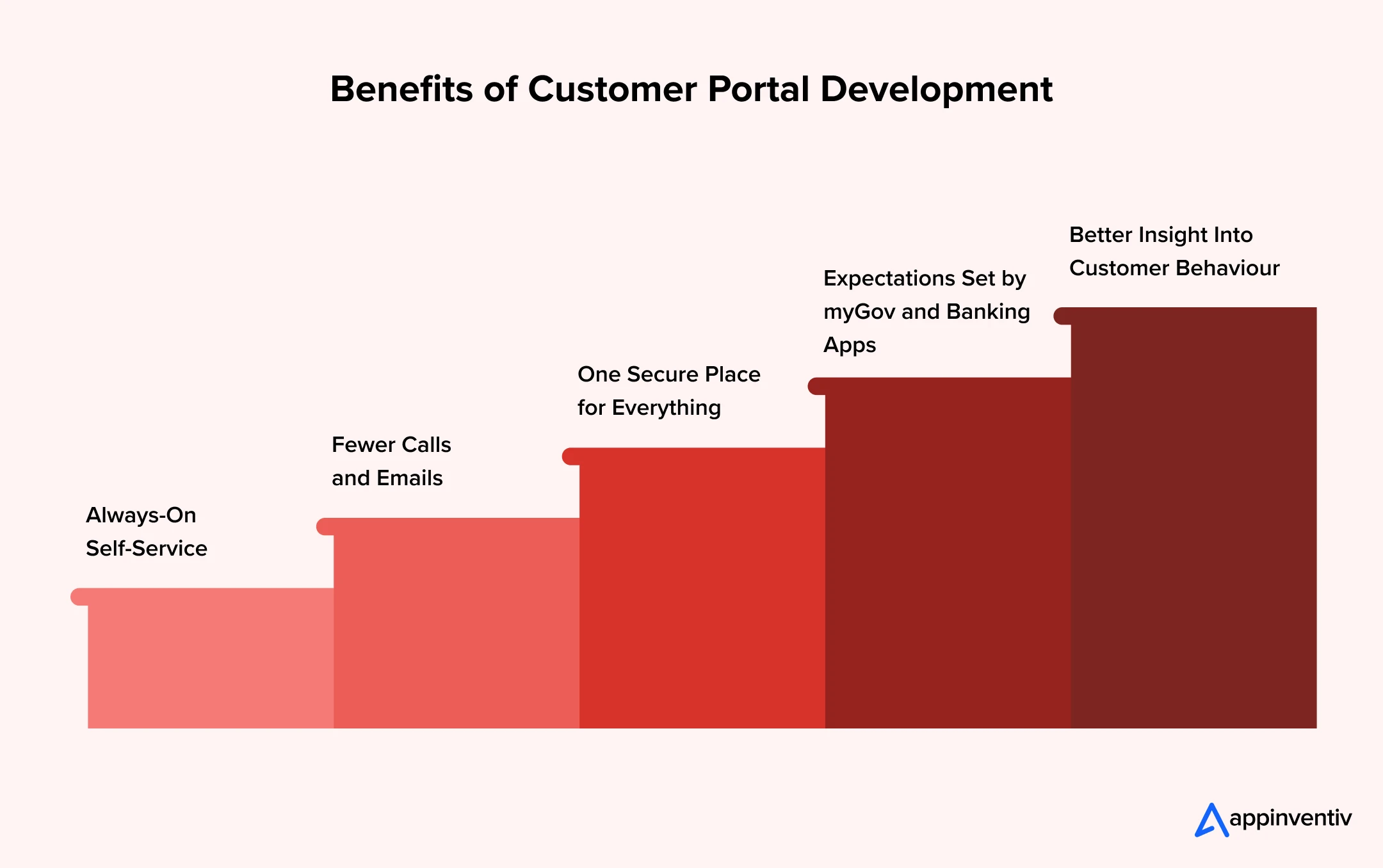
One Secure Place for Everything
Documents, payments and account details sit behind a single login with proper access controls. That’s easier for customers to use and easier for you to protect under the Privacy Act.
Always-On Self-Service
Customers can pay, apply, track and update details at any hour. Your team stops being the only way to get an answer, and routine requests no longer pile up in the queue.
Fewer Calls and Emails
When community can see their own invoices, orders and request status, the “where’s my request?” contact drops. Staff spend their time on the work that actually needs a person.
Expectations Set by myGov and Banking Apps
Australians now expect their council, utility or supplier to be as simple as myGov or their bank. Organisations that deliver that keep customers longer.
Better Insight Into Customer Behaviour
Portal activity shows what customers ask for most and where they get stuck. That data helps you fix the real friction points instead of guessing.
That’s the case for building a portal. The next question is whether it can work independently or needs to connect with the existing systems.
Why Customer Portals Need CRM, ERP and Other System Integrations
A portal that runs separately from core business systems creates four problems quickly.
- Duplicate data entry. Staff retype what customers have already entered, and customers re-enter what the organisation already holds.
- Inconsistent records. The same customer exists in several systems, each slightly different.
- Manual hand-offs. Requests wait in inboxes and queues until someone moves them to the next team.
- Limited visibility. Neither staff nor customers can see the full picture of activity across channels.
Consider something simple. A customer updates their address in the portal. The CRM still shows the old one, and billing posts the next invoice there. The customer did everything right, yet the organisation produced an error, and now both sides spend time correcting it.
Multiply that across thousands of customers and several data fields and the cost of disconnection becomes a real ordeal.
Solution? A portal should not become another data silo. It should be a front door to systems that already hold the truth.
Which Business Systems Should a Customer Portal Integrate With?
You do not need every integration and trying to is a common way to blow a budget. The right combination depends on what customers need to do through the portal. The better questions to begin with are: what does the customer need to do, and which systems make that possible?
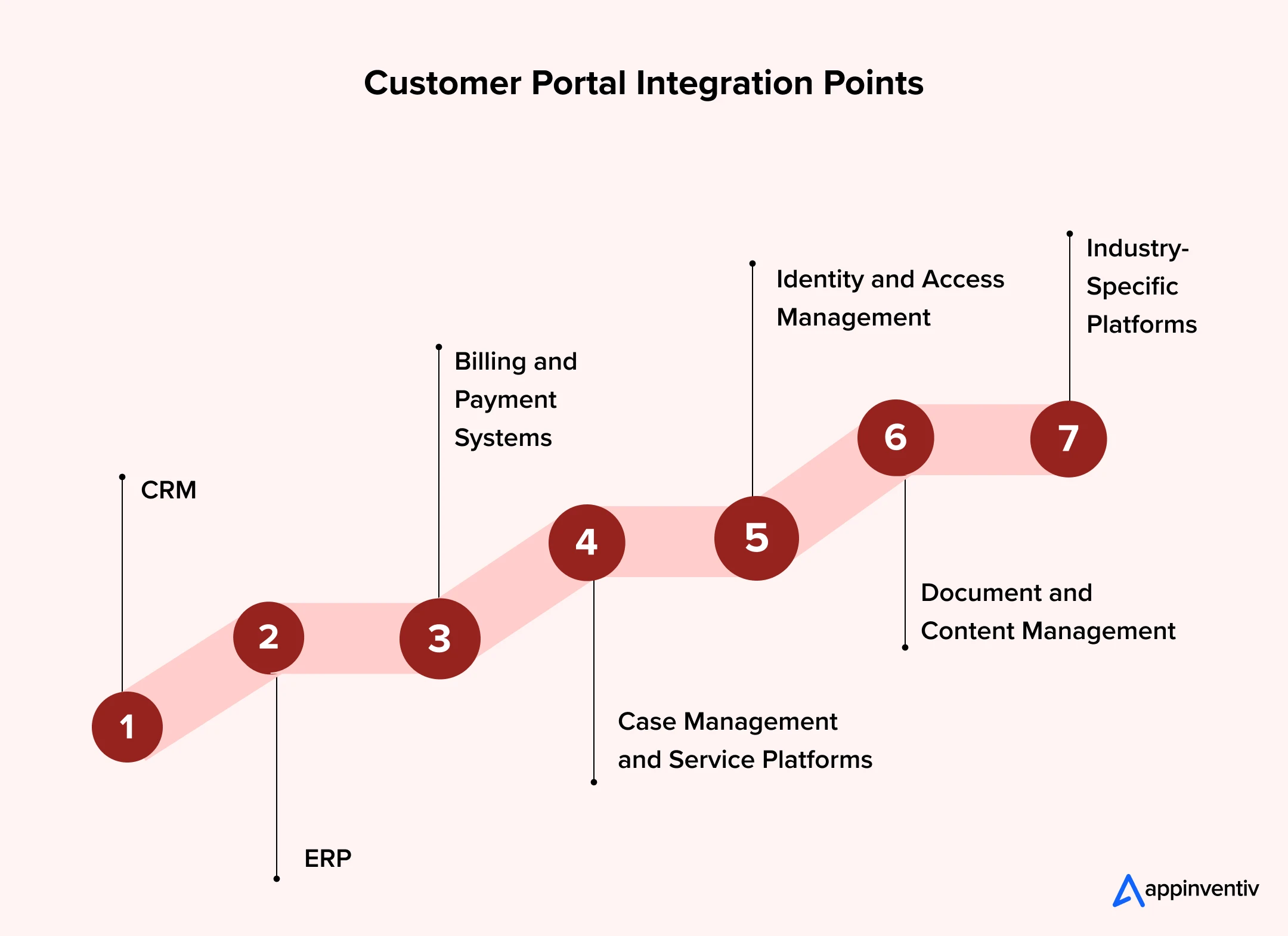
CRM
This is usually the first connection worth making. The CRM holds the customer record and interaction history, so linking it means portal activity shows up on the screen your staff already use, and anything they change appears in the portal. It also removes the most visible duplication. Many councils and agencies run platforms such as TechnologyOne or Civica alongside a separate CRM, so this link matters.
ERP
The ERP holds orders, inventory, finance and fulfilment data. Connecting ERP lets customers place orders, see availability and track progress without anyone rekeying data between systems. Finance and operations also see demand as it happens, which improves planning.
Billing and Payment Systems
People expect to see an invoice, pay it and watch the balance update straight away. That only works if the portal and the finance system agree on what’s owed. It often means supporting BPAY, direct debit and PayTo through the New Payments Platform, and, for B2B, Peppol e-invoicing, which the ATO is promoting as the national standard.
Case Management and Service Platforms
Requests need somewhere to go. Case management routes them to the right team and sends status changes back to the customer. Without it, the portal is just a form.
Identity and Access Management
Single sign-on decides who sees what. For government-facing services, this is also where the Digital ID System (myID) and the Digital ID Act 2024 come in. If you run more than one portal, shared identity saves customers from juggling logins and gives security teams one place to enforce policy.
Document and Content Management
Applications, contracts and supporting evidence move through portals all day. Storing them against the right record means customers stop resending files and staff stop hunting through inboxes.
Industry-Specific Platforms
Rating and property systems, patient management, policy administration, asset management and utility billing engines often sit at the centre of operations. Many weren’t designed for modern integration, so check their interfaces early. They frequently decide whether a project takes weeks or months.
What Are Customer Portal Integration Use Cases for Different Industries?
The value of integration becomes clearer when it is tied to a task customers already perform. The systems vary by industry, but the objective is similar: information should reach the right place without unnecessary manual handling.
Local Government and Councils
Councils can connect self-service portals with government CRMs, rates management, property, payments and customer request systems. Residents can report missed bins or damaged roads, track service requests, apply for building and development permits, check property information and pay council rates online. Integrations help council teams route requests to the right departments, update case statuses and reduce manual data entry, giving residents a clearer view of their requests and applications.
Healthcare
Portals can connect to patient management and scheduling systems so appointments, referrals and results appear in the right record. Access controls and consent handling matter a great deal here because health information is among the most sensitive data covered by the Privacy Act. Integration with My Health Record and Healthcare Identifiers adds further requirements.
Utilities
Connection requests, outage reports and billing queries link to field service, metering and billing systems. Because utilities are critical infrastructure, the SOCI Act raises the bar for how these connections are secured. During an outage, customers can see crew progress and restoration times without ringing, and that can be the difference between a manageable day and a swamped contact centre.
Insurance and Financial Services
Claims lodged online can trigger identity checks, assessment workflows and payment through connected policy and claims platforms. For regulated institutions, integration also supports audit trails and operational resilience obligations under APRA’s CPS 230.
Retail and eCommerce
Here the customer often asks a simple question: “where’s my order?” When the portal is connected to your ERP, inventory and fulfilment systems, they can see stock, track the parcel and start a return without contacting support. The return flows straight back to stock and finance, so refunds don’t sit in a queue.
B2B
Think of a trade customer who needs to reorder 200 units before Friday. In a connected portal, they log in and see their own contract pricing and live stock levels, pulled straight from the ERP. They place the order and download last month’s tax invoices without ringing anyone. Meanwhile, the account manager sees the same activity in the CRM, so there’s no chasing by email. Reorders, returns and contract queries become self-service, and where you’re invoicing other businesses, the same integration can feed Peppol e-invoicing.
How to Implement Customer Portals with the Existing Systems?
Integration planning should happen early in the project, not after the portal interface has been built. Retrofitting connections to a finished design is slower, more expensive and often forces compromises. The customer portal implementation process below keeps integration at the centre.
- Identify the customer tasks the portal must support
List what customers need to do: pay, apply, track, update, raise a request. Each task points to the systems involved.
- Audit existing systems, data and integration capabilities
Find out which systems have usable APIs, how clean the data is and who maintains each platform. This shapes scope, timeline and budget.
- Decide which system owns each type of information
Pick a system of record for customer details, orders, payments and documents. Without that, conflicting updates are inevitable.
- Choose the APIs, middleware and synchronisation approach
Match the method to the need. Direct APIs suit simple connections, middleware suits several systems working together, and real-time sync suits anything customers expect to see immediately.
- Design security, access controls and error handling
Define who can see what, how data is protected in transit and at rest, and what happens when a connection fails. Customer portal security should follow privacy-by-design principle. Aligning with the ASD Essential Eight and building in accessibility to WCAG 2.2 should happen here too.
- Test end-to-end scenarios, including failed transactions and unavailable systems
Test the full journey, then break it on purpose. What does the customer see when billing is down or a payment fails?
- Launch in stages and monitor integration performance
Release the highest-value journeys first, then monitor response times, error rates and data accuracy before expanding. Early feedback from staff and customers feeds the next release.
Assess your requirements, existing systems and integration needs before you commit a budget.

What Are the Must-Have Features of A Connected Customer Portal?
The features that matter most are the ones that keep data reliable, protect access and help requests move between systems. Advanced capabilities can come later, once the core connections work as intended.
| Feature category | Customer Portal Features | Why it matters |
|---|---|---|
| Essential | API connectivity | Allows the portal to exchange information with business systems |
| Essential | Data mapping and validation | Helps prevent inconsistent records and incorrect information |
| Essential | Clear data ownership | Establishes which system controls each type of record |
| Essential | Authentication and access controls | Limits access to authorised users and relevant information |
| Essential | Proactive notifications | Tells customers before they need to ask |
| Essential | Audit logs and monitoring | Makes changes and integration issues easier to trace |
| Essential | Responsive, accessible interface | Helps customers complete tasks across devices and access needs |
| Emerging | Event-driven integration | Triggers actions when relevant changes occur in connected systems |
| Emerging | AI-assisted support | Helps customers find approved information or understand next steps |
| Emerging | Predictive analytics | Identifies recurring service issues when reliable data is available |
| Emerging | Personalised dashboards | Presents relevant account, order and service information |
| Emerging | Workflow Automation | Automates requests, approvals and onboarding steps |
Not every organisation needs every feature. For instance, if you handle a small number of account tasks, you don’t need advanced analytics or AI assistance. And if you manage large volumes of orders across several systems, you must opt for constant monitoring and event-driven workflows.
What Are Some Common Customer Portal Integration Challenges and How to Solve Them?
Your customer portal Integration projects can encounter problems even when you are clear about your requirements. The most common issues are often rooted in existing systems and data rather than the portal itself.
| Challenge | How to solve it? |
|---|---|
| Legacy systems without modern APIs | Use adapters or middleware, and phase modernisation for the platforms that limit you most |
| Inconsistent or duplicate data | Assign data ownership, clean records before migration and apply validation rules |
| Security and privacy risk across connections | Apply threat modelling, least-privilege access, encryption and privacy impact assessments, aligned to the Essential Eight |
| New privacy obligations on automated decisions | Document where portal workflows make or support automated decisions ahead of the 10 December 2026 transparency requirements |
| Integration failures that affect customers | Build in retries, clear error messages and monitoring alerts |
| Slow performance under load | Test at realistic volumes and use asynchronous processing where it fits |
Security deserves extra attention. Under the Notifiable Data Breaches scheme, organisations must report eligible breaches, and the OAIC received 1,205 data breach notifications in 2025, up 8% (1,112) on 2024. Every integration is another path for data to travel, so each one needs deliberate controls.
How Much Does Custom Customer Portal Development Cost?
On average, customer portal development cost in Australia typically ranges from AUD 70,000 to AUD 700,000+. However, it is just a rough estimate, the actual cost is driven by the number of integrated systems, data quality, workflow complexity, security and compliance requirements, and how much existing platform capability can be reused.
Here’s an estimated planning estimates:
| Portal type | Estimated range | Typical scope |
|---|---|---|
| Basic portal | 70,000 – 150,000 | Core accounts, forms, document access and limited integrations |
| Integrated portal | 150,000 – 300,000 | Multiple workflows, CRM or ERP connections, notifications and reporting |
| Complex digital service platform | 300,000 – 700,000+ | Multiple user groups, several enterprise integrations, advanced permissions and complex workflows |
How to Control Costs Without Limiting Future Growth
- Prioritise high-volume service journeys first.
- Reuse existing platforms where they are suitable.
- Build reusable integration components so the second and third services cost less than the first.
- Release in phases, and learn from each
- Above all, focus on total cost of ownership.
Before you commit to customer portal development, get clarity on the build cost, system integrations and technical decisions that could affect your budget.
Measuring the ROI of Customer Portal Integration
Portal registrations and login numbers just show whether customers are using the digital channel. But they do not tell the whole story.
A portal may attract plenty of users while employees continue copying information between systems, correcting records and responding to routine status enquiries. If it continues, you have just improved access without saving your workforce time and improving the underlying process.
So, a right approach to measure the ROI is to look at what integration is expected to change.
| Measure | What to assess |
|---|---|
| Manual data entry | Whether employees spend less time transferring information |
| Processing time | Whether requests or orders move through the workflow faster |
| Repeat enquiries | Whether customers make fewer calls or emails to check progress |
| Data accuracy | Whether duplicate records and conflicting information decrease |
| Support workload | Whether routine requests take less staff time |
| Transaction errors | Whether failed payments or processing issues become less frequent |
The ROI benefits of customer portal integration will vary by use case. CRM integration may improve access to customer history, while ERP integration may reduce order enquiries and manual reconciliation.
So, before you start, set a baseline. Capture handling time per request, duplicate rates, call volumes and processing times, then review at 90 days and again at 12 months.
And measure the process, not just the portal. A portal with plenty of logins but the same call volumes and processing times hasn’t fixed the service, it’s just moved the front door. The strongest business cases track what changed behind it.
The central question is not simply whether the portal is being used. Is the connection between the portal and the business systems making the service easier to complete?
How Appinventiv Approaches Customer Portal Integration?
Customer and client portal development takes more than front-end design. It calls for an experienced software development company in Australia with deep architecture expertise, integration experience, and reliable engineering.
Appinventiv, with 11+ years of APAC delivery experience, build custom customer portals and local government software solutions in Australia with integration designed in from day one. Our team of 1700+ tech experts audit existing systems, connect CRM, ERP, billing and industry platforms, and modernise legacy systems; so, you don’t have to rebuild every application at once.
Working with Australian clients such as Tribees and Rapid Teachers, and holding panel approval on the Local Buy and QLD Gov, has shaped how we tackle fragmented systems and manual fulfilment.
Interested in customer portal software development and integration? Discuss your requirements with us to connect your portal with core business systems, reduce manual work and deliver a more connected customer experience.
FAQs
Q. What is customer portal integration?
A. It’s the connection between a self-service portal and back-end systems such as CRM, ERP, billing and case management. Data and actions flow between them automatically, so customer updates reach the right systems and staff changes show up in the portal without anyone retyping anything.
Q. Which systems should a customer portal integrate with?
A. Common integrations include CRM for customer records, ERP for orders and invoices, payment platforms for transactions, and helpdesk systems for support requests. Other services may require scheduling, document management or industry-specific platforms.
Q. How long does customer portal integration take?
A. A simple integration may take 2 -4 months, while projects involving multiple systems, complex workflows or legacy technology can take 4 – 12 months or longer. Timelines depend on system readiness, data quality, security reviews, testing and the availability of technical and business stakeholders.
Q. How can organisations secure customer portal integrations?
A. Use role-based access, strong identity controls, encryption in transit and at rest, and audit logging at every integration point. Run threat modelling and privacy assessments before build, then keep monitoring and testing as connected systems change.
Q. How does customer portal integration work?
A. Customer portal integration works by connecting the portal to systems such as CRM, ERP, billing and support platforms through APIs or middleware. When a customer submits a request or updates information, the data flows to the relevant system, triggers the required workflow and returns updates to the portal.


Fast 2-minute response, fully NDA-protected.
CRM Software for Local Government: From Community Requests to Better Service Delivery
Key takeaways: A council CRM should sit around existing systems as a service layer, not replace them. Integration with ERP, rates, property and GIS systems prevents another data silo and duplicate entry. Start with one high-volume service, pilot it with residents, then scale on measured results. Track resolution time, SLA compliance, self-service rates and cost…

The Ultimate Guide to CRM for Insurance: Features, Cost, Top Platforms, Integration & More
Key takeaways: CRM for insurance connects sales, service, and claims into one governed system, distinct from the policy administration system. Core features span pipeline management, policy visibility, claims tracking, commission management, AI analytics, and compliance controls. Cost ranges from roughly USD 15,000 for configuration to USD 150,000 and beyond for custom development at enterprise scale.…
How to Choose a Technology Partner for Government Software Development
Key takeaways: Evaluate the partner across five layers: procurement eligibility, assurance, engineering, delivery and long-term ownership. Choose a government technology partner on evidence, governance and delivery depth, not development capability alone. Match partner evaluation criteria to the security, integration and operational risks of the programme. Treat data sovereignty, privacy, accessibility and security as architecture decisions…