




















CRM Software for Local Government: From Community Requests to Better Service Delivery

 Share -


- 015 Core Council Service Problems CRM Can Solve
- 02How CRM for Local Government Improves Service Delivery?
- 03What Are the Core CRM Features Councils Actually Need
- 04CRM Integration: The Difference Between Another System and A Service Platform
- 05Security, Privacy and Accessibility Requirements for Council CRM
- 06Build, Buy or Customise: Which CRM Approach Fits a Council?
- 07How to Choose the Right CRM Software for Your Council?
- 08How to Implement CRM Software for Local Government?
- 09How to Measure CRM ROI in Local Government?
- 10How Appinventiv Helps Councils Build a Connected CRM Ecosystem?
- 11FAQs

Key takeaways:
- A council CRM should sit around existing systems as a service layer, not replace them.
- Integration with ERP, rates, property and GIS systems prevents another data silo and duplicate entry.
- Start with one high-volume service, pilot it with residents, then scale on measured results.
- Track resolution time, SLA compliance, self-service rates and cost per request to prove ROI.
A resident reports a missed bin on the council app. Another rings the call centre about the same street. A third emails the mayor. Three channels, three records, and nobody can say who owns the problem.
Requests arrive by phone, counter, email, social media and portal, then stall between departments. Residents expect simple digital interactions, but council teams still work across inboxes, spreadsheets and legacy applications.
What’s the solution to this disconnected interaction? It’s CRM software for local government.
CRM for local government fixes this by creating one record per request, connected to the systems behind it.
Want to know more how CRM benefits your council and how to get started? This blog covers the business case, the integration architecture, security requirements, a build-or-buy comparison, a roadmap and the KPIs that prove return.
Connect your CRM with community portals and council systems to automate requests routing and keep residents informed.
5 Core Council Service Problems CRM Can Solve
Most council service complaints trace back to five questions that nobody can answer quickly. A well-integrated CRM turns each one into a capability with a measurable outcome.
“Where is this request up to?”
Without a single request record, the honest answer is “let me check.” A CRM gives each request an owner, status, history and SLA clock. Anyone on the team can answer in seconds.
“Why does every team have different information?”
Rates, waste and planning each hold their own version of the resident. A unified community and interaction view cuts duplicate records and stitches the histories together.
“Why are staff still manually forwarding requests?”
Workflow automation can route, assign, escalate and notify based on request type or priority. A fallen-tree report goes to the right crew without a human reading an inbox.
“Why can’t residents see progress?”
Self-service portals let residents lodge a request, track its status and receive updates without calling anyone. Fewer status calls means more capacity for complex cases.
“Why can’t leadership see service bottlenecks?”
Dashboards show request volumes, resolution times, SLA breaches, channel performance and recurring issues. Executives can fund the fix instead of guessing at it.
How CRM for Local Government Improves Service Delivery?
A council CRM manages the full journey from request to resolution, capturing every interaction, routing work automatically, updating residents and feeding outcome data back into service planning. The value compounds at each stage.
How it works?
Resident submits request → CRM captures interaction → Request is classified → Workflow routes it → Team resolves it → Resident receives updates → Outcome is recorded → Data informs future service improvements
| Stage | Business value |
|---|---|
| Capture | Every channel feeds one record, so nothing lives in a personal inbox |
| Classify | Consistent categories make reporting reliable |
| Route | Handoff delays shrink because work reaches the right team first time |
| Resolve and update | Residents see progress, which reduces repeat contact |
| Record and learn | Outcome data shows which services generate recurring demand |
The technology matters at each stage, but the operational design matters more.
A missed bin collection may begin through a portal. A pothole may arrive through a mobile form. A parking complaint could come through a contact centre. A rates enquiry might require information from the council’s finance system. A planning enquiry could involve property, documents and several internal teams.
The CRM brings these interactions into a consistent service process without forcing every department onto the same application.
Brisbane City Council offers a useful real-world example of this model. Residents can view their service requests and statuses in one place through MyServices Brisbane.
What Are the Core CRM Features Councils Actually Need
Your council does not need a 50-item feature list. It just needs a short set of essentials that handle volume and connect the journey. You can even opt for a few emerging capabilities such as AI-assisted triage, which are worth planning for.
| Capability | Why it matters | Maturity |
|---|---|---|
| 360-degree interaction view | Gives staff relevant request, communication and service history in one place. | Essential |
| Omnichannel communication | Connects portal, phone, email, forms and other channels into a consistent record. | Essential |
| Unified community and property view | Ends duplicate records across departments | Essential |
| Configurable workflow and SLA engine | Routes, escalates and notifies without code changes | Essential |
| Resident self-service portal and app | Submit, track and receive updates without calling | Essential |
| Integration and API layer | Connects ERP, rates, GIS, records and payments | Essential |
| Reporting dashboards | Shows volumes, breaches and recurring issues | Essential |
| AI-assisted operations | Supports classification, summarisation, knowledge retrieval and other controlled staff workflows. | Emerging |
| Proactive notifications | Warns residents of outages or collection changes | Emerging |
CRM Integration: The Difference Between Another System and A Service Platform
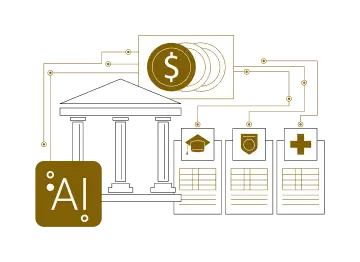
A CRM that creates another data silo does not solve a council’s service-delivery problem. The value comes from sitting at the centre of the systems that already hold the answers. Why so? It will help you modernise resident experiences without replacing systems that still perform valuable functions.
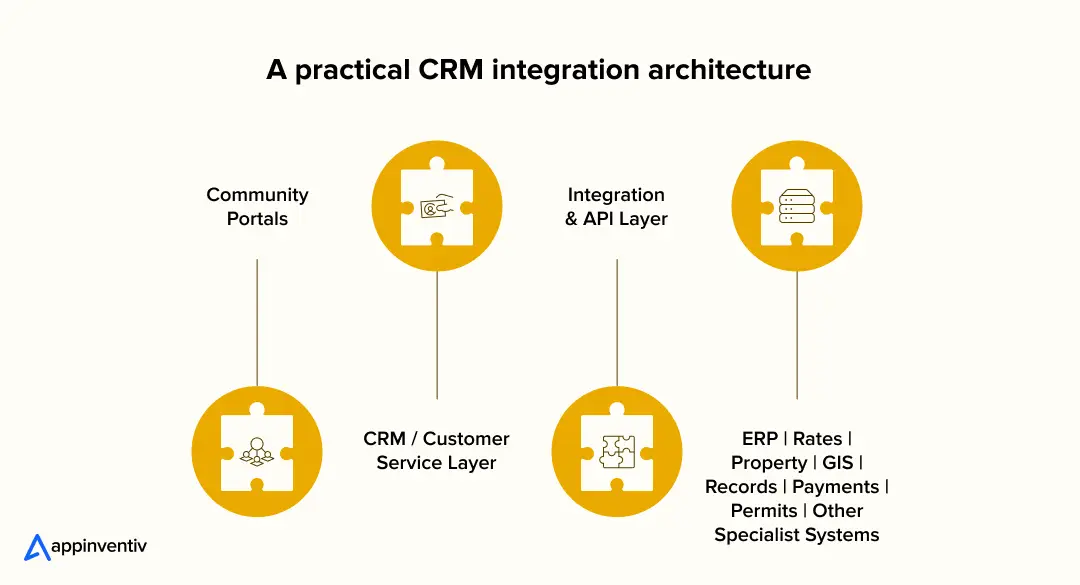
This is the architecture behind effective CRM integration for local government and community portals. A few principles keep it practical:
- CRM does not need to replace the ERP. It provides the interaction and service layer around existing systems.
- APIs and controlled data synchronisation reduce duplicate entry. Data flows between systems instead of being retyped.
- A unified data model creates a more reliable record. One definition of “resident”, “property” and “request” keeps reports consistent.
- Legacy systems can stay where replacement is not justified by the business case.
This approach aligns with AGA guidance, which treats integration and interoperability as a core domain.
Connect residents requests, workflows and core systems through a CRM architecture built around your existing environment.
Security, Privacy and Accessibility Requirements for Council CRM
A council CRM holds sensitive resident data. It simply means that security, privacy and accessibility must be design requirements from day one, not afterthoughts added before go-live.
A practical governance model should address:
- Data access: Define who can view, modify and export different categories of information.
- Privacy: Collect only what the service needs and establish clear handling, retention and consent practices. Compliance with the Privacy Act 1988 and APPs.
- Cybersecurity: Apply strong authentication, encryption, logging, monitoring and appropriate separation of environments. Alignment with the ASD Essential Eight.
- Integration security: Govern APIs, service accounts and data exchanges between CRM and specialist systems.
- Data location: Clear answers on where data is hosted and who can access it.
- Accessibility: Design portals and digital workflows against Disability Discrimination Act and the latest WCAG.
Build, Buy or Customise: Which CRM Approach Fits a Council?
Councils have four realistic paths: off-the-shelf, custom, an existing CRM with customisation, or a CRM + an integration layer. Confused between which path to choose? Well, the right choice depends on your unique service architecture because each path suits a different starting point.
| Approach | Best suited for |
|---|---|
| Off-the-shelf CRM | Councils with standard processes, limited IT capacity and few legacy dependencies |
| Custom CRM | Councils with distinctive workflows, complex service models or specific operational requirements. |
| Existing CRM + customisation | Councils whose current CRM works but lacks portals, workflows or reporting |
| CRM + integration layer | Councils with many specialist systems that must stay in place |
In many digital transformation programmes for government, the practical answer is not always replacing the CRM or ERP. It is building the missing service and integration layer around what your council already owns.
That is where custom CRM software development for local government makes sense. The custom work can focus on workflows, portals, APIs, data models and council-specific service processes.
Interested in CRM integration but not sure about the investment? Check out our detailed blog on CRM development costs in Australia to make an informed decision.
How to Choose the Right CRM Software for Your Council?
Skip the feature checklist. These are the questions CXOs should put to every vendor.
- Does it solve our highest-volume service problems?
- Check against your top ten request types.
- Can it integrate with our existing ERP and specialist systems?
- Ask for live integration examples.
- Can we configure workflows without rebuilding the platform?
- Check how workflows, routing and business rules can be maintained over time.
- Can residents use it without staff intervention?
- Test the portal with real residents.
- Can leadership measure service performance?
- Reporting should be built in, not bolted on.
- Does the architecture support security, privacy and accessibility requirements?
- Ask for evidence, not assurances.
- Can the platform scale across departments and services?
- Plan for year three, not just the pilot.
- What is the total cost beyond licensing?
- Budget for implementation, integration, data migration, configuration, training, support, upgrades and AI usage where applicable.
- Who owns the data and the exit path?
- Confirm hosting location, data portability and what happens if you change vendor.
- Has the vendor delivered in government before?
- Procurement panel status and public-sector references reduce delivery risk.
How to Implement CRM Software for Local Government?
CRM integration is essential but you don’t need to transform every service at once. Governments that succeed start narrow, prove value and expand. Here is how most councils get this done without a big-bang risk.
Step 1: Map citizen journeys
Start with the services residents use most and complain about most. Those are your highest-friction, highest-return candidates.
Step 2: Audit systems and data
List every CRM, ERP, rates, property, GIS, records and communication system, and note where data is duplicated or stuck.
Step 3: Define the target service architecture
Decide what the CRM will own, what stays in existing systems and how information moves between them through governed integrations.
Step 4: Pilot one high-value service
Pick something measurable, like customer requests, waste services or permits, and prove it works with real residents.
Step 5: Scale using measurable outcomes
Expand workflows, integrations and channels based on evidence from the pilot rather than assumptions about what residents or staff need. This mirrors the DSS’ emphasis on user research, service measurement and continuous improvement.
Bring requests, teams and service updates together without replacing every system you already use.
How to Measure CRM ROI in Local Government?
Vague efficiency claims do not survive a budget review. The real ROI of government CRM solutions shows up in service metrics. To measure ROI, you must set baselines before launch and track these ten KPIs against them.
| KPI | What it tells you |
|---|---|
| Average resolution time | Whether requests are being completed faster. |
| First-contact resolution | Whether staff can resolve more enquiries without handoffs. |
| SLA compliance | Whether service commitments are being met consistently. |
| Requests per channel | How residents are choosing to interact with the council. |
| Self-service completion rate | How many residents finish without staff help |
| Duplicate request rate | Whether disconnected channels are creating repeat records. |
| Staff handling time | How much manual effort is required per request. |
| Cost per request | The operational cost of delivering the service. |
| Citizen satisfaction | Whether operational improvements are visible to residents. |
| Repeat contact rate | Whether residents need to contact the council again for the same issue. |
How Appinventiv Helps Councils Build a Connected CRM Ecosystem?
Most councils do not need another system. They need the ones they already run to work together. As a software development company in Australia, Appinventiv builds and integrates CRM around your existing ERP, rates, property and GIS platforms, so requests, workflows and data connect without a rip-and-replace.
Our work covers custom CRM development for community portals, workflow automation, API integration, AI implementation, data architecture and change management. After 11+ years, 3,000+ digital products deliveries and 500+ legacy processes transformation, we know where council projects tend to stall, and it is rarely the software itself.
Our 1,700+ tech architects design the service layer first: what the CRM owns, how APIs connect it to your back-office systems, and where the resident-facing portal fits on top. We also build for regional realities, including field apps that keep working offline, so a job logged at a remote depot is not lost until someone is back in range.
Security and compliance are part of our local government software solutions delivery, not an afterthought. We hold ISO 27001, ISO 9001 and SOC 2 certifications, and are approved on the Federal DTA Software and ERP Marketplace, the Queensland Government ICTSS panel and Local Buy’s local government panel, which keeps procurement straightforward.
Still dealing with disconnected council systems? Talk to our integration experts and get a connected architecture mapped to your existing systems.
FAQs
Q. What is CRM software for local government?
A. CRM software for local government is a platform that records, routes and tracks every resident interaction with a council. It creates one request record across phone, counter, email and portal channels. Staff, residents and leadership all see the same status, history and performance data.
Q. How does CRM improve council customer service?
A. It gives every request an owner, a status and an SLA clock, then automates routing and resident updates. Residents get answers without chasing, and staff stop manually forwarding emails. Leaders gain visibility of bottlenecks and recurring issues.
Q. Can we connect existing CRM systems with community portals and service workflows?
A. Yes. An integration layer links the portal, CRM and back-end systems through APIs, so requests flow into workflows automatically. Existing platforms can usually be extended rather than replaced. The key design step is deciding what each system owns.
Q. How much does it cost to implement a council CRM?
A. As a baseline, custom software projects in Australia typically range from AUD 70,000 to AUD 700,000 or more, depending on scope, integrations and data migration requirements.
Q. How long does it take to implement a council CRM?
A. On average, a focused pilot for one service can often go live within 3-6 months. Full rollouts across departments and integrations take nearly 6 – 12+ months. The exact timeline varies, depending on the integration complexity, data quality and change management needs.
Q. What are the benefits of CRM integration?
A. Integration removes duplicate data entry, gives staff a complete resident view and keeps records consistent across systems. It also lets residents track requests that touch several departments. Councils see faster resolution and cleaner reporting.
Q. Does it replace our ERP or asset management system?
A. No. A CRM provides the service and interaction layer around existing ERP, asset and specialist systems. They remain the system of record for finance and assets. APIs keep the two sides in sync.


Fast 2-minute response, fully NDA-protected.
API Integration in Australia: Connect ERP, CRM and Legacy Systems
Key takeaways: API integration lets legacy, ERP and CRM systems share data without a risky full replacement. A seven-step roadmap, from system audit to ongoing API management, keeps delivery controlled and maintainable. Privacy Act reforms, APRA CPS 230 and SOCI Act shape integration design early. API integration cost ranges between AUD 70,000 and AUD 700,000…

Beyond Customer Portal Development: Building Connected Digital Services
Key takeaways: A portal without CRM, ERP and billing integration leaves your staff doing the connecting. Start with customer tasks, then integrate only the systems those tasks actually need. Name one system of record for each data type before choosing APIs or middleware. Plan integration, security and privacy obligations at the start, not after the…

The Ultimate Guide to CRM for Insurance: Features, Cost, Top Platforms, Integration & More
Key takeaways: CRM for insurance connects sales, service, and claims into one governed system, distinct from the policy administration system. Core features span pipeline management, policy visibility, claims tracking, commission management, AI analytics, and compliance controls. Cost ranges from roughly USD 15,000 for configuration to USD 150,000 and beyond for custom development at enterprise scale.…