




























How to Build an AI App? Steps, Features, Costs, Trends

 Share -


- 01AI Application Development Process: A Step-by-Step Guide
- 02Understanding the Core Components of AI Applications
- 03Benefits of Building an AI App for Businesses
- 04Industry-Wise Use Cases of an AI Application
- 05What Features of an AI App Should You Prioritize for Real Business Impact?
- 06Choosing the Right Approach to Build an AI App
- 07How Much Does It Cost to Build an AI App?
- 08Understanding Monetization Models for AI Applications
- 09How to Measure the ROI of Your AI App
- 10AI Compliance, Security, and Governance Requirements
- 11Enterprise Challenges in AI App Development and How to Solve Them
- 12Future Trends in AI Application Development
- 13Why Choose Appinventiv to Build and Scale Your AI Application
- 14Frequently Asked Questions

Key takeaways:
- Pick one problem that actually affects the business. Link it to a number such as cost, time, or error rate. Get everyone aligned before you start building.
- Choose a model that fits the data you already have. Keep it simple. Complex setups slow teams down and rarely add value early.
- Spend time on your data. Clean it, label it, and make it usable. Then train the model and connect its output to real workflows people use every day.
- Make the system easy to understand. Show clear results. Help users act on what the model gives them without confusion.
- Once the app is live, keep an eye on it. Watch for drops in accuracy, retrain when needed, and keep the system stable over time.
Your business already runs on data. The real question is how you turn that into a working system. This is where AI app development comes in. Not experiments. Not isolated models. A full application that connects data, models, and workflows into something teams can use every day.
Many companies try to build AI apps. Most stop at early pilots. The gap is not access to AI. It is execution. Systems fail when data stays fragmented, models stay disconnected, and outputs never reach real workflows.
Adoption is no longer the issue. McKinsey reports that 78% of organizations already use AI in at least one function, and 71% apply generative AI across business areas. The shift has already happened. The challenge now is building systems that work in production.
This is why the focus is moving from “using AI” to building complete applications. That means handling data pipelines, model deployment, system integration, and continuous updates. Each step affects whether the system delivers value or becomes another stalled project.
This guide breaks down how to build an AI app from the ground up. It covers the process, cost, and decisions that shape real outcomes in enterprise environments.
Wrong steps can lead to compliance risks, failed deployments, and wasted spend. Work with experts who deliver AI 10x faster and cut costs by up to 40%.

AI Application Development Process: A Step-by-Step Guide
Building an AI system is rarely a straight process. Things change midway. Data behaves differently than expected. Models that worked in testing may fail in production. That is normal. In practice, teams increasingly rely on mobile app benchmarks for 2026 to understand how AI-driven systems perform once deployed at scale.
What matters is having a working structure when you build an app with AI-powered features and capabilities. Not a perfect one. Just something that helps you move from idea to a system that actually runs in real conditions without pushing up AI app development cost unnecessarily. Once you have the idea, a capable team will help you make the best of it.
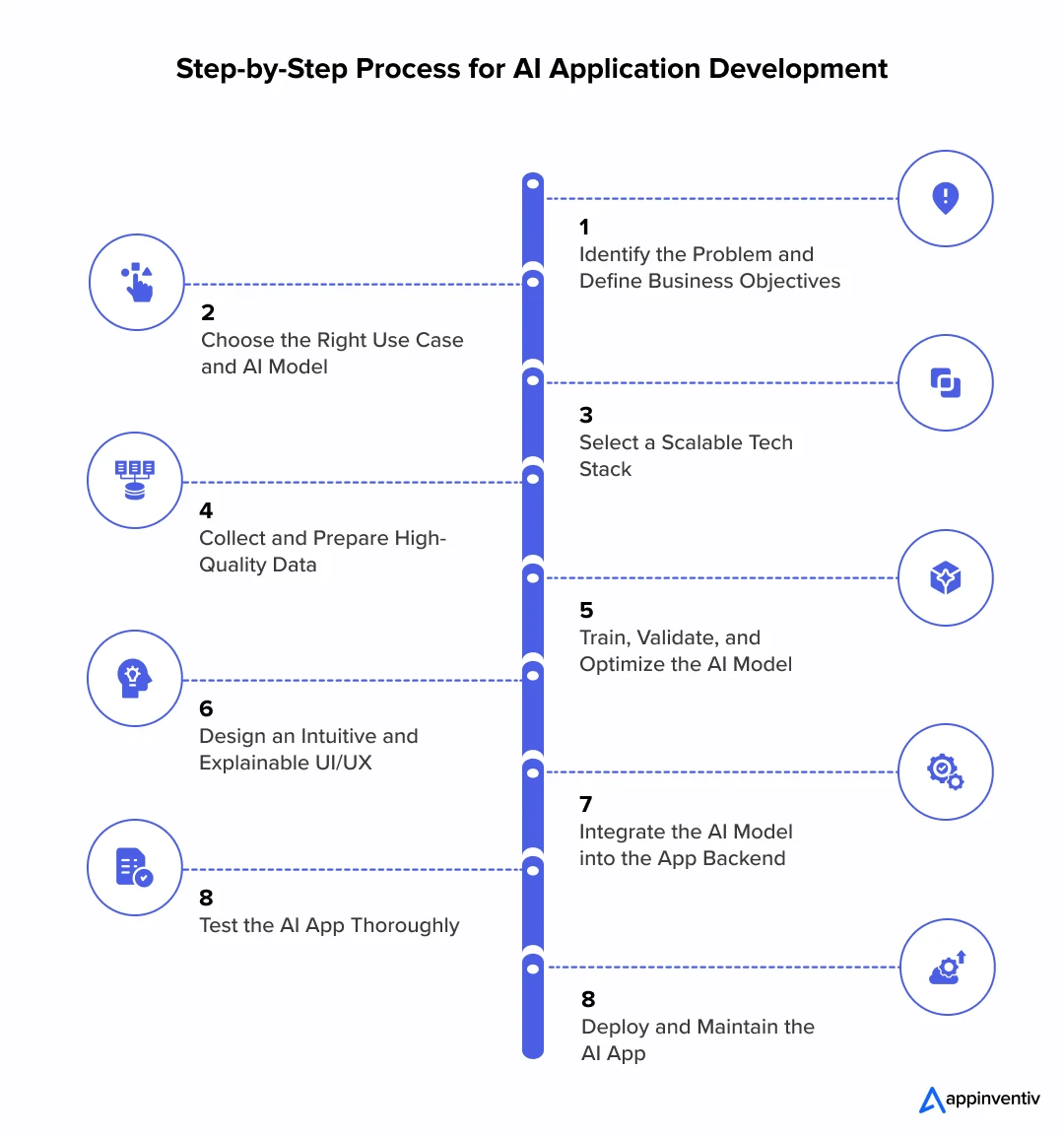
Step 1. Define the Problem and Business Goal
Start with one question. What are you trying to fix? This is where an AI maturity assessment helps define readiness before development begins.
Many teams jump into tools too early. That usually leads nowhere. You need a clear outcome first, then you start building an intelligent AI model.
- Pick a single problem that affects business performance
- Tie it to a number like cost, time, or accuracy
- Look at where people are still doing manual work
- Get alignment before moving forward
This step sounds basic, but it determines whether building custom AI applications will yield results or just another experiment.
Step 2. Choose the Right Use Case and Model
Once the problem is clear, the next step is to figure out which model fits. This is where things often get overcomplicated.
- Use simple prediction models for structured data
- Leverage NLP use cases in text and language tasks
- Use vision models for images or video
- Start with existing models before building your own
The goal is not to use the most advanced model. The goal is to make an AI app that actually works with the data you have.
Step 3. Select a Scalable Tech Stack
This part is less about tools and more about flexibility. Whatever you choose should not lock you in.
- Keep services separate so changes are easier later
- Use APIs to connect different parts of the system
- Plan for higher usage even if you start small
- Think about where the system will run, not just how it is built
Many AI application development efforts slow down here because the setup cannot keep pace with growth.
Recommended AI Tech Stack for App Development:
| Layer | Technology Stack | Purpose |
|---|---|---|
| Programming Language | Python, JavaScript, Java | Core development and backend logic |
| AI/ML Frameworks | TensorFlow, PyTorch, Keras | Model training and inference |
| Mobile Inference | TensorFlow Lite, Core ML, ONNX | On-device model execution |
| NLP Libraries | Transformers, spaCy, NLTK | Language processing tasks |
| Computer Vision | OpenCV, YOLO, Detectron2 | Image and video analysis |
| Backend Development | FastAPI, Flask, Node.js | API and application logic |
| Database | PostgreSQL, MongoDB, Firebase | Data storage |
| Containerization | Docker, Podman | Consistent deployment |
| Orchestration | Kubernetes, Docker Swarm | Scaling applications |
| Cloud Platforms | AWS, Azure, Google Cloud | Training and deployment infrastructure |
| CI/CD & DevOps | Jenkins, GitHub Actions | Automation pipelines |
| Monitoring & MLOps | MLflow, Prometheus, Grafana | Model tracking and performance |
| Version Control | Git, DVC | Code and data versioning |
Step 4. Collect and Prepare High-Quality Data
This is where most of the real work happens. Data is rarely clean. It comes from different systems, in different formats, and often with gaps.
- Clean and standardize what you have
- Label data carefully if models depend on it
- Remove duplicates and obvious errors
- Set up a way to keep updating data over time
- Track changes so nothing breaks later
In many cases, building AI applications is less about models and more about fixing data.
Also Read: Preventing AI Model Collapse: Addressing the Inherent Risk of Synthetic Datasets
Step 5. Train, Validate, and Optimize the Model
Training is the visible part. Validation is what makes it usable. A model that performs well in a test environment may still fail when exposed to real inputs.
- Split your data properly before training.
- Check accuracy, but do not rely on one metric
- Adjust parameters and test again
- Run the model against edge cases
This is usually when teams realize whether they can build an AI app that holds up in uncontrolled conditions.
Step 6. Design an Intuitive and Explainable Experience
Even a strong model can fail if users do not trust it. People need to understand what the system is doing, at least at a basic level.
- Show simple explanations where needed.
- Keep the interface focused on the task
- Avoid exposing too much technical detail
- Add context for important decisions
If users ignore the output, the system has no value.
Also Read: How Explainable AI can Unlock Accountable and Ethical Development of Artificial Intelligence
Step 7. Integrate the Model into Backend Systems
This is where things either click or fall apart. A model that is not connected to real systems stays isolated.
- Expose the model through APIs
- Connect it with the tools teams already use
- Keep response time low enough for real usage
- Add backup logic in case something fails
This step is what turns predictions into actual actions.
Step 8. Test the AI App Thoroughly
Testing AI is different from testing regular software. You are not just checking if something works. You are checking how it behaves.
- Test with incomplete or messy inputs
- Look at how the system performs under load
- Check for bias in outputs
- Run security checks where needed
- Compare results with current processes
Skipping this step usually shows up later, and fixing it then is harder.
Step 9. Deploy and Maintain the AI App
Once the system is live, things do not stay the same. Data changes. User behavior shifts. Models lose accuracy over time.
- Monitor performance regularly
- Retrain models when data shifts
- Track system health and response time
- Keep logs for debugging and audits
This is the part that keeps the system useful, not the launch itself.
Continuous Optimization Strategy
| Strategy | Purpose |
|---|---|
| Monitor Model Drift | Track when model accuracy starts dropping |
| Schedule Retraining Cycles | Keep models updated with new data |
| Collect User Feedback | Improve based on real usage |
| Update Security Protocols | Handle new risks as they appear |
| Version Models and Data | Keep track of changes and allow rollback |
Understanding the Core Components of AI Applications
AI systems rarely come from a single model. Most teams build them as a set of connected parts. Each part handles a specific job. Data comes in, models process it, and the results move into business systems where people act on them.
In real projects, these layers work together. If one part breaks, the whole system slows down. That is why teams focus on how these components fit, not just how each one works on its own.
Below are the core components that show up in most production setups.

Machine Learning (ML)
Machine learning works by learning patterns from data instead of following fixed rules. You give it examples, and it learns how to respond.
- Supervised learning uses labeled data. Teams use it for tasks like credit scoring or demand prediction
- Unsupervised learning looks for patterns in raw data. It helps group users or spot unusual activity
- Reinforcement learning improves decisions over time based on feedback
Most enterprise systems rely on supervised learning first. Unsupervised methods are often added later to find hidden patterns.
Also Read: Machine Learning App Development Cost Guide

Neural Networks
Neural networks are useful when data is complex and hard to map with simple models.
- ANNs handle basic classification and regression tasks
- CNNs work with images and pick up features like edges and shapes
- RNNs handle sequences, though many teams now use transformer models instead
These models need more data and compute power. In return, they handle complex inputs better than simpler models.
Deep Learning
Deep learning builds on neural networks. It uses multiple layers to learn patterns step by step.
- Works well with images, audio, and text
- Breaks data into simple and complex patterns over time
- Often trained using GPUs or distributed systems
Many modern AI use cases depend on deep learning. This includes speech recognition and recommendation systems.
Natural Language Processing (NLP)
NLP focuses on how systems read and generate text. Most current systems rely on transformer-based models.
- Text classification helps detect sentiment or intent
- Named entity recognition pulls key details from text
- Language generation powers chat and summaries
In production, NLP models often connect with retrieval systems so responses stay grounded in real data.

Computer Vision
Computer vision helps systems understand images and video. It turns visual input into structured data.
- Image classification identifies objects
- Object detection finds multiple items in one frame
- Segmentation breaks images down at the pixel level
You will see these systems in healthcare imaging, retail analytics, and surveillance.
Robotics and Process Automation
Some AI systems work outside apps. They interact with workflows or physical systems.
- Robotic process automation handles repetitive digital tasks
- Autonomous systems run with minimal human input
- Hybrid setups mix rules with learning models
Many companies start with RPA before adding more advanced AI layers.
Expert Systems
Expert systems rely on predefined rules instead of learning from data.
- A knowledge base stores rules
- An inference engine applies those rules to make decisions
These systems are useful in regulated environments where decisions must be clear and traceable.
Fuzzy Logic
Fuzzy logic handles cases where inputs are not exact. Instead of fixed values, it works with ranges.
- Useful in control systems and real-time adjustments
- Often combined with other models
It appears in systems where decisions depend on gradual changes rather than strict cutoffs.
Each of these components plays a different role. You should pick what fits your data, your use case, and how your system needs to run.
How These Components Work Together
In real systems, these components do not operate in isolation. A typical setup might look like this:
- Data pipeline feeds cleaned data into models
- ML or deep learning models generate predictions
- NLP or vision models process specific input types
- Outputs connect to APIs or business systems
The goal is not to use every component when you build an app with AI. It is about choosing the right mix based on the problem and the available data.
Traditional Apps vs AI-Powered Apps
Traditional apps follow fixed rules, but AI-powered apps learn from data and improve how they respond over time.
| Aspect | Traditional App | AI-Powered App |
|---|---|---|
| Core Logic | Rule-based, fixed workflows | Learns from data and adapts over time |
| Decision-Making | Predefined conditions | Predictive and probabilistic outputs |
| Data Usage | Limited to stored inputs | Continuously learns from new data streams |
| User Experience | Static and uniform | Personalized and context-aware |
| Scalability | Requires manual updates | Improves automatically with more data |
| Error Handling | Fails on unknown scenarios | Adapts to edge cases over time |
| Development Approach | Deterministic programming | Model training + continuous optimization |
| Maintenance | Code updates required | Model retraining and monitoring are needed |
| Performance Over Time | Remains constant | Improves with usage and feedback |
| Business Impact | Supports operations | Drives decisions and automation |
Benefits of Building an AI App for Businesses
Most teams start seeing value once routine work drops. Fewer manual steps. Fewer delays. Work moves faster.
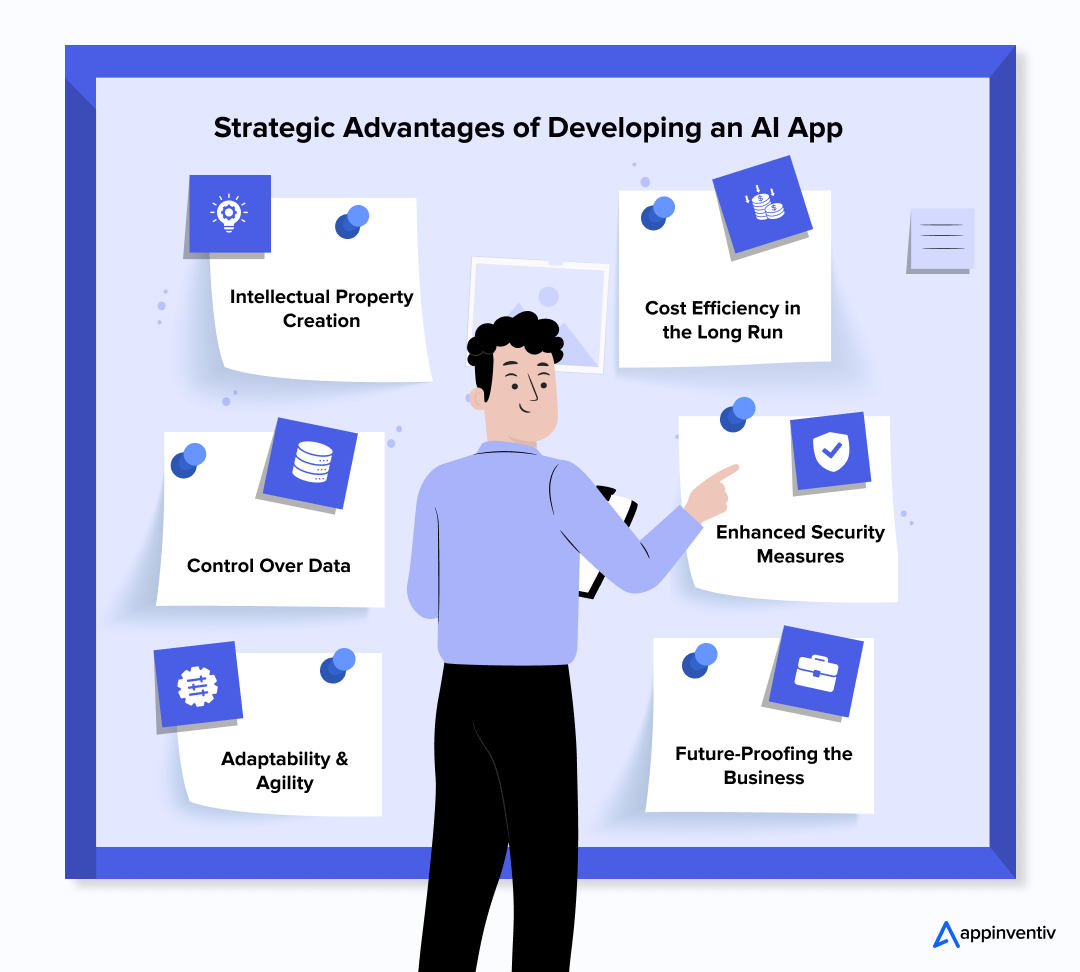
- Intellectual Property Creation
When a company builds its own AI system, it owns what gets created. That can turn into a long-term asset. Some teams even package parts of it later. - Control Over Data
Data stays inside the company. That matters for privacy and internal policies. It also avoids sending sensitive data to outside tools. - Adaptability and Agility
Business needs shift often. With an internal system, teams can change logic or flows without waiting on vendors. - Cost Efficiency Over Time
Early investment is higher. Over time, fewer tools and less manual work bring costs down. - Stronger Security
Security follows internal rules. Teams decide who gets access and how data is handled. - Future Readiness
AI tools keep changing. When the system is yours, adding new capabilities becomes easier.
Industry-Wise Use Cases of an AI Application
AI starts to matter when work slows down or errors pile up. Teams use it to react sooner and rely less on manual checks. This is where AI application development moves from concept to real impact across industries.

Healthcare – Predictive Analytics for Patient Care
Doctors handle large volumes of patient data. AI tools scan records and point out cases that need attention. It also helps review medical images, which can speed up early detection. This gives doctors more time to decide on treatment.

Example: Health at Scale flags potential risks early so care teams can act before problems grow.
Transportation – Autonomous Vehicles
Driving leaves very little time to react. Systems have to read the road, spot changes, and act within seconds. AI models use camera feeds and sensor data to guide those decisions in real time. Teams working on AI applications in mobility and logistics rely on this setup to reduce manual control and improve response speed.
Example: Waymo operates autonomous cars that read live traffic conditions and adjust their driving as situations change.
Also Read: AI in Transportation: Benefits, Use Cases, and Examples
Real Estate – Property Valuation and Market Analysis
Property pricing often varies based on location and past sales. AI reviews this data and suggests a price range. This reduces back-and-forth decisions.
Example: HouseEazy studies property data and provides value estimates along with market signals.
Retail – Personalized Shopping Experiences
Retail apps track user activity like clicks and purchases. AI uses this to adjust what each person sees. This keeps the experience relevant.
Example: Amazon recommends products based on browsing and buying patterns.
Finance – Budget Management
Tracking expenses takes time. AI tools review transactions and highlight spending patterns. Users get a clearer picture without manual tracking.
Example: Mudra analyzes spending behavior and suggests ways to manage budgets.

Manufacturing – Predictive Maintenance
Machines fail without much warning. That leads to downtime, delays, and repair costs. AI helps teams spot early signs of wear by reading equipment data over time. This gives operators a chance to act before a breakdown happens. For teams exploring how to build an AI app, this is one of the most practical places to start since the impact is easy to measure.
Example: General Electric uses its Predix platform to track equipment performance and schedule maintenance based on real usage, not fixed timelines.
AI continues to find its place across industries. The goal stays simple. Act earlier, reduce effort, and make better calls with data. For teams exploring how to build an AI app, these use cases show where it delivers real value.
What Features of an AI App Should You Prioritize for Real Business Impact?
Strong AI systems do more than automate a few tasks. They connect data, models, and workflows so teams can act on results. If you plan to build an AI app, focus on features that work across teams and fit into systems you already use. This matters for anyone learning how to use AI to create an app or scale it later.
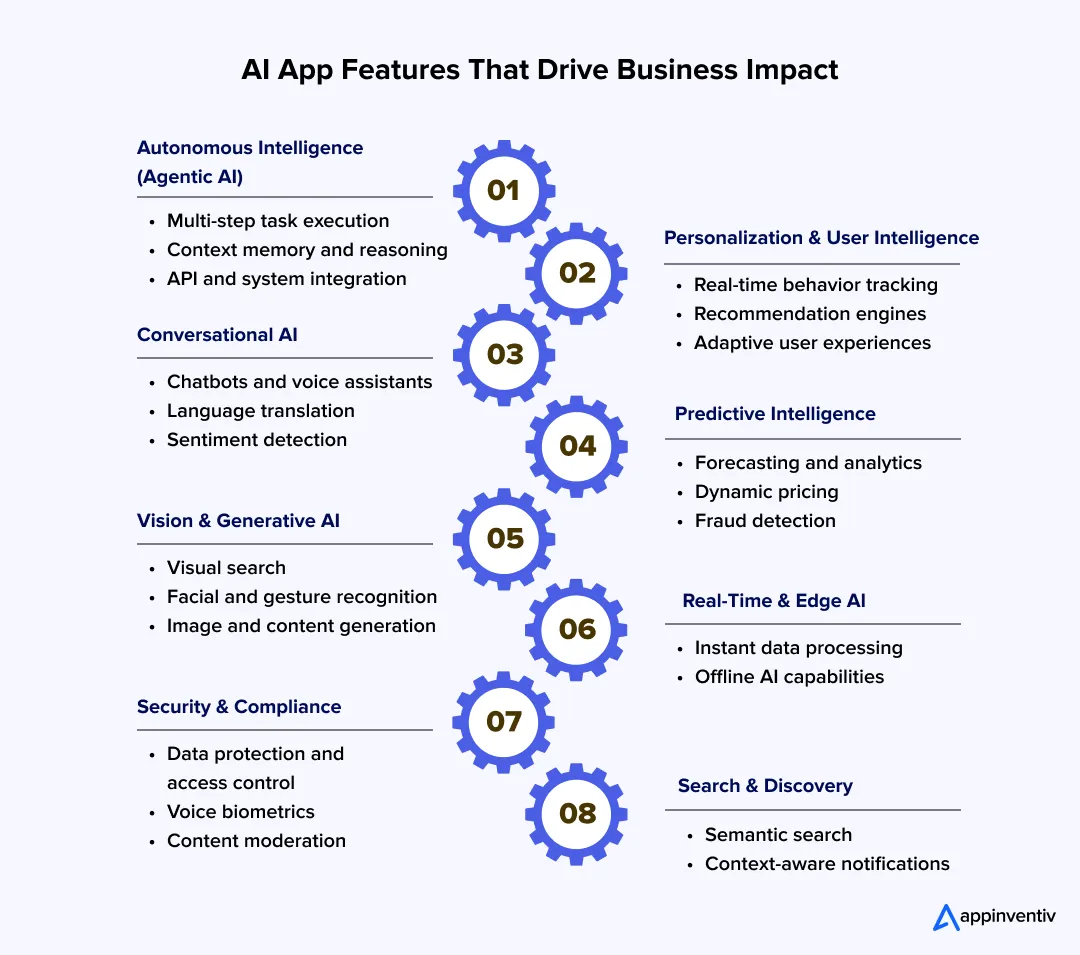
Autonomous Intelligence (Agentic AI)
Agentic AI handles tasks with less manual input. It can take a goal, break it into steps, and complete the work using available systems.
In practice, an AI agent can pull customer data, generate a reply, and trigger actions in the backend without extra input.
Key elements include:
- Task planning across multiple steps
- Memory that keeps context between actions
- Tool access through APIs and system integrations
These are some of the most advanced features of an AI app used in enterprise environments. They are shaping how teams think about the development of AI applications.
Personalization and User Intelligence
AI systems track user behavior and adjust outputs in real time. This helps apps stay relevant to each user.
- Recommendation systems based on user activity
- Behavior tracking using sessions and interactions
- Adaptive systems that change content or workflows
This plays a central role in AI application development, especially for platforms that depend on engagement and retention.
Conversational and Language Capabilities
Users expect natural interaction. Most artificial intelligence app interfaces now rely on language models to handle this.
- Chatbots and voice assistants for support
- Language translation for global users
- Sentiment analysis to read intent
- Text suggestions and auto-complete features
For teams working on how to create an AI app, this is often the first feature users interact with.

Predictive and Decision Intelligence
These systems use data to predict outcomes and guide decisions. They work with both stored and live data.
- Predictive analytics based on past and current data
- Pricing changes based on demand
- Fraud detection using anomaly patterns
These features help teams act earlier instead of reacting late.
Computer Vision and Generative Capabilities
AI can read and create visual content using deep learning models.
- Visual search based on images
- Facial recognition for identity checks
- Gesture recognition for device control
- Image and content generation
- Text-to-video generation
These features often appear in both consumer apps and enterprise tools.

Real-Time Processing and Edge AI
Some systems need to respond instantly. This requires data to be processed as it arrives.
- Real-time processing using streaming systems
- On-device models that work without internet access
These features matter when teams build an app with AI for fast decision environments.
Security, Compliance, and Trust
AI systems handle sensitive data. Strong controls are required at both system and model levels.
- Data encryption and access control
- Voice-based identity checks
- Content filtering and moderation
These features are important during AI app creation, especially in sectors like finance and healthcare.
Search and Discovery Intelligence
Search has moved beyond keyword matching. Systems now understand intent and context.
- Semantic search using vector-based systems
- Notifications based on user behavior
This helps users find what they need faster and reduces time spent searching.
Teams that focus on these features tend to see better results when building AI applications. The goal is not to add every feature. The goal is to connect the right ones so the system actually supports decisions and day-to-day work.
Choosing the Right Approach to Build an AI App
The way you choose to build an AI app shapes what it can handle later. Some options help you test ideas fast. They work for early validation. But once usage grows, gaps start to show. Systems struggle with scale, security, and performance.
At the enterprise level, the focus shifts. Teams look for control over how the system runs, how data is handled, and how it fits into existing workflows. Speed matters early. Control matters later.
Below is a comparison to guide that decision.
| Approach | Best Fit | Timeline | Cost Profile | Control Level | Key Trade-Off |
|---|---|---|---|---|---|
| No-Code / Low-Code | Early validation, internal tools, small workflows | Weeks | Low upfront cost | Low | Limited flexibility, not suited for complex or regulated environments |
| AI-Assisted Development | MVPs, mid-scale products, faster delivery cycles | 2–4 months | Moderate | Medium | Faster delivery, but still constrained by pre-built components |
| Custom AI Development | Enterprise systems, regulated industries, and core business platforms | 6–12+ months | Higher upfront, optimized long-term cost | High | Requires investment, but delivers full ownership and scalability |
Custom AI development gives that control. Teams decide how data moves, how models behave, and how everything connects. The system fits into core platforms instead of sitting outside them.
Models are trained for specific use cases, not generic patterns. This improves accuracy and reduces rework. The initial cost is higher, but the system performs better over time. It also grows with the business without needing a full rebuild.
What works in early stages often breaks in production. Invest in a custom approach that supports real business growth and complexity.

How Much Does It Cost to Build an AI App?
Costs change based on what you are trying to build. A small internal tool will cost far less than a system that runs in real time and connects with several platforms.
In most cases, the AI app development cost for enterprise projects sits between $50,000 and $500,000. The cost to build an AI app goes up as the system becomes more complex.
Here is a breakdown of AI app development costs:
| App Complexity | Timeline | Cost Range (USD) |
|---|---|---|
| Basic AI App | 3–6 months | $50,000 – $100,000 |
| Mid-Level AI App | 4–9 months | $100,000 – $250,000 |
| Advanced AI App | 9–12+ months | $250,000 – $500,000 |
What Drives the Cost
The cost to build an AI app comes down to a few practical things. Teams usually run into these during AI app development.
- Feature scope
A basic model is quicker to build. Real-time systems and advanced logic take more time and effort. - Data work
Most datasets are not ready to use. Teams spend time cleaning, labeling, and fixing gaps before building AI applications. - Integration
Connecting the app with CRM, ERP, or internal tools adds extra work. Each connection needs testing. - Infrastructure
Cloud usage, storage, and compute power all add to the AI app development cost. Higher usage means higher spend. - Team
Senior engineers cost more per hour. They also reduce mistakes and speed up delivery. - Compliance
Projects in finance or healthcare need extra checks. This increases time and cost during AI application development. - Ongoing work
After launch, models need updates. Monitoring and retraining add to long-term AI app development cost.
These factors explain why building custom AI applications can vary widely in price, even when the end goal looks similar.
Understanding Monetization Models for AI Applications
AI applications can generate revenue in different ways. The model depends on how the product is used and who pays for it.
Here’s a breakdown of how apps make money:
| Model | How it Works | Where it Fits |
|---|---|---|
| Subscription-Based | Users pay a fixed monthly or yearly fee to use the AI app | SaaS tools, AI analytics platforms, business software |
| Freemium + Pay-Per-Use APIs | Basic version is free, users pay for advanced features or higher usage | AI APIs like vision, NLP, voice tools, developer platforms |
| Ad-Based | Revenue comes from ads shown inside the app | Consumer apps such as media platforms, voice assistants, social apps |
| Licensing & White Labeling | Businesses pay to use the AI system under their own brand | Enterprise AI products, B2B platforms, OEM partnerships |
| Data Monetization | Aggregated and anonymized data is used to generate insights that are sold | Fintech, healthcare, retail apps with large datasets |
The model should match how the AI application delivers value and how users are willing to pay for it.
How to Measure the ROI of Your AI App
AI investments need clear financial outcomes for teams learning how to build an app with AI. ROI should tie directly to cost savings, revenue impact, and system performance.
The goal is to measure what changed after deployment, not just what the system can do when building an AI app.
Core ROI Formula
Start with a simple calculation:
ROI (%) = [(Total Benefits − Total Costs) / Total Costs] × 100
Where:
- Total Benefits = cost savings + revenue uplift
- Total Costs = development + infrastructure + maintenance
1. Cost Savings from Automation
Measure the amount of manual effort the system replaces.
Formula:
Cost Savings = Hours Saved × Cost per Hour
Example:
- 2,000 hours saved per month
- $25 per hour
→ Monthly savings = $50,000
This is often the first measurable outcome in AI application development projects.
2. Revenue Uplift
Track how AI affects conversions, pricing, or upsell.
Formula:
Revenue Uplift = (New Conversion Rate − Old Conversion Rate) × Traffic × Average Value
Example:
- Conversion rate increases from 2% to 3%
- 100,000 users
- $50 average order
→ Incremental revenue = $50,000
3. Efficiency Gains
AI reduces time per task or decision cycle.
Formula:
Efficiency Gain (%) = (Old Time − New Time) / Old Time × 100
This applies to areas such as claims processing, document review, or support resolution. Teams exploring how to build an AI-powered app often start measuring ROI here.
4. Accuracy and Error Reduction
Errors carry direct costs. AI reduces rework, fraud, and missed signals.
Formula:
Error Cost Reduction = (Old Error Rate − New Error Rate) × Volume × Cost per Error
This is critical in finance, healthcare, and logistics systems.
5. Decision Speed Impact
Faster decisions improve throughput and responsiveness.
Track:
- Time to decision (before vs after)
- Number of decisions handled per day
Shorter cycles often lead to higher output without increasing headcount.
6. Customer Retention and Lifetime Value
AI-driven personalization and support improve retention.
Formula:
LTV Increase = (New Retention Rate − Old Retention Rate) × Average Customer Value
This is often a key metric during AI app creation, especially in subscription or platform-based models.
7. Scalability Gains
AI systems handle higher volumes without proportional increases in cost.
Measure:
- Requests handled per system
- Cost per transaction before and after deployment
A drop in cost per unit signals strong long-term ROI.
What Good ROI Looks Like
In most enterprise cases:
- 20–40% reduction in operational cost
- 5–15% increase in conversion or revenue
- 2–5x faster decision cycles
AI ROI becomes clear when systems reduce cost, increase output, or improve accuracy at scale. The key is to track these metrics from day one and link them directly to business outcomes.
AI Compliance, Security, and Governance Requirements
AI systems deal with real user data and real decisions. That creates risk the moment the system goes live. In artificial intelligence app development, teams cannot treat compliance as a later step. It has to be built in from the start.
Most teams end up dealing with three things again and again:
- how data is stored and accessed
- how model decisions are tracked
- how the system is controlled in day-to-day use
Each region sets its own rules. The names change, but the expectations are similar. You need clear records, controlled access, and a way to explain what the system is doing.
here is how global AI compliance requirements by region looks like:
United States
Laws like CCPA, CPRA, and HIPAA focus on user data and healthcare data. There are also guidelines from the FTC and NIST.
Teams usually put in:
- access controls for sensitive data
- logs that record system activity
- consent tracking for user data
- basic explainability for automated decisions
Europe
GDPR and the EU AI Act set strict rules for personal data and high-risk AI systems.
In practice, teams work on:
- collecting only the data they need
- asking for clear user consent
- making model decisions easier to explain
- adding human checks for critical decisions
Australia (AUS)
The Privacy Act 1988 and AI ethics principles guide how data is handled.
Teams focus on:
- protecting personal data
- checking for bias in outputs
- showing how decisions are made
- collecting user consent where required
Middle East (ME)
Regulations like UAE PDPL, Saudi PDPL, DIFC, and ADGM focus on data control and regional compliance.
Common steps include:
- storing data within required regions
- encrypting sensitive information
- setting role-based access
- running regular compliance checks
Asia (General)
Frameworks such as Singapore PDPA, India DPDP Act, and China PIPL deal with data protection and transfer rules.
Teams usually implement:
- consent management systems
- clear data storage policies
- user rights handling
- local data storage where required
Across all regions, the pattern stays the same. Control the data. Track what the model does. Keep records that explain decisions. Teams that handle this early avoid rework once the system grows.
Enterprise Challenges in AI App Development and How to Solve Them
Many teams start with a clear goal when they build an AI app. The early stages look promising. Then things slow down once the system moves closer to real use. This happens often in building custom AI applications.
The problem is rarely the model. It is usually the data, the systems around it, or how everything connects.
Here are the issues teams run into, and what they do to fix them.
Data Fragmentation and Poor Data Quality
Most enterprise data sits in different tools. Formats do not match. Labels are missing. Teams spend more time fixing data than building models during AI app creation.
New products face another issue. There is not enough past data to train on.
What teams do:
- Bring data into one place across systems
- Set up pipelines to clean and label data
- Use external or synthetic data when gaps are too large
Integration with Existing Systems
AI systems need to connect with ERP, CRM, and internal tools. These systems were not built for real-time use. Integration breaks when data moves slowly or systems do not align.
Teams that build AI apps often see outputs that never reach real workflows.
What teams do:
- Build APIs for every AI component
- Add middleware to connect older systems
- Test integration early, not at the end
High Infrastructure and Ongoing Costs
The cost of AI application development does not stop after launch. Training needs compute. Running models adds cost per request. Monitoring and retraining add more over time.
Some teams plan only for the build phase and struggle later.
What teams do:
- Start with managed cloud services to control early spend
- Use pre-trained models where possible
- Shift to hybrid setups once usage becomes stable
Model Degradation in Production
Models do not stay accurate forever. Data changes. User behavior shifts. External conditions change. Without tracking, performance drops slowly.
This is common in teams focused on developing AI applications without a long-term plan.
What teams do:
- Track accuracy, drift, and latency on a regular basis
- Set retraining schedules based on real data
- Keep version control for models and datasets
Bias, Privacy, and Regulatory Risk
Models can reflect bias from training data. This is why reducing bias in AI models is a real concern, especially in finance and healthcare.
These systems also handle sensitive data. That raises privacy and compliance issues.
What teams do:
- Train on diverse and representative datasets
- Apply strict access control and encryption
- Run regular audits for bias and compliance
Talent Gaps and Execution Bottlenecks
AI projects need people who understand data, models, and business context. Many teams do not have all three.
Hiring slows things down. Internal teams struggle to move past early experiments. This is where knowing how to hire an AI developer becomes important.
What teams do:
- Start with one focused use case tied to business value
- Work with experienced partners for complex builds
- Train internal teams during the project
Failure to Scale Beyond Pilots
Some systems work in testing but break at scale. Data grows. New use cases get added. Teams end up rebuilding from scratch.
This happens often when teams try to build AI apps without a shared base.
What teams do:
- Design systems in modular parts
- Use container-based deployment
- Standardize data and model pipelines
Unclear Business Alignment
Some teams focus on models and tools but skip the business side. The system works, but it does not move any key metric.
This confusion shows up when teams try to figure out how to use AI to build an app without clear goals.
What teams do:
- Define the business outcome before building
- Link each model output to a real decision
- Track impact using cost, time, or accuracy metrics
AI systems work when data, systems, and business goals stay aligned. That is what helps teams move from early prototypes to systems that run in real conditions.
Fix data gaps, integration issues, and scaling risks early so your AI system delivers results from day one.

Future Trends in AI Application Development
AI apps are changing fast, and any AI app development guide must reflect this shift. What worked a year ago already feels outdated. Most teams are now focused on systems that act in real time, adapt to users, and fit into daily workflows.
Here are the trends shaping what comes next:
AI with Connected Devices
AI with IoT systems now processes data from sensors and devices in real time. This helps predict failures and improve operations without delays. IoT analytics estimate that over 39 billion connected devices will be active by 2030, which is pushing demand for real-time AI systems in industries like manufacturing and logistics.
Stronger Personalization
Personalization now goes beyond basic segmentation. Systems adjust in real time based on behavior, usage patterns, and feedback loops. McKinsey reports that companies using advanced personalization can see 10–30% ROI uplift, which is why this trend continues to expand across retail and finance.
Generative AI Inside Products
Generative AI now writes, summarizes, and creates content within apps. This reduces manual work across teams. MIT found that 95% of companies have incorporated gen AI in one way or another.
Explainable Systems
Businesses want to know how decisions are made. Clear outputs and confidence scores are becoming standard. Gartner predicts that by the end of 2026, 50% of governments will enforce AI transparency requirements, pushing the adoption of explainable AI systems.
Edge AI Adoption
Edge AI models run on devices rather than in the cloud. This improves speed and keeps data local. Adoption is rising at the enterprise level. Around 55% of organizations already use or plan to use edge AI within the next two years, driven by the need for faster decisions and better data control.
Autonomous Agents
Business autonomous AI agents now handle multi-step tasks with less human input. They manage workflows, not just respond to prompts. Gartner predicts that by 2028, 33% of enterprise software will include autonomous agents, making them a core part of business systems.
Human and AI Working Together
Apps are designed to support users, not replace them. Suggestions, edits, and controls stay in human hands. In our experience of over 10+ years and delivering 3000+ digital solutions, the most successful systems are those where humans stay in control, and AI supports execution.
RAG-Based Systems
Retrieval-Augmented Generation (RAG)based systems pull from internal data before responding. This improves accuracy and reduces wrong outputs. In our work across enterprise AI deployments, we have seen RAG improve response accuracy by 30–40% in knowledge-driven systems.
AI is moving toward systems that act faster, learn continuously, and fit directly into business operations when you build an app with AI.
Why Choose Appinventiv to Build and Scale Your AI Application
Most AI projects struggle with the same issues. Data is scattered, systems do not connect, models lose accuracy, and costs grow over time. As an AI development services company, Appinventiv addresses these challenges by building systems end-to-end. The focus stays on clean data pipelines, strong integrations, monitored models, and systems that scale in production.
What We Have Delivered
- 300+ AI-powered solutions delivered
- 150+ custom AI models trained and deployed
- 50+ bespoke LLMs fine-tuned for real use cases
- 75+ enterprise AI integrations completed
- 98% prediction accuracy in production systems
- 10x faster time-to-market across projects
- Up to 40% reduction in operational costs
Real AI Systems Built Across Industries
These results come from solving real business problems, not running experiments.
| Solution | What Was Built | Impact Delivered |
|---|---|---|
| AI in Banking Platform | Fraud detection and risk scoring systems | Faster decisions, reduced fraud risk |
| Vyrb (Voice AI App) | Voice-based interaction layer for social platforms | Higher engagement, improved accessibility |
| JobGet (AI Hiring Platform) | AI-driven job matching engine | Faster hiring, better match accuracy |
| Mudra (Finance App) | AI-based expense tracking and insights | Smarter financial decisions, higher retention |
| YouComm (Healthcare App) | AI-powered patient communication system | Faster response, improved patient care |
AI works when systems are built to handle real-world complexity with the support of an Artificial Intelligence consulting company.
That is where most teams fail, and where Appinventiv focuses. Teams exploring how to integrate AI into an app or how to create an app using AI need systems that connect data, models, and workflows from day one.
If you plan to build an AI app, focus on execution, not experimentation. Let’s connect and start building an AI app before your competitors do.
Frequently Asked Questions
Q. How AI app development is reshaping the tech industry?
A. Software no longer just follows fixed rules. It reacts to data. Many tools now adjust based on usage, not just code. This changes how teams work. Support, operations, and even product decisions now rely on systems that keep learning as data grows.
Q. What are the key steps to building an AI app?
A. Start simple. Define the problem clearly. Then check if you have the right data. After that, pick a model that fits the task. Train it, test it, and connect it to your system. Once it goes live, track results and keep updating it as new data comes in.
Q. What technologies are used to develop AI applications?
A. Most teams use Python for model work. Frameworks like TensorFlow or PyTorch handle training. Text and image tasks rely on NLP and vision libraries. The rest depends on APIs, backend systems, and cloud setup. Monitoring tools track how models perform after release.
Q. What types of apps can be built using artificial intelligence?
A. There is no single type. Some apps handle chat or support queries. Others recommend products or detect fraud. In healthcare, systems review reports and scans. In finance, they track spending or flag risk. It depends on the problem and the data available.
Q. How much does it cost to build an AI app?
A. Costs vary a lot. A simple app may start at around $50,000. Mid-level systems often go past $100,000. Complex builds can reach $500,000 or more. Time ranges from a few months to a year. The final number depends on features, data work, and integrations.
Q. How does Appinventiv help businesses build AI-powered apps?
A. The team handles the full build. That includes data setup, model training, and system integration. The focus stays on real use, not just testing. Past projects help avoid common gaps, so systems work properly once deployed and scale as usage grows.


Fast 2-minute response, fully NDA-protected.
AI Data Integration: How to Connect, Clean and Prepare Data for AI
Key takeaways: AI initiatives fail when fragmented, poor-quality data reaches models without sufficient context, controls or ownership. AI-ready pipelines must connect, clean, enrich, govern and continuously monitor data across its lifecycle. Real-time processing matters when AI decisions depend on current transactions, events, inventory or operational conditions. Data architecture should follow the AI use case, balancing…
AI Agent Governance: How to Govern Autonomous AI Across Business Systems
Key takeaways: AI agents require controls at the action, identity, data, tool, and workflow levels. Every enterprise agent should have a registered owner, an approved purpose, and a defined risk tier. Access must be based on the agent’s task rather than inherited from a human user or shared service account. High-impact actions need real-time policy…

'I.D.E.A.S.' - The Five Pillar Framework to Ace AI-Native Enterprise Apps in 2027
Key takeaways: AI-native enterprise apps are moving beyond AI agents toward intelligent, adaptive, autonomous and context-aware digital capabilities that can operate across mobile, web, voice, wearables and emerging interfaces. The I.D.E.A.S. framework for AI enterprise apps in 2027 - Interactive Intent, Decisioning Autonomously, Experiential System Design, Adaptive Execution, and Security Layered. Context intelligence and reusable…