






























ERP Solutions for Local Government: Features, Integrations, and Costs

 Share -


- 01What Are the Key Features of a Council ERP System?
- 02Critical ERP Integrations for Australian Councils
- 03Core ERP Architecture for Australian Councils
- 04ERP Security and Compliance Considerations for Australian Councils
- 05How Much Does ERP Software Implementation Cost for Local Government?
- 06How to Implement ERP for the Public Sector?
- 07Common Challenges in Local Government ERP Systems Development and How to Overcome them?
- 08Build, Buy or Modernise: Which ERP Approach Fits Your Council?
- 09How Appinventiv Helps Australian Councils Modernise ERP Systems?
- 10FAQs

Key takeaways:
- ERP for local councils unify isolated municipal workflows, reducing manual overhead and cross-departmental friction.
- It ensures regulatory alignment with state Local Government Acts and AASB standards.
- Modular, API-first architectures enable seamless bi-directional integration with GIS, EDRMS, and state planning portals.
- Phased implementation reduces operational downtime, ensuring financial transparency and sustained community trust.
- ERP implementation costs can range from AUD 70,000 to AUD 700,000+, depending on scope and complexity.
When finance, rates, procurement, assets, planning and customer services operate across disconnected systems, the problem rarely stays within IT. Staff re-enter the same information, managers work across inconsistent reports, integrations become fragile and simple service requests can turn into manual workflows.
The pressure shows up in audits. In the NSW Auditor-General’s review of 2024-25 council audits, 69% of audit findings were related to IT and asset management. For local government, these inefficiencies also create pressure around data governance, auditability, cybersecurity and the continuity of essential services. This is where a well-architected ERP can change the operating model.
Rather than forcing every council function into one platform, modern ERP architecture connects core financial and operational processes with specialist systems already in use. Finance can share data with asset management. Property and rating records can connect with GIS. Procurement can flow into financial controls, while customer and field-service workflows can feed operational teams in near real time.
For Australian councils, the priority is not simply implementing an ERP. It is creating an integrated technology environment that is easier to govern, scale and maintain. That holds for a metropolitan council and for a remote shire working with patchy connectivity.
This blog examines the ERP features, integrations, architecture choices, implementation process and costs the local government should consider when modernising their systems.
Build a practical ERP modernisation roadmap that connects critical systems, data and workflows without unnecessary replacement.
What Are the Key Features of a Council ERP System?
A council ERP brings core administrative and operational functions into one connected environment. The most relevant features cover revenue, assets, finance, regulatory workflows, customer services and workforce management. Each module addresses a specific council function while giving teams a consistent source of operational and financial information.
Council ERP modules at a glance
| Module | Core capabilities | Typically connects with |
|---|---|---|
| Property and Rating | Property records, valuations, rate categories, concessions, instalments, notices, payments | GIS, finance, customer service |
| Asset, Infrastructure and Maintenance | Asset register, condition data, work orders, inspections, renewal planning, offline field mobile | Finance, GIS, IoT sensors |
| Regulatory, Planning and Enforcement | Development application tracking, building and planning workflows, environmental health, animal registration, parking and ranger activity | State planning portals, EDRMS, finance |
| Financial Management and Statutory Reporting | Budgeting, general ledger, capital and operational expenditure, supplier payments, contracts, statutory reports | Procurement, assets, payroll |
| CRM and Community Engagement | Service requests, bookings, payments, complaints, resident self-service | Operational teams, payment gateways |
| HCM and Payroll | Employee records, rostering, timesheets, leave, payroll, workforce costing | Finance, field mobile apps |
Property and Rating Management Engine
Property and rating management handles the revenue processes linked to council properties. It manages property records, rate categories, valuations, rate calculations, instalments, notices, concessions and interest. It also supports billing for services such as water, trade waste and other council charges where applicable.
Automated calculations reduce manual rate processing and improve consistency across property records. Staff can also access current account and payment information when responding to ratepayer enquiries.
Asset Management
Asset management provides a central record of council-owned infrastructure and facilities. It tracks roads, bridges, parks, buildings, drainage infrastructure, vehicles and other assets throughout their lifecycle. The module records asset condition, inspections, maintenance history, work orders and expenditure.
Field teams can access work orders and update asset information through mobile devices. Maintenance records then remain linked to the relevant asset, giving council teams a clearer history of repairs and inspections.
Planning and Compliance
Planning and compliance features manage regulatory processes handled by councils. The module can track development applications, building approvals, inspections, environmental health activities, animal registrations, parking infringements and ranger activities.
Each application or case follows a defined workflow, with records of submissions, actions, approvals and outcomes. This gives authorised staff a consistent view of the status of each matter.
Financial Management
Financial management forms the core of council ERP operations. It manages general ledger transactions, budgets, accounts payable, accounts receivable, capital expenditure and operational expenditure. It also supports financial reporting across departments, funds and cost centres.
Finance teams gain a single view of transactions and budgets instead of reconciling figures across separate spreadsheets and applications. This reduces the amount of manual reconciliation required at reporting time.
The reporting rules are specific. NSW councils, for instance, must value infrastructure, property, plant and equipment at fair value under AASB 116, and the state’s accounting code sets out guidance on AASB 15 and AASB 1058 for revenue and grants. Building those rules into the data model is far cheaper than reconciling them at year-end.
Procurement Management
Procurement management controls purchasing from requisition through to payment. It manages purchase requests, approval workflows, purchase orders, supplier records, contracts and invoices. Spending can be linked to approved budgets and delegated authorities.
This creates a clearer audit trail for council purchases and gives finance teams better visibility into committed and actual expenditure.
Customer Request Management
Customer request management records and tracks interactions between residents and council teams. Residents can submit requests such as missed bin collections, pothole reports, facility issues and service enquiries. Requests are assigned to the relevant team and tracked through to resolution.
A central record also helps customer service teams provide accurate updates without contacting multiple departments for information.
Human Capital Management (HCM) and Payroll
Workforce and payroll features manage employee information, working hours and payroll processes. The module handles employee records, leave, timesheets, rostering, payroll and workforce costing. It can also support relevant awards and enterprise agreements used across council workforces.
For field teams, mobile timesheet and rostering capabilities provide more accurate records of hours worked and resources allocated to operational activities.
Reporting and Analytics
Reporting and analytics brings information from core ERP functions into management views. Council leaders can monitor budgets, expenditure, revenue, procurement, workforce costs and asset activity through dashboards and reports.
AI can also support selected analytical tasks. For example, historical financial or asset data can be used for forecasting, anomaly detection or maintenance analysis where the underlying data is reliable.
Have our architects test your current processes against this feature set and show where a standard platform fits and where custom modules make sense.
Critical ERP Integrations for Australian Councils
The ERP is only one part of a council’s technology environment. Most implementations need to coexist with GIS, records platforms, payment services, planning systems, customer applications and specialist operational tools. Integration should therefore be treated as part of the ERP architecture from the beginning, with clear ownership for data, interfaces, security and error handling.
Geographic Information Systems (GIS)
GIS provides the spatial context that many council systems lack. Connecting it with ERP data allows financial, property and asset information to be viewed against actual locations.
For example, a road asset can connect its financial value, maintenance history, condition information and geographic position. Property and rating information can similarly connect with parcel and boundary data.
Platforms such as Esri ArcGIS or MapInfo may therefore remain specialist systems while the ERP acts as the source for relevant financial and operational information.
Electronic Document and Records Management Systems (EDRMS)
Council transactions generate records that may need to be retained, retrieved and audited over long periods.
An ERP should therefore integrate with the council’s approved records environment rather than treating document storage as an afterthought. Depending on the council and jurisdiction, this may involve platforms such as Objective or Content Manager and applicable state records requirements.
The integration should define which system owns the record, what metadata is retained, how access is controlled and how information moves through its retention lifecycle.
State and Federal Government Portals
Councils exchange information with government systems for planning, property, revenue, reporting and other functions.
The ERP integration layer may connect with relevant state planning portals (such as the NSW Planning Portal), land and property services, revenue systems and government data exchanges. API-based connectivity can reduce the need for manual re-entry and provide better control over data validation.
This also makes future change easier. When an external government interface changes, the integration layer can absorb much of that change without requiring extensive modification to the ERP core.
Payment Gateways and Financial Networks
Payments need more than a simple checkout connection. The council needs to know whether a transaction succeeded, failed, was reversed or requires reconciliation.
Depending on the council’s service model, integrations may include BPAY, Australia Post payment services, banking APIs and online payment providers.
Transaction status, refunds, reconciliation and audit records should flow back into the financial environment. This creates a reliable financial trail and reduces manual reconciliation.
Smart City and IoT Sensors
Connected infrastructure creates another source of operational data. Smart waste bins, water meters, parking sensors and environmental monitoring systems can produce information that becomes useful when linked to local government workflows.
For example, an asset-management platform could receive an alert from a connected device and generate a maintenance workflow. The ERP does not need to process every sensor event itself. It needs a controlled integration path for the information that has operational or financial value.
Core ERP Architecture for Australian Councils
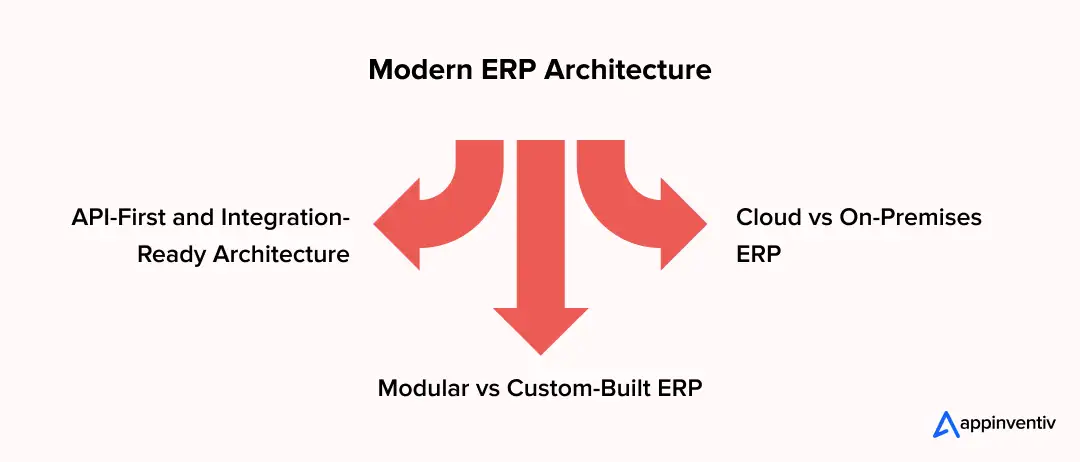
ERP architecture determines whether a council can modernise incrementally or becomes locked into another tightly coupled environment. The preferred design should separate core business functions from specialist systems while providing secure, well-defined interfaces between them.
Cloud vs On-Premises ERP
Cloud ERP can reduce infrastructure management and provide easier access to managed services, updates and scalable computing. However, councils should assess:
- Data residency requirements
- Vendor hosting locations
- Backup arrangements
- Disaster recovery
- Connectivity dependency
- Identity and access controls
- Exit and portability provisions
- Contractual service levels
Connectivity dependency deserves more weight than it usually gets. Around 55% of Australia’s 537 councils are in regional, rural or remote areas. Where links are slow or intermittent, a hybrid or offline-first design lets depot and field teams keep working and synchronise later, instead of stopping when the connection drops.
On-premises infrastructure can provide greater direct control but brings greater responsibility for patching, hardware, resilience and lifecycle management.
The decision should be based on the council’s risk profile and operating model, not simply on the preference for one deployment model.
Modular vs Custom-Built ERP
A standard ERP is generally well suited to common processes such as finance, procurement and workforce management. Problems arise when councils heavily customise the core platform to reproduce highly specialised processes.
A more maintainable model is to keep standard ERP functionality at the centre and develop custom applications or modules around it where the council has genuinely distinctive requirements.
A practical model is often:
Core ERP → Custom modules → Integration layer → Specialist systems → Data and analytics
This avoids customising the ERP core unnecessarily while still allowing the council to build capabilities around its specific operating requirements.
Custom applications can also extend an existing ERP without replacing its core functionality. Councils can build resident portals, mobile field applications, approval workflows, reporting tools or specialised operational applications that exchange data with the ERP through APIs. This approach preserves existing ERP investments while adding capabilities the standard platform does not provide.
API-First and Integration-Ready Architecture
An API-first architecture gives each system a defined way to exchange information. It also creates clearer boundaries around authentication, validation, monitoring and error handling.
A simplified council architecture can look like this:
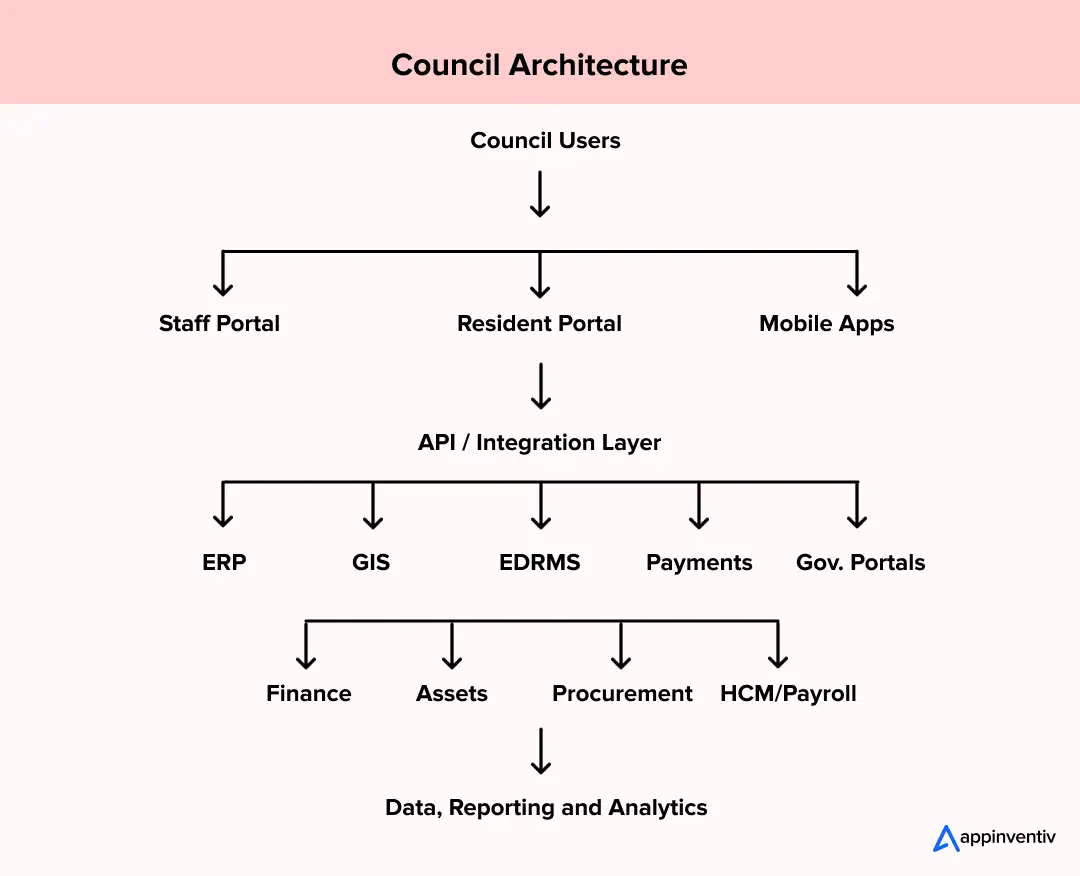
This structure also makes it easier to introduce AI selectively. Predictive maintenance, anomaly detection or forecasting can consume governed data through the same integration environment rather than creating another isolated technology stack.
ERP Security and Compliance Considerations for Australian Councils
ERP security cannot be separated from architecture because council systems hold financial, employee, property and community information. Australian councils also operate under different state and territory privacy arrangements, so compliance requirements should be established according to jurisdiction and information type. Security controls, records management, data location and continuity planning should be addressed before procurement and development decisions are locked in.
| Requirement | Australian anchor | What the ERP should support |
|---|---|---|
| Privacy | State and territory privacy law, such as the Privacy and Personal Information Protection Act 1998 (NSW) and the Information Privacy Act 2009 (Qld); the federal Privacy Act does not cover councils | Role-based access, purpose-limited data use, audit logs |
| Data sovereignty | Council data residency and governance requirements, including state or council-specific requirements for where sensitive data is stored, processed and accessed. | Australian data residency, controlled administrative access and clear data-location controls to support local governance and reduce third-party data exposure. |
| Data breach notification | NSW Mandatory Notification of Data Breach scheme (since 28 November 2023); Queensland local governments (since 1 July 2026) | Breach detection, assessment, register and notification workflows |
| Cybersecurity | ASD Essential Eight; state guidance such as the NSW Cyber Security Guidelines for Local Government | MFA, privileged access controls, patching, backups, logging |
| Records management | State records legislation, such as the State Records Act 1998 (NSW) | Retention, disposal, metadata and access control through the EDRMS |
| Financial reporting | AASB 116, AASB 15, AASB 1058 and AASB 16, alongside each state’s Local Government Act | Chart of accounts, asset valuation, grant and revenue treatment, audit trail |
| Accessibility | Disability Discrimination Act 1992 (Cth); WCAG as the benchmark | Accessible resident portals, forms and internal interfaces |
How Much Does ERP Software Implementation Cost for Local Government?
ERP implementation cost for local government varies, depending on the number of modules, integrations, custom workflows, data quality and the amount of legacy technology that must remain operational.
On average, a council ERP program can fall between AUD 70,000 and AUD 700,000 or more. These figures are indicative rather than fixed market prices; and complex integration requirements can materially change the final budget.
| ERP Scope | Indicative Cost | Typical Timeline |
|---|---|---|
| Small / Rural Councils, under 15,000 residents | AUD 70,000–180,000 | 4–6 months |
| Mid-Sized / Regional Councils, 15,000–80,000 residents | AUD 180,000–450,000 | 6–9 months |
| Large Metropolitan / City Councils, 80,000+ residents | AUD 450,000–700,000+ | 9–12+ months |
Population is only one factor. A smaller council with fragmented legacy systems, difficult integrations and poor-quality data can face greater engineering effort than a larger organisation with a relatively mature technology estate.
Remote and regional councils should also allow for offline-capable field modules, synchronisation logic and testing under low-bandwidth conditions, which can add scope within any tier.
Hidden and Ongoing Cost Variables
The initial implementation budget should not be mistaken for the total cost of ownership.
Custom API development, third-party licensing, data migration, cloud infrastructure, cybersecurity assessments, integration maintenance, user training and post-launch support can all add to the overall cost.
There is also a longer-term consideration. An ERP that is inexpensive to implement but difficult to modify can become expensive to operate. Councils should therefore assess upgrade effort, vendor dependency, integration ownership and future development requirements as part of the business case.
Share your module scope, integrations and data condition, and request an indicative cost range and timeline for your council’s size and location.
How to Implement ERP for the Public Sector?
A successful ERP implementation connects council systems, data and workflows while keeping disruption low and giving teams a clear path to adoption. Here is a phased approach of the local government ERP implementation process:
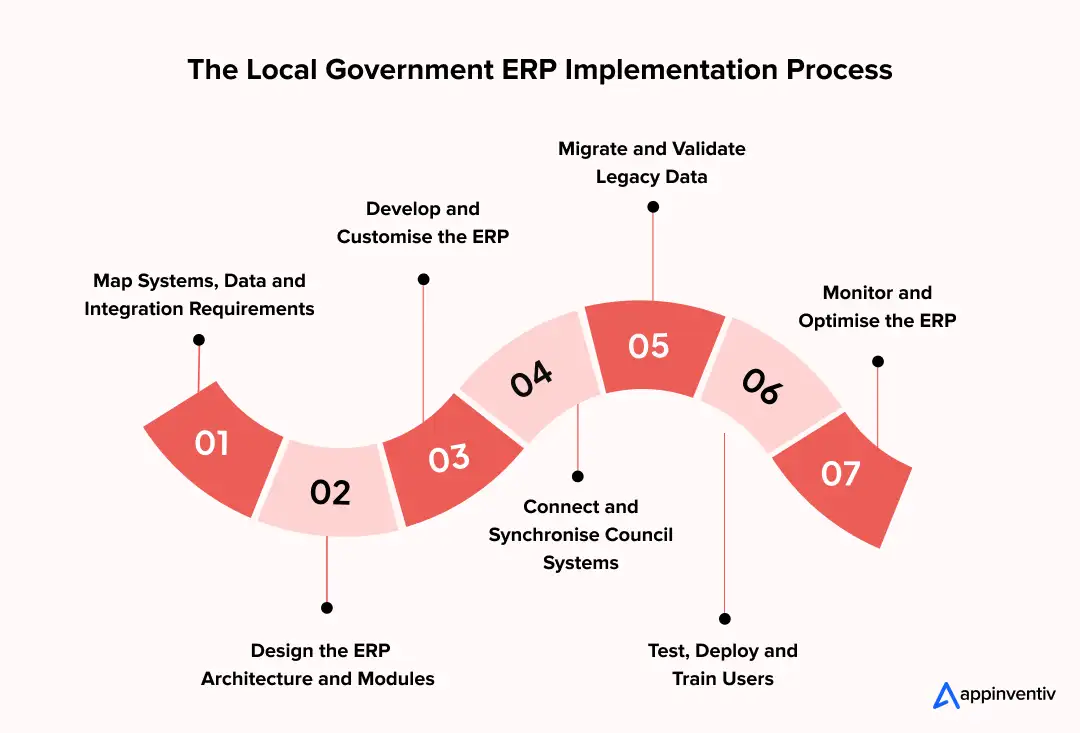
1. Map Systems, Data and Integration Requirements
Start by documenting finance, rates, assets, planning, records and customer systems. Map data flows, dependencies and integration points to identify duplication, gaps and legacy constraints. Document which applications should be retained, replaced, integrated or retired.
2. Design the ERP Architecture and Modules
Define the ERP architecture around council priorities, existing technology and future requirements. Select the modules, hosting model, data structure and integration approach needed for sustainable operations.
3. Develop and Customise the ERP
Configure core ERP functions and develop council-specific capabilities where standard features fall short. Customise workflows for finance, rates, assets, approvals and other established council processes.
4. Connect and Synchronise Council Systems
Connect the ERP with GIS, EDRMS, payment platforms, planning systems and other operational applications. Use APIs and integration services to keep critical data consistent across systems.
5. Migrate and Validate Legacy Data
Clean and structure legacy records before migration. Transfer essential property, financial, asset, employee and customer data, then validate accuracy, completeness and relationships before retiring older systems.
6. Test, Deploy and Train Users
Test workflows, integrations, permissions, reports and data across realistic council scenarios. Deploy in controlled stages and train staff around their roles, processes and day-to-day ERP tasks.
7. Monitor and Optimise the ERP
Track system performance, integration health, user adoption and data quality after deployment. Use operational feedback to resolve issues, refine workflows and prioritise future ERP improvements.
Common Challenges in Local Government ERP Systems Development and How to Overcome them?
Council ERP projects often become difficult at the boundaries between departments and systems. Legacy data may be inconsistent, specialist applications may have limited integration capability and teams may rely on established processes that are not documented anywhere. Addressing these issues early allows the implementation team to spend more time improving the target environment rather than resolving avoidable problems during deployment.
Legacy Data Migration
Legacy records often contain years of duplicated, incomplete or inconsistent information.
The answer is not to move everything into the new ERP unchanged. Councils should establish data ownership, define cleansing rules and decide which historical records need to be migrated, archived or retained elsewhere.
Integration With Existing Council Systems
An ERP can create another silo when integration is treated as a later technical task.
Integration requirements should therefore be captured during discovery and reflected in the architecture, development plan, testing strategy and budget from the beginning.
Business Continuity During Migration
Councils cannot simply pause essential services while a new ERP is deployed.
A controlled rollout should therefore include migration rehearsals, cutover planning, fallback procedures and clear ownership for resolving issues. Where appropriate, a phased implementation can reduce the number of business functions changing at the same time.
Build, Buy or Modernise: Which ERP Approach Fits Your Council?
Selecting the optimal software delivery model requires evaluating trade-offs between speed of deployment, total ownership costs, customisation flexibility, and strategic autonomy. Councils must decide whether commercial off-the-shelf software, platform configuration, modular extensions, or custom development best fulfills their long-term operational vision.
Municipal leadership teams must evaluate four distinct delivery models when planning system updates.
| Strategic Approach | Optimal Council Context | Primary Trade-offs and Considerations |
|---|---|---|
| Buy Standard ERP | Small rural councils seeking rapid deployment with standardised processes. | Pros: Fast initial deployment schedules. Cons: Limited customisation, high recurring license costs, potential vendor lock-in. |
| Configure Existing ERP | Mid-sized councils with recent software investments seeking workflow updates. | Pros: Preserves existing software investments. Cons: Limited architectural flexibility; heavy configurations can break during vendor upgrades. |
| Extend ERP with Custom Modules | Councils needing specialized tools (such as mobile field modules) attached to an existing core. | Pros: Fills specific functional gaps without requiring a complete core platform replacement. Cons: Demands ongoing API maintenance across module boundaries. |
| Build Custom Modular ERP Software for Government | Councils requiring complete operational flexibility, unique regional tools, and total IP ownership. | Pros: Fully tailored to exact council workflows, zero per-seat licensing bloat, complete control over data and IP. Cons: Requires higher initial capital engineering investment. |
Strategic Value of Custom Modular Engineering
Custom modular development gives councils more control over their roadmap, data and intellectual property, and can reduce reliance on per-seat licence fees. It also lets a council add digital features as community needs change, without waiting on a vendor’s release cycle.
The trade-off is a higher upfront engineering investment and responsibility for ongoing maintenance, so it suits councils with distinctive requirements or long planning horizons rather than every council.
How Appinventiv Helps Australian Councils Modernise ERP Systems?
Selecting an experienced delivery partner ensures enterprise software modernisation projects are executed efficiently, securely, and in full compliance with Australian regulatory standards. Appinventiv provides senior practitioner-led consulting and ERP software development services to help local councils build scalable, future-ready systems.
We are a digital transformation partner for Australian government and enterprise clients. Our team of 1700+ tech architects assess a council’s existing systems first, then design, build and integrate around what should stay, rather than defaulting to replacement. We deliver across the whole of Australia, including regional and remote councils.
Councils and agencies can also engage us through established procurement routes. We are approved on the Federal Australian Government Digital Transformation Agency (DTA) Software and ERP Marketplace, a Whole of Australian Government (WoAG) arrangement that all agencies can use. We are also a listed Queensland Government ICTSS.2601 Panel member and is a Local Buy LGA LB308 Arrangement ICT Solutions, Products, Services and New Technologies.
Our Core Track Record and Operational Impact
- Delivery scale: 3000+ digital products developed and deployed across 35+ industries.
- Modernisation experience: 500+ legacy processes transformed, supported by 1700+ tech architects.
- APAC Delivery Scale: 11+ years in business, 5+ agile delivery centres across the nation and a 90% recurring client base.
- Australian clients: work for Tribees, Rapid Teachers, Lite N’ Easy and Multinail.
- Remote-ready engineering: experience building software that keeps working offline in remote areas, which matters for councils and resources businesses far from reliable connectivity.
- Enterprise Security Standards: ISO 27001, ISO 9001, and SOC2 certified operations maintaining a 99.50% security compliance SLA.
Practical Systems Assessment and ERP Implementation Roadmap
We start government ERP software development with an assessment, not a replacement proposal. Our architects work with council executives to map current systems, find the integration bottlenecks and set out a local government ERP systems development roadmap that fits the council’s priorities and budget.
Share your project vision with us now.
FAQs
Q. How much does ERP software development cost for an Australian council?
A. ERP software development cost can range from around AUD 70,000 to AUD 700,000+, depending on modules, custom development, integrations, migration requirements, security and implementation complexity.
Q. How long does it take to implement an ERP system for a council?
A. A smaller local government ERP systems development and implementation may take around 4 to 6 months, while larger council programs involving multiple systems, extensive migration and custom development can take 6 to 12+ months or longer.
Q. What systems should a council ERP integrate with?
A. A council ERP commonly integrates with GIS, EDRMS, CRM, payment gateways, payroll, asset management platforms, planning systems, banking services and relevant government portals.
Q. Can councils customise an existing ERP platform?
A. Yes. Councils can configure standard ERP functionality and add custom modules, workflows and integrations where existing capabilities do not adequately support their operational requirements.
Q. What are the main benefits of ERP for local government?
A. The benefits of ERP for local government include better data consistency, connected financial and operational workflows, reduced manual processing, stronger reporting and improved visibility across council operations.
Q. How can councils migrate data from legacy systems to a new ERP?
A. Councils should first profile legacy data, identify ownership and quality issues, define migration rules, cleanse records and run test migrations before validating the final dataset.


Fast 2-minute response, fully NDA-protected.

Auto Spare Parts Management System Development: Complete Enterprise Guide
Key takeaways: Build an AI parts platform that links inventory, purchasing, warehouses, dealers, and ERP systems into one network. Examine system architecture, tech stacks, and software connections built for multi-site parts operations. See how AI sharpens order forecasts, stock planning, purchasing, and part lookups to cut daily delays. Compare custom code and ready-made apps to…
Aerospace ERP Software Development: Cost, Features, Timeline & Tech Stack
Key Takeaways Aerospace ERP platforms help production, procurement, maintenance, and finance teams work from the same operational records. Aircraft manufacturers use ERP systems to track serialized parts, supplier activity, maintenance history, and production schedules more accurately. Modern aerospace ERP environments now include AI forecasting, IoT telemetry, digital twins, and predictive maintenance monitoring. ERP modernization projects…

ERP Implementation Costs: Pricing, TCO, and the Hidden Cost Drivers of Large-Scale Deployments
Key Takeaways ERP implementation costs typically range from $50,000 to $1,000,000+, varying by business size, customization, and deployment model. Major cost drivers include software licensing, infrastructure, customization, data migration, integration, training, and change management. Hidden costs often arise from data preparation, process reengineering, scope changes, and ongoing post-launch support. Advanced technologies like AI, IoT, and…