





























CRM for Education: Features, Integrations, and Use Cases to Consider Before Adoption

 Share -



- 01How Does CRM Work in Education?
- 02Essential Integrations for an Education CRM
- 03CRM for Education: Use Cases and Examples to Consider Before Adoption
- 04Benefits of CRM for Higher Education Institutions
- 05How to Implement a CRM Successfully in an Education Business
- 06Challenges of Adopting an Education CRM and How to Address Them
- 07Why Partner with Appinventiv for Education CRM Development
- 08FAQs

Key Takeaways
- An education CRM puts student, prospect, admission and communication data in a single tool.
- The core features consist of lead management, admissions, student engagement, communication, automation, reporting and role-based access.
- Key integrations for education CRM systems include SIS, LMS, payment, communication, marketing, ERP, and identity systems.
- Use cases of CRM include recruitment, lead nurturing, enrollment, onboarding, student support, retention and alumni engagement.
- AI can be used for lead scoring, student segmentation, personalised communication and predictive analysis.
- A phased rollout can help manage data migration, staff training, workflow testing and user adoption.
It can be challenging to track students from admissions through marketing, counseling, enrollment and support teams. Data is frequently spread across multiple documents like spreadsheets, emails, SIS systems and other user systems, which makes it difficult to keep track of interactions and respond to students in a timely manner.
These processes are integrated into a single platform through a well thought-out CRM for education. It provides a real-time, unified experience for teams of student interactions, automates follow-ups, personalizes student communication, and enables institutions to make real-time decisions. AI can also help with lead scoring, student segmentation, predictive insights and personalisation of engagement.
The market is responding to this increase in demand. The global Education CRM market is expected to grow to $7.6 billion by 2034, growing at 11.7% CAGR between 2026 and 2034 (Source: Data Intelo). This expansion is driven by several factors, including the need for personalized experiences, the adoption of the cloud, the inclusion of AI features, and integration with SIS and LMS platforms. For institutions investing in CRM, this can be an opportunity to enhance recruitment efforts, boost student engagement, and foster more cohesive admin processes.
Build an education CRM that helps your teams manage admissions, student communication, and daily workflows with less manual work.

How Does CRM Work in Education?
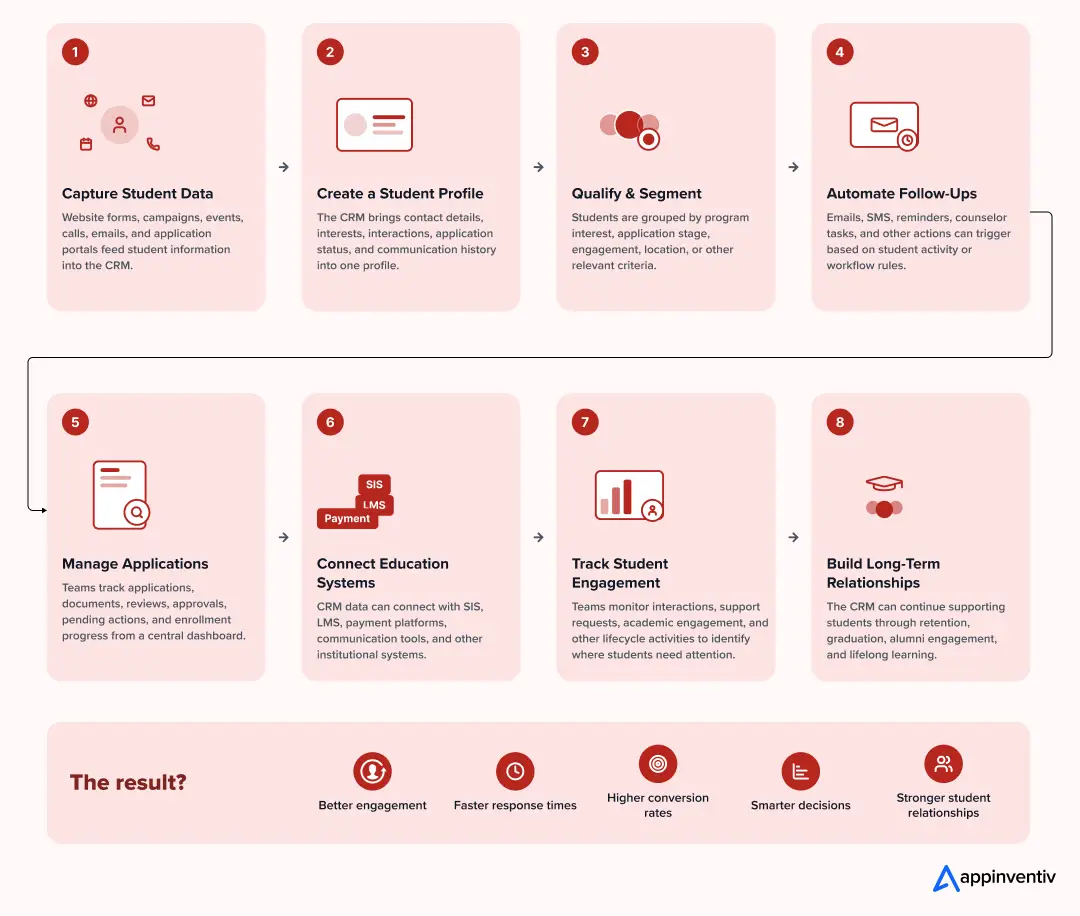
An education CRM integrates student information, communication, processes and institutional systems all onto one single platform. It provides admissions, academic, support and administrative staff with a holistic overview of every student on their educational journey. Teams can monitor interactions, manage tasks and provide timely support from initial inquiry to enrollment.
To gain a better overview of the relationship between these functions throughout the student lifecycle, check out the diagram below showing how an education CRM can tie them all together.
Key Features of an Education CRM
The education CRM integrates student data, student admissions, communications with students, and student engagement in a single system. It enables institutions to keep accurate records and to provide greater visibility of the different phases in the student journey for teams. Here are some of the features of education CRM software:
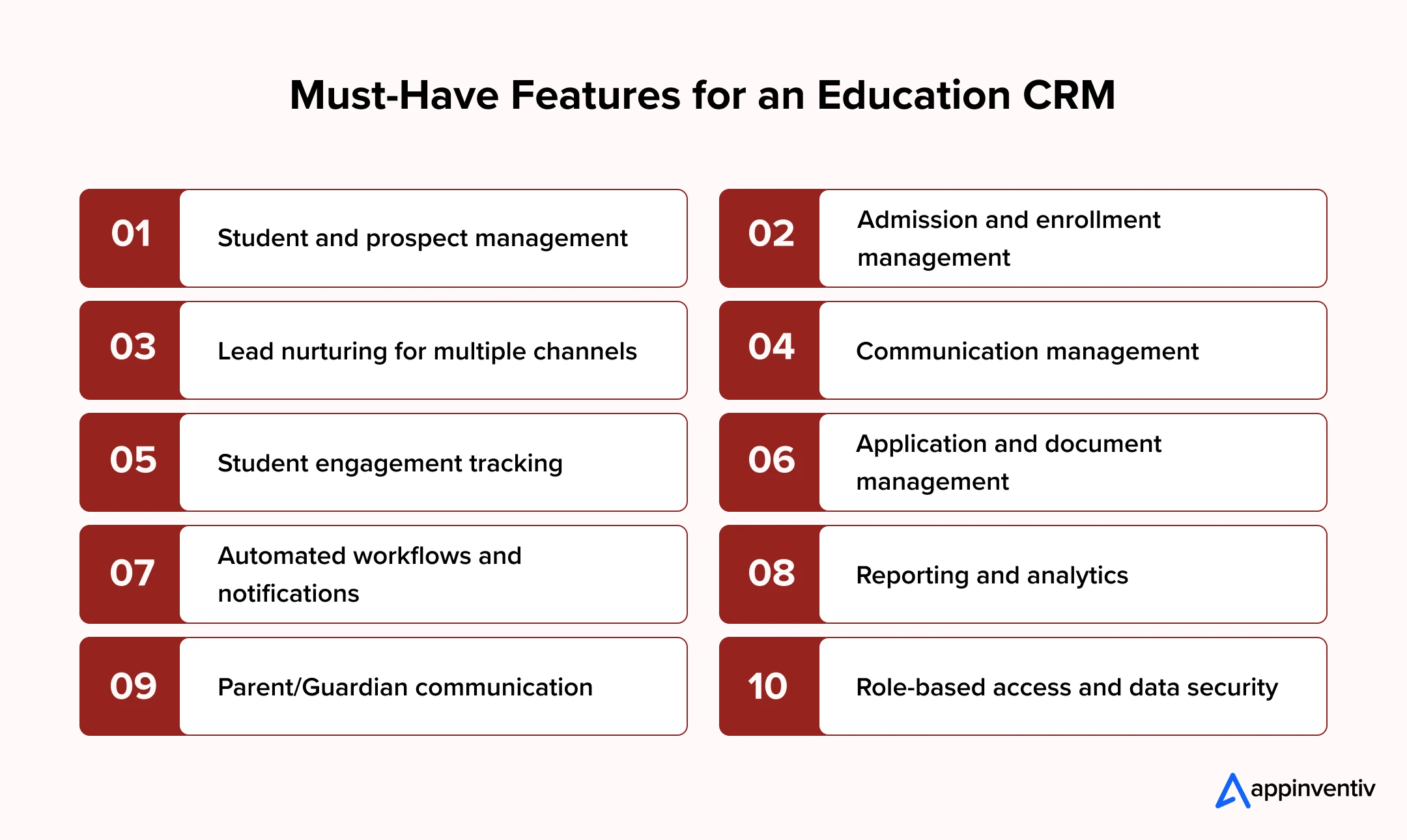
Student and prospect management: Store student and prospect details and information, and interaction history, as well as academic information and more in one location.
Admission and enrollment management: Monitor the application process, stages of admission, and enrollment status, and follow up from initial application to confirmation.
Lead nurturing for multiple channels: Collect leads on various channels, hand off leads to counselors, and automate follow-up actions based on the lead’s interaction.
Communication management: Send emails, SMS, calls, push notifications and manage interactions along with interaction records of each student.
Student engagement tracking: Track attendance, participation, inquiries, requests for support and more all to understand student engagement.
Application and document management: Manage application forms and related documents; monitor applications and missing documents.
Automated workflows and notifications: Send reminders, follow-ups, alerts and task assignments when students take certain actions or when certain events occur.
Reporting and analytics: Provide administrators with reports and dashboards of admissions, enrollment, lead conversion, engagement and more.
Parent/Guardian communication: Keep relevant parent/guardian records and facilitate timely communications regarding admissions, progress, payments or updates on the institution.
Role-based access and data security: Ensure access to the system is controlled by staff according to their roles and protect and secure sensitive student information.
Essential Integrations for an Education CRM
A CRM for education system is best used when it integrates with an institution’s existing systems. These integrations enable transfer of student, academic, financial and communication data across platforms, without the need for duplicate manual data entry.
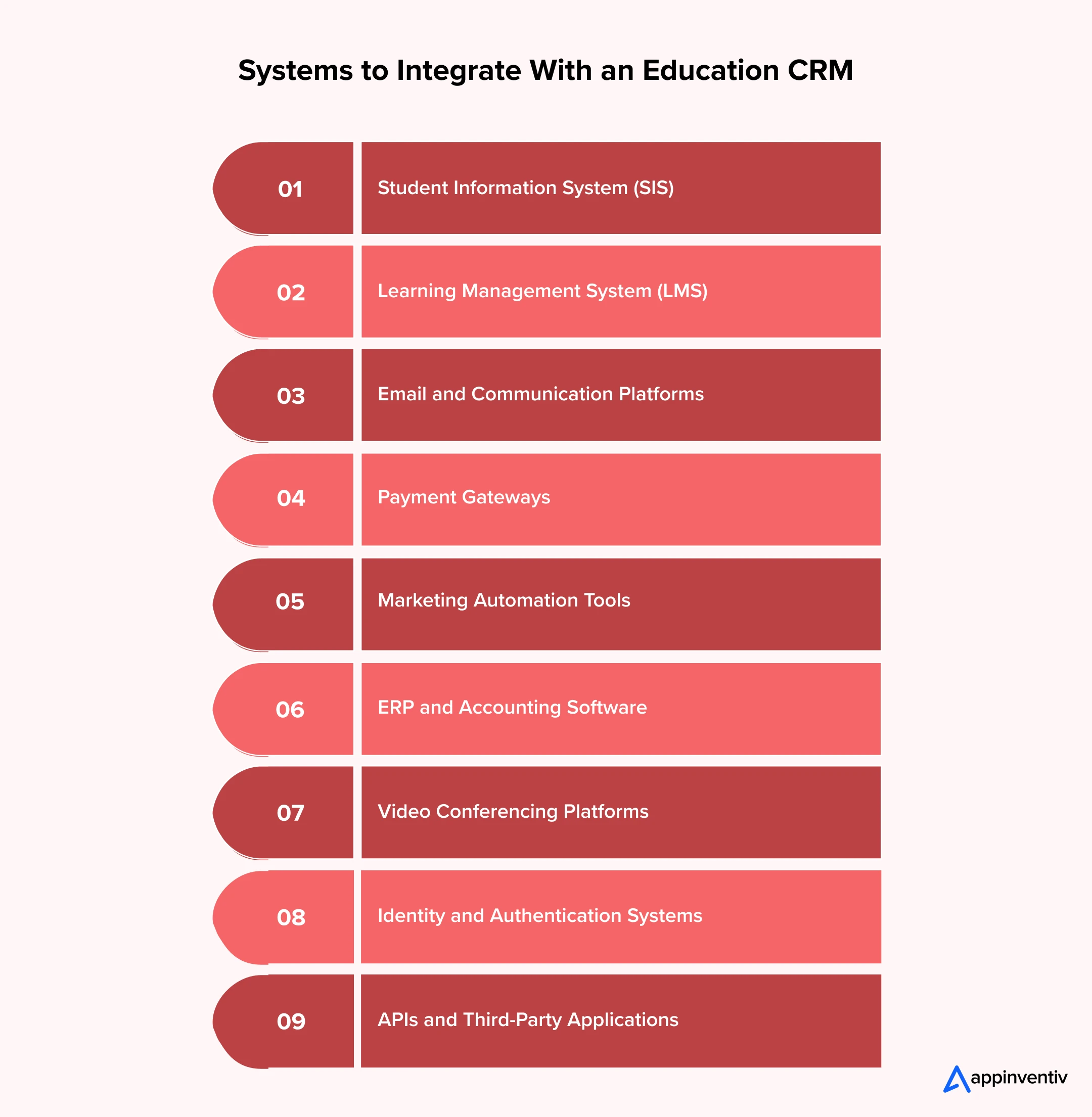
Student Information System (SIS)
The integration of the CRM and an SIS enables institutions to sync student profiles, enrollment, academic information, course information, and contact information. Admission and administrative staff can access relevant data without manually transferring it between systems. There can also be updates between platforms for maintaining student data.
Learning Management System (LMS)
A Learning Management System includes relevant course and learning activity information in the customer relationship management software. Teams can see the engagement data in relation to course enrolment and participation, assignment activity, and other engagement data in relation to student records. This provides counselors and support teams with context when monitoring student progress and/or when checking for student engagement changes.
Email and Communication Platforms
Seamless integration of email, SMS, calling and messaging platforms means that staff can handle communication from the CRM. Follow-up conversations can be tied to a student profile or a prospect profile. Teams may set reminders/alerts for applications, requests, enrollment updates, etc. and other interactions.
Payment Gateways
Payment gateway integration links student records to application fees, tuition payments, refunds and transaction statuses. Upon successful payment, the corresponding CRM record can be automatically updated. The finance and admission teams can also track up and follow up on overdue payments without having to cross-reference various systems.
Marketing Automation Tools
Institutions can import prospect and campaign information into the CRM by connecting marketing automation tools. The teams can monitor sources of inquiry, answers to campaigns, website visits, and other prospect activities. The data this information provides can then enable admission teams to better assess the state of each prospect’s application process and follow up accordingly.
ERP and Accounting Software
Accounting and ERP software integrations link the CRM system with financial and accounting systems. Invoices, fee structures, payments, refunds, and account information can be synced from the institution, as needed. A CRM system for education can then give permitted users pertinent financial information without having to operate throughout various applications.
Video Conferencing Platforms
Video conferencing platforms for admission interviews, counseling, student meetings and virtual events can be integrated with institutions. Staff can arrange and/or share session details and maintain relevant interaction records in the CRM. This is particularly helpful for institutions that have admissions and student support operations that are remote.
Identity and Authentication Systems
Identity & authentication integrations aid in the management of secure access by students, faculty, counselors and administrative staff. Single sign-on may help to streamline access, and role-based permissions or MFA authentication help to dictate what information and functionality each user has access to. This is especially relevant in the case of implementing CRM for higher education across multiple departments.
APIs and Third-Party Applications
APIs enable CRM software for higher education to share information with apps without direct integrations. Institutions can integrate assessment systems, library systems, career platforms, internal portals and other niche applications according to the needs they have. APIs also facilitate easy integration of new systems and workflows into the CRM.
CRM for Education: Use Cases and Examples to Consider Before Adoption
A CRM for education can be used for admissions, student services, communication, marketing and alumni relations. Education organizations use CRM platforms to keep student records together and give staff a clear view of each interaction. The following examples show how real institutions use CRM technology in their daily operations.
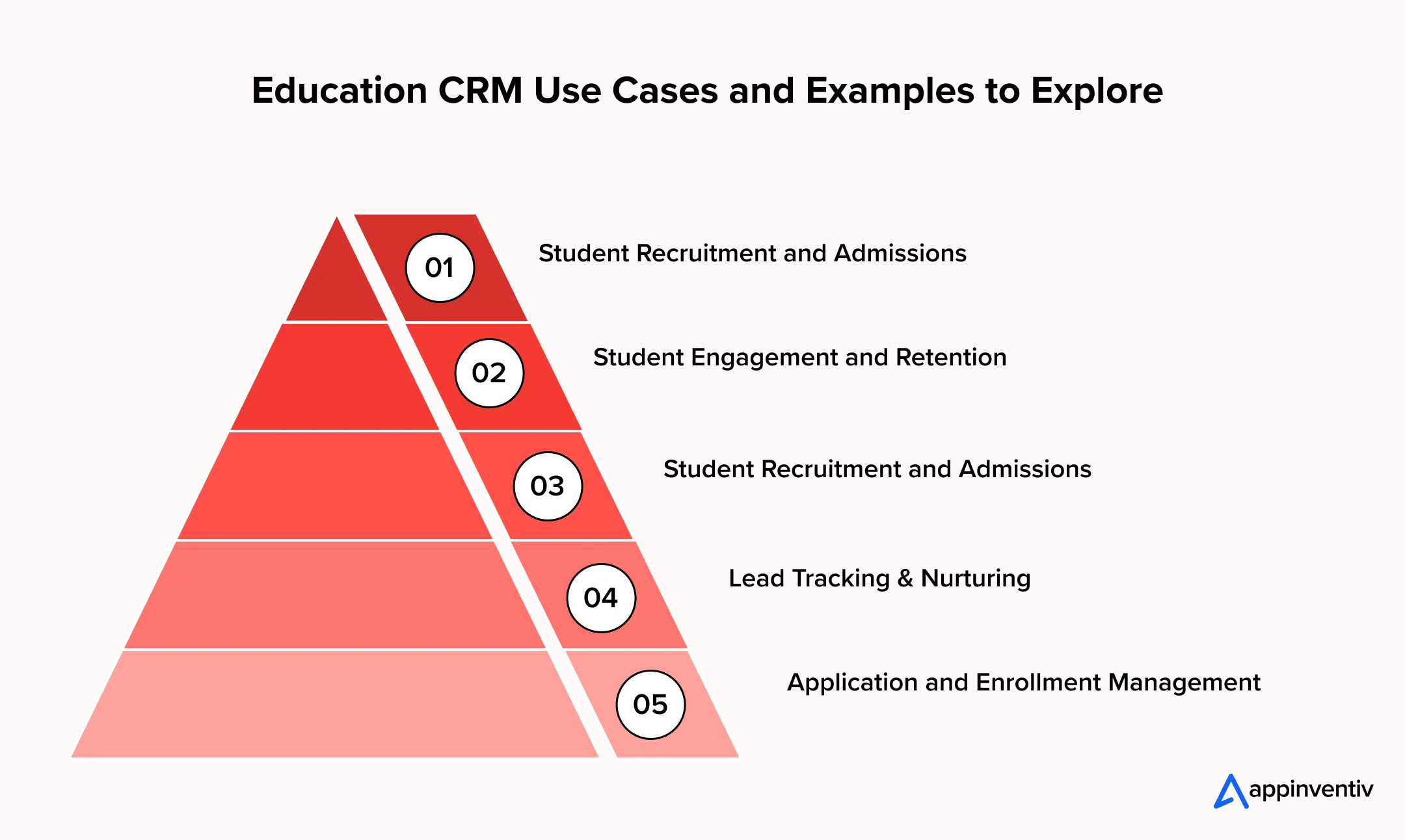
Student Recruitment and Admissions
Customer relationship management software is utilized by admissions staff to gather enquiries, track prospects, allocate counselors, and monitor applications. Staff can add calls, emails, meetings and follow-up in the same student record.
Iowa State University is a Salesforce customer that leverages Sales Cloud and Salesforce Marketing Cloud for prospective student recruitment. The university had a 25% increase in business productivity, a 30% increase in the number of targeted emails sent and a 94% increase in the number of emails sent through this Salesforce integration solution.
Student Engagement and Retention
CRM in education can help staff track student interactions with academic and support teams. Connected records give advisors better visibility into students who may need additional attention.
Crowder College uses Anthology Reach to connect admissions and student retention data. Advisors can use consolidated engagement and performance information with risk scoring to identify students who may need earlier intervention. The college reported an 11% increase in summer enrollment after adopting the platform.
Student Recruitment and Admissions
A CRM system for education assists admissions staff members to compile enquiries, monitor prospective students, designate counselors, and monitor applications. Staff have the ability to write notes about calls, emails, meetings and follow-ups within the same student profile.
Olivet Nazarene University have chosen Ellucian CRM Recruit as their recruitment and enrollment system. The Graduate and Continuing Studies team at the university said that they consolidated two databases of CRM and achieved almost $1 million in savings, plus a 25% boost in new students, as a result.
Lead Tracking & Nurturing
Students can engage with admissions departments, academic departments, events, and marketing teams prior to applying. A CRM consolidates all of these interactions and provides counselors with a history of student interests, communications and follow-ups.
St. John Fisher University uses Slate to manage student search, recruitment communications, applicant portals, and recruitment analytics. Its Slate implementation helped the university to move student search in-house, and campaigns resulted in a 2.4% increase in applications received.
A CRM for education consultant helps advisors to monitor inquiries, application progress, documents, counselor notes, and communications across various institutions.
Application and Enrollment Management
A CRM can be linked with application, document collection, counselor communications as well as enrollment tasks. The admissions staff can review the progress made by each applicant and what is still to be done.
University of Salford embraced the Microsoft Dynamics 365 and Power Platform suite to streamline admissions and streamline the application management with a unified portal. The university automated processes like document reminders and generation of offer letters for admission; and its in-house team created the first admissions portal in 10 weeks.
Create a platform that brings student records, communication, follow-ups, and support activities into one place.

Benefits of CRM for Higher Education Institutions
With an education CRM, you can combine admissions, marketing, communications, student support and engagement. It improves teams’ visibility of student interactions and reduces repetitive administrative tasks. Here are some of the benefits of adopting education CRM:
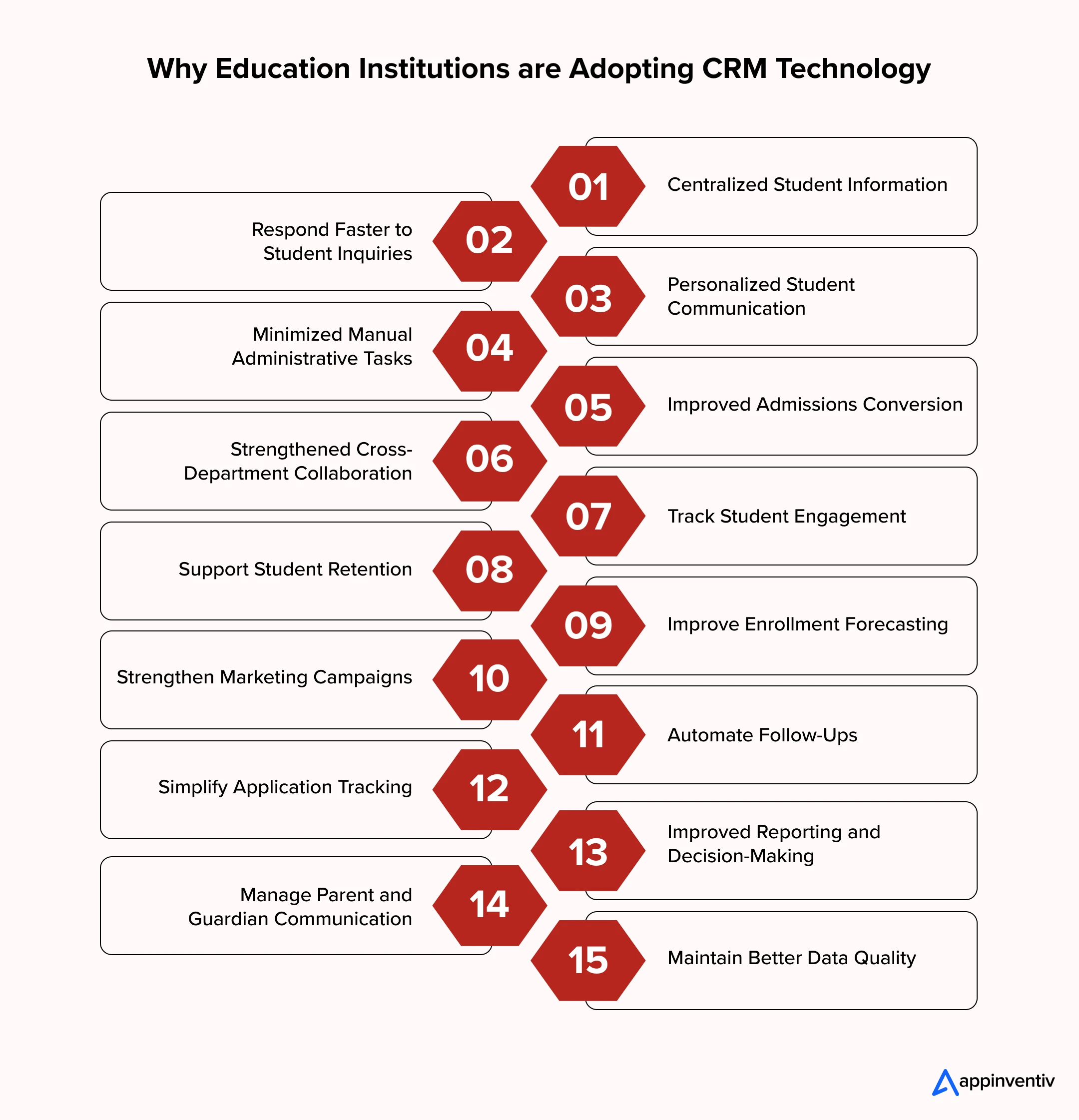
Centralized Student Information
CRM software for education keeps inquiries, applications, documents, communication history, and counselor notes within unified student profiles. Teams can find relevant information quickly without checking multiple spreadsheets or systems.
Respond Faster to Student Inquiries
A CRM for education helps admissions teams capture new inquiries, assign leads, schedule follow-ups, and monitor application activity. Automated reminders can prompt counselors to contact students at the right time.
Personalized Student Communication
For higher education, AI CRM tools can study student engagement and interests to ensure more targeted interactions. Teams can customize the messages they send, taking into account the stage that each student is at in the admissions or enrollment process.
Minimized Manual Administrative Tasks
There are repetitive tasks, like assigning leads, following up on them, updating status, sending notifications, updating records, etc., which can be automated by automation within CRM in education. Staff will have more time to spend directly with students.
Improved Admissions Conversion
A CRM provides admissions teams with a more transparent view of each prospect, from inquiry to enrollment. Counselors can see where applications are languishing, track pending applications, and concentrate on high-engagement prospects.
Strengthened Cross-Department Collaboration
Shared student records enable admissions, marketing, counselling, student services and management teams to all access the same student records. Every department receives what they need without having to repeatedly ask for information from other departments.
Track Student Engagement
Interactions can be tracked over email, events, applications, support requests, and more. These records give teams insight into student engagement and engagement change.
Support Student Retention
When staff can use CRM data to find students who are not responding, are not taking the important steps or are exhibiting reduced engagement, it will help them make decisions on interventions. Teams can then reach out with relevant guidance prior to further disengagement.
Improve Enrollment Forecasting
Historical CRM data can be used to establish trends in inquiries, applications, admissions and enrollments. These trends can help leadership teams to better predict needs and schedule recruitment efforts.
Strengthen Marketing Campaigns
Marketing teams can segment their target students by interests, courses, location, stage in the application process, and engagement history. This allows for more specific campaigns as opposed to reaching out to all prospects at once with the same message.
Automate Follow-Ups
Reminders can be set up to trigger based on any activity in the CRM, such as an inquiry, an application, an on-campus activity, a document upload or a missed action. Counsellors can have a clear, step-by-step process and do not have to manually follow every step of the process.
Simplify Application Tracking
Application status and pending documents, review stages and enrollment decisions can all be seen from a single dashboard. This will help identify missing applications and avoid delays.
Improved Reporting and Decision-Making
Dashboards can bring together inquiry volumes, conversion rates, application numbers, enrollment figures, campaign results, and counselor performance. Leadership gets a clearer picture of what is working and where teams need attention.
Manage Parent and Guardian Communication
Institutions can maintain relevant communication records for parents and guardians alongside student profiles. Staff can track conversations, requests, and updates without creating separate records across different systems.
Maintain Better Data Quality
Centralized records reduce duplicate entries and scattered student information. Validation rules, standardized fields, and controlled data updates can help teams maintain cleaner records over time.
How to Implement a CRM Successfully in an Education Business
CRM implementation works best when institutions plan the student lifecycle, data structure, integrations, and user workflows before launch. A phased approach can reduce disruption and make adoption easier for different teams.
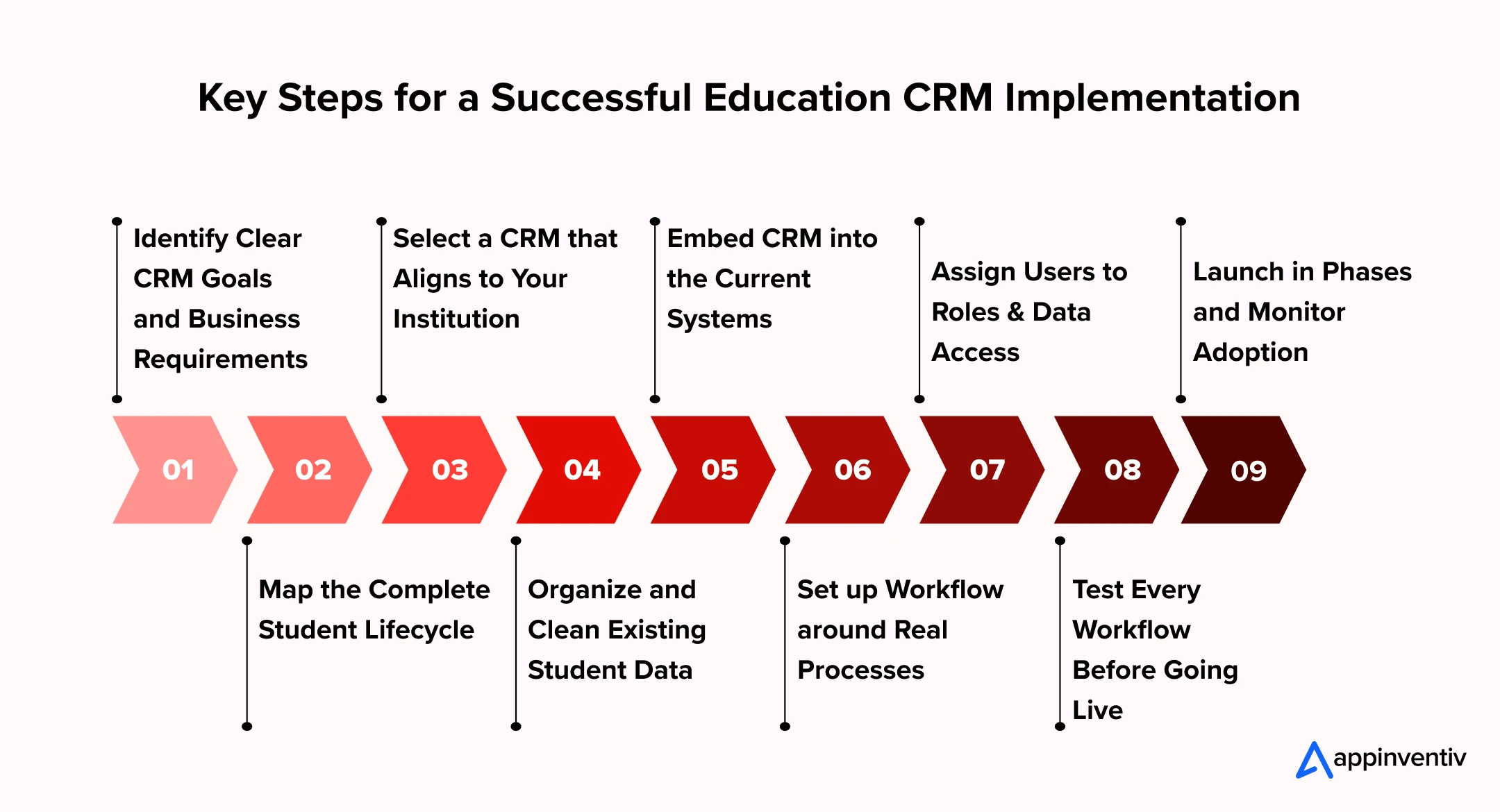
Identify Clear CRM Goals and Business Requirements
Identify areas for improvement for the CRM before selecting or setting up a platform. Analyze the essential requirements for admissions, recruitment, students’ support, communication, marketing and reporting. Goals are the criteria that help teams understand if the CRM is providing the desired business results.
Map the Complete Student Lifecycle
Record all the processes from inquiries to applications, to enrolment, to engagement, to graduation and to alumni communication. Recognize who is on the team, what information is gathered, what actions are taken and what communication is shared throughout the process. This provides a real-world example of a CRM workflow.
Select a CRM that Aligns to Your Institution
Evaluate platforms on student lifecycle features, customization, automation, security, integrations, reporting, and ownership costs. Depending on the size of the university, there may be a need for a lot of workflows and integrations, but for smaller institutions it might be sufficient to have a platform that offers the core CRM functions.
Organize and Clean Existing Student Data
Thoroughly review the records before transferring them to CRM. Clean up duplicates, complete missing data, normalize data fields and set data ownership rules. Clean data provides teams with more accurate student information in the system and doesn’t allow previous database problems to transfer over.
Embed CRM into the Current Systems
Integrate the CRM to other systems in the institution such as SIS, LMS, payment gateway, email platform, marketing platforms, communication platforms, and others. These integrations enable a seamless transfer of pertinent data across platforms and minimize duplicate data entry.
Set up Workflow around Real Processes
Create workflows to assign leads, track applications, collect documents, follow up with counselors, remind students to enroll, and communicate with students. The setup should be a realistic one and not have extra steps.
Assign Users to Roles & Data Access
Set up permissions for admissions staff, counselors, faculty, marketing, administration and others. The information to support each role should be accessible to the role. This helps to secure student information and minimize unnecessary access.
Test Every Workflow Before Going Live
Test cloud data migration, integrations, automated notifications, reports, permissions, and communication workflows prior to launch. Identify broken processes and incorrect data flows in real-world scenarios. Addressing these issues prior to launch will help to avoid disruption of staff and students.
Launch in Phases and Monitor Adoption
Before implementing the CRM throughout an institution, begin with a department, campus or specific workflow. Monitor post-launch user adoption, data quality, response times, workflow completion and system issues after launch. Once more teams begin using the CRM, use these findings to further refine the CRM.
Set clear workflows, migration priorities, integration needs, and adoption goals before your education CRM goes live.

Challenges of Adopting an Education CRM and How to Address Them
Education CRM adoption can involve data migration, system integration, staff training, and workflow changes. Identifying these challenges early helps institutions plan implementation better and reduce disruption.
| Challenge | Solution |
|---|---|
| Scattered Student Data | A CRM for education can centralize records, clean and deduplicate existing data before migration. |
| Complex System Integrations | Map existing systems first and use APIs to connect SIS, LMS, payment, and communication platforms with CRM in education. |
| Staff Resistance | Provide role-based training and involve users during CRM configuration to encourage adoption. |
| Complex Student Workflows | Map each student lifecycle stage and configure workflows around actual admission, enrollment, and support processes. |
| Data Privacy Concerns | Use role-based access, authentication, encryption, and audit controls to protect student information. |
| High Implementation Costs | Prioritize critical workflows first and roll out the CRM software for higher education in phases. |
| Poor Data Quality | Set data standards, validation rules, and ownership responsibilities to keep records accurate. |
| Multiple Institution or Counselor Needs | Configure flexible profiles, workflows, and permissions so CRM for education consultants can support different student and institution requirements. |
| Low User Adoption | Keep workflows simple, provide hands-on training, and review usage regularly after launch. |
| Unclear CRM Performance | Define KPIs for inquiries, conversions, enrollment, engagement, response times, and user adoption before implementation. |
Why Partner with Appinventiv for Education CRM Development
More than just a CRM that stores student information is required for education institutions. They require a solution that integrates admissions, student engagement, communication, counseling and support, but doesn’t overly disrupt their technology stack. With a well-designed education CRM, you can cut down on manual tasks, enhance follow-up efforts, provide more visibility into student interactions, and deliver improved student enrollment and retention results.
Creating such a platform demands expertise in CRM Architecture, education workflows, integrations, data management, automation, AI, and cloud technologies. This is where Appinventiv’s custom CRM development services comes in.
Being a knowledgeable technology partner, Appinventiv offers complete educational CRM development solutions for various education providers, including education companies, training agencies, EdTech companies, and educational institutions. We manage the entire full lifecycle of a CRM project, from strategy through the UX process, through custom development, third-party integrations, automation, analytics, AI features, all the way to deployment on the cloud.
We’ve been across all the education platforms and digital products, with exposure to different user journeys, engagement models and technology needs, with some of our clients being Gurushala, Nova, Bada Business, Dr. Reddy’s, etc. This helps us to shape CRM platforms around true business processes, instead of forcing institutions to adapt their processes based on a generic platform.
As a globally trusted software development company, Appinventiv brings years of experience in enterprise software integration, cloud, APIs, data engineering, and product engineering to build education CRM systems that can grow with the institution’s needs. From boosting student recruitment and automating admissions to enhancing engagement and integrating disconnected systems into an environment, we can help you plan and create the ideal solution.
Get in touch with our experts to discuss your education CRM development project.
FAQs
Q. What are the most useful education CRM integrations?
A. The most helpful education CRM integrations are SIS, LMS, payment gateways, email and SMS, WhatsApp, student portals, marketing automation, and analytics. Linking these systems ensures that student information is maintained, follow-ups are automated, student applications can be tracked, and it provides staff with a holistic view of student interactions. The right CRM for education are based on the current systems and institutional processes.
Q. How to choose between custom & platform-based education CRM?
A. A platform-based CRM is best for consultants who require basic CRM features to manage leads, communicate and report on them. As for education consultants, CRM systems are more effective as a custom system if there are specific counselor workflows, multiple institution management, and custom reports. Check the platform’s features, user restrictions, integrations and costs before making a decision.
Q. How much does it cost to develop education software?
A. The cost of building education software can range between $40,000 to $120,000 for an MVP, $120,000 to $400,000 for a mid-sized platform, and $400,000 or more for an enterprise platform. Adding a custom CRM can add $20,000 to $150,000+ to the budget. The final cost depends on CRM features, integrations, automation, data migration, and AI requirements.
Q. What are some of the popular education CRM platforms?
A. Some widely used education CRM platforms include:
- Salesforce Education Cloud
- Slate by Technolutions
- Ellucian CRM
- HubSpot CRM
- Microsoft Dynamics 365
- Element451
Q. What type of education CRM services does Appinventiv provide?
A. Appinventiv assists in building and implementing CRM systems for educational institutions on their admissions, student engagement, communication and administration processes.
- CRM Consulting: Admissions and student engagement, communication, and institutional workflows are the areas in which CRM requirements are defined.
- CRM Implementation: We will set up and integrate CRM systems to enable enrollment, student records, communication and staff workflows.
- Education CRM Development: We create education CRMs based on particular admission processes, student journeys and institutional requirements.
- CRM Integration: We integrate education CRMs with SIS, LMS, ERP, payment gateway, email and other campus systems.


Fast 2-minute response, fully NDA-protected.

Beyond Customer Portal Development: Building Connected Digital Services
Key takeaways: A portal without CRM, ERP and billing integration leaves your staff doing the connecting. Start with customer tasks, then integrate only the systems those tasks actually need. Name one system of record for each data type before choosing APIs or middleware. Plan integration, security and privacy obligations at the start, not after the…
CRM Software for Local Government: From Community Requests to Better Service Delivery
Key takeaways: A council CRM should sit around existing systems as a service layer, not replace them. Integration with ERP, rates, property and GIS systems prevents another data silo and duplicate entry. Start with one high-volume service, pilot it with residents, then scale on measured results. Track resolution time, SLA compliance, self-service rates and cost…

The Ultimate Guide to CRM for Insurance: Features, Cost, Top Platforms, Integration & More
Key takeaways: CRM for insurance connects sales, service, and claims into one governed system, distinct from the policy administration system. Core features span pipeline management, policy visibility, claims tracking, commission management, AI analytics, and compliance controls. Cost ranges from roughly USD 15,000 for configuration to USD 150,000 and beyond for custom development at enterprise scale.…