
























Data Center Infrastructure Management Software Development: Cost, Process, Architecture & Features

 Share -


- 01Data Center Infrastructure Management Software Development Process
- 02Enterprise Use Cases for DCIM Software
- 03DCIM Architecture, Deployment Models, and Technology Stack
- 04How Is AI Changing DCIM Software Development?
- 05How Does DCIM Software Support AI Data Centers and Liquid Cooling?
- 06What Security Controls Should Enterprise DCIM Software Include?
- 07How Do You Integrate DCIM Software With Enterprise Systems?
- 08Benefits of Developing Custom Enterprise DCIM Software
- 09Challenges of Custom DCIM Software Development
- 10How Much Does DCIM Software Development Cost and How Long Does It Take?
- 11Build vs Buy: Which DCIM Strategy Is Right for Your Enterprise?
- 12Future Trends in Data Center Infrastructure Management Software
- 13Why Choose Appinventiv for Data Center Infrastructure Management Software Development?
- 14Frequently Asked Questions

Key takeaways:
- DCIM development begins with physical audits, telemetry specifications, and operational workflows before system design.
- Edge telemetry collectors, standardized data models, and time-series databases power large multi-site facility deployments.
- Predictive analytics align upcoming compute workloads with available power, cooling, physical space, and network headroom before hardware setup.
- System security requires device authentication, isolated networks, API protections, detailed logs, and safeguards for automated commands.
- Total software cost combines development scope, integration depth, telemetry volume, rollout scale, and ongoing operating expenses.
Enterprise data centers integrate compute, storage, network, and power systems into a single facility. They also incorporate liquid cooling gear, environmental sensors, and building controls. High-density artificial intelligence workloads push power requirements past traditional limits and narrow operating thermal envelopes across facilities.
The IEA projects global data center electricity use to rise from about 485 TWh in 2025 to 950 TWh by 2030. This rising demand makes infrastructure visibility and capacity planning more important for large data center operators.
Managing these infrastructure assets through separate monitoring tools, manual spreadsheets, and disconnected IT software creates costly operational blind spots. Custom DCIM software development builds a single platform that connects physical facility operations directly with logical IT workflows.
The platform uses industrial protocols such as SNMP, Modbus, BACnet, and MQTT to collect continuous telemetry from all equipment. It combines real-time data with physical rack locations, cabling connections, predictive capacity models, and automated change management tasks.
Real-time data center visibility software gives engineering leadership insight into power consumption, cooling metrics, rack space availability, and hardware changes. Unified data helps teams prevent downtime, lower energy expenses, and plan capital expenditures accurately.
This guide details system architecture, technology stacks, artificial intelligence integration, security standards, costs, timelines, ROI calculations, and deployment strategy.
Growing electricity demand is putting pressure on enterprise power capacity and making fragmented infrastructure data harder to manage.
Data Center Infrastructure Management Software Development Process
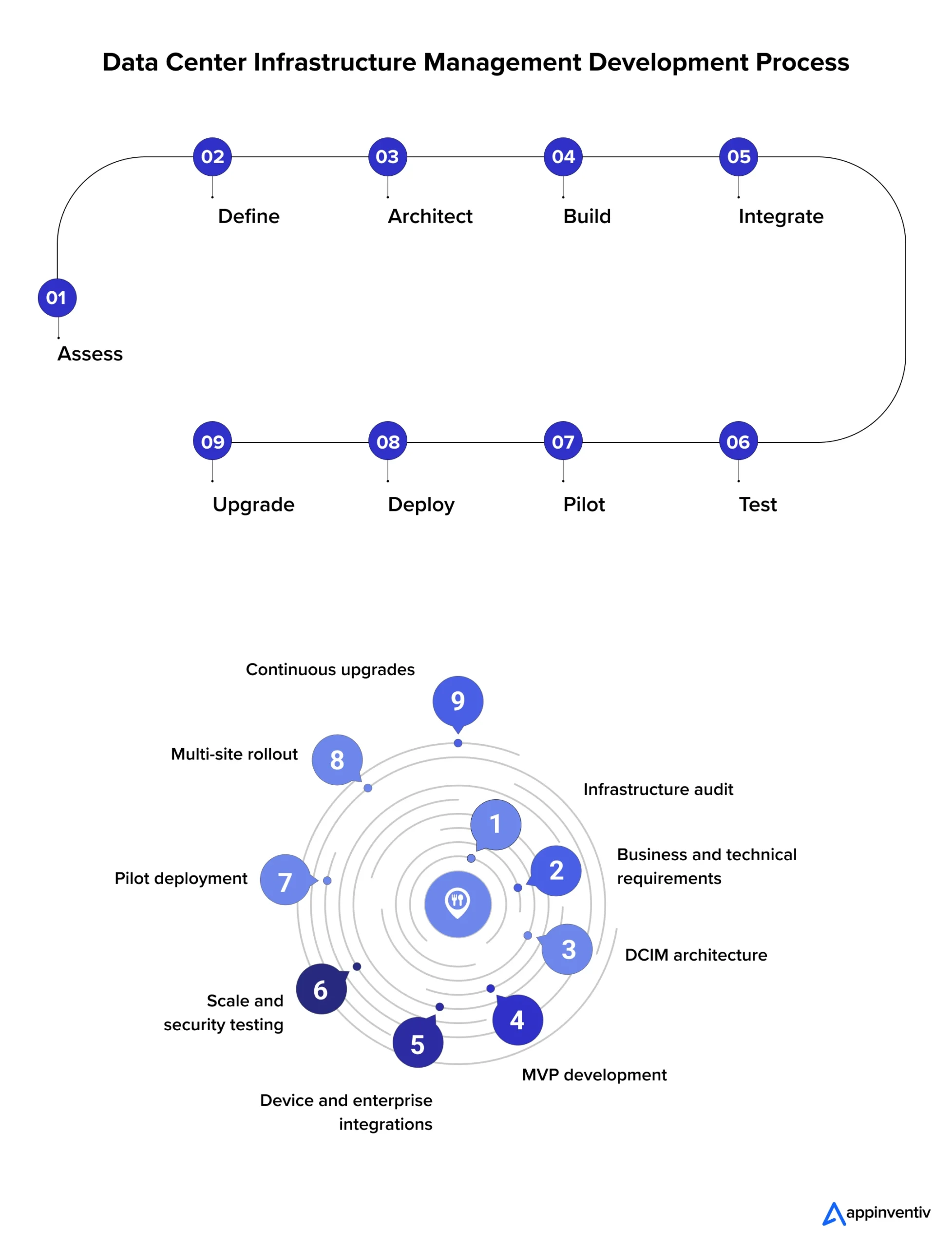
Building DCIM software starts with the physical infrastructure rather than user interfaces. Enterprise platforms track assets, telemetry, power paths, cooling systems, network links, workflows, and site dependencies. Engineering teams connect these physical and digital layers into a single operating system for the facility.
Step 1 – Assess the Existing Data Center Environment
Engineers begin by auditing servers, racks, power distribution units, uninterruptible power supplies, cooling equipment, sensors, and network switches. The assessment inventories existing building management systems, configuration management databases, IT service management tools, and ticketing software. Teams document hardware vendors and protocol compatibility, including SNMP, Modbus, BACnet, and MQTT. Fixing inaccurate asset records prevents downstream errors across every software module. Teams record exact facility counts, device numbers, rack positions, active users, and incoming telemetry volumes.
Step 2 – Define Business, Technical, and Operational Requirements
Clear requirements link platform capabilities directly to operational goals. Teams define targets for asset visibility, capacity planning, power metrics, environmental data, network links, analytics, and security controls. Performance benchmarks specify device capacity, telemetry volume, data retention periods, uptime targets, and expansion goals. Software supporting 200,000 devices demands far more data pipeline capacity than local single-site installations. Project leaders detail critical operational workflows, including equipment provisioning, rack reservations, maintenance approvals, and incident response routines.
Step 3 – Design the Solution Architecture
Infrastructure details drive software architecture decisions. High device diversity shapes data ingestion requirements, while polling frequency determines database storage needs. Real-time monitoring demands low-latency communication design. Global enterprises place regional telemetry collectors near data centers, sending aggregated data to central analytical engines. Security protocols isolate operational device networks from corporate application layers. The system architecture scales horizontally, isolates failures, and exposes application programming interfaces for enterprise integrations.
Also Read: Cloud Data Migration Strategy
Step 4 – Build a Minimum Viable Product Around High-Value Workflows
The initial release addresses core operational bottlenecks to deliver immediate value. A targeted release contains:
- Central asset inventories
- Real-time power and thermal monitoring
- Operational dashboards
- Basic rack capacity planning
- Threshold alert engines
- Connections to existing configuration databases and service desks
Starting with core functions establishes a stable production system. Development teams add specialized capabilities based on actual user feedback and live telemetry.
Step 5 – Develop Infrastructure Integrations and Ingestion Pipelines
Ingesting telemetry across vendor platforms forms the technical core of DCIM software. SNMP connects IT switches and servers. Modbus gathers metrics from electrical infrastructure and power meters. BACnet communicates with cooling units and building management hardware. MQTT handles low-power environmental sensors and modern event streams. The ingestion engine normalizes varied incoming data formats into unified data structures and automatically handles connection drops, duplicate packets, device reboots, and network schema updates.
Step 6 – Develop Analytics, Workflows, and Visualization Services
The application layer transforms raw telemetry into actionable operational metrics. Rule engines calculate thresholds and trigger automated notifications. Capacity services track available rack space, power capacity, cooling limits, and switch port density. Workflow modules route maintenance requests, record system changes, and manage work orders.
Interactive visual tools render floor plans, rack elevations, and active equipment dependencies. When combined with dedicated energy management software, these digital twins enable operators to model consumption scenarios before committing capital. It also fuses spatial data with active telemetry, giving operators an exact virtual representation of every facility.
Step 7 – Test for Scale, Reliability, and System Failures
Platform testing evaluates software performance under peak telemetry loads and infrastructure failures. Engineering teams run load tests to verify ingestion throughput, database performance, and API response times during traffic spikes. Testing confirms system recovery behavior during hardware drops, network partitioning, and service crashes. Security testing verifies identity controls, role permissions, audit logging, and API endpoints. Disaster recovery exercises validate data backup integrity and target system restoration speeds.
Step 8 – Pilot, Validate, and Deploy
Deploying software in a single-pilot facility enables safe validation of device connections, alert rules, user permissions, and real-world workflows. Engineers refine platform features using live operational data before expanding deployment to regional facilities. Phase-based rollouts prevent operational disruptions and allow continuous refinement based on feedback from facility managers.
Step 9 – Maintain and Upgrade the Platform
DCIM development extends far beyond initial deployment. Data center hardware evolves, requiring continuous updates to device definition libraries, protocol adapters, security patches, and database structures. Platform engineers release software updates to support new equipment models without disrupting active operations. Modular software design enables feature additions without requiring core system overhauls.
Building enterprise DCIM software requires an infrastructure-first mindset. Engineering teams design data pipelines, system architecture, analytical tools, and user interfaces to match exact facility requirements.
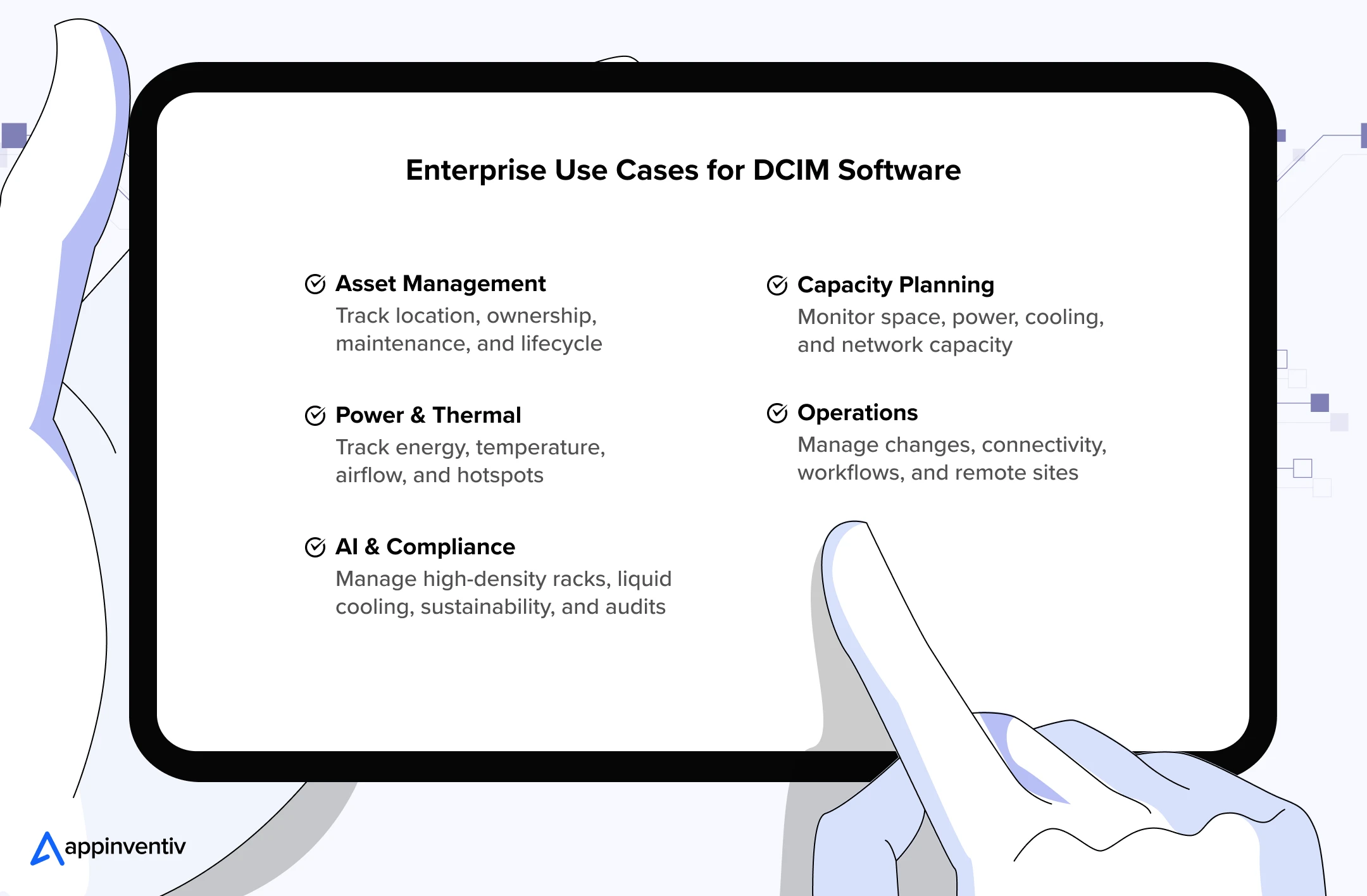
Enterprise Use Cases for DCIM Software
Enterprise data center monitoring software development converts physical infrastructure metrics into actionable operational choices. The platform delivers immediate value when operations scale across multiple facilities, tight thermal limits, and thousands of connected hardware assets.
Asset Lifecycle and Infrastructure Management
Data center asset management software handles thousands of physical hardware assets spread across facilities. Data center asset tracking software creates a centralized system of record for every server, rack unit, switch, and power distribution device. Engineering teams can view location details, warranty dates, maintenance records, and operational statuses without searching disconnected databases. Clear asset tracking prevents inventory errors and simplifies hardware replacement schedules.
Capacity Planning and Infrastructure Forecasting
Data center capacity planning software must handle precise calculations for physical space, power supply, cooling capacity, and network ports. DCIM aggregates space, power, cooling, and network variables into unified planning dashboards. Operational managers test proposed server installations against existing power and thermal headroom before buying hardware. Predictive modeling uses historical power consumption data to forecast future space needs accurately.
Power, Energy, and Thermal Management
Power allocation and thermal management control daily operational expenses directly. DCIM gathers live operational metrics from power distribution units, chillers, and environmental sensors. Automated alerts highlight voltage spikes or rising rack temperatures before hardware failures occur. Facility teams calculate power usage effectiveness ratings and correct hotspots by rebalancing cooling airflow.
Change Management, Connectivity, and Remote Operations
System upgrades require coordination across physical equipment, power lines, and network connections. DCIM maps precise dependencies between servers, patch panels, circuits, and upstream power sources. Technicians trace connection paths quickly to evaluate the operational impact of planned maintenance. Centralized dashboards, a core capability of modern facility management software, let engineers oversee multi-site data centers without physical site visits.
AI Infrastructure, Sustainability, and Compliance Management
High-density artificial intelligence racks create intense electrical loads and severe thermal demands. DCIM monitors liquid cooling loops, coolant distribution units, flow rates, and leak detectors alongside standard rack infrastructure. Unified tracking links high-performance computing demand directly to facility resource consumption. The software maintains complete audit trails for regulatory compliance, water usage, carbon tracking, and hardware changes, aligning facility operations with broader green cloud computing goals.
DCIM Architecture, Deployment Models, and Technology Stack
Enterprise DCIM platforms run on dedicated hardware, public cloud environments, or hybrid architectures. Security requirements, facility footprint, and connectivity goals determine the optimal deployment architecture.
Deployment Models
Enterprises have four common deployment options. Each model handles infrastructure data differently, so the choice should match the organization’s security requirements, operating model, and facility footprint.
Common deployment and delivery approaches include on-premises, cloud, hybrid, and managed/SaaS offerings.
For a deeper comparison of the two primary approaches, see the on-premises vs. cloud comparison.
| Deployment Model | How It Works | Best Suited For | Key Consideration |
|---|---|---|---|
| On-premises | DCIM software runs on owned hardware within local data centers | Highly regulated, isolated, or air-gapped environments | Grants total operational control over infrastructure data |
| Cloud-based | Centralized DCIM services run inside public cloud infrastructure | Distributed enterprises managing multiple remote facilities | Scales resource capacity automatically across global operations |
| Hybrid | Local edge collectors process facility data before syncing central cloud tools | Enterprise facilities with mixed infrastructure and compliance rules | Balances localized operational control with cloud analytics |
| DCIM as a Service | External service providers host and manage platform infrastructure | Edge locations, micro data centers, and small IT teams | Demands strict service level agreements and security controls |
Also Read: Edge Computing in Enterprise
Enterprise DCIM System Architecture
DCIM software architecture separates physical equipment monitoring from processing engines, storage databases, business logic, and operator dashboards.
Infrastructure Layer
Physical infrastructure generates all raw operational measurements.
- Servers and storage racks: Provide primary compute capacity data and thermal profiles.
- Network switches and patch panels: Supply port availability and connection topology metrics.
- Smart power distribution units: Measure electrical branch currents and power loads.
- Uninterruptible power supply systems: Supply battery status and backup power metrics.
- Backup generators and switchgear: Report fuel capacity and electrical transfer status.
- CRAC units and chillers: Provide cooling-system performance, temperature and other available equipment telemetry.
- Coolant distribution units: Track fluid pressure and temperatures in liquid systems.
- Environmental sensor arrays: Measure localized humidity, heat, and fluid leaks.
The platform maintains a unified asset profile storing hardware models, firmware versions, rack positions, IP addresses, and power paths.
Also Read: IoT in Enterprise
Data Ingestion Layer
The ingestion layer collects continuous telemetry across diverse vendor protocols.
- SNMP: Collects status data from network switches, servers, and power strips.
- Modbus TCP/RTU: Gathers electrical telemetry from power meters and switchgear.
- BACnet/IP: Connects building automation platforms and HVAC equipment.
- MQTT: Delivers lightweight telemetry from distributed environmental sensors.
- REST APIs: Exchanges operational data with third-party software platforms.
The ingestion engine automatically converts hardware-specific telemetry streams into standardized data structures.
Data Processing Layer
Processing engines clean raw device telemetry before ingestion by applications. Key processing tasks include:
- Schema validation: Confirms the structure of incoming messages and drops corrupted packets.
- Unit conversion: Standardizes power and temperature units across varied devices.
- Timestamp alignment: Synchronizes event timing across global facility streams.
- Duplicate suppression: Filters redundant status messages from noisy sensors.
- Identity mapping: Matches telemetry streams directly to specific physical hardware.
- Event classification: Groups device status changes into logical operational alerts.
Standardized telemetry feeds analytical modules, capacity calculations, and operational dashboards simultaneously.
Data Layer
DCIM software separates data management between two distinct storage engines. Time-series databases store high-frequency measurements such as power, current, fluid pressure, and temperature. Relational databases manage structured records, including hardware inventories, physical rack layouts, user access levels, work orders, and network wiring topology.
Business Layer
The business logic engine converts processed telemetry into operational intelligence. Calculation engines compute physical space availability, power headroom, thermal thresholds, and cooling distribution. Rules engines evaluate environmental boundaries to trigger emergency notifications or automated maintenance tasks. Workflow engines manage approvals, equipment reservations, and change requests across operations teams.
Experience Layer
Visual interfaces present operational insight to facilities management and executive leadership.
- Executive dashboards: Display facility performance, total power usage, and energy trends.
- Spatial floor maps: Present visual room layouts and thermal condition gradients.
- Interactive rack elevations: Show physical equipment placement, U-space, and power draw.
- Central alarm consoles: Highlight active equipment failures and emergency events.
- Digital twin models: Combine spatial records with live telemetry for interactive management.
Technology Stack for DCIM Software Development
Technology choices should follow telemetry volume, device diversity, latency requirements, visualization needs, security policies, and existing enterprise systems.
| Layer | Technology Options | Primary Purpose |
|---|---|---|
| Backend | Go, Java, Python | Telemetry processing, system services, analytics |
| APIs | REST, WebSocket, gRPC | Internal and external system communication |
| Device Protocols | SNMP, Modbus, BACnet, MQTT | Hardware infrastructure connectivity |
| Relational Database | PostgreSQL, MySQL | Asset records, spatial maps, user workflows |
| Time-Series Database | TimescaleDB, InfluxDB | High-frequency telemetry storage |
| Frontend | React, Angular | Responsive enterprise management interfaces |
| Visualization | WebGL, Three.js, D3.js | Interactive spatial layouts and 3D modeling |
| Messaging | Apache Kafka | High-throughput event stream processing |
| Containers | Docker, Kubernetes | Application deployment and service orchestration |
| Cloud | AWS, Azure, Google Cloud | Distributed infrastructure hosting |
Go or Java backends support concurrent telemetry streams and low-latency protocol collectors. Python models perform complex predictive capacity analytics and machine learning tasks. PostgreSQL manages relational dependencies, and TimescaleDB retains historical time-series telemetry. React interfaces render responsive dashboards, and Three.js powers 3D facility models linked directly to live device metrics.
How Is AI Changing DCIM Software Development?
Artificial intelligence transforms DCIM platforms from static monitoring tools into predictive decision engines. Rising rack densities produce high telemetry volumes that require real-time analytics, automated forecasting, and controlled operational actions.
The IEA expects electricity use from accelerated servers, driven mainly by AI, to grow by about 30% per year through 2030. This growth increases the need for stronger monitoring of power, thermal, and capacity.
- Predictive Maintenance Models: Machine learning algorithms analyze continuous equipment telemetry to detect failure patterns early. Engineering teams perform targeted hardware maintenance before component failures interrupt active data center operations.
- Infrastructure Telemetry Anomaly Detection: Artificial intelligence identifies subtle deviations across power draw, temperature readings, airflow rates, and device behavior. The system categorizes anomalies by risk severity, filtering out background noise caused by minor operational fluctuations.
- Capacity Forecasting Engines: Predictive analytics software combines historical consumption metrics with planned server deployments and facility limits. Engineering leaders accurately project future requirements for physical rack space, power capacity, cooling headroom, and switch ports.
- Power and Thermal Optimization: Data center capacity optimization software recommends precise adjustments to power distribution, cooling settings, and workload placement. Recommendations adhere strictly to preconfigured facility policies and electrical safety boundaries.
- Digital Twin Simulation: Virtual twin models combine physical room geometry with operational telemetry to test deployment scenarios. Facility managers simulate new server installations, power shifts, and airflow changes without risking physical hardware.
- Correlated Root Cause Analysis: Machine learning links related events across power paths, cooling loops, network links, and physical assets, helping operators identify likely root causes faster through cross-system event correlation.
- Natural Language Interfaces: Conversational interfaces translate natural language questions into database queries. Facility managers query available rack space or abnormal energy usage across regional sites to receive immediate data.
- Operational Safeguards for Autonomous Systems: Automated systems require strict guardrails to prevent unauthorized operational changes. Safe execution follows a controlled sequence: system recommendation, human validation, policy validation, controlled execution, and complete audit logging.
Also Read: AI in Data Center Operations
How Does DCIM Software Support AI Data Centers and Liquid Cooling?
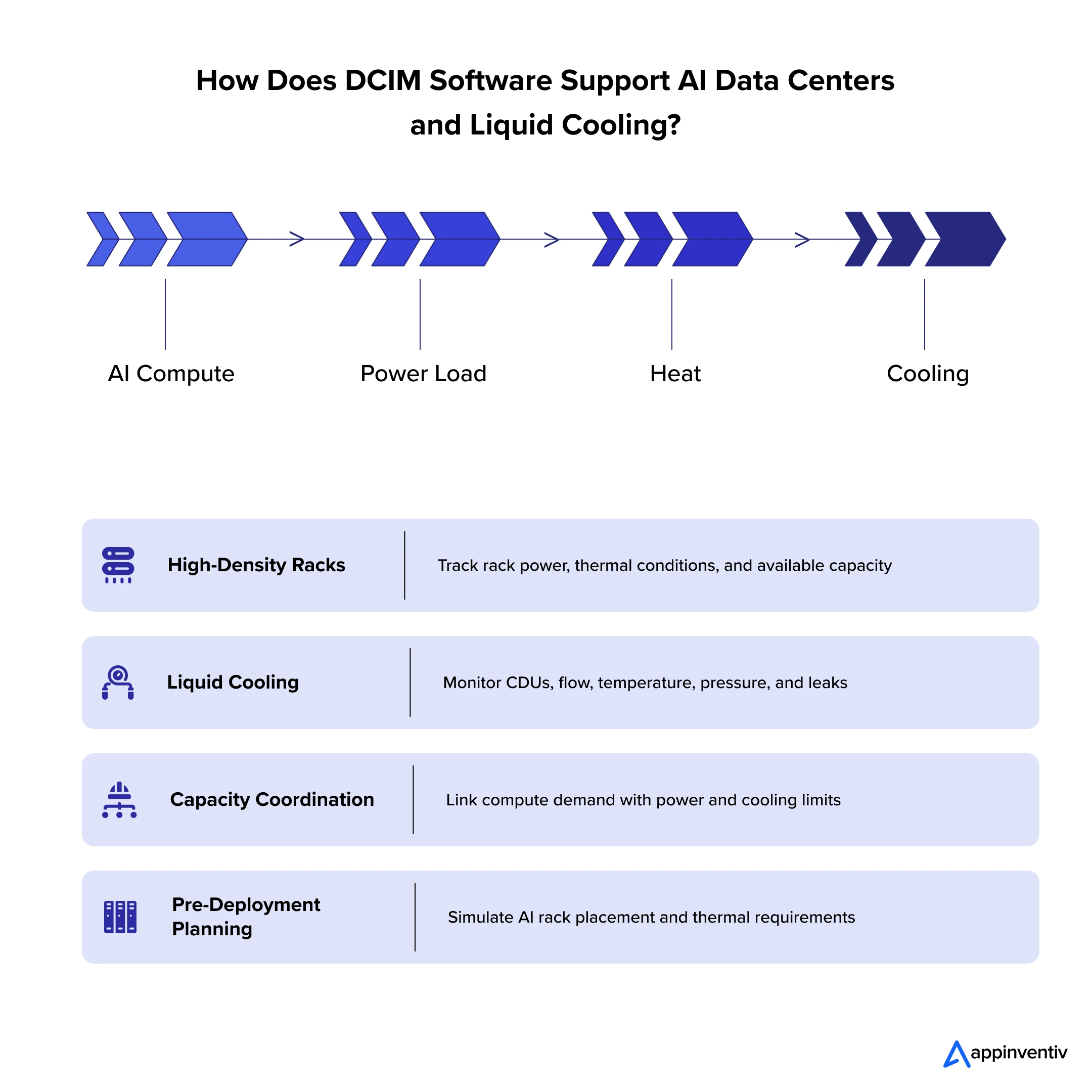
High-density artificial intelligence deployments place immense physical stress on facility power delivery and thermal management systems. Software platform connections across physical resources give operations teams real-time visibility during deployment planning.
Managing High-Density AI Racks
Graphics processing unit clusters pull massive electrical loads inside individual server racks. The management software monitors rack power draw, internal thermal readings, airflow velocity, and available infrastructure capacity. Engineering teams verify electrical circuit limits and thermal thresholds before mounting new compute hardware.
Uptime Institute reports growing adoption of 10–30 kW racks, while racks above 30 kW remain uncommon. Higher rack densities increase the need for rack-level power and thermal monitoring.
Monitoring Liquid-Cooling Infrastructure
Liquid cooling introduces specialized equipment and new telemetry points into data center operations. Platforms track coolant distribution units, fluid flow rates, supply temperatures, fluid pressure, and moisture leak sensors. The system manages direct-to-chip liquid cooling systems, total-fluid-immersion tanks, and traditional air-cooling methods in a single view.
Coordinating Power and Thermal Capacity
Computing workloads increase electrical consumption and thermal output simultaneously. Operational software maps the complete dependency chain from compute demand to power draw, heat generation, and cooling capacity. Linking these operational variables prevents technicians from approving server hardware deployments that exceed facility limits.
Planning AI Infrastructure Before Deployment
Virtual digital twin technology simulates high-density cluster installations before physical hardware arrives at the loading dock. Facility managers evaluate equipment placement, circuit loads, and fluid cooling requirements in virtual room environments. Simulated planning reveals physical facility bottlenecks well before technicians mount equipment in racks.
Coolant flow, pressure, temperature, and leak data now need to sit alongside traditional power and environmental telemetry.
What Security Controls Should Enterprise DCIM Software Include?
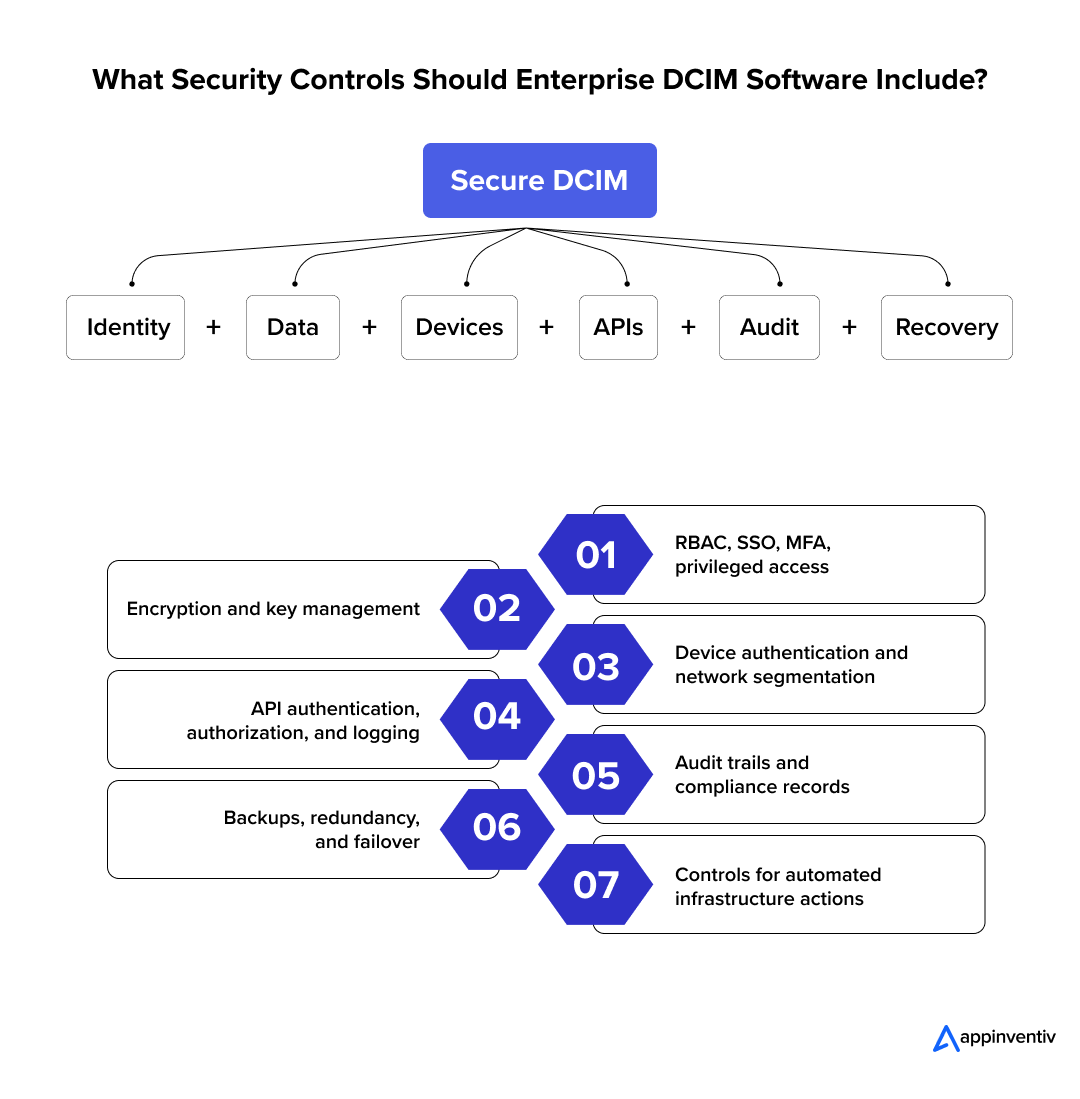
Enterprise DCIM platforms manage critical facility hardware, so the security architecture must safeguard both physical equipment and operational data streams.
Identity and Access Management
Role-based access controls limit user permissions to assigned facilities and designated administrative tasks. Single sign-on tools and multi-factor authentication protect user credentials against unauthorized access attempts. Security teams review privileged access accounts regularly to enforce operational boundaries.
Data Security
Transport layer encryption protects live telemetry and network communication between physical devices and software modules. Databases, system backups, and application logs store encrypted files at rest, following the same application security principles used across enterprise IT. Key management systems store encryption keys, software tokens, and administrative credentials outside source code repositories.
Device and Infrastructure Security
DCIM collectors demand authenticated network connections to gather operational metrics from physical hardware. Modern encryption protocols replace legacy unencrypted communication methods across network links. Isolated virtual local area networks separate facility management hardware, telemetry collectors, and corporate software services.
API Security
DCIM applications share telemetry with external service desks and building systems through secure programming interfaces. Strong authentication controls and token expiration policies restrict unauthorized third-party requests. Automated rate limits block malicious traffic, and detailed API logs record incoming data calls and system errors.
Auditability and Compliance
The platform records system configuration changes, user logins, maintenance approvals, and physical workflow events in real time. Tamper-evident or immutable audit mechanisms can help protect audit records from unauthorized modification. Historical operational logs allow enterprises to demonstrate strict compliance during regulatory inspections.
Resilience and Disaster Recovery
DCIM platforms maintain continuous infrastructure monitoring during individual hardware or service outages. Redundant application servers, database replication, and automated failover mechanisms prevent system downtime. Defined recovery time objectives dictate system restoration targets during unexpected hardware outages.
Security Controls for Automated Infrastructure Actions
Automating physical power or cooling changes introduces severe operational risks without proper safeguards. Automated commands pass through policy validation checks, administrative approval flows, and preconfigured operating limits before active execution. Every automated system action is recorded in complete audit records to preserve operational accountability.
How Do You Integrate DCIM Software With Enterprise Systems?
Enterprise DCIM platforms exchange data with existing IT, facility, financial, and security tools to prevent isolated operational siloes.
- Building Management Systems: DCIM software exchanges power, cooling, and environmental telemetry with facility platforms to provide a unified operational view.
- Configuration Databases and ITSM: Connecting physical asset records with tools like ServiceNow or Jira links hardware changes directly to approved service tickets.
- Network Monitoring Tools: Linking device health metrics directly to physical rack locations, cabling paths, and electrical circuits simplifies root cause analysis.
- Cloud and Virtualization Platforms: Matching virtual workloads with physical power and thermal constraints improves capacity planning across hybrid environments.
- Enterprise Finance and Billing: Feeding actual power consumption data into accounting software automates tenant billing and internal department chargebacks.
- Identity Management Systems: Connecting user permissions to corporate single sign-on directories enforces established access policies across all facilities.
- APIs and Event Webhooks: REST APIs and event webhooks automatically push real-time asset updates, system alarms, and workflow approvals to connected enterprise applications.
Benefits of Developing Custom Enterprise DCIM Software
Custom DCIM software development gives operations executives direct control over physical data center assets, energy costs, and capacity risks.
Uptime Institute found that 57% of respondents reported outage costs exceeding $100,000 for their most recent serious or severe outage. DCIM can help reduce exposure through stronger monitoring, dependency mapping, and change control.
- Unified infrastructure visibility: The platform centralizes hardware metrics and facility telemetry into one trusted operating view across all locations.
- Higher asset and capacity utilization: Data center resource utilization software precisely tracks rack space, power, cooling, and network ports, eliminating stranded physical resources.
- Faster operational decisions: Live infrastructure data enables engineers to evaluate alerts, system dependencies, and deployment options rapidly.
- Lower power and cooling waste: Continuous thermal profiling identifies overcooled zones, unbalanced electrical loads, and idle equipment power draw.
- Reduced manual work: Automated hardware discovery and reporting tools, powered by process automation, reduce manual spreadsheet tracking and repetitive administrative checks.
- Better change governance: Structured approval workflows and automated audit trails maintain strict operational control over physical infrastructure modifications.
- Faster incident investigation: Visual dependency mapping helps technicians trace system outages directly back to failing power, cooling, or network components.
- Better infrastructure planning: Long-term consumption records improve capital expenditure forecasting and physical expansion timelines.
- Standardized multi-site operations: Unified operational policies and shared data models establish consistent management practices across regional facility sites.
- Stronger sustainability reporting: Exact energy metrics streamline tracking of power usage effectiveness, carbon audits, and corporate sustainability reporting.
Challenges of Custom DCIM Software Development
Building enterprise DCIM software requires managing complex physical hardware, legacy protocols, massive data streams, and fragmented team workflows across facilities.
Nearly two-thirds of operators surveyed by Uptime Institute reported difficulty retaining data center staff, finding qualified candidates, or both. This increases the value of centralized monitoring, guided workflows, and remote operations.
- Legacy Infrastructure and Vendor Diversity: Equipment spans multiple generations and vendors, often using outdated communication protocols. Developers build modular adapter layers that standardize device telemetry without altering core system code.
- Inconsistent Asset Data: Inaccurate ownership records, duplicate assets, and missing rack locations ruin dependency mapping. Software teams enforce unified data schemas and strict validation rules during initial database imports.
- High-Volume Telemetry Processing: Thousands of connected sensors simultaneously stream continuous power, cooling, and network metrics. Systems deploy event-driven message queues and time-series databases to separate live telemetry streams from transactional asset records.
- Real-Time Performance and Latency: Delayed status updates and slow-loading dashboards prevent operators from reacting to critical system changes. Modern platforms use WebSockets and event streams to push operational updates directly to user interfaces.
- Alert Fatigue: Uncalibrated alarm thresholds trigger constant minor notifications that obscure real equipment failures. Engineering teams group related alerts through correlation rules, severity rankings, and contextual escalation paths.
- Multi-Site Data Discrepancies: Regional sites often maintain different naming conventions, workflow steps, and asset classification standards. Central governance rules establish common data models while granting regional teams limited operational flexibility.
- Legacy Process Resistance: Operations teams often resist replacing familiar spreadsheets and manual email workflows with automated tools. Architects map existing operational routines during early design phases and introduce guided workflows through phased training.
- System Scalability and High Availability: Hardware additions, additional facility locations, and increasing telemetry volumes can quickly degrade application performance. Developers design microservices that scale horizontally across redundant servers to eliminate single points of failure.
- Proprietary Vendor Lock-In: Closed hardware interfaces make future equipment changes expensive and technically difficult. System designers maintain vendor-neutral core data models connected to open application programming interfaces.
- Visibility Across Hybrid Environments: Operations teams struggle to track asset conditions consistently across private facilities, edge nodes, and cloud systems. Organizations deploy secure regional telemetry collectors that push standardized operational data into central dashboards.
How Much Does DCIM Software Development Cost and How Long Does It Take?
DCIM implementation cost ranges from $40,000 to $500,000+, depending on the platform’s scope, infrastructure complexity, and integration needs.
Key cost drivers include the number of facilities and connected devices, telemetry volume, custom modules, and enterprise integrations. Other factors include visualization depth, digital twin features, AI capabilities, security requirements, deployment model, and post-launch maintenance.
DCIM Development Cost by Solution Scope
| Solution scope | Cost range | Typical timeline |
|---|---|---|
| DCIM MVP | $40K–$80K | 3–5 months |
| Operational DCIM | $80K–$180K | 5–8 months |
| Enterprise DCIM | $180K–$350K | 8–12 months |
| Intelligent DCIM | $350K–$500K+ | 12–18+ months |
These are planning ranges, not fixed quotations. DCIM software development costs can vary widely from a focused proof of concept or MVP to a multi-site enterprise platform depending on device count, telemetry volume, integrations, visualization, AI capabilities, deployment model, security requirements, and ongoing support.
How Long Does It Take to Build DCIM Software?
Here’s how to build DCIM software in a typical enterprise programme:
Discovery → Architecture → MVP → Integrations → Testing → Pilot → Rollout
The software build is only one part of the timeline. Hardware access, device onboarding, data cleanup, integration approvals, security reviews, and user acceptance testing can extend delivery.
How Do You Calculate DCIM ROI?
A practical ROI model should compare the platform’s total cost against measurable operational gains. Track the following:
- Lower energy and cooling costs
- Deferred infrastructure expansion
- Higher capacity utilization
- Lower manual operating effort
- Faster provisioning
- Lower maintenance costs
- Reduced downtime exposure
DCIM ROI = (Financial Benefits − Total Cost of Ownership) /Total Cost of Ownership × 100
For enterprise planning, measure these figures before deployment and compare them against the same KPIs after rollout.
Also Read: IT Cost Reduction Strategies
Build vs Buy: Which DCIM Strategy Is Right for Your Enterprise?
Enterprises can buy a commercial DCIM platform, build a custom system, or combine both models. The right choice depends on integration depth, workflow needs, ownership, and long-term control.
| Factor | Buy | Build |
|---|---|---|
| Time to Deployment | Faster | Longer |
| Custom Workflows | Limited by platform | High |
| Initial Engineering | Lower | Higher |
| Integration Control | Vendor-dependent | Greater |
| Product Ownership | Limited | Full |
| Differentiation | Limited | High |
| Long-Term Flexibility | Vendor-dependent | High |
| Maintenance Responsibility | Vendor-led | Enterprise or partner-led |
The strongest fit comes from matching the strategy to the enterprise’s infrastructure, workflows, integration needs, and long-term control requirements.
Custom DCIM brings control, but running its cloud infrastructure requires continuous monitoring, security, DevOps, and capacity management.
Future Trends in Data Center Infrastructure Management Software
Data center infrastructure software is evolving toward automated control, tight facility coordination, and minimal manual intervention.
- Autonomous data center operations: Software platforms execute routine choices regarding cooling adjustments, power distribution, alert routing, and workload placement using established corporate policies.
- AI-driven closed-loop control: Machine learning models move beyond basic recommendations to adjust power delivery, cooling systems, and hardware maintenance tasks automatically.
- Digital twin-based planning: High-fidelity virtual models simulate complex physical changes, rack placement scenarios, thermal effects, and electrical demand before physical installation begins.
- Liquid-cooling-aware platforms: Management software tracks liquid distribution loops, fluid quality, leak events, and heat-rejection metrics alongside those of traditional air-based cooling systems.
- Distributed and edge management: Centralized software architectures control dispersed networks of micro data centers through local telemetry collectors, a pattern closely tied to edge computing in IoT design.
- Grid-interactive operations: Infrastructure platforms coordinate facility power demand with regional electrical grids, battery storage systems, and renewable energy availability.
- Predictive capacity forecasting: Analytics engines project exact future dates when power, cooling, physical rack space, or network bandwidth limits will constrain growth.
- Robotic physical audits: Autonomous facility robots verify physical hardware locations, inspect rack configurations, and sync inventory data directly with central asset databases.
Why Choose Appinventiv for Data Center Infrastructure Management Software Development?
Appinventiv brings enterprise software engineering, IoT integration, AI, cloud and data engineering capabilities that can support organizations developing custom DCIM platforms. Engineering teams combine deep technical experience across distributed systems, artificial intelligence, and physical infrastructure integration.
- Enterprise Software Engineering: Engineers have delivered over 3,000 software solutions and modernized 500 legacy operational systems using high-throughput API architectures.
- IoT and Infrastructure Integration: Development teams design real-time telemetry pipelines and protocol adapters to collect continuous device metrics from facility hardware.
- AI and Data Systems: Data engineers build predictive models for anomaly detection, capacity forecasting, and workflow automation across large operational datasets.
- Cloud and Reliability Infrastructure: Appinventiv delivers cloud-managed services with over 2,000 cloud deployments and 500 cloud migrations, maintaining a 99.90% availability agreement while doubling infrastructure efficiency.
- Discovery and Architecture Planning: Systems architects guide projects from initial infrastructure audits through requirements mapping, system designs, working prototypes, and deployment roadmaps.
- Long-Term Engineering Support: Dedicated engineering teams support multi-site facility expansions, security updates, hardware integrations, and machine learning upgrades.
Let’s connect and build a custom DCIM platform before legacy systems limit visibility into infrastructure.
Frequently Asked Questions
Q. What is DCIM software and why do data centers need it?
A. DCIM software development creates platforms that track assets, power draw, cooling, physical space, network links, and environmental data within a single system. Data centers require custom software to eliminate fragmented monitoring tools and manual spreadsheets. The software gives operators complete visibility into tracking hardware, locating available capacity, investigating system failures, approving changes, and planning future facility expansions.
Q. How much does it cost to develop custom DCIM software?
A. Custom DCIM software development ranges from $40,000 to over $500,000. A basic minimum viable product with asset tracking, operational dashboards, and alert engines occupies the lower price range. Enterprise systems with multi-site management, digital twin modeling, predictive artificial intelligence, and deep software integrations demand larger budgets. Device counts, facility footprints, telemetry volume, security standards, and support agreements dictate final project costs.
Q. What DCIM software features should an enterprise platform include?
A. Core DCIM platforms include asset tracking, capacity planning, power monitoring, environmental tracking, cable mapping, alert engines, automated workflows, and data reporting. Enterprise systems add open application programming interfaces, role-based access security, immutable audit logs, multi-site management, and high-volume telemetry processing engines.
Q. How is DCIM different from traditional IT monitoring tools?
A. Traditional IT monitoring tools track software performance, server uptime, and network traffic flow. DCIM connects digital data directly to physical infrastructure such as server racks, power distribution units, cooling systems, and environmental sensors. The software manages physical space capacity, hardware dependencies, maintenance workflows, power draw, and thermal profiles across facilities.
Q. Can DCIM software integrate with existing BMS and ITSM systems?
A. Yes. Custom DCIM software connects with building systems, configuration databases, service desks, and enterprise accounting tools through secure application programming interfaces. These connections synchronize hardware changes, work orders, approval workflows, and capacity metrics across platforms without creating duplicate data entries.
Q. How long does it take to build a custom DCIM solution?
A. Building a custom DCIM platform can take 3 to over 18 months, depending on project complexity. Development teams build a targeted minimum viable product in 3 to 5 months. Mid-tier operational platforms require 5 to 8 months of development time. Intelligent enterprise platforms with multi-site capabilities, artificial intelligence tools, and extensive hardware integrations take 8 to 18 months to build. Complex device protocols, security reviews, legacy data migration, and multi-facility deployments expand overall project timelines.


Fast 2-minute response, fully NDA-protected.

Beyond Customer Portal Development: Building Connected Digital Services
Key takeaways: A portal without CRM, ERP and billing integration leaves your staff doing the connecting. Start with customer tasks, then integrate only the systems those tasks actually need. Name one system of record for each data type before choosing APIs or middleware. Plan integration, security and privacy obligations at the start, not after the…
CRM Software for Local Government: From Community Requests to Better Service Delivery
Key takeaways: A council CRM should sit around existing systems as a service layer, not replace them. Integration with ERP, rates, property and GIS systems prevents another data silo and duplicate entry. Start with one high-volume service, pilot it with residents, then scale on measured results. Track resolution time, SLA compliance, self-service rates and cost…

The Ultimate Guide to CRM for Insurance: Features, Cost, Top Platforms, Integration & More
Key takeaways: CRM for insurance connects sales, service, and claims into one governed system, distinct from the policy administration system. Core features span pipeline management, policy visibility, claims tracking, commission management, AI analytics, and compliance controls. Cost ranges from roughly USD 15,000 for configuration to USD 150,000 and beyond for custom development at enterprise scale.…