























Generative AI in Software Testing: How Enterprises Scale Quality With Humans in the Loop

 Share -



- 01Moving AI From Pilot to Production: Trust, Integration and Oversight
- 02Generative AI vs Traditional And Manual Testing: Assign Work By Task, Not By Trend
- 03Why Enterprises Are Adopting Generative AI for Software Testing
- 04GenAI Testing Models: Key Types Used in Software Testing
- 05Advanced Technologies Integrated in Generative AI Software Testing
- 06Benefits of Generative Software Testing: What Enterprises Can Measure
- 07How to Implement Generative AI in Enterprise Software Testing
- 08Challenges of GenAI in Software Testing and How to Govern Them
- 09Generative AI Testing: Governance, Ethics and Reliability
- 10Future Trends in Generative AI for Software Testing
- 11Scale Enterprise QA With a Human-Led Generative AI Strategy
- 12FAQs

For CTOs and QA heads deciding where to trust AI-written tests, a practical way to scale coverage without scaling risk.
Somewhere in your organization, code is being written faster than it can be tested. Developers have AI assistants, release windows keep shrinking, and QA is expected to keep pace without lowering the bar.
Generative AI in software testing looks like the obvious relief, and in many ways it is. A model can read a user story and draft a full set of test cases before a tester has finished reading the requirement. That speed raises a harder question, though: if AI writes the tests, who makes sure the tests are right? A test that passes against the wrong expected result does more damage than a missing one, because it gives the team confidence it hasn’t earned.
Enterprises should build review processes into their testing workflows alongside AI generation. Models can draft test cases, generate test data, and summarise failures, while QA teams review the outputs based on business risk. Additional validation helps confirm that each test performs as intended and checks the expected behaviour.
This guide shows how to put that model in place; where generative AI fits alongside manual and automated testing, which use cases to start with, how to govern the output, and what to measure so the gains hold up in front of leadership.
Key takeaways:
- Generative AI can draft test cases, scripts, synthetic data, and failure summaries, but its outputs need validation.
- Manual testing, traditional automation, and AI assistance work best together, with humans owning critical decisions.
- Scale depends on integrating AI into existing QA workflows and matching review effort to business risk.
- Track net time savings, coverage, defects, and costs against a baseline, not just the number of tests generated.
- Start with a controlled pilot and expand only when results demonstrate reliable quality and manageable costs.
The real value of Generative AI in software testing depends on how well it fits into your existing processes. Before expanding its use across teams, enterprises need to assess their testing maturity, identify suitable use cases, and establish clear review and validation practices. The right implementation strategy would help teams maintain an efficient QA testing process.
Improve test coverage, accelerate test cycles, and identify defects earlier with AI-assisted QA and human oversight.

Moving AI From Pilot to Production: Trust, Integration and Oversight
Generative AI testing stalls at scale for operating reasons, not model reasons. The challenge often lies in fitting AI into existing QA processes while maintaining clear ownership, reliable outputs, and adequate oversight.
In the World Quality Report 2025, the top barriers respondents named were integration complexity (64%), data privacy risks (67%), and hallucination and reliability concerns (60%). None of those is about raw model capability. There’s also a quieter problem: the senior engineer who made the pilot work moves on, and nobody owns the output anymore. Fix ownership, integration and review capacity before adding more use cases.
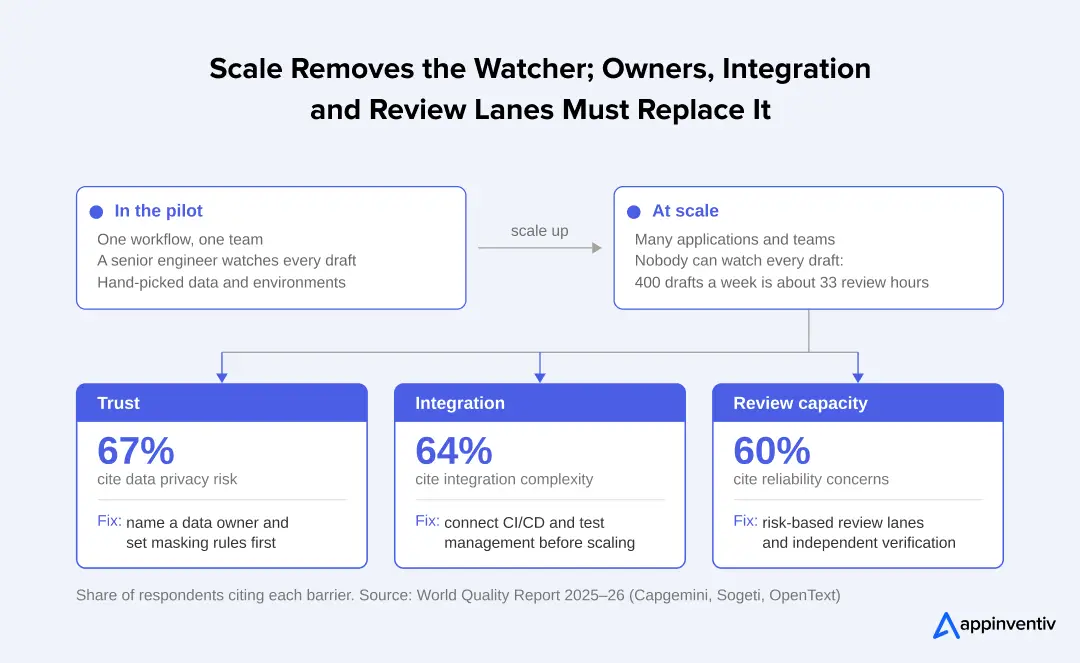
What works in a pilot often breaks across a full application portfolio:
- Trust: In a pilot, one expert checks every GenAI-drafted test. At scale, teams need clear rules on which outputs need full review, which can be sampled, and who signs off.
- Integration: A pilot can run beside the pipeline. At scale, AI-generated tests have to live inside your test management, CI/CD and defect tools, or they become another silo.
- Review capacity: Generative AI produces drafts faster than people can check them. Without lanes based on risk and rotating reviewers, approvals turn into rubber stamps.
Generative AI vs Traditional And Manual Testing: Assign Work By Task, Not By Trend
Each testing approach handles a different part of the QA process. Manual testing relies on human judgment to explore workflows and identify unexpected behaviour. Traditional automation executes predefined test scripts consistently across repeated runs.
Generative AI for business brings additional capabilities to QA by supporting test design, execution, and analysis. It can interpret requirements, draft test scenarios, generate automation code, and analyze failures, but its outputs still require validation.
| Comparison area | Manual testing | Traditional test automation | Generative AI-powered testing |
|---|---|---|---|
| Test case creation | Testers manually interpret requirements and create test cases. | Once test cases are approved, engineers write them as scripts to execute. | Creates test cases, edge cases and negative paths from requirements/acceptance criteria. |
| Test execution | Testers run test cases, follow workflows and explore them manually. | Executes pre-defined scripts with given inputs and outputs. | Can create and run tests via built-in tools, with operations being monitored by a human. |
| Test coverage | Relies on some degree of exploratory judgment, available time and testers’ experience. | Implements pre-defined situations and conditions in scripts. | Proposes other scenarios, boundary conditions and not-so-obvious test paths based on the patterns in the context. |
| Test data generation | Testers create test data from scratch or make use of available datasets. | Utilises pre-defined datasets, fixtures and parameterised inputs. | Produces synthetic data, boundary values and different input combinations. |
| Visual validation | Testers visually validate screens and compare layouts. | Applies pre-defined image comparisons and visual regression rules. | Interprets screens using multimodal models and determines if screen layout or rendering will vary. |
| Test maintenance | Test cases are manually modified by the testers when the requirements change. | Engineers make changes to scripts, selectors and assertions when the application changes. | Proposes fixes for locators and scripts in response to changes in the application. |
| Failure analysis | Testers analyze logs, recreate failures and determine possible causes. | Reports failures, execution logs and error details. | Summarizes logs, traces and run history to suggest potential failure causes. |
| Human involvement | High. Design, execution and analysis are driven by human judgement. | Moderate. Scripts are written and maintained by engineers, and automated for execution. | Essential. Testers validate scenarios, engineers review assertions, and QA teams verify model-generated findings. |
| Ideal for | Exploratory testing, usability checks, unexpected behaviours. | Repetitive regression testing, stable workflows and predictable validation. | Test authoring, scenario expansion, synthetic data generation and failure triage. |
Selecting the most appropriate testing method(s)
It is a matter of what task and the level of judgment required.
- Resort to manual testing when the application is for exploratory evaluation, usability assessment and investigation of the behaviour which cannot be fully anticipated.
- Automate using traditional automation when workflows are predictable, the results are known, and tests are required to be repeated with a definite result.
- Leverage generative AI to assist QA teams in translating requirements into test cases, broadening test scenario coverage, creating test data, and investigating failures.
Generative AI also ushers in a unique validation requirement. A syntactically correct test that makes an incorrect assertion. It could, for instance, determine that a payment workflow ran successfully, and miss a wrong tax calculation. The result expected, also referred to as the test oracle, should therefore be based on approved business rules.
The best suggestion is to use a mixture of the three. Test manually for judgement, automatically for repeatability and with generative AI for authoring and analysis. Maintain assertion approval, business-rule validation and final defect confirmation within the QA team.
Why Enterprises Are Adopting Generative AI for Software Testing
Enterprise QA teams are under increasing pressure to test more, release more, and test more complex applications, all while testing budgets don’t keep pace with the growth of testing.
This is fueling the interest in generative AI in software testing, especially within organizations that have massive automation suites, deploy regularly, and have enterprise applications that are connected. Key adoption drivers include:
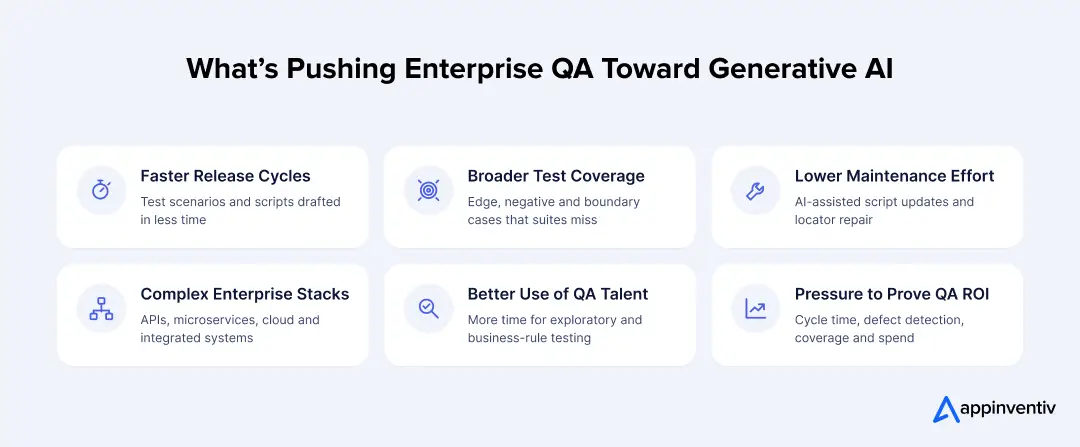
- Faster release cycles: Generative AI helps QA teams create test scenarios and automation scripts faster, reducing the time spent on repetitive test preparation.
- Broader test coverage: AI identifies additional edge cases, negative scenarios, and boundary conditions that conventional test suites may overlook.
- Lower test maintenance effort: AI-assisted script updates and locator repair help teams manage frequent application changes.
- Complex enterprise environments: Organizations can use generative AI for software testing across APIs, microservices architecture, cloud applications, and integrated business systems.
- Better use of QA expertise: Testers can spend less time drafting repetitive test cases and more time on exploratory testing, business-rule validation, and critical workflows.
- Pressure to demonstrate QA ROI: Enterprise leaders want measurable improvements in test cycle time, defect detection, automation coverage, and overall testing expenditure.
For enterprises, adoption also depends on integration with existing QA infrastructure, data security, and the ability to validate AI-generated outputs. This is where specialized Generative AI testing services can help organizations assess their QA maturity, select suitable use cases, integrate AI capabilities, and establish governance before scaling across application portfolios.
8 High-Value Generative AI Use Cases in Software Testing
The practical value of GenAI in QA becomes clearer when mapped to specific testing activities. These kinds of applications can help enterprise QA teams to cut back on repetitive work and boost testing coverage, from requirements to test cases to analysis of test failures.
Here are some notable software testing use cases for generative AI that illustrate its ability to support various stages of testing.
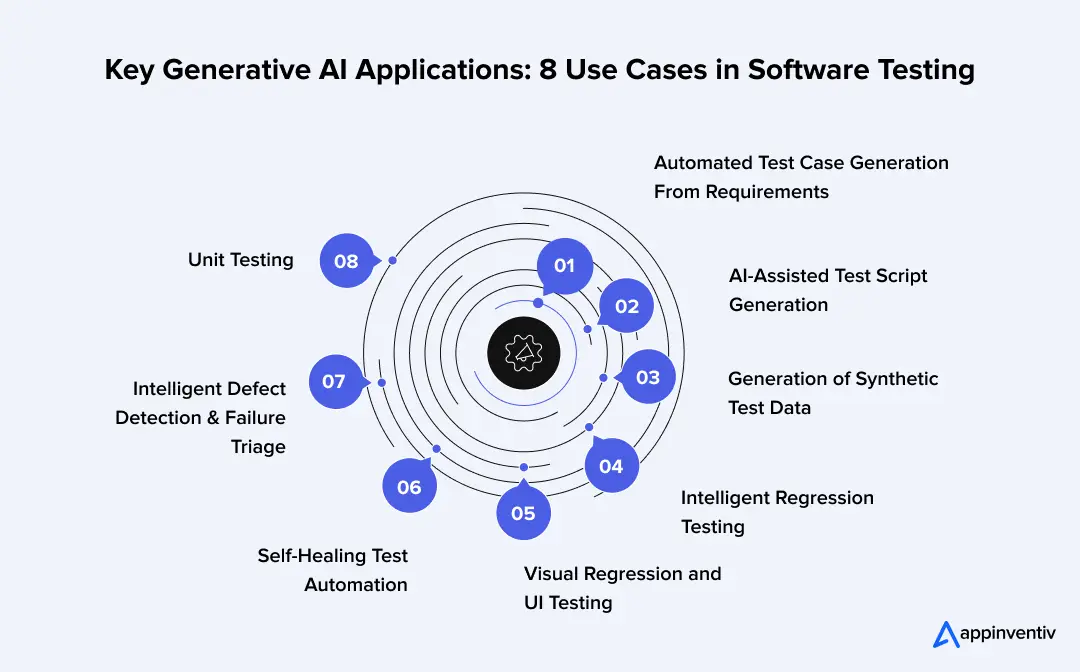
1. Automated Test Case Generation From Requirements
Generative AI interprets user stories, functional specifications, and acceptance criteria to draft test cases. It can suggest positive scenarios, negative paths, boundary conditions, and edge cases that testers may not have explicitly documented.
This saves enterprises’ manual effort in designing tests and helps identify gaps prior to execution for those with large requirements repositories. Testers should still need to validate generated cases to ensure they are true to the business rules.
2. AI-Assisted Test Script Generation
GenAI can translate approved manual test cases into the initial scripts for automation, such as those using the Selenium, Playwright or Cypress frameworks.
It can write code, provide assertions and customize scripts to a given testing framework. Engineers verify the scripts created and ensure that they are correct and maintainable while also ensuring that they reflect the application behaviour before incorporating them in their automation pipelines.
3. Generation of Synthetic Test Data
For enterprise testing, there are frequently many datasets that need to be processed across various user profiles, transaction types, input combinations and unusual conditions.
Generative models can generate schema-valid synthetic data, including rare combinations of inputs and boundary values. This not only allows QA teams to test complex workflows but also minimizes reliance on production data with sensitive information. There is still a need for privacy and business constraint validation of generated datasets.
4. Intelligent Regression Testing
Regression test cases could be suggested by Generative AI based on the analysis of code changes, changed requirements and previous test results.
For instance, if a business rolls out a new payment system integration, AI can discover transaction flows, API requirements, and existing tests that are impacted. This aids QA teams in focusing on the areas where the change is likely to impact.
5. Visual Regression and UI Testing
Multimodal AI systems can analyze screenshots and application interfaces to draw conclusions regarding possible differences in layout, rendering and visual elements.
They can assist in identifying problems like misaligned elements, missing components, as well as irregular screen actions across devices. Reviewers need to be able to identify differences between actual and expected changes in the interface.
6. Self-Healing Test Automation
Changes to application interfaces frequently break existing automation scripts, particularly when developers modify element IDs, selectors, or page structures.
GenAI can review the updated interface, detect missing locators and recommend replacement selectors or changes to the script. Engineers ought to check repairs whenever they possibly can modify the flow or claims being checked.
7. Intelligent Defect Detection and Failure Triage
GenAI can analyze application logs, failure histories, error messages, and execution traces to summarize failed test runs.
It can aggregate failures, detect trends and suggest potential root causes. This provides useful information for engineers to start their investigation and saves them time in manually sifting through a lot of execution data.
8. Unit Testing
Enterprise applications rely on a set of multiple APIs, third-party services, and connected systems. GenAI can analyze API documentation and specs to create test scenarios for the various parameters in requests, response formats, authentication, error handling, and integration behaviour.
It can also provide negative cases to test and make unusual combinations of inputs to explore how connected services will behave when they are not supplied with valid and expected data.
What These Applications Mean for Enterprise QA
These generative AI applications in software testing can support different stages of the QA lifecycle, from test design and data preparation to execution support and defect investigation. QA testers remain involved throughout the development process, reviewing AI-generated test cases, validating outputs, identifying gaps, and working with developers to address defects.
The value of these applications depends on how well they integrate with existing testing frameworks and how reliably their outputs can be verified. Enterprises should prioritize applications where AI reduces repetitive effort, improves scenario coverage, or speeds up investigation without introducing excessive validation overhead.
GenAI Testing Models: Key Types Used in Software Testing
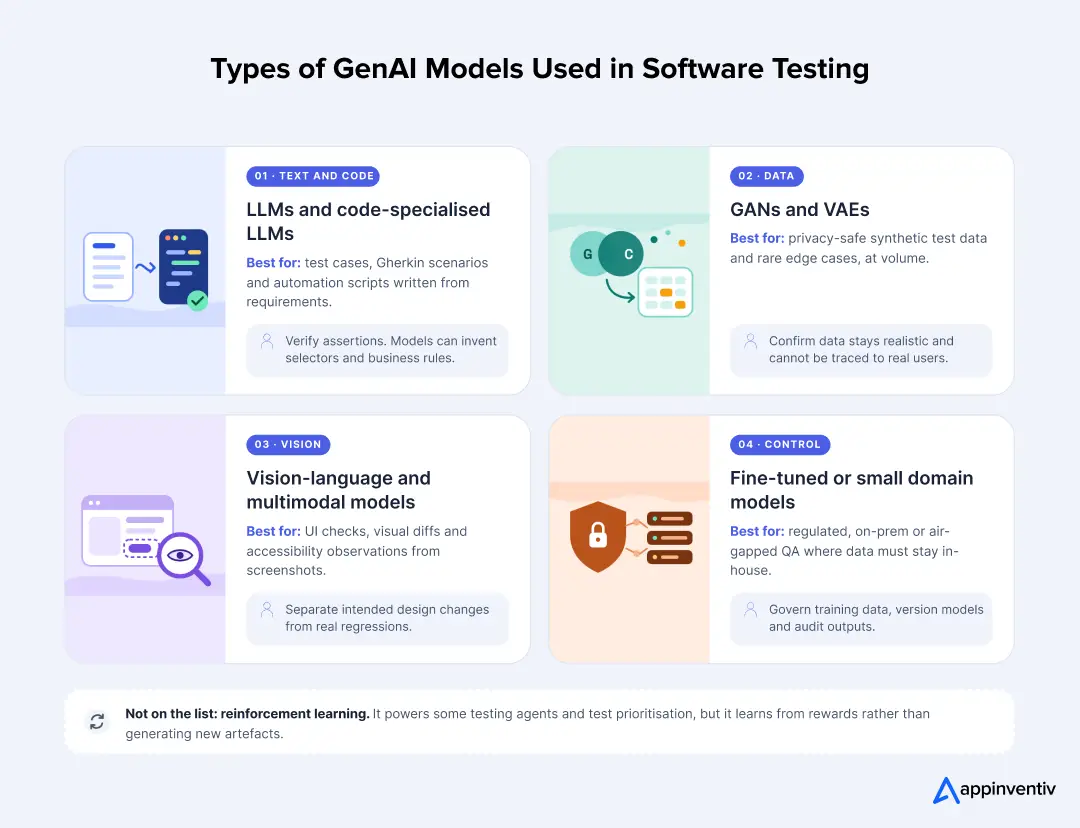
Generative AI-powered testing uses different model architectures depending on the task, data type, and level of reasoning required. LLM fine-tuning handles most test authoring and failure analysis, while multimodal models support visual validation and GANs or diffusion models help generate synthetic test data.
Enterprises should select models based on their QA requirements, integration needs, and validation capabilities.
Advanced Technologies Integrated in Generative AI Software Testing
Generative AI works alongside several technologies that improve how QA systems understand requirements, generate test scenarios, interact with applications, and analyze execution results. These integrations help enterprises connect AI-powered QA solutions with existing development and testing environments.
| Advanced technology | How it works in software testing | Enterprise application |
|---|---|---|
| Retrieval-Augmented Generation (RAG) | Retrieves relevant information from enterprise documentation, historical defects, test repositories, and business rules to ground AI-generated outputs in approved sources. | Generates requirement-aligned test cases and supports context-aware defect analysis. |
| AI Agents and Tool Calling | Allows AI agents to interact with testing frameworks, issue trackers, CI/CD pipelines, and application environments through controlled tools and APIs. | Coordinates test creation, execution, failure reporting, and workflow management with human oversight. |
| Multimodal AI | Processes and interprets different input formats, including screenshots, text, application logs, and visual elements. | Supports visual regression testing, UI validation, and cross-device interface analysis. |
| Knowledge Graphs and Semantic Search | Connects requirements, application components, test cases, dependencies, and defects through structured relationships. | Improves test traceability, impact analysis, and identification of missing test coverage. |
| Reinforcement Learning and Feedback Loops | Uses feedback from verified test outcomes and human reviews to improve recommendations and testing decisions. | Helps refine test prioritisation, scenario selection, and failure classification over time. |
| CI/CD and Test Orchestration | Connects AI-generated testing workflows with build pipelines, automated execution environments, and test management systems. | Enables continuous test generation, execution, reporting, and feedback throughout software delivery. |
Benefits of Generative Software Testing: What Enterprises Can Measure
Most claims about generative AI in testing stop at “teams get more productive”. That doesn’t help a CIO make a budget case or a QA head decide where to pilot first. The data also shows the gains are uneven. Below are the benefits enterprises can realistically expect, and how to measure each one.
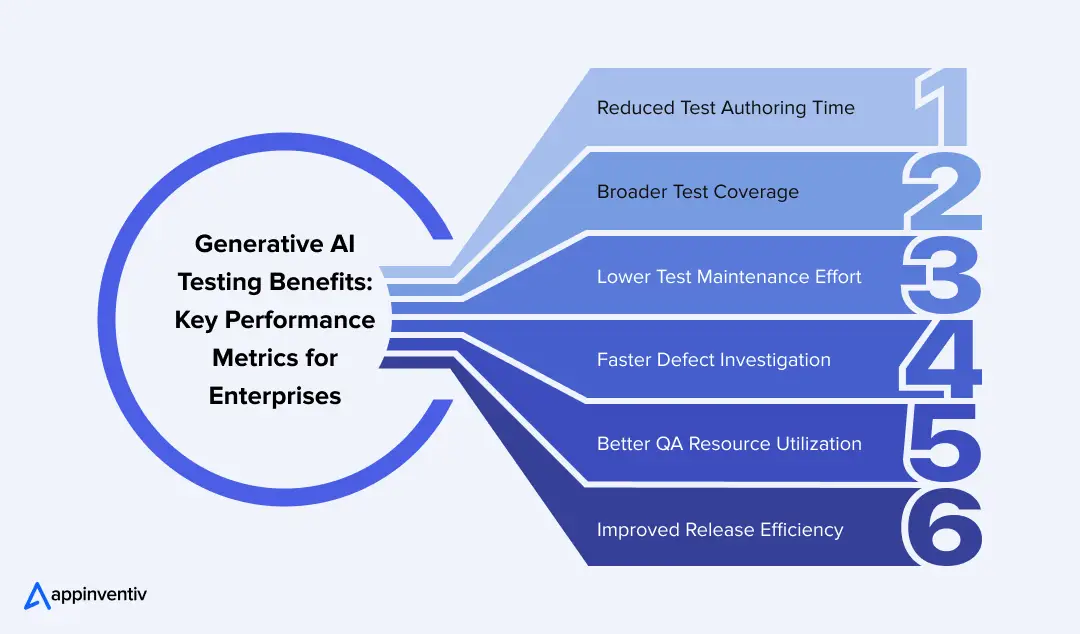
Reduced Test Authoring Time
GenAI turns user stories and specs into first-draft test cases and scripts in minutes, so engineers spend their time reviewing coverage and assertions instead of writing every step. Measure net time saved, with review and correction included.
Broader Test Coverage
Models surface the boundary conditions, negative paths and edge cases that existing suites often miss. Grounded in your requirements and defect history, they help close the gaps that lead to costly production issues.
Lower Test Maintenance Effort
Suggested locator repairs and context-aware script updates keep automation suites from breaking after every UI change. Engineers still approve each fix, so a “healed” test never quietly checks the wrong thing.
Faster Defect Investigation
GenAI summarizes logs and screenshots and groups related failures, so teams start an investigation with a lead instead of a blank screen. Failed builds turn into actionable defect tickets sooner.
Better QA Resource Utilization
With routine drafting and upkeep handled, senior testers can focus on exploratory testing, complex workflows and business-critical validation. That’s where their judgement matters most.
Improved Release Efficiency
Running AI-assisted test generation, selection and triage inside the CI/CD pipeline gives developers faster feedback while the change is still fresh. That supports shorter QA cycles and more predictable releases.
Measurable Business Outcomes to Track
Set a baseline for these metrics before your pilot. Without one, any improvement you report later is guesswork.
| Business metric | What enterprises should measure |
|---|---|
| Test authoring efficiency | Time required to create and approve test cases |
| Automation productivity | Time required to develop and maintain automation scripts |
| Test coverage | Percentage of requirements and critical workflows covered |
| Defect detection | Defects identified before production |
| Failure investigation | Mean time to identify and validate root causes |
| Release efficiency | QA cycle time and release frequency |
| Testing costs | Cost per test cycle and overall QA expenditure |
Results depend on application complexity, data quality and automation maturity, so validate any quoted improvement in your own environment before you build a business case on it.
Identify overlooked scenarios, generate synthetic test data, and strengthen regression testing across critical workflows.

How to Implement Generative AI in Enterprise Software Testing
Introducing generative AI into an enterprise QA setup takes some groundwork. Most organisations already have testing frameworks, automation scripts, test repositories, and CI/CD pipelines in place. The question is where GenAI fits into that setup and which activities are worth changing first. A phased approach helps teams test its value before making wider changes.
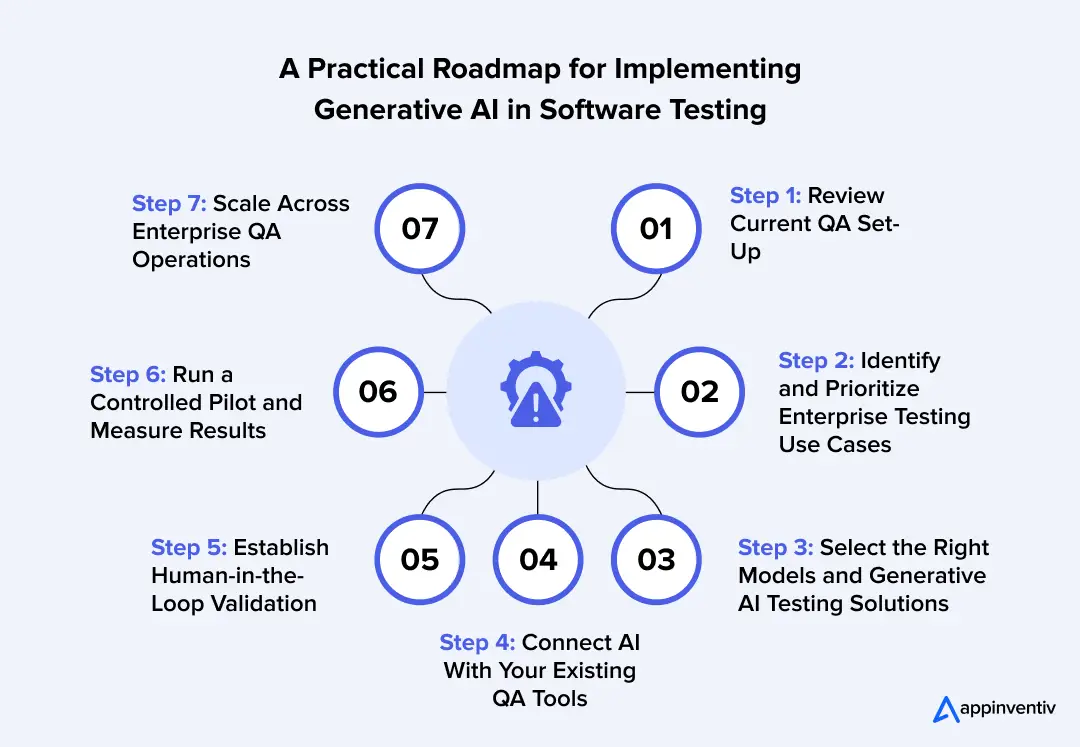
Step 1: Review Current QA Set-Up
Begin with the testing process you’re already using. Examine the time spent on the team and activities that slow releases.
- Review existing manual testing, automation coverage, test repositories, and existing CI/CD workflows.
- Seek out repetitive work, especially test case writing, script maintenance and failure investigation.
- Assess test data quality, application dependencies, and existing integration capabilities.
- Document test cycle time, defect rates, coverage and QA costs. These will be used to compare later.
Step 2: Identify and Prioritize Enterprise Testing Use Cases
Not every QA activity requires generative AI. Prioritize use cases based on their business impact, implementation complexity, and ease of validation.
- Select repetitive, high-volume activities such as test scenario generation and defect triage.
- Identify workflows where existing automation struggles with changing requirements or application interfaces.
- Evaluate the risk associated with AI-generated test cases and assertions.
- Build a prioritized roadmap with measurable success criteria for each use case.
Step 3: Select the Right Models and Generative AI Testing Solutions
The model needs to be congruent with the testing task. An LLM might be okay for creating test cases, and a visual testing model requires a model that understands images and interface components.
- Evaluate LLMs for test writing and failure analysis, and multimodal models for validation using images.
- Use GANs or diffusion models where synthetic test data generation is required.
- Make a comparison of the different Generative AI testing solutions available in terms of security, integration support, scalability, and operating expenses.
- Consider the use of managed APIs, private model deployments, or models tailored to your application domain.
Step 4: Connect AI With Your Existing QA Tools
Tests created by AI must integrate seamlessly with the development and testing processes that your engineers are already familiar with. Otherwise, a team will have to deal with another isolated piece of software.
- Integrate generative AI in software testing tools with test management platforms, issue trackers, source code repositories, and CI/CD pipelines.
- Connect automation frameworks such as Selenium, Playwright, and Cypress.
- Use APIs and orchestration layers to enable controlled communication between models and testing environments.
- Use RAG models to ground GenAI outputs in verified requirements and approved test documentation, improving the accuracy and relevance of generated test cases and recommendations.
Step 5: Establish Human-in-the-Loop Validation
Define which AI-generated outputs require human review before they enter the testing lifecycle.
- Have testers approve generated scenarios against functional requirements.
- Require engineers to review automation code, assertions, and expected results.
- Validate synthetic datasets against privacy requirements, schemas, and business constraints.
- Ensure QA leads retain responsibility for defect confirmation and release approvals.
Step 6: Run a Controlled Pilot and Measure Results
Test the implementation against a representative application or workflow before expanding it across the enterprise.
- Select a pilot with clearly defined testing objectives and an existing performance baseline.
- Compare AI-assisted test authoring and execution with conventional QA workflows.
- Track changes in test preparation time, coverage, false positives, defect detection, and maintenance effort.
- Document model errors, incorrect assertions, integration issues, and additional validation costs.
Step 7: Scale Across Enterprise QA Operations
Once the pilot demonstrates measurable value, expand Generative AI in Quality Assurance (QA) across applications and testing teams.
- Extend approved workflows to additional application portfolios and development teams.
- Establish a centralized AI-powered data governance model, access policies, and audit trails.
- Monitor model performance, output reliability, inference costs, and latency.
- Build feedback loops using verified test results and tester corrections.
- Review the QA strategy periodically as application architecture and testing requirements evolve.
Implementation takeaway: Successful adoption of generative AI in software testing depends on aligning model capabilities with existing QA processes, establishing reliable validation checkpoints, and measuring business outcomes at every stage. Enterprises should scale only those workflows that demonstrate consistent quality improvements and manageable operating costs.
Challenges of GenAI in Software Testing and How to Govern Them
Most risks in AI-generated testing are predictable, which means each can be assigned to an owner with a standing control. The table pairs every risk with its fix.
| Risk | What it looks like | Fix |
|---|---|---|
| Hallucinated tests | A passing test for a feature that does not exist | Map every draft to a requirement ID; reject orphans |
| Shared blind spots | Code and tests inherit one misreading | Independent verifier; mutation testing |
| Masked regressions | Self-healing recovers a locator and hides a real UI change | Review repairs that alter test intent |
| Data exposure | Sensitive records pasted into prompts | Masking, synthetic data, contractual limits on training |
| Reviewer fatigue | Rubber-stamped approvals as volume grows | Lanes, sampling and rotating reviewers |
| Deskilling | Juniors stop learning how tests are designed | “Suggest, don’t implement” for early-career testers |
Generative AI Testing: Governance, Ethics and Reliability
AI-generated test results should not independently determine production release readiness. Governance makes that principle enforceable through six controls, each with a named owner and evidence an auditor or CISO can inspect. It deserves its own workstream, not a clause in the implementation plan.
| Control | What to define | Evidence to keep |
|---|---|---|
| Data governance | Which application data, logs, source code and customer information models may access; masking and retention rules | Data-flow map, provider terms on training and retention |
| Model governance | Model inventory, version control and an approval process for changes | Evaluation records, approved-version register |
| Access governance | Role-based access and least-privilege permissions for AI agents and testing tools | Permission matrix, access logs |
| Output reliability | Validation of generated scenarios, assertions, test data and defect classifications against trusted references | Acceptance rate, mutation score, rejected-draft log |
| Auditability | Traceability from requirement to generated test, execution result and human approval | Linked records, prompt and model-version logs |
| Ethical considerations | Bias in generated scenarios, explainability, accountability and responsible use of testing data | Coverage-gap reviews, named owner per lane |
Future Trends in Generative AI for Software Testing
Enterprise QA is moving towards more autonomous, adaptive, and context-aware testing systems. The following developments are likely to shape the next phase of testing.
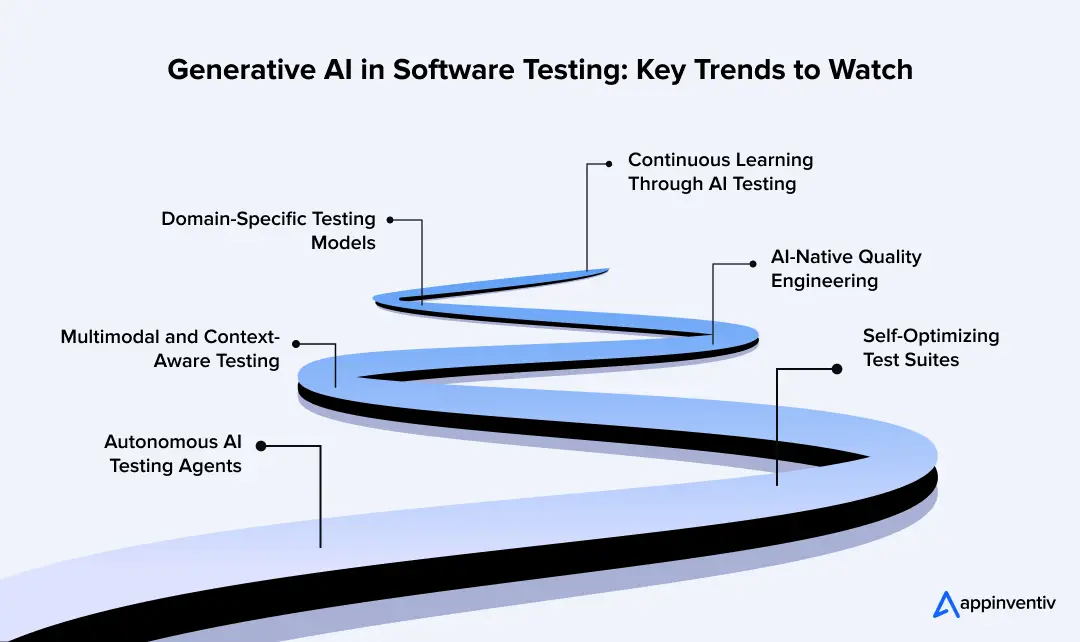
Autonomous AI Testing Agents
AI agents will plan test workflows, interact with testing environments, and execute approved actions with controlled permissions, reducing manual intervention in repetitive QA tasks.
Self-Optimizing Test Suites
AI systems will use code changes, historical results, and defect patterns to prioritize relevant tests, reduce redundant execution, and improve regression coverage.
Multimodal and Context-Aware Testing
Advances in generative AI in software testing will help models interpret source code, screenshots, logs, and requirements together to identify behavioural inconsistencies.
AI-Native Quality Engineering
QA architectures will integrate GenAI-assisted product development, continuous validation, and quality intelligence across the software development lifecycle.
Domain-Specific Testing Models
Industry-adapted models will support sector-specific testing requirements across healthcare, banking, insurance, and enterprise SaaS businesses, including regulatory rules and complex workflows.
Continuous Learning Through AI Testing
GenAI-powered software testing will use feedback from previous test runs, defect reports, and production incidents to refine test recommendations and identify recurring failure patterns.
Identify where autonomous agents, self-optimizing suites, and specialized models can improve your existing testing processes.

Scale Enterprise QA With a Human-Led Generative AI Strategy
Generative AI can strengthen enterprise QA by accelerating test authoring, expanding test coverage, generating realistic test data, and improving failure analysis. However, successful adoption depends on selecting suitable models, integrating them with existing QA workflows, and establishing clear governance and human review processes.
Our GenAI development services cover the development and integration of generative AI capabilities across the software testing lifecycle. This includes building AI-powered test generation workflows, expanding test scenarios, automating test data creation, analysing failures, and integrating AI capabilities into existing QA environments. Each implementation includes extensive testing to validate output accuracy, reliability, security, and performance before deployment.
Our Generative AI testing services sit within broader software engineering services, so the testing design stays connected to how the software is built. Engagements can begin with a readiness assessment scoped to one workflow, which means the first deliverable is a baseline and a lane map, not a licence.
FAQs
Q. How to use generative AI in software testing?
A. Start with one stable, high-volume workflow such as regression test drafting. Record its baseline, then route every AI output through a review lane matched to its business risk. Keep generation and verification separate. Expand to new workflows only after the pilot beats its baseline on escaped defects.
Q. How can GenAI reduce software testing costs?
A. Savings come from faster authoring, lower maintenance and earlier defect detection. Reported gains vary: TestRail reports up to 90% faster test-case creation for early adopters, while the World Quality Report puts the average productivity gain at 19%. Review time offsets part of any saving, so track cost per accepted test rather than tests generated.
Q. How can enterprises scale AI-powered testing across complex applications?
A. Scale by risk lane, not by team. Stabilize each application’s foundations first, keep context bounded per application, integrate with CI/CD and test management for traceability, and expand only where acceptance rate and escaped-defect data hold across release cycles. Complex estates need a baseline for each application.
Q. Can generative AI replace software testers?
A. No. It drafts, expands and triages, while people own risk judgment, ambiguous requirements, exploratory testing and release decisions. Testers increasingly act as validators and evaluation designers, so reviewing AI output becomes a core skill. Teams that treat it as a headcount substitute tend to lose the verification that makes the output trustworthy.
Q. How long does it take to see results?
A. Teams with stable foundations can see pilot signals within weeks. Teams that must first rebuild locator strategy and requirements quality face a longer road: Ranorex estimates six to twelve months of foundation work. Either way, judge results over at least one full release cycle against your baseline.


Fast 2-minute response, fully NDA-protected.

AI-Native Security Maturity Model: Score Where Your Security Stack Stands
Key takeaways: If Human oversight scores below 2, you're at Level 3 at most, whatever your total score says. Moving to Level 3 starts with unifying your telemetry, which most teams can do with tools they already own. Define approval points before you automate response. Oversight added later costs more. Buy a platform when your…
The AI ROI Crisis: Why Enterprises Are Struggling to Prove Value and How to Fix It
Key takeaways: AI ROI is a capital-allocation question. Boards want payback periods and P&L impact. AI ROI challenges rarely have a single cause. Data, legacy systems, use-case choice, ownership and stalled pilots compound each other. Choose two or three outcome metrics per use case, set the baseline first, and report in dollars. Make every further…

Retrieval Augmented Generation in Australia: Architecture, Implementation and Cost
Key takeaways: RAG grounds LLM answers in approved content, improving reliability without retraining a model. Data quality and access permissions decide production outcomes more than the model. Indicative build costs run from AUD 70,000 to 700,000, driven by data and integrations. Measure value against a pre-deployment baseline, separating realised benefits from projected savings. A general-purpose…