
































The Ultimate Guide to CRM for Insurance: Features, Cost, Top Platforms, Integration & More

 Share -



- 01CRM vs. AMS vs. Policy and Claims Systems
- 02What Are the Must Have CRM Features for the Insurance Industry?
- 03The Business Benefits of Implementing CRM in Insurance
- 04Insurance CRM Use Cases Across the Customer Lifecycle
- 05Insurance CRM Integration: What Systems Should It Connect With?
- 06Top Off-the-Shelf CRM Platforms for Insurance Companies
- 07Insurance CRM Platform Selection Guidelines
- 08Should You Buy, Customise or Build an Insurance CRM?
- 09How Much Does Insurance CRM Cost?
- 10How to Integrate a CRM With an Existing Insurance Technology Stack
- 11Appinventiv for Insurance: From CRM Strategy to Development and Integration

Key takeaways:
- CRM for insurance connects sales, service, and claims into one governed system, distinct from the policy administration system.
- Core features span pipeline management, policy visibility, claims tracking, commission management, AI analytics, and compliance controls.
- Cost ranges from roughly USD 15,000 for configuration to USD 150,000 and beyond for custom development at enterprise scale.
- Custom development suits insurers with differentiated workflows, legacy integrations, or data ownership requirements.
- Integration architecture, not platform choice alone, determines whether a CRM investment delivers measurable retention and revenue impact.
Insurance customers rarely see the systems behind a quote, policy change, claim, or renewal. They simply expect the insurer or agent to know their history and respond without making them repeat information.
That expectation is putting pressure on insurance technology stacks that were built around separate policy, claims, billing, and customer systems. A CRM can bring these interactions together, but only when it is designed around the wider operating environment rather than deployed as another standalone application.
The shift is becoming more significant as AI enters insurance workflows. Deloitte’s research found that 76% of 200 US insurers had already implemented generative AI in at least one business function. Claims, distribution, and risk management are among the areas seeing adoption, increasing the need for customer and operational data to move reliably across systems.
For businesses, the decision is therefore bigger than choosing a CRM platform. It involves deciding which customer data the CRM should own, which systems should remain authoritative, how insurance CRM integrations should work, and whether an existing platform can support the organization’s processes.
This blog will answer all such queries. It will examine the features, costs, platforms, integration strategy, and selection decisions that shape a modern CRM for insurance.
Connect customer journeys, legacy systems, and intelligent workflows with an enterprise CRM built for your operating model.

CRM vs. AMS vs. Policy and Claims Systems
CRM, agency management, policy administration, and claims systems serve different purposes. A CRM manages relationships and engagement, while specialized insurance systems manage the underlying transactions and records. Keeping these responsibilities clear is critical when designing an enterprise architecture.
| System | Primary role | Typical responsibility |
|---|---|---|
| CRM | Customer relationship management | Leads, contacts, interactions, opportunities, service |
| AMS | Agency management | Producers, accounts, commissions, agency workflows |
| Policy administration | Policy lifecycle | Quotes, policies, endorsements, premiums |
| Claims system | Claims lifecycle | Claims, assessments, reserves, settlements |
A CRM should usually connect these systems rather than replacing them.
For example, a service representative may open one customer record and see policy information from the policy administration system, claim status from the claims platform, and payment information from billing.
The CRM becomes the working interface. The underlying systems remain authoritative for their respective domains.
What Are the Must Have CRM Features for the Insurance Industry?
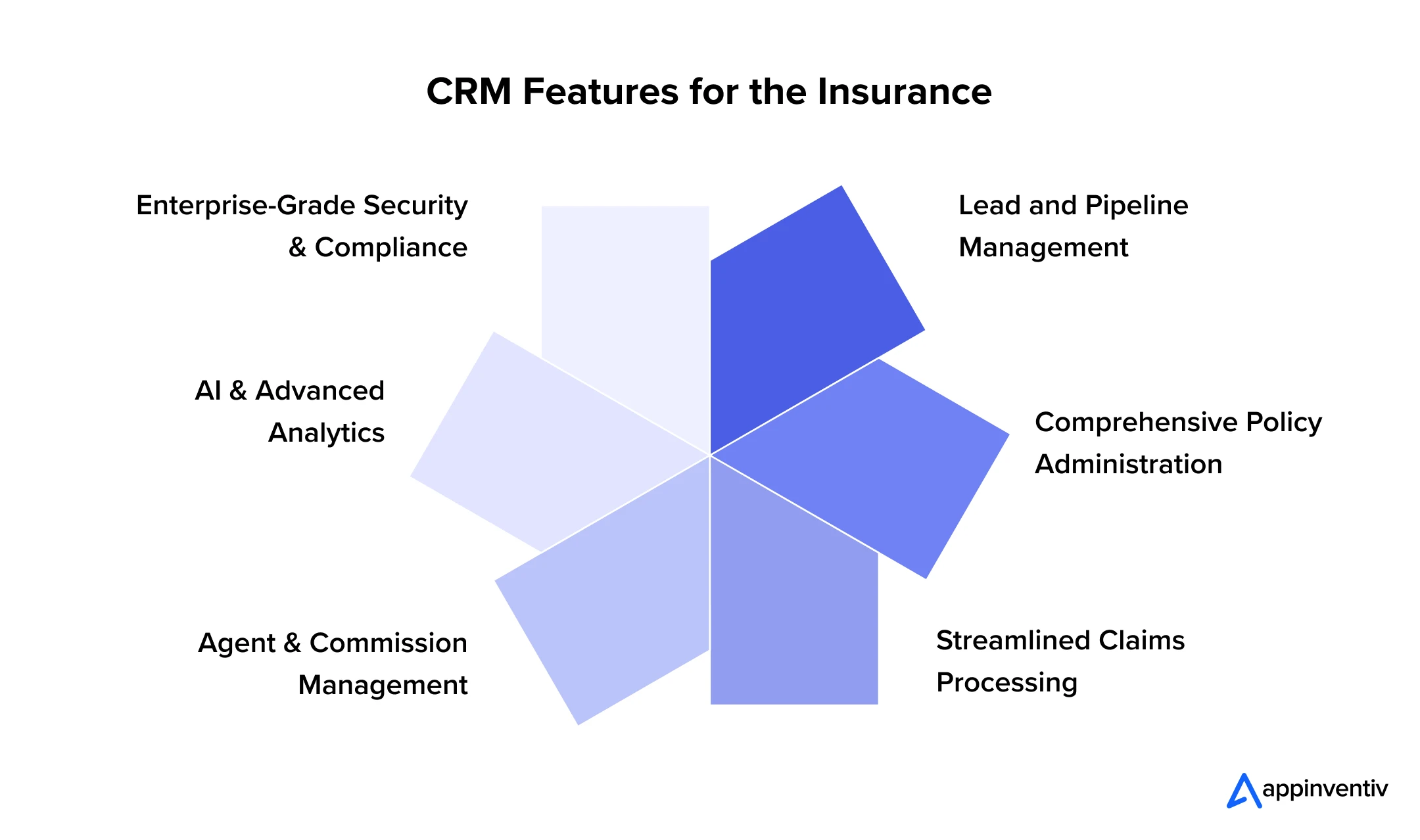
The most useful CRM features for the insurance industry are tied to actual insurance workflows. Sales automation alone is not enough. A serious implementation needs customer data management, policy and claims visibility, workflow automation, integration services, analytics, and appropriate security controls.
Lead and Pipeline Management
Captures inbound leads from web forms, call centers, and referral partners, then scores and routes them by product line, territory, and license eligibility, reducing the lag between first contact and quote.
Comprehensive Policy Administration
Surfaces policy status, coverage details, and renewal dates inside the CRM record, giving agents a working view of the book without logging into the core PAS separately.
Streamlined Claims Processing
Connects claims status and adjuster notes to the customer record, so service teams can answer status questions without transferring calls, and can flag at-risk relationships during a claim.
Agent and Commission Management
Tracks producer hierarchies, split commissions, and licensing status, a feature set that distinguishes CRM software for insurance agents from generic sales CRMs built for transactional B2B sales.
AI and Advanced Analytics
AI powered features in CRM like predictive lapse scoring, next-best-product recommendations, and generative AI-assisted service summaries are moving from pilot to production. Gartner projects that 40% of enterprise applications will carry task-specific AI agents by the end of 2026, up from under 5% in 2025, a trend already visible in insurance CRM roadmaps.
Enterprise-Grade Security and Compliance
The platform must feature role-based access control, localized data residency options, and immutable audit logs. SOC 2 Type II compliance and robust encryption protocols ensure that sensitive financial and medical data remains protected against unauthorized access and cyber threats.
The Business Benefits of Implementing CRM in Insurance
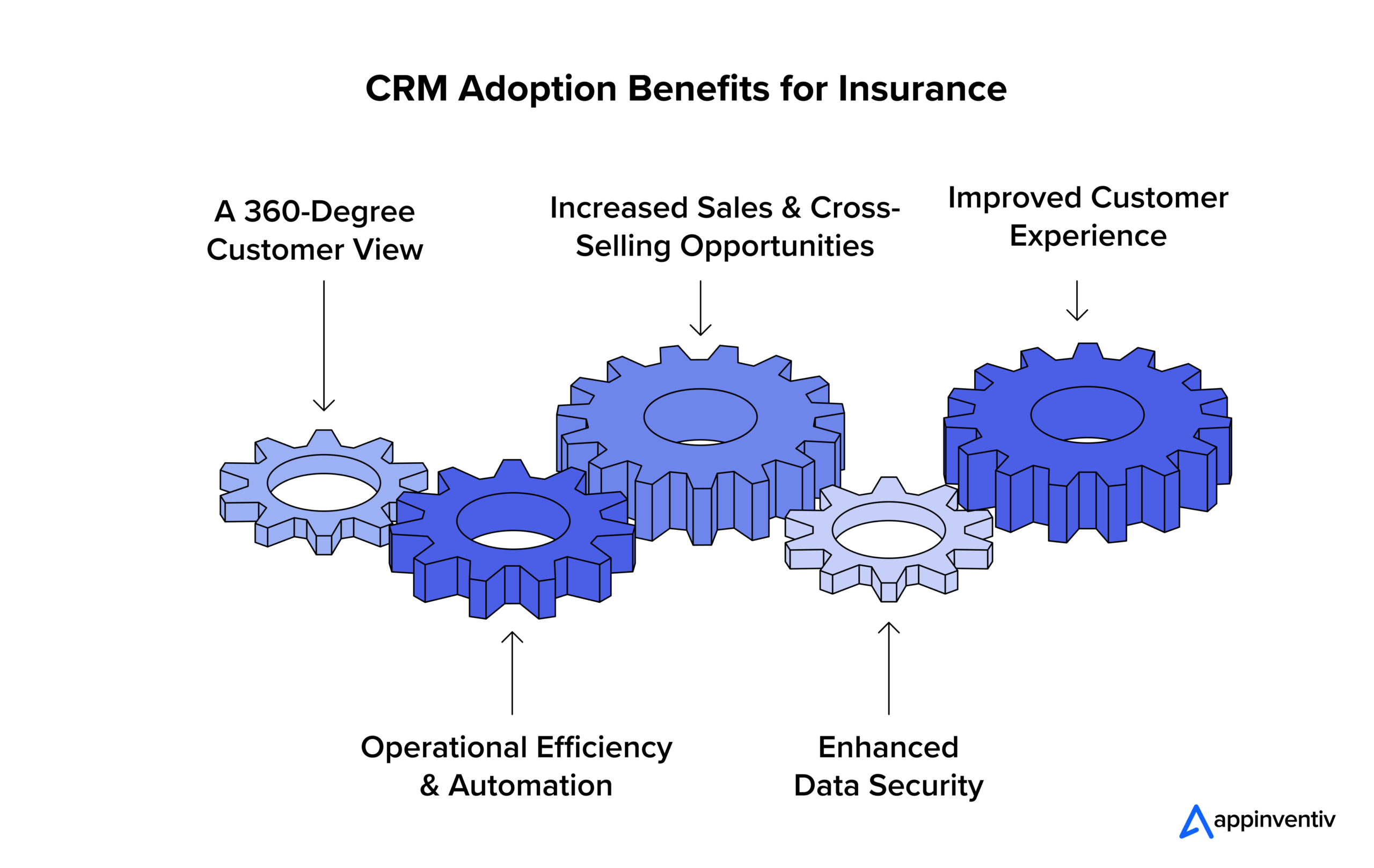
The benefits of adopting insurance CRM solutions are most visible when CRM removes operational friction. Better customer visibility, automated workflows, improved sales management, and stronger data governance can affect both front-office productivity and the quality of customer interactions.
A 360-Degree Customer View
Every touchpoint, policy, claim, and service interaction lives in one record, eliminating the handoffs that erode trust during renewals and claims.
Operational Efficiency and Automation
Automated renewal reminders, task routing, and document generation reduce manual effort across service and sales teams, freeing licensed staff for advisory work rather than data entry.
Increased Sales and Cross-Selling
A unified view of coverage gaps and life events turns a CRM for insurance sales into a structured cross-sell engine rather than a contact list, lifting bundled policy penetration.
Enhanced Data Security
Centralizing customer data inside one governed platform, instead of spreadsheets and inboxes, narrows the attack surface and simplifies the evidence trail examiners request during audits.
Improved Customer Experience
Consistent, context-aware service across every channel, phone, email, agent portal, and self-service, removes the repeated explanations and delays that drive policyholders to switch carriers at renewal.
Insurance CRM Use Cases Across the Customer Lifecycle
Insurance CRM becomes easier to evaluate when each capability is tied to a business stage. This also gives businesses a clearer way to measure value after implementation instead of relying on user adoption alone.
| Business Stage | CRM Use Case | Business Outcome |
|---|---|---|
| Acquisition | Lead capture and routing | Faster response |
| Quote | Opportunity and quote tracking | Better pipeline visibility |
| Onboarding | Task and document automation | Less manual coordination |
| Policy servicing | Customer and policy context | Faster service |
| Claims | Status visibility and communication | Better customer handling |
| Renewal | Alerts and targeted outreach | Stronger retention |
| Cross-sell | Segmentation and recommendations | More relevant offers |
| Retention | Churn signals and service history | Earlier intervention |
This lifecycle model also helps determine which workflows should be included in the first release.
Insurance CRM Integration: What Systems Should It Connect With?
Insurance CRM integrations should be designed around data ownership and business events. Connecting every available system is not the goal. Each integration should have a defined purpose, source of truth, synchronization method, security model, and failure-handling process.
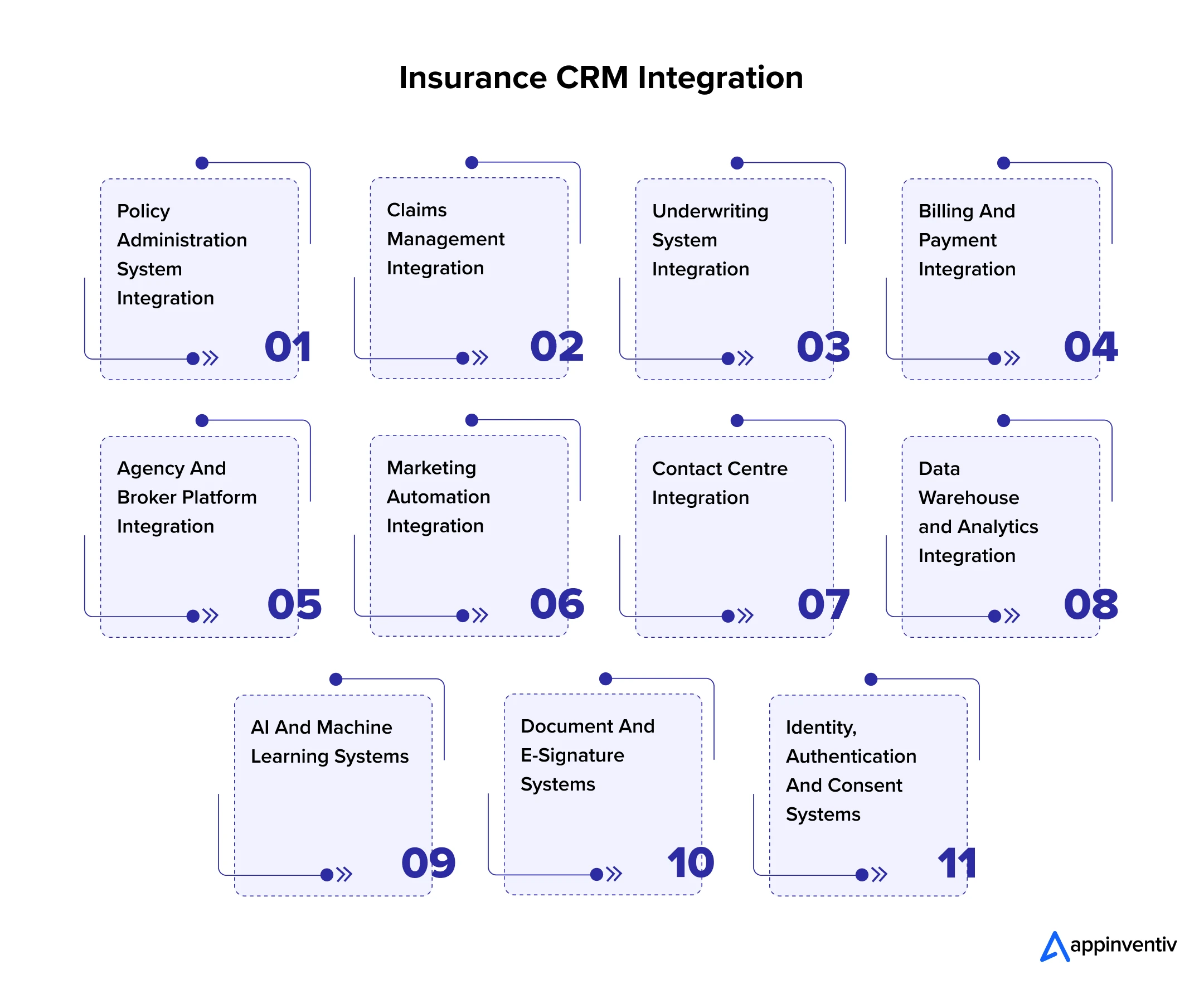
Policy Administration System Integration
Connecting to the backend administration system ensures that the front office sees accurate premium calculations and active coverage dates. This bidirectional sync prevents representatives from selling outdated products and ensures that newly captured client data flows directly into the core rating engine.
Claims Management Integration
Front-line staff must view insurance claim management without accessing the highly restricted backend adjudication environment. Passing status updates, adjuster assignments, and payment dates through an API gateway keeps clients informed while protecting sensitive financial workflows.
Underwriting System Integration
Brokers need immediate feedback on risk acceptability. Integrating with automated insurance underwriting engines allows the system to instantly flag prohibited risks or request additional documentation, drastically shortening the time required to bind a new policy.
Billing and Payment Integration
Displaying invoice histories and past-due alerts within the agent dashboard prevents awkward client interactions. Secure tokenization allows representatives to process premium payments directly from the customer profile without exposing the organization to stringent PCI compliance risks.
Agency and Broker Platform Integration
Connecting a CRM for insurance brokers to external distribution networks requires pushing product updates and marketing collateral to broker portals. Integration ensures that external representatives operate with the same accurate data as internal staff, maintaining pricing consistency across all sales channels.
Marketing Automation Integration
While some platforms include basic email capabilities, enterprise organizations rely on sophisticated marketing engines. Syncing lead statuses allows marketing teams to deploy highly targeted nurture campaigns based on specific product interests or geographic locations.
Contact Center Integration
Telephony integration pops the caller profile onto the screen before the representative even says hello. Logging call recordings and interaction transcripts directly to the client file maintains a perfect historical record for quality assurance and compliance audits.
Data Warehouse and Analytics Integration
Pushing raw interaction data into central data lakes allows business intelligence teams to perform complex macro-level analysis. This connection fuels the predictive models that forecast regional claims trends and optimize pricing strategies based on deep historical context.
AI and Machine Learning Systems
Connecting to external natural language processing engines allows the software to summarize lengthy email threads or extract critical data points from unstructured broker submissions. This accelerates intake processing and reduces manual oversight significantly.
Document and E-Signature Systems
Insurance runs on strict contractual agreements. Integrating digital signature platforms automates the generation, dispatch, and tracking of binding documents. Once signed, the finalized contracts automatically attach to the client record, creating an immutable audit trail.
Identity, Authentication and Consent Systems
Integrating with enterprise identity management protocols like OAuth or SAML ensures strict access control. Managing consumer privacy preferences through unified consent modules ensures compliance with GDPR, CCPA, and evolving state-level data privacy regulations.
Top Off-the-Shelf CRM Platforms for Insurance Companies
There is no single best CRM software for insurance for every organization. The right choice of CRM depends on insurance specialization, existing technology investments, integration requirements, customization needs, licensing structure, and the degree of control the enterprise needs over its architecture.
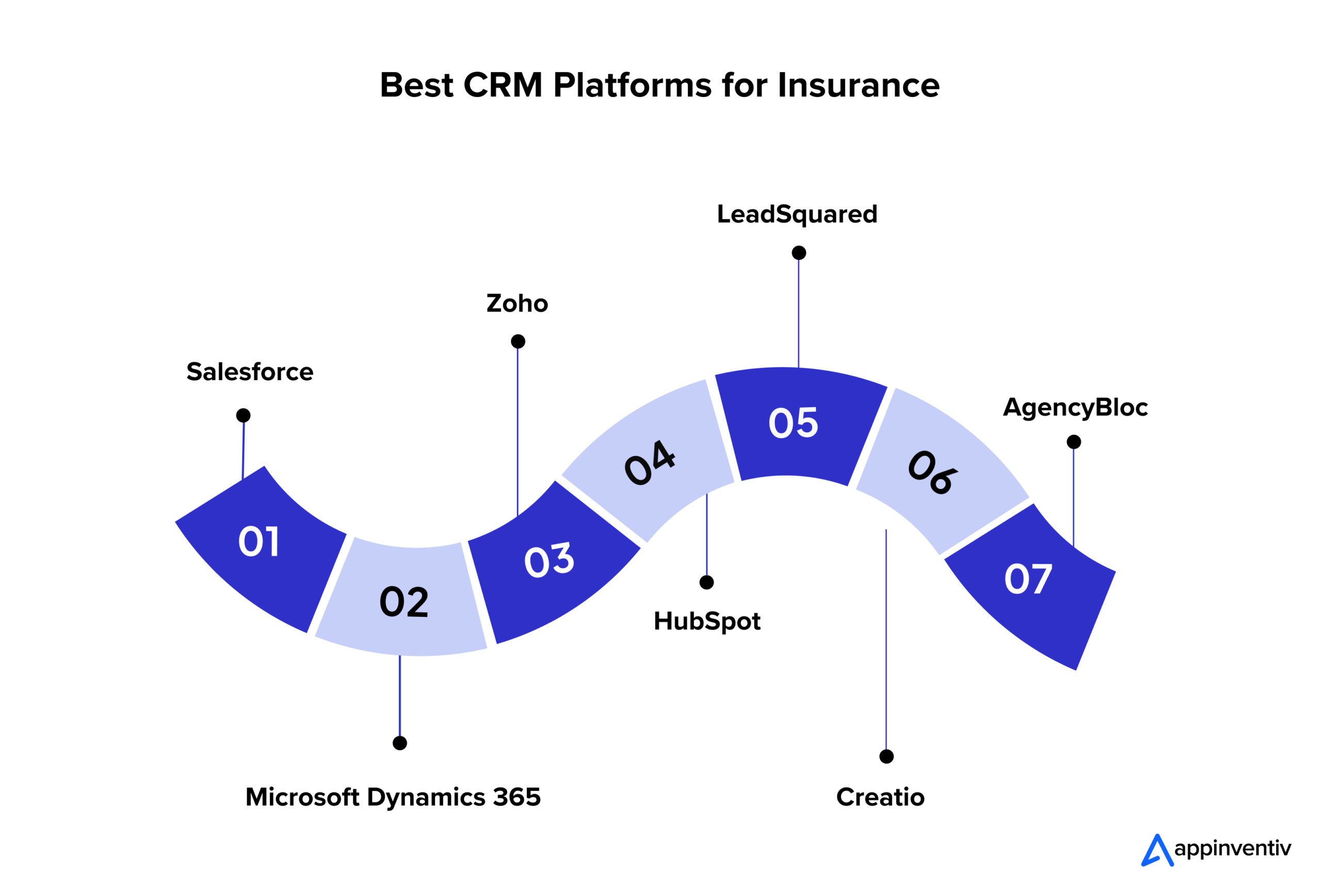
Salesforce
Salesforce dominates the enterprise space by offering an incredibly robust and highly customizable ecosystem for insurance and BFSI companies. The platform includes pre-built data models for householding and life events. However, Salesforce requires significant implementation budgets, dedicated internal administrators, and managing complex per-user licensing costs as the organization scales.
Microsoft Dynamics 365
Dynamics 365 appeals to organizations heavily invested in the Azure ecosystem. It offers deep integration with Outlook, Teams, and PowerBI. The platform excels at handling complex data security requirements and offers immense customization potential. Its user interface often requires extensive training for non-technical sales staff.
Zoho
Zoho provides a highly cost-effective and feature-rich alternative for mid-market brokerages. It offers excellent workflow automation and a vast suite of native integrations. While it lacks the out-of-the-box data models found in Salesforce, its low total cost of ownership makes it highly attractive for growing regional agencies.
HubSpot
HubSpot leads the market in usability and inbound marketing capabilities. It features an incredibly intuitive interface that ensures high user adoption rates. Its core architecture heavily favors B2B sales processes, requiring substantial workarounds to accommodate complex multi-policy household relationships and intricate commission tracking requirements.
LeadSquared
LeadSquared focuses intensely on high-velocity sales and lead execution. It excels at processing massive volumes of internet inquiries and routing them to available representatives instantly. It performs brilliantly for direct-to-consumer acquisition but may lack the deep policy servicing capabilities required for long-term account management.
Creatio
Specialized Insurtech CRMs like Creatio combine customer management with powerful no-code business process management. This allows operations teams to rapidly build and modify complex underwriting workflows without requiring deep engineering resources. It is highly adaptable but requires strong internal governance to prevent severe workflow sprawl.
AgencyBloc
Niche products like AgencyBloc cater specifically to life and health agencies, offering native commission calculators and carrier integrations. These platforms deploy rapidly and solve immediate industry pain points but often struggle to integrate with bespoke enterprise data lakes or scale alongside complex international carrier operations.
A Quick Comparison Between the Leading Leading CRM Platform for Insurance
| Platform | Key Features | Insurance Depth | Limitations | Best Suited For |
|---|---|---|---|---|
| Salesforce | Advanced analytics, householding models | Very High | Expensive licensing, complex setup | Large Carriers, Enterprise MGAs |
| Dynamics 365 | Azure integration, deep security | High | Steep learning curve, rigid UI | Enterprises using Microsoft tech |
| Zoho CRM | Cost-effective, extensive app ecosystem | Medium | Requires manual industry tailoring | Mid-market and regional agencies |
| HubSpot | Superior marketing, intuitive design | Low | Lacks native policy structures | Growth-focused retail brokers |
| LeadSquared | High-velocity lead routing | Medium | Weak on complex post-sale servicing | Direct-to-consumer digital agencies |
| Creatio | No-code process automation | High | Requires strict process governance | Agile carriers needing fast changes |
| AgencyBloc | Native commission tracking | Very High | Limited enterprise scalability | Life and Health general agencies |
Insurance CRM Platform Selection Guidelines
Before selecting a CRM platform, Insurance companies should test how the platform handles actual insurance processes, existing integrations, data governance, security, customization, and future operating requirements. They must evaluate:
- Insurance-specific data models and workflows
- API quality and integration options
- Existing policy and claims compatibility
- Identity and access management
- Data residency and governance requirements
- Workflow customization
- AI capabilities and model controls
- Reporting and analytics
- Mobile and agent experience
- Licensing and implementation costs
- Vendor roadmap and ecosystem
- Exit and data portability considerations
A proof of concept should use representative insurance workflows rather than a generic sales demo. Test a renewal, a service request, a claim-related interaction, an agent workflow, and a cross-system customer lookup.
Should You Buy, Customise or Build an Insurance CRM?
Deciding between buying an off-the-shelf CRM, customizing the platform or building a custom system represents a massive strategic crossroads. You need to evaluate some specific conditions when making a decision:
Buy When Standardization Is the Priority
An off-the-shelf platform is generally suitable when:
- Core sales and service workflows are conventional
- Existing systems have usable APIs
- Customization requirements are modest
- Rapid implementation matters
- Internal teams can work within platform constraints
Customize When the Core Platform Fits
Customization is appropriate when the CRM already provides the required foundation but needs:
- Insurance-specific workflows
- Custom dashboards
- Specialized approval processes
- Legacy integrations
- Tailored customer journeys
Build When the CRM Is a Strategic Product
Custom development is easier to justify when:
- The business model is highly specialized
- Existing CRM products create major process compromises
- Legacy integration is unusually complex
- Data architecture requires greater control
- Customer experience is a competitive differentiator
- The CRM must orchestrate proprietary business processes
Remember, to make the decision based on the full ownership picture, not the first-year implementation quote.
Compare your existing platform, customization needs, integrations, and long-term requirements before committing to a CRM strategy.

How Much Does Insurance CRM Cost?
Insurance CRM cost varies widely depending on several factors, including whether you buy, build, or customize the platform, the number of users, integration complexity, data migration requirements, level of workflow customisation, AI capabilities, security and compliance needs, infrastructure, and ongoing maintenance.
For instance, a CRM with standard features and limited integrations requires a relatively smaller investment than an enterprise-grade insurance CRM connected to policy administration, claims, underwriting, billing, analytics, and legacy systems.
Insurance CRM Cost by Implementation Type
On average, the cost of CRM for insurance falls between the below range, depending on your unique needs. It does not include the licensing fee.
| Approach | Estimated Cost Range | Best Suited For |
|---|---|---|
| Off-the-shelf CRM configuration | $30,000 to 60,000 | Smaller teams, single product line |
| Industry CRM implementation | $40,000 to 150,000 | Mid-market insurers and agencies |
| Enterprise CRM customization | $150,000 to 250,000 | Carriers and MGAs with complex books |
| Custom CRM development | $100,000 to $500,000+ | Complex or unique technology ecosystems |
How to Calculate the Total Cost of Ownership
Insurers often underweight integration and AI or API consumption costs in early budgeting, which is where actual spend most often exceeds the initial estimate once claims, billing, and underwriting connections are scoped in detail. To calculate the TCO, you should follow the below formula:
| TCO = Licensing + Implementation + Integration + Migration + Customization + Infrastructure + Training + Support + AI/API Consumption |
How to Integrate a CRM With an Existing Insurance Technology Stack
Integration is where most CRM in insurance projects succeed or fail, because the value of the platform depends entirely on the accuracy and timeliness of the data flowing into it. The nine steps below reflect the sequence used for CRM implementations.
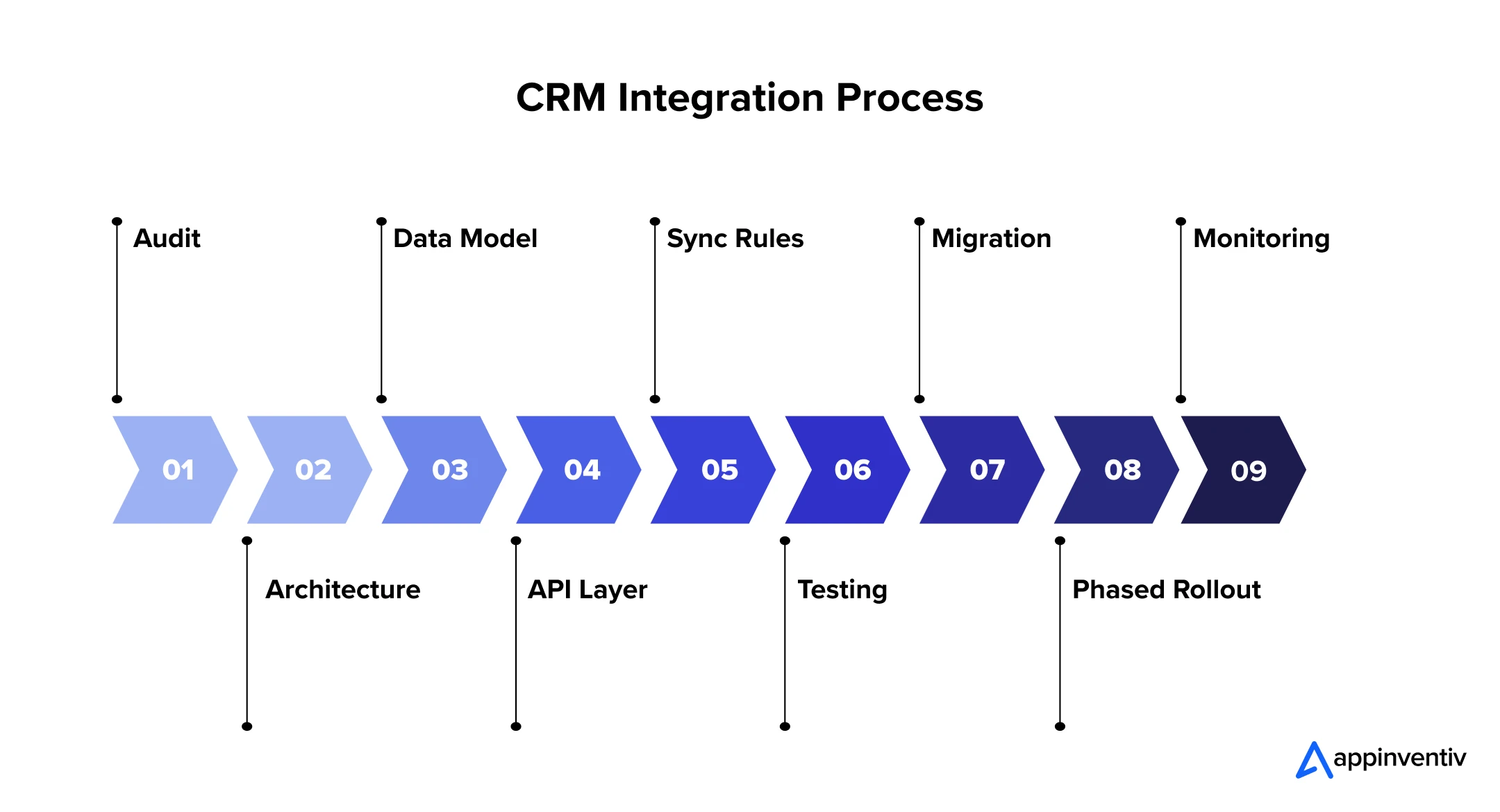
Audit the Existing Technology Ecosystem
Catalog every system that touches customer, policy, or claims data, including undocumented spreadsheets and shadow tools.
Outline the CRM Integration Architecture
Decide between point-to-point integration, an integration platform layer, or an event-driven architecture based on data volume and latency needs.
Define the Insurance Data Model
Establish a single definition of a customer, policy, and claim across all connected systems before any code is written.
Build the API and Integration Layer
Develop or configure connectors between the CRM and PAS, claims, billing, and underwriting systems.
Establish Data Synchronization Rules
Set which system owns each data field and how conflicts are resolved when two systems disagree.
Test Workflows and Integrations
Validate end-to-end scenarios, including claims-triggered service alerts and renewal-triggered outreach, not just individual field mappings.
Migrate and Validate Data
Move historical records in batches with reconciliation checks against the source systems before cutover.
Roll Out by Business Function
Sequence go-live by team, typically sales first, then service, then claims-adjacent functions, to contain risk.
Monitor and Optimize
Track sync failures, adoption metrics, and data quality post-launch, adjusting rules as new systems are added.
Appinventiv for Insurance: From CRM Strategy to Development and Integration
Choosing an insurance CRM is only the starting point. The harder part is making it fit existing policy, claims, billing, underwriting, agency, and customer service systems without creating another data silo.
Appinventiv supports insurers across this lifecycle, from CRM consulting and architecture planning to custom development, platform customization, integration, migration, and workflow automation. We provide comprehensive technology services tailored specifically for insurance and FinTech sector, ensuring your transition eliminates data silos without disrupting daily underwriting operations.
Our End-to-End CRM Services
As a trusted software development company with 11+ years of industry experience, we offer targeted services across the entire CRM SDLC.
- CRM Consulting: We help businesses evaluate whether to configure an off-the-shelf platform or pursue custom architecture based on TCO, existing infrastructure, and specific compliance requirements.
- Custom CRM Development: We provide custom CRM development services to build the precise modules required for your unique commission structures, specialized rating algorithms, and distinct distribution channels.
- CRM Customization: Our team of 1700+ tech experts excel at adapting popular off-the-shelf platforms with tailored modules, automated workflows, and specialized user interfaces to fit your unique operations.
- Data Migration and Modernization: We extract, clean, and migrate historical policy data into modern cloud platforms without operational downtime or security risks.
- CRM Implementation: We also handles end-to-end platform deployment, system configurations, user access setup, and onboarding for smooth organizational adoption.
- Legacy System Integration: Our developers securely connect modern front-office interfaces with your existing policy administration and claims management backend. We utilize secure middleware and API gateways to ensure zero data loss during complex migrations.
Our Proven FinTech and InsurTech Execution
Handling sensitive policyholder information requires the same rigorous security standards utilized in consumer banking and digital wealth management. We bring deep architectural experience from engineering high-transaction platforms for prominent financial innovators:
- Mudra: For Mudra, we developed a secure and highly scalable budget management application, focusing heavily on financial data protection and real-time processing.
- Edfundo: Our teams built the interactive ecosystem for this specialized financial literacy platform, ensuring strict data governance, secure authentication, and seamless user onboarding.
At Appinventiv, our focus is on building and modernizing enterprise software around the operating model, not simply reproducing a standard CRM interface. This commitment to delivering measurable enterprise value is evident in our 95% client satisfaction rate alongside a 90% repeat clientele metric.
By focusing strictly on scalable outcomes and secure architecture, we have helped our global partners achieve over 100M+ app downloads while securing critical financial infrastructure.
Ready to build a platform that scales alongside your enterprise ambitions? The starting point should be the business and technology assessment: what the CRM should own, what existing systems should retain, which integrations matter most, and where custom development provides a measurable advantage.
Contact our InsurTech experts to define your CRM integration roadmap.
FAQs
Q. What is the difference between CRM and AMS?
A. CRM manages the customer relationship, including leads, service cases, and cross-sell activity. An Agency Management System is built for agencies and brokers to manage commissions, carrier relationships, and book-of-business reporting. Many agencies run both systems together, with the CRM feeding customer engagement data into the AMS for commission and reporting purposes.
Q. How does AI improve CRM software for insurance agents?
A. AI adds predictive lapse scoring, next-best-product recommendations, and automated service summaries to routine agent workflows. It also supports fraud flagging on claims and faster document review during underwriting. These capabilities shift agents from manual data review toward advisory conversations with policyholders.
Q. How long does it take to develop a custom CRM for an insurance company?
A. Custom CRM development for an insurance company typically takes four to nine months, depending on integration scope and compliance requirements. Projects with multiple legacy system connections or complex commission logic sit at the longer end of that range. A phased rollout by business function can bring core sales functionality live sooner than the full build.
Q. How to build custom CRM for insurance agents?
A. Start with a technology audit and a defined data model before any development begins, since most delays trace back to unclear ownership of customer and policy data. Prioritize the integration layer connecting the CRM to the policy administration and claims systems, since that connection drives most of the platform’s day-to-day value. Build in role-based security and audit trails from the outset rather than retrofitting them ahead of a compliance review.
Q. Why do insurance companies need a CRM solution?
A. Insurance companies need a CRM for insurance agency and carrier operations because policyholder data otherwise remains fragmented across policy, claims, and billing systems, creating service delays and missed renewal opportunities.
A unified CRM improves retention, supports compliant cross-selling, and gives leadership a portfolio-level view of customer health. As customer experience increasingly drives shareholder return in the sector, a properly governed CRM has become a board-level priority rather than a departmental tool.


Fast 2-minute response, fully NDA-protected.

Beyond Customer Portal Development: Building Connected Digital Services
Key takeaways: A portal without CRM, ERP and billing integration leaves your staff doing the connecting. Start with customer tasks, then integrate only the systems those tasks actually need. Name one system of record for each data type before choosing APIs or middleware. Plan integration, security and privacy obligations at the start, not after the…

CRM Software for Local Government: From Community Requests to Better Service Delivery
Key takeaways: A council CRM should sit around existing systems as a service layer, not replace them. Integration with ERP, rates, property and GIS systems prevents another data silo and duplicate entry. Start with one high-volume service, pilot it with residents, then scale on measured results. Track resolution time, SLA compliance, self-service rates and cost…

How to Choose a Technology Partner for Government Software Development
Key takeaways: Evaluate the partner across five layers: procurement eligibility, assurance, engineering, delivery and long-term ownership. Choose a government technology partner on evidence, governance and delivery depth, not development capability alone. Match partner evaluation criteria to the security, integration and operational risks of the programme. Treat data sovereignty, privacy, accessibility and security as architecture decisions…