























Where Server-Driven UI Belongs in Enterprise Mobile Apps and Where It Doesn’t

 Share -


- 01What Server-Driven UI Actually Is (and What It Isn’t)
- 02Where Server-Driven UI Belongs in Enterprise Mobile Apps
- 03Where It Does Not Belong
- 04Client-Driven UI vs. Server-Driven UI: The Real Trade
- 05Server-Driven UI Architecture and Implementation: The Five Moving Parts
- 06The Server-Driven UI Tech Stack, Without the Hype
- 07Server-Driven UI Benefits: What the Business Actually Gains
- 08Server-Driven UI Use Cases: How Well-Known Teams Apply It
- 09UI Lessons from Appinventiv: KFC, Adidas and Pizza Hut
- 10The Reversibility Test: A Five-Question Filter We Use Before Any Screen Goes Server-Driven
- 11How to Implement Server-Driven UI: A Six-Step Path
- 12Final Thoughts: Be Deliberate About Who Owns the Decision
- 13How Appinventiv’s UI/UX Design Services Fit In
- 14FAQs

A practical guide for enterprise teams deciding where server-driven UI fits, where native architecture works better, and how to balance flexibility with performance.
Delegating interface decisions to the server is not a new idea, yet enterprise teams still tend either to over-adopt it or to dismiss it outright. Both responses overlook what matters: the approach pays off only when the right screens are chosen.
A pattern recurs in our architecture reviews. A product team, frustrated by a two-week app store approval cycle for a simple banner change, proposes that the backend deliver the screen definition. Six months later, the checkout flow, biometric login and settings page are all described in JSON, and the team struggles to explain the degraded performance of the camera screen.
Server-driven UI is a powerful architectural pattern, but not a universal one. This blog is a practical guide to using server-driven UI for mobile apps effectively: where it delivers clear value in enterprise applications, where it adds more cost than it returns, and a simple test we apply to distinguish the two before any schema is written.
Key takeaways:
- Server-driven UI is most effective on screens that change often and are built from repeatable components.
- It should not be used everywhere; authentication, payments, biometrics, and offline-first flows usually need native control.
- Hybrid architecture is often the best choice for enterprise apps because it balances flexibility with reliability.
- Strong governance matters as much as the schema, including versioning, fallback logic, validation, and testing.
- SDUI is a selective strategy, not a universal fix, and works best when applied only where the trade-off is clearly justified.
Identify the right screens for server-driven UI while keeping critical workflows stable and secure by assessing use cases and implementation requirements.
What Server-Driven UI Actually Is (and What It Isn’t)
In a conventional app, the layout of every screen is compiled into the binary. The server sends data; the client decides how to present it. In a server-driven model, the server also sends instructions about the presentation: which components to show, in what order, with what copy and what actions attached. The app becomes a rendering engine for a vocabulary of components it already knows.
You will see this abbreviated as SDUI, and it helps to be precise about what it is not. It is not a web view wrapped in a native shell. It is not a no-code tool that lets marketing rebuild your app. And it is not “sending HTML.” The screens still render with the five pillars of native components, so scrolling, accessibility, and system behaviour stay native. What changes is who holds the blueprint.
That distinction matters in enterprise settings, where a regulated bank or a hospital network cannot trade away native reliability for release speed. The honest framing is that server-driven UI moves a specific category of decisions from build time to run time. Your job is to decide which decisions deserve that move.
Where Server-Driven UI Belongs in Enterprise Mobile Apps
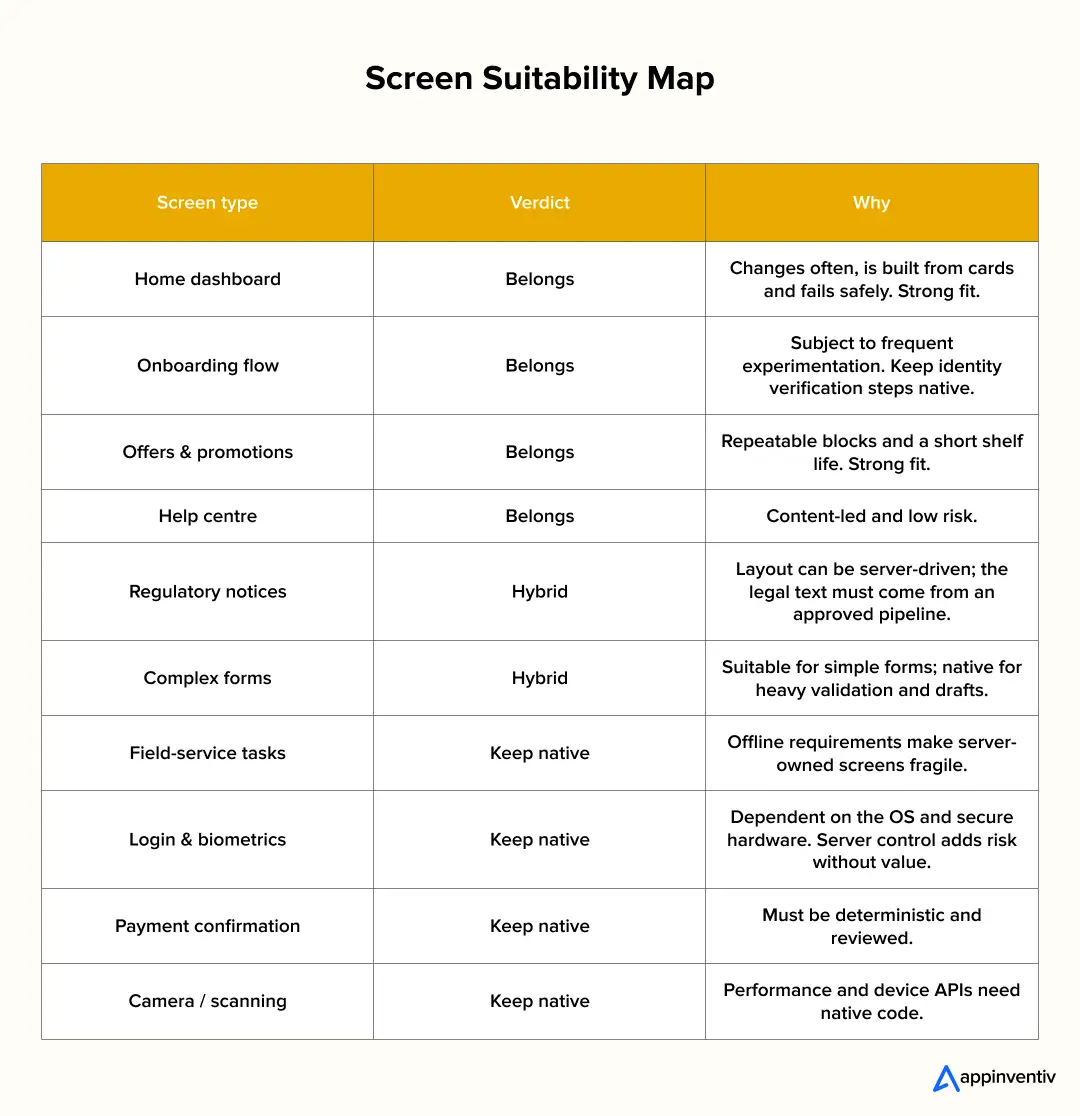
This is the core of the decision. Server-driven UI for mobile apps works best where three conditions hold: the content changes often, the layout is built from repeatable blocks, and a wrong screen is inconvenient rather than dangerous. The infographic below shows how common enterprise screens fall against that test.
Where It Does Not Belong
Server-driven UI in mobile apps introduces trade-offs in performance, security, and device-level control, making it unsuitable for certain enterprise use cases.
Authentication and Security Moments
Biometric prompts, multi-factor authentication, PIN entry and device binding depend on the OS and secure hardware. A server-described version enlarges the attack surface without benefit, and a tampered payload could turn a login screen into a phishing vector.
Payments and Irreversible Actions
A transfer confirmation must show exactly what will happen, every time. Let the server lead the user there, but keep the confirmation itself native, deterministic and reviewed.
Gesture-Rich, Performance-Critical Interfaces
Camera capture, scanning, maps, live charts, video and custom animation expose the limits of a generic renderer. Teams typically work around it, then end up maintaining both approaches.
Offline-First Workflows
Field-service, logistics and healthcare apps often operate in low-connectivity environments. If the screen definition lives on a server, being offline means having no screen.
Deeply Stateful Forms
Cross-field validation, conditional logic and draft saving quickly outgrow a schema, and teams end up building a programming language inside JSON.
Client-Driven UI vs. Server-Driven UI: The Real Trade
The comparison usually gets reduced to “faster releases versus better performance.” That is true but shallow. The deeper trade is about where change happens and who is accountable for it. In client-driven UI, change flows through engineers, code review, QA and the store. In server-driven UI, change can flow through content owners, experimentation platforms and backend services, which is wonderful until you realize you have also moved the blast radius.
The infographic below shows how the two approaches behave across the dimensions enterprise teams argue about most. The scores are directional, drawn from patterns across mature builds rather than a benchmark.
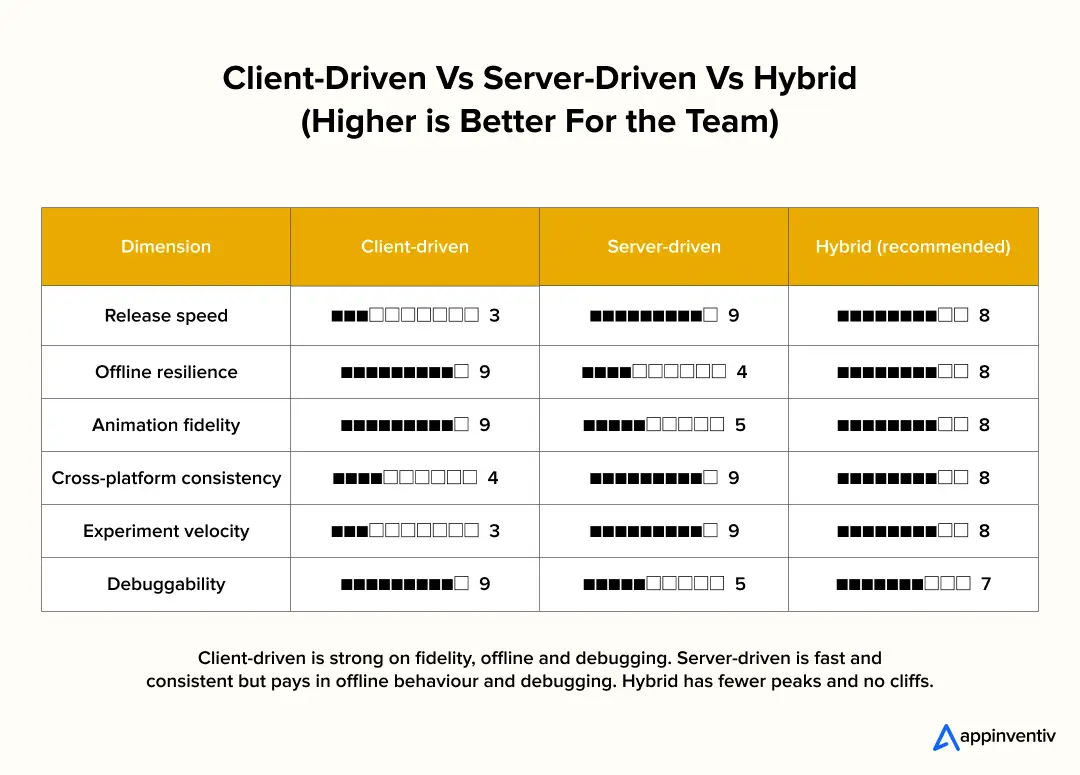
Notice the hybrid profile. It does not win every row, but it has no catastrophic row either. That is usually what a good enterprise architecture looks like: no heroic strengths, no hidden cliffs.
Server-Driven UI Architecture and Implementation: The Five Moving Parts
Strip away the vendor language and every working implementation has the same five parts. Getting these right matters more than which library you pick.
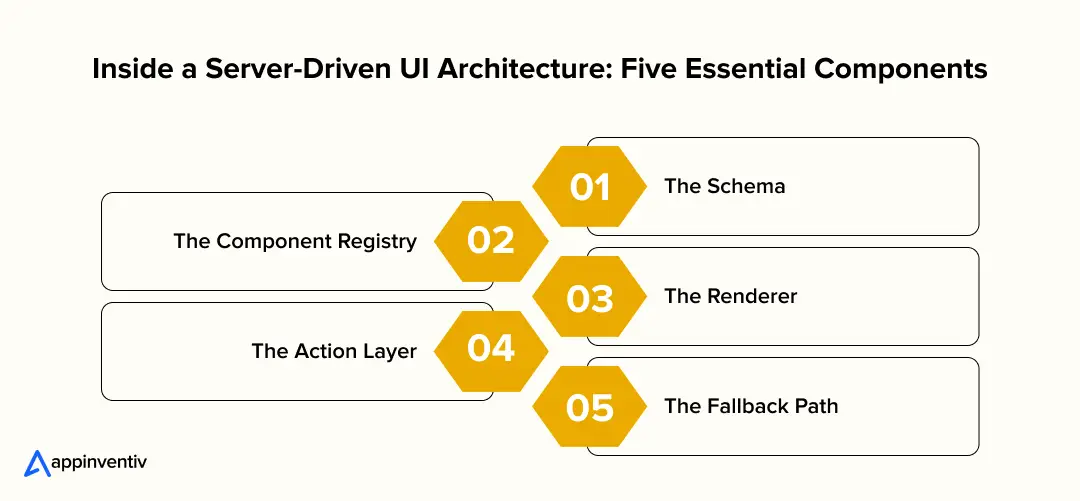
1. The Schema
This is the contract: a versioned description of screens, components and actions. Treat it like a public API, because it is one. Teams that treat it as an internal convenience end up with undocumented fields and silent breakage.
2. The Component Registry
The app ships with a fixed catalogue of components (a card, a list row, a banner, a form field). The server can only compose what the registry contains. This is the guardrail. A small, well-designed registry beats a sprawling one every time.
3. The Renderer
The renderer converts the schema into native views that users can interact with. It maps each component type to its registered native counterpart, applies properties, and arranges components according to the layout rules. It should remain predictable, heavily tested, and independent of business logic.
4. The Action Layer
Taps, submits and navigation need to be described too: “open this screen,” “call this endpoint,” “show this confirmation.” This is where complexity hides. Keep the action vocabulary tiny and push anything involving device capabilities, such as biometrics, camera or secure storage, to native handlers.
5. The Fallback Path
Every server-driven screen needs a defined answer to “what if the payload is invalid, late or unsupported by this app version?” In enterprise environments, where users run versions you cannot force-update, this is not optional. Cache the last good screen, ship a native fallback, and version your components so older apps degrade gracefully rather than crash.
Implementation order matters as much as the parts. Start with one read-heavy, low-risk screen. Prove the renderer, the schema versioning and the fallback before you let anything transactional near it.
Let our experts help you plan the five core components of your SDUI architecture around performance, security, and compatibility.
The Server-Driven UI Tech Stack, Without the Hype
There is no single canonical server-driven tech stack, but the layers are consistent from one enterprise build to the next. The table maps each layer to its job and to the options teams most often use. The right choice depends on what your engineers already know and which platforms you support.
| Layer | What it does | Common options |
|---|---|---|
| Client renderer | Turns schema into native screens | SwiftUI (iOS), Jetpack Compose (Android), or Flutter / React Native |
| Component registry | Fixed catalogue the server can compose from | Shared design system with design tokens and versioned components |
| Schema contract | Versioned description of screens and actions | JSON Schema, Protobuf or GraphQL |
| Composition service | Assembles screens from domain services | Backend-for-frontend in Node.js, Kotlin or Java |
| Delivery layer | Serves, caches and gates payloads | CDN, caching, feature flags, remote config |
| Validation and testing | Catches bad payloads before users do | Schema checks in CI, payload snapshots, preview environment |
| Observability | Ties issues to a schema version | Crash reporting and analytics tagged per screen |
On build versus buy, an SDUI framework can save months. Open and commercial options exist, and large consumer apps such as Airbnb have publicly described their own platforms. Adopt where the problem is generic (rendering, versioning, delivery), and build where it is specific to your domain (the component vocabulary and the rules about who may change what).
Server-Driven UI Benefits: What the Business Actually Gains
Server-driven UI can reduce release dependencies, speed up interface changes, and give product teams greater control over user experiences. Here are the key benefits businesses can gain from its implementation.
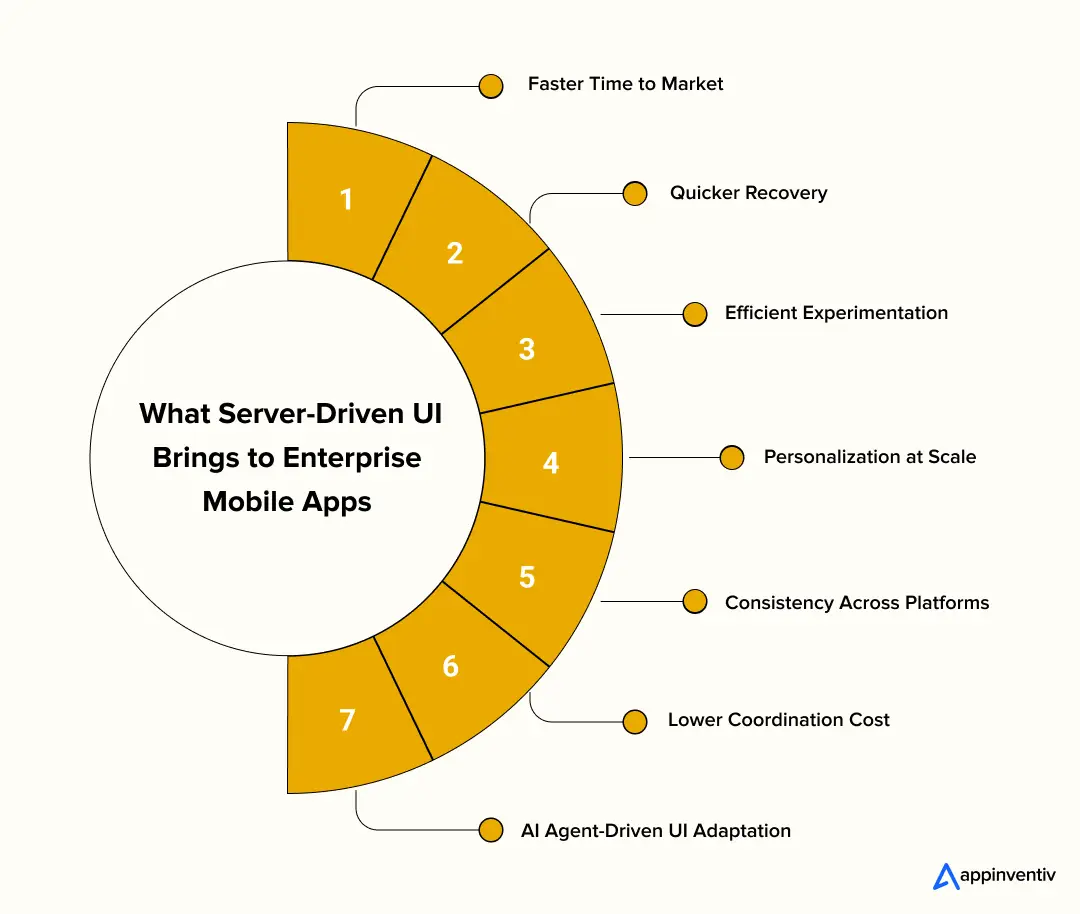
Faster Time to Market: A new layout, a revised sequence or a corrected line of copy reaches every active user as soon as it is published, so campaigns no longer depend on the release schedule.
Quicker Recovery: When a screen malfunctions, it can be withdrawn at the source within minutes, rather than through an emergency build, test and release cycle.
Efficient Experimentation: Variants are held on the server, allowing teams to run several tests concurrently on native screens and evaluate them on observed user behaviour.
Personalization at Scale: A single codebase can present different layouts by segment, region or plan tier, which is particularly valuable for multi-market enterprises.
Consistency Across Platforms: Layout decisions are made once and applied across various platforms, so iOS and Android users receive a consistent experience and brand rules are enforced centrally.
Lower Coordination Cost: Routine UI updates no longer require an engineering sprint, which frees engineers for more complex work. These server-driven UI advantages compound over time: faster testing leads to better layouts, which in turn inform the next test.
AI Agent-Driven UI Adaptation: AI agent-driven UI can interpret user intent and context to recommend or assemble suitable interface components within predefined rules. Combined with server-driven UI, this can support more adaptive workflows while keeping permissions, security checks, and critical actions under controlled application logic.
Server-Driven UI Use Cases: How Well-Known Teams Apply It
The pattern established its reputation at organizations with very large audiences and constant interface change. The examples below draw on public engineering write-ups and industry coverage, and should be read as illustrations of the approach rather than audits of current systems.
Airbnb: Airbnb’s Ghost Platform is the most frequently cited example. A single server-defined screen description serves iOS, Android and web, allowing a product team to launch an experiment once rather than coordinate three parallel builds.
Meta: The news feed is an early, large-scale case. The server describes each story card, and the app renders it as native views, so the feed can change for any audience segment without a release.
Lyft: Lyft is reported to use the approach in its driver app, where an unintended layout change directly affects people at work. In that context, the ability to withdraw a change immediately matters as much as the speed of shipping it.
Shopify: The merchant app applies it so that sellers see layouts reflecting their plan, region and business type, rather than a single screen designed for all.
The common thread is clear: feeds, search results and dashboards that are content-led, frequently changed and closely measured.
UI Lessons from Appinventiv: KFC, Adidas and Pizza Hut
Appinventiv’s three successful projects demonstrate how effective UI/UX in mobile app development can improve user engagement, conversion rates, and customer experience. These projects highlight the importance of balancing consistent design standards with flexibility across user journeys.
Adidas
Adidas launched apps for Saudi Arabia and Qatar while preserving the brand’s logo, colour palette, and design system. The interface included multilingual and multi-currency support, along with animated, video-led landing screens that presented products through a more engaging shopping experience.
The apps recorded 2 million downloads and acquired 500,000 new users, expanding the brand’s digital reach across both markets.
Pizza Hut
Pizza Hut introduced two apps across the UAE, Egypt, Bahrain, and Saudi Arabia. The development process began with user research, wireframing, and journey mapping to align the interface with customer expectations. Fast screen transitions remained a priority, even when users navigated large menu datasets.
The resulting apps achieved 30% higher conversion and more than 50,000 downloads, demonstrating the value of a carefully planned ordering experience.
KFC
KFC launched seven apps across the Middle East, with a UI/UX design tailored to different ordering preferences. The home screen brings delivery, self-pickup, drive-thru, dine-in, and carhop together, while QR-based restaurant ordering, order history, and multiple payment gateways simplify the customer journey.
The redesign delivered 22% higher conversion and a 4.5-star rating. More than 50% of orders came through the app, while dependence on third-party aggregators fell from around 90% to under 50%.
The Reversibility Test: A Five-Question Filter We Use Before Any Screen Goes Server-Driven
Across enterprise engagements, we replaced screen-by-screen debate with a consistent set of questions, which we call the Reversibility Test. Its premise is simple: a screen is a good candidate when a wrong version is cheap to detect and cheap to reverse. Apply it to a screen on your own roadmap.
The Reversibility Test (tick what is true for your screen)
| ✓ | Question |
|---|---|
| ☐ | It changes more often than our release cycle |
| ☐ | It is built from repeatable blocks (cards, rows, banners) |
| ☐ | A wrong version causes no financial, security or safety harm (VETO: if this is false, keep it native) |
| ☐ | A cached or native fallback is acceptable |
| ☐ | Layout changes will go through review and audit |
| Score | Verdict |
|---|---|
| 4–5 ticks | Good candidate. Start here, with fallbacks and review in place. |
| 3 ticks | Hybrid. Drive the layout from the server, keep sensitive logic native. |
| 0–2 ticks | Not yet. The case is weak; revisit when the surface changes more frequently. |
Two rules apply. First, the harm question is a veto: if harm is possible, the screen stays native regardless of its other scores. Second, a “belongs” verdict means “belongs first”: sequence matters, and the platform should be proven on safe surfaces before its remit widens.
How to Implement Server-Driven UI: A Six-Step Path
Applying the right UI design principles can improve usability, strengthen user engagement, and make mobile experiences easier to navigate. The following steps outline how to implement server-driven UI effectively.
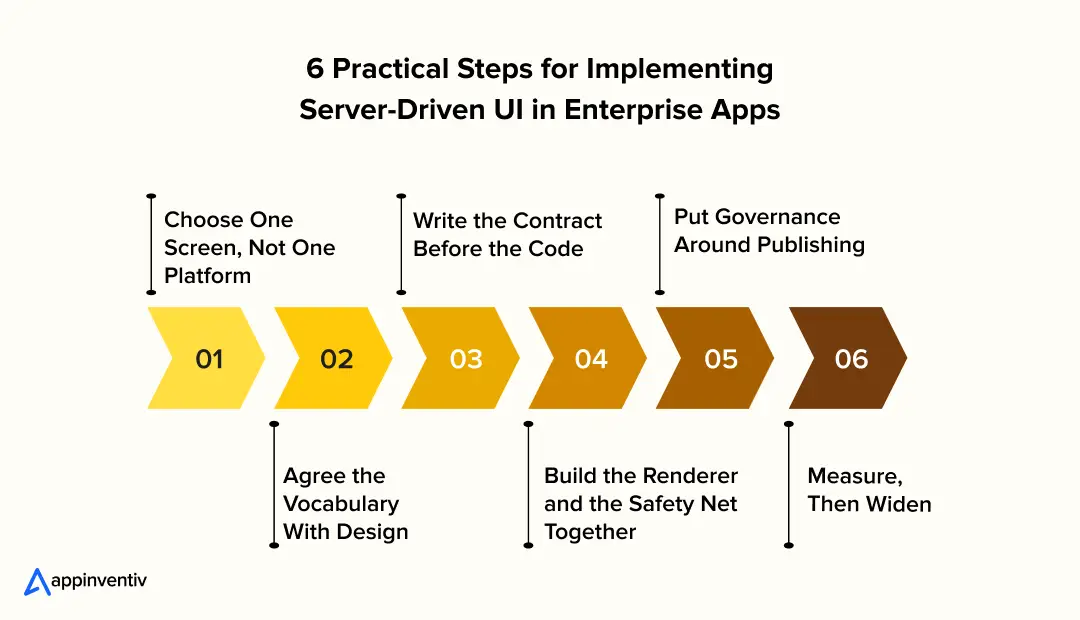
- Choose One Screen, Not One Platform
Apply the Reversibility Test above and select a content-led screen with a high change rate. An early success on a low-risk surface builds stakeholder confidence faster than a broad rollout.
- Agree the Vocabulary With Design
Agree a small starter set of components, such as text, image, button, card and list, and document the rules for each. Design and engineering should co-own this catalogue from the outset.
- Write the Contract Before the Code
Define the schema, the allowed actions and the versioning rules, including what an older app should do when it meets a component it does not know.
- Build the Renderer and the Safety Net Together
Ship the renderer with cached last-valid screens, a native fallback and logging for unexpected payloads, so that failures remain contained rather than visible to users.
- Put Governance Around Publishing
Introduce schema validation in CI, a preview environment, approvals and an audit trail. The principal server-driven UI challenges are organisational: who may publish, how a change is tested, and how quickly it can be rolled back.
- Measure, Then Widen
Track time from idea to live layout, experiments run and forced updates avoided. Extend scope only when those numbers improve, and preserve an exit path: a healthy platform allows a screen to return to native within a sprint.
Final Thoughts: Be Deliberate About Who Owns the Decision
Server-driven UI for mobile apps is neither a universal solution nor a passing trend. It is a decision to let certain screens be owned by the people closest to the content and the customer, rather than by the release calendar. For home surfaces, onboarding, offers, notices and multi-market variation, that is a sound and often highly effective trade. For authentication, payments, offline work and high-fidelity interaction, it is a trade to decline.
The teams that succeed with server-driven UI are not those with the most sophisticated schema, but those with the clearest boundaries and the discipline to maintain them. Mobile app consulting services can help teams assess these boundaries, evaluate architectural trade-offs, and define a practical implementation strategy.
Define the line early, document it, and review it every quarter. Good architecture is largely a series of deliberate answers to one question: who should own this decision?
Identify the right use cases to reduce release overhead, control maintenance costs, and improve development efficiency. Start with an ROI assessment today.
How Appinventiv’s UI/UX Design Services Fit In
Whether a screen ends up native, server-led or a hybrid of both, the quality of the interface still depends on design decisions made early: who the user is, what their journey looks like and which moments must never change. This is where our work begins.
Appinventiv’s UI UX design services apply research, wireframing and user journey mapping, keep every screen faithful to the brand’s design system, and design mobile-first so that flexibility never compromises clarity.
As design, development and deployment operate together, the component vocabulary an app depends on is defined with engineering involved from the start, which keeps a flexible interface reliable at enterprise scale.
Connect with our experts to define the right UI architecture for your mobile app, balance flexibility with performance, and build an experience that supports long-term business goals.
FAQs
Q. Can you build a server-driven UI without extensive coding?
A. Yes, we can create a limited code UI at Appinventiv using existing component libraries, schema-based configurations and a low-code development tool, which is server-driven. But initially setting this up still involves developers configuring the component registry, rendering logic, API contracts and security rules.
Q. What is server-driven UI (SDUI) in mobile app development?
A. Server-driven UI (SDUI) is an architecture where a server provides structured data to an app to dictate how its UI should look on a mobile device. It allows the teams to make changes on supported screens, layouts and content without publishing a new version of the application for each update.
Q. Where should server-driven UI be used in enterprise mobile apps, and where should it not be used?
A. Server-driven UI for mobile apps is perfect for onboarding flows, promoting banners, dashboards, content feeds, and market-specific screens that need regular updates. It is not well suited for authentication, payment, and workflows that require advanced device features and features that cannot be completed without an internet connection. These functions should be better controlled natively, be predictable and be more secure. Hybrid architecture is a good fit for enterprise applications.
Q. What are the best practices for implementing server-driven UI in large-scale mobile applications?
A. Here are some of the top best practices to successfully implement server-driven UI in enterprise mobile apps:
- Define a versioned schema and API contract
- Maintain a controlled component registry
- Separate rendering from business logic
- Keep the action layer simple and secure
- Validate server payloads before rendering
- Implement caching and native fallback screens
- Test backward compatibility across app versions
- Monitor rendering errors and performance
- Apply role-based access controls and data validation
- Review component usage and schema changes regularly.
Q. What are some of the pros and cons of server-driven UI?
A. Server-driven UI allows teams to update supported screens without waiting for app store releases. It speeds up content changes, supports market-specific experiences, and reduces repeated development work across platforms. It also gives product teams greater control over interface changes.
However, SDUI adds complexity to schema management, component versioning, testing, and debugging. Rendering depends on payload quality and network availability, while unsupported components can cause failures. Security-sensitive features and complex native interactions may also require platform-specific implementation.


Fast 2-minute response, fully NDA-protected.

Why and How to Create an Omni-Channel Retail Customer Experience?
In the present Retail era, brick-and-mortar stores are undergoing a myriad of changes in their processes. They are not only coming up with different lucrative discounts and offers to lure their target audience, but are also exploring different channels for driving higher incentives. They are looking into ways to provide a seamless and interactive experience…