



























How to Integrate an AI Voice Assistant with CRMs: Salesforce, HubSpot, and Microsoft Dynamics

 Share -


- 01How CRM Integration Powers Enterprise AI Voice Assistants
- 02Enterprise Architecture Behind AI Voice Assistant CRM Integration
- 03How to Integrate an AI Voice Assistant with Salesforce: Key Steps for Enterprise Teams
- 04How to Integrate AI Voice Assistants with HubSpot
- 05How to Integrate AI Voice Assistants with Microsoft Dynamics 365
- 06How Much Does CRM-Integrated Voice AI Development Cost?
- 07Build vs Buy: Which Voice AI Strategy Fits Enterprise Needs?
- 08Business Impact of CRM-Integrated Voice AI
- 09Enterprise Integration Principles That Apply Across All CRM Platforms
- 10Major Enterprise Challenges in AI Voice Assistant CRM Integration
- 11Security, Compliance, and Governance Best Practices
- 12Step-by-Step Enterprise Implementation Roadmap
- 13How Appinventiv Helps Enterprises Build CRM-Integrated AI Voice Systems
- 14Frequently Asked Questions

Key takeaways:
- Voice assistants work far better once they can access CRM records, customer history, support activity, and live workflow data.
- Enterprise deployments rely on APIs, middleware, webhooks, and event pipelines working together without delays during customer conversations.
- Salesforce, HubSpot, and Dynamics 365 integrations help automate ticketing, lead routing, scheduling, and post-call CRM updates.
- RAG pipelines help voice assistants respond using actual business data instead of generic model-generated answers during live interactions.
- Strong deployments focus early on security controls, escalation paths, synchronization reliability, and clean CRM data management.
A voice assistant without CRM access is mostly guessing. It can answer questions and route calls, but it cannot see customer records, support history, sales activity, or open deals. The conversation breaks fast once the caller asks for anything specific.
That is why AI voice assistant CRM integration has become essential for large enterprises connecting with Salesforce, HubSpot, and Microsoft Dynamics 365.
The CRM gives the assistant a live business context. During a call, the system can fetch account details, update pipeline stages, create support tickets, log summaries, or trigger workflows from the same interaction.
The setup takes more than a basic API connection. Most enterprise teams handle webhook events, OAuth tokens, telephony infrastructure, rate limits, and real-time synchronization across multiple systems. The assistant must process speech, retrieve CRM data, maintain session memory, and return accurate responses within a few seconds.
Older IVR systems followed prewritten flows. Modern voice assistants work differently. They handle dynamic conversations and execute CRM actions during live interactions. That shift is pushing enterprise adoption quickly.
Market.us projects the market for top AI voice assistants with CRM integration to reach $47.5 billion by 2034, growing at a 34.8% CAGR. Much of that growth is tied to customer support, sales operations, and workflow automation deployments.
This blog will explain how to integrate an AI voice assistant with CRM platforms like Salesforce, HubSpot, and Microsoft Dynamics 365. It will also explain the architecture behind these systems, the operational challenges teams face during deployment, and the security and governance controls required for production-scale environments.
Enterprises still relying on disconnected IVRs risk slower response cycles, fragmented workflows, and rising support costs.

How CRM Integration Powers Enterprise AI Voice Assistants
A voice assistant becomes useful only after it gains access to customer context, which is why enterprises looking to integrate AI voice assistants with CRM systems see adoption rising consistently.
That explains why enterprise adoption continues to rise. Large organizations already account for more than 70% of the voice AI market, driven largely by support automation and operational scale requirements.
The CRM supplies that context. It stores customer records, sales activity, ticket history, communication logs, and workflow rules that guide live conversations.
From Scripted IVRs to Context-Aware Conversations
Traditional IVRs followed fixed menus and predefined responses. While chatbot CRM integration addressed some of those limitations through text, modern voice CRM systems go further by processing intent in real time during spoken conversations.
They retrieve CRM records during active calls and adjust responses based on customer history, account status, or support activity.
A customer calling about an unresolved ticket should not repeat the same issue three times. CRM-connected voice systems reduce that friction by carrying customer history into the conversation itself.
The shift matters for customer experience as well. Voice interfaces are part of a broader trend where AI is replacing traditional UI patterns across enterprise software.
Recent market data shows that 87% of U.S. consumers feel frustrated with repeated transfers and disconnected support interactions.
What Happens Without CRM Context
CRM voice systems without proper integration create operational gaps fast:
- Duplicate customer records
- Repeated verification steps
- Incomplete call summaries
- Broken handoffs between teams
- Incorrect lead routing
- Delayed follow-ups
- Fragmented omnichannel history
Most failed deployments trace back to disconnected systems rather than poor speech models.
Core Business Functions Enabled Through CRM Integration
An AI voice assistant for CRM systems like Salesforce or Microsoft Dynamics 365 can execute the following tasks during live conversations. These align closely with enterprise CRM use cases that large organizations already depend on:
- Lead qualification and scoring
- Automated appointment scheduling
- Intelligent sales routing
- Support ticket creation
- Post-call transcript summaries
- Workflow and webhook triggering
- Real-time CRM record updates
- Omnichannel conversation continuity
Some enterprises already report shorter resolution cycles after deployment. Market studies cite telecom support environments reducing average call handling time by nearly 35%.
CRM Data Improves Response Accuracy
Enterprise voice assistants rely on grounded business data. These CRM voice records act as structured memory during conversations. This reduces hallucinated responses and improves response relevance across support, sales, and account management workflows.
Also Read: AI In CRM: Redefining How Businesses Connect with Customers
Enterprise Architecture Behind AI Voice Assistant CRM Integration
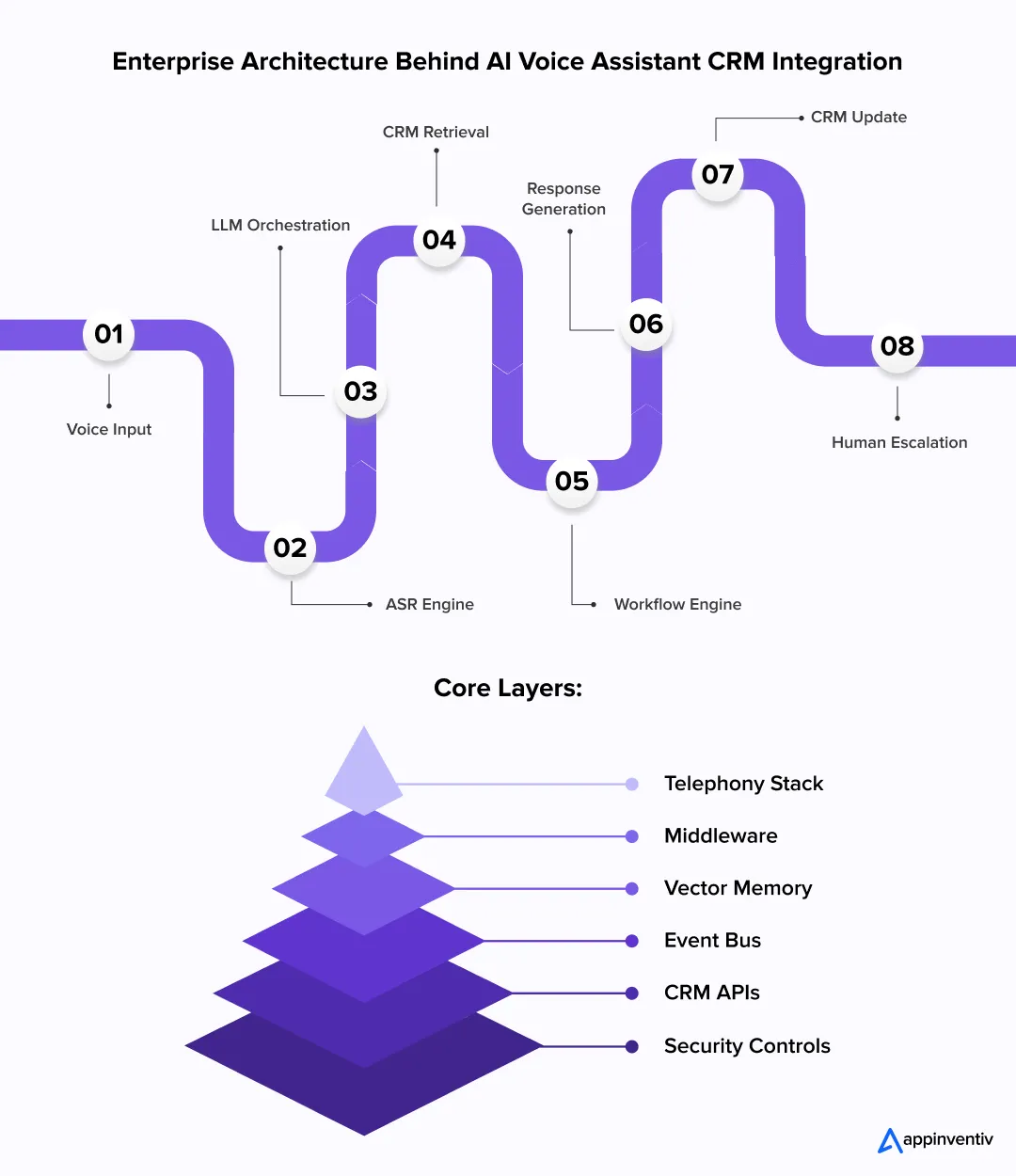
Enterprise voice systems rely on multiple infrastructure layers working together in real time. A delay of even two or three seconds can disrupt conversations and reduce resolution rates. That is why enterprise deployments focus heavily on orchestration, memory management, event processing, and low-latency data retrieval.
Core Components of the Integration Stack
For teams looking to understand the full build process, building an AI voice agent from scratch involves assembling the following layers that enterprise deployments depend on:
- ASR (Automatic Speech Recognition): Converts live speech into text streams.
- Enterprise LLM orchestration layer: Handles intent recognition, response generation, tool calling, and conversation state management.
- TTS (Text-to-Speech): Converts generated responses into natural voice output.
- CRM APIs: Fetch and update customer records during active calls.
- Middleware layer: Manages authentication, API routing, retries, and data transformation.
- Vector memory databases: Store embeddings for semantic retrieval and long-context conversations.
- Workflow engines: Execute downstream actions such as ticket creation or lead assignment.
- Event bus systems: Process asynchronous CRM and telephony events across distributed systems.
- Telephony infrastructure: Connects SIP trunks, PBX systems, VoIP platforms, and call routing services.
Bringing these components together requires a deliberate approach to AI API integration across enterprise infrastructure.
Most enterprises now deploy these systems through microservices and containerized workloads using Kubernetes or serverless event pipelines.
How Real-Time Bidirectional CRM Synchronization Works
The voice CRM system must read and write data continuously during live interactions. Enterprise deployments usually rely on two-way synchronization. The assistant retrieves the customer’s history before responding and writes the conversation data back into the CRM after the interaction ends. Most systems use a mix of webhook listeners and API-based synchronization.
API polling creates delays and increases infrastructure load. Event-driven architectures work faster. CRM triggers push updates instantly via webhooks or message queues such as Kafka or RabbitMQ.
This architecture supports:
- Real-time ticket updates
- Pipeline movement
- Contact creation
- Activity logging
- Call disposition tracking
Low latency matters here. A delayed CRM lookup can interrupt live conversations. Most enterprise systems aim for sub-second retrieval of customer-state data.
Transactional consistency also matters. Failed writebacks can create duplicate records, disrupt workflows, or lead to inaccurate reporting across sales and support teams.
Retrieval-Augmented Personalization Using CRM Data
Modern voice assistants depend heavily on retrieval pipelines. The CRM serves as the AI system’s structured memory.
During a call, the orchestration layer retrieves:
- Account history
- Prior conversations
- Open tickets
- Purchase records
- Communication preferences
- Support escalations
The system injects this data into the LLM context window before generating responses. This process is commonly called Retrieval-Augmented Generation (RAG).
RAG pipelines reduce hallucinated responses and improve contextual grounding. Instead of generating generic answers, the assistant responds using verified enterprise data tied to the customer session.
Human Escalation and Fallback Architecture
No system built through enterprise AI voice agent development services operates fully unattended. Early-stage deployments often restrict sensitive CRM actions through approval-based workflows.
Refund requests, account changes, or escalation closures may require human review before execution. Escalation logic remains a critical part of production deployments.
Most systems monitor:
- Sentiment shifts
- Silence duration
- Repeated intent failures
- Low confidence scores
- Compliance-sensitive requests
Once thresholds are crossed, the platform transfers the interaction to a human agent. Session memory, transcripts, CRM activity, and conversation summaries are carried over with the escalation request.
Without handoff continuity, customers repeat information and resolution times increase quickly.
How to Integrate an AI Voice Assistant with Salesforce: Key Steps for Enterprise Teams
Many enterprises choose Salesforce for AI voice deployments. The platform stores customer activity, support history, opportunity data, and workflow logic in one environment. The voice assistant becomes more useful by reading and updating this data in real time during live conversations.
Salesforce APIs and Integration Options
Salesforce AI voice assistant integration typically starts with API development fundamentals, using REST endpoints to access customer records, update contacts, create tickets, and log activities. Streaming APIs handle real-time event delivery across high-volume environments.
Many enterprises combine voice AI systems with tools like Salesforce Einstein, Agentforce, Apex triggers, and MuleSoft. Middleware services usually sit between the voice layer and Salesforce orgs to manage token refresh, retry logic, data mapping, and request throttling.
Common Salesforce Voice AI Workflows
Conversational AI for Salesforce CRM empowers sales and support teams. The system handles several automated tasks during live calls:
- Lead qualification and opportunity status updates
- Case routing and ticket creation
- Appointment scheduling and follow-up workflows
- Call transcript logging and summaries
Most workflows trigger Salesforce actions through APIs or Apex-based automation rules. Enterprises looking for a broader view of connecting third-party systems can also explore Salesforce integration solutions beyond voice AI use cases.
Teams still evaluating platforms can explore how to choose the right CRM for their business needs.
Key Security and Governance Considerations in Salesforce Environments
Enterprise deployments require strict access controls. Most organizations use OAuth 2.0 authentication, role-based access, field-level permissions, and audit trails. PII masking and encrypted session storage play a major role in regulated industries. Securing the API layer itself remains critical.
Enterprise Challenges When Integrating with Salesforce
Salesforce environments often contain custom objects, legacy workflows, and deeply connected business logic. A poorly configured integration can create duplicate records, API bottlenecks, or workflow conflicts.
Large deployments face API rate limits, data synchronization delays, multi-org complexity, and sandbox migration risks. Most enterprises solve this problem through event-driven architectures and centralized orchestration layers.
Before diving into the integration itself, teams that are still evaluating platforms can explore how to choose the right CRM for their business needs.
How to Integrate AI Voice Assistants with HubSpot
HubSpot AI voice assistant implementation is popular among mid-sized and enterprise sales teams. They use it as the central system for customer communication, lead tracking, and service operations.
Connecting a voice assistant lets it access contact records, ticket activity, deal stages, and engagement history during live conversations.
HubSpot CRM Objects, APIs, and Workflow Automation
Most integrations revolve around HubSpot CRM objects like contacts, companies, deals, tickets, and engagement records.
- The voice assistant interacts with these objects through HubSpot APIs.
- During a call, the system pulls customer details and updates pipeline stages.
- It can also attach call summaries directly to the CRM timeline.
- HubSpot workflows handle downstream automation.
A completed call can assign leads, trigger onboarding emails, open support tickets, or change lifecycle statuses.
Most enterprise teams place middleware between HubSpot and the voice layer to handle webhook delivery, token refresh cycles, API retries, and event processing.
AI Voice Assistant Use Cases Within HubSpot Ecosystems
HubSpot voice deployments focus on high-volume customer workflows:
- Inbound lead qualification and demo booking
- Customer onboarding and follow-up reminders
- Renewal outreach and support call routing
- Post-call transcript generation
Sales teams review AI-generated summaries directly from the contact activity feed after each interaction.
Scaling Voice Automation Across Marketing, Sales, and Service Hubs
Multiple teams sharing the same CRM environment increases operational complexity. For example, a billing support call can automatically pause active sales outreach.
A poor customer experience score can suppress marketing campaigns. These actions rely on clean event synchronization across workflows.
HubSpot Integration Challenges Enterprises Must Address
Most production issues appear after scale increases. Common problems include duplicate contacts, conflicting automation rules, delayed webhooks, and API throttling. CRM governance becomes a critical part of the deployment. Clean data structures matter just as much as the AI model itself.
How to Integrate AI Voice Assistants with Microsoft Dynamics 365
Many enterprise teams run customer operations through Microsoft Dynamics 365. Sales, service, finance, and field teams work inside the same environment. Connecting a voice assistant lets it access customer records during calls and update business activity in real time.
Dynamics 365 + Copilot + Voice AI Architecture
Microsoft Dynamics CRM AI integration involves several moving parts. The speech engine converts live audio into text. The orchestration layer processes intent, retrieves CRM data, and sends actions to Dynamics 365.
The response then returns through the voice layer. Many organizations combine voice systems with Microsoft Copilot features to automate tasks.
During a live interaction, the assistant can pull records, create cases, update opportunities, and generate summaries. Most environments run these actions through APIs and middleware connected with Microsoft cloud infrastructure.
Integrating with Dataverse, Power Automate, and Teams
Microsoft Dataverse stores operational data inside Dynamics environments. The voice assistant reads customer records directly from Dataverse tables during conversations. Power Automate handles process execution after the interaction.
A completed call can send alerts, assign tickets, route approvals, or trigger escalation paths. Many support teams connect the system with Microsoft Teams so live agents can join conversations during escalations.
Building Unified Customer Intelligence Across Microsoft Ecosystems
Most enterprises using Microsoft products store customer activity across several systems. Data from Outlook, Teams, Dynamics, and ERP systems feed into the same workflow layer. This gives the voice assistant better context during conversations. The system references open cases, billing history, or prior meetings without forcing the customer to repeat information.
Governance and Identity Management Considerations
Security controls become strict at enterprise scale. Most organizations use Azure AD for authentication and role-based access management. Large deployments rely on tenant isolation, conditional access, audit logging, and data residency enforcement. These controls help enterprises manage customer data across regions and regulated environments.
Production deployments demand event pipelines, middleware orchestration, escalation logic, and low-latency CRM synchronization across environments.
How Much Does CRM-Integrated Voice AI Development Cost?
Enterprise teams need clear budgets for a new build. A custom deployment requires deep investment in infrastructure, speech models, and secure data sync.
Total CRM voice assistant software development costs typically range from $50,000 to $500,000+ for an initial production setup.
Your architectural choice dictates the overall price. Simple integrations using basic vendor tools cost less but offer limited control. Custom Enterprise AI voice agent development services sit at the higher end of the price scale.
| Expense Category | Typical Cost Range (USD) | Key Drivers |
|---|---|---|
| Core Voice Infrastructure | $50,000 to $120,000 | Custom speech-to-text models, telephony trunks, latency tuning |
| CRM Data Pipelines | $40,000 to $100,000 | API middleware, secure webhooks, two-way data syncing |
| Security & Compliance | $30,000 to $80,000 | SOC 2 controls, PII data masking, role-based access rights |
| Deployment & Tuning | $40,000 to $200,000 | Testing cycles, LLM prompt engineering, edge hosting setups |
Ongoing operational fees add to the base build expense. You must account for cloud infrastructure hosting, LLM token charges, and telephony network costs. Custom AI integration services help plan these fees to prevent unexpected cost spikes at scale.
Build vs Buy: Which Voice AI Strategy Fits Enterprise Needs?
Enterprise executives must choose between building a custom platform or buying vendor software. This decision impacts your data control, launch speed, and total tech spend. Deciding how to deploy AI Agent CRM Integration requires looking at internal engineering skills and long-term business goals.
| Option | Business Benefits | Operational Downsides |
|---|---|---|
| Build Custom Platforms | Complete data control. Custom data workflows. | High engineering costs. Long timeline for CRM voice assistant software development. |
| Buy Ready-Made Software | Fast setup times. Quick AI Agent CRM Integration across teams. | Rigid code rules. Monthly subscription fees. |
Business Impact of CRM-Integrated Voice AI
Connecting voice tools to your customer database drives clear operational gains. Market data shows the financial and practical results of these setups:
- Automated systems lower overall operating costs by 20% to 30% in high-volume workflows.
- The technology addresses consumer friction, as 87% of buyers feel frustrated by repeated call transfers.
- Real-time data updates eliminate manual entry errors and speed up support cycles.
A large telecom enterprise used this framework to manage 1.8 million monthly customer calls and recorded these metrics:
- Average call handling times dropped by 37%.
- Support teams resolved open tickets 42% faster.
- Manual database updates decreased by 31%.
Enterprise Integration Principles That Apply Across All CRM Platforms
An AI voice assistant for CRM systems follows similar architectural patterns across Salesforce, HubSpot, and Microsoft Dynamics 365. The real challenge is not connecting systems. The challenge is maintaining clean data flow, reliable workflow execution, and accurate customer context during live conversations.
Core Integration Principles
These practices, found in the best CRM integration with voice AI features, appear in most successful enterprise deployments.
| Integration Area | Enterprise Requirement |
|---|---|
| CRM synchronization | Read customer history before the call and write interaction data back after the conversation |
| Idempotent API writes | Prevent duplicate tickets, records, and workflow actions during retries |
| Middleware orchestration | Manage retries, queue handling, API failures, and event routing |
| Human approval workflows | Restrict sensitive CRM actions until human review is completed |
| CRM field mapping | Connect sentiment scores, transcript summaries, and intent categories with CRM objects |
| Structured summaries | Store action items and summaries instead of raw transcript dumps |
Why Operational Scope Matters Early
Most enterprises, particularly those running custom CRM software, start with a limited deployment scope, then scale AI-powered voice automation for CRM across departments.
Common starting workflows include:
- Inbound lead qualification
- Appointment scheduling
- Support call routing
- Renewal reminders
- Post-call summarization
A smaller rollout helps teams validate CRM synchronization, escalation logic, and workflow reliability before expanding into more complex automation layers.
Event Handling and Workflow Reliability
Enterprise systems must continue operating even during failures or traffic spikes.
Most production environments use:
- Retry queues for failed API requests
- Webhook monitoring for delayed events
- Session orchestration layers for conversation continuity
- Event buses like Kafka or RabbitMQ for distributed processing
Without proper orchestration, failed CRM updates can trigger duplicate workflows or corrupt customer records across systems.
Also Read: The Cost and Benefits of Developing an AI-Powered Smart Personal Assistant App
Major Enterprise Challenges in AI Voice Assistant CRM Integration
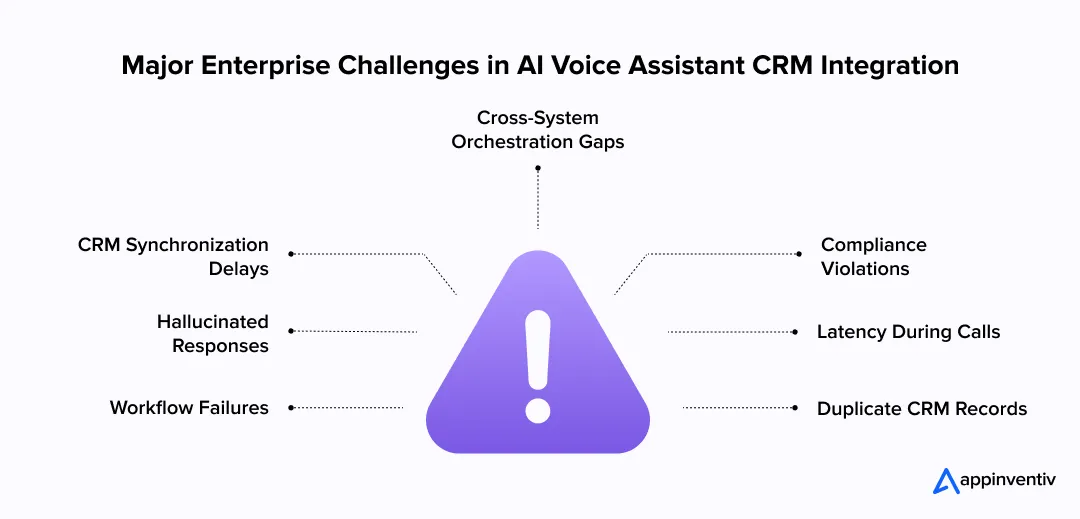
Most AI voice bot integration with CRM failures happen after deployment, not during demos. Production environments contain legacy systems, inconsistent CRM records, regional compliance rules, and thousands of simultaneous customer interactions. That complexity creates operational risks quickly.
Latency and Real-Time Conversation Constraints
Voice systems must respond within seconds. Delays during CRM lookups or orchestration calls can interrupt conversations and frustrate customers.
Many enterprises reduce latency through:
- Edge AI processing
- Event-driven architecture
- Cached customer-state retrieval
- Low-latency vector databases
- Edge computing for regional infrastructure deployment
Data Synchronization and CRM Integrity Risks
A failed writeback in a CRM voice environment can create duplicate contacts, broken workflows, or inaccurate reporting data. Many enterprises use idempotent write operations so repeated API calls do not generate duplicate tickets, records, or workflow actions during retry events. This becomes a major issue across sales and support operations.
Most enterprises address this through:
- Webhook-based synchronization
- Idempotent API design
- Retry queues
- Record validation rules
- Centralized middleware orchestration
Hallucinations and Context Reliability
Voice assistants without grounded enterprise data often generate inaccurate responses. This becomes risky in healthcare, finance, and customer support workflows, and it is one of the core reasons voice agents fail in production.
Most production systems reduce hallucinations through:
- RAG pipelines
- CRM-grounded prompts
- Confidence scoring
- Restricted tool access
- Human escalation logic
Compliance, Consent, and Data Residency
Call recordings and customer transcripts often contain regulated information. Enterprises operating across multiple regions must carefully manage consent rules and data storage policies.
Common controls include:
- PII masking
- Encrypted transcript storage
- Regional data hosting
- Consent logging
- Role-based access controls
Managing Multi-System Workflow Orchestration
Enterprise workflows rarely operate inside a single platform. A voice assistant often interacts with CRMs, ERP systems, ticketing platforms, payment gateways, and communication tools within a single conversation.
Most enterprises solve orchestration complexity through middleware layers, API gateways, and centralized event buses that coordinate actions across systems.
How a Global Telecom Enterprise Reduced Call Resolution Delays With CRM-Integrated Voice AI
A global telecom provider operating across North America and Europe struggled with fragmented support workflows spread across Salesforce, legacy ticketing systems, and regional call centers.
Agents spent too much time switching between systems during customer calls, which slowed issue resolution and increased operational load.
Appinventiv deployed a CRM-integrated AI voice orchestration layer connected with Salesforce APIs, webhook pipelines, retrieval systems, and workflow automation services.
The assistant retrieved customer records during calls, generated summaries, updated tickets, and routed escalations automatically based on customer intent and sentiment.
Within six months, the enterprise reported:
- 37% lower call handling time
- 42% faster ticket resolution
- 31% fewer manual CRM updates
- 28% reduction in escalation transfers
The deployment supported more than 1.8 million customer interactions each month.
Security, Compliance, and Governance Best Practices
Enterprise voice assistants process large volumes of customer data every day, which is why voice agent security must be built into the stack from day one. Call transcripts, payment details, medical information, support records, and internal business data often pass through the same system during live interactions.
Security controls cannot remain limited to basic API authentication. Many enterprises still prefer hybrid or on-premise deployments for sensitive workloads, particularly in regulated industries. Market.us reports that on-premise environments accounted for more than 62% of the market in 2024.
Most enterprises start with compliance alignment. Global deployments usually require support for:
- SOC 2 compliance controls
- GDPR data protection requirements
- HIPAA safeguards for healthcare environments
- ISO 27001 security management standards
Encryption plays a central role across the entire stack. Enterprises typically encrypt:
- Voice recordings
- CRM payloads
- Session memory
- API traffic
- Transcript storage
PII masking is equally important. Production systems often redact customer identifiers, payment details, and protected records before data reaches logging systems or LLM pipelines.
Access governance also becomes stricter at scale. Most organizations implement:
- Role-based access controls
- Conditional authentication policies
- API token rotation
- Session monitoring
- Audit logging across user and system activity
Model governance has become another major priority. Enterprises now track prompt activity, tool usage, retrieval sources, escalation events, and response accuracy across production deployments.
Observability platforms help operations teams monitor:
- Latency spikes
- Hallucination rates
- API failures
- Escalation frequency
- Workflow execution errors
Most enterprises avoid storing raw transcripts directly inside CRM records. The orchestration layer usually generates structured summaries, action items, and follow-up recommendations instead.
Without strong governance controls, voice AI deployments become difficult to audit, secure, and scale across regulated enterprise environments.
Step-by-Step Enterprise Implementation Roadmap
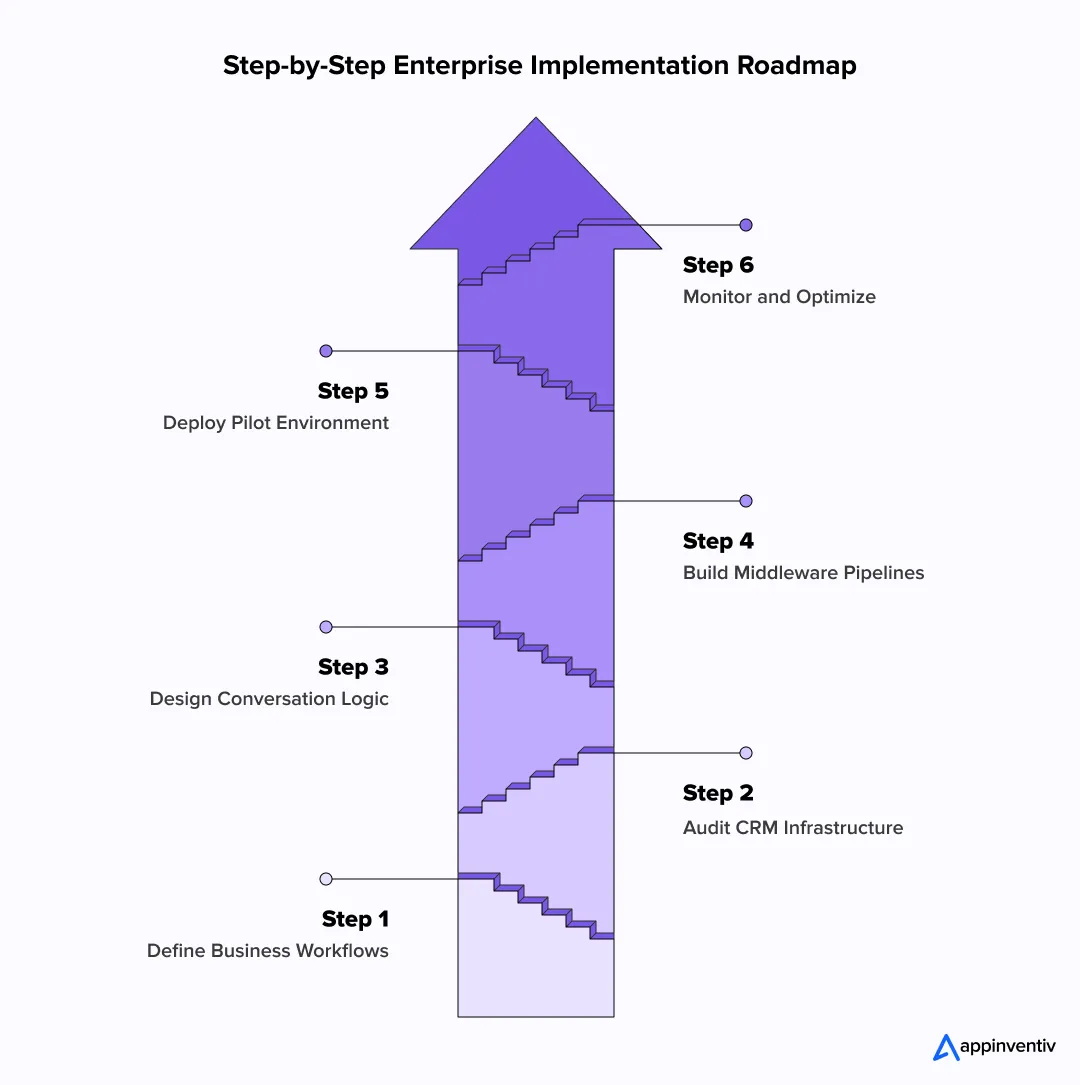
Most enterprise voice AI projects fail when teams rush to integrate AI voice assistants with CRM systems without first fixing operational gaps. The strongest deployments usually begin with workflow mapping, CRM cleanup, and infrastructure planning before any production rollout starts.
Define Business Objectives and Workflow Ownership
The first step in AI agent integration with CRM systems is identifying the exact workflows the voice assistant will handle. Teams usually define the assistant’s operational role early in the project. Some systems focus only on inbound support. Others handle outbound qualification, appointment scheduling, or renewal workflows.
Some enterprises focus on support automation. Others prioritize inbound sales qualification or appointment scheduling.
Each workflow needs clear ownership across:
- Sales teams
- Support operations
- IT departments
- Compliance teams
- CRM administrators
Without operational ownership, escalation paths and workflow rules break quickly after deployment.
Audit CRM Data Quality and API Readiness
Voice assistants depend heavily on CRM implementation quality. Duplicate contacts, outdated records, or broken workflows create inaccurate responses during live conversations.
Most enterprises audit:
- CRM object structures
- CRM field mapping and schema consistency
- API rate limits
- Workflow dependencies
- Record consistency
- Authentication policies
- Existing webhook infrastructure
Teams also map caller identity, sentiment scores, transcript summaries, and detected intent categories to CRM objects before production rollout begins. This stage often exposes operational issues unrelated to the AI model itself.
Design Conversation Flows and Escalation Logic
Production systems need a structured conversation design before launch. Teams usually define:
- Intent categories
- Escalation triggers
- Fallback responses
- Authentication steps
- Compliance-sensitive workflows
Most deployments also include confidence scoring and sentiment analysis to determine when human agents should take over.
Build Integration Middleware and Event Pipelines
Middleware connects the voice layer with CRM systems, telephony platforms, workflow engines, and internal applications.
Most enterprise deployments rely on:
- API gateways
- Webhook listeners
- Kafka event streams
- Retry queues
- Session orchestration services
This layer handles synchronization, workflow execution, and real-time event processing.
Pilot, Evaluate, and Continuously Optimize
Most enterprises begin with a limited voice CRM rollout before expanding globally. Teams monitor:
- Call resolution rates
- Escalation frequency
- CRM synchronization failures
- Latency performance
- Customer satisfaction metrics
The system improves over time through prompt tuning, workflow refinement, and better retrieval accuracy.
Build CRM-connected voice systems with secure orchestration, governance controls, and production-scale workflow reliability from day one.

How Appinventiv Helps Enterprises Build CRM-Integrated AI Voice Systems
Building an enterprise voice AI system requires much more than connecting APIs. Enterprises are investing in these deployments for measurable operational gains as well. Recent market studies show AI-powered support environments reducing operational costs by roughly 20% to 30% in high-volume workflows.
Teams must manage orchestration layers, CRM synchronization, workflow reliability, compliance controls, and low-latency infrastructure across production environments.
At Appinventiv, we deliver the best voice AI CRM integration solutions for enterprises, connecting securely with platforms like Salesforce, HubSpot, and Microsoft Dynamics 365.
Our teams specialize in hiring the right CRM software developer profiles, covering LLM deployment, workflow orchestration, retrieval pipelines, middleware engineering, and enterprise integration architecture.
Our enterprise AI capabilities include:
| Capability Area | Delivery Scale |
|---|---|
| AI-powered solutions delivered | 300+ |
| Data scientists and AI engineers | 200+ |
| Custom AI models deployed | 150+ |
| Enterprise AI integrations completed | 75+ |
| Bespoke LLMs fine-tuned | 50+ |
| Industries supported | 35+ |
Our teams also help enterprises improve operational performance through:
- 98% AI prediction accuracy
- 75% faster decision-making
- Up to 40% lower operational costs
- Up to 10x faster deployment cycles
Through our AI integration services, the focus stays on production-ready systems that operate reliably across enterprise-scale environments.
Let’s connect and build CRM-integrated voice AI before support costs rise further.
Frequently Asked Questions
Q. How to integrate voice AI with your CRM?
A. AI voice assistant CRM integration usually starts with the CRM APIs. The voice assistant needs permission to read customer records and write activity updates after each interaction. Most enterprise teams connect the system via middleware to manage webhooks, retries, authentication tokens, and workflow routing in one place. Teams also test latency, escalation paths, and CRM field mapping before rolling the system into production.
Q. What are the key benefits of integrating AI voice assistants with CRM?
A. A CRM voice assistant works with the actual customer context rather than generic prompts. It can check support history, pull account details, update tickets, and log call summaries during the conversation itself. Sales teams save time after calls, and support teams receive cleaner records. Businesses also get faster routing, better follow-up tracking, and fewer gaps between customer conversations across channels.
Q. What types of businesses benefit most from AI voice CRM integration?=
A. Companies with large support or sales operations usually benefit first. Hospitals use these systems to manage appointments and communicate with patients. Retail and telecom companies use them for customer service and order tracking. SaaS businesses often connect voice assistants with CRM workflows for demo booking, lead qualification, onboarding, and renewal calls across global customer accounts.
Q. How does AI voice CRM integration improve customer experience?
A. Most customers get frustrated when they repeat the same issue across multiple calls. CRM integration reduces that problem. The assistant can see earlier conversations, open tickets, purchase activity, or account status before responding. If the interaction moves to a human agent, the conversation summary and customer details follow. That keeps the handoff shorter and makes the interaction feel more connected.


Fast 2-minute response, fully NDA-protected.
AI Data Integration: How to Connect, Clean and Prepare Data for AI
Key takeaways: AI initiatives fail when fragmented, poor-quality data reaches models without sufficient context, controls or ownership. AI-ready pipelines must connect, clean, enrich, govern and continuously monitor data across its lifecycle. Real-time processing matters when AI decisions depend on current transactions, events, inventory or operational conditions. Data architecture should follow the AI use case, balancing…

AI-Native SDLC: Foundational 90-Day, 5R AI SDLC Adoption Playbook
Key takeaways: Why AI coding tools accelerate coding and software delivery How AI-native SDLC shifts engineering from code to intent, context, and outcomes The role of specifications, AI agents, and continuous verification in enterprise delivery How to redesign engineering teams for human–agent collaboration The platform, governance, and guardrails required to scale AI-native development A practical…
AI Agent Governance: How to Govern Autonomous AI Across Business Systems
Key takeaways: AI agents require controls at the action, identity, data, tool, and workflow levels. Every enterprise agent should have a registered owner, an approved purpose, and a defined risk tier. Access must be based on the agent’s task rather than inherited from a human user or shared service account. High-impact actions need real-time policy…