


























![70 Points Apple App Store Submissions Checklist [2019 Edition]](https://appinventiv.com/wp-content/uploads/2018/05/70-Points-Apple-App-Store-Submissions-Checklist.png)


How to Build an AI Voice Agent? Process, Costs & Features

 Share -



- 01Best Use Cases for AI Voice Agents in Production
- 02Business Case & ROI: Key Benefits of Developing an AI Voice Agent
- 03Step-by-Step Process to Build an AI Voice Agent
- 04Implementation of AI Voice Agent: Timeline & How Long Does It Take
- 05Core Features of an AI Voice Assistant With Enterprise-Grade Technology
- 06Key Components of an AI Voice Agent (What You Need to Build It)
- 07Enterprise Architecture of AI Voice Agents
- 08Designing Voice Intelligence: Prompts, Behaviors & Control Systems
- 09Testing, Reliability & Continuous Monitoring of Voice Agents
- 10What Does It Cost to Build an AI Voice Agent? Enterprise Breakdown
- 11Voice AI Ecosystem: Platforms, Models & Infrastructure Layers
- 12Build vs Buy vs Hybrid: Enterprise Decision Framework
- 13Steps to Build a No-Code AI Voice Agent
- 14Security, Compliance & Risk Management
- 15Implementation of AI Voice Agent at Scale: Challenges After Deployment & How Enterprises Address Them
- 16Best Practices for Deploying an AI Voice Agent for Business at Enterprise Scale
- 17Future Trends in AI Voice Agents (2026–2030)
- 18How Can Appinventiv Help You Build AI Voice Agents That Actually Work at Scale?
- 19Frequently Asked Questions

Key takeaways:
- AI voice agents reduce support costs, improve resolution rates, and handle high-volume interactions without increasing headcount or operational overhead.
- Enterprise success depends on streaming architecture, strong integrations, and controlled orchestration, not just model selection or conversational capability.
- Most organizations adopt hybrid build approaches to balance speed, control, and scalability across complex enterprise workflows.
- ROI is driven by cost reduction, faster handling times, and higher containment across support, sales, and collections use cases.
- Systems fail after deployment without strong conversation design, latency control, and integration depth across CRM, ERP, and backend systems.
Most enterprises have already stretched what IVR systems and chatbots can do. They route calls well, but they rarely resolve complex requests. That gap is pushing enterprises to build AI voice agents that can understand intent, access business systems, and complete actions within the same conversation.
According to the 2026 AI Voice Agent Report, 87.5% of organizations are already building or testing voice agents, signaling a clear shift from experimentation to production.
The technology has also matured. Modern voice agents combine real-time speech processing, LLM reasoning, structured tool calling, and backend integrations to automate workflows across support, sales, collections, and operations.
For enterprises, the opportunity is clear: handle more interactions, reduce operational load, and deliver faster service without scaling headcount at the same rate. This guide explains how to build an AI voice agent, including the development process, architecture, core features, costs, integrations, and deployment considerations.
Enterprises are moving fast toward production-grade voice systems. Delay now and you risk falling behind competitors already deploying at scale.

Best Use Cases for AI Voice Agents in Production
Before we get into the build process, let’s explore the best use cases for AI voice agents and where they deliver real value. Most deployments start with high-volume interactions that follow a clear structure. These are the areas where voice systems can handle tasks end-to-end with minimal human input.
| Function | Use Case | Business Impact |
|---|---|---|
| Customer Support | L1–L2 call automation | 40–70% call deflection |
| Sales | Lead qualification and follow-ups | Higher conversion rates |
| Finance | Payment reminders and collections | Faster recovery cycles |
| Operations | Appointment scheduling | Reduced manual workload |
| Internal Ops | Employee helpdesk assistants | Productivity gains |
Support teams use AI agents in customer service to answer common queries, check order status, and reset accounts through CRM integrations. Operations teams use AI voice receptionist systems for scheduling, call routing, visitor intake, and internal helpdesk workflows.
In sales, AI voice sales agent development supports lead qualification, intent capture, and pipeline updates, while finance teams automate reminders and payment workflows. Support and collections often deliver strong returns due to high volumes and repeatable tasks. More complex workflows involving billing or legacy ERP systems require deeper integrations and tighter data controls.
Industry-Specific AI Voice Agent Use Cases
AI voice agent use cases also vary by industry because workflows, data access, and compliance requirements differ.
| Industry | Voice Agent Use Cases |
|---|---|
| Banking & FinTech | Handle account queries, payment reminders, transaction status checks, customer verification, and collections while applying strict authentication controls. |
| Healthcare | Schedule appointments, manage reminders, answer routine patient queries, and support care coordination while protecting sensitive health data. |
| Retail & eCommerce | Deploy AI agents in customer service to automate order tracking, returns, product queries, delivery updates, and voice-assisted purchasing. |
| Insurance | Support policy queries, claim status checks, renewal reminders, initial claim intake, and document follow-ups. |
| Travel & Hospitality | Manage bookings, cancellations, itinerary changes, reservation queries, and multilingual guest support around the clock. |
| Telecom | Handle billing queries, plan changes, service activation, troubleshooting, and outage-related call spikes without proportionally increasing support capacity. |
Industry-focused agents become more valuable when connected to domain-specific data and workflows. The same voice architecture can support different sectors, but conversation logic, integrations, compliance controls, and knowledge systems must be adapted to each environment.
Voice Assistant vs Voice Agent vs Chatbot
These terms often get mixed up in early discussions. They sound similar, but the way they work in real systems is quite different. The gap becomes clear once you look at how each one handles a task.
| Type | What it actually does | How it interacts | Where it breaks |
|---|---|---|---|
| Chatbot | Answers queries using rules or basic NLP | Text, step-by-step replies | Loses context, cannot complete tasks |
| Voice Assistant | Executes predefined commands | Voice input, command-response | Limited to known actions |
| Voice Agent | Understands context and completes actions | Multi-turn voice conversations | Needs deeper setup and control |
A chatbot is useful for simple queries like FAQs. A voice assistant can trigger actions such as setting reminders or fetching data. A voice agent goes further. It can handle a full interaction, check backend systems, and complete the task without handing it off.
This difference matters when teams decide how to create an AI voice agent vs. a basic assistant during planning. Many projects start with chatbot logic and expect voice agents to behave the same way. That gap leads to delays and rework later.
Business Case & ROI: Key Benefits of Developing an AI Voice Agent
The value of AI voice agent development shows up in cost control and revenue lift. It reduces the load on human agents and keeps service active around the clock. An AI voice agent for business delivers returns based on call volume, task complexity, and depth of integration. In practice, about 50% of teams measure ROI through cost savings, especially in support and operations.
- Lower call volume through automated resolution
- Reduced average handle time across support teams
- Higher first-call resolution for routine queries
- Better lead conversion in sales workflows
- Faster payment cycles in collections
Typical payback window
| Deployment Type | Payback Period |
|---|---|
| High-volume support | 6–12 months |
| Integrated workflows | 12–18 months |
Returns drop when conversations fail, systems respond slowly, or backend access is limited. Strong design and integration keep performance stable.
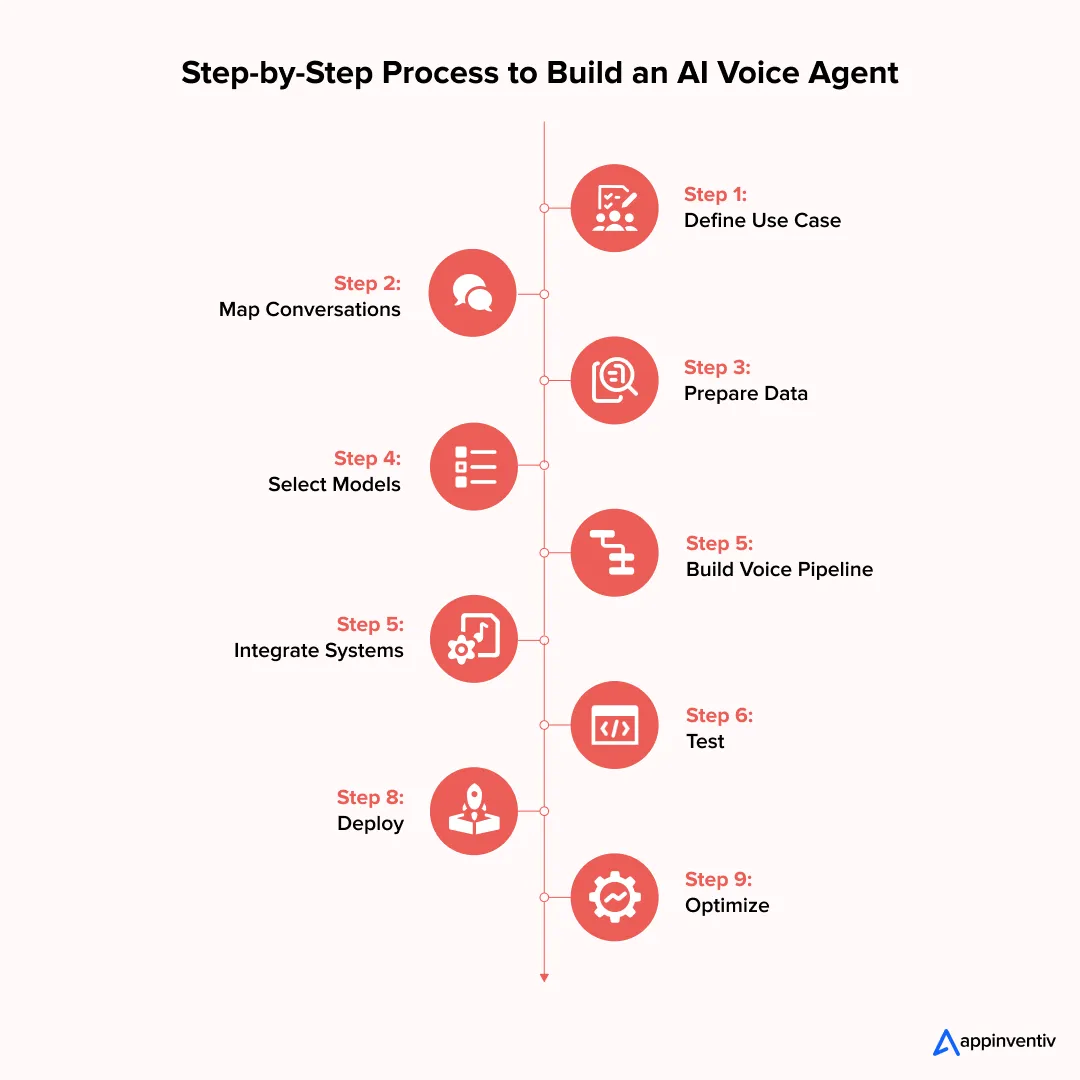
Step-by-Step Process to Build an AI Voice Agent
The steps to create an AI voice agent follow a structured sequence. Enterprise teams build controlled systems, not standalone features. They build controlled systems that connect conversation, reasoning, and backend execution. Each step below reflects how production-grade deployments are structured.
Step 1: Define Business Objectives & KPIs
Start with a use case that has a predictable intent and measurable volume. Avoid broad scopes in early stages.
- Identify high-frequency call types such as account queries, payment reminders, or lead qualification
- Map expected automation depth: full containment vs assisted handling
- Set clear KPIs tied to operations:
| Metric | Target Range | What It Indicates |
|---|---|---|
| Containment rate | 40–70% | Automation coverage |
| AHT reduction | 20–40% | Efficiency gain |
| CSAT | ≥ baseline | Experience quality |
Tie these metrics to business units. Support, sales, and finance teams will track different outcomes.
Step 2: Map Conversations & Customer Journeys
This step defines how the system behaves under real conditions. Static scripts fail here, so design for variability.
- Break conversations into states: intent detection, validation, execution, closure
- Define transitions using dialogue state tracking
- Add fallback layers for low-confidence intent scores
- Handle real-world interruptions such as barge-in and silence
Include escalation triggers based on:
- Confidence thresholds
- Repeated failure loops
- Sensitive intents such as payments or disputes
Step 3: Prepare Data & Knowledge Systems
Raw data cannot be used directly. It must be structured for retrieval and response generation, which is why understanding how to build AI models helps teams design better knowledge pipelines from the start.
- Build a domain-specific knowledge base with normalized formats
- Use retrieval-augmented generation to fetch relevant context at runtime
- Convert documents into embeddings and store them in a vector database
- Extract intents and entities from historical call transcripts
Focus on:
- Clean data pipelines
- Version-controlled knowledge sources
- Real-time retrieval latency under 200–300 ms
Step 4: Select AI Models & Voice, Stack
Choosing the right models is key when you create an AI voice agent, as it directly shapes performance, cost, and user experience. The enterprise LLM model you select will determine reasoning quality, tool calling ability, and response latency across the entire pipeline.
| Layer | Options | Selection Criteria |
|---|---|---|
| ASR | Whisper, Deepgram | Accuracy in noisy environments |
| LLM | GPT-class, Claude, open models | Reasoning + tool calling |
| TTS | ElevenLabs, Azure Neural | Voice quality + latency |
Key trade-offs:
- Higher accuracy often increases latency
- Lower latency may reduce response quality
- Domain tuning improves both, but increases setup effort
Step 5: Build Real-Time Voice Pipeline
This is where most systems fail if not designed correctly.
- Connect ASR → LLM → TTS in a streaming architecture
- Use partial transcription to trigger early LLM processing
- Stream tokens from the LLM into TTS to reduce response delay
- Maintain session context using memory buffers or state stores
Target:
- Time to first audio response under 1.5 seconds
- Full response completion within conversational tolerance
Step 6: Integrate with Enterprise Systems
Without integration, the system cannot complete tasks. A well-planned CRM implementation is often the first integration teams prioritize, followed by:
- Integrate ERP and billing systems for transactions
- Use API orchestration layers to manage requests and retries across CRM, ERP, and billing systems.
- Link with contact center platforms for routing and escalation
Key requirement:
- Secure data exchange with role-based access and logging
Step 7: Test in Controlled Environments
Testing must reflect production complexity, not ideal scenarios.
- Run scripted and unscripted conversations
- Simulate edge cases such as incomplete inputs and noisy audio
- Measure:
– Latency under load
– API response accuracy
– Intent classification precision
Include adversarial testing to detect failure patterns.
Step 8: Deploy Pilot & Scale Gradually
Start with a limited rollout to reduce risk.
- Deploy to a small percentage of traffic
- Keep the human fallback active for all interactions
- Track real-time metrics and failure logs
- Expand coverage based on stability and performance
Pilot success depends on consistent containment and acceptable user experience.
Step 9: Continuous Optimization & Governance
Production systems require constant tuning.
- Analyze conversation logs for drop-offs and failure loops
- Refine prompts and system instructions
- Retrain models with updated datasets
- Implement governance:
– Audit logs
– Access controls
– Compliance checks
Performance improves over time only if feedback loops remain active.
Implementation of AI Voice Agent: Timeline & How Long Does It Take
Building a production-grade voice agent takes staged execution. Timelines vary based on integration depth, data readiness, and compliance scope.
| Phase | Timeline |
|---|---|
| Proof of Concept (POC) | 4–8 weeks |
| Pilot Deployment | 2–4 months |
| Production Rollout | 4–9 months |
- POC focuses on a single use case with limited integrations
- Pilot introduces real users, live APIs, and fallback systems
- Production requires scale, monitoring, and governance layers
More integrations increase build time. Systems that connect with CRM, ERP, and payment infrastructure need additional validation and security checks.
Core Features of an AI Voice Assistant With Enterprise-Grade Technology
Enterprise voice agents are judged on how they handle real conversations and complete real tasks. The difference shows up in how they manage context, respond under pressure, and connect with backend systems.
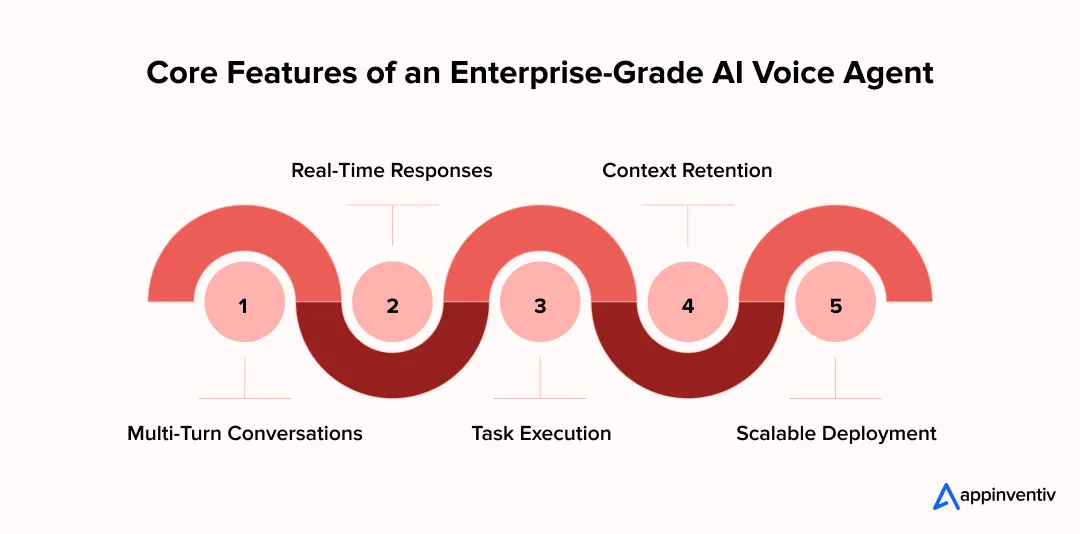
Conversational Intelligence
A production system must track context across multiple turns, not just respond to single queries.
- Maintains session state using dialogue state tracking
- Resolves intent even when users change direction mid-call
- Recovers from low-confidence inputs without breaking flow
- Uses entity extraction to capture names, dates, and account details
These systems rely on intent classification, slot filling, and memory buffers to keep conversations coherent.
Real-Time Voice Experience
Response speed and timing define user perception.
- Delivers first audio response within 1–2 seconds
- Handles barge-in events where users interrupt mid-response
- Streams partial outputs instead of waiting for full responses
- Generates speech using neural TTS with natural pauses and tone
Streaming pipelines and token-level generation reduce delays and improve flow.
Multilingual Voice & Localization
Enterprise voice agents must handle language differences without breaking conversation quality or intent detection.
- Supports multilingual conversations and real-time language switching
- Recognizes regional accents, dialects, and pronunciation variations
- Localizes vocabulary, tone, greetings, dates, currencies, and terminology
- Routes users to language-specific models or human agents when confidence drops
Multilingual ASR, localized TTS voices, and language-specific knowledge bases help enterprises maintain consistent experiences across regions. Domain-specific testing is still essential, since speech accuracy can vary by accent, language, audio quality, and industry terminology.
Action & Workflow Execution
A voice agent must complete tasks, not just respond.
- Executes API calls for payments, bookings, and updates
- Writes data back to CRM and ERP systems
- Validates inputs before triggering transactions
- Handles multi-step workflows across systems
Tool calling and function execution allow the model to interact with external services.
Enterprise Readiness
Scalability and control separate prototypes from production systems.
- Enforces access control and encrypts sensitive data
- Tracks logs for every interaction and system decision
- Monitors performance through latency and failure metrics
- Scales across regions, languages, and channels
Observability stacks and audit trails keep the system reliable under load.
Key Components of an AI Voice Agent (What You Need to Build It)
A production voice agent is a system of coordinated services, not a single model. Each layer handles a specific function, and performance depends on how these layers interact under load.
Speech-to-Text (ASR)
This layer converts live audio into structured text for downstream processing.
- Uses acoustic and language models trained on domain-specific data
- Supports streaming transcription with partial results
- Handles noise, accents, and variable speech rates
- Outputs timestamps and confidence scores for each segment
Accuracy and latency both matter. Poor transcription breaks the entire pipeline. Around 76% of teams rate speech accuracy as a critical factor, since even small errors can disrupt workflows.
Language Model (LLM / Reasoning Engine)
This layer interprets input and decides the next action.
- Performs intent detection, entity extraction, and response generation
- Uses tool calling to trigger external APIs
- Maintains context across turns using session memory
- Works with retrieval systems to pull grounded information
The model must balance reasoning depth with response speed.
Text-to-Speech (TTS)
This layer converts generated text into audio output.
- Uses neural synthesis for natural tone and pacing
- Supports streaming audio generation
- Adjusts prosody based on context and intent
- Handles interruptions during playback
Voice quality affects trust and user comfort.
Orchestration Layer
This is the control layer that connects reasoning with execution.
- Routes requests between models and backend services
- Manages conversation state and workflow logic
- Handles retries, fallbacks, and error states
- Coordinates multi-step task execution
It acts as the decision engine of the system.
Integration Layer
This layer connects the voice agent to enterprise systems.
- Interfaces with CRM, ERP, and databases
- Executes API calls for transactions and updates
- Manages authentication and data validation
- Syncs real-time data across systems
Strong integration determines how much work the agent can complete.
Telephony & Communication Infrastructure
This layer is what separates the best voice AI agents for phone-based automation, as it handles call connectivity and routing.
- Uses SIP or WebRTC for voice transmission
- Connects with contact center platforms
- Manages call queues, routing, and escalation
- Supports outbound and inbound call flows
Reliable communication infrastructure keeps interactions stable at scale.
Enterprise voice agents must handle scale, latency, and complex workflows together. Most systems fail because they are not built for this.

Enterprise Architecture of AI Voice Agents
Production voice agents run as distributed, event-driven systems and rely on professional AI integration services to connect models, speech layers, and enterprise data in real time. Audio, text, and actions move across services with strict latency budgets. Each layer must handle partial inputs, maintain state, and recover from failures without breaking the conversation.
End-to-End Voice Pipeline
This defines how audio moves through the system from input to response.
- Ingress via SIP trunks or WebRTC gateways with RTP streams
- Streaming ASR produces partial hypotheses with timestamps and confidence scores
- LLM consumes partial text, applies dialogue state, and plans actions
- Token streaming feeds TTS, so audio starts before the full text is ready
- Playback continues while the next turn is already being processed
Key targets:
- Time to first audio: ~1–1.5 seconds
- End-to-end turn: ~3–5 seconds
- Continuous handling of barge-in, silence, and partial inputs
Voice Agent Architecture Types (Enterprise Comparison)
Different architectural patterns balance latency, flexibility, and system control.
| Architecture Type | Description | Pros | Limitations | Best Fit |
|---|---|---|---|---|
| Pipeline (Sequential) | Linear flow: ASR → LLM → TTS | Simple, quick to deploy | Higher latency, rigid | Basic automation |
| Streaming (Real-Time) | Parallel processing of input/output | Low latency, natural UX | Complex to build | Customer-facing agents |
| Orchestrated (Tool-Driven) | Central logic managing APIs/workflows | Flexible, scalable | Design complexity | Enterprise workflows |
| Multi-Agent Architecture | Multiple specialized agents collaborate | Highly scalable, intelligent | Hard to maintain | Advanced automation |
| Hybrid Architecture | Combines streaming + orchestration | Balanced performance | Moderate complexity | Most enterprises |
Most enterprise systems adopt a hybrid model with streaming pipelines and a central orchestration layer.
Real-Time Streaming & Latency Design
Latency control determines whether the system feels responsive or mechanical.
- Partial ASR decoding triggers early LLM inference
- LLM streams tokens instead of waiting for full completion
- TTS begins synthesis on partial tokens using chunked audio generation
- Parallel execution reduces blocking between services
Latency contributors:
- ASR decoding window size
- LLM tokens per second (throughput)
- TTS synthesis time per token
- Network round-trip across microservices
Design targets:
- Sub-second response start
- Stable jitter control across audio streams
Orchestration Layer (Decision Engine)
This layer coordinates reasoning, tools, and workflow execution.
- Routes prompts using intent classification and routing policies
- Executes tool calls through function schemas and API contracts
- Maintains session state in low-latency stores such as Redis or in-memory caches
- Applies guardrails, retries, and fallback logic
Implements:
- Dialogue state management
- Policy engines for sensitive operations
- Multi-step workflow execution across services
Integration Architecture
This layer connects the voice system with enterprise data and action layers.
- CRM integration for identity resolution and history lookup
- Contact center platforms for routing, queues, and escalation
- ERP and billing systems for transactional workflows
- API gateways for request validation, throttling, and logging
Technical patterns:
- REST and gRPC for synchronous calls
- Event-driven queues, such as Kafka, for async processing
- Idempotent APIs to avoid duplicate actions
Deployment Models
Deployment choice defines control, compliance posture, and scaling strategy.
- Cloud: autoscaling clusters, managed inference endpoints, global availability
- Private cloud: isolated environments with controlled access and network policies
- On-prem: local deployment for strict data residency and regulatory needs
Key considerations:
- Data residency laws
- Network latency between services
- Security controls such as VPC isolation and encryption at rest and in transit
Designing Voice Intelligence: Prompts, Behaviors & Control Systems
Voice systems fail or succeed at the behavior layer. The model alone does not control outcomes. Prompts, state, and guardrails define how the agent responds under pressure and across edge cases.
Prompt Engineering for Voice Systems
This layer defines how the model interprets input and generates actions in real time.
- Use structured prompts with clear sections: role, task, constraints, output format.
- Inject context from CRM, session memory, and retrieved documents
- Pass system instructions that enforce tone, brevity, and response limits
- Use function schemas to guide tool calling and API execution
Keep prompts compact to reduce latency. Large prompts increase token processing time and slow responses.
Conversation Design Principles
This layer controls how the system behaves across multi-turn interactions.
- Manage turn-taking with silence detection and speech activity signals
- Handle interruptions through barge-in support and state recovery
- Design fallback flows for low-confidence intent or missing data
- Define escalation rules for sensitive or repeated failures
Use dialogue state tracking to maintain flow across turns and avoid resets.
Guardrails & Response Control
This layer keeps outputs accurate, safe, and consistent.
- Validate responses against structured data before execution
- Restrict model outputs using predefined templates and policies
- Block unsupported actions through rule-based checks
- Monitor outputs for drift and inconsistency
Ground responses using retrieval systems to reduce incorrect answers. Control improves when the model relies on verified data instead of free generation.
Testing, Reliability & Continuous Monitoring of Voice Agents
Production voice agents need controlled testing, strict reliability checks, and constant monitoring. Each phase builds confidence before full-scale deployment.
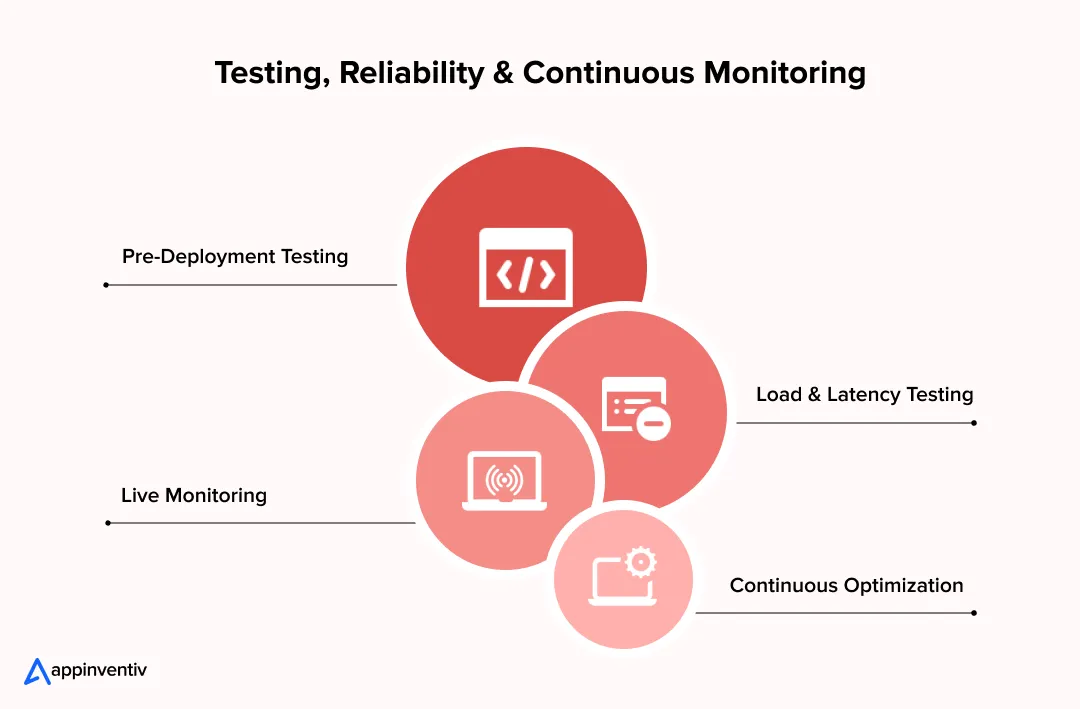
Phase 1: Pre-Deployment Testing
This phase validates whether the system behaves correctly across expected scenarios.
- Run functional tests on intent detection, entity extraction, and API execution.
- Simulate conversations with predefined scripts and random inputs
- Validate dialogue state transitions across multi-turn interactions
- Test fallback paths for low-confidence scores and missing data
Include domain-specific test sets based on historical call logs. Coverage should reflect real user behavior, not ideal flows.
Phase 2: Performance & Latency Testing
This phase measures how the system performs under real-world load.
- Test concurrent sessions to evaluate scaling limits
- Measure:
- ASR transcription latency
- LLM token generation speed
- TTS synthesis delay
- Track time to first response and full response completion
Target benchmarks:
- First response under ~1.5 seconds
- Stable performance under peak traffic conditions
Load testing should simulate call spikes, not steady traffic.
Phase 3: Live Monitoring & Observability
Once deployed, the system must be continuously tracked.
- Capture conversation logs with timestamps and decision paths.
- Monitor key metrics:
– Containment rate
– Drop-off points
– Error rates
- Detect failures in:
– API responses
– intent classification
– conversation loops
Use observability stacks with logging, tracing, and alerting to detect issues early. Pairing these with AI analytics for businesses gives teams a clearer view of performance trends across live traffic.
Phase 4: Continuous Improvement Loops
Performance improves through structured iteration, not one-time tuning.
- Analyze conversation transcripts for failure patterns
- Update prompts to correct response behavior
- Retrain models with new data and edge cases
- Refine retrieval systems to improve answer grounding
Maintain version control for prompts and models. Each update should be tested before release.
Reliability depends on how well these phases connect. Systems that skip monitoring or iteration degrade quickly, even if initial performance is strong.
What Does It Cost to Build an AI Voice Agent? Enterprise Breakdown
Costs vary based on scope, integrations, and performance targets. As with broader AI development costs, systems handling simple queries require less investment than those executing transactions across multiple enterprise platforms.
AI Voice Agent Development Cost Overview
This gives a high-level view of typical enterprise spending based on system complexity.
| Deployment Level | Cost Range (USD) | Scope |
|---|---|---|
| Foundational | $50K–$120K | Single-use case, limited integrations |
| Mid-Level | $120K–$300K | Multi-use case, CRM/API integration |
| Advanced | $300K–$500K+ | Full automation, multi-system orchestration |
Costs increase with integration depth, latency requirements, and compliance scope.
AI Voice Agent Development Cost Breakdown by Components
Each component contributes differently based on system design and usage patterns.
| Component | Description | Cost Range (USD) | Cost Impact |
|---|---|---|---|
| AI Models | LLM inference, token usage | $10K–$120K+ | High |
| Speech Systems | ASR and TTS processing | $8K–$80K+ | Medium–High |
| Integration | CRM, ERP, API orchestration | $15K–$150K+ | High |
| Infrastructure | Cloud compute, storage, scaling | $10K–$100K+ | Medium |
| Compliance | Security, logging and audit systems | $5K–$60K+ | Variable |
Model usage and integration complexity drive most of the AI voice agent development cost.
AI Voice Agent Runtime Costs
Development cost is only one part of the budget. Once deployed, every live conversation consumes speech processing, model inference, telephony, and infrastructure resources.
The main recurring costs include:
- ASR: Real-time speech-to-text processing
- LLM inference: Tokens used for reasoning, context, retrieval, and tool calling
- TTS: Generation of spoken responses
- Telephony: SIP trunks, carrier minutes, phone numbers, and call routing
- Cloud infrastructure: Compute, storage, networking, and autoscaling
- Observability: Logging, tracing, analytics, and production monitoring
Runtime costs are usage-driven and should be calculated against expected call volume and conversation length:
Monthly runtime cost = monthly calls × average call duration × average runtime cost per minute
For example, an AI voice agent handling 100,000 calls per month with an average duration of four minutes processes around 400,000 voice minutes. The actual runtime cost depends on the ASR, LLM, TTS, telephony, infrastructure, and provider stack selected.
Hidden Costs Enterprises Must Plan For
Long-term budgets should also account for costs beyond initial development and per-minute processing:
- Continuous prompt and conversation-flow optimization
- Knowledge base and retrieval updates
- Model evaluation and tuning
- Infrastructure scaling as call volume grows
- Security reviews and compliance audits
- Ongoing monitoring and maintenance
For accurate budgeting, enterprises should evaluate the total cost of ownership across initial development, runtime usage, and ongoing maintenance.
Also Read: How much does it cost to build an AI voice generator and text-to-speech reader app like Speechify?
Voice AI Ecosystem: Platforms, Models & Infrastructure Layers
Enterprise voice agents rely on a stack of providers across models, speech systems, orchestration, and contact center software. Getting the AI tech stack right at this stage affects latency, control, and long-term cost.
Model Providers
These vendors supply the reasoning engine that drives intent detection, response generation, and tool use.
- Closed models: GPT-class, Claude
- Strong reasoning, structured outputs and tool calling
- Open models: LLaMA, Mistral
- Greater control and lower inference cost require tuning
Key considerations:
- Token pricing and throughput
- Support for function calling and JSON outputs
- Fine-tuning or retrieval integration
Voice Infrastructure Providers
These vendors handle speech recognition and voice generation.
- ASR providers: Deepgram, Whisper-based systems
- Real-time transcription, domain adaptation
- TTS providers: ElevenLabs, Azure Neural
- Natural voice output, low synthesis delay
Evaluation factors:
- Word error rate in noisy conditions
- Streaming capability
- Voice quality and consistency
Orchestration Frameworks
This layer connects models with workflows and system logic. It is also where a general-purpose agent orchestration framework either fits the workload or gets in the way, since voice carries a latency budget most framework comparisons leave out — which is why teams often keep the turn loop custom and use the framework only for the steps that follow the call.
- Frameworks manage:
– Prompt routing
– Tool execution
– State management
- Examples include custom orchestration layers and agent frameworks
Key requirements:
- Low-latency execution
- Reliable API handling
- Support for multi-step workflows
Contact Center Integrations
These systems connect the best voice AI agents for phone-based automation to live call infrastructure.
- Platforms: Genesys, Five9, Amazon Connect
- Capabilities:
– Call routing and queuing
– Human agent escalation
– Call recording and analytics
Integration points:
- SIP and WebRTC for call handling
- CRM sync for customer context
- Event triggers for workflow execution
This layer determines how well the voice agent fits into existing operations.
Build vs Buy vs Hybrid: Enterprise Decision Framework
Enterprises approaching AI voice agent development can build a custom system, use a managed platform, or combine both. The right choice depends on deployment speed, integration depth, compliance needs, and the level of control required.
| Approach | Pros | Limitations | Best For |
|---|---|---|---|
| Custom Build | Full control over architecture, data, integrations, and governance | Higher cost and longer timeline | Complex, regulated, high-volume deployments |
| Managed Platform | Faster deployment and lower initial engineering effort | Platform dependency and limited architectural control | POCs and standard workflows |
| Hybrid | Combines managed services with custom orchestration and integrations | More components to manage | Most enterprise deployments |
Managed Voice AI Platforms vs Custom Development
Platforms such as Synthflow, Retell AI, Vapi, and Bland AI can accelerate deployment with managed voice infrastructure, APIs, visual tooling, and telephony capabilities. They also help teams validate focused applications such as support automation and AI in voice commerce before committing to larger deployments.
| Criteria | Managed/Low-Code Platforms | Custom Development |
|---|---|---|
| Deployment Speed | Faster | Longer |
| Initial Investment | Lower | Higher |
| Customization | Platform-dependent | Extensive |
| Enterprise Integrations | Standard APIs/connectors | Custom CRM, ERP, and legacy integrations |
| Data & Governance Control | Provider-dependent | Greater control |
| Performance Optimization | Within platform capabilities | Tuned across the architecture |
| Best Fit | POCs and standard workflows | Complex enterprise workflows |
For many enterprises, a hybrid model offers a practical balance. Teams can use managed ASR, LLM, TTS, or telephony services while applying custom AI voice agent development to orchestration, integrations, security controls, and governance.
Managed platforms work well for early validation. As workflows require deeper integrations, stricter compliance, or greater performance control, custom engineering becomes more important.
At that stage, knowing how to choose the best AI agent development company helps enterprises evaluate technical expertise, integration capabilities, governance practices, and production experience.
Steps to Build a No-Code AI Voice Agent
Some teams test ideas using no-code platforms before committing to full-scale development. These setups work for early validation but have limits when systems grow.
- Choose a no-code platform with built-in ASR, LLM, and TTS
- Define basic conversation flows using visual builders
- Connect APIs for simple actions such as bookings or status checks
- Test with limited datasets and predefined scenarios
- Deploy for internal use or small user groups
No-code tools help validate ideas quickly. They struggle with deep integrations, strict compliance needs, and complex workflows. Teams that need to create an AI voice agent at enterprise scale typically move beyond no-code once requirements expand.
Security, Compliance & Risk Management
Voice agents sit close to customer data and payment flows. That makes risk control part of the build, not a later step. Teams need clear rules on what the system can say, what it can access, and what it can execute.
Key Risks
These risks show up quickly once real traffic hits the system.
- Incorrect responses that trigger wrong actions
- Data exposure across sessions or logs
- Misread intent that leads to failed transactions
- Unchecked API calls with broader access than intended
- Capture of personal or payment data without proper handling
Most of these issues trace back to weak validation and loose access control. A dedicated approach to voice agent security helps teams address these gaps before real traffic exposes them.
Governance Framework
Control comes from how the system is designed and monitored. Teams operating in the US should also factor in AI regulation compliance when defining audit logs, access roles, and policy checks.
- Human review for payments, disputes, and account changes
- Role-based access tied to user identity and system roles
- Full interaction logs with timestamps and action traces
- Policy checks before any external call is executed
- Version tracking for prompts, workflows, and model updates
This structure allows teams to trace decisions and correct issues quickly.
Compliance Readiness
Regulatory alignment depends on how data is stored, processed, and accessed. Teams building for European users should refer to GDPR compliance requirements covering consent capture, data minimization, and deletion workflows.
- GDPR: consent capture, data minimization, deletion workflows
- HIPAA: protection of health data, strict access logging
- PCI DSS: tokenized payments, no storage of raw card data
- SOC 2: controls across security, availability, and data handling
- Regional data laws that define where data can reside
Encryption technology must cover both data in transit and stored data. Access keys and credentials need strict rotation and audit.
Implementation of AI Voice Agent at Scale: Challenges After Deployment & How Enterprises Address Them
Once a voice agent goes live, new issues appear under real traffic. These are not model limits. They come from how the system handles conversations, latency, and integrations at scale.
| Challenge | Root Cause | What Happens in Production | Resolution |
|---|---|---|---|
| Poor user experience | Weak conversation design | Repeated questions, lost context, broken flows | Redesign flows with state tracking and clear fallback logic |
| High latency | Inefficient architecture | Delayed responses, users interrupt or drop | Use streaming pipelines and reduce response time |
| Low ROI | Wrong AI voice agent use cases selection | Low automation, limited cost savings | Focus on high-volume, repeatable interactions |
| Integration gaps | Siloed systems | Tasks stall; manual intervention is needed | Use orchestration layers and unified APIs |
These issues follow a pattern. More than half of users report repeating themselves as the most frustrating part of voice systems, which usually points to weak context handling. Systems struggle when conversation control, latency, or integrations are not treated as core layers during design.
Also Read: AI Voice Agent Challenges and How to Tackle Them
Systems break due to weak design, latency issues, and integration gaps. Build with production-grade architecture from day one.
Best Practices for Deploying an AI Voice Agent for Business at Enterprise Scale
Teams that see steady results follow a few consistent practices. These choices shape performance, cost, and user experience from the first release.
- Start with narrow, high-impact use cases: Pick flows with clear intent and high volume, such as order status or payment reminders. Limit scope in the first release, then expand after stable containment and acceptable CSAT.
- Design for latency from day one: Set targets for time to first audio and full response. Use streaming ASR, token-level generation in the LLM, and streaming TTS. Trim prompt size and reduce network hops between services.
- Prioritize system integration early: Connect CRM, billing, and scheduling systems in the pilot. Define API contracts, idempotent writes, and retry logic. A voice agent must complete actions, not just respond.
- Implement governance frameworks upfront: Apply role-based access, full audit logs, and policy checks before any external call. Keep human review for payments, disputes, and account changes.
- Continuously improve from real usage: Review transcripts for drop-offs and loops. Adjust prompts, update knowledge retrieval, and retrain with new data. Track containment, AHT, and error rates each week.
Future Trends in AI Voice Agents (2026–2030)
The next few years will redefine how teams build voice AI agents that perform in real settings. Broader AI trends in 2026 show that voice is becoming a core interface layer across industries, not just a support channel. Early deployments focused on handling simple calls. New systems take on longer tasks, connect to more systems, and adjust responses based on what they hear.
- Multi-agent voice systems
Teams are starting to split work across smaller agents. One handles intent, another pulls data, and another completes the action. A controller manages the flow. This setup helps during long calls where tasks change midway. - Emotion-aware AI
Voice systems are beginning to read tone and pace. This is closely related to AI sentiment analysis, in which systems detect frustration or urgency and adjust escalation or response style accordingly. This is already being tested in support and collections. - Autonomous call handling
Some systems now complete tasks from start to finish. They verify user details, check records, and confirm actions. Human review still exists for sensitive steps. - Voice with other channels
A call can shift to chat or app screens without losing context. The same session carries across channels. - Industry-focused agents
Many teams now build agents for specific domains such as banking or healthcare. Agentic AI in healthcare is one of the more complex applications, where agents follow strict clinical rules and interact with structured patient data. These systems follow strict rules and use structured data to reduce errors.
How Can Appinventiv Help You Build AI Voice Agents That Actually Work at Scale?
Enterprises reach a point where voice systems stop delivering expected results. Calls get routed back to agents, latency increases during peak hours, and integrations fail during live transactions.
Appinventiv, a top AI voice agent development services company, addresses these gaps through end-to-end AI voice agent development that combines streaming pipelines, structured prompt layers, and direct API orchestration.
- 100+ autonomous AI agents deployed across production environments
- 150+ engagements to build custom AI voice agents and domain-specific models for enterprise workflows
- 200+ data scientists and AI engineers delivering large-scale systems
- Experience across 35+ industries with strict compliance and data requirements
Business impact delivered:
- 50% reduction in manual processes
- 90%+ task accuracy across workflows
- 2x increase in system scalability under load
In one deployment, a large enterprise was handling over 120,000 calls per month, with only 28% resolution on first interaction. The system lacked real-time access to CRM and billing data, which forced agents to take over mid-call.
Through its AI voice agent development services, Appinventiv redesigned the system with streaming ASR, controlled prompt execution, and secure API orchestration. The voice agent was connected directly to backend systems, allowing it to retrieve data and complete actions within the same interaction.
Within months:
- Call containment increased to 65%
- Average handle time reduced by 35%
- First-response latency stabilized under 1.8 seconds
- Operational costs reduced by 38%
Ready to build an AI voice agent that performs at scale? Let’s connect before your competitors close the gap!
Frequently Asked Questions
Q. How to build an AI voice agent?
A. To build an AI voice agent, start with a clear use case and define KPIs such as containment and AHT. Design conversation flows and fallback logic. Select ASR, LLM, and TTS models based on latency and accuracy. Build a streaming pipeline, then integrate CRM and APIs. Test under load, deploy a pilot, and continuously refine prompts and data.
Q. How much does it cost to build an AI voice agent?
A. Costs range from $50K to $500K+ based on scope. A basic setup with limited integrations stays at the lower end. Systems with CRM, billing, and compliance layers move higher. Major cost drivers include model usage, speech processing, integration effort, and infrastructure required to support real-time interactions.
Q. How to create a custom voice for a conversational AI agent?
A. Use neural TTS models that support voice cloning or fine-tuning. Train on curated voice samples with consistent tone and pronunciation. Adjust prosody, pacing, and pitch through model parameters. Test output across different phrases and contexts. Ensure compliance with voice consent and usage rights during deployment.
Q. How to start an AI voice recorder business strategy?
A. Identify a niche such as customer support recording, compliance logging, or meeting transcription. Build a system using ASR for transcription and storage pipelines for audio and text. Add analytics features like keyword tagging and sentiment scoring. Focus on data security, storage compliance, and integration with enterprise tools.
Q. What are the main components of building a voice agent system?
A. A voice agent includes ASR for speech input, an LLM for reasoning, and TTS for output. It also needs an orchestration layer to manage logic, an integration layer for APIs and databases, and a telephony infrastructure for call handling. Each component must work together in real time to complete tasks.
Q. How to create an AI voice agent for customer support?
A. Start with high-volume support queries such as order status or account updates. Design conversation flows with clear fallback and escalation paths. Integrate CRM systems for real-time data access. Use streaming pipelines to reduce latency. Track containment, CSAT, and error rates, then refine prompts and workflows based on usage.
Q. How to plan a budget for a large-scale voice agent deployment?
A. Start by defining the number of use cases, expected call volume, and required integrations. Budget planning should include AI model usage, speech processing, cloud infrastructure, API orchestration, monitoring tools, compliance controls, and ongoing optimization. Enterprises should also account for scaling costs as traffic and workflow complexity increase.
Q. What is the voice assistant implementation timeline for business?
A. A business voice assistant project usually moves through three stages: proof of concept, pilot deployment, and production rollout. A basic proof of concept may take 4–8 weeks, while enterprise-scale deployment with integrations, testing, governance, and optimization can take several months, depending on system complexity.


Fast 2-minute response, fully NDA-protected.

The AI ROI Crisis: Why Enterprises Are Struggling to Prove Value and How to Fix It
Key takeaways: AI ROI is a capital-allocation question. Boards want payback periods and P&L impact. AI ROI challenges rarely have a single cause. Data, legacy systems, use-case choice, ownership and stalled pilots compound each other. Choose two or three outcome metrics per use case, set the baseline first, and report in dollars. Make every further…

Retrieval Augmented Generation in Australia: Architecture, Implementation and Cost
Key takeaways: RAG grounds LLM answers in approved content, improving reliability without retraining a model. Data quality and access permissions decide production outcomes more than the model. Indicative build costs run from AUD 70,000 to 700,000, driven by data and integrations. Measure value against a pre-deployment baseline, separating realised benefits from projected savings. A general-purpose…
The Multiplier Effect of AI Agents: The Rise of AI Swarms
Key takeaways: AI agent swarms coordinate specialized agents to solve complex problems that may be difficult for a single agent to handle effectively. More agents do not automatically mean better outcomes. Swarms deliver value when work can be divided, executed in parallel, and coordinated toward a shared objective. Enterprise readiness depends on governance. Clear accountability,…