































How AI Copilots Are Spearheading Workflow Transformation – Benefits, Types and Use Cases

 Share -


- 01Understanding the Role of AI Copilots in Business
- 02Benefits of AI Copilots for Enterprise Workflows
- 03Types of AI Copilots Businesses Should Know About
- 04Multiple AI Copilot Use Cases Across Industries
- 05The Business Impact of AI Copilots on Enterprise Operations
- 06What Challenges Affect Enterprise AI Copilot Integration?
- 07What Is the Future of AI Copilots?
- 08Appinventiv: Your Copilot in AI Innovation
- 09FAQs

Key takeaways:
- AI copilots combine large language models, enterprise data, and business rules to support employees within existing workflows.
- Businesses can deploy copilots for general workplace tasks, specific business functions, technical roles, or industry-specific processes.
- Leading AI copilot use cases include clinical assistance, financial analysis, predictive maintenance, sales enablement, customer support, coding, and HR operations.
- Enterprise value depends on data quality, secure integrations, role-based access, employee adoption, and continuous performance monitoring.
- Building a custom AI copilot can cost between $45,000 and $500,000+, depending on features, integrations, security, and deployment scale.
- Future copilots will become more autonomous, multimodal, context-aware, and capable of coordinating complex actions across enterprise systems.
Why are so few enterprises turning AI investment into both lower costs and higher revenue?
Only 12% of CEOs report achieving both outcomes from AI, while more than half have seen no meaningful financial benefit, according to PwC’s 2026 Global CEO Survey insights. One reason is that many AI initiatives remain disconnected from the workflows where employees make decisions and complete work.
AI copilots for business address this gap by bringing AI directly into those workflows. Connected with enterprise data, machine learning, and advanced analytics, they can retrieve information, prepare decisions, and complete approved tasks across business systems.
For CEOs, this creates a clearer route from AI experimentation to business value. Well-designed AI copilots can reduce operating costs, shorten cycle times, improve service capacity, and help teams act faster.
This blog examines the different types of AI copilots and practical AI copilot use cases that can deliver measurable value across enterprise operations.
We build AI copilots that automate routine activities, surface trusted information, and support faster decisions within your existing workflows.

Understanding the Role of AI Copilots in Business
Most employees lose time moving between systems, searching for information, and preparing routine updates. AI copilots bring support directly into that work. They can find approved information, summarize records, draft content, explain data, and recommend the next action.
Their role is to assist employees, not make every decision for them. A copilot uses business data, user context, permissions, and workflow rules to provide relevant help. The employee reviews the response and remains responsible for sensitive actions.

Well-known AI Copilot examples show how this works in practice. Microsoft 365 Copilot supports document creation, email, and workplace collaboration. GitHub Copilot helps developers write and review code. These AI copilot tools serve different roles but operate within the applications employees already use.
Common AI Copilot features include natural-language interaction, enterprise search, content generation, contextual recommendations, and system integration. More advanced copilots can also update records, route requests, and complete approved workflow steps.
McKinsey explains that businesses capture greater value from generative AI when they redesign workflows instead of adding AI to existing processes without wider changes. This makes workflow fit central to successful copilot adoption.
Building custom AI copilots allows enterprises to shape this support around their own data, systems, access rules, and operating needs. The result is a copilot that helps work move faster without removing human control.
Benefits of AI Copilots for Enterprise Workflows
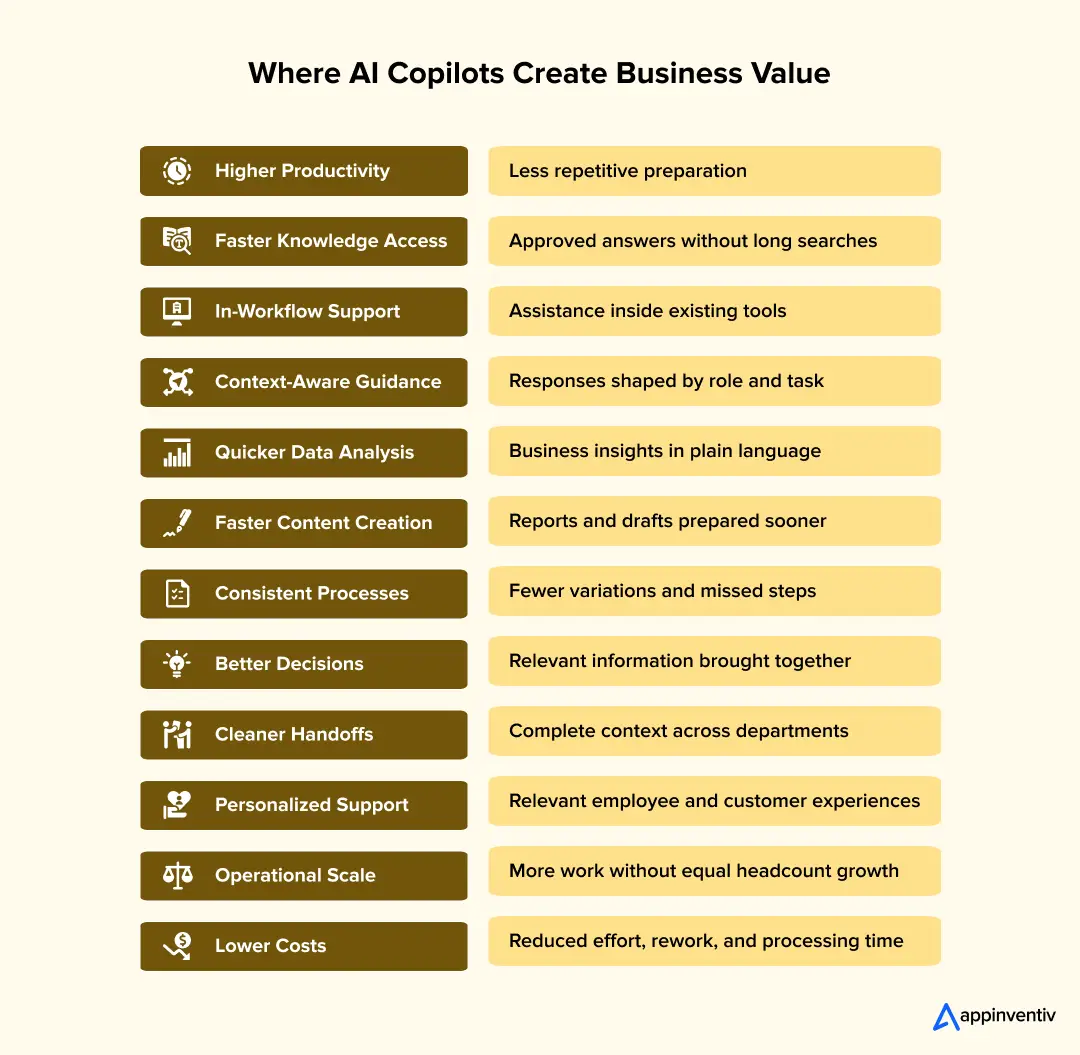
The appeal of an AI copilot is simple. It helps people get through work that currently takes too many searches, handovers, checks, and system switches. The real gain comes when it works with company data and fits the way teams already operate. Furthermore, the impact of AI copilots on enterprise operations can be seen in shorter task times, cleaner handovers, and better access to company knowledge.
Here are some of the major advantages of AI copilots that businesses might experience:
Higher Productivity Across Teams
Routine tasks quietly consume hours each week. Employees draft emails, prepare notes, find documents, update records, and build reports.
An AI copilot can handle this groundwork while employees review the final output. Sales teams gain more time for prospects, while finance and support teams focus on exceptions.
Faster Access to Company Knowledge
Business knowledge often sits across emails, shared drives, CRM records, contracts, policies, and support tickets.
A copilot can search approved sources and retrieve relevant answers. New employees get help faster, while experienced staff receive fewer routine questions.
Support Inside the Tools Employees Already Use
A copilot brings more value when it works within email, spreadsheets, CRM platforms, ERP systems, and service desks.
Employees can prepare account briefs, investigate figures, or draft customer replies without switching between multiple applications. This also makes adoption easier.
More Relevant Support Through Business Context
A general AI tool only sees the user’s prompt. An enterprise copilot can also consider their role, permissions, customer history, and current task.
This context helps it provide suitable answers for salespeople, compliance teams, service agents, and managers. It can also retain relevant details as work moves through longer processes.
Better Analysis Without Waiting for a Specialist
Business teams often wait for analysts to prepare reports or explain unexpected changes. Even simple questions can enter a lengthy reporting queue.
AI copilots let users explore approved data in everyday language. They can compare periods, highlight unusual activity, and summarize possible causes. Specialists can then focus on deeper investigations.
Faster Content and Document Preparation
Enterprise teams regularly create proposals, reports, presentations, training material, and customer responses.
A copilot can prepare initial drafts using approved templates, brand guidelines, product facts, and previous content. Employees can spend more time checking accuracy and strengthening the final message.
More Consistent Work and Fewer Avoidable Errors
Processes become inconsistent when employees follow different instructions or use outdated files.
An AI Copilot for workflow automation can check required fields, route requests, and flag incomplete steps. These advantages of AI copilots help businesses reduce errors across onboarding, compliance, reporting, and customer service.
Faster Decisions With the Right Information at Hand
Managers often need information from finance, operations, and customer systems before making a decision.
An AI copilot can bring these inputs together, highlight unresolved issues, and present available options. Employees still make the final decision but spend less time collecting information.
Stronger Collaboration and Cleaner Handoffs
Important context often gets lost when work moves between departments. The next team may receive a request without its full history or supporting records.
A copilot can prepare handover notes, gather documents, and list pending actions. Each team receives a clearer view of what happened and what comes next.
More Personal Employee and Customer Experiences
A new employee may need detailed guidance, while an experienced user wants a quick answer. Returning customers also expect businesses to remember earlier interactions.
The AI agents in customer service tools can adjust support using roles, preferences, and account history. However, businesses must apply clear privacy controls and use personal data only with proper permission.
Operational Scale Without Equal Growth in Manual Work
Customer questions, internal requests, and administrative tasks increase as a business grows. Hiring at the same rate may not remain practical.
A copilot can manage the first stage of routine requests and pass sensitive cases to employees. Enterprises can support more users and locations without lowering service quality.
Better Employee Experience and Lower Workload Pressure
Repeated data entry, system searches, and routine updates create unnecessary pressure for employees.
A useful copilot removes this friction and helps people complete everyday work faster. However, it must fit naturally into the workflow and remain dependable in regular use.
Lower Operating Costs Over Time
AI copilots can reduce the effort required for document reviews, reporting, internal support, and customer queries.
Businesses should compare infrastructure, integration, monitoring, and support costs against actual workflow savings. Usage alone does not prove value. The copilot must reduce costs or improve measurable outcomes.
How Can Businesses Measure the Value of an AI Copilot?
Success measures should reflect the workflow. A finance copilot should not use the same targets as a customer support copilot.
Businesses should record current costs, task times, errors, and service levels before implementation. They can then track:
- Productivity: Time saved across tasks, reports, and cases
- Knowledge access: Time required to find an approved answer
- Service delivery: Response, resolution, and escalation rates
- Quality: Errors, corrections, rework, and output acceptance
- Employee adoption: Active users, repeat use, and abandoned requests
- Customer experience: Satisfaction, repeat contacts, and complaints
- Operational scale: Requests handled without additional headcount
- Financial return: Cost per task, savings, and return on investment
- Risk control: Policy breaches, access attempts, and audit exceptions
These measures reveal whether the copilot solves a real business problem. Enterprises should review them during the pilot and after wider deployment.
Also read:- How is AI in Business Bringing Transformation? A Complete Guide
Types of AI Copilots Businesses Should Know About
Not every AI copilot is built for the same job. Some help employees manage daily work, while others support a specific department or handle complex industry processes. A business may begin with one type and add others as its data, workflows, and AI strategy mature.
The right enterprise AI copilot applications depend on who will use the system, which data it needs, and what actions it can take.
| Type | What it is built for | Common uses | Real example |
|---|---|---|---|
| Productivity copilots | Everyday workplace support | Drafting documents, summarizing meetings, analyzing spreadsheets | Microsoft 365 Copilot |
| Developer copilots | Software development and engineering | Code generation, debugging, testing, and documentation | GitHub Copilot |
| Function-specific copilots | Work handled by a particular department | Sales, finance, HR, marketing, legal, and procurement | Salesforce Agentforce for Sales |
| Customer-facing copilots | Direct assistance across customer channels | Product discovery, account support, and troubleshooting | Amazon Rufus |
| Industry-specific copilots | Workflows shaped by sector rules and terminology | Clinical assistance, underwriting, and predictive maintenance | Microsoft Dragon Copilot |
| Agentic copilots | Approved tasks involving several connected steps | Updating records, routing cases, and completing workflows | SAP Joule Agents |
Now that we know the basics about AI copilots let’s take a deep dive into the various use cases of AI copilots.
From architecture and data preparation to integration, security, testing, and monitoring, we help enterprises build copilots ready for real operations.
Multiple AI Copilot Use Cases Across Industries
AI copilots are transforming various industries by streamlining workflows and enhancing productivity. These intelligent systems can be integrated in numerous ways, improving efficiency and decision-making processes.
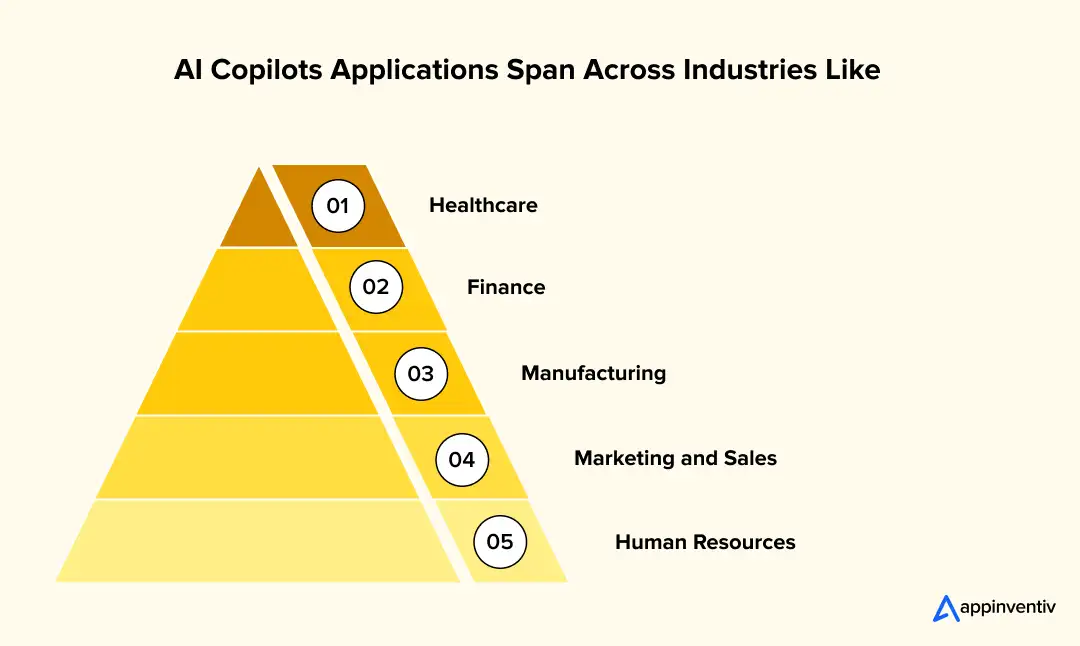
Healthcare
AI copilots are revolutionizing healthcare by enhancing both administrative and clinical functions. In healthcare, businesses can find many uses of AI copilots. These intelligent systems automate routine tasks such as patient scheduling and billing, freeing up staff for more critical activities.
Various AI copilots developed for business, like IBM Watson Health, assist in clinical decision-making by analyzing vast datasets to provide evidence-based recommendations. They support doctors in diagnosing conditions and choosing treatment plans. By streamlining administrative tasks and aiding clinical decisions, AI copilots significantly improve efficiency and patient care, demonstrating their transformative potential in the healthcare industry.
Finance
There are multiple AI copilot use cases in the field of finance. AI copilots are transforming the finance sector by automating compliance and reporting tasks. These systems streamline regulatory processes, ensuring timely and accurate submissions. The artificial intelligence copilot solutions for the finance industry further enhance customer service through advanced chatbots, offering personalized assistance and resolving queries efficiently.
By leveraging AI in financial software, businesses can improve operational efficiency and customer satisfaction. These copilots handle repetitive tasks and provide real-time insights, allowing financial professionals to focus on strategic initiatives. This integration of AI copilots significantly optimizes both compliance management and customer service, showcasing their invaluable role in modern finance.
Manufacturing
AI copilots are revolutionizing manufacturing by enhancing equipment monitoring and predictive maintenance. These two areas happen to be one of the major uses of AI copilots in manufacturing. These intelligent systems analyze real-time data to predict potential equipment failures, enabling proactive maintenance and reducing downtime. AI copilots further optimize supply chain management by analyzing logistics data, forecasting demand, and identifying inefficiencies, thus ensuring timely delivery and reducing operational costs.
By integrating AI copilots into manufacturing processes, companies can achieve higher efficiency, reduce risks, and maintain seamless operations, ultimately driving better productivity and profitability in the industry.
Marketing and Sales
Generative AI copilots are transforming marketing and sales by personalizing customer interactions and analyzing market trends. These systems leverage data to tailor customer experiences, enhancing engagement and satisfaction. By analyzing consumer behavior, AI copilots provide insights into market trends, enabling businesses to make informed decisions.
They help in creating targeted marketing campaigns and optimizing sales strategies. This personalization and data analysis drive better customer relationships and improved sales performance. Integrating AI copilots in marketing and sales processes boosts efficiency, supports strategic planning, and enhances overall business outcomes.
Human Resources
AI copilots are transforming human resources by improving recruitment processes and enhancing employee training and development. These systems streamline the recruitment process by automating resume screening, scheduling interviews, and evaluating candidates based on data-driven insights. This leads to faster and more accurate hiring decisions.
One of the major AI copilot use cases in HR is employee training. The AI copilots can enhance employee training by providing personalized learning paths and real-time feedback.
They analyze performance data to identify skill gaps and recommend targeted training programs. By integrating AI copilots, HR departments can optimize recruitment and foster continuous employee development, resulting in a more efficient and capable workforce. This transformation boosts organizational productivity and employee satisfaction.
From automating customer service interactions to providing real-time data analysis, these AI tools optimize workflows. They also support predictive maintenance in manufacturing, ensuring smooth operations. These enterprise AI copilot applications show how the same technology can support very different workflows across departments and sectors.
Also read:- Top AI Trends in 2026: Transforming Businesses Across Industries
Build a domain-aware copilot grounded in your business data, operational rules, compliance requirements, and employee workflows.

The Business Impact of AI Copilots on Enterprise Operations
The value of an AI copilot is not limited to helping employees write faster or find information. Its wider business impact appears when it becomes part of everyday workflows across sales, finance, operations, customer service, and HR.
The impact of AI copilots on enterprise operations can be seen in how quickly work moves from one stage to another. Copilots can retrieve information from approved systems, prepare the next action, flag missing details, and route tasks to the right person. This reduces the delays caused by repeated searches, manual updates, and incomplete handovers.
For enterprises, this can lead to:
- Shorter approval, reporting, and service cycles
- Lower manual processing and support costs
- Faster decisions based on trusted business data
- Fewer errors and greater process consistency
- Higher service capacity without equal headcount growth
- Better coordination across teams and locations
However, the business impact differs by industry because each sector has its own workflows, data, and performance priorities. The following table shows where AI copilots can make a measurable difference across major industries and the outcomes enterprises should track.
| Industry | Where AI Copilots Create Impact | Measurable Business Outcome |
|---|---|---|
| Healthcare | Clinical summaries, patient triage support, documentation, and record retrieval | Less documentation time, faster care coordination, and fewer administrative delays |
| Banking and Finance | Financial analysis, compliance checks, reporting, and customer support | Faster reviews, fewer processing errors, and shorter response times |
| Insurance | Claims intake, policy searches, underwriting support, and fraud review | Quicker claim handling, lower review effort, and faster policy decisions |
| Manufacturing | Maintenance guidance, inspection reviews, and equipment-data analysis | Lower downtime, faster issue resolution, and better asset use |
| Retail and Ecommerce | Product search, customer assistance, inventory queries, and campaign support | Faster service, higher employee capacity, and improved conversion opportunities |
| Logistics | Shipment tracking, exception management, route analysis, and document processing | Faster exception handling, fewer delays, and better delivery visibility |
Businesses should compare task time, cost, error rates, service capacity, and revenue impact before and after implementation. This helps determine whether the copilot is creating measurable value or simply attracting employee usage.
What Challenges Affect Enterprise AI Copilot Integration?
Enterprise AI copilots introduce risks related to accuracy, permissions, compliance, integration, cost, and employee behavior. These risks can be controlled when governance is built into the system before organization-wide rollout.
Here are some of the major enterprise AI copilot challenges that businesses face:
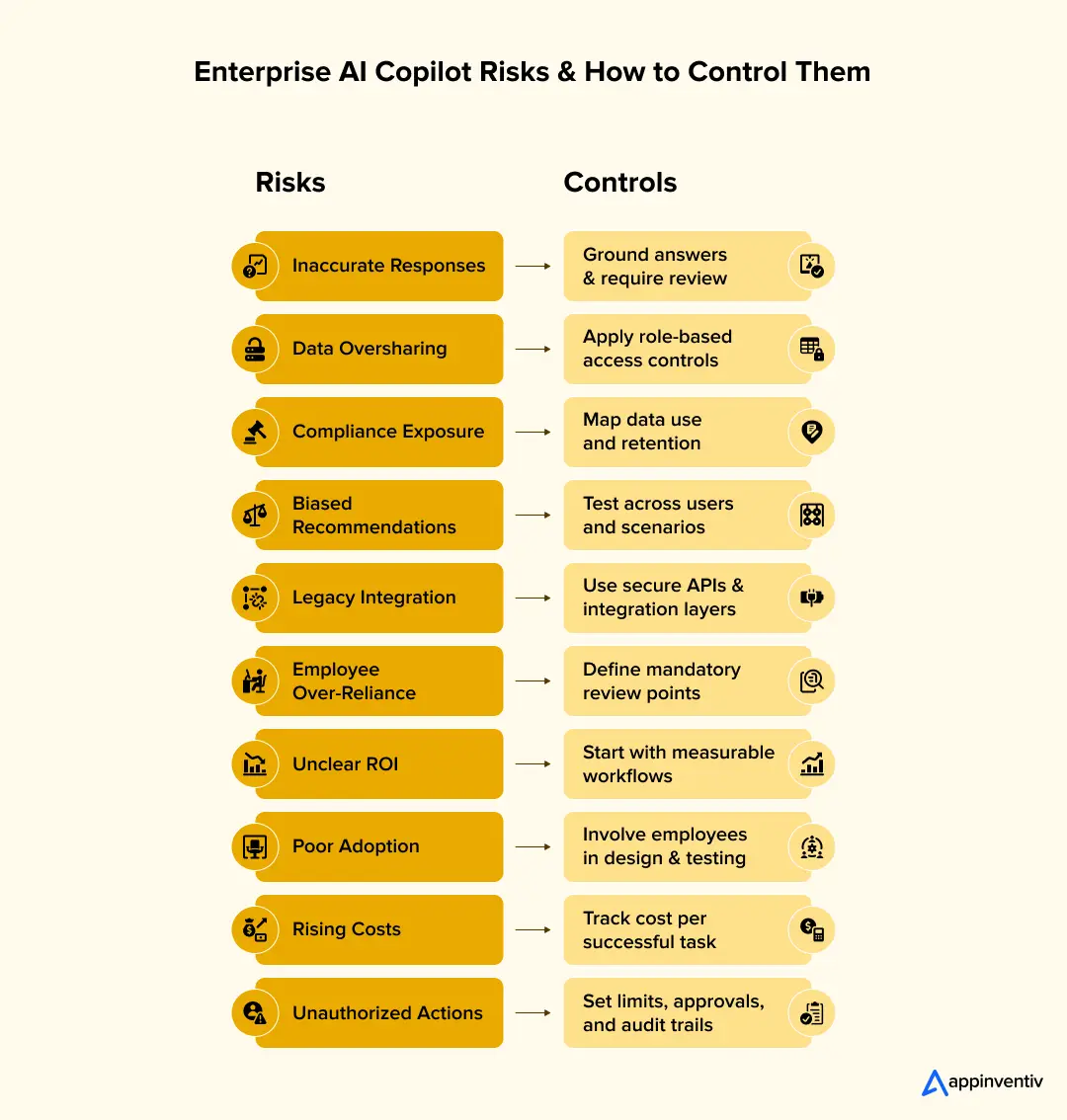
Inaccurate or Fabricated Responses
Large language models can generate confident but incorrect answers. This becomes risky when employees use copilots for financial, legal, technical, or clinical work.
How to address it: Ground responses in approved enterprise sources through RAG powered applications. They can show citations, define confidence thresholds, test high-risk scenarios, and require human approval for sensitive decisions.
Data Exposure and Oversharing
A copilot may surface confidential information when existing permissions are broad or poorly configured. Common enterprise AI copilot security risks include data leakage, oversharing, prompt attacks, and unauthorized system actions.
How to address it: Review permissions before deployment. Apply role-based access, data classification, encryption, sensitivity labels, and audit logs. The copilot should inherit the user’s authorized access instead of receiving unrestricted data access.
Regulatory and Compliance Risk
Copilots may process personal, financial, healthcare, or confidential business information. This can create obligations under GDPR, HIPAA, CCPA, and sector-specific requirements.
How to address it: Map data movement, retention, model usage, and processing locations. Add consent controls, deletion policies, auditability, and legal review where required.
Bias and Inconsistent Recommendations
Biased training data or incomplete enterprise data can affect recommendations. The impact can be serious in hiring, lending, healthcare, and employee assessment.
How to address it: Test outputs across representative groups and scenarios. Businesses can also use documented evaluation criteria, human review, bias monitoring, and clear escalation paths to detect bias in AI models.
Legacy-System Integration
Enterprise data often sits across ERP, CRM, content platforms, data warehouses, and older applications. Weak integrations can leave the copilot without current or complete context.
How to address it: Begin with an integration and data-readiness assessment. Use secure APIs, connectors, orchestration layers, and staged modernization for systems that cannot support reliable access.
Employee Over-Reliance
Employees may accept polished responses without checking the underlying facts. Excessive dependence can reduce critical thinking and spread errors across workflows.
How to address it: Train users to verify high-impact outputs. Clearly label generated content and communicate when human review is mandatory.
Unclear ROI and Rising Costs
Model usage, infrastructure, integrations, licenses, monitoring, and support can increase total cost which can be one of the major challenges of implementing AI copilots. Broad deployment without prioritized use cases may produce low adoption and weak returns.
How to address it: Start with high-volume workflows that have measurable baselines. Track usage, time saved, completion rates, correction rates, and cost per successful task.
Poor User Adoption
Employees may avoid a copilot that adds extra steps or provides unreliable answers. Launching the tool without redesigning the workflow rarely creates sustained value.
How to address it: Include employees during discovery and testing. Embed the copilot within familiar systems and improve it through actual usage feedback.
Also read:- How AI Carries an Impact On Your Business, Across Domains?
What Is the Future of AI Copilots?
Most copilots today still wait for users to ask questions or give instructions. This will change as businesses connect them with more systems, data sources, and approved actions.
The following AI copilot trends show how these systems will become more context-aware, connected, autonomous, and valuable across enterprise operations.
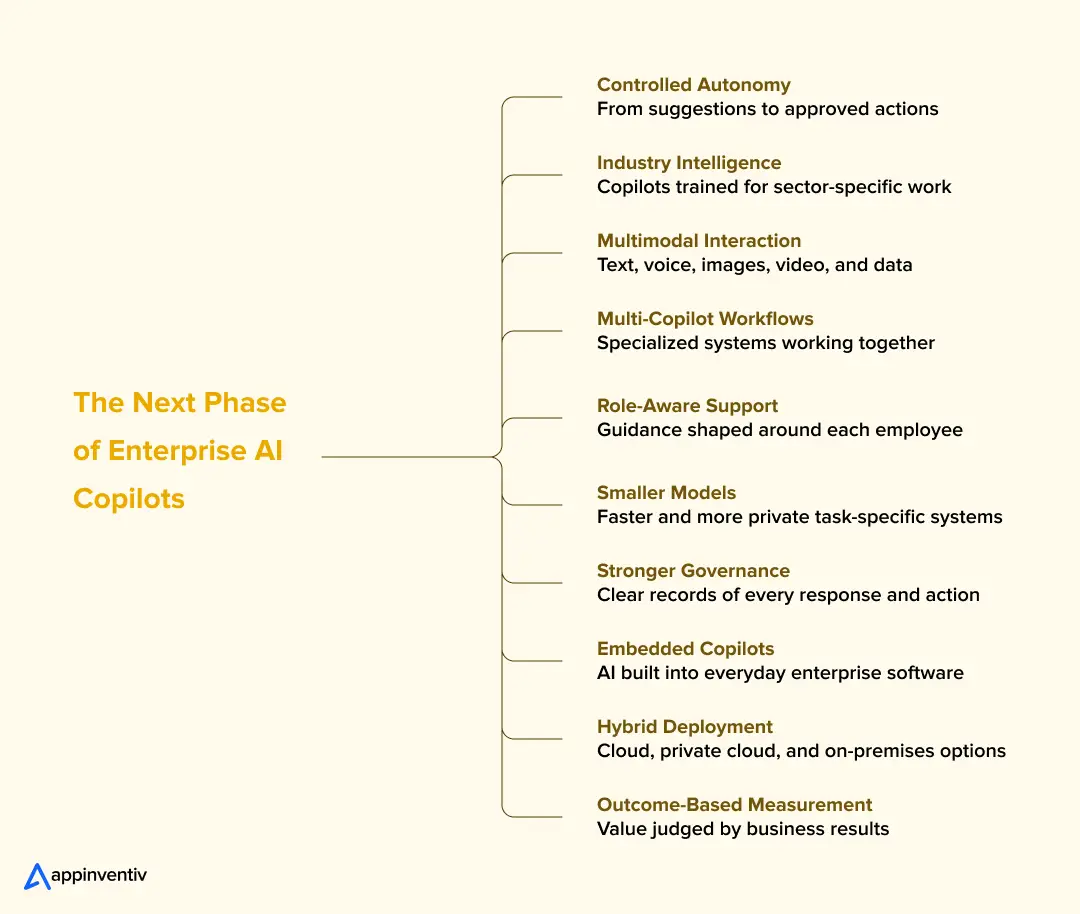
AI Copilots Will Move From Assistance to Controlled Action
Copilots will move beyond drafting and summarizing. With approval, they will complete routine steps, update requests, send reminders, and flag policy issues. People will still control sensitive decisions.
Industry-Specific Copilots Will Replace Generic Solutions
Generic copilots cannot fully understand clinical notes, insurance claims, credit reviews, or factory inspections. Industry-specific systems will use relevant terminology, records, regulations, and operating rules to provide more accurate support.
Multimodal Copilots Will Work With Voice, Images, Video, and Data
Employees will interact with copilots through voice, images, documents, video, and sensor data. A technician could share a damaged component’s photograph and receive repair guidance based on its service history.
Multiple Copilots Will Work Together Across Departments
Sales, legal, finance, HR, and operations will use copilots built around their work. These systems will exchange approved information as processes move between teams. Shared rules for access, identity, and record keeping will remain essential.
AI Copilots Will Deliver More Role-Aware Assistance
Future copilots will consider the employee’s role, current work, and permitted data. This will provide more relevant support without repeated explanations. Access controls must prevent users from seeing restricted information.
Smaller Specialized Models Will Gain Enterprise Adoption
Many business tasks do not require the largest models. Smaller models can deliver faster responses, lower costs, and greater data control. Businesses may run them in private clouds, on-premises systems, or near connected devices.
Copilot Governance Will Become a Core Business Requirement
Businesses must track the sources copilots use, their recommendations, approvals, and completed actions. These records will support audits, security reviews, investigations, and performance improvements.
Copilots Will Become a Standard Layer Across Enterprise Software
Copilot support will sit inside CRM, ERP, finance, service, and collaboration platforms. Employees will receive help within their existing workflows, reducing system switching and improving adoption.
Hybrid Copilot Deployment Will Become More Common
Enterprises will combine public cloud, private cloud, and on-premises environments. Each workflow can then run where its security, compliance, cost, and performance needs are best met.
Businesses Will Measure Copilots by Outcomes, Not Usage
Active users and query volumes show adoption, but not business value. Companies will track cycle times, errors, review effort, operating costs, and service outcomes. They should compare AI copilot tools by integration fit, data controls, deployment options, and long-term costs.
Appinventiv: Your Copilot in AI Innovation
Appinventiv is dedicated to integrating artificial intelligence copilots into business workflows. With a strong focus on leveraging advanced AI capabilities, we help businesses optimize processes, enhance decision-making, and drive innovation.
Our AI copilot development services help automate routine tasks, freeing up valuable time for strategic initiatives, allowing businesses to realize the positive impact of AI. These solutions are designed to be flexible and scalable, ensuring they can be seamlessly integrated into existing systems for minimal disruption and maximum efficiency.
As a dedicated AI development services provider, we offer comprehensive support throughout the AI implementation journey, from initial consultation to deployment and beyond. Our commitment to client success is reflected in our hands-on approach and customized solutions. By partnering with us, businesses gain access to cutting-edge AI technologies and industry-leading expertise. We help navigate the complexities of AI adoption, ensuring that our clients can fully realize the transformative potential of these technologies.
Get in touch to get a reliable partner dedicated to helping businesses to understand the impact of AI copilot and achieve sustained success through innovative AI-powered solutions.
FAQs
Q. How can an AI copilot improve your existing business workflows?
A. An AI copilot can reduce the time employees spend searching, summarizing, updating systems, and preparing routine work. It can support:
- Customer query handling
- Sales research and CRM updates
- Financial reporting
- Contract and compliance reviews
- Employee onboarding
- Internal knowledge searches
The AI Copilot framework should meet current workflow needs while supporting future integrations, users, and processes.
Q. What role does generative AI play in modern AI copilots?
A. Generative AI helps copilots understand natural language, summarize information, draft content, explain data, and recommend suitable actions.
Connected with approved business systems, a generative AI copilot can:
- Prepare reports, emails, and proposals
- Summarize meetings and customer records
- Retrieve answers from approved sources
- Explain business data and exceptions
- Support multistep workflows with human approval
Q. How can you identify the right AI copilot use case for your enterprise?
A. Start with a workflow that consumes significant time, causes repeated delays, or requires employees to search across several systems.
Compare potential AI copilot use cases based on:
- Current task time and cost
- Employee involvement
- Data availability and quality
- Error and rework rates
- Integration requirements
- Expected savings or service improvements
Q. How can enterprises integrate AI copilots with existing business systems?
A. Copilots can connect with existing applications through APIs, secure connectors, and integration layers.
A planned enterprise AI copilot integration may connect with:
- Salesforce and Dynamics 365
- SAP and Oracle
- Microsoft 365 and Google Workspace
- EHR and claims systems
- ServiceNow and Jira
- Data warehouses and document platforms
Q. How can Appinventiv help businesses build and scale an AI copilot?
A. Appinventiv builds secure, production-ready copilots around enterprise workflows, data, systems, roles, and compliance needs.
Our services cover:
- Use-case discovery and ROI assessment
- Custom copilot development
- RAG and knowledge-base integration
- Enterprise system integration
- Access and governance controls
- Security and performance testing
- Pilot rollout and enterprise scaling
We help businesses apply high-value AI copilot use cases to reduce manual work, improve decisions, and create measurable operational value.


Fast 2-minute response, fully NDA-protected.

AI-Native Security Maturity Model: Score Where Your Security Stack Stands
Key takeaways: If Human oversight scores below 2, you're at Level 3 at most, whatever your total score says. Moving to Level 3 starts with unifying your telemetry, which most teams can do with tools they already own. Define approval points before you automate response. Oversight added later costs more. Buy a platform when your…

The AI ROI Crisis: Why Enterprises Are Struggling to Prove Value and How to Fix It
Key takeaways: AI ROI is a capital-allocation question. Boards want payback periods and P&L impact. AI ROI challenges rarely have a single cause. Data, legacy systems, use-case choice, ownership and stalled pilots compound each other. Choose two or three outcome metrics per use case, set the baseline first, and report in dollars. Make every further…

Retrieval Augmented Generation in Australia: Architecture, Implementation and Cost
Key takeaways: RAG grounds LLM answers in approved content, improving reliability without retraining a model. Data quality and access permissions decide production outcomes more than the model. Indicative build costs run from AUD 70,000 to 700,000, driven by data and integrations. Measure value against a pre-deployment baseline, separating realised benefits from projected savings. A general-purpose…