






























AI Agents in Customer Service: The Future of Seamless Customer Interactions

 Share -



- 01How AI Agents Have Changed the Customer-Service Investment Case
- 02Types of AI Agents Used in Customer Service
- 03Business Benefits of AI Agents in Customer Service
- 04Industry-Specific Use Cases of AI Agents in Customer Service
- 05The Enterprise Architecture Behind AI-Powered Customer Service
- 06How Much Does It Cost to Build an AI Customer Service Agent?
- 07How to Successfully Deploy AI Agents in Customer Service
- 08Key Challenges of Implementing AI Agents in Customer Service
- 09How to Measure the Performance of AI Customer Service Agents
- 10Build Enterprise-Ready AI Customer Service Agents With Appinventiv
- 11FAQs

Key takeaways:
- AI agents move customer service beyond scripted responses by completing multi-step requests across connected enterprise systems.
- Enterprises can use conversational, voice, transactional, proactive, copilot, and specialized agents based on the customer journey.
- High-value applications span healthcare, banking, insurance, telecom, retail, travel, and automotive customer service.
- Developing an AI customer service agent can cost between $40,000 and $400,000 or more, depending on integrations, autonomy, channels, and compliance.
- Successful deployment requires reliable data, clear permissions, human escalation, continuous monitoring, and performance measurement based on complete resolution.
AI agents have moved beyond answering routine questions. They can now verify customers, access enterprise systems, make permitted decisions, complete service requests, and escalate sensitive cases with the full context intact.
This changes what customers will expect from every business: immediate support that does not stop at a response but continues until the issue is resolved.
For enterprises, adopting AI agents in customer service is no longer about keeping pace with a technology trend. It is about building a service model that can handle rising demand without increasing wait times, costs, and operational pressure at the same rate.
This blog examines where AI agents create business value, how they work across customer journeys, what it takes to deploy them responsibly, and how enterprises can move from isolated automation to seamless resolution.
Identify where an AI agent can remove the most customer effort and deliver the fastest operational win.

How AI Agents Have Changed the Customer-Service Investment Case
Traditional customer-service automation was designed primarily to contain demand. Interactive voice response systems routed calls, rules-based bots returned prepared answers, and self-service portals directed customers towards knowledge articles. These systems reduced some manual work but often left customers to complete the actual resolution themselves.
AI agents for enterprises can change that equation as they can pursue an outcome across several connected steps. They interpret the request, retrieve relevant information, select an approved course of action, work across enterprise systems, verify the result, and determine whether human intervention is needed.
The shift is already accelerating. Gartner predicts that agentic AI will autonomously resolve 80% of common customer-service issues by 2029, potentially reducing operational costs by 30%.
However, investing in technology is not bound to guarantee results. Another Gartner study found that only 10% of customer-service leaders had achieved their primary business objectives from GenAI investments. The gap shows why businesses need more than a conversational interface placed over an unchanged service process.
Furthermore, enterprises must understand that the real advantage lies in extending automation beyond the initial customer conversation. AI agents can verify identity, retrieve account history, evaluate available options, initiate approved actions across connected systems, and preserve the complete context when specialist intervention is required. This allows enterprises to automate resolution workflows rather than simply deflecting enquiries.
Looking for commercial proof? Well, it’s significant. According to McKinsey’s 2025 research, AI-powered next-best experiences can improve customer satisfaction by 15%-20%, increase revenue by 5%-8%, and reduce the cost to serve by 20%-30%.
Realising these gains requires enterprises to approach agentic AI for customer service as an operating-model transformation. Workflows, system permissions, approval thresholds, human responsibilities, and governance controls must all be redesigned around complete customer outcomes and not only on isolated automated responses.
Types of AI Agents Used in Customer Service
Not every customer-service agent is built to perform the same role. Some are designed to hold conversations, while others complete transactions, assist employees, monitor customer activity, or coordinate work across several systems.
Enterprises may use one type for a specific workflow or combine multiple agents to support a complete customer journey.
| Type of AI agent | Primary role | What it can handle | Human involvement | Best suited for |
|---|---|---|---|---|
| Conversational support agents | Manage customer conversations through chat, email, or messaging platforms | Answer questions, retrieve account information, explain policies, collect details, and guide customers through standard processes | Required when the request involves an exception, complaint, or sensitive decision | Retail, travel, banking, SaaS, healthcare administration, and ecommerce |
| Voice AI agents | Understand and respond to customers through natural spoken conversations | Manage incoming calls, verify basic information, answer questions, book appointments, provide status updates, and route calls | Required for emotionally sensitive, high-risk, or unusually complex conversations | Telecom, banking, insurance, healthcare, travel, utilities, and hospitality |
| Transactional service agents | Complete approved actions across connected business systems | Process refunds, modify bookings, update subscriptions, replace cards, reschedule appointments, and create service requests | Approval may be required when an action exceeds a financial or risk threshold | Banking, insurance, ecommerce, travel, subscription services, and logistics |
| Customer-service copilots | Assist human employees during live customer interactions | Summarize case history, retrieve policies, recommend responses, suggest next actions, and prepare case notes | The employee retains control of the conversation and final decision | Regulated industries, technical support, complaint management, and high-value customer service |
| Proactive support agents | Identify potential customer issues before support is requested | Detect failed payments, delivery delays, service disruptions, expiring documents, unusual activity, and renewal risks | Employees handle cases where the suggested response needs review or negotiation | Telecom, banking, insurance, utilities, travel, ecommerce, and subscription businesses |
| Specialized industry agents | Handle workflows that require sector-specific knowledge and controls | Support claims, patient scheduling, banking disputes, network diagnostics, policy servicing, or regulated customer communication | Specialist review remains necessary for regulated advice, exceptions, and consequential decisions | Healthcare, banking, insurance, telecom, legal services, and public-sector operations |
| Multi-agent customer-service systems | Coordinate several specialized agents to resolve a broader customer request | Assign tasks to billing, identity, logistics, product, risk, or scheduling agents and combine their outputs into one resolution | Human review is required when agents produce conflicting results or reach an approval boundary | Large enterprises with complex products, multiple systems, and cross-department service workflows |
These types are not mutually exclusive. An AI voice agent, for example, may also be transactional if it can update a booking or process a payment. A conversational agent may work as an AI copilot in one workflow and operate autonomously in another.
Now, businesses must also understand that the term “AI agent” is often used for every automated support tool, even though chatbots, assistants, and agents provide very different levels of capability. Understanding this distinction helps businesses choose a solution that matches the complexity of the customer journey.
AI Agent vs AI Chatbot vs AI Assistant
AI chatbots, assistants, and agents are often grouped together, but they serve different purposes. The main distinction lies in how much context they understand, how independently they can work, and whether they can take action across business systems.
| Factor | AI chatbot | AI assistant | AI agent |
|---|---|---|---|
| Primary purpose | Answers common questions and follows predefined conversation paths | Helps customers or employees find information and complete individual tasks | Works towards a defined customer outcome across multiple steps |
| Decision-making ability | Uses fixed rules, intents, or prepared responses | Generates recommendations based on the user’s request and available context | Selects the next appropriate action within approved business rules |
| System access | Usually retrieves limited information from a knowledge base | May access customer data and connected applications | Works across CRM, billing, order, claims, scheduling, and other operational systems |
| Ability to take action | Rarely moves beyond answering or routing | Assists the user but often requires them to complete the action | Can complete approved tasks such as processing refunds, updating bookings, or creating service requests |
| Handling complex requests | Performs best with predictable and repetitive enquiries | Supports more flexible questions but usually handles one task at a time | Breaks a broader request into steps, checks results, and adjusts the resolution path when needed |
| Human involvement | Transfers requests it cannot recognize | Keeps the user or employee in control of most actions | Operates independently within defined limits and escalates when judgement or approval is required |
The right option depends on the intended outcome. Chatbots remain suitable for predictable FAQs and basic routing, while AI assistants help customers or employees complete individual tasks. AI agents are more appropriate when the business needs the system to coordinate several steps, work across enterprise platforms, and complete approved actions.
It’s worth taking that distinction one step further, since AI agents and agentic AI aren’t quite the same thing either — a single agent handling one workflow is different from an agentic system coordinating several agents toward a broader outcome.
Business Benefits of AI Agents in Customer Service
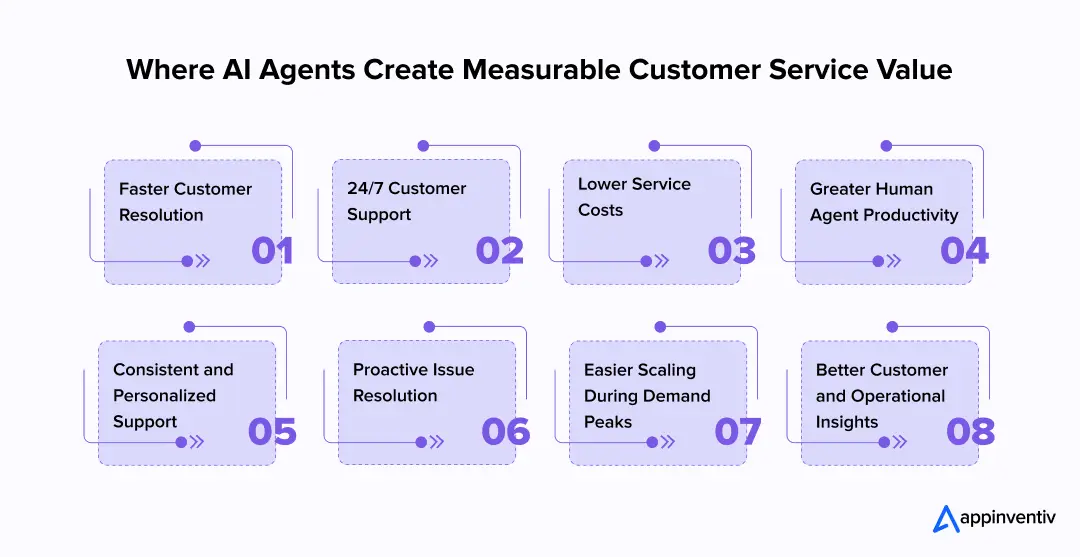
AI agents create value when they help customers complete a task, not when they simply produce quicker replies. By connecting conversations with customer data, company policies, and operational systems, they can reduce service effort while giving human teams more time for cases that require judgement.
Faster Customer Resolution
An AI customer service agent can understand a request, retrieve the necessary information, and complete approved actions within the same interaction. This reduces transfers, follow-ups, and the delays caused by moving cases between departments.
24/7 Customer Support
An AI agent for customer support can handle routine requests outside standard working hours and across different time zones. Customers receive immediate assistance, while complex or sensitive matters remain available for human review.
Lower Service Costs
Customer support automation using AI agents reduces the manual effort involved in retrieving account details, updating records, routing cases, and completing standard requests. This allows businesses to lower service costs while keeping human teams available for complex customer needs.
Greater Human-Agent Productivity
The employees often spend significant time searching for policies, reviewing previous interactions, and updating several systems. AI customer support agents can complete this preparation in real time, allowing employees to focus on complaints, exceptions, and conversations that require empathy.
Consistent and Personalized Support
Customer service AI agents can use approved customer information and the latest company policies to provide relevant support across chat, email, voice, and mobile channels. Customers receive consistent answers without having to repeat their history whenever the channel or representative changes.
Proactive Issue Resolution
AI agents can identify delayed orders, failed payments, expiring services, or unusual account activity before customers raise a complaint. They can notify the customer, suggest the next step, or initiate an approved corrective action.
Easier Scaling During Demand Peaks
Businesses can use AI agents for customer support automation to manage sudden increases in routine enquiries without expanding support teams at the same rate. The agents can provide updates, complete standard requests, and direct urgent or sensitive cases to the appropriate employees.
Better Customer and Operational Insights
An AI agent for customer service can analyze conversations to identify repeated complaints, knowledge gaps, product issues, and failed service processes. These findings help businesses improve not only customer support but also products, policies, and operational decisions.
The benefits of AI agents in customer service ultimately come down to better resolution at scale. Businesses can respond faster, control service costs, support employees, and give customers a more consistent experience without treating every increase in demand as a hiring problem.
Industry-Specific Use Cases of AI Agents in Customer Service
Customer-service priorities differ across industries. A bank may need an agent to investigate a transaction, while a healthcare provider may use one to coordinate appointments and answer coverage questions. The technology may be similar, but the data, actions, risks, and escalation requirements are not.
Here are some of the strongest industry-specific applications:
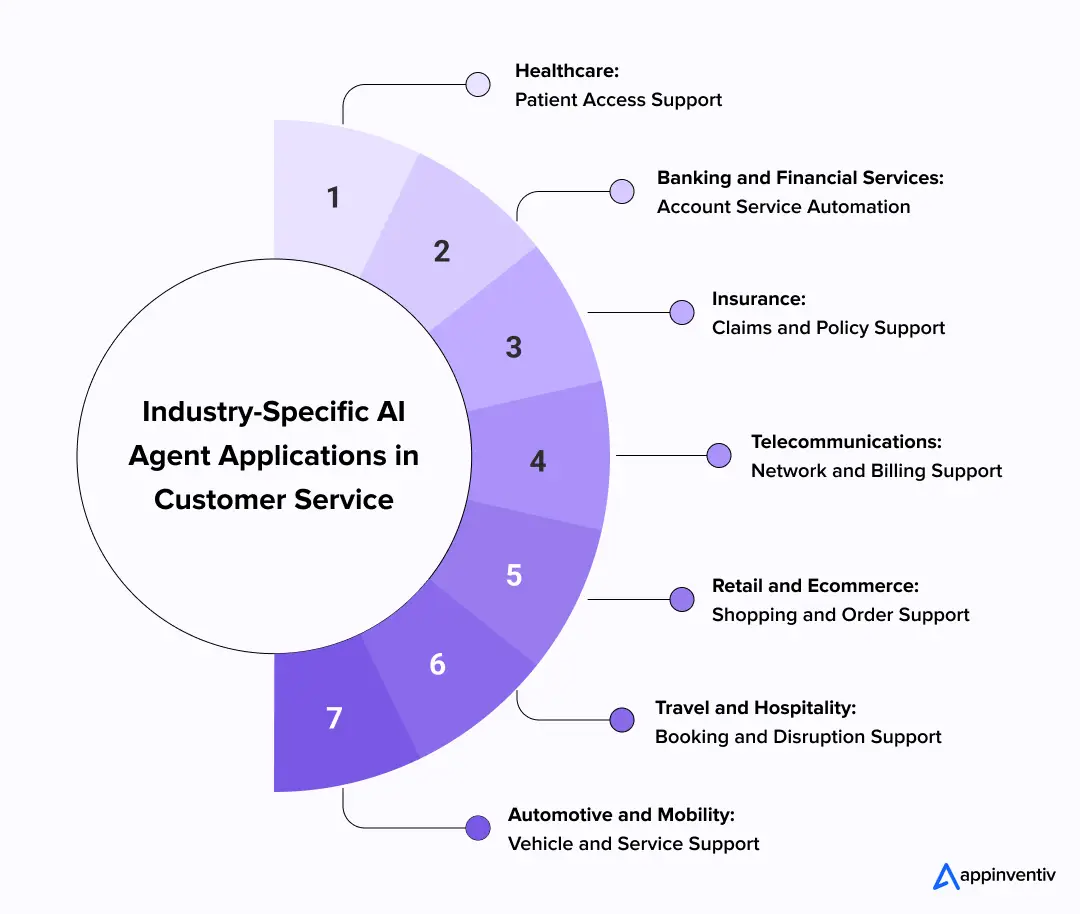
Healthcare
Healthcare providers can use AI agents to manage appointment scheduling, patient registration, insurance verification, billing questions, referral updates, and pre-visit instructions. Agents can also remind patients about follow-ups or help them identify the correct department based on their stated needs.
These workflows reduce the administrative pressure on front-desk and contact-centre teams. However, the agent must clearly separate administrative assistance from clinical advice. Symptoms, treatment decisions, emergencies, and other high-risk concerns should follow defined clinical escalation protocols.
For example, healow developed an AI-powered contact centre that provides real-time responses to patient enquiries while automating routine administrative tasks. The system helps reduce staff workload and gives patients easier access to support.
[Also Read: How Agentic AI in Healthcare Is Bringing in Industry-level Transformation]
Banking and Financial Services
Banks can deploy AI agents for transaction enquiries, payment issues, card management, account servicing, dispute intake, loan-status updates, and fraud-related support. An agent can retrieve account information, verify the customer, explain an unfamiliar charge, and guide them towards the next approved action.
Additional controls are required when the interaction involves payments, financial advice, fraud, hardship, or changes to sensitive account information. The agent’s permissions should reflect the risk attached to each task.
Bank of America’s Erica is one of the most established examples. According to the bank, Erica had supported almost 50 million users and completed more than three billion interactions by August 2025. Customers use it to review transactions, manage recurring charges, monitor spending, and complete everyday banking activities.
Insurance
Insurance customer service involves policy questions, claims, renewals, document collection, coverage checks, payment changes, and regular status enquiries. AI agents can help policyholders submit the required information, understand the next step, and track a claim without repeatedly contacting the insurer.
They can also assist service representatives by summarizing case histories, retrieving policy details, and preparing customer communications. Claims involving suspected fraud, unclear liability, large losses, or vulnerable customers should remain with qualified professionals.
AIA Group uses Copilot within Dynamics 365 Customer Service to support its representatives. The system summarizes conversations and lengthy case histories, retrieves corporate knowledge, and assists with customer emails. AIA reports that this allows employees to manage more cases while providing more personal support.
Telecommunications
Telecom providers handle large volumes of enquiries related to billing, network performance, service activation, plan changes, device setup, and outages. Many of these requests require information from several systems, which makes them suitable for connected AI agents.
An agent can check whether an outage exists, review the customer’s account and device, run approved diagnostics, recommend a suitable plan, or arrange a technician visit. During widespread disruptions, it can provide customer-specific updates while human teams focus on unusual or urgent cases.
Vodafone has explored multimodal AI to support its field-service employees. The system gives field agents faster access to relevant knowledge, helping them diagnose issues and improve first-time fixes. Google Cloud highlighted the initiative as an example of AI-supported telecom service at its 2025 industry event.
Retail and Ecommerce
Retailers can use AI agents across both shopping and post-purchase support. Customers may ask for product comparisons, compatibility information, stock availability, delivery changes, loyalty assistance, or help with a return.
Because the agent can consider the customer’s current order, previous purchases, preferences, and available inventory, it can provide more relevant support than a generic chatbot. It may recommend a suitable alternative, update a delivery slot, initiate a return, or arrange a replacement during the same conversation.
Retail agents can also respond proactively. If an item becomes unavailable or an order is delayed, the agent can notify the customer and present options before they need to contact support.
The same approach is appearing in restaurant service. Wendy’s uses FreshAI to manage voice orders while accounting for menu customization, limited-time products, and differences between customer language and official product names.
Travel and Hospitality
Travel businesses face highly variable demand. Flight cancellations, weather disruption, missed connections, and booking changes can generate thousands of customer requests within a short period.
AI agents can check booking conditions, suggest available alternatives, modify reservations, provide baggage updates, and communicate schedule changes. They can also support hotel bookings, loyalty programmes, destination questions, and pre-arrival requests.
The greatest value appears during disruption. An agent that merely explains why a flight was cancelled offers limited help. An agent connected with booking, inventory, payment, and notification systems can move the customer towards another suitable option.
Air India uses its AI assistant, AI.g, to answer booking and travel-related questions at scale. According to Microsoft, the assistant handles around 40,000 customer enquiries each day, helping the airline improve response speed while reducing pressure on human support teams.
Automotive and Mobility
Automotive companies can use AI agents to answer vehicle questions, schedule maintenance, explain warning indicators, assist with roadside support, and provide updates on repairs or deliveries. When connected with vehicle and service data, agents can make support more specific to the customer’s model and current situation.
They can also support drivers inside the vehicle. Mercedes-Benz uses Gemini through Vertex AI within its MBUX Virtual Assistant. The system allows drivers to ask natural questions about navigation and nearby locations, creating a more conversational form of in-vehicle support.
For manufacturers and dealerships, the opportunity extends beyond answering questions. Agents can coordinate appointments, check parts availability, provide repair updates, and notify owners when maintenance may be required.
Across these industries, the most effective AI agents in customer service are designed around the customer journey, operational systems, and risk profile of the sector. The use case should determine the agent’s permissions and escalation rules, rather than applying the same level of autonomy to every interaction.
The Enterprise Architecture Behind AI-Powered Customer Service
An AI agent may appear as a single conversational interface, but resolving a customer request requires several systems to work together. The architecture connects customer channels, contextual intelligence, enterprise applications, security controls, and human support within one coordinated environment.
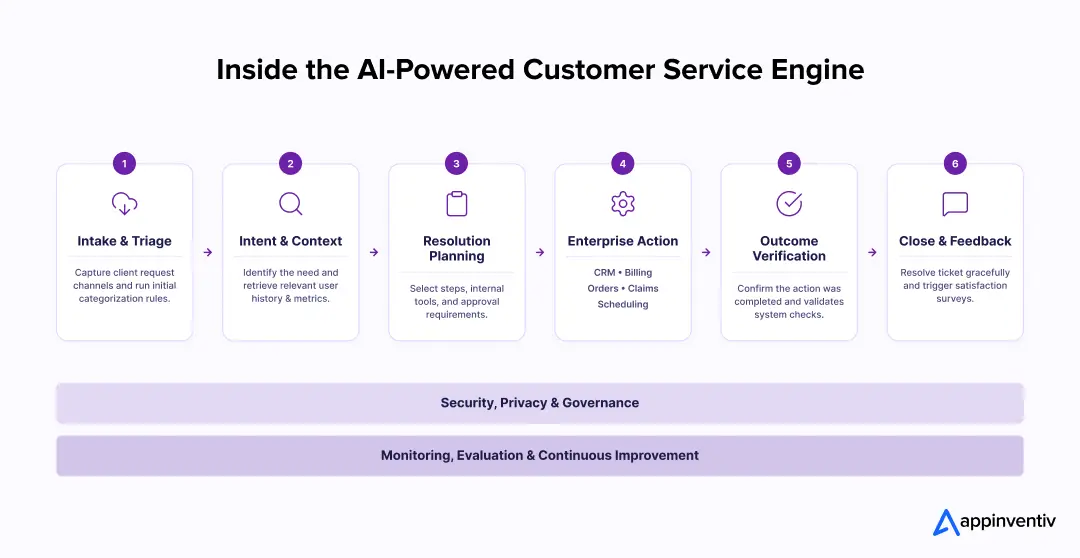
Customer Request: The interaction begins through chat, voice, email, or a mobile application.
Intent and Context: The agent identifies the customer’s need and retrieves relevant account or interaction history.
Resolution Planning: It selects the required steps, systems, and approval level based on business rules.
Enterprise Action: The agent connects with CRM, billing, order, claims, or scheduling systems to complete the task.
Outcome Verification: It confirms that the requested action was completed before informing the customer.
Resolution or Escalation: The agent closes the request or transfers it to an employee with the complete context.
Security and Governance: AI agent governance applies permissions, privacy controls, approval limits, and audit records govern every stage.
Continuous Improvement: Performance monitoring helps identify failed interactions, knowledge gaps, and workflow improvements.
How Much Does It Cost to Build an AI Customer Service Agent?
The cost of building an AI customer service agent can range from $40,000 to $400,000 or more. The final investment depends on what the agent needs to understand, which systems it must access, how independently it can act, and the level of security required.
A customer-facing agent that answers questions from an approved knowledge base will cost far less than an enterprise system that supports voice, processes refunds, manages claims, and works across several countries.
Estimated AI Customer Service Agent Development Cost
| Implementation level | Typical capabilities | Estimated cost |
|---|---|---|
| Basic support agent | FAQ resolution, knowledge retrieval, simple ticket creation, one language, and one customer channel | $40,000 to $70,000 |
| Integrated service agent | CRM access, customer authentication, personalized responses, case routing, human handoff, and two or more channels | $70,000 to $120,000 |
| Transactional AI agent | Refunds, booking changes, account updates, claims intake, workflow automation, and multiple enterprise integrations | $120,000 to $200,000 |
| Enterprise omnichannel system | Voice and chat support, multilingual interactions, multi-agent orchestration, advanced security, analytics, and regional compliance | $200,000 to $400,000+ |
These figures are indicative. A detailed estimate requires an assessment of the customer journeys, existing technology, data readiness, transaction volume, and regulatory environment.
What Influences the Development Cost?
The following factors have the greatest effect on the overall AI agent development cost:
- Number of use cases: An agent that manages one support journey is easier to build than one covering billing, orders, claims, onboarding, and technical support.
- Enterprise integrations: Connecting CRM, ERP, payment, inventory, ticketing, or legacy systems requires additional engineering and testing.
- Level of autonomy: Costs increase when the agent can complete transactions or make decisions instead of only retrieving information.
- Customer channels: Voice, email, chat, mobile, and social messaging each require separate experience and integration work.
- Languages and markets: Multilingual support requires language testing, localized knowledge, and region-specific policies.
- Security and compliance: Healthcare, banking, and insurance agents need stronger authentication, auditability, privacy controls, and approval workflows.
- Data and knowledge readiness: Scattered, outdated, or conflicting information must be organized before the agent can use it reliably.
- Monitoring and maintenance: Enterprises need ongoing evaluation, model usage management, knowledge updates, security reviews, and workflow optimization.
How to Calculate the ROI of AI Agents in Customer Service
The return should not be calculated only through reduced staffing costs. AI agents can also lower repeat contacts, improve employee productivity, protect customer relationships, and help businesses manage higher service volumes.
A practical ROI calculation can use the following formula:
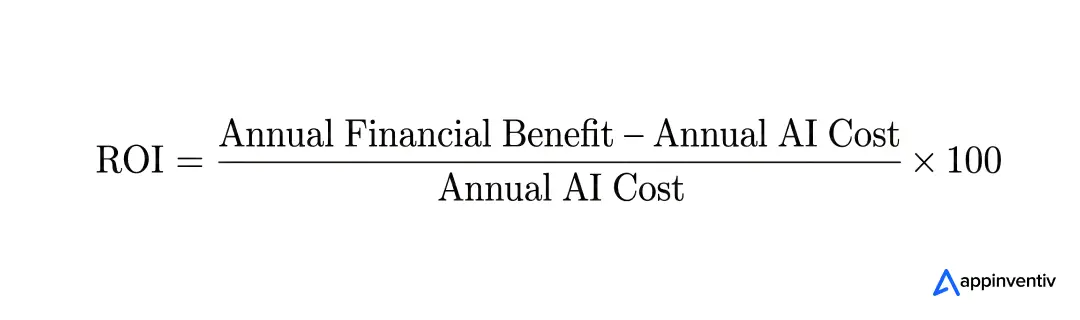
The annual financial benefit may include:
- Lower cost per successfully resolved request
- Fewer repeat contacts and unnecessary transfers
- Reduced average resolution time
- Higher productivity among human agents
- Lower overtime and seasonal staffing requirements
- Improved customer retention
- Revenue protected through faster issue resolution
- Additional demand handled without proportional team expansion
The annual AI cost should include:
- Initial development cost allocated across the expected system life
- Platform and model usage
- Cloud infrastructure
- Integration maintenance
- Monitoring and evaluation
- Security and compliance reviews
- Knowledge-base management
- Employee training and operational support
For example, suppose an enterprise spends $180,000 annually on its AI customer-service capability and generates $450,000 in measurable savings and retained revenue.
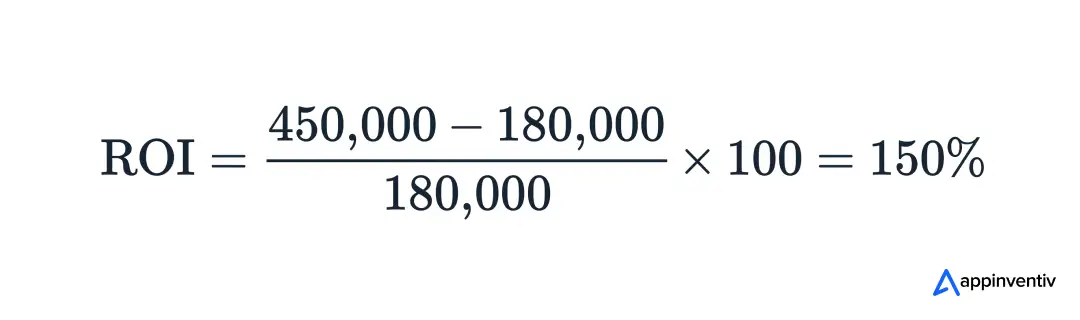
This means the business receives $1.50 in net value for every dollar invested during that period.
The calculation should be based on successful resolutions, not the number of conversations handled. A low-cost interaction creates little value if the customer has to contact the business again or an employee must correct the agent’s action later.
Get a clear view of development cost, operating spend, expected savings, and the customer journeys most likely to generate ROI.

How to Successfully Deploy AI Agents in Customer Service
Deploying an AI agent is not simply a matter of selecting a model and connecting it to a chat interface. The agent needs a clear role, reliable information, controlled system access, and measurable goals. A phased rollout helps enterprises prove value without exposing every customer journey to unnecessary risk. Let’s look into the process to build AI customer service agents for enterprises:
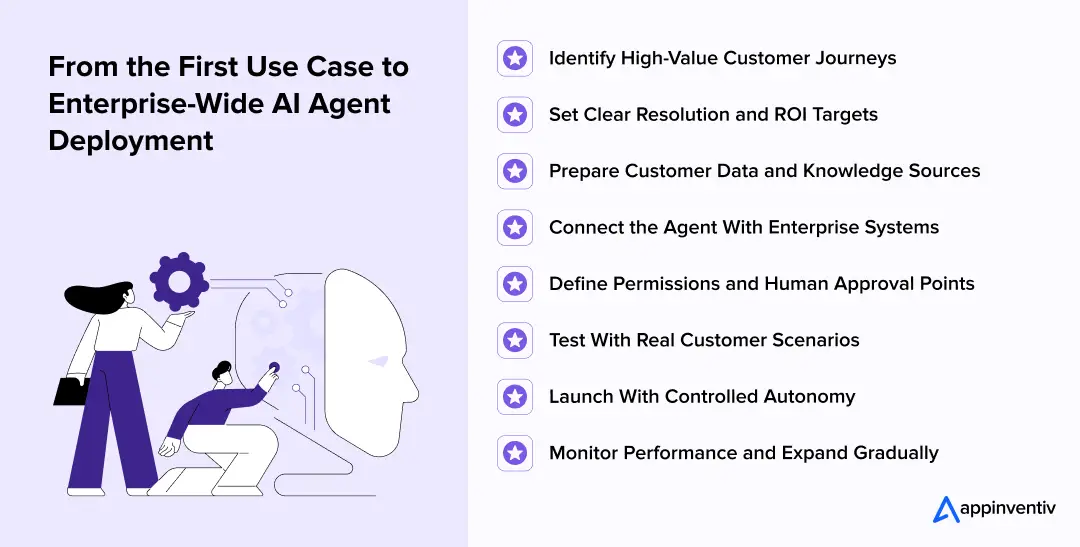
Identify High-Value Customer Journeys
Begin with customer requests that occur frequently, follow reasonably stable rules, and create unnecessary work for support teams. Order changes, appointment scheduling, account updates, subscription management, and standard claim enquiries are often suitable starting points.
Avoid choosing the most complicated workflow for the first deployment. The initial use case should be valuable enough to demonstrate an impact but controlled enough to test safely.
Set Clear Resolution and ROI Targets
Define what the agent is expected to improve before development begins. The goal may be to reduce resolution time, increase first-contact resolution, lower repeat enquiries, or improve service availability.
These targets should be connected with the business case prepared for the investment. Clear measures prevent the pilot from being judged only by the number of conversations handled.
Prepare Customer Data and Knowledge Sources
The agent needs accurate customer information and up-to-date business knowledge. Review policies, FAQs, product documents, service procedures, and previous support content before connecting them to the system.
Remove outdated or conflicting information and assign ownership for future updates. Customer data should also be organized so the agent can access only what is relevant to the current request.
Connect the Agent With Enterprise Systems
An agent can answer questions without system integration, but it cannot complete many customer requests. Connect it with the CRM, ticketing platform, billing system, order management, claims, inventory, or scheduling tools required by the selected use case.
Each connection should have clear permissions, input rules, failure responses, and confirmation checks. The agent must know whether an action succeeded before communicating the outcome to the customer.
Define Permissions and Human Approval Points
Decide which actions the agent can complete independently, which require employee approval, and which should always remain with a human specialist.
For example, the agent may be allowed to change a delivery date but require approval for a high-value refund. Fraud concerns, financial hardship, medical issues, serious complaints, and regulatory exceptions should follow dedicated escalation paths.
These boundaries allow businesses to introduce autonomy without giving the agent unrestricted control.
Test With Real Customer Scenarios
Testing should cover more than common, perfectly worded questions. Use real conversation patterns, incomplete requests, multiple intents, spelling errors, regional language, emotional customers, conflicting information, and failed system actions.
Teams should verify whether the agent retrieves the correct information, follows policy, completes actions accurately, and escalates at the right time. Security and privacy testing should also examine whether customers can access information or actions beyond their permission level.
Launch With Controlled Autonomy
Start with a limited customer group, channel, region, or set of actions. The agent may initially recommend responses to employees or require approval before completing transactions.
Autonomy can increase as the business gathers evidence that the agent performs reliably. This allows teams to identify weaknesses in knowledge, integrations, and escalation rules before the system reaches a larger customer base.
Monitor Performance and Expand Gradually
After launch, track successful resolutions, repeat contacts, customer effort, incorrect actions, human overrides, escalation quality, response time, and operating cost.
Use these findings to improve knowledge, prompts, workflows, and system connections. Once the first use case produces stable results, the same foundation can support additional customer journeys.
A careful rollout does not slow adoption. It gives enterprises the evidence and operational control needed to scale AI agents in customer service with confidence.
Key Challenges of Implementing AI Agents in Customer Service
AI agents interact directly with customers, access business data, and may complete actions across enterprise systems. This creates risks that do not exist with a basic FAQ chatbot. Enterprises need to define how the agent responds, what it can access, and when a person must take control.
| Challenge | What can go wrong | Practical solution |
|---|---|---|
| Inaccurate or unsupported responses | The agent may provide information that sounds convincing but conflicts with current policies, pricing, or product details. | Ground responses in approved enterprise sources, apply content review dates, test high-risk queries, and escalate when reliable information is unavailable. |
| Customer data security and privacy risks | The agent may retrieve unnecessary personal information, expose data to the wrong customer, or process information without a valid purpose. | Apply strong identity verification, encryption, data minimization, role-based access, retention controls, and field-level restrictions. |
| Unauthorized or incorrect actions | An agent could process the wrong refund, change an account incorrectly, or perform an action beyond its intended authority. | Use transaction limits, deterministic business rules, confirmation steps, approval workflows, and reversible actions wherever possible. |
| Weak legacy-system integration | Outdated systems, incomplete APIs, and conflicting records may prevent the agent from completing a request correctly. | Introduce secure integration layers, define authoritative systems, validate data before execution, and create clear recovery paths for failed actions. |
| Poor handling of sensitive conversations | Automated responses may appear careless when customers report financial hardship, medical concerns, bereavement, discrimination, or serious complaints. | Detect sensitive intents and transfer them to trained employees with the customer history and relevant case information attached. |
| Bias across languages and customer groups | Language, accent, disability, location, or communication style may affect how accurately the agent understands and supports different customers. | Test performance across relevant customer groups, review outcome differences, provide accessible alternatives, and maintain human review for consequential decisions. |
| Inconsistent brand communication | Responses may be accurate but use language that conflicts with the company’s tone, disclosure requirements, or customer-service standards. | Define clear communication guidelines, use approved response patterns, test conversations by intent, and review outputs regularly. |
| Lack of clear human escalation | Customers may become trapped in an automated loop when the agent cannot resolve the issue or recognize its limitations. | Define escalation triggers based on risk, customer sentiment, repeated failure, confidence, and direct requests for human assistance. |
| Rising model and infrastructure costs | Long conversations, unnecessary model calls, and poorly designed workflows can make the agent expensive to operate at scale. | Route tasks to suitable models, shorten unnecessary context, cache approved information, monitor cost per resolution, and optimize high-volume workflows. |
| Unclear accountability | When several models, vendors, and systems contribute to an outcome, it may be difficult to determine who owns an error. | Assign business and technical owners, maintain complete audit records, document decision rights, and establish incident investigation procedures. |
These challenges do not make AI agents unsuitable for customer service. They show why production deployment requires more than conversational accuracy. Clear permissions, reliable data, human oversight, and continuous monitoring allow enterprises to expand autonomy without losing control of customer outcomes.
How to Measure the Performance of AI Customer Service Agents
The number of conversations handled does not show whether an agent is successful. Enterprises should measure resolution quality, customer experience, operational impact, and risk together.
| Metric | What it reveals |
|---|---|
| End-to-end resolution rate | Percentage of requests completed without further customer effort |
| First-contact resolution | How often the issue is resolved during the first interaction |
| Customer satisfaction | Whether customers are satisfied with the support received |
| Escalation and repeat-contact rate | How often the agent fails to complete the request independently |
| Cost per successful resolution | Total AI and operational cost required to resolve one request |
| Accuracy and policy compliance | Whether responses and actions remain correct, secure, and within company rules |
The right measurement approach focuses on successful customer outcomes, not simply automation volume.
A dedicated AI development partner can help enterprises define the right metrics, build evaluation frameworks, connect performance data across systems, and improve the agent based on real customer outcomes. This ensures the business measures what matters from the beginning instead of trying to establish accountability after deployment.
Build a secure AI agent that works across your systems, completes approved actions, and scales with your service operation.

Build Enterprise-Ready AI Customer Service Agents With Appinventiv
A customer-service agent must do more than generate natural responses. It needs to understand business rules, connect with existing systems, protect customer data, complete approved actions, and perform reliably when service demand increases.
As an AI agent development services provider, Appinventiv helps enterprises move from use-case discovery to production deployment. We design and build conversational, voice, transactional, and multi-agent solutions tailored to specific customer journeys.
Our services cover:
- Customer-service workflow discovery and AI readiness assessment
- Conversation and voice experience design
- CRM, billing, order, claims, and ticketing integrations
- Retrieval systems grounded in enterprise knowledge
- Agent permissions, human approvals, and escalation workflows
- Security, privacy, compliance, and performance monitoring
- Post-launch evaluation and continuous improvement
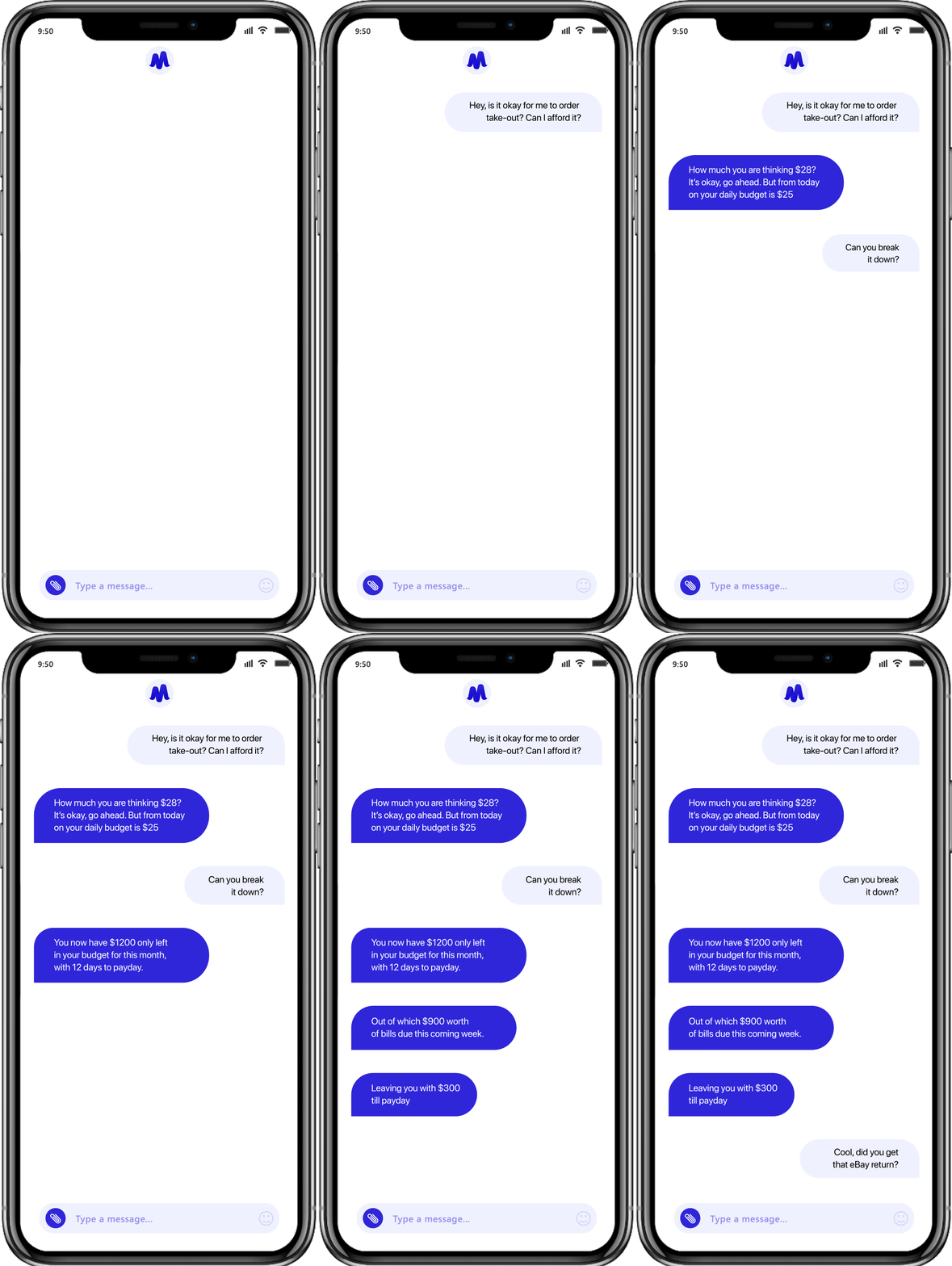
At Appinventiv, our team built Mudra, an AI chatbot that makes budget management and expense tracking much simpler for everyday users. The interface works like having a regular conversation in real-time, which helps people plan their finances better and develop good money habits over time.
We have also been recognized as Leader in AI-First Product Engineering at the ET Industry Changemakers’26 Awards, reflecting our focus on building enterprise AI systems around measurable outcomes, scalability, and responsible implementation.
Whether the objective is to automate high-volume enquiries, assist human support teams, introduce multilingual voice service, or build an end-to-end customer service AI agent, we help create a roadmap that fits the organization’s technology, risk profile, and customer expectations.
FAQs
Q. AI agents vs traditional chatbots: Which is better for enterprise customer support?
A. Traditional chatbots still make sense for fixed questions such as store timings, return windows, or ticket status. They become limiting when a request involves several systems or needs an action.
That is where AI agents are more useful. They can look up the customer’s record, check the relevant rule, carry out an approved step, and bring in an employee if the case moves outside their authority. The choice comes down to the job: use a chatbot to share information and an AI agent to work towards a resolution.
Q. Which customer-service tasks should AI agents automate first?
A. The safest place to begin is with work the support team already handles in much the same way every day. Businesses implementing these can start with the following AI customer service agent use cases:
- Order and delivery updates
- Appointment scheduling
- Account-information requests
- Subscription changes
- Standard returns and refunds
- Ticket classification and routing
There is little value in starting with one of the hardest customer service AI solutions in the queue. First prove that the agent can follow a known process, use the correct data, and hand over the case when something does not fit.
Q. What is the ROI of implementing AI agents in customer support?
A. Look at what changes after the agent goes live. Are fewer customers calling back? Are cases closing sooner? Are support employees spending less time searching records and writing summaries? Can the same team manage a larger volume?
Those gains must be weighed against development, integrations, model usage, platform fees, monitoring, and maintenance. Counting automated chats will produce an impressive number, but it says very little about ROI. Count the issues resolved correctly.
Q. How much does it cost to build an AI customer service agent?
A. A realistic budget for deploying AI agents in customer service starts at around $40,000 and can exceed $400,000.
The lower range covers a focused agent working on one channel with an approved knowledge base. Costs increase once voice, multiple languages, customer authentication, legacy systems, transactions, or regulated data enter the scope. The estimate should follow the actual workflow, not a generic feature list.
Q. Should enterprises build a custom AI customer service agent or buy an off-the-shelf platform?
A. Off-the-shelf software is useful for testing a narrow idea. It is less convincing when the agent must work with older systems, follow internal approval rules, reflect the company’s service style, or meet strict data requirements.
For that kind of environment, a custom AI customer service agent is the more sensible investment. The business decides how the agent behaves, where its data goes, which systems it can use, and when a person must step in. It also avoids rebuilding the entire setup when the first use case expands into five more.


Fast 2-minute response, fully NDA-protected.
AI-Native Security Maturity Model: Score Where Your Security Stack Stands
Key takeaways: If Human oversight scores below 2, you're at Level 3 at most, whatever your total score says. Moving to Level 3 starts with unifying your telemetry, which most teams can do with tools they already own. Define approval points before you automate response. Oversight added later costs more. Buy a platform when your…

The AI ROI Crisis: Why Enterprises Are Struggling to Prove Value and How to Fix It
Key takeaways: AI ROI is a capital-allocation question. Boards want payback periods and P&L impact. AI ROI challenges rarely have a single cause. Data, legacy systems, use-case choice, ownership and stalled pilots compound each other. Choose two or three outcome metrics per use case, set the baseline first, and report in dollars. Make every further…

Retrieval Augmented Generation in Australia: Architecture, Implementation and Cost
Key takeaways: RAG grounds LLM answers in approved content, improving reliability without retraining a model. Data quality and access permissions decide production outcomes more than the model. Indicative build costs run from AUD 70,000 to 700,000, driven by data and integrations. Measure value against a pre-deployment baseline, separating realised benefits from projected savings. A general-purpose…