


























Integrating AI into Apps: Personalization, Predictive Analytics, and Scalable Enterprise Architecture

 Share -


- 01Step-by-Step Guide to Implementing AI in Your Apps
- 02Challenges of Integrating AI Into an App: Common Pitfalls and Red Flags
- 03Why Enterprises Choose Appinventiv for AI Integration
- 04Best Practices for Integrating AI Into Your App: Successful Enterprise AI Integration
- 05Future Outlook: AI-Native Applications and Autonomous Enterprises
- 06Building AI-First Applications with Appinventiv
- 07FAQs

Key takeaways:
- Define AI use cases tied to revenue, cost, or risk to avoid pilots that fail to deliver measurable business impact.
- Build a unified data foundation with clean pipelines and shared schemas to support consistent model training and real-time decisions.
- Design real-time personalization systems that react instantly to user behavior, improving engagement and conversion across digital channels.
- Embed predictive analytics into workflows so decisions happen automatically within operations, not delayed through dashboards and manual review.
- Architect scalable AI infrastructure with MLOps, real-time processing, and monitoring to support enterprise-wide deployment and continuous improvement.
Understanding how to integrate AI into an app starts with recognizing that most enterprise apps today still follow fixed logic. They process inputs, apply rules, and return outputs. That model is starting to break down.
Today, 88% of companies already use AI in at least one function, yet most systems still run on static workflows. Users expect systems to react in real time and adjust to their behavior without friction.
Many teams have added AI features over the past few years. A recommendation engine here. A chatbot there. Yet these additions often sit on the surface. The core system still runs on static workflows. That gap limits impact.
Personalization is no longer a differentiator. It is the baseline. Users expect apps to reflect their intent at every step. Predictive analytics has shifted as well. It now drives live decisions, not just reports. Pricing, risk scoring, and supply planning depend on it. The real challenge sits deeper. Most architectures were not built for constant data flow or real-time model inference.
So, where do things break? Not at the model level. Despite heavy experimentation, only 21% of companies have adopted AI at an organizational level, which explains why many systems fail to scale. When teams try to integrate AI into an app, the breakdown happens during integration. Data stays fragmented. Pipelines lag. Systems fail to scale once usage grows.
This blog serves as a step-by-step guide to implementing AI in your app. It focuses on data readiness, real-time systems, and scalable design. AI integration demands solid engineering. It cannot stay a side experiment.
Most enterprises stay stuck in pilots. Move faster with production-ready AI systems built for real-world performance and scale.

Step-by-Step Guide to Implementing AI in Your Apps
Most enterprises already have the data and tools to start. The challenge is knowing where to begin. Jumping into model building often leads to delays and unclear outcomes. A structured approach brings clarity, aligns teams, and ties each step to business impact.
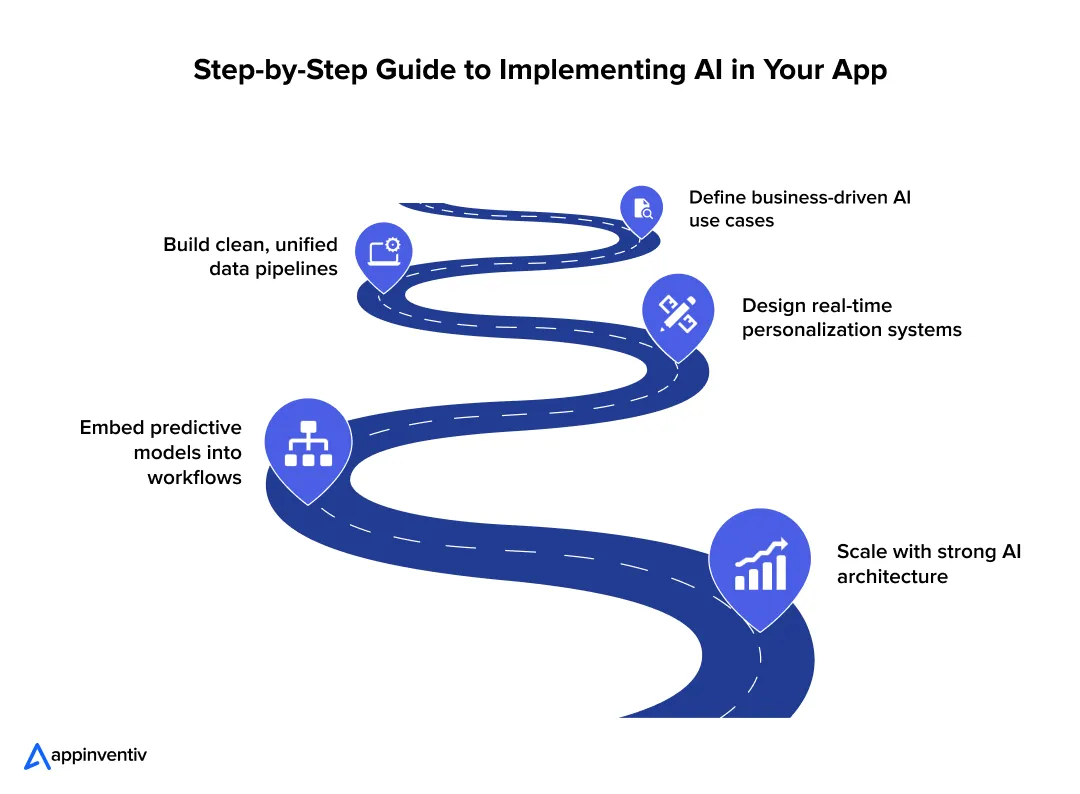
Step 1: Define High-Impact AI Use Cases Aligned with Business Outcomes
Many AI programs fail before the first model goes live. The issue starts at the strategy layer. Teams pick use cases that sound advanced but lack clear business value. The result is a working model with no measurable impact.
The focus should stay on outcomes. Every AI use case must tie to revenue, cost, or risk. This matters even more as 64% of businesses report that AI is already driving innovation, yet many struggle to translate that into measurable outcomes.
Where AI Drives Measurable Value
| Business Goal | AI Application | What It Changes in Practice |
|---|---|---|
| Revenue growth | Personalization, recommendation engines | Higher conversion rates, larger basket size |
| Cost reduction | Process automation, demand forecasting | Lower manual effort, better inventory use |
| Risk control | Fraud detection, anomaly detection | Faster detection, reduced financial loss |
Each use case should answer one question: what metric will move, and by how much?
Why Strategy Fails Early
Understanding the factors to consider when assessing AI readiness for your application starts here. Common patterns show up across enterprises:
- Teams select use cases based on trends, not data
- Business teams and engineering teams work in silos
- Success metrics stay vague or undefined
- Data readiness is not validated before model design
A model built without clear targets will struggle to justify its cost.
A Simple Prioritization Framework
Plot each use case across two axes:
- Business impact
- Implementation complexity
| Category | Action |
|---|---|
| High impact, low effort | Start here. Quick wins build momentum |
| High impact, high effort | Plan as strategic initiatives |
| Low impact, low effort | Test only if resources allow |
| Low impact, high effort | Avoid. These drain time and budget |
This helps leadership focus on outcomes instead of experimentation.
Enterprise Use Cases That Deliver Results
Enterprise AI integration examples that deliver results focus on measurable impact across revenue, cost, and risk.
Retail
- Dynamic pricing models adjust prices based on demand, inventory, and competitor data.
- Real-time recommendation engines drive cross-sell and upsell
Banking and Financial Services
- Credit risk models score users in milliseconds using transaction data
- Fraud detection systems flag anomalies during the transaction, not after
Healthcare
- Clinical decision systems, a key application of AI in EHR, assist doctors with treatment suggestions based on patient history.
- Predictive models identify high-risk patients before complications occur
What This Means for Leadership
Clear use cases drive alignment across teams. They define data needs, model design, and infrastructure requirements from day one. More importantly, they make it easier to track ROI.
Without this clarity, any attempt to integrate AI into an app stays stuck in pilot mode. This is where AI integration consulting can help teams move from strategy to execution. This is why only 1 in 4 businesses have deployed AI at scale, even though adoption is widespread. With it, AI becomes a revenue and efficiency driver across the enterprise.
Step 2: Build a Unified Data Foundation for AI Readiness
AI systems break in production for a simple reason. The data feeding them is inconsistent, delayed, or incomplete. Most enterprises already store large datasets. The real issue is how that data moves and gets prepared for model use.
Core Components of a Reliable Data Layer
A reliable data layer moves clean, consistent data from source systems to models without delay or loss.
Data Ingestion Pipelines
Data enters from multiple systems such as CRM, ERP, mobile apps, and IoT devices, each representing distinct multimodal AI applications that feed into the unified data layer.
- Batch pipelines run on schedules. Tools like Apache Spark process large datasets for training
- Streaming pipelines use systems like Apache Kafka or AWS Kinesis to capture events in real time
| Pipeline Type | Typical Stack | Where It Fits |
|---|---|---|
| Batch | Spark, Hadoop | Model training, reporting |
| Streaming | Kafka, Flink | Fraud detection, personalization |
Batch builds context. Streaming powers real-time decisions.
Storage Layer
The storage choice affects both performance and flexibility.
| Storage Type | Tech Examples | Practical Use |
|---|---|---|
| Data Lake | Amazon S3, Azure Data Lake | Raw logs, images, clickstream data |
| Data Warehouse | Snowflake, BigQuery | Structured analytics, BI dashboards |
| Lakehouse | Delta Lake, Apache Iceberg | Unified analytics and ML workloads |
Many enterprises now adopt lakehouse setups to avoid duplicating data across systems.
Data Preparation And Labeling
Raw data often contains gaps, duplicates, and inconsistent formats.
- Normalization aligns formats across sources
- Deduplication removes repeated records
- Labeling defines target variables for supervised models
For example, a fraud model needs labeled transactions marked as fraud or valid. Poor labels reduce model accuracy, even if the algorithm is strong.
Also Read: AI Data Integration: How to Connect, Clean and Prepare Data for AI
Enterprise Challenges That Slow Down AI
These issues appear in almost every large organization:
- Data sits across legacy systems with no shared schema
- APIs between systems are missing or unstable
- Data quality checks run late or not at all
- Ownership of data pipelines is unclear
A common case: marketing, finance, and operations each maintain separate customer records. Models trained on this data produce conflicting outputs.
Advanced Layer: Feature Stores
Feature stores solve a specific problem. They keep model inputs consistent across training and production.
- Store precomputed features such as user lifetime value or transaction frequency
- Serve the same features during training and live inference
- Reduce duplicate pipeline work across teams
Tools like Feast or Tecton help manage this layer. Without it, teams often rebuild features in different ways, which leads to mismatches and model drift.
Governance, Lineage, and Audit Readiness
Enterprise AI must remain traceable.
- Data lineage tools like Apache Atlas track how data flows and transforms
- Access control systems restrict sensitive data usage
- Audit logs record model decisions and data access
These controls matter in sectors like banking, where every decision must be explainable.
A stable data foundation does more than support models. It reduces rework, speeds up deployment, and builds trust across teams. Without it, AI systems fail under real-world conditions.
Step 3: Design Personalization Systems That Operate in Real Time
Static personalization no longer holds up. Showing the same “recommended products” for hours ignores what the user just did. Modern systems react within seconds. They adjust content, pricing, and flows as behavior changes.
Core Architecture Layers
Core architecture layers define how data, models, and applications connect to deliver AI decisions at scale.
Behavioral Data Capture
Capture every relevant event across channels.
- Web and mobile events: clicks, scrolls, add-to-cart
- Backend events: orders, payments, returns
- Context signals: location, device, time
Typical setup uses SDKs or event collectors that push data to a central stream. Common formats include JSON with user_id, event_type, timestamp, and attributes.
Real-Time Event Processing
Events must be processed as they arrive.
- Stream processors (Apache Flink, Kafka Streams) compute features such as session activity or recent views
- Windowing logic aggregates signals over the last few seconds or minutes
- State stores keep per-user context for quick lookup
| Component | Example Tech | What It Does |
|---|---|---|
| Event broker | Apache Kafka | Moves events with low latency |
| Stream processor | Flink, Kafka Streams | Transforms and aggregates events |
| State store | RocksDB, Redis | Holds the recent user state |
Model Inference Layer
To integrate the AI model into your app, models must score each user or item in real time.
- Online inference services (TensorFlow Serving, TorchServe) return predictions in milliseconds
- Feature retrieval pulls fresh signals from caches or a feature store
- A decision layer ranks items or selects the next action
Latency budgets are tight. Many teams target 50–150 ms per request for end-to-end scoring.
Experience Delivery via APIs
Decisions must reach the product quickly.
- AI API integration through gateways exposes endpoints for recommendations or next actions
- Edge caching (CDN, Redis) reduces response time for repeated queries
- AI in product design ensures frontend clients render results without blocking the user flow
Real-Time vs Batch Personalization
Batch systems update recommendations on a schedule. Real-time systems update them per interaction.
| Mode | Update Frequency | Impact on User Experience |
|---|---|---|
| Batch | Hourly or daily | Stale suggestions, lower engagement |
| Real-Time | Per event or request | Relevant results, higher conversion |
Latency affects outcomes directly. If a system reacts within a session, users see content that matches intent. Delays reduce clicks and conversions.
Enterprise Use Cases
Enterprise use cases show how AI fits into real workflows to improve decisions and outcomes.
eCommerce
- Dynamic product ranking based on recent clicks, stock, and price changes
- Real-time bundles and cross-sell offers during checkout
OTT Platforms
- Content ranking that adapts to watch time, skips, and recent searches
- Home screen rows that refresh during the session
Banking
- Next-best-action engines for offers, limits, or alerts based on live transactions
- Real-time risk checks that adjust flows for high-risk activity
Event-Driven Systems in Practice
Real-time personalization depends on event-driven design.
- Producers (apps, services) publish events to Kafka topics
- Consumers (stream jobs) process and enrich events
- Downstream services read processed data for inference
This pattern decouples systems. It supports scale and fault tolerance. Partitions in Kafka allow parallel processing across large user bases. Backpressure controls prevent overload during traffic spikes.
A real-time personalization system ties data, models, and delivery into a single loop. Each user action updates the next response. That loop is what drives engagement at scale.
Step 4: Embed Predictive Analytics into Core Business Workflows
Many enterprises still treat AI analytics for businesses as a reporting function. Data flows into dashboards. Teams review numbers. Decisions follow hours or days later. That delay limits impact.
Predictive systems change this flow. They connect data directly to decisions, then push those decisions into live workflows. The shift moves from insight to action without manual steps.
From Insights to Decisions to Automation
To integrate AI into predictive analytics, a working system follows a simple chain:
- Data feeds models
- Models generate predictions
- Predictions trigger actions inside applications
For example, a churn model flags a high-risk customer. The system triggers a retention offer within the same session.
Core Components of Predictive Systems
Core components of predictive systems turn past data into real-time predictions that drive everyday decisions.
Historical Data Pipelines
These pipelines collect and prepare past data for training.
- Sources include transaction logs, user activity and sensor data
- Batch processing tools like Spark handle large datasets
- Feature engineering creates inputs such as averages, counts, or time gaps
Model Training Pipelines
Models learn patterns from historical data.
- Training runs on platforms like TensorFlow or PyTorch
- Pipelines include data validation, training, and evaluation steps
- Version control tracks model changes over time
| Stage | What Happens |
|---|---|
| Data prep | Clean and transform raw data |
| Training | Fit a model on historical patterns |
| Evaluation | Measure accuracy and performance |
| Versioning | Store model artifacts and metadata |
Real-Time Inference APIs
Once trained, models must serve predictions in live systems.
- APIs expose prediction endpoints
- Low-latency services return results in milliseconds
- Caching layers reduce repeated computation
These APIs connect directly to business applications such as checkout flows, fraud systems, or inventory tools.
High-Impact Enterprise Use Cases
High-impact enterprise use cases focus on areas where AI can quickly improve revenue, reduce costs, or control risk.
Demand forecasting
- Predicts product demand across regions and time periods
- Helps adjust inventory and reduce stockouts
Fraud detection
- Scores transactions in real time based on behavior patterns
- Flags suspicious activity before completion
Predictive maintenance
- Uses sensor data to detect early signs of failure
- Schedules maintenance before breakdowns occur
Churn prediction
- Identifies users likely to leave based on engagement patterns
- Triggers retention actions such as offers or support outreach
Predictive vs Prescriptive Systems
There is a clear difference between predicting outcomes and deciding actions.
| Type | Output | Example |
|---|---|---|
| Predictive | What will happen | The customer will churn |
| Prescriptive | What action to take | Offer a discount to retain the user |
Many enterprises stop at prediction. Real value comes when systems recommend or execute the next step.
Measuring ROI
Predictive systems must tie back to business metrics.
- Efficiency gains: reduced manual effort, faster decisions
- Cost savings: lower inventory waste, fewer fraud losses
- Revenue growth: higher retention, better conversion rates
A demand forecasting model that reduces excess inventory by 15 percent can free up millions in working capital. A fraud system that blocks high-risk transactions can cut direct losses and chargeback costs.
Predictive analytics delivers value when it becomes part of daily operations. Models should not sit in isolated environments. They must run inside the systems where decisions happen.
Step 5: Architect for Scale with Enterprise-Grade AI Infrastructure
Most teams focus on models. They tune the accuracy, test algorithms, and compare results. The real constraint appears later. Systems fail when they cannot handle live traffic, data volume, or continuous updates.
Scaling AI for enterprise is an architecture problem. This becomes critical as AI is expected to contribute $15.7 trillion to the global economy by 2030, pushing enterprises to move from pilots to production systems.
Why Architecture Becomes the Bottleneck
Early pilots run in controlled environments. Data is limited. Load is predictable. Once deployed, conditions change.
- Data volume increases across channels
- Requests spike during peak usage
- Models need frequent updates
- Latency requirements tighten
Without the right structure, systems slow down or break.
Core Layers of Enterprise AI Architecture
Core layers of enterprise AI architecture define how data, models, and systems work together to support reliable, large-scale operations.
Data layer
Handles ingestion, storage, and governance.
- Pipelines move data from source systems into central storage
- Governance controls access and tracks lineage
- Supports both batch and streaming workloads
AI/ML layer
Responsible for training and serving models.
- Training pipelines run on distributed systems
- Inference services handle real-time predictions
- LLM integration supports use cases such as search, chat, and summarization
Orchestration layer
Manages workflows and dependencies.
- Tools like Apache Airflow schedule batch jobs
- Kubeflow manages ML pipelines and experiments
- Coordinates data processing, training, and deployment steps
| Tool | Role |
|---|---|
| Airflow | Job scheduling and workflow logic |
| Kubeflow | ML pipeline orchestration |
Application layer
Connects AI services to business systems.
- Microservices expose APIs for predictions
- API gateways manage routing and security
- Services scale independently based on demand
Experience layer
Delivers outputs to end users.
- Web and mobile apps consume AI-driven APIs
- Dashboards present insights for internal teams
- Interfaces must handle real-time updates without delay
Deployment Patterns
Deployment patterns describe how AI systems are set up across cloud, on-premise, or edge environments to meet performance and control needs.
Cloud-native
- Uses services from AWS, Azure, or Google Cloud
- Supports elastic scaling and managed infrastructure
- Works well for global applications with variable load
Hybrid setups
- Combine cloud with on-prem systems
- Used in sectors with strict data control requirements
- Sensitive data stays local, while compute can scale in the cloud
Edge AI
- Runs models closer to the data source
- Reduces latency for use cases like IoT or real-time monitoring
- Common in manufacturing, logistics, and smart devices
MLOps: Keeping Systems Reliable Over Time
AI systems need continuous management after deployment, which is why custom MLOps platforms for enterprises have become a critical part of production architecture.
- Model versioning tracks changes and allows rollback
- CI/CD pipelines automate testing and deployment
- Drift detection identifies when model accuracy drops
- Retraining pipelines update models using fresh data
| Function | Why It Matters |
|---|---|
| Versioning | Maintains control over model changes |
| CI/CD | Speeds up deployment cycles |
| Drift detection | Prevents silent performance drops |
| Retraining | Keeps models relevant over time |
What This Means in Practice
A working AI system is not just a model. It is a connected system of data pipelines, services, and workflows.
If one layer fails, the entire system degrades.
AI success depends on four elements working together:
- Data
- Models
- Orchestration
- Monitoring
Enterprises that design for scale from the start avoid rework later. They move from isolated pilots to systems that handle real-world complexity.
Models fail without scalable systems. Build infrastructure that supports real-time data, inference, and continuous learning.

Challenges of Integrating AI Into an App: Common Pitfalls and Red Flags
Many teams build a model that works in testing. They show early results to leadership. Then progress slows down once the system faces real users and real data. The pilot looks strong, but the rollout struggles. This pattern shows up across large organizations.
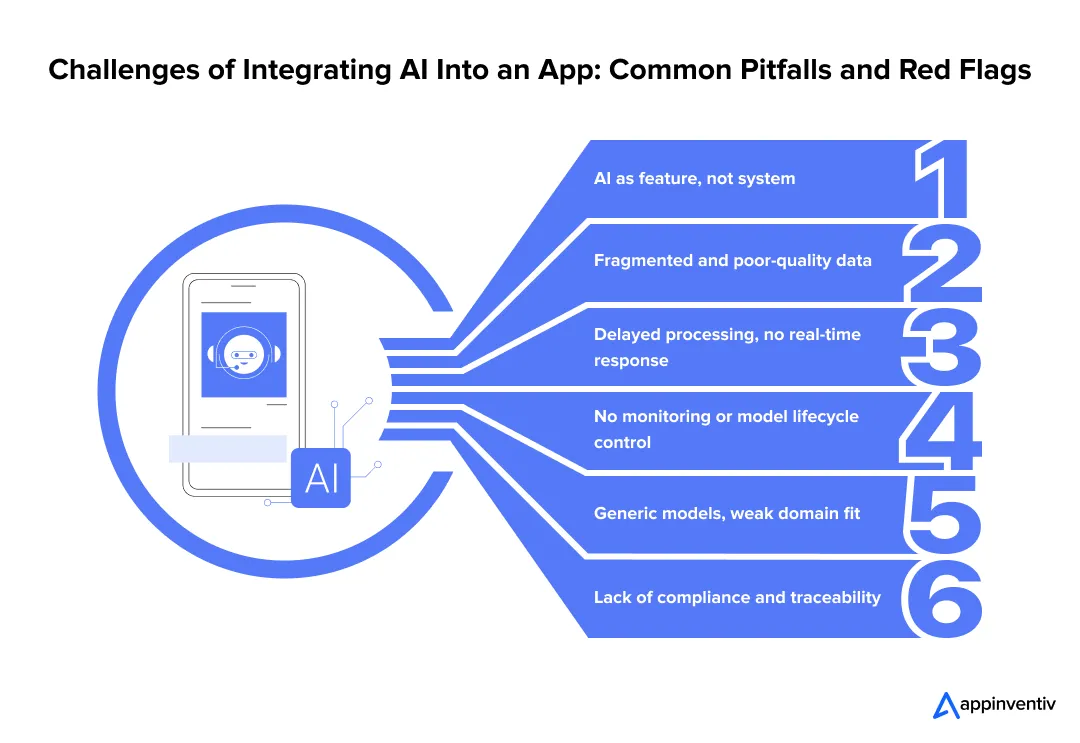
Treating AI as a Feature, Not Infrastructure
Teams often place AI on top of existing systems. The core workflow stays rule-based. The model sits in isolation and has a limited impact on decisions.
Solution:
- Rework key workflows so model outputs drive actual decisions
- Connect AI services to pricing, risk, or operations systems
Poor Data Readiness
Data lives across tools that do not connect well. Fields differ, records are missing, and formats vary. Models trained on such data behave unpredictably.
Solution:
- Define common data structures across teams
- Clean, validate, and standardize data before training
Lack of Real-Time Capabilities
AI integration in mobile apps and enterprise systems alike suffers when outputs update only once or twice a day. Users act in seconds. This delay leads to weak personalization and missed signals.
Solution:
- Process user events as they occur
- Keep response times low for user-facing actions
No MLOps or Monitoring
A model performs well at launch. Over time, patterns change. Accuracy drops, but teams notice it late.
Solution:
- Track model performance using live data
- Retrain models on a fixed schedule
Over-Reliance on Off-the-Shelf Models
Generic models save time but miss business context. They fail to capture patterns unique to each domain.
Solution:
- Train models on internal datasets
- Adjust outputs using business logic where needed
Ignoring Compliance and Explainability
Some decisions must be explained and audited. If teams cannot trace how a model reached a result, risk increases.
Solution:
- Log inputs, outputs, and model versions
- Use methods that explain model decisions
These problems stay hidden during early testing. They surface once systems scale and start handling real demand.
Why Enterprises Choose Appinventiv for AI Integration
Many AI programs fail during execution, not design. Systems do not scale, data breaks across pipelines, and models lose accuracy over time. Appinventiv’s AI integration services focus on fixing these exact gaps.
How Appinventiv Solves What Slows AI Down
How Appinventiv solves what slows AI down focuses on fixing data, integration, and scaling gaps that block real-world deployment.
| Challenge | What Changes in Execution |
|---|---|
| AI treated as a surface feature | AI embedded into core workflows and decisions |
| Fragmented data systems | Unified pipelines across business functions |
| Delayed processing | Real-time event-driven systems |
| No lifecycle control | MLOps with monitoring and retraining |
| Generic model performance | Domain-trained and fine-tuned models |
| Compliance gaps | Traceable, audit-ready system design |
Key Benefits of Integrating AI Into an App with Appinventiv
- Full ownership from data pipelines to production systems
- Architecture built for real traffic, not controlled demos
- Systems designed for regulated environments
Flynas Airline App: Personalization at Scale
Context: High drop-offs during booking flows and limited user engagement.
What Changed:
- Introduced personalized recommendations across booking steps
- Simplified user flows using behavioral signals
- Improved backend performance with DevOps-led scaling
Impact Snapshot:
| Metric | Before | After Implementation |
|---|---|---|
| User engagement | Low | Higher session interaction |
| Booking flow friction | Complex | Streamlined |
| System performance | Inconsistent | Stable under load |
This case shows how personalization tied to system design improves both experience and performance. Read the complete case study here.
AI in Banking Systems: Real-Time Decisioning
Context: Delayed fraud detection and limited visibility into transaction risk.
What Changed:
- Deployed real-time fraud detection models
- Integrated predictive scoring into transaction workflows
- Built monitoring systems for continuous model tracking
Impact Snapshot:
| Area | Traditional Setup | AI-Driven System |
|---|---|---|
| Fraud detection speed | Post-transaction | During transaction |
| Risk visibility | Limited | Real-time scoring |
| Response time | Delayed | Immediate action |
This case reflects how predictive systems reduce loss by acting within live workflows. Read the complete case study here.
What This Means in Practice
Enterprises do not need more models. They need systems that run those models reliably.
Appinventiv builds AI systems that:
- Connect data, models, and workflows
- Perform under real usage conditions
- Stay stable as the scale increases
This is not feature development. It is system-level AI engineering, and it starts with knowing how to integrate AI into an app the right way.
Inaccurate predictions and delays impact revenue and trust. Build reliable AI systems that hold under pressure.

Best Practices for Integrating AI Into Your App: Successful Enterprise AI Integration
Integrating Artificial Intelligence into an app requires more than model building. Teams often rush into that part. At the same time, 50% of companies now have dedicated AI teams, yet many still struggle to align efforts across data, engineering, and business functions. The work feels productive, but the results stay limited. Progress improves when the focus shifts to how AI will affect real business outcomes.
- Start with ROI-driven use cases
Pick problems tied to clear metrics such as conversion rate, fraud loss, or inventory cost. Define targets before any model work begins. - Invest early in data architecture
Set up pipelines that pull data from core systems like CRM, ERP, and product logs. Clean and standardize fields at this stage. Fixing data later delays releases. - Build for real-time, not batch-first
A recommendation updated every few hours misses active user intent. Systems should process events as they happen and respond within milliseconds. - Implement MLOps from day one
Track model accuracy using live data. Store versions and retrain models on a fixed cycle. This prevents silent drops in performance. - Maintain explainability and compliance
Record how each prediction is made. Store inputs, outputs, and model versions. This reduces risk during audits. - Align teams early
Data, engineering, and business teams must agree on goals and metrics. Gaps here slow down deployment.
AI integration changes how systems run and how teams work. Treating it as a shared effort across functions leads to better results.
Also Read: AI in Product Development: Enterprise Strategies for Faster Innovation
Future Outlook: AI-Native Applications and Autonomous Enterprises
Enterprise AI is moving past isolated use cases. Systems are becoming autonomous, connected, and embedded into daily operations. The next phase will reshape how applications behave at scale.
Agentic AI Systems Will Take On Execution, Not Just Analysis
AI agents are shifting from assistants to operators. They can plan tasks, take actions, and adjust based on outcomes. Many enterprises are already testing multi-agent systems that handle workflows end-to-end.
Real-Time Decisioning Will Become Standard
Batch processing will fade in critical systems. Decisions will happen during the event itself, whether it is a transaction, a user action, or a supply chain update. This shift is already visible in fraud detection and logistics systems.
Hyper-Personalization Will Run Continuously
Personalization will not refresh every few hours. It will update in real time, driven by live signals across devices and channels.
AI Will Sit Inside Every Core Workflow
As enterprises move to integrate AI features into mobile apps and core systems, AI is becoming part of operations, not a separate layer.
Convergence Across Systems Will Accelerate
- AI + IoT will enable predictive control in physical systems
- AI + edge computing will reduce latency in real-time environments
- AI + SaaS platforms will embed intelligence across business tools
By 2026, a large share of enterprise applications will include task-specific AI agents.
The shift is clear. Enterprises will compete on how fast their systems sense, decide, and act. The speed of intelligence will define performance.
Building AI-First Applications with Appinventiv
AI works when three layers come together. Personalization shapes the user experience. Predictive systems guide decisions. Architecture keeps everything running at scale.
When you integrate AI into your product, many teams build models. Fewer build systems that hold up under real usage. That difference shows up in performance, cost, and long-term value.
This is where understanding how to integrate AI into an app becomes critical. It is not just about getting a model into production. Integration continues well beyond deployment. Models need updates. Data keeps changing. Systems must adapt without breaking.
Appinventiv’s AI development services focus on building AI systems that last. From data pipelines to real-time inference, each layer is designed for production use. Teams that get this right move faster and operate with more control. Let’s connect and build AI systems that scale
FAQs
Q. How do you integrate AI into an existing enterprise application?
A. Start with the right problem, not the model. Teams often get this wrong when thinking about how to integrate AI into an app, and it usually backfires. Pick one flow where decisions feel slow or manual. Then check your data. Is it usable or scattered across systems? Fix that first. Build a small model and connect it to the actual workflow through an API. Release it to a limited set of users. Watch what breaks, then improve.
Q. What is the role of AI in app personalization for enterprises?
A. Users behave differently every minute. Some browse, some compare, some leave quickly. AI watches these signals and adjusts the app on the fly. For example, a user who keeps checking the same category may start seeing more of it instantly. This makes the experience feel relevant. Over time, this leads to more engagement and better conversion.
Q. How much does it cost to integrate AI into an app?
A. There is a wide range. A small use case built on clean data can be done quickly. Costs rise when systems need real-time responses, custom models, and multiple integrations. Data work often takes more effort than expected. Then there is the ongoing cost. Models need updates, and systems need monitoring. Many teams miss this part during planning.
Q. How can I add AI personalization to my mobile apps?
A. AI integration in mobile apps starts simply. Track what users do inside the app. Taps, time spent, and navigation paths give useful signals. Send this data to your backend as events. Train a model that predicts what the user may do next. Connect it back through an API. The key is timing. If the app responds during the same session, users notice it right away.


Fast 2-minute response, fully NDA-protected.

Retrieval Augmented Generation in Australia: Architecture, Implementation and Cost
Key takeaways: RAG grounds LLM answers in approved content, improving reliability without retraining a model. Data quality and access permissions decide production outcomes more than the model. Indicative build costs run from AUD 70,000 to 700,000, driven by data and integrations. Measure value against a pre-deployment baseline, separating realised benefits from projected savings. A general-purpose…
The Multiplier Effect of AI Agents: The Rise of AI Swarms
Key takeaways: AI agent swarms coordinate specialized agents to solve complex problems that may be difficult for a single agent to handle effectively. More agents do not automatically mean better outcomes. Swarms deliver value when work can be divided, executed in parallel, and coordinated toward a shared objective. Enterprise readiness depends on governance. Clear accountability,…

AI Data Integration: How to Connect, Clean and Prepare Data for AI
Key takeaways: AI initiatives fail when fragmented, poor-quality data reaches models without sufficient context, controls or ownership. AI-ready pipelines must connect, clean, enrich, govern and continuously monitor data across its lifecycle. Real-time processing matters when AI decisions depend on current transactions, events, inventory or operational conditions. Data architecture should follow the AI use case, balancing…