




























AI integration in EHR systems: Cost, use cases, and implementation plan

 Share -



- 01What should decision-makers know before starting AI in EHR integration?
- 02Why is AI in EHR becoming a priority for healthcare organizations?
- 03What are the strongest use cases of AI in EHR integration?
- 04What AI EHR integration architecture works in real healthcare environments?
- 05What are the key AI technologies powering EHR integration?
- 06How should you implement AI with EHR systems without disrupting care?
- 07What are the real challenges of AI-EHR integration, and how do you solve them?
- 08How should compliance and governance work for AI integration with electronic health records?
- 09How much does it cost to implement AI in an EHR system?
- 10Which implementation approach should you choose for AI-EHR/EMR integration?
- 11How do AI-powered EHR integrations improve provider-patient communication?
- 12How do lab, radiology, and imaging workflows change with AI in EHR?
- 13How do you choose the right EHR integration company?
- 14What should your AI-EHR readiness matrix look like?
- 15What metrics should prove that AI in EHR is working?
- 16How Can Appinventiv Help You Out?
- 17FAQs

Key Takeaways
- Pick one painful EHR workflow first, then decide where AI should assist.
- Check FHIR, HL7, PHI access, APIs, and data quality before building.
- Pilot AI drafts first; allow EHR write-back only after trust is proven.
- Budget can start near $40,000 and cross $1.5M+ for enterprise AI-EHR rollouts.
- The hardest part is not the model; it is fragmented data, governance, and unsafe outputs.
AI integration in EHR systems is no longer a “nice to test” project. It is becoming the operating layer that helps hospitals, clinics, labs, imaging centers, and digital health companies reduce administrative drag, improve data quality, and place clinical context where teams need it most.
The problem is not whether AI can work with electronic health records. The problem is whether it can work inside messy clinical workflows without creating new risk. That takes more than a model. It takes interoperability, governance, workflow design, compliance, and a rollout plan that clinicians will actually use.
ONC’s 2024 AHA IT Supplement found that 71% of hospitals reported using predictive AI integrated with the electronic health record, up from 66% a year earlier. That tells us one thing clearly: AI in EHR is already entering real care settings. The winners now will be the organizations that move from “AI feature” thinking to safe, integrated execution.
Before a healthcare team invests in AI, the real question is not whether the model can generate a useful answer. It is whether the surrounding system can protect PHI, read the right records, respect user roles, and keep every action traceable. That is why many AI-EHR programs eventually depend on AI development services that understand both model behavior and clinical system constraints.
Healthcare is the costliest breach target on earth, and your AI layer widens it. Talk to experts to safeguard your EHR solution.

What should decision-makers know before starting AI in EHR integration?
AI in EHR integration works best when it is treated as a clinical operations program, not a software plug-in. The real goal is to make the EHR more useful at the point of care, the front desk, the billing desk, and the patient communication layer.
Here is the quick read.
| Decision area | What it means for your EHR AI project |
|---|---|
| Best starting point | Documentation, inbox triage, scheduling, lab and imaging workflows, billing checks, and patient outreach |
| Required foundation | FHIR APIs, HL7 interfaces, secure patient data exchange, role-based access, audit logs, and clean data mapping |
| Biggest risk | AI that gives confident answers using incomplete, outdated, or poorly contextualized EHR data |
| Most useful architecture | EHR data layer, interoperability layer, AI orchestration layer, model layer, workflow layer, and governance layer |
| Typical cost range | $40,000 for a controlled pilot to $1.5 million or more for enterprise-scale AI-EHR/EMR integration |
| Must-have controls | HIPAA safeguards, bias checks, explainability, human approval, model monitoring, source tracking, and incident response |
| Best rollout pattern | Start with one workflow, prove safety and adoption, then expand across departments |
The executive takeaway is simple. Integrating artificial intelligence with EHR systems should not begin with “Which AI model should we use?” It should begin with “Which workflow is costly, repetitive, data-heavy, and safe enough to automate or assist?”
That one question can save months.
That question also keeps the scope honest. If the project needs new apps, custom interfaces, or patient-facing workflows around the record, teams usually revisit EHR software Development budget early so the AI roadmap does not sit apart from the broader software budget.
Why is AI in EHR becoming a priority for healthcare organizations?
Three market signals hint at where AI in EHR is going.
First, AI adoption inside EHRs is already mainstream. ONC reported that 71% of hospitals used predictive AI integrated with EHRs in 2024. The fastest-growing use cases included billing automation and scheduling support.
Second, API access is improving. ONC also reported that about nine in 10 hospitals enabled patient electronic access through APIs in 2024, while seven in 10 used standards-based APIs such as FHIR. That matters because AI needs clean, permissioned access to structured data before it can be trusted in live workflows.
This is where healthcare APIs become more than an IT topic. They decide how fast the AI layer can retrieve patient context, sync updates, trigger workflows, and send information back without forcing staff into duplicate entry.
Third, security and governance pressure are rising. IBM’s 2025 Cost of a Data Breach Report placed the average healthcare breach cost at $9.77 million. IBM’s 2025 report also found that 63% of organizations lacked AI governance policies, while AI access controls were missing in most organizations that reported AI-related security incidents.
That is why implementing AI in EHR systems has to be done carefully. A weak AI pilot may create extra work. A weak AI integration can create privacy, safety, reimbursement, and trust risks.
What are the strongest use cases of AI in EHR integration?
The shortest path to value is not a moonshot. It is the documentation and coding grind every clinician resents. Start where the pain is loudest, then expand.
Ambient documentation is the headline use case. An AI medical scribe listens to the visit, then clinical language models draft a structured note that the clinician edits instead of typing from scratch.
A large part of the value sits inside unstructured notes, referral letters, discharge summaries, and patient messages. That is where healthcare NLP helps convert clinical text into usable signals for summaries, coding support, risk models, and follow-up workflows.
The measured results from common use cases now stack up:
The strongest results are showing up in documentation workflows.
- One large medical group reported saving more than 15,700 hours of documentation work in a year after deploying ambient AI scribes across roughly 2.5 million patient encounters. Put differently, that is the equivalent of nearly 1,800 working days returned to clinicians and care teams.
- The effect is not limited to time savings. Across six health systems, clinician burnout dropped from 51.9% to 38.8% within 30 days of adopting AI-assisted scribing, suggesting that reducing documentation burden can have a measurable impact on day-to-day work experience.
- That said, organizations should not expect identical results. A separate study covering 1,800 clinicians across five academic medical centers found more modest gains: about 16 minutes less documentation time and 13 fewer minutes spent in the EHR during an eight-hour shift.
The contrast between these findings highlights an important point. The value of AI in EHR workflows depends as much on implementation and workflow design as it does on the technology itself.
Beyond the note, the same data foundation pays off across several high-volume workflows. The table below maps where AI applications in EHR turn into hours back on the calendar.
| Use case | What AI does | Why it matters | Integration requirements |
|---|---|---|---|
| Clinical documentation support | Converts encounter conversations, dictation, or rough notes into structured drafts | Reduces after-hours documentation and note fatigue | Ambient AI, speech recognition, NLP, EHR write-back controls, clinician approval |
| Chart summarization | Pulls key diagnoses, medications, labs, imaging, allergies, and recent history into one view | Helps clinicians avoid hunting through long charts | FHIR resources, clinical note access, retrieval controls, source attribution |
| Lab and imaging integration | Validates lab orders, radiology orders, medical necessity, and result routing | Reduces order errors and missed follow-ups | HL7, FHIR, LOINC, DICOM metadata, order reconciliation, results delivery |
| Patient outreach | Automates appointment reminders, two-way texting, payment reminders, and review request texts | Cuts front desk load and improves attendance | Patient communication platform, schedule sync, consent rules, message logging |
| Revenue cycle support | Flags missing codes, documentation gaps, eligibility issues, and payer-specific requirements | Helps reduce denials and reimbursement delays | Billing software, payer rules, CPT, ICD-10, claims workflows, audit trails |
| Risk prediction | Identifies patients at risk for readmission, deterioration, care gaps, or no-shows | Helps care teams intervene earlier | Structured EHR data, model validation, bias checks, alert governance |
| Inbox and referral triage | Routes messages, referrals, refill requests, and patient portal notes | Reduces response delays | EHR messaging APIs, intent detection, escalation rules, human review |
| Clinical decision support | Suggests next steps based on guidelines, history, and current data | Supports faster and more consistent decisions | CDS Hooks, SMART on FHIR, model cards, governance, explainability |
| Population health analytics | Spots cohorts for chronic care, preventive care, or risk-based programs | Supports value-based care and payer reporting | Data warehouse, EHR extracts, quality measures, reporting workflows |
The benefits of AI in EHR system implementation show up fastest when you pick workflows that already have clear inputs, clear outputs, and measurable business value.
For example, an AI tool that summarizes a 10-year patient history may help clinicians. But an AI tool that summarizes the chart, cites the source, flags missing labs, and creates a draft follow-up plan inside the EHR workflow creates far more value.
What AI EHR integration architecture works in real healthcare environments?
AI EHR integration needs a layered architecture. Without it, teams end up with a model connected directly to sensitive patient data, no audit trail, no data lineage, and no easy way to explain what happened when an output looks wrong.
A safer architecture looks like this.
| Layer | What it does | Key design choices |
|---|---|---|
| Source systems | EHR, labs, imaging centers, billing software, patient portals, scheduling systems, communication platforms, and post-acute systems | Map data ownership, access limits, and workflow dependencies early |
| Interoperability layer | Moves data through FHIR APIs, HL7 v2, CDA, DICOM, flat files, or vendor-approved connections | Use FHIR where possible, but plan for legacy interfaces where reality demands it |
| Data normalization layer | Converts records into consistent patient, encounter, observation, medication, order, and result structures | Standardize codes with SNOMED CT, LOINC, RxNorm, ICD-10, and CPT |
| Security and consent layer | Controls PHI access, encryption, consent, minimum necessary use, and audit logging | Apply role-based access, tokenized access, logging, and data retention rules |
| AI orchestration layer | Decides what data the AI can retrieve, which model to call, and what guardrails to apply | Use retrieval-augmented generation, prompt policies, model routing, and source filters |
| Model layer | Runs LLMs, machine learning models, NLP tools, computer vision models, or rules engines | Match model type to risk level, latency needs, data type, and explainability requirements |
| Workflow layer | Places AI output inside clinician, front office, billing, patient, or care team workflows | Avoid separate screens wherever possible |
| Governance layer | Tracks accuracy, bias, drift, safety, escalation, and audit evidence | Use model cards, source attributes, monitoring, and human approval checkpoints |
The hidden challenge is not usually the AI model. It is mapping the clinical context correctly.
For instance, a patient may have outdated medications, duplicate allergies, old lab panels, outside imaging, and scanned notes. If your AI pulls from the wrong source, it may generate a polished but unsafe summary. That is why FHIR-based services, data quality checks, and source attribution matter so much.
Do not let AI answer from the EHR unless the system can show what it read, when it read it, and why that data was allowed.
What are the key AI technologies powering EHR integration?
Key AI technologies that power EHR integration should be selected by workflow, not by trend. A hospital does not need a large language model for every problem. Sometimes a rules engine, classifier, or search layer is safer, cheaper, and easier to validate.
If your EHR software development process also involves focusing on AI-powered features, the model should be selected only after the workflow is clear. A rules engine may be safer for payer checks, while an LLM may be better suited for note summaries, draft messages, or patient-friendly explanations.
Generative AI in healthcare becomes useful only when it is grounded in approved clinical data, protected by access controls, and reviewed before it affects the patient record. Without those controls, it can create confident language faster than the organization can verify it.
| Technology | Best-fit EHR use cases | What to watch |
|---|---|---|
| Natural language processing | Extracting problems, symptoms, history, medications, and social determinants from clinical notes | Accuracy drops when notes are inconsistent or full of abbreviations |
| Large language models | Summaries, draft messages, documentation support, patient-friendly explanations, and internal copilots | Needs retrieval controls, PHI protection, source citations, and human review |
| Retrieval-augmented generation | Grounding AI answers in approved EHR data, policies, pathways, and clinical references | Retrieval quality matters more than prompt style |
| Predictive machine learning | No-show prediction, readmission risk, sepsis risk, denial risk, and patient deterioration | Requires bias testing, drift monitoring, and local validation |
| Speech recognition and ambient AI | Visit transcription, SOAP notes, discharge summaries, and follow-up instructions | Consent, recording policies, noise handling, and clinician approval are critical |
| Computer vision | Imaging support, wound tracking, pathology support, and scanned document extraction | May trigger medical device and safety review requirements |
| OCR and document AI | Extracting data from referrals, prior authorization forms, faxed documents, and scanned charts | Needs confidence scoring and manual review queues |
| Rules engines | Eligibility checks, medical necessity checks, payer rules, and order validation | Rules must be versioned and maintained |
| Agentic AI workflows | Multi-step administrative workflows such as referral routing, scheduling, and status checks | Needs strict permissions, approval gates, and rollback paths |
The safest approach is often hybrid. Use deterministic rules for compliance-heavy checks, machine learning for pattern detection, and LLMs for language-heavy workflows where outputs can be reviewed.
We know tons of developers who know how to handle AI as well as EHR systems while keeping them compliant.
How should you implement AI with EHR systems without disrupting care?
The implementation process of integrating AI with EHR should move in phases. Large healthcare rollouts often look clean in planning decks, but the real test happens at the nurse station, the call center, the billing desk, and the exam room.
A safer path is controlled, measured, and workflow-led.
Step 1: Start with workflow discovery
Begin by mapping the workflow as it works today, not as leadership assumes it works. Look at user roles, handoffs, approval points, data sources, repeated delays, and the places where staff still rely on manual checks.
This gives your team a clear view of where AI can reduce work without adding risk.
Step 2: Score the right use cases
Not every EHR workflow deserves AI. Rank each use case by business value, clinical risk, data availability, integration difficulty, and adoption friction.
This helps separate practical opportunities, such as note drafting or order validation, from ideas that look impressive in a demo but create problems in daily care.
Step 3: Audit data and interoperability readiness
Before development starts, review FHIR readiness, HL7 feeds, APIs, EHR vendor limits, data quality, PHI flows, and existing integration gaps. AI can only perform safely when the data layer is clean, permissioned, and reliable.
This stage tells you whether the project is ready to build or whether the foundation needs repair first.
Step 4: Design the AI-EHR architecture
Define how data will move, which systems the AI can access, where audit logs will sit, what latency targets apply, and what fallback paths users will have when the AI output is unavailable or uncertain.
The architecture should make one thing clear: AI must support the workflow, not sit outside it as another screen to manage.
Most teams think the hard part is building AI. In healthcare, the harder work is usually connecting it to fragmented systems, limiting what it can access, proving what it read, and making sure users can reject or correct its output.
Step 5: Build a limited prototype
Create a controlled version of the AI workflow using sandbox data or de-identified data. Keep the scope narrow enough for clinicians, IT, compliance, and operations teams to test it properly.
A prototype should prove whether the idea fits the workflow before the organization invests in a full rollout.
Step 6: Validate accuracy, safety, and usability
Test the system for output accuracy, bias, workflow fit, security, usability, and compliance risk. The review should include the people who will actually use the tool, not only technical reviewers.
If clinicians or staff need extra time to correct the AI, the system is not ready for live care.
Step 7: Run a controlled pilot
Deploy the AI workflow to one department, one user group, or one operational process first. Track adoption, exceptions, override rates, cycle time, user feedback, and measurable outcomes.
A good pilot should show whether AI reduces work, improves accuracy, or speeds up a process without weakening trust.
Step 8: Add EHR write-back only after trust is proven
Do not allow AI to write directly into the EHR too early. First, prove that output quality, approval flows, audit trails, and rollback paths work consistently.
For most organizations, the safer first move is AI-assisted drafting, not automatic chart updates.
Step 9: Scale across teams and facilities
Once the pilot proves value, expand the system across specialties, facilities, user roles, or administrative functions. Keep the rollout modular so each new workflow can be tested before full deployment.
Scaling should feel like repeating a proven pattern, not restarting the project every time.
Step 10: Monitor and improve after launch
Track drift, errors, latency, user feedback, exceptions, security events, compliance evidence, and model performance over time. AI-EHR integration is not finished at launch.
It needs active governance because clinical workflows, payer rules, patient data, and model behavior all change over time.
When integrating AI into EHR software, start with assistive workflows before autonomous ones. Let AI draft a note before letting it write to the chart. Let AI suggest a billing correction before letting it update the claim. Let AI triage a message before letting it send a patient-facing response.
That is not caution for the sake of caution. It is how you preserve trust.
What are the real challenges of AI-EHR integration, and how do you solve them?
The real challenges of this integration usually stem from workflow, data, compliance, and trust. Most failed AI-EHR projects do not fail because the model is weak. They fail because the model does not fit the clinical setting.
| Challenge | What usually goes wrong | Solution |
|---|---|---|
| Fragmented data | Notes, labs, images, claims, and messages sit in different systems | Build a unified EMR platform layer or integration hub that normalizes patient data |
| Legacy EHR limitations | APIs may be limited, expensive, slow, or uneven across modules | Use a mixed integration approach with FHIR, HL7, events, batch jobs, and vendor-approved connections |
| Poor data quality | AI sees duplicate records, missing fields, old medications, and unstructured notes | Add data quality scoring, master patient indexing, terminology mapping, and source ranking |
| Hallucination risk | LLMs may answer from general knowledge instead of patient-specific facts | Use RAG, approved knowledge bases, source citations, constrained prompts, and human review |
| Alert fatigue | Predictive tools create too many warnings | Use threshold tuning, role-based alerts, suppression rules, and clinical governance |
| Compliance uncertainty | Teams are unsure where HIPAA, FDA, ONC, or payer rules apply | Classify each use case by risk, purpose, data type, and user impact before development |
| Clinician resistance | Staff see AI as another screen, not a workload reducer | Co-design workflows with clinicians, front office teams, and billing users from day one |
| Bias and drift | Models perform differently across patient groups or change over time | Run subgroup testing, fairness reviews, drift monitoring, and scheduled revalidation |
| Write-back risk | AI-generated content may enter the chart without proper review | Require approval states, traceability, rollback, and signed user actions |
| Vendor lock-in | EHR or AI vendors restrict portability | Negotiate API access, export rights, audit access, and model documentation early |
The best teams handle these issues before development. That means your first sprint should not be “build the model.” It should be “prove the workflow, data path, safety case, and adoption plan.”
How should compliance and governance work for AI integration with electronic health records?
Compliance for AI integration with electronic health records has to cover privacy, security, interoperability, clinical safety, auditability, and model behavior. HIPAA is the base, not the full plan.
At a minimum, governance should answer these questions:
- Which PHI does the AI system access?
- Is the data access limited to the minimum necessary?
- Is the AI vendor a business associate under HIPAA?
- Where is data processed, stored, logged, and retained?
- Can the organization audit every AI request and output?
- Can users see the source evidence behind AI-generated recommendations?
- Who approves outputs before they enter the chart?
- How are model errors escalated, reviewed, and corrected?
- How are bias, drift, and safety measured after launch?
- What happens when the AI system is unavailable?
ONC’s HTI-1 final rule matters here because it introduced transparency requirements for AI and predictive algorithms that are part of certified health IT. The rule pushes the industry toward clearer source attributes, risk management practices, and information that helps users assess whether predictive decision support tools are fair, appropriate, valid, effective, and safe.
For higher-risk AI, also consider whether the tool may fall under FDA oversight as software as a medical device. FDA’s guidance on predetermined change control plans for AI-enabled device software functions supports planned updates while maintaining safety and effectiveness.
A practical governance model for AI in EHR should include:
| Governance component | What to include |
|---|---|
| AI use case register | Purpose, users, risk level, data sources, expected outputs, and owner |
| Model card | Training data, intended use, limitations, validation results, bias checks, and update schedule |
| Access policy | Role-based access, least privilege, consent rules, and user authentication |
| Audit trail | Prompt, retrieved sources, output, user action, timestamp, and system version |
| Human-in-the-loop rule | Defines when AI can suggest, draft, route, or act |
| Monitoring plan | Accuracy, bias, drift, latency, downtime, override rate, and complaint signals |
| Incident plan | Escalation path for unsafe output, privacy issue, downtime, or model failure |
| Change control | Review process for model updates, prompt changes, new data sources, and workflow expansion |
Security teams should also treat AI systems as part of the clinical attack surface. Shadow AI, weak access controls, overbroad API permissions, and unlogged model prompts can become new breach paths.
How much does it cost to implement AI in an EHR system?
The cost to implement AI in an EHR system usually ranges from $40,000 for a narrow pilot to $1.5 million or more for enterprise-level AI-EHR/EMR integration. The spread is wide because cost depends on workflow complexity, number of EHR systems, data quality, compliance needs, model type, and whether the system reads data only or writes back into the EHR.
Here is a practical cost view.
| Project type | Typical scope | Estimated cost |
|---|---|---|
| AI documentation pilot | Ambient note drafting, chart summary, or visit note support for one specialty | $40,000-$120,000 |
| Patient communication automation | Appointment reminders, two-way texting, payment reminders, and patient profile pop-ups | $60,000-$180,000 |
| Lab and imaging workflow integration | EHR orders, lab and radiology orders, result routing, medical necessity checks, and reconciliation | $100,000-$300,000 |
| Revenue cycle AI | Coding support, denial prevention, eligibility checks, reimbursement process support, and billing analytics | $120,000-$400,000 |
| Predictive AI inside EHR | Risk scoring, no-show prediction, readmission risk, or high-risk outpatient identification | $150,000-$500,000 |
| Enterprise AI-EHR integration platform | Multisite integration, governance layer, RAG, MLOps, monitoring, and multiple use cases | $500,000-$1.5 million+ |
| AI-enabled clinical decision support | Advanced CDS, specialty workflows, FDA-sensitive use cases, and high validation needs | $300,000-$2 million+ |
Recurring costs may include cloud infrastructure, model usage, EHR vendor fees, integration maintenance, security audits, monitoring tools, data labeling, and clinical validation.
The easiest way to control cost is to avoid building a generic AI layer on top of the whole EHR. Start with one measurable workflow. Define the baseline. Measure cycle time, error rate, denial rate, clinician time, patient response rate, or scheduling efficiency. Then scale what proves value.
Talk to us and get a real-world quote.

Which implementation approach should you choose for AI-EHR/EMR integration?
There are four common approaches. The right one depends on your EHR maturity, compliance risk, budget, timeline, and use case.
| Approach | Best for | Pros | Risks |
|---|---|---|---|
| Native EHR AI modules | Organizations that already trust their EHR vendor’s roadmap | Faster procurement, familiar workflow, vendor support | Less customization, possible lock-in, limited control over model behavior |
| Third-party AI integration | Specific workflows like documentation, coding, patient outreach, or risk scoring | Faster time to value, mature point solutions | Requires vendor review, data sharing controls, and integration testing |
| Custom AI layer | Unique workflows, proprietary data, or differentiated digital health products | Full workflow control, tailored model behavior, stronger product differentiation | Higher cost, longer validation, more governance responsibility |
| Hybrid model | Enterprises that need speed in some areas and customization in others | Balances speed, cost, and flexibility | Requires strong architecture ownership |
A mixed approach works best for many US healthcare organizations. Use proven tools where the workflow is standard, such as ambient documentation or appointment reminders. Build custom where the workflow is proprietary, high-value, or tied to your operating model.
For example, a multi-location practice may use a third-party patient communication platform for reminders but build a custom AI layer for order reconciliation, diagnostic data routing, and payer-specific documentation checks.
How do AI-powered EHR integrations improve provider-patient communication?
AI-powered EHR integrations improve provider-patient communication by reducing delays, personalizing outreach, and making patient context visible at the right moment. The front office should not need to open five tabs just to answer, “Do I need to fast before my lab?” or “Why did I receive this bill?”
Useful communication workflows include:
- Appointment reminders based on the schedule sync between systems
- Two-way texting for confirmations, cancellations, and follow-ups
- Automated payment reminders tied to billing status
- Automated review request texts after eligible visits
- Patient profile pop-ups when a call, message, or chat begins
- AI-assisted communication tools for post-visit instructions
- Patient portal summaries written in plain language
- Outreach lists for overdue labs, imaging, annual exams, and chronic care follow-ups
- Routing of urgent messages to clinical staff and routine messages to support teams
The integration matters because communication without an EHR context is just messaging. Communication with the EHR context becomes care coordination.
For appointment-driven practices, this can reduce no-shows, back-and-forth calls, missed results, and staff burnout. For hospitals and post-acute networks, it can help coordinate discharge instructions, follow-up appointments, home care, and lab or imaging results.
How do lab, radiology, and imaging workflows change with AI in EHR?
Lab and imaging workflows are among the strongest candidates for AI in EHR because they involve structured orders, diagnostic data, status changes, medical necessity checks, result delivery, and reimbursement rules.
AI can help with:
- Validating EHR orders before submission
- Checking whether lab and radiology orders include required diagnoses
- Matching orders with results
- Flagging delayed or missing results
- Routing abnormal results to the right care team
- Summarizing imaging reports for clinicians
- Supporting custom lab integrations and custom radiology integrations
- Assisting with COVID-19 testing support or similar high-volume diagnostic workflows
- Checking payer rules before submission
- Reducing manual follow-up by front office teams
The technical setup may include HL7 v2 for orders and results, FHIR for patient and observation resources, DICOM metadata for imaging, LOINC for lab codes, and secure exchange with labs and imaging centers.
This is also where “single connection” claims can be misleading. A single connection can help, but only if the partner understands ordering workflows, result routing, data accuracy, vendor-approved connections, and how each care setting actually works.
How do you choose the right EHR integration company?
Choosing the right EHR Integration Company is less about who says “we know healthcare” and more about who can prove they understand workflow, compliance, interoperability, and AI governance together.
Use this checklist.
| Evaluation area | What to ask |
|---|---|
| EHR/EMR platform experience | Have they integrated with the type of EHR, EMR, lab, imaging, billing, or patient engagement platforms you use? |
| FHIR and HL7 depth | Can they work with FHIR APIs, HL7 v2 feeds, vendor APIs, flat files, and legacy interfaces? |
| Workflow understanding | Can they map clinical, front office, billing, and patient communication workflows before coding? |
| AI governance | Do they define model monitoring, bias testing, human review, audit logs, and change control early? |
| Compliance readiness | Can they work within HIPAA, BAA, PHI, access control, encryption, retention, and audit requirements? |
| Security engineering | Do they plan threat modeling, API security, logging, secrets management, and incident response? |
| Data quality approach | Do they test duplicate records, missing values, terminology mapping, and source reliability? |
| Support model | Can they support postlaunch monitoring, retraining, integration updates, and EHR version changes? |
| Build transparency | Will they show architecture, risk assumptions, validation plans, and cost drivers clearly? |
A capable partner should push back on unsafe ideas. If a team says yes to everything, that is not a good sign in healthcare. You want a team that can say, “That workflow needs a human approval step,” or “That model should not write directly to the chart yet.”
What should your AI-EHR readiness matrix look like?
Before you invest, score your organization across five areas. This matrix helps leadership see whether the project is ready for build, pilot, or foundational cleanup.
| Readiness area | Low maturity | Medium maturity | High maturity |
|---|---|---|---|
| Data quality | Duplicate records, missing fields, inconsistent notes | Some normalization, partial terminology mapping | Strong patient identity, coded data, and source reliability |
| Interoperability | Manual exports, limited APIs, heavy vendor dependency | Some FHIR or HL7 coverage | Standards-based APIs, event feeds, and clear vendor agreements |
| Workflow clarity | Process varies by team and location | Core steps mapped, exceptions unclear | Clear workflow maps, owners, SLAs, and escalation rules |
| Governance | No AI policy or model review | Basic security and clinical review | AI use case register, model cards, monitoring, and change control |
| Adoption readiness | Users are not involved | Users validate late | Clinicians, front office, billing, and IT co-design from day one |
If two or more areas are low maturity, start with discovery and data cleanup. If most are medium, start with a controlled pilot. If several are high, you can design for multisite expansion.
What metrics should prove that AI in EHR is working?
Good AI-EHR programs measure operational outcomes, not just model accuracy. A model can be 95% accurate and still fail if it slows down clinicians or creates a review burden.
Track these metrics by workflow.
| Workflow | Metrics to track |
|---|---|
| Documentation | Time per note, after-hours documentation time, note completion time, clinician edit rate and user satisfaction |
| Chart summarization | Time to find relevant history, source accuracy, missed-context rate, and clinician trust score |
| Scheduling | No-show rate, call volume, reminder response rate and reschedule time |
| Patient messaging | First response time, escalation rate, patient satisfaction and unsafe response incidents |
| Billing | Denial rate, clean claim rate, coding correction rate, days in accounts receivable |
| Lab and imaging | Order error rate, result turnaround time, missing result rate and abnormal result escalation time |
| Predictive AI | Sensitivity, specificity, subgroup performance, override rate, alert burden, clinical outcome impact |
| Governance | Drift signals, bias review cadence, audit completeness, incident count, model update history |
The most useful metric is often the one tied to human behavior. Are clinicians editing less? Are front desk teams clicking less? Are patients responding faster? Are billing teams seeing fewer rework loops?
That is where AI in EHR moves from demo to value.
How Can Appinventiv Help You Out?
AI in EHR development needs more than model expertise. It needs secure data flow, clean integrations, workflow-aware design, and compliance controls that are planned before development begins.
Appinventiv, as an industry-leading EHR and EMR software development company, has delivered 500+ digital health platforms, worked with 450+ healthcare clients, and connected 300+ medical devices to existing systems. The team helps healthcare organizations build systems that connect with real clinical workflows instead of adding another disconnected layer on top of the EHR.
On the AI side, Appinventiv’s AI development services and generative AI expertise cover the core pieces behind AI-powered EHR systems, including FHIR-based pipelines, a retrieval-augmented generation orchestrator, machine learning models for risk and prediction, and governance controls that keep outputs auditable.
For patient-facing and clinician-facing platforms, its custom healthcare app development approach keeps security, usability, and compliance part of the build from the first sprint. The same applies to EMR integration solutions, where the focus is on connecting records with patient portals, RCM systems, labs, imaging platforms, and other systems that shape the care journey.
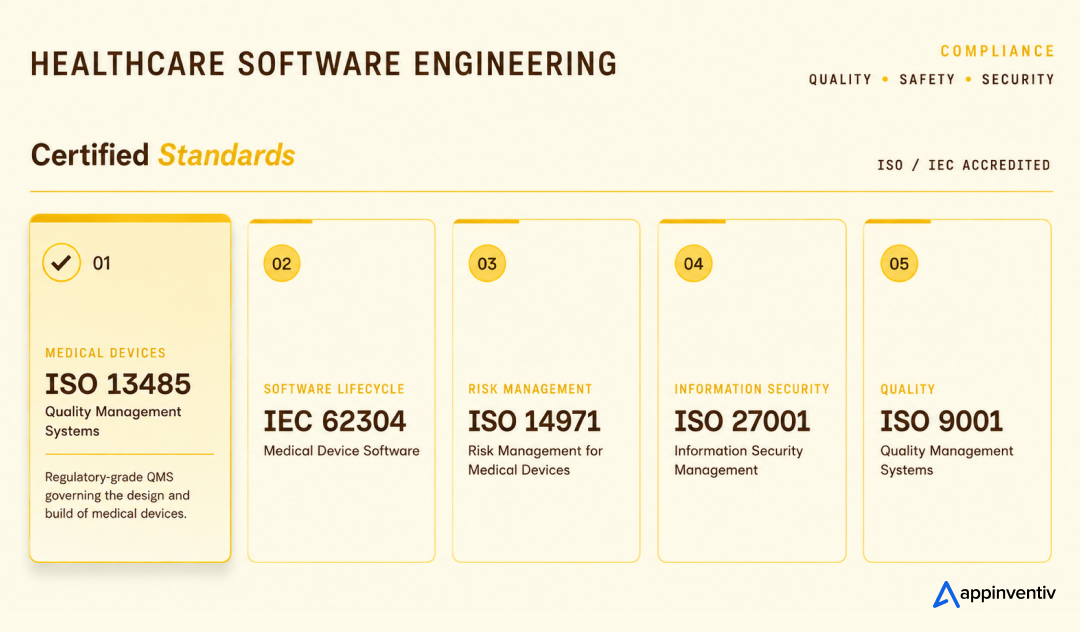
The compliance layer matters just as much. Appinventiv’s healthcare engineering approach is supported by standards such as ISO 13485, IEC 62304, ISO 14971, ISO 27001, and ISO 9001, helping teams build with quality, safety, and security in view.
If you are planning AI EHR development, our healthcare AI developers can help you define the right scope, choose the right architecture, prioritize integrations, and build a system that clinicians can actually use.
Ready to build AI into your EHR the right way?
FAQs
Q. What is AI integration with EHR systems?
A. AI integration with EHR systems means connecting artificial intelligence tools to electronic health record data and workflows. The AI can summarize charts, draft notes, validate orders, predict risk, automate patient outreach, support billing, or assist clinical decision-making while keeping humans in control.
Q. How is AI being used in modern EHR software?
A. AI is being used in modern EHR software for documentation support, chart summarization, clinical decision support, patient communication, scheduling, coding, billing, risk prediction, lab order validation, imaging workflow support, and inbox triage.
Q. How does AI improve efficiency in EHR systems?
A. AI improves efficiency in EHR systems by reducing repetitive documentation, helping users find relevant patient data faster, automating routine reminders, flagging missing information, routing messages, validating orders, and reducing manual rework across clinical and administrative teams.
Q. How does AI integration work within EHR architecture?
A. AI integration works within EHR architecture by connecting source systems to an interoperability layer, normalizing data, applying security controls, routing approved data to AI models, placing outputs inside user workflows, and monitoring performance through governance systems. FHIR, HL7, audit logs, access controls, and human review are central to safe execution.
Q. What interoperability standards are essential for AI-EHR integration?
A. The most important interoperability standards include FHIR for modern API-based exchange, HL7 v2 for legacy clinical messaging, CDA for document exchange, DICOM for imaging, SMART on FHIR for app launch context, CDS Hooks for decision support, and coding systems such as LOINC, SNOMED CT, RxNorm, CPT, and ICD-10.
Q. What are the biggest risks of integrating AI into EHR software?
A. The biggest risks include inaccurate outputs, hallucinations, biased predictions, poor data quality, privacy violations, weak access controls, alert fatigue, unsafe write-back, unclear accountability, and poor clinician adoption. These risks can be reduced with RAG, source attribution, human approval, audit logs, bias testing, and postlaunch monitoring.
Q. How long does AI-EHR integration take?
A. A focused AI-EHR pilot can take 8-16 weeks if the workflow is narrow and data access is ready. A more advanced integration with EHR write-back, predictive models, compliance validation, and multisite rollout can take 6-12 months or more.
Q. What is the difference between EHR and EMR integration?
A. EMR integration usually focuses on digital records within one practice or organization. EHR integration is broader and often includes information exchange across providers, labs, imaging centers, payers, patient portals, and external systems. AI-EHR integration usually needs stronger interoperability planning because it touches more data sources and workflows.
Q. What should healthcare leaders do before implementing AI in EHR systems?
A. Healthcare leaders should identify one high-value workflow, audit data quality, confirm EHR API access, define compliance requirements, involve clinicians early, set success metrics, build a governance model, validate AI outputs, and start with a controlled pilot before scaling.


Fast 2-minute response, fully NDA-protected.
The Multiplier Effect of AI Agents: The Rise of AI Swarms
Key takeaways: AI agent swarms coordinate specialized agents to solve complex problems that may be difficult for a single agent to handle effectively. More agents do not automatically mean better outcomes. Swarms deliver value when work can be divided, executed in parallel, and coordinated toward a shared objective. Enterprise readiness depends on governance. Clear accountability,…
AI Data Integration: How to Connect, Clean and Prepare Data for AI
Key takeaways: AI initiatives fail when fragmented, poor-quality data reaches models without sufficient context, controls or ownership. AI-ready pipelines must connect, clean, enrich, govern and continuously monitor data across its lifecycle. Real-time processing matters when AI decisions depend on current transactions, events, inventory or operational conditions. Data architecture should follow the AI use case, balancing…

AI-Native SDLC: Foundational 90-Day, 5R AI SDLC Adoption Playbook
Key takeaways: Why AI coding tools accelerate coding and software delivery How AI-native SDLC shifts engineering from code to intent, context, and outcomes The role of specifications, AI agents, and continuous verification in enterprise delivery How to redesign engineering teams for human–agent collaboration The platform, governance, and guardrails required to scale AI-native development A practical…