














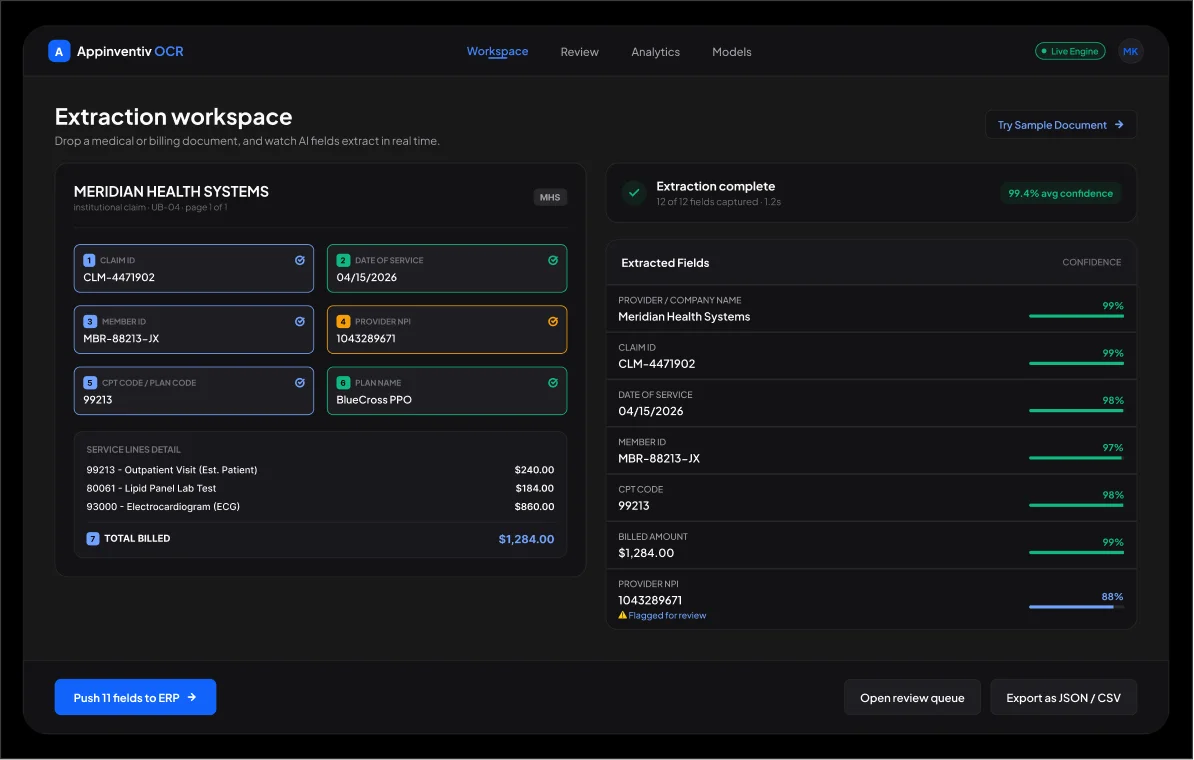
Drop zone, live read
Drop an invoice, claim, or ID. Fields fill in as it reads, each with a score; the confident ones post themselves.


 Leader in AI-First Product Engineering Read Full Article
 IT Managed & Outsourcing
 Contact Us

We build OCR software that lifts fields off invoices, claims, IDs, contracts, and handwritten forms, checks each one against your rules, and writes the result into the systems you already run, at field-level accuracy past 99%. One team carries it end-to-end, from your first document sample to a trained model in production.
Most of what a company knows never reaches its software. AI-driven storage demand is being fueled by the activation of unstructured data use cases, contributing to strong growth in enterprise storage infrastructure. Optical character recognition development is how that content turns into something your systems can act on.
Grand View Research values the OCR market at $32.9 billion by 2030 on 14.8% yearly growth, and sizes intelligent document processing (IDP), the reasoning layer above raw OCR, at $29.7 billion by 2033, up from $3 billion in 2025.
What tipped the timeline is generative AI. McKinsey puts the technology's yearly upside at $2.6 trillion to $4.4 trillion, largely because machines can finally read plain language, the skill behind about a quarter of all working hours. In practice, that is what AI OCR software development now delivers.
The quiet tax. Keying a document by hand runs $12 to $20 and slips an error into nearly 39% of them. A trained OCR system takes most of that off the books, one line at a time.
Curious how that impacts your monthly volume?
Drop an invoice, claim, or ID. Fields fill in as it reads, each with a score; the confident ones post themselves.
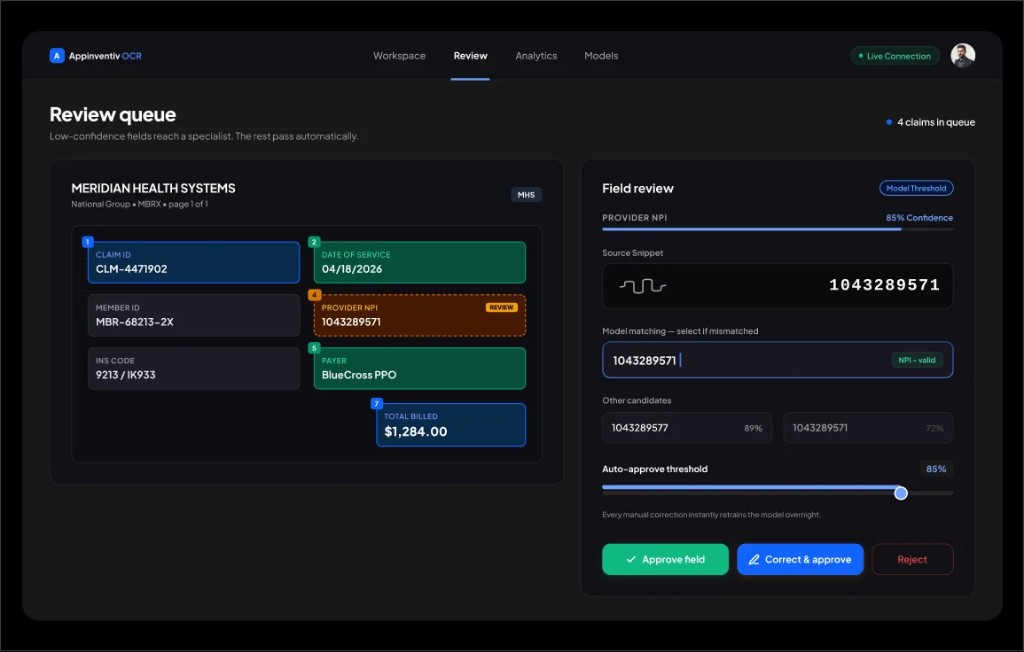
Whatever the model is unsure about waits here. A reviewer settles it in a click, and that click becomes training data.
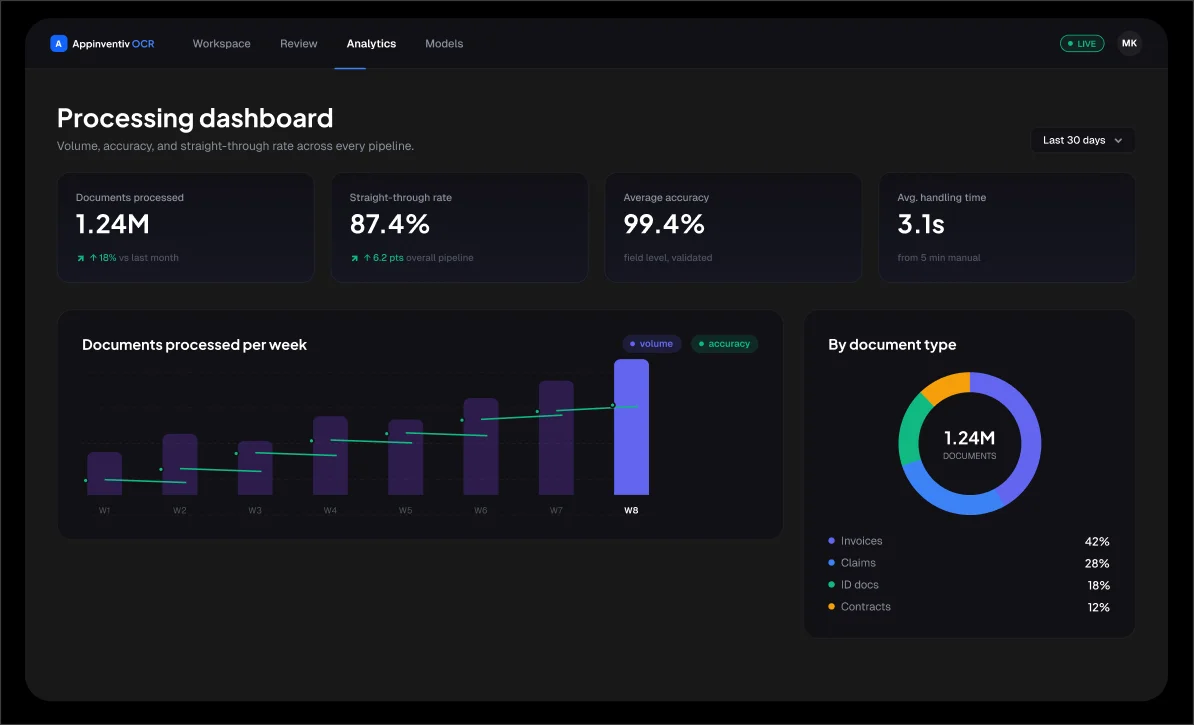
Throughput, straight-through rate, and accuracy on one screen, next to the manual spend you are no longer paying.

Want these screens running on
your own paperwork, under NDA?
Get a prototype on your docs
You won't be passed to a rotating bench of contractors. A standing pod, engineers, data scientists, and a compliance reviewer stay on the build from the first sample through the weeks after launch. Whatever you run, Epic, SAP, or something homegrown, the integration is written into the plan, not sprung on you in phase two.
This is AI OCR software development run like product engineering, and the AI-powered OCR systems it produces are meant to sit in production, not a demo folder.
Kickoff is deliberately dull: a working session, an NDA, and a cost plan that finance can read within days. There's more on the team about Appinventiv and the custom AI development services that back every OCR system software build.
Hand-keying lands between $12 and $20 a document. Automated capture settles near $3 and keeps falling as volume grows.
Past 85% straight-through on a well-scoped flow, exceptions are the only thing your team ever opens.
Confidence thresholds and validation rules mean the figures reaching your ledger are the ones that belong there.
Work that costs a person several minutes is cleared in about three, through document processing automation.
Every read, edit, and export is timestamped, so a compliance request is a query, not a scramble.
Data capture automation turns dead PDFs into structured records your analytics stack can actually query.
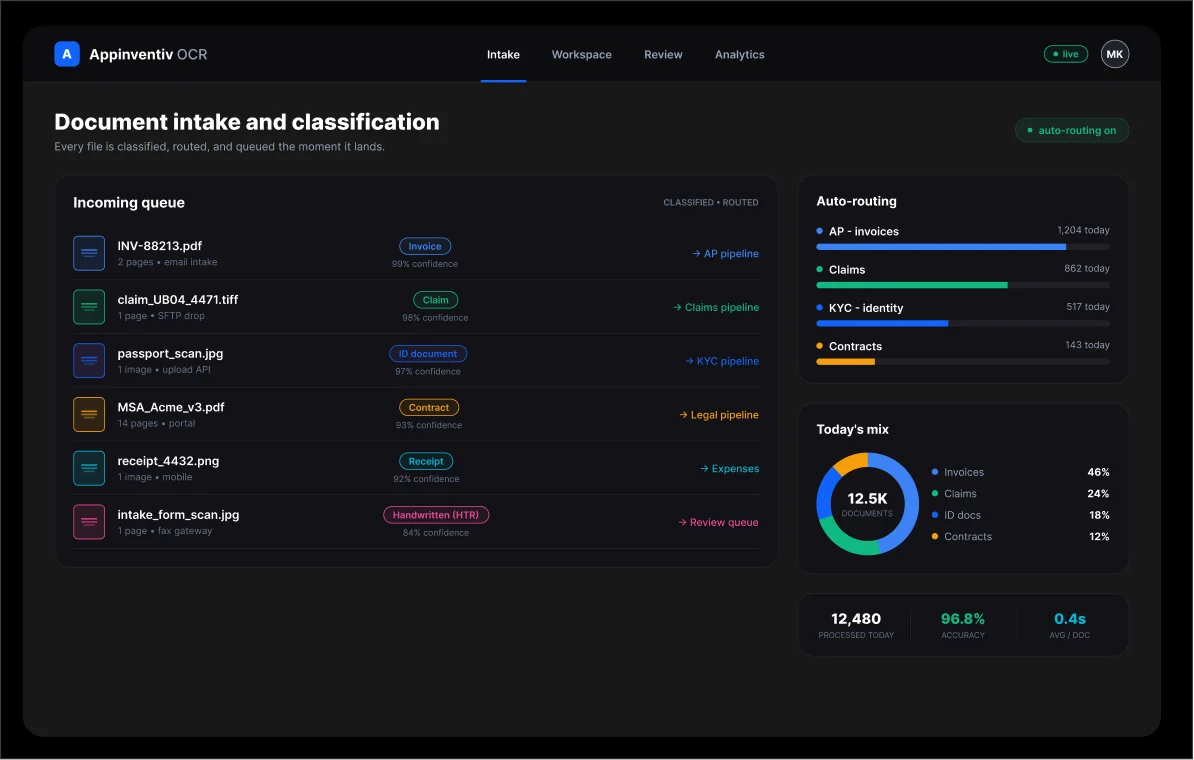
Headers, line items, and totals are pulled and cross-checked in a 3-way match before a cent posts to your ERP.
Codes, member IDs, and NPIs are read directly from UB-04 and CMS-1500 forms and written to your EHR in the formats it expects.
Passports, licenses, and address proofs are parsed for KYC, with image-to-text conversion that survives a bad phone photo.
Bills of lading, delivery proofs, and customs forms are captured at the dock instead of a week later in a shared inbox.
Clauses and key terms extracted so a document management system with OCR becomes something you search, not just store.
Our document digitization solutions turn decades of paper into searchable records, with HTR reading handwritten notes accurately.
01.Clean it up first. Skew, speckle, and weak contrast get corrected before a single character is read, because bad input is the quickest route to bad output.
02.Map the page. Computer vision finds the blocks, tables, and fields, regardless of how the layout shifts from one vendor to the next.
03.Read it. The machine learning OCR engine converts images to text, print and handwriting alike, using text recognition technology trained on your documents rather than a generic corpus.
04.Make sense of it. A natural language processing (NLP) layer works out what the document is and what each field means, then maps it to your schema.
05.Check it. Your business rules and confidence cutoffs run here; only the genuinely doubtful fields ever reach a person.
06.Send it on. Cleared data leaves through APIs into your ERP, EHR, or document store, with nobody retyping it at the other end.
Proving one flow before you commit
Core Capabilities
Scaling past a single document type
Core Capabilities
High volume, tight regulation, your infra
Core Capabilities

Send a sample and a feature list; get a costed work-package breakdown inside 48 hours.
Get a line-item quote
Upkeep. Set aside 15% to 20% of the budget each year for dependency bumps, shifting document formats, and the odd fix.
Hosting. Compliant infrastructure runs $500 to $5,000 a month, tracking your volume and how long you keep the data.
Retraining. Documents drift, and templates change, so plan on a quarterly check and a retrain to keep accuracy from sliding.
Security. Budget $10,000 to $30,000 a year for penetration tests and the audits your compliance team will ask for.
This part is just multiplication: documents per month times the cost you strip out of each one.
Take an AP team clearing 50,000 invoices a month. At roughly $15 to key each by hand, that is about $9 million a year.
Automate to near $3 a document, and the same work costs $1.8 million, leaving $7.2 million on the table. On numbers like that, a growth-tier build tends to earn itself back well before the year is out.

Ready to put your documents on autopilot?
Book a 30-minute working session. We map one live document flow and size the build.
Optical character recognition, the step that turns a document image into machine-readable text.
Intelligent character recognition, for reading hand-printed characters one box at a time.
Handwritten text recognition for cursive and free-form handwriting.
Intelligent document processing, OCR plus classification, NLP, validation, and hand-off.
Finds the text, tables, and fields on a page before anything gets read.
Natural language processing, the part that reads meaning, not just characters.
How sure is the model about a field, and what decides post-vs-review?
The slice of documents that are clear with no human in the loop at all.
The work moves in five stages, and each one ends with something concrete in your hands rather than a status update. If you have been wondering how to build an OCR system without the usual black-box drift, this is the shape of it.
We inventory your document types, volumes, and target systems, then agree on the accuracy and straight-through numbers that count as done. You walk away with a requirements doc and a plan.
We gather and label a representative sample and stand up the intake pipeline. Because OCR development using machine learning is only as good as its labels, this stage sets your accuracy ceiling.
Schema, validation rules, and every integration point get mapped with your team on a whiteboard before we write code that is expensive to unwind.
Models get built, trained, and tuned on your real files, the review console goes in, and the integrations get wired. AI-based OCR system development against actual documents, not a tidy demo set.
We ship to your cloud or your own servers, connect it to your stack, and watch accuracy closely once traffic is real. Enterprise OCR implementation does not stop at go-live, and neither do we.

The India's Fastest-Growing Companies 2026 Recognised by TIME and Statista

Statista High Growth Companies APAC - 2026

Statista India's Growth Champions 2023

Send your security questionnaire; we'll answer it before you sign anything.
Our security leaders will take you through every flaw and improvement point that can help your project become better.

ISO/IEC 27001

ISO/IEC 27701

SOC 2 Type II

GDPR

HIPAA

HITRUST CSF

ISO 9001

HL7

FHIR

PCI DSS
ISO/IEC 42001

CMMI Level 3
HEALTH PLAN
Claims that used to take a person six minutes now clear in roughly three seconds, holding 99.4% field accuracy.
LOGISTICS GROUP
Bills of lading and delivery proofs captured at 87% straight-through, with per-document cost cut by about four-fifths.
ENTERPRISE FINANCE
Fifty thousand invoices a month are read and reconciled to the ERP, with the error rate held under 1%.
A single-document pilot is usually live in 4 to 8 weeks. A full intelligent document processing (IDP) platform runs for 3 to 6 months, and enterprise rollouts longer. What moves the timeline is document variety and the number of integrations, not the size of your company.
Roughly $30,000 for a tight pilot up to $250,000 and beyond for an enterprise platform, with a per-page option if you'd rather pay as you go. The cost to develop an OCR system rides on document types, volume, the accuracy bar, handwriting, integrations, and compliance.
Past 99% at the field level on production documents once the model is trained and the validation rules are set. Confidence scores send anything shaky to a quick human check, so accuracy climbs the longer it runs. That's the whole point of AI-based OCR system development over off-the-shelf readers.
Yes. Handwritten text recognition (HTR) covers cursive and free-form notes, and the cleanup stage, deskew, denoise, and contrast repair, deals with faxes, photos, and tired old scans.
Plain OCR reads characters and stops. What we build classifies the document, reads context with NLP, validates against your rules, and delivers structured data ready to post, closer to intelligent document processing than to a text dump.
Yes. Output posts through APIs into your ERP, EHR, and any OCR document management system you keep records in, with healthcare data exchanged over HL7 and FHIR.
Builds run to ISO/IEC 27001, SOC 2 Type II, HIPAA, and GDPR, with encryption, least-privilege access, and full audit logs. When data can't leave your walls, we deploy on-prem or in a private cloud.
Yes, entirely. The trained models, the labeled data, and the code are yours. Nothing is locked inside a proprietary box you can't leave.


 A single document type, core extraction