
























- Mobile App Development Process: Step-by-Step Structured Development Lifecycle
- Types of Mobile App Development in Large Businesses
- Enterprise Mobile App Architecture: What Powers Scalability
- Key Technology Decisions That Impact Long-Term ROI
- Mobile App Development Cost Breakdown for Large Businesses
- Timeline and Delivery Models for Enterprise Mobile Apps
- Security, Compliance and Governance in Enterprise Apps
- Common Mobile App Development Challenges (and Solutions)
- How to Choose the Right Mobile App Development Partner
- Future Enterprise Mobile App Development Trends
- How Can Appinventiv Reduce Your Time-to-Market While Keeping Enterprise-Grade Quality Intact?
- FAQs
Key takeaways:
- Most business-critical mobile apps fail after launch, not during build, usually due to weak planning and poor system connections.
- Early choices around architecture and integrations decide how the app performs months after it goes live.
- Cost is not just development; ongoing fixes, scaling, and infrastructure often take up a large share of it.
- Apps that focus on one clear outcome tend to perform better than those trying to solve everything at once.
- The right partner can prevent delays and rework by getting the basics right before development even starts.
Mobile app development now sits at the center of how large companies operate and grow. Banks route payments, loan checks, and alerts through mobile systems. Retail brands track that over half of their digital sales now come from apps, based on data from Statista. Inside the business, custom apps cut manual work across logistics, finance, and field teams.
Even with this shift, many business projects fall short. In fact, nearly 70% of large digital programs miss targets for cost, schedule, or value. Teams often rush into development. Requirements stay unclear. Systems pass early testing but fail under real traffic or complex integrations.
A mobile app at this level is not just a front end. It connects APIs, data stores, identity systems, and third-party services. One weak layer can slow the entire system or expose risk.
This guide explains the mobile app development lifecycle in full. It links business goals with engineering choices, so teams can build apps that perform well, scale with demand, and deliver measurable returns.
Most enterprise apps break under real load due to poor planning, weak architecture, and rushed execution decisions

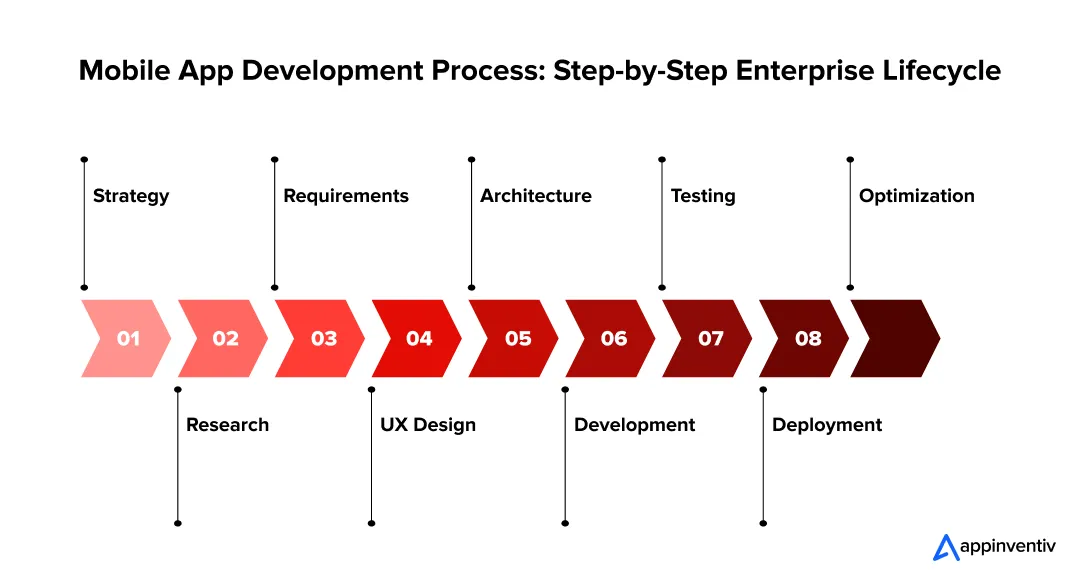
Mobile App Development Process: Step-by-Step Structured Development Lifecycle
Mobile app development for large businesses is not a linear task. Each stage connects with the next and shapes cost, scale, and system stability. Miss one layer and issues appear later in production. The steps below break down how businesses plan, build, and run mobile systems with control and clarity.
Step 1 – Business Strategy & Outcome Definition
Every mobile app development process must clear business outcomes before any design or code begins, which is why starting with a solid mobile app business plan sets the right foundation.
With global app downloads crossing 137 billion, even small inefficiencies at scale can impact large user bases. Teams that skip this step struggle to justify cost and fail to track impact after launch.
Start with measurable targets. Avoid vague goals like “better engagement.” Define metrics that can be tracked from day one.
- Revenue impact: conversion rate, average order value, repeat purchase rate
- Cost reduction: manual hours saved, process cycle time, error rates
- Customer experience: retention rate, session time, task completion rate
Map these KPIs to specific app functions. For example, a retail app feature such as one-click checkout should link to conversion rate and cart abandonment data, reflecting how apps are changing how consumers shop. This creates a direct line between product decisions and business results.
Next, align stakeholders early. Production-ready apps touch multiple systems and teams. CIOs focus on infrastructure and risk. CTOs review architecture and scalability. Product leaders define user flows and priorities. Misalignment at this stage often leads to rework during development.
Use structured workshops to lock scope. Many teams rely on product requirement documents, user story mapping, and value stream analysis. These help identify which features deliver the highest impact within the first release.
Prioritization matters. Not every feature belongs in version one. Focus on use cases that drive measurable value within the first six months of launch.
Step 2 – Market, User & Competitive Intelligence
Complex organizations reduce product risk by validating decisions against real user behavior and market data before development begins.
Start with user segmentation based on data, not assumptions. Pull signals from CRM systems, app analytics, support logs, and transaction history. Segment users by behavior, value, and context of use. A logistics platform, for example, may split users into dispatch managers, drivers, and warehouse staff. Each group interacts with the app in a different way and expects different response times and workflows.
Go deeper than demographics. Track task frequency, session length, device type, and failure points. These inputs help define performance targets and UI complexity early.
Next, benchmark competitors at a feature and system level. Do not stop at UI comparisons. Break down how competing apps handle:
- Onboarding flows and authentication methods
- Offline access and data sync behavior
- API response times and app load speeds
- Feature depth across core journeys
This step often reveals hidden gaps. A competitor may offer faster checkout but rely on limited backend validation, which creates risk at scale.
Map these findings into a gap matrix.
| Area | Competitor Strength | Observed Gap | Opportunity |
|---|---|---|---|
| Onboarding | Fast signup | Weak identity checks | Add secure onboarding with low friction |
| Performance | Quick load time | Limited data depth | Balance speed with richer data |
| Features | Broad coverage | Poor workflow clarity | Simplify task flows |
This exercise shapes product direction with clear trade-offs. It shows where to match the market and where to stand apart with measurable impact.
Step 3 – Requirements Engineering and Scope Definition
Unclear requirements lead to delays, rework, and rising costs. Teams need a clear scope before the mobile app development process can begin.
Start by splitting requirements into two groups. One defines what the app should do. The other defines how the system should behave under load.
Functional requirements cover user actions and system flows:
- User login, role-based access, session control
- Order placement, payments and status tracking
- Data exchange with systems like SAP or Salesforce
Non-functional requirements set performance limits:
- API response time under 300 ms during peak load
- Support for 5,000 to 20,000 concurrent users
- Uptime target, such as 99.9 percent, with failover
These numbers come from expected usage, not guesswork. Teams often review past system data or run early load estimates.
Scalability planning starts here. A retail app may see traffic jump 3 to 5 times during a sale window. If the system cannot scale at that moment, revenue drops.
Compliance needs clear mapping from day one.
| Area | What to define | Why it matters |
|---|---|---|
| Data privacy | Data storage and access rules | Affects the database and APIs |
| Payments | Transaction security rules | Impacts checkout flow |
| Healthcare | Patient data handling | Requires audit logs |
Most teams capture this in user stories, API specs, and acceptance criteria. Clear inputs here reduce confusion once development begins.
Step 4 – UX Architecture and Experience Design
Enterprise UX focuses on how quickly users complete tasks and how clearly they navigate workflows across different roles.
This is why the importance of UI/UX design cannot be overlooked, as poor interface choices slow execution and increase support load even when the backend works correctly.
Key UX Design Principles
- Keep screens clutter-free during core tasks
- Reduce cognitive load by breaking flows into steps
- Use clear navigation paths for repeat actions
- Maintain consistent UI patterns through style guides
- Validate inputs early to prevent downstream errors
Start with real workflows, not screens. Map what a user does step by step. Take a field service app as an example. A technician logs in, checks assigned jobs, updates status, and uploads data. Each step must work even with a weak or no network. Offline capture and later sync are not optional in such cases.
Next comes structure. Information should follow tasks, not backend systems. Users should reach key actions within a few taps. Many large-scale applications fail here. They mirror internal systems instead of user work patterns.
Role separation matters early. A single app often serves different groups:
- Managers track performance and approvals
- Operators complete tasks and update records
- Auditors review logs and history
Each role needs a focused view. Mixing all data into one interface slows work and increases errors.
Plan how the app reacts to failure. Slow APIs, broken sessions, and partial data loads will happen. Define fallback states, retries, and local storage before development starts.
Test flows with clickable prototypes. Track how long tasks take and where users hesitate. Adjust early, not after release.
Also Read: Insider’s Guide to Mobile App Design
Step 5 – Technical Architecture and Stack Selection
Mobile application development architecture choices made at this stage decide how the app behaves under real traffic, how often teams can release updates, and how the system handles growth over time.
Hybrid vs Native Apps Development: Making the Right Decision
The native vs hybrid app development decision shapes performance, cost, and how the system handles growth, as shown in the comparison below.
| Factor | Native Apps | Cross-Platform Apps |
|---|---|---|
| Performance | Direct access to device hardware, stable under heavy load | Depends on the abstraction layer; it may lag in complex tasks |
| Development Speed | Separate builds for iOS and Android | Single codebase for both platforms |
| Cost | Higher build and upkeep effort | Lower initial cost |
| Scalability | Handles large user loads and real-time operations | Works well for controlled workloads |
| Use Case Fit | Trading, gaming, high-load large-scale applications apps | Internal tools, standard business app development |
The choice depends on what the app needs to handle. A real-time trading system or a ride-hailing app cannot afford delays in rendering or data sync. An internal approval app does not need that level of control.
Platform Strategy for Mobile Apps
Most business-critical apps do not rely on a single platform. They run across mobile, web, and controlled environments.
- iOS apps handle high-value users and secure transactions
- Building an Android app for your business supports wider device coverage and is especially suited for field operations.
- Web apps provide universal access without installation
- Enterprise distribution uses MDM tools and private app stores
Evaluating cross-platform app frameworks like React Native and Flutter helps reduce build time, though critical systems often keep native components for performance and security-sensitive flows.
Backend and Architecture Choices
Backend structure defines how the system grows and how teams manage changes.
- Monolith works well in the early stages. One codebase, simpler deployment, faster initial build
- Microservices split the system into smaller services. Each service handles a specific function and can scale on its own
Hosting setup shapes system behavior under load. Cloud setups allow auto-scaling and managed services. Traditional setups rely on fixed capacity and manual scaling.
API design controls how data moves between the frontend and the backend.
- REST sends fixed data structures and works well for predictable flows
- GraphQL lets clients request only the data they need, which helps in data-heavy screens
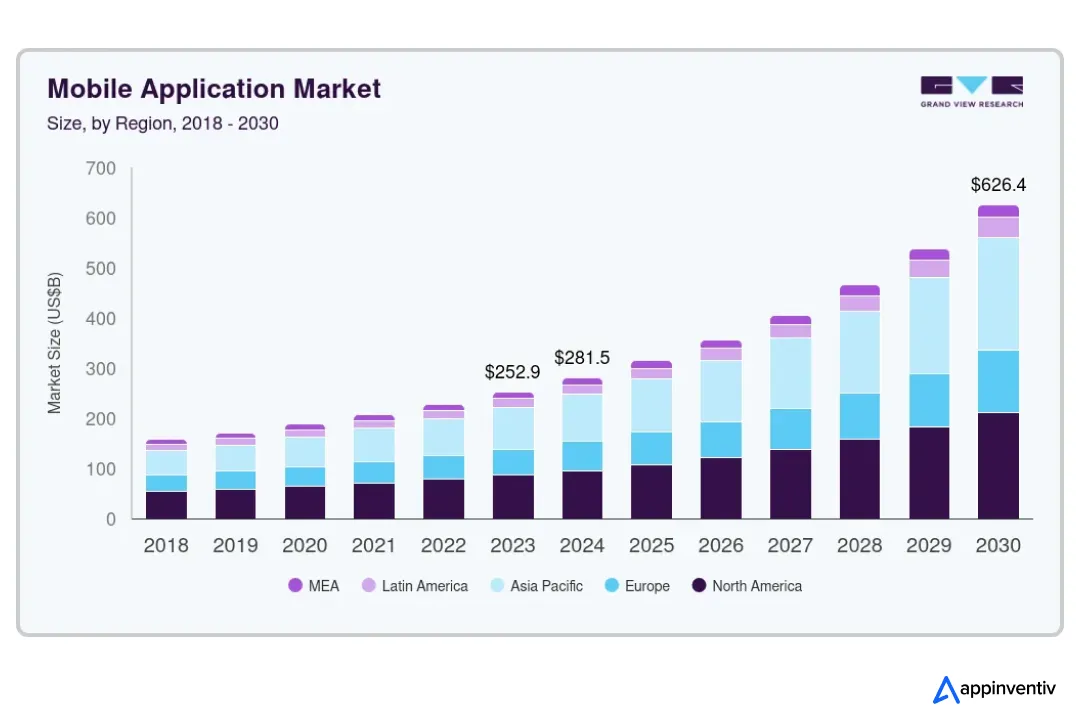
These decisions stay with the system for years. Fixing them later often means rewriting large parts of the application. This becomes critical as the mobile app market moves toward a $626 billion valuation by 2030.
Tech Stack for Mobile App Development: Key Considerations
Here is a quick overview table.
| Aspect | Tools |
|---|---|
| Backend | Node.js, Java, or .NET for scalable services |
| Mobile | Swift, Kotlin, React Native, or Flutter |
| APIs | REST for stable flows, GraphQL for flexible queries |
| Infra | Docker for packaging, Kubernetes for orchestration |
| Monitoring | Tools like Sentry or Bugsnag for crash tracking |
Choosing the right mobile app technology stack affects latency, release cycles, and long-term system stability.
Step 6 – Development & Integration
Enterprise mobile application development runs in parallel streams. Frontend, backend, and integrations move at the same time, and small gaps between them can break the system later.
Teams split work across services, not screens. Backend engineers build APIs and data flows. Mobile teams consume those APIs.
Integration teams connect external systems like SAP, Salesforce, or other platforms, where CRM implementation defines how customer data flows across services. All three must stay in sync through shared contracts.
The delivery model affects how fast teams release working features. Many established companies use a mix of sprint cycles and milestone reviews.
- Short sprint cycles for feature development and fixes
- Milestone gates for security checks, compliance review, and release approval
Integration work takes more effort than new feature development. Legacy systems often expose limited APIs or rely on batch processing. Teams build middleware layers or adapters to handle data exchange and format changes.
CI/CD pipelines control how code moves to production. A typical pipeline includes:
- Code commit with automated build triggers
- Unit and integration tests running on each build
- Artifact creation and versioning
- Deployment to staging, then production after approval
Environments stay separate. Development, staging, and production run on isolated setups with controlled access. This reduces risk during releases and allows safe testing under near-real conditions.
Strong coordination across these layers keeps releases stable and predictable.
Real-world enterprise deployments show how integration and scale decisions directly impact performance across regions and systems.
Americana Group: Multi-Region QSR Platform at Scale
Americana Group needed a unified mobile platform across brands and geographies.
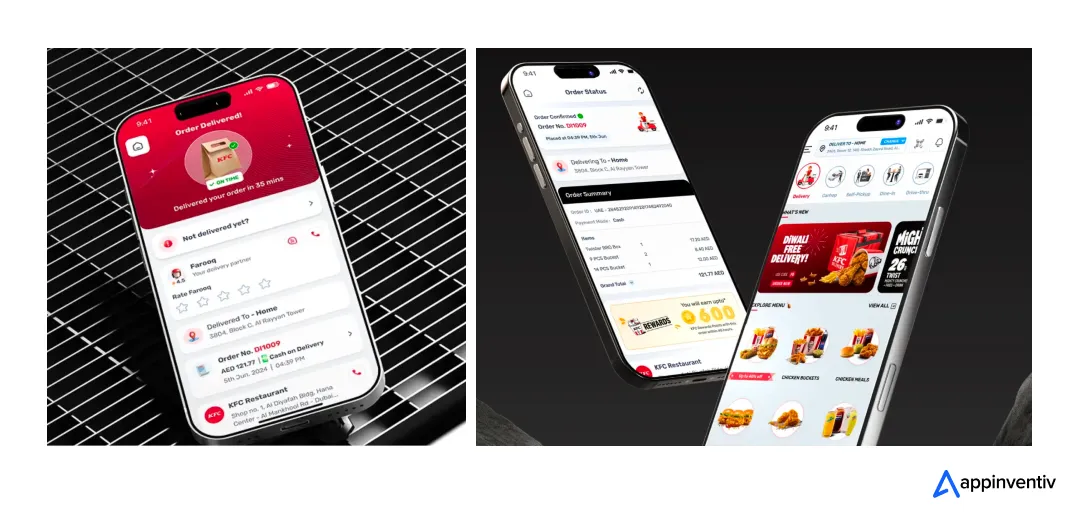
What was needed
- Multi-brand rollout across 4+ countries
- Real-time order tracking and payment orchestration
- Stable integration with POS and backend systems
What Appinventiv delivered
- Scalable backend handling high concurrent orders
- Region-aware deployments across multiple markets
- Seamless API integrations for ordering and payments
Impact
- Improved system stability during peak traffic
- Faster order processing across regions
- Consistent conversion performance at scale
Read the full case study here.
Step 7 – Testing, QA and Security Validation
Testing shows how the system behaves under real usage and pressure before it reaches production.
Testing Coverage for Apps
- Functional testing for core workflows
- Performance testing under peak load
- Crash monitoring using tools like Sentry
- User acceptance testing before release
Testing must validate both system behavior and real user interaction at scale.
Defining mobile app testing strategies early ensures core flows like login, payments, data entry, and sync actions work every time. Teams usually automate these paths so they run on each build. If a new change breaks an old flow, it gets caught early. This avoids last-minute fixes close to release.
Performance checks come next. Real users do not arrive in a steady line. Traffic spikes, drops, and shifts across regions.
- Simulate peak users based on expected scale, not averages
- Track response times at higher percentiles, not just the mean
- Run spike tests where traffic jumps within minutes
- Keep the system under load for hours to catch memory issues
Security work runs alongside testing, not after it. Mobile apps rely on APIs, tokens, and device storage. Each layer needs validation.
- Scan code for weak patterns
- Test running APIs for broken access or data leaks
- Check how tokens are stored and refreshed
- Review data stored on the device
Release gates matter here. If performance drops or a security check fails, the build does not move forward. This keeps production stable and avoids incidents after launch.
Step 8 – Deployment and Go-to-Market Execution
Deployment defines how the app reaches users and how safely new versions move into production.
Start with the distribution model. Public apps go through app stores. Internal or partner apps often use controlled distribution.
- App Store distribution: review process, version control, staged rollouts
- Enterprise distribution: MDM tools, private app stores, direct installs
Each path affects release speed and control. App stores add review delays. Multinational companies channels allow faster updates but require device and access management.
Release orchestration keeps deployments stable. Teams avoid pushing updates to all users at once.
- Phased rollout to a small user group first
- Monitor crash rates, API errors, and session drops
- Gradually increase exposure if metrics stay within limits
Versioning matters. Backend and mobile versions must stay compatible. Many teams maintain backward support for at least one previous app version to avoid breaking active users.
Rollback planning is critical. If a release introduces issues, teams need a fast recovery path.
- Revert backend services to a stable build
- Disable faulty features through feature flags
- Pause rollout or remove app versions if needed
These controls reduce risk during releases and keep user impact low even if issues appear.
Step 9 – Post-Launch Monitoring and Continuous Optimization
Release is the start of live operations. Systems need constant tracking and controlled updates to stay stable as usage grows.
Set up observability across all layers. Logs record events at the service level. Metrics track system health, such as CPU use, memory, and request rates. Tracing follows a request across services to find delays or failures. Together, these help teams detect issues before users report them.
- Centralized logging for all services and APIs
- Metrics dashboards with real-time alerts
- Distributed tracing to locate slow services
- Error tracking with stack traces and user context
User analytics adds another layer. It shows how people actually use the app, not how teams expect them to.
- Session duration and drop-off points
- Feature usage across roles
- Task completion time
- Crash reports by device and OS version
This data feeds product updates. Teams adjust flows, remove friction, and fix edge cases based on real usage.
Release cycles continue after launch. New builds move through the same pipeline with small, controlled changes.
When developing mobile apps, post-launch iteration defines long-term success. Systems improve through continuous updates, not one-time releases.
- Frequent releases with limited scope
- Feature flags to enable or disable changes
- A/B testing for new flows
Steady updates keep the system stable and aligned with user needs as scale increases.
Types of Mobile App Development in Large Businesses
Established companies rarely choose one approach and stick to it. The choice depends on traffic, user behavior, and how the app connects with other systems. A field app used in low-network zones needs a different setup than a trading app handling live data.
Each type comes with clear trade-offs. Teams must also evaluate the different types of mobile apps to align their choice with business needs.
| App Type | Where It Fits | Key Strength | Limitation |
|---|---|---|---|
| Native Apps | Real-time systems, high-traffic apps, finance, logistics | Fast response, direct device access, stable under load | Higher build effort, separate iOS and Android code |
| Cross-Platform Apps | Products that need faster rollout across devices | Single codebase, quicker updates | May slow down with complex workflows or heavy data |
| Hybrid Apps | Internal dashboards, admin tools | Quick to build, works across platforms | Limited performance and weaker scaling |
| Progressive Web Apps (PWA) | Customer portals, low-frequency usage apps | No install, easy access through browser | Limited offline support and device control |
In practice, many business applications mix these. Core flows may run natively, while support features sit on shared code. This helps teams move faster without affecting performance where it matters.
Enterprise Mobile App Architecture: What Powers Scalability
Core business systems apps run on multiple layers that handle different responsibilities. This separation helps systems scale without breaking and keeps failures isolated, rather than spreading across the entire app.
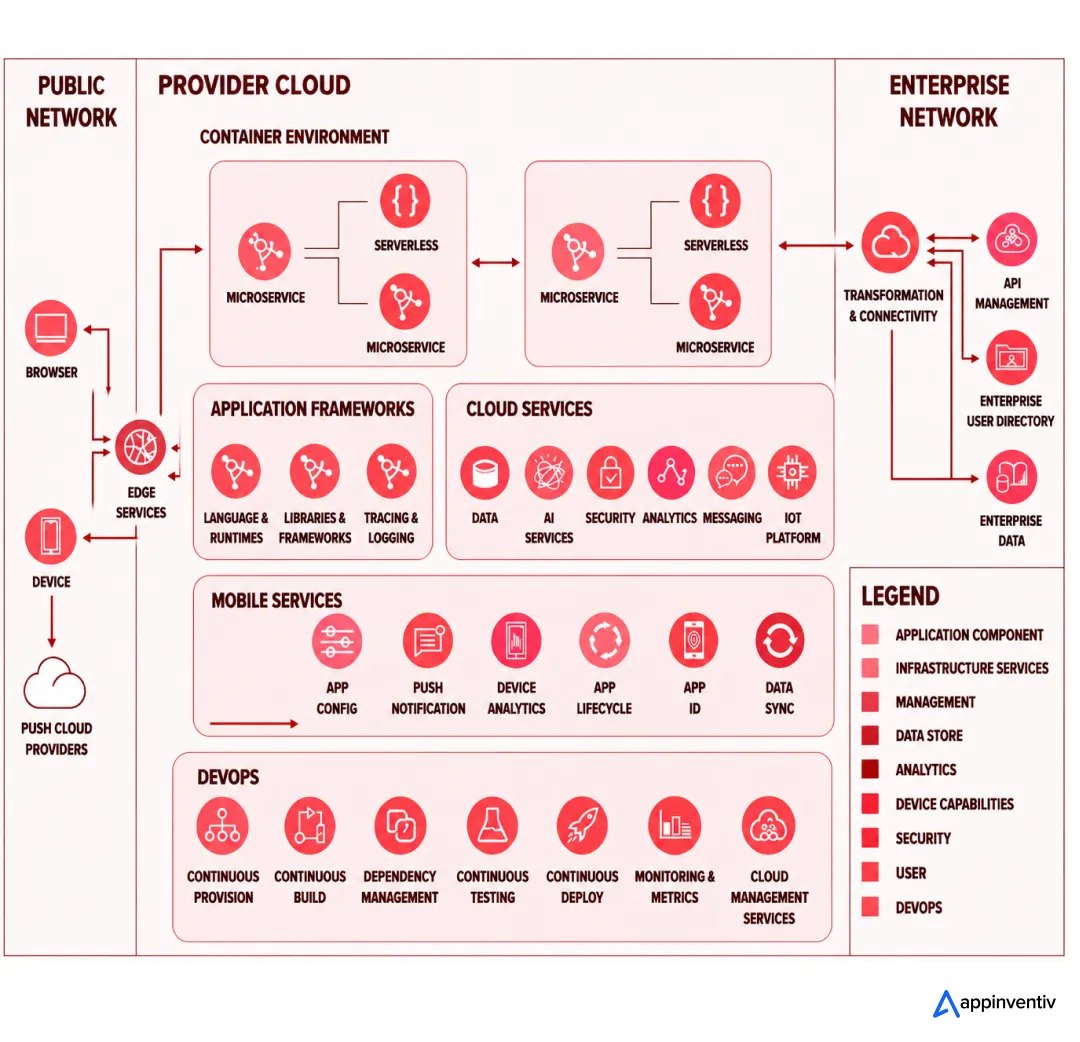
Understanding the key aspects of mobile app development starts with these layers:
Frontend Layer
The frontend controls how quickly users can act, how smooth screens feel, and how the app behaves on real devices.
Native builds give direct control over device behavior.
- As any iOS app development guide will highlight, Swift handles memory, threading, and system APIs closely for tighter device control.
- Kotlin for Android gives better control over background tasks and device services
This matters in apps that rely on real-time updates, animations, or hardware access like camera and biometrics.
Cross-platform tools reduce duplicate work but introduce a bridge between code and device.
- Flutter renders UI through its own engine
- React Native connects JavaScript to native modules
This layer can affect startup time, scrolling smoothness, and memory use. Teams test these factors early instead of deciding based on speed of development alone.
Backend and Application Layer
This layer runs the core logic and manages how requests move through the system.
Many core business systems move away from a single codebase as they grow. They split functions into smaller services.
- A payment service handles transactions
- A user service manages identity and profiles
- A notification service sends alerts and updates
Each service can scale on its own, which is the core principle behind application scalability. If one service slows down, it does not block the rest.
Event-based systems help handle delayed or heavy tasks. Instead of waiting for a process to finish, the system passes it to a queue.
- Kafka or RabbitMQ handle message flow.
- Workers process tasks in the background
This setup helps during traffic spikes and keeps user-facing actions fast.
Data Layer
The data layer controls how information is stored, retrieved, and kept consistent across services.
Relational databases work well for structured records.
- Orders, payments, and account data fit here
- Strong consistency helps avoid data mismatch
Non-relational systems handle flexible or large-scale data.
- Document stores manage user profiles or content
- Key-value stores support caching and sessions
Data does not stay in one place. It moves across systems for reporting and analytics.
- Batch jobs process large data sets at intervals
- Streaming pipelines push updates in near real time
Indexing, partitioning, and caching decisions at this stage affect response time as usage grows.
Integration Layer
This layer connects the app with internal systems and external services.
APIs define how systems talk to each other.
- REST works well for fixed data flows
- GraphQL helps when screens need different data sets
Middleware handles translation between systems. It formats data, routes requests, and bridges older systems with newer services.
Third-party services extend capabilities.
- Payment gateways
- Notification services
- Identity providers
Each integration adds delay and risk. Teams track latency and failure rates to avoid bottlenecks.
Infrastructure Layer
Infrastructure supports how the app runs, scales, and stays available during traffic changes.
Cloud platforms allow systems to adjust capacity based on demand. Most critical workflows apps run on AWS, Azure, or GCP with API management layers controlling service communication and scaling behavior.
- AWS, Azure, and GCP provide compute and storage
- Auto-scaling increases or reduces capacity based on load
Containers package applications with all dependencies.
- Docker keeps environments consistent
- Kubernetes manages scaling, deployment, and recovery
This setup allows teams to release updates without downtime and handle sudden traffic increases without manual steps.
Security Layer
Security protects data, access, and communication across all layers.
- App-level security layers, such as app wrapping, protect runtime behavior
- BYOD environments require additional device-level security controls
Access control defines who can do what.
- Role-based access separates user permissions
- Token-based systems manage session control
Data protection runs at multiple levels.
- TLS secures data during transfer
- Encrypted storage protects sensitive records
Mobile apps need extra care. Data stored on devices must stay encrypted and tied to device-level security.
Security checks run as part of development and after release. Code scans, dependency checks, and runtime monitoring help catch issues before they affect users.
Key Technology Decisions That Impact Long-Term ROI
Early business mobile app development technology choices shape how the system grows, how much it costs to run, and how hard it becomes to change later. Fixing a poor choice at scale often requires rework across multiple layers.
Build vs Buy vs Low-Code
Here is a quick comparison table.
| Approach | Pros | Cons | Best Fit |
|---|---|---|---|
| Build | Full control over logic, data, and integrations | Higher cost and longer build time | Core business platforms |
| Buy | Faster setup with ready features | Limited control over workflows and data models | Standard business needs |
| Low-code | Quick setup and faster iterations | Performance and scale limits | Internal tools and prototypes |
The choice depends on how critical the app is to business operations. Systems tied to revenue or core workflows usually require full control. Pre-built tools work well when processes are standardized and do not require deep customization.
Additional Critical Decisions
Cloud strategy defines how workloads run across regions and providers.
- Single cloud keeps operations simple and reduces overhead
- Multi-cloud spreads risk and supports regional compliance needs
AI and ML readiness depend on data availability and use cases. Teams must check if clean, labeled data exists before planning features like recommendations or predictions, and understanding how machine learning algorithms work in business operations clarifies where to begin.
Offline capability matters in environments with unstable networks. Apps used in logistics, healthcare, or field operations often store data locally and sync once connectivity returns.
Each of these decisions connects back to cost, system behavior, and future changes. Off-the-shelf tools may work early, but custom app development gives better control as systems grow and requirements shift over time.
Custom mobile app development allows better control over architecture, integrations, and scaling as business needs evolve

Mobile App Development Cost Breakdown for Large Businesses
Cost depends on scope, system links, and compliance load. Early budgets miss integration effort and post-launch spend, and that shows up later as overruns.
Investment shifts with feature depth, traffic, and the number of connected systems.
| Tier | Typical Scope | Cost Range (USD) | Timeline |
|---|---|---|---|
| Basic apps | Forms, simple flows and few integrations | $40,000 – $80,000 | 2–4 months |
| Mid-level apps | Custom UI, several APIs, moderate traffic | $80,000 – $180,000 | 4–8 months |
| Enterprise platforms | Complex workflows, many systems, high concurrency, strict access control | $180,000 – $500,000+ | 8–12+ months |
A simple build handles limited logic. A large platform must process high volumes of traffic, coordinate services, and enforce access rules across roles.
Also Read: How Much Does It Cost to Develop an App in 2026? A Detailed Guide
How Enterprises Measure ROI from Mobile App Investments
Value shows up through business results that teams can measure. Apps also improve conversion rates and support subscription-based models. Having clear app monetization strategies ensures these usage patterns translate into consistent revenue
- Revenue: conversion rate, order value, repeat purchases
- Operations: fewer manual steps, shorter cycle time, lower error rate
- Customer experience: retention, session depth, task completion
Track these from the first release so spend ties back to clear results.
Also Read: Loyalty and Rewards App Development Guide
High-scale commerce platforms show how performance improvements directly translate into measurable user growth and revenue impact.
Adidas: Scaling Mobile Commerce with Performance
Adidas needed to shift from a web-heavy experience to mobile-first commerce.

What was needed
- Mobile-first strategy for millennial users
- Real-time inventory and product discovery
- High-performance checkout under load
What Appinventiv delivered
- End-to-end mobile app across iOS and Android
- Optimized UX and backend performance
- Localized experience for regional markets
Impact
- 2M+ app downloads
- 500K+ new users acquired
- Expanded mobile reach across key regions
Read the full case study here.
Timeline and Delivery Models for Enterprise Mobile Apps
The mobile app development process timeline depends on scope, team setup, and how work moves across systems. Most delays come from integration gaps and testing cycles, not from writing code.
Agile vs Waterfall vs Hybrid
Here is a quick comparison table.
| Model | Flexibility | Speed | Best Use Case |
|---|---|---|---|
| Agile | Adapts during development cycles | Fast, frequent releases | Products that evolve after launch |
| Waterfall | Fixed plan from start to end | Slower, step-by-step delivery | Projects with locked scope |
| Hybrid | Mix of iterative builds and fixed checkpoints | Balanced pace | Large systems with compliance needs |
Most enterprise teams mix models. Feature work runs in short cycles. Security reviews, audits, and release approvals follow fixed checkpoints. This keeps delivery steady without losing control.
Timeline Expectations
Understanding how long it takes to develop an app depends on feature depth, the number of integrations, and the testing scope.
| Stage | Scope | Timeline |
|---|---|---|
| MVP | Core features, limited integrations, controlled rollout | 3–6 months |
| Full-scale app | Complete feature set, multiple systems, performance tuning, security checks | 6–12+ months |
Understanding the role of MVP in mobile app development helps teams validate flows and system behavior early with a narrow set of use cases.
A full-scale build includes deeper integrations, higher traffic handling, and stricter validation cycles.
Integration work often runs alongside development. A single connection with an ERP or payment system can take weeks of testing before it behaves as expected.
Most schedule slips appear during integration and system testing. Teams that plan buffer time for these stages avoid last-minute delays.
Security, Compliance and Governance in Enterprise Apps
Security and compliance run through the entire lifecycle. Gaps show up later as breaches, outages, or audit failures, and they are costly to fix at that stage.
Data Protection and Privacy
Data protection starts with clarity on what data exists, where it moves, and who can access it.
Teams map data flows across the system. This includes user details, transaction records, and logs. Each category carries a different risk level and must follow specific rules.
- GDPR sets rules for consent, storage, and data deletion
- HIPAA defines how patient data is stored, accessed, and audited
- Regional laws often restrict where data can be hosted
Here is a quick overview of some regional laws.
| Region | Law / Compliance | What it Covers |
|---|---|---|
| US | HIPAA, CCPA | Health data protection, consumer data rights |
| Europe | GDPR | Consent, data access, right to delete |
| Australia | Privacy Act 1988, APPs | Data handling, user consent, cross-border rules |
| Middle East | PDPL (UAE, Saudi) | Data residency, user consent, processing control |
Sensitive data stays encrypted during transfer and storage. Access is limited and tracked. Data classification helps separate high-risk data from general records so controls stay consistent.
Identity and Access Management
Access control defines how users enter the system and what they can do once inside.
Role-based access splits permissions across user groups.
- Admins control system settings
- Operators handle daily workflows
- Auditors review logs and activity
Authentication adds another layer. There are multiple ways to implement multifactor authentication in a mobile app, combining passwords with device-based verification or one-time codes
Session handling needs clear limits. Tokens expire after a set time. Idle sessions close automatically. This reduces the chance of misuse from inactive devices.
DevSecOps Integration
Security checks run during development and continue after release.
Code scans run on each build. They flag issues such as exposed credentials, weak encryption use, or outdated libraries.
- Static checks review code before execution
- Runtime tests evaluate APIs and services under real conditions
- Dependency scans track known issues in third-party packages
After release, monitoring systems track unusual patterns. Repeated login failures, traffic spikes, or abnormal API calls trigger alerts.
This setup helps teams catch issues early and respond before they affect users.
Audit and Governance
Audit controls track system activity and support compliance checks.
Logs record key events across the system.
- Login attempts and access changes
- Data updates and transactions
- Configuration changes
Logs stay stored in centralized systems with restricted access. They must remain intact and tamper-resistant.
Monitoring tools track system health and usage patterns over time. Teams use these records during audits to show how the system handles access, data, and operations.
Common Mobile App Development Challenges (and Solutions)
When developing mobile apps, most issues show up after the first release, not during early builds. Systems start to slow, data does not match across services, or users stop using key features. These problems repeat across large projects.
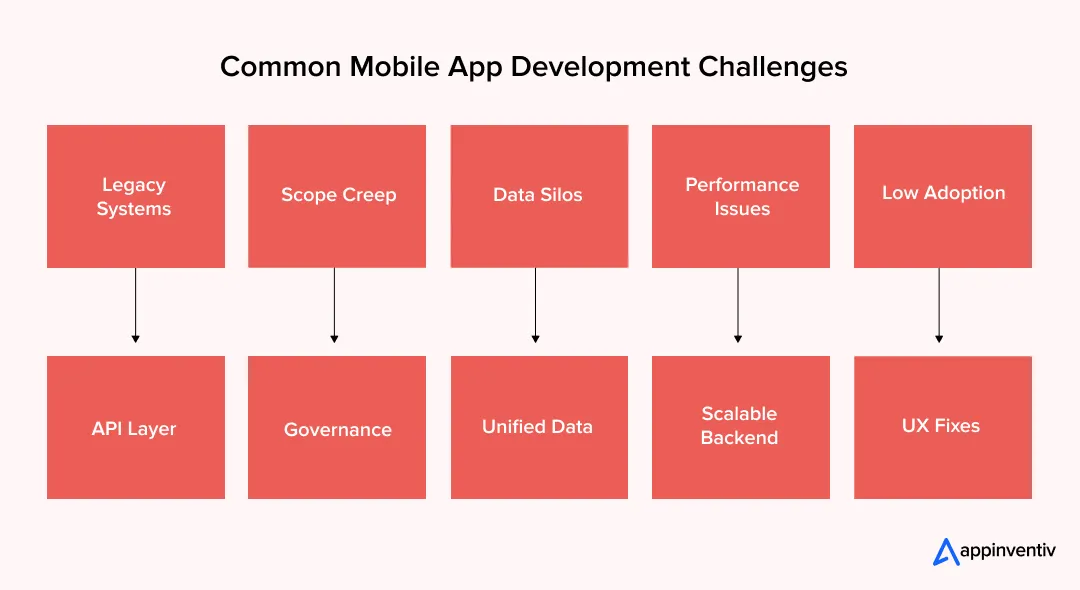
Legacy System Integration Delays
Older systems often work on batch updates or expose limited interfaces. Real-time data flow becomes hard to achieve.
Solutions:
- Add an API layer instead of connecting directly to old systems
- Use middleware to handle format changes between systems
- Cache frequent responses to reduce load on slow services
- Test integrations with real data early, not at the end
Scope Creep and Uncontrolled Feature Expansion
New requests keep coming in once teams see early builds. Timelines stretch and focus shifts.
Solutions:
- Freeze the core scope before development starts
- Route new requests through a review process
- Link each feature to a clear business metric
- Push low-impact features to later releases
Data Silos Across Systems
Data sits in different systems and does not sync in real time. Teams see different numbers for the same metric.
Solutions:
- Create a central data layer for key workflows
- Sync critical data in near real time
- Standardize formats across services
- Add checks to catch mismatched records
Performance Bottlenecks at Scale
Apps run well with test users but slow down with real traffic. Delays often come from APIs or database locks.
Solutions:
- Test with peak traffic, not average load
- Scale backend services based on demand
- Tune database queries and indexes
- Cache high-frequency data
Low User Adoption After Launch
Users drop off when flows feel slow or unclear. This happens even if features work as planned.
Solutions:
- Test flows with actual users before release
- Keep screens focused on one task at a time
- Add simple onboarding inside the app
- Track usage and fix drop-off points quickly
These issues appear in most strategic systems builds. Teams that address them early avoid rework and keep releases stable.
How to Choose the Right Mobile App Development Partner
The team you pick for developing mobile applications will influence how the app is built, how it runs under load, and how it performs months after release. Many enterprise projects slow down during execution, not at the planning stage.
Evaluation Criteria
Knowing how to hire mobile app developers goes beyond past projects. Look at how the team works day-to-day.
- Technical depth: Ask how they handle traffic spikes, slow APIs, and data sync issues. Real teams talk through failure cases, not just success stories
- Domain experience: Familiarity with your industry reduces time spent on basic workflow understanding
- Security readiness: Check how they handle access control, data storage, and session management
- Post-launch support: Ask what happens after release. Who monitors the system, and how fast do they respond to issues
Ask for working details. Sample APIs, scaling decisions, and past incidents give a clearer picture than slides.
Red Flags to Avoid
Some issues arise early and often, leading to delays or rework.
- Limited exposure to large systems: Teams used to small builds may struggle with concurrency and integrations
- Unclear security practices: If answers stay vague, risks remain hidden
- No plan after release: Systems need ongoing fixes, updates, and monitoring
- Compressed timelines: Ignoring integration and testing effort leads to delays later
A strong partner like Appinventiv sets realistic timelines, explains risks upfront, and shows how they handle problems when systems are live.
Weak technical decisions lead to delays, rework, and unstable systems once the app reaches real users

Future Enterprise Mobile App Development Trends
After working on mobile systems across industries for more than a decade and building thousands of applications, we at Appinventiv have begun to see clear patterns emerge. Apps also improve conversion rates and support subscription-based models.
Staying ahead of mobile app development trends is shifting business-critical apps from static tools to systems that act, decide, and adapt in real time. The next wave will focus less on screens and more on intelligence, data flow, and system behavior under changing conditions.
AI-Native Applications
Apps will not just use AI as a feature. AI will sit inside core workflows and drive decisions. Around 63% of apps already use AI in some capacity, which shows how fast this shift is happening.
- Models will run inside key flows like fraud checks, pricing, and recommendations
- On-device inference will reduce latency for critical actions
- Systems will retrain models based on live usage data instead of fixed training cycles
This changes how apps are built. Around 70% of apps now use AI to improve user experience, which pushes teams to design for model updates, not just code updates.
Super Apps with Modular Ecosystems
Enterprises will move toward platforms that host multiple services inside one app.
- A single app may include payments, support, analytics, and partner services
- Internal modules will plug into a shared identity and data layer
- Feature rollout will happen at the module level instead of full app releases
This reduces user switching and keeps engagement within one system.
Edge-Driven Processing
Data processing will move closer to the user instead of relying only on central servers.
- Critical operations will run on device or near-edge nodes
- Apps used in logistics, healthcare, and manufacturing will process data locally
- Sync with central systems will happen in controlled intervals
This reduces latency and allows apps to function even with unstable networks.
Predictive User Experiences
Apps will start acting before users take action, based on behavior patterns.
- Systems will pre-load data based on usage history
- Alerts and actions will trigger based on predicted needs
- Task flows will adjust based on role, time, and past activity
This reduces effort for users and shortens task completion time.
These shifts will change how teams design and maintain apps. Systems will need to handle continuous data flow, real-time decisions, and frequent updates across both code and models.
How Can Appinventiv Reduce Your Time-to-Market While Keeping Enterprise-Grade Quality Intact?
Business-critical apps often slow down after launch. Systems struggle to scale, integrations break, and teams lack clear ownership. These issues usually come from early decisions. Appinventiv works on fixing these gaps from the start.
The team has spent over 10 years building mobile systems across 35+ industries. More than 2000 applications have been delivered, driving over 100M downloads. Client retention stays high, with 90% repeat business and a 95% satisfaction rate.
- Mobile app development services tied to business metrics like revenue and process efficiency
- Cloud-based systems built to handle growth and traffic spikes
- Direct integration with ERP, CRM, and existing enterprise systems
- Security and compliance are built into the system from the first release
- Faster delivery cycles, with MVP builds completed in a few weeks
- Ongoing monitoring with uptime maintained at 99.90%
The team includes 1600+ specialists working across 5 global offices, with 15+ industry recognitions.
If you are planning mobile app development, early planning with the right team helps avoid delays, removes integration challenges, and keeps the system stable as it grows. Let’s connect and build scalable mobile apps.
FAQs
Q. What is mobile app development?
A. It is the work behind the app you install, but most of it sits behind the screen. When a user logs in or places an order, the app talks to servers, checks data, and sends responses back in seconds. In large systems, one action can touch several services at once. Building the interface is one part. Making everything work together is the bigger task
Q. What should an entrepreneur know before developing an app?
A. Many projects slow down because the starting point is not clear. A tight use case helps more than a long feature list. It is better to solve one problem well than to cover many things halfway. Plan for what happens after launch, too. Updates, fixes, and hosting costs continue. Early design choices can either make future changes easy or very expensive.
Q. How can I monetize a mobile app?
A. The model depends on how people use the app. If users return often, subscriptions can work. If they complete transactions, a fee per action fits better. Ads need a large number of active users. Some apps do not charge users at all but reduce internal costs or improve conversion. The pattern of usage usually points to the right path.
Q. What makes a mobile app successful in today’s market?
A. Users expect the app to respond fast and work every time. If it crashes or feels slow, they leave quickly. Apps that perform well often keep things simple. They focus on one main task and make it easy to complete. Regular updates based on real usage data help keep the app useful over time.
Q. Why is mobile app development crucial for businesses in today’s digital era?
A. Mobile application development brings the business closer to the user. Orders, support, and updates happen in real time. Teams inside the company use apps to manage tasks and data without delays. This reduces manual work and speeds up decisions. Mobile app development for business now handles a large share of activity across many industries.
Q. How should enterprises choose the right platform for mobile app development?
A. Platform selection depends on your target audience, use case, and internal development skills. Most teams start with an MVP and test early builds on TestFlight or other private beta platforms. iOS apps go through the Apple App Store, while Android apps launch on the Google Play Store. Cross-platform apps using tools like Buildfire help speed delivery, but hardware specifications and performance needs still influence the final decision.
Q. What are the benefits of mobile app development?
A. Mobile apps help businesses stay closer to users and respond faster to their needs. They reduce manual work by automating tasks like order processing, tracking, and support. Apps also capture real-time usage data, which helps teams improve decisions. For many companies, apps increase repeat usage and retention since users return more often compared to web channels. Over time, this leads to better efficiency, stronger engagement, and steady revenue growth.


- In just 2 mins you will get a response
- Your idea is 100% protected by our Non Disclosure Agreement.

In March 2020, when the world came to a standstill due to COVID-19, telemedicine use among physicians skyrocketed from 15.4% in 2019 to 86.5% in 2021. This dramatic shift wasn't just a temporary pandemic response—it fundamentally changed how we think about healthcare delivery.

Key takeaways: Dating app success depends more on early product decisions than flashy features or quick monetization. A strong MVP focuses on matching, messaging, and trust before advanced functionality. Monetization works best when introduced after users see real value, not at first interaction. Safety, privacy, and data protection directly impact retention and willingness to pay.…

Every successful business today shares one common thread: they've mastered the art of meeting customers where they spend their time. And increasingly, that place is iOS devices. While many companies are still debating whether mobile apps are worth the investment, smart businesses are already reaping the rewards of iOS mobile app development.