


































Build vs Buy Software: How to Make the Right Choice for Your Business

 Share -


- 01Software Build vs Buy: What is Ideal For Your Business?
- 02Buy vs Build Analysis: When To Choose What?
- 03How Do You Know Which Option Fits Your Business Best?
- 04How to Run a Structured Build vs Buy Assessment
- 05When to Bring in a Digital Strategy Consulting Partner
- 06Build vs. Buy Software Decision Matrix
- 07Buy vs. Build Decision Framework: Steps Explained
- 08How Does the Build vs Buy Software Analysis Decision Differ for Startups vs. Enterprises?
- 09Appinventiv Your Trusted Tech Partner For Custom Solutions
- 10FAQs.

For CTOs and CIOs weighing a core platform decision: how to compare build, buy and hybrid options on cost, risk and fit.
You’ve mapped your business goals and locked in your growth strategy, and now comes a deceptively simple question: Should we buy existing software or build our own?
Build vs buy software is a classic dilemma. And one that doesn’t come with a universal answer.
On one hand, off-the-shelf software is fast to deploy, tested by thousands, and usually backed by robust support. On the other hand, a custom-built solution gives you full control and is designed to match your workflows, needs, and pace.
But here’s the catch: both paths come with trade-offs: Time, Cost, Flexibility, Maintenance, and Scalability. What works brilliantly for one company can be a total misfit for another. And in today’s high-speed digital landscape, making the wrong call isn’t just inconvenient – it can set you back months or even years.
That’s why this decision deserves more than a knee-jerk reaction.
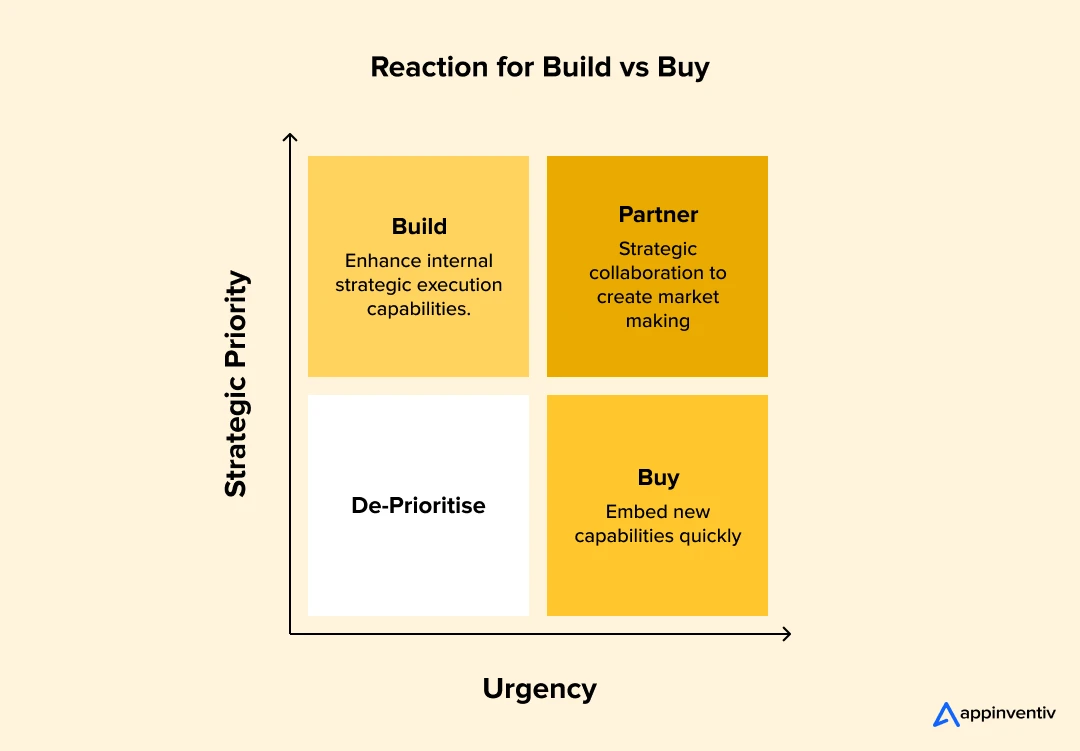
In this article, we’ll discuss both options’ real-world pros and cons—buying and building—and walk you through the key considerations that move the needle. Whether scaling fast, managing legacy systems, or launching something entirely new, this guide will help you make a buy vs. build software decision that supports—not stalls—your growth.
Key takeaways:
- Make the build vs buy call for each capability, not for the whole platform at once.
- Buy commodity functions like CRM and payments, and build the workflows that set you apart.
- Compare options on three-to-five-year total cost of ownership, not on year-one price alone.
- Plan for maintenance, vendor exit costs and talent dependency before you commit.
- Bring in an independent consulting partner when the decision involves a core technology platform.
Software Build vs Buy: What is Ideal For Your Business?
At its core, the “should I buy or build software” decision concerns how to obtain the software tools your business needs to operate, compete, and grow.
| Building Software | Buying Software |
|---|---|
| Means developing a custom solution from scratch – or customizing open-source frameworks – to fit your unique business requirements. You hire a dedicated development team, partner with an agency, or bring in freelance specialists. | Means purchasing or subscribing to a pre-built solution – something already developed by a third-party vendor. Think for CRM implementation, QuickBooks for accounting, or Shopify for ecommerce. These tools are ready to go (mostly), come with regular updates, and are used across industries. |
| The appeal of building? You own it. You control it. And ideally, it fits like a glove. | The appeal of buying? It’s quick, predictable, and often more affordable upfront. |
What is Ideal For Your Business: The nuance lies in your business model, goals, and how for off-the-shelf software considerations can take you before it starts holding you back. That’s what makes the choice so tricky, and so important.
Buy vs Build Analysis: When To Choose What?
Organizations often need to make the important decision between developing personalized software solutions internally or buying products ready for use. This decision, referred to as an analysis of “Buy vs Build”, usually determines that resources can be optimized to meet a specific organizational need.
A complete buy vs build analysis should consider the repercussions of each choice in relation to cost, time to market, scalability, customization and maintenance over time. Tailored software construction provides the ability to fully customize a solution for exclusive business processes, but usually spend significant time, financial resources and technical skills. On the other hand, ready -made software can be deployed faster and at a lower immediate cost, but it can offer little flexibility with customization, leading to suppliers’ dependence on additional development.
The purpose of this analysis is to create an informed approach to guide stakeholders in defining the most ideal path that meets organizational needs along with objectives, restrictions and the broader context in the market. Companies are better positioned to make decisions that promote growth and strengthen competitive advantage when evaluating the merits and deficiencies of the options available.
When Should You Build Software?
Building software is a bigger commitment, but it’s the game-changer in the build vs. buy strategy for the right use case. If your business model is unique, if you’re chasing a specific customer experience, or if no existing solution truly fits what you need, then building your own software might be the only path forward.
Custom software development gives you full control. You define the roadmap, the features of building software, the integrations, and how it scales. This level of ownership is especially valuable when tech is a core differentiator in your business. Instead of adjusting your operations to fit someone else’s product, you get to craft a tool that molds around your exact workflows and goals.
But one of the challenges of build or buy software lies in the fact that building is not for the faint of heart. It takes time, money, and ongoing maintenance. And you’ll need either an in-house team or a trusted tech partner who can not only deliver the product, but also stick around for versioning, debugging, and scaling.
Benefits of Building Software
- Tailored functionality: Every feature is designed to solve your business problem, not a general market one.
- Scalability on your terms: Your product evolves with your growth and pivots alongside your goals.
- Competitive edge: A well-built custom tool can be the differentiator that sets your business apart.
- No license fees or usage limits: You own the product, so there is no per-seat pricing and no surprise hikes.
- Full control over roadmap and security: You decide what gets prioritized and how your data is protected.
Trade-Offs to Consider:
- Longer time to value: Custom builds can take months to launch, and even longer to refine.
- Higher upfront cost: Development, testing, and iteration require significant investment early on.
- Ongoing maintenance burden: Bugs, updates, and performance tuning become your responsibility.
- Talent dependency: Success depends heavily on the quality and stability of your dev team or tech partner.
When Should You Buy Software?
Buying software is often the faster, more straightforward route—and for many businesses, it just makes sense in the build vs buy software analysis. If your needs are fairly standard, time-to-market matters more than deep customization, or you want something proven and well-supported, then purchasing an off-the-shelf product is likely the smart move.
Today’s SaaS landscape is vast. From finance to HR, marketing to operations, there’s likely a tool already built for what you’re trying to solve. These platforms are continuously updated, backed by support teams, and battle-tested by thousands of users. For early-stage companies or teams without technical bandwidth, this is a huge advantage, especially from the cost to build vs buy angle.
Bonus Read: Guide For Software Development Cost in 2026
However, buying software also means adapting your business processes to fit the tool, not the other way around. That can work fine at first, but rigid features of buying software or pricing limitations might start to pinch over time.
Benefits of Buying Software:
- Speed of deployment: You can use the tool within hours or days, not months.
- Lower upfront cost: Subscription models spread out expenses and reduce initial investment.
- Proven reliability: Off-the-shelf tools are usually stable, secure, and used by many.
- Built-in support and updates: Regular patches, upgrades, and customer service are often included.
- Focus on core business: With tech handled externally, your team can concentrate on what you do best.
Trade-Offs to Consider:
- Limited customization: You may have to adjust your processes to match the tool’s capabilities.
- Scalability concerns: As your business grows, the software might not evolve with your needs—or it might get expensive quickly.
- Vendor lock-in: Migrating away later can be complicated, especially if data portability is poor.
- Feature overload or underload: You could be paying for features you don’t need, or missing ones you do.
In short, buying works best when your needs align with what’s already available, and speed, convenience, and predictability outweigh the need for a perfect fit.
In short, in the buy vs build analysis, choose build when your business demands precision, flexibility, or innovation that simply doesn’t exist in the current software market. But go in with eyes wide open specially having known the build vs buy software pros and cons, since it’s a strategic move that requires both commitment and a clear plan for long-term sustainability.
How Do You Know Which Option Fits Your Business Best?
There’s no universal answer to the build vs buy software decision debate. The right decision depends on your business model, growth stage, internal capabilities, and how central the software is to your operations. Below are some key factors that can help tilt the decision in one direction.
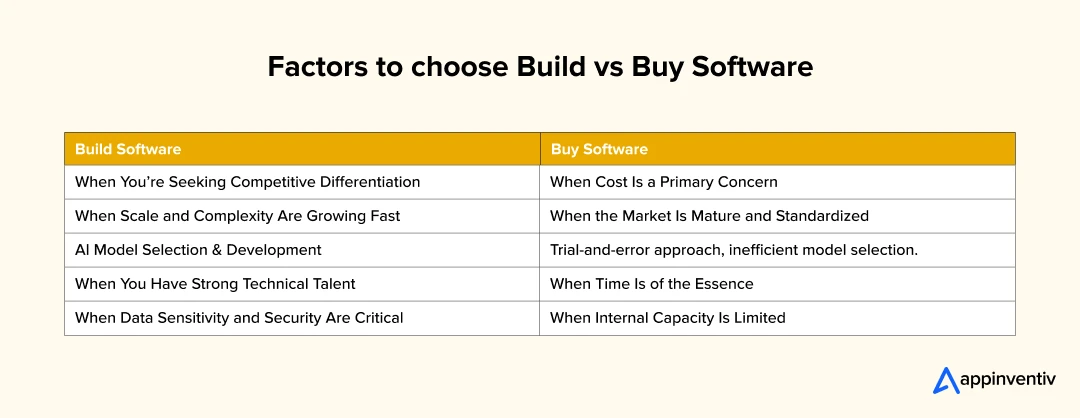
When Cost Is a Primary Concern, buy it.
Buying software is usually more affordable upfront. Subscription models mean no massive investment in development, and the vendor handles maintenance. This makes it ideal for companies watching every dollar – especially startups or teams validating their product-market fit yet struggling with build or buy software decision.
But remember: recurring costs add up, and you may eventually pay more for features you don’t fully use.
When You’re Seeking Competitive Differentiation, build it.
If software is core to how you operate or compete, building your solution can unlock unique advantages. You can design features around your exact workflow, brand experience, or user expectations—something a generic off-the-shelf product just won’t deliver. This gives custom software development vs SaaS a clear advantage in the build vs buy software comparison. The added control can create a moat that competitors can’t easily cross, ensuring a higher software ROI comparison and long-term value.
When Scale and Complexity Are Growing Fast, build it.
Out-of-the-box tools often start strong, but they can buckle under the weight of advanced processes or custom integrations. As your business scales, the flexibility of a custom-built system helps you adapt quickly, without relying on third-party roadmaps or API limitations.
When the Market Is Mature and Standardized, buy it.
In areas like payroll, invoicing, CRM, or project management – where processes are well-understood and solutions are abundant – buying makes a lot of sense in the buy vs build software choice. Why reinvent something already refined over years of feedback and development?
When Time is of the Essence, buy it.
Need to launch fast? Buying software gives you immediate access to ready-to-use tools. For businesses trying to capitalize on a market opportunity or those mid-pivot, the time saved might be worth more than the flexibility lost.
When You Have Strong Technical Talent, build it.
An in-house team with development chops – and a solid product owner – can build something tailored, scalable, and future-proof. If you already have the resources, building can be the smarter long-term investment compared to software build vs buy.
When Internal Capacity Is Limited, buy it.
No dev team? No time? No desire to manage software internally? A well-supported SaaS solution helps you move without hiring or stretching your existing people thin. It’s a pragmatic choice when you need to focus elsewhere.
When Data Sensitivity and Security Are Critical, build it.
In industries like healthcare, banking, or government, where IT compliance regulations and data protection are non-negotiable, building your software allows for tighter control over architecture, encryption, and access. While this could put some negative marks in the cost to build vs. buy bucket, you’re not just trusting someone else’s standards; you’re creating your own.
How to Run a Structured Build vs Buy Assessment
A structured assessment turns an opinion-led debate into a decision that technology, finance and business leaders can all sign off on. It maps capabilities, scans the market, models total cost of ownership, scores risk and ends with one recommendation per capability, backed by a phased roadmap.
| Stage | What Happens | Output |
|---|---|---|
| 1. Capability mapping | Mark each capability as differentiating or commodity | Capability map |
| 2. Market scan | Test vendor and open-source options against real workflows, not demos | Vendor fit scores |
| 3. TCO modeling | Cost build, buy and hybrid options over three to five years | Side-by-side TCO model |
| 4. Risk scoring | Score lock-in, security, compliance, delivery and talent risk | Weighted risk register |
| 5. Recommendation | Combine cost, risk and fit into one decision per capability | Decision and phased roadmap |
What is Ideal For Your Business: The nuance lies in your business model, goals, and how far off-the-shelf software can take you before it starts holding you back. That’s what makes the choice so tricky, and so important.
What the TCO Model Should Include
Apply the same five cost categories to every option, over the same period.
| Cost Category | Build | Buy |
|---|---|---|
| Upfront | Discovery, design, development and testing | Licenses, implementation and configuration |
| Integration | APIs and connectors to existing systems | Connectors, middleware and vendor services |
| Ongoing | Hosting, maintenance and new features | Renewals, seat growth, usage and AI charges |
| People | Engineering team or partner retainer | Admins, vendor management and training |
| Exit and change | Refactoring as requirements change | Data migration and switching costs |
When to Bring in a Digital Strategy Consulting Partner
Bring in an independent digital strategy consulting partner when the decision covers a core technology platform, internal teams have a stake in the outcome, or a wrong call would lock you into years of cost. A good partner runs the structured assessment, models TCO for each option and makes a clear recommendation.
| What to Look For | Why It Matters |
|---|---|
| Platform strategy experience | They have led build vs buy or replatforming decisions at a similar scale |
| A documented assessment method | Capabilities, vendors and risks are scored, not judged on opinion |
| Multi-year TCO modeling | Integration, usage-based pricing and exit costs are included |
| Vendor neutrality | No resale deals or referral fees that could bias the recommendation |
| Engineering depth | Build and hybrid estimates reflect real delivery effort |
| Industry and compliance knowledge | Regulated sectors need advisors who know the rules that shape architecture |
Ask for a sample deliverable before you sign. If it reads like a generic list of pros and cons rather than a decision per capability, with costs and a phased roadmap, keep looking.
Build vs. Buy Software Decision Matrix
When deciding whether to build or buy software for your business, a structured approach can help clarify the best path forward. Below is a decision matrix and a checklist to guide your process:
| Factor | Build | Buy |
|---|---|---|
| Customization | Highly customizable to your specific needs | Limited customization; may require workarounds |
| Cost | Higher upfront and long-term development costs | Lower upfront costs; subscription/licensing fees |
| Time to Market | Longer development time | Immediate or short deployment timeline |
| Scalability | Tailored scalability as per business growth | May require upgrades or scaling limitations |
| Integration with Existing Systems | Can be fully integrated with current infrastructure | Might require additional tools or third-party integrations |
| Control & Flexibility | Full control over updates, features, and security | Limited control over updates or feature releases |
| Support & Maintenance | Ongoing internal resource allocation required | Vendor-provided support and maintenance |
| Security & Compliance | Custom-built for specific security requirements | Pre-set compliance standards; may need customization |
| Risk | Higher risk of project delays or budget overruns | Lower risk, but reliance on third-party vendors |
| Long-Term Value | Long-term investment with ownership of the product | Pay-as-you-go; may become expensive over time |
Buy vs. Build Decision Framework: Steps Explained
Making the Buy vs. Build decision for your software solution requires a structured, methodical approach. Here’s a step-by-step framework to guide your decision-making process and ensure that you choose the best option for your business needs.
Step 1: Define Business Requirements
- Identify Core Needs: List the critical features and functionalities that the software must support.
- Assess Customization Needs: Determine if off-the-shelf solutions can meet these needs or if you require bespoke features.
- Business Objectives Alignment: Align the software with your long-term strategic goals, such as scalability, customer experience, and operational efficiency.
Step 2: Evaluate Functional Areas Against Evaluation Criteria
- Core Business Functions: Identify which business functions are most critical to your success (e.g., customer support, sales, operations).
- Performance Expectations: Ensure the solution will meet performance needs such as uptime, speed, and data handling.
- User Experience: Consider how each option (building vs. buying) will impact the end-user experience, ensuring it aligns with your goals.
Step 3: Look into Building Custom Software
- Customization and Flexibility: Building custom software allows you to create solutions specifically tailored to your business workflows, branding, and user expectations.
- Control Over Features: You maintain full control over the features, security, and scalability of the application.
- Long-Term Investment: Consider the long-term benefits of building a solution that evolves with your business and integrates deeply with your existing systems.
Step 4: Look into Buying Software
- Quick Deployment: Off-the-shelf software can be deployed quickly, allowing you to meet immediate business needs.
- Lower Initial Costs: Buying software typically involves lower upfront costs compared to custom development.
- Limited Customization: Evaluate whether the software can be customized enough to meet your needs or if it requires extensive modification.
Step 5: Analyze Cost Implications
- Initial Investment: Compare the upfront costs of buying a license or subscription versus developing a custom solution.
- Ongoing Expenses: Consider ongoing maintenance, licensing fees, updates, and the cost of development teams if building.
- Total Cost of Ownership: Factor in hidden costs like customization, integration, and training when evaluating the total cost over time.
Step 6: Assess Scalability and Flexibility
- Growth Potential: Evaluate whether the solution will be able to scale with your business as it grows.
- Adaptability: Custom-built software can be designed to evolve with your business needs, while buying software may require upgrades or may not offer the flexibility needed for complex needs.
Step 7: Evaluate Integration and Compatibility
- System Compatibility: Ensure the software can integrate seamlessly with your current infrastructure, whether building or buying.
- Vendor Lock-In: Consider the long-term flexibility of using a third-party software vendor versus building your own solution where you control integrations.
Step 8: Consider Long-Term Maintenance and Support
- Post-Deployment Support: For built software, consider the internal resources required for ongoing support and bug fixes. For purchased solutions, ensure that the vendor offers comprehensive maintenance and timely updates.
- Security and Compliance: Custom software can be tailored to meet your specific security and compliance needs, while third-party solutions might require customization to comply with your industry’s regulations.
Step 9: Risk Management
- Development Risks: Building custom software can come with risks such as project delays, cost overruns, and quality issues.
- Vendor Risks: When buying software, assess vendor reliability, contract terms, and the risk of the vendor discontinuing the product or ceasing support.
Step 10: Make the Decision
Based on the criteria above, compare the pros and cons of both options. If you need a highly customized, scalable solution that aligns with your long-term vision, building may be the best choice. If you need a quick, cost-effective solution that meets basic requirements, buying could be the ideal option
How Does the Build vs Buy Software Analysis Decision Differ for Startups vs. Enterprises?
Should I buy or build software often hinges on the size and stage of your organization. Startups and enterprises have fundamentally different pressures, and that shapes how they approach this choice.
Startup
For startups, the build vs buy strategy is different. Startups tend to prioritize speed, simplicity, and resource efficiency. With limited funding and small teams, the ability to move fast matters more than having a tailor-made solution. That’s why many young businesses and startups lean on ready-to-use platforms or choosing CRM integrations like Shopify.
It gives them everything from hosting and payment processing to inventory management, without needing a single line of custom code. Instead of pouring energy into building infrastructure, they can focus on testing their idea, acquiring customers, and growing fast.
Enterprises
For enterprises, the build vs buy strategy shifts. These businesses often operate within complex environments where software needs to interact with a web of internal systems and workflows. Off-the-shelf tools may not offer the depth or flexibility required.
Real Example: Netflix
Commercial CDNs couldn’t support their scale or performance expectations, so they built their content delivery network – Open Connect to optimize streaming quality and control distribution. Building gave them the power to shape infrastructure exactly to their needs, reduce long-term costs, and safeguard competitive advantage.
In short, startups typically buy to stay lean and move fast, while enterprises go with the build side of build vs buy software analysis to gain control and push boundaries. Each path reflects the priorities and pressures of where a company is in its journey.

Appinventiv Your Trusted Tech Partner For Custom Solutions
At Appinventiv, we understand that the decision to buy vs build software is not one-size-fits-all. Whether you choose to build a custom solution or purchase an off-the-shelf product depends on your business’s unique needs, resources, and long-term goals. Here’s how we at Appinventiv solves challenges of build vs buy software.
Building custom software can offer unmatched flexibility and control for businesses requiring a tailored, competitive advantage or those with highly specialized needs. However, if speed, cost-efficiency, and reliability are your primary considerations, buying a proven solution may be the best path forward.
Whatever your build vs buy software decision is, it’s crucial to weigh all the factors: time, budget, scalability, and ongoing support, before making the call. Being a custom software development company, we guide businesses through this complex decision-making process of build or buy software, helping you choose the best approach and deliver the right technology solution for your specific needs.
Discuss your requirements with us and receive expert assistance on the ‘build vs. buy’ decision. Calculate your build cost today.
FAQs.
Q. How Much Does It Cost to Build or Buy Software?
A. If you are facing dilemma for cost to build vs buy. Here’s the solution. Building custom software can cost anywhere from $50,000 to millions, depending on complexity. It also requires ongoing maintenance and updates. The buying part of buy vs build software is more affordable upfront, usually through subscriptions ranging from $20 to $500+ per month, but these costs can add up over time.
Q. What Are Use Cases of Build vs Buy Software?
A. Build software when you need a highly specialized solution, like in fintech or healthcare, where off-the-shelf options won’t work. It’s also ideal for maintaining a competitive edge or ensuring full control over your solution. Buy software for standard needs like accounting or CRM, especially when you need a quick, cost-effective solution without extensive customization.
Q. How does the buy vs build software decision impact return on investment (ROI)?
A. The ROI implications of the buy vs build software decision vary:
- Buying Software: Offers quicker deployment, lower initial costs, and leading to faster ROI.
- Building Software: Need higher upfront investment and longer development time but yield higher ROI over time.
Q. What is the Difference Between Building and Buying Software?
A. Building software part of build vs buy software offers full customization and control, but it’s time-consuming and costly. Buying software is quicker to implement and cheaper upfront but offers limited customization and flexibility.
Q. What Are the Key Components of Build vs Buy Software?
A. Key Components of Build vs Buy Software are –
- Customization:
Build offers complete control; buy offers limited customization. - Cost:
Build is expensive upfront; buy has lower initial costs but ongoing fees. - Time to Implement:
Build takes longer; buy is ready to go quickly. - Maintenance:
With build, you handle it; with buy, the vendor manages it.


Fast 2-minute response, fully NDA-protected.
API Integration in Australia: Connect ERP, CRM and Legacy Systems
Key takeaways: API integration lets legacy, ERP and CRM systems share data without a risky full replacement. A seven-step roadmap, from system audit to ongoing API management, keeps delivery controlled and maintainable. Privacy Act reforms, APRA CPS 230 and SOCI Act shape integration design early. API integration cost ranges between AUD 70,000 and AUD 700,000…
Beyond Customer Portal Development: Building Connected Digital Services
Key takeaways: A portal without CRM, ERP and billing integration leaves your staff doing the connecting. Start with customer tasks, then integrate only the systems those tasks actually need. Name one system of record for each data type before choosing APIs or middleware. Plan integration, security and privacy obligations at the start, not after the…
CRM Software for Local Government: From Community Requests to Better Service Delivery
Key takeaways: A council CRM should sit around existing systems as a service layer, not replace them. Integration with ERP, rates, property and GIS systems prevents another data silo and duplicate entry. Start with one high-volume service, pilot it with residents, then scale on measured results. Track resolution time, SLA compliance, self-service rates and cost…