





























Telehealth EHR Integration – Benefits, Process, Costs, and Best Practices

 Share -



- 01Step-by-Step Telehealth EHR Integration Process
- 02Types of Telehealth EHR Integration (With Maturity Levels)
- 03Tech Stack to Telehealth Integration with EHR System
- 04Benefits of Telehealth EHR Integration for Healthcare Organizations
- 05EHR Integration for Telehealth Cost (Based on Level of Integration)
- 06Common Challenges of Telehealth Integration with EHR and How to Handle Them
- 07Compliance and Security Considerations for Integration
- 08Key Considerations for Successful EHR Integration with Telehealth
- 09Future Trends of EHR and Telehealth Integration
- 10How Appinventiv Delivers Enterprise-Grade Telehealth EHR Integration
- 11FAQs

Key takeaways:
- Start with system reality, not assumptions: Audit what your EHR and telehealth platform can actually exchange before designing anything.
- Lock data mapping early or expect downstream issues: Clear field-level mapping between telehealth sessions and EHR records prevents duplicates, gaps, and billing errors.
- Your integration layer decides scalability: Choosing between FHIR APIs, HL7 engines, or a hybrid setup shapes performance, flexibility, and long-term maintainability.
- Design for failure, not just flow: Queues, retries, and validation layers ensure data doesn’t break when real-world scenarios hit.
- Test with real clinical workflows, then scale gradually: Simulate full visit journeys, roll out in phases, and monitor closely before expanding across the system.
For healthcare providers looking ahead, telehealth is no longer just an access channel. It’s becoming a core part of how care is delivered, documented, and reimbursed across the system.
Now here’s where things get interesting. As virtual care scales, the real bottleneck isn’t adoption, it’s fragmentation. The global telemedicine market is projected to reach $123.39 billion in 2026, as per the Fortune Business Insights. That growth is forcing organizations to rethink how telehealth EHR integration is handled, because disconnected systems simply don’t hold up under that volume.
In practice, telehealth integration with EHRs connects the full care journey. A patient books an appointment, joins a virtual consult, and the interaction automatically updates records, triggers billing, and aligns follow-ups without manual intervention.
This is where EHR integration for telehealth starts delivering measurable impact. The benefits of telehealth EHR integration include reduced administrative load, faster documentation, and more accurate revenue capture.
In this blog, we break down how to approach Telehealth integration with EHR systems from an architecture, process, and cost perspective, with a focus on what actually works in real-world healthcare systems.
If your telehealth and EHR systems don’t align now, you’ll feel it at scale. Get a clear integration roadmap before complexity builds up.
Step-by-Step Telehealth EHR Integration Process
This isn’t a plug-and-play exercise. Most delays happen when teams discover, halfway through, that the EHR won’t expose what they need or the telehealth platform structures data differently. Getting this right comes down to how you design the integration layer, not just how fast you connect healthcare APIs.
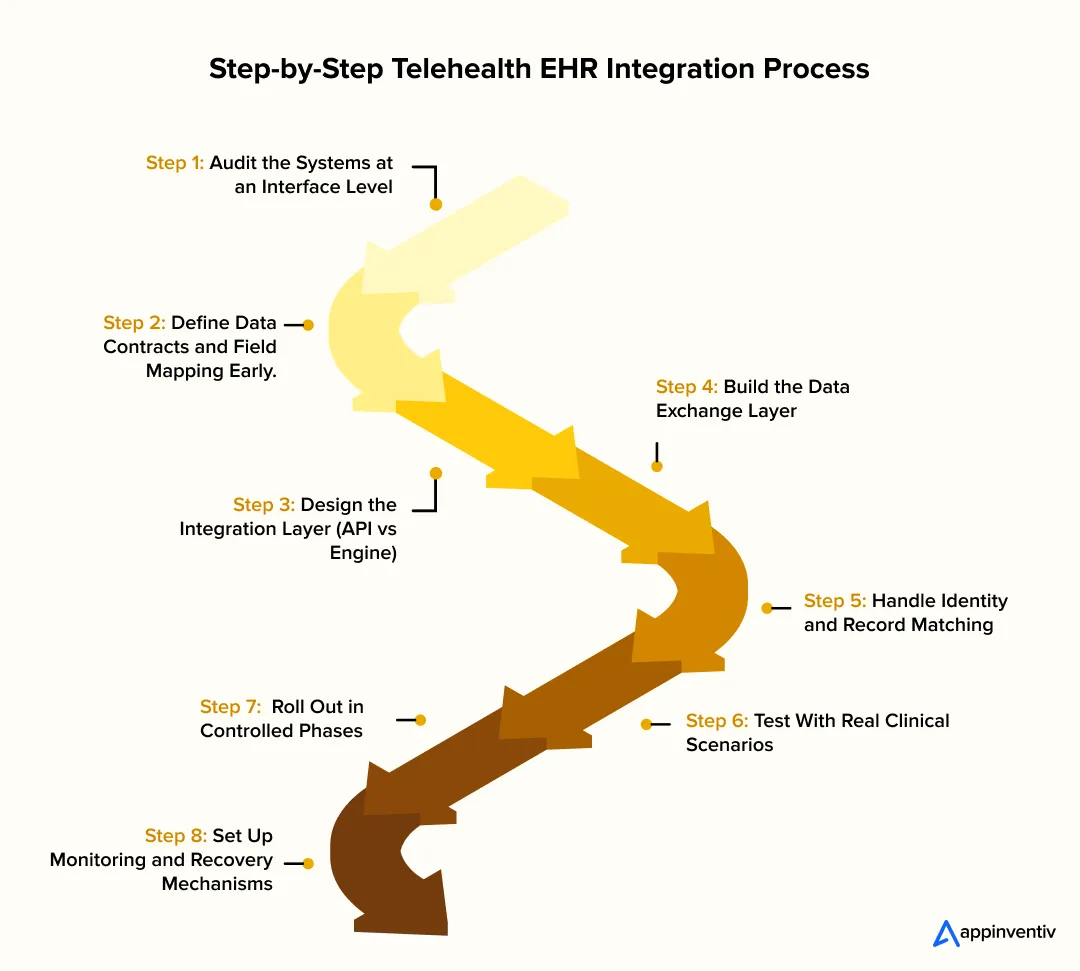
1. Audit the Systems at an Interface Level
Start by looking at what your systems can actually exchange, not what the docs claim.
- EHR side: available endpoints (FHIR resources like Patient, Encounter, Observation), HL7 v2 feeds, rate limits
- Telehealth side: session IDs, call metadata, transcript handling, webhook support
- Auth model: OAuth 2.0, token expiry behavior, refresh cycles
You’re identifying hard constraints here. For example, some EHRs allow read access to encounters but restrict write operations unless routed through specific workflows.
2. Define Data Contracts and Field Mapping Early
This is where most integrations break quietly. You need explicit mapping between systems:
- Telehealth session → EHR Encounter
- Provider notes → Clinical Document or Observation resources
- Prescriptions → Medication Request
- Visit timestamps → Encounter period (start/end)
Also decide:
- What is the source of truth for each data type
- How to handle conflicts (last write wins vs system priority)
- Required vs optional fields to avoid failed writes
Without this, you’ll see partial records, duplicated encounters, or billing mismatches later.
3. Design the Integration Layer (API vs Engine)
This decision shapes everything downstream, especially when you’re evaluating different EHR integration solutions to support your architecture.
- FHIR API-led approach: Best when the EHR supports modern RESTful endpoints. Lower latency, cleaner data models
- HL7 v2 via integration engine (e.g., interface engine) Needed for legacy systems. Requires message parsing (ADT, ORM, ORU) and transformation
- Hybrid setup: FHIR for real-time clinical data. HL7 or batch jobs for billing and reporting
At this stage, you also define whether communication is:
- Synchronous (real-time API calls during consult)
- Asynchronous (queued events via message brokers or webhooks)
4. Build the Data Exchange Layer
This is where the actual integration takes shape. Key components:
- API connectors or HL7 listeners
- Transformation layer (JSON ↔ HL7 ↔ internal schema)
- Validation rules before pushing data to EHR
- Retry logic for failed transactions
For example, if a telehealth note is submitted before an Encounter is created, the system should queue and retry instead of failing silently.
5. Handle Identity and Record Matching
Patient matching is a common failure point. You need a reliable strategy:
- Use unique identifiers (MRN, patient ID) when available
- Fallback to probabilistic matching (name, DOB, phone)
- Avoid duplicate patient creation with strict validation rules
Even a small mismatch here leads to fragmented records across systems.
6. Test With Real Clinical Scenarios
Unit testing isn’t enough. You need to simulate:
- A full virtual visit from booking to billing
- Edge cases like cancelled calls, dropped sessions, or rescheduled visits
- Concurrent updates from multiple providers
Validate:
- Data accuracy inside the EHR UI, not just API responses
- Timing issues, especially with async workflows
- Billing triggers linked to encounter completion
7. Roll Out in Controlled Phases
Start with a narrow scope.
- One department or specialty
- Limited visit types (e.g., follow-ups only)
- Monitor API response times, error rates, and data completeness
Expand only after workflows hold up under real usage.
8. Set Up Monitoring and Recovery Mechanisms
Once live, issues won’t stop, they’ll just change form. You’ll need:
- Logging for every transaction (request, response, error)
- Alerts for failed writes or delayed syncs
- Replay mechanisms for failed messages
For example, if an HL7 message fails due to a format issue, you should be able to correct and resend it without manual re-entry.
When done right, the Telehealth integration with EHR systems process becomes a stable pipeline that reliably moves data across systems. That’s what makes telehealth integration sustainable at scale, not just functional during a demo.
Types of Telehealth EHR Integration (With Maturity Levels)
Most teams don’t build this all at once. It usually starts with fixing one obvious gap, then grows as the pressure on workflows increases. Here’s how telehealth integration with EHR tends to evolve in practice.
| Level | What It Looks Like in Practice | What It Actually Changes |
|---|---|---|
| Level 1: Basic Data Sync | Patient info moves between systems, sometimes with a lag | Staff spend a bit less time re-entering data, but still jump between screens |
| Level 2: Workflow Integration | Appointments, notes, and prescriptions start syncing as the consult happens | Visits feel smoother, and clinicians aren’t chasing updates after every call |
| Level 3: Full Clinical Integration | Billing, orders, and reports connect directly to each virtual visit | Fewer billing errors, quicker claims, and better coordination across teams |
| Level 4: Intelligent Integration | The system starts assisting with notes, follow-ups, and routine tasks | Less admin work piling up, and the setup holds up better as volume grows |
At the lower levels, EHR and telehealth integration is mostly about reducing friction. As you move up, it starts supporting how your team actually works day to day, without constant workarounds.
Tech Stack to Telehealth Integration with EHR System
Most integration issues don’t show up on day one. They surface a few weeks later when volume increases or when different systems start talking simultaneously. That’s usually a sign that the architecture underneath wasn’t set up to handle real workflows.
A solid Telehealth integration with EHR is set up to separate responsibilities, so data moves cleanly without breaking under pressure.
| Layer | What’s Actually There | What It Does in Real Use |
|---|---|---|
| Experience Layer | Patient apps, clinician dashboards | Where visits are booked, calls happen, and notes are entered. Keeps the interface simple while everything complex stays behind the scenes |
| Telehealth Core | Session manager, video service, visit logic | Handles the consult itself. Creates session IDs, tracks call events and knows when a visit starts and ends |
| Integration Layer | API gateway, FHIR endpoints, HL7 engine, queues | The control point. Moves data between systems, converts formats, retries failed requests, and manages timing |
| Interoperability Layer | FHIR resources, HL7 messages, mapping rules | Make sure both systems understand the same data. For example, turning a call into a proper Encounter in the EHR |
| EHR Layer | Core EHR system, clinical and billing modules | Stores the actual records. This is where encounters, prescriptions, and billing entries live |
| Security Layer | Auth, encryption technology, audit logs | Runs across everything. Controls access and keeps patient data protected at every step |
A patient books an appointment, joins a call, and the system starts generating events in the background. Those events move through the integration layer, get reshaped into FHIR or HL7 formats, and land in the EHR as structured records. If something fails, it should retry automatically, not disappear.
Where Teams Usually Get Stuck
- Connecting systems directly without a buffer layer
- Mapping data loosely, which leads to broken or duplicate records
- Treating everything as real-time when some parts should run asynchronously
When this setup is done right, telehealth integration with EHR feels invisible. Data just shows up where it should, without your team having to chase it.
FHIR, HL7 and middleware; the wrong choice slows everything down later. Get clarity on the tech stack that fits your system.
Benefits of Telehealth EHR Integration for Healthcare Organizations
You usually notice the impact in everyday operations first. Fewer corrections, fewer delays, and less time spent fixing gaps between systems. That’s where Telehealth integration with EHR systems starts to pay off.
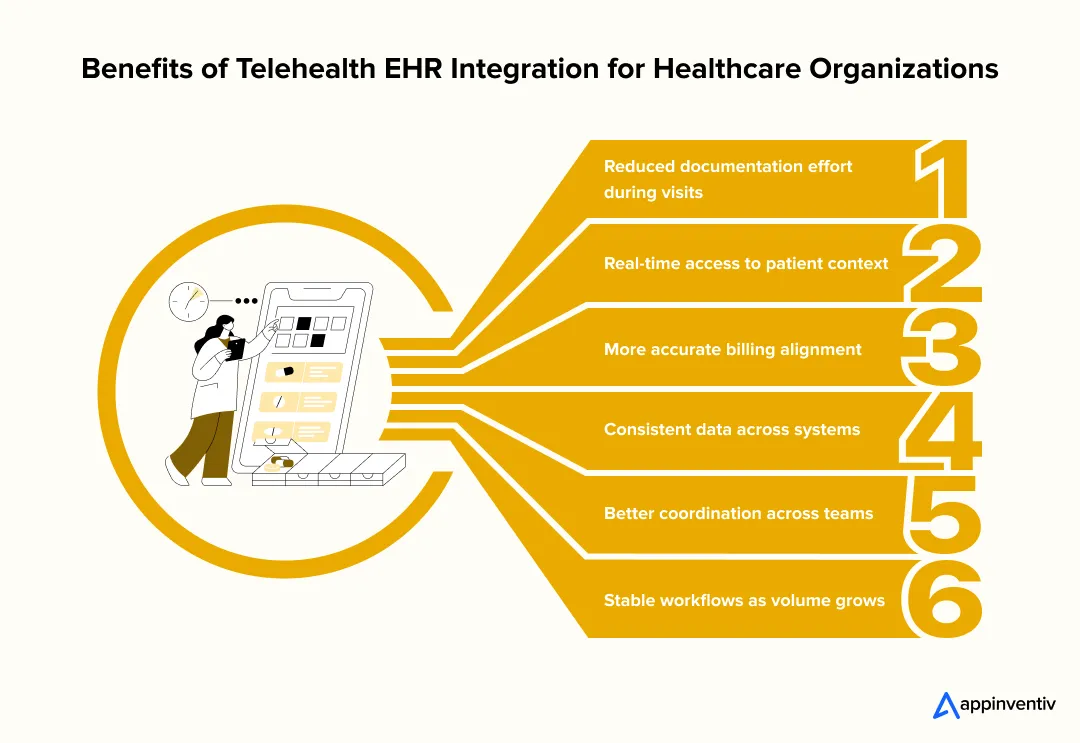
- Reduced documentation effort during visits: Notes, timestamps, and visit details flow directly into the EHR, so clinicians don’t have to complete records after the consult.
- Real-time access to patient context: Clinicians can view a patient’s history, medications, and prior visits during the call without switching systems, improving on-the-spot decision-making.
- More accurate billing alignment: Telehealth sessions map directly to EHR encounters, keeping documentation and billing in sync and reducing claim issues.
- Consistent data across systems: Structured data mapping keeps records aligned, avoiding duplicates or missing information.
- Better coordination across teams: Updates made during a visit are instantly visible, so teams don’t have to chase information across systems.
- Stable workflows as volume grows: As usage increases, the system continues to handle data flow without adding manual steps. This is where telehealth integration with EHR starts to reliably support operations.
In day-to-day use, the benefits of telehealth EHR integration show up as fewer disruptions and smoother workflows across the board.
EHR Integration for Telehealth Cost (Based on Level of Integration)
If you’ve been part of one of these projects, you already know the cost doesn’t come from “connecting two systems.” It comes from how much of your workflow you want to rely on that connection.
| Level of Integration | What It Actually Covers | Estimated Cost Range |
|---|---|---|
| Basic Integration | Patient details and visit summaries move between systems | $40,000 – $80,000 |
| Workflow Integration | Scheduling, notes, and prescriptions update as the visit happens | $80,000 – $150,000 |
| Full Clinical Integration | Encounters, billing, orders, and reporting stay connected end to end | $150,000 – $250,000 |
| Advanced / Intelligent Integration | Intelligent Automation, assisted documentation, and coordination across systems | $250,000 – $400,000 |
Where the Cost Usually Builds Up
- Older EHRs that don’t expose clean APIs
- Time spent aligning data fields between systems
- Compliance layers for handling patient data securely
- Middleware or interface engines to manage multiple connections
- Real-time processing and error recovery setup
How Teams Typically See the Return
- Less time spent finishing charts after visits: Notes and updates land where they should during the consult, not hours later.
- Fewer billing corrections: When visits and codes stay aligned, claims don’t bounce back as often.
- Fewer data cleanups later: You’re not fixing duplicates or missing records at the end of the day.
- More room to handle higher volume: As telehealth usage grows, the system holds up without adding extra manual work.
In most cases, teams don’t go all in from day one. They start with a focused setup and expand as the value becomes clear. Over time, Telehealth integration with EHR stops feeling like a project and becomes part of the core system.
Common Challenges of Telehealth Integration with EHR and How to Handle Them
Most issues don’t show up during development. They surface once clinicians start using the system under real conditions. Here’s where teams usually run into trouble, and what actually helps fix it.
| Challenge | What It Looks Like in Real Use | How Teams Handle It |
|---|---|---|
| Inconsistent data mapping | Visit notes show up partially, or fields don’t align between systems | Define field-level mapping upfront and validate against real EHR records, not just API responses |
| Duplicate patient records | The same patient appears multiple times due to mismatched identifiers | Use MRN or unique IDs as the primary key and apply strict validation before creating new records |
| Limited EHR API access | You can read data, but can’t write encounters or updates directly | Route writes through supported workflows or uses middleware to bridge gaps in EHR capabilities |
| Latency during real-time sync | Notes or updates take time to reflect during or after a consult | Use async queues for non-critical updates and reserve real-time calls only for essential actions |
| Broken workflows for clinicians | Clinicians still switch systems because integration doesn’t match their flow | Test with actual users early and adjust integration around how visits are conducted, not assumptions |
| Billing mismatches | Encounters don’t align with billing codes, leading to claim issues | Tie billing triggers directly to encounter completion events instead of manual inputs |
| Error handling gaps | Failed data transfers go unnoticed until someone flags missing records | Implement logging, alerts, and retry mechanisms so failed transactions can be tracked and replayed |
When teams address these early, telehealth integration with EHR systems becomes far more predictable. Most of the friction isn’t technical complexity alone; it’s how well the system fits into real clinical workflows.
Compliance and Security Considerations for Integration
Most teams don’t run into security problems on day one. They show up later, when data starts moving across systems at scale. A video call turns into a clinical record, then into a billing event. That entire path needs to be controlled, not just the endpoints.
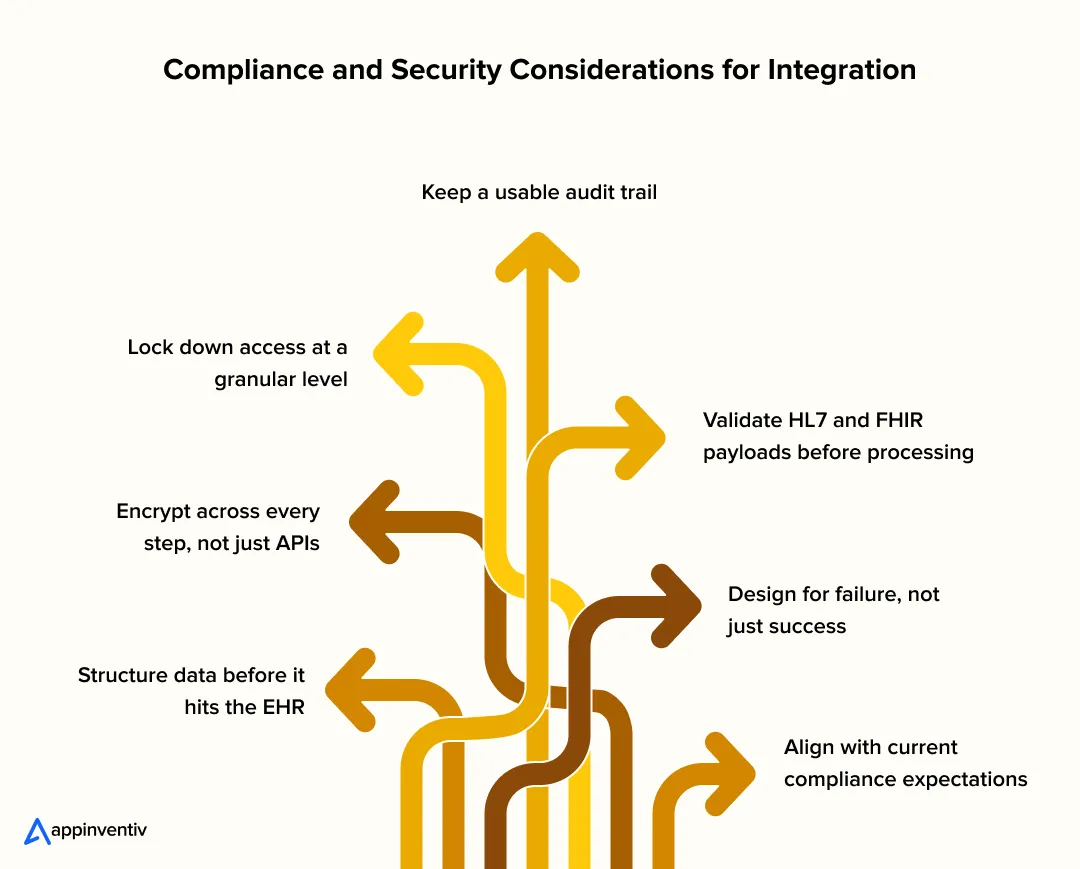
Structure data before it hits the EHR
Raw notes or transcripts shouldn’t go in as-is. Convert them into FHIR resources, such as Encounter or Observation, and validate the required fields. It prevents half-filled records and downstream billing issues.
Encrypt across every step, not just APIs
It’s easy to secure API calls and forget everything else. Queue systems, logs, and backups also carry PHI. Use TLS 1.2+ for transport and at-rest encryption for anything stored, especially retry queues.
Lock down access at a granular level
OAuth 2.0 with scoped tokens works better than broad access keys. Pair that with role-based controls so a clinician, admin, or service only sees what they need. No shared credentials between services.
Keep a usable audit trail
Every write, update, or failed attempt should be traceable. Not just for compliance, but for debugging when something doesn’t show up where expected.
Validate HL7 and FHIR payloads before processing
A small mismatch in an HL7 message or a missing field in a FHIR resource can quietly break records. Catch it early, rather than fixing it after it lands in the EHR.
Design for failure, not just success
Writes will fail at some point. Network drops, timeouts, API limits. Queue those events and retry them safely, rather than losing data.
Align with current compliance expectations
Beyond HIPAA, teams now look at FHIR-based interoperability mandates under the 21st Century Cures Act, stronger audit and access controls aligned with SOC 2, and data privacy expectations influenced by regulations like GDPR. If payments are involved, PCI DSS also applies.
In practice, EHR and telehealth integration security isn’t about adding more tools. It’s about making sure every handoff, from call to record to billing, holds up without exposing patient data or slowing the system down.
Key Considerations for Successful EHR Integration with Telehealth
This is where most projects either settle into a stable flow or keep needing fixes. The difference usually comes down to a few early decisions.
- Define system boundaries upfront: Be clear on what the telehealth layer owns vs what stays in the EHR. For example, session data vs clinical records. Blurred ownership leads to duplicate writes and inconsistencies later.
- Treat data mapping as a core task, not a side step: Map fields at the resource level, like how a telehealth session becomes an Encounter. Decide the source of truth for each data type before building anything.
- Use async flows where real-time isn’t required: Not every update needs to happen in real time. Queue non-critical writes to avoid slowing down live consultations or hitting API limits.
- Validate workflows with clinicians early: A technically correct integration can still fail if it doesn’t match how visits actually happen. Test with real consult scenarios, not just API responses.
- Plan the rollout in stages: Start with a limited set of visit types or departments. It’s easier to catch mapping or timing issues early than after a full deployment.
- Build visibility into the integration layer: Logging, error tracking, and replay mechanisms aren’t optional. If something fails, you should know exactly where and why.
When these are in place, Telehealth integration with EHR ends to run quietly in the background, which is exactly what you want.
When workflows, data mapping, and compliance align, integration stops being a project and starts driving operations.
Future Trends of EHR and Telehealth Integration
The shift is becoming more visible now. Integration isn’t just about moving data between systems anymore. It’s starting to shape how care actually runs.
One clear indicator: the health data interoperability market is projected to reach $103.9 billion by 2026, as per Coherent Market Insights. That level of investment points to one thing: integration is moving closer to core infrastructure.
Here’s how that shows up in practice:
- More event-driven workflows, less batch syncing
Instead of waiting for scheduled updates, systems react to events such as a completed consult or an updated record. Data moves when it’s needed, not later. - FHIR is becoming the default layer
FHIR APIs are now widely used for real-time data exchange. They’re replacing a lot of the custom workarounds teams used to rely on. - Interoperability that actually gets used
Many systems can exchange data, but the focus now is on making that data usable inside workflows, not just accessible. - AI is built into the flow, not added on top
Documentation, summaries, and basic decision support are starting to happen during the consult itself, not after. - Continuous data coming into the EHR
IoT-based remote monitoring and patient-generated data are feeding directly into systems, shifting care from one-time visits to ongoing tracking.
What’s changing underneath is simple. EHR and telehealth integration is moving from a connection layer to something that actively supports how care is delivered day to day.
How Appinventiv Delivers Enterprise-Grade Telehealth EHR Integration
Most teams don’t struggle to connect systems. They struggle when those connections don’t hold up once clinicians start using them every hour of the day. Appinventiv, as a telehealth app development company, approaches telehealth EHR integration with that reality in mind. The goal is simple: ensure data flows cleanly from a live consult into the EHR and then into billing, without anyone having to step in to fix it later.
That approach comes from working across 500+ digital health platforms, with 10+ years in HealthTech projects and integrations involving 300+ connected medical devices. Some setups rely on FHIR APIs, others still run on HL7, and most sit somewhere in between. The integration layer is built to handle that mix, including retries, data transformation, and system load when usage spikes.
Where this really shows up is in daily use. When telehealth integration with EHR is done right, clinicians don’t think about it. Data lands where it should, and workflows just move.
If you’re planning this for your own system, getting that foundation right early will save you a lot of rework later. Let’s connect!
FAQs
Q. Why should you invest in EHR-integrated telehealth apps?
A. Because the gaps between systems slow everything down. With EHR integration for telehealth, visits, notes, and billing, everything stays connected. That means less rework, fewer delays, and a setup that can handle higher patient volume without extra admin load.
Q. How to integrate telehealth with your EHR system?
A. A typical Telehealth integration with EHR process looks like this:
- Audit your current EHR and telehealth setup
- Map how data should move between systems
- Choose the right approach (FHIR APIs, HL7, or middleware)
- Build and test with real workflows
- Roll out in phases and monitor closely
The approach also depends on the Types of EHR Integration for telehealth you’re aiming for.
Q. How do you ensure data security in a telehealth-EHR integrated app?
A. It comes down to how data is handled:
- Use structured formats like FHIR
- Encrypt data in transit and at rest
- Control access with roles and tokens
- Keep audit logs for every update
These steps help meet compliance needs without slowing the system down.
Q. How do you customize telehealth EHR integration for different providers?
A. Every provider runs workflows differently. Customization usually means:
- Mapping data based on their EHR structure
- Aligning with how they handle visits and billing
- Choosing a Tech Stack for Telehealth integration with an EHR system that fits their setup
Q. How does EHR integration enhance the telehealth experience for patients?
A. It removes friction. Patients don’t repeat information, records are updated on time, and follow-ups stay connected. That’s where the benefits of telehealth EHR integration become visible in everyday care.
Q. What is the role of integration engines in telehealth EHR integration?
A. Think of an integration engine as the layer that keeps systems in sync without constant breakpoints. It sits between the telehealth platform and the EHR, handling data exchange in both directions. Whether it’s HL7v2 messages for scheduling or REST APIs for clinical data, it handles format conversion, routing, and retrying failed requests. This is what keeps scheduling, billing, and visit data flowing without putting pressure on either system.
Q. How do vendor-specific integrations (Epic, Cerner, Zoom) work in telehealth EHR integration?
A. Most major EHR vendors already provide built-in integration paths. For example, Epic uses App Orchard and supports video visits within its own ecosystem, while Cerner offers integrations through its app gallery. Platforms like Zoom connect via secure APIs or marketplace integrations to enable virtual visits inside these systems. In practice, you still need an integration layer to handle data mapping, authentication, and workflow alignment so these tools work smoothly within your setup.


Fast 2-minute response, fully NDA-protected.

Wearable Data Integration: Connecting Multiple Devices to a Unified Health Platform
Key takeaways: Device support should reflect the measurements your service needs, the people using it, and the decisions those readings inform. A unified health data platform must preserve source, timing, and measurement context while resolving duplicate records. Phone health platforms, manufacturer APIs, and direct device connections serve different integration needs. Clinical workflows require agreed review…
Sleep Tracker App Development: Features, Wearable Integration, AI, and Compliance
Key takeaways: Sleep tracking presents opportunities across consumer wellness, fitness, healthcare, employee wellness, senior care, and infant-care markets. Successful products combine actionable insights, wearable connectivity, user-friendly reports, privacy controls, and clearly differentiated experiences. HealthKit, Health Connect, and direct device APIs provide different data depths, costs, limitations, and maintenance requirements. AI supports sleep-stage estimation and personalization,…

Diet and Nutrition App Development: Process, Features, Cost, and Technology Stack
Key Takeaways Diet and nutrition tracking app development goes past basic calorie counters with verified food databases, custom meal schedules, AI tools, wearable device links, and corporate manager tools. Structure database models around raw food items, serving portions, nutrient facts, recipes, software links, and regional diet rules. Pair computer vision models, recommendation algorithms, language engines,…