































Enhancing the Care Journey via Human Centric Patient Portal Development

 Share -



- 01How to Build a Human-Centric Patient Portal: Step-by-Step Framework
- 02Key Features & Functionalities of Patient Portals
- 03Integration and Adoption Strategy: Creating a Unified Patient View That People Actually Use
- 04Tech Stack for a Custom Patient Portal
- 05Trust, Privacy, and Consent Design for Patient Confidence
- 06Patient Portal Software Cost and Timeline
- 07Challenges of Patient Portal Development and How to Address Them
- 08Future Trends Shaping Human-Centric Patient Portals
- 09How Appinventiv Supports Patient-Centred Portal Development

Key Takeaways
- Human-centric patient portals reduce friction across the care journey, from scheduling to follow-up, improving both patient experience and staff efficiency.
- Strong integration with EHRs, labs, billing, and pharmacy systems ensures patients see accurate, complete information in one place.
- Features like digital intake, secure messaging, results access, and remote monitoring improve communication, adherence, and continuity of care.
- Privacy controls, consent management, and secure identity access build trust and support HIPAA-compliant patient portal development.
- When implemented thoughtfully, patient portal solutions lower administrative workload, reduce call volume and no-shows, and strengthen patient engagement over time.
Sit in on a leadership review at any large healthcare organization, and the conversation often drifts to the same friction points. Not just clinical performance, but everything happening around it, missed calls, repeated forms, patients struggling to access basic information.
Care today doesn’t start at the hospital. It starts when someone tries to book an appointment late at night or check a report on their phone between meetings. When those moments feel disconnected, the impact shows up quickly. More calls, slower workflows, and gaps in follow-through.
This is why patient portal software development is no longer treated as a side capability. It’s becoming a core part of how care is delivered and managed. The shift is visible in the numbers as well, with the global patient portal market expected to grow from about $4.8 billion in 2024 to nearly $19 billion by 2034.
What’s changing underneath is straightforward. Patients expect the same ease they get elsewhere, and teams need systems that reduce operational load, not add to it. Earlier portals were built around internal systems. Now the focus is shifting to removing friction across the care journey, making access simpler for patients while keeping workflows tighter for providers. Let’s explore in detail here!
Create a patient portal experience that reduces friction, improves engagement, and supports seamless care journeys.

How to Build a Human-Centric Patient Portal: Step-by-Step Framework
In a real build discussion, this isn’t approached as a feature rollout. It’s treated as a system design problem where integration depth, data consistency, and workflow alignment define success.
Below is how enterprise teams typically approach patient portal development when the goal is to build something that actually holds up in production.
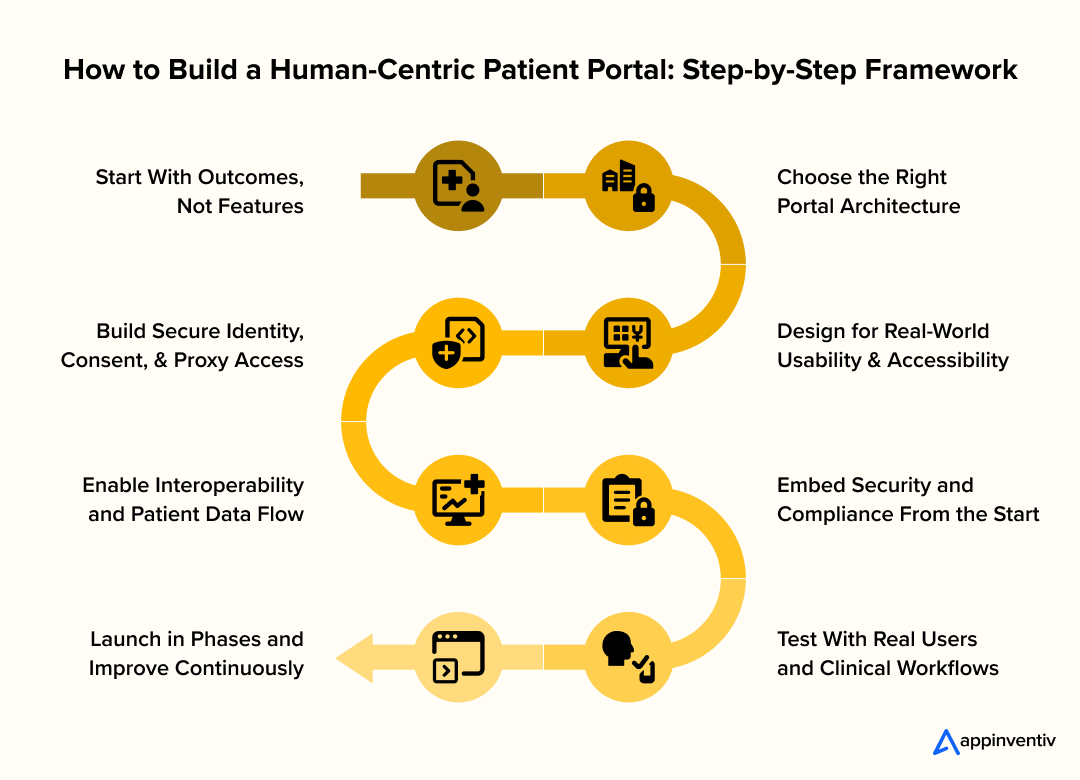
1. Define Outcomes as System-level Behaviors
Instead of listing features, the focus shifts to how the system should behave under real conditions. Intake data should move directly into EHRs without manual correction. Appointment updates should reflect instantly across systems.
From a development standpoint, this translates into:
- Designing APIs that enforce data consistency across services
- Mapping workflows to backend services, not just UI flows
- Setting clear SLAs for data sync and response times
This keeps patient portal software development aligned with operational outcomes rather than surface-level functionality.
2. Architect for Integration depth, not just Flexibility
Architecture decisions are driven by the number of systems that need to connect and the frequency with which they exchange data. Most enterprise builds move toward a hybrid model with a custom experience layer over EHR systems.
This typically involves:
- API orchestration layers to manage multi-system communication
- Event-driven services for real-time updates, like scheduling or lab results
- Caching mechanisms to handle latency from external systems
The objective is to maintain loose coupling while ensuring reliable data flow.
3. Design for Asynchronous, Real-world Usage Patterns
Users don’t follow ideal flows. They log in briefly, complete one action, and leave. The system needs to respond quickly without depending on long sessions.
From an engineering lens, this means:
- Building mobile-first, lightweight interfaces using React, Flutter, or similar frameworks
- Supporting partial sessions and state recovery without data loss
- Structuring APIs for quick, single-purpose interactions
Consistency in performance becomes more important than interface complexity.
4. Implement Identity, Consent, and Access as Core Layers
Access to healthcare is multi-dimensional. Patients, caregivers, and providers interact with the same data under different permissions.
This is handled through:
- OAuth 2.0 and OpenID Connect for authentication
- Role-based and attribute-based access control models
- Consent management systems that dynamically control data visibility
- Proxy access layers for caregiver roles
These components form the backbone of HIPAA compliant patient portal development and directly impact system trust.
5. Build Interoperability Pipelines, Not One-time Integrations
Integration is not a one-time task. Data needs to remain consistent across systems over time. In practice, this includes:
- HL7 FHIR APIs for standardized data exchange
- Data normalization layers to align formats across systems
- Patient identity resolution to prevent duplication
- Retry and reconciliation mechanisms for failed syncs
This ensures the portal reflects accurate, real-time information instead of fragmented data.
6. Embed Security into the Infrastructure Layer
Security is enforced across the system, not just at the interface level. It needs to run continuously without affecting usability. Typical implementations include:
- End-to-end encryption for data in transit and at rest
- Token-based authentication with short-lived credentials
- Audit logging pipelines for traceability
- Monitoring systems for anomaly detection
These measures protect sensitive data while keeping workflows uninterrupted.
7. Validate Against Real Workflows and System Load
Testing in isolation doesn’t reveal how the system behaves under real conditions. Validation needs to reflect live usage patterns.
Teams typically test:
- Concurrent access across patients, staff, and caregivers
- Edge cases like duplicate records or delayed data updates
- Message routing and system response under load
This ensures the system performs reliably beyond controlled environments.
8. Roll Out in Controlled Phases with Feedback Loops
Enterprise deployments are staged to avoid disruption and allow iterative improvements. This approach includes:
- Releasing to a limited user group or department first
- Monitoring API performance, latency, and error rates
- Refining workflows based on actual usage data
Over time, the system scales without creating operational friction.
When approached this way, patient portal development becomes a disciplined engineering effort. The focus stays on reliability, interoperability, and system behavior, ensuring the portal supports care delivery without adding complexity.
Also Read: Patient Access App Development Cost: Factors & Features
Key Features & Functionalities of Patient Portals
You’ll notice it in a busy clinic hour. If a portal helps patients book, check results, or message quickly, it gets used. If not, it’s ignored. That’s why patient portal app development focuses on a few high-frequency interactions that simplify everyday care for both patients and providers.
These are the capabilities most organizations prioritize when building practical patient portal solutions in healthcare.
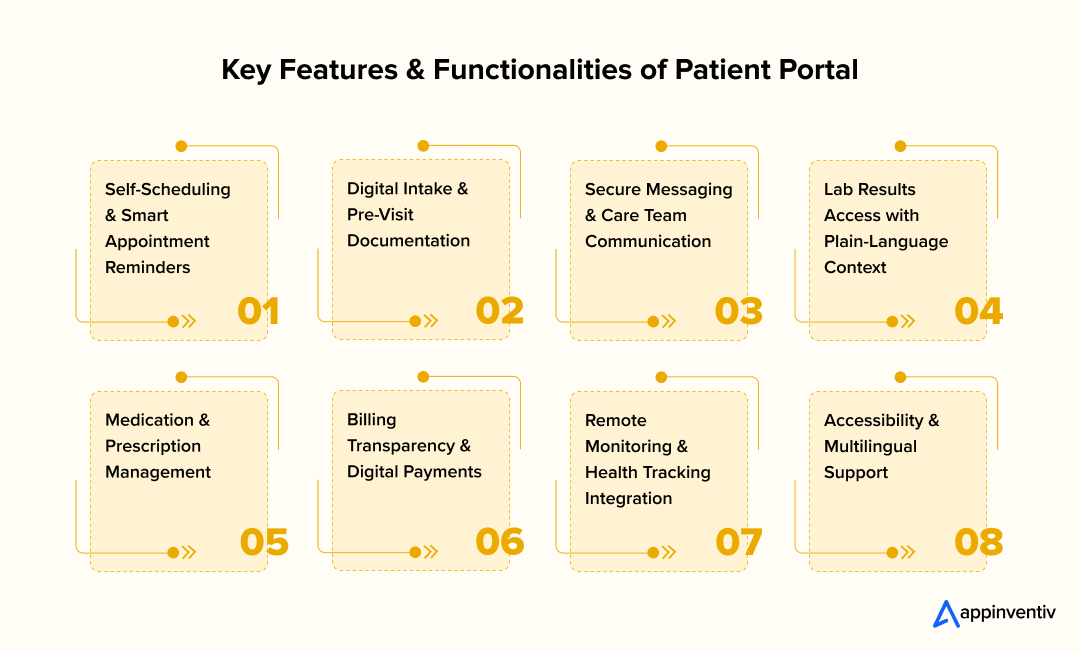
1. Self-Scheduling and Smart Reminders
Patients should be able to book, reschedule, or cancel without calling the clinic. Real-time slots matter because “call us to confirm” defeats the purpose. Reminders do the basic job too: they reduce missed visits, especially when appointments are scheduled weeks out.
Value: fewer no-shows, less rescheduling churn, reduced front-desk load.
2. Digital Intake and Pre-Visit Forms
Paper forms slow down check-in and often return incomplete. Digital intake works best when it’s simple and timed well: not a long questionnaire sent days early, but a clean set of essentials that patients can complete on a phone. Uploads (ID, insurance card, referral notes) prevent the same “can you bring this next time” cycle.
Value: faster check-ins, cleaner data, fewer corrections later.
3. Secure Messaging With Care Teams
Most follow-up questions don’t need a new visit. They need a quick clarification. Messaging works well when it’s routed properly, and there are clear expectations for response time. Without routing rules, inboxes overflow. With routing rules, teams can handle questions without constant phone interruption.
Value: better clarity for patients, fewer unnecessary appointments, and less phone tag.
4. Lab Results With Plain-Language Summaries
Patients want results, but they don’t want to decode them. A portal doesn’t need to “interpret” clinically. It needs to provide context that reduces panic: reference ranges, a short explanation of what’s normal, and what typically happens next. Even a simple “your clinician will review within X hours” helps.
Value: fewer anxious calls, better understanding, smoother follow-up.
5. Medication and Prescription Management
Medication questions drive a lot of calls: refills, dosage reminders, “what was I told to take?” A portal works when it keeps the current list visible, supports refill requests, and makes instructions easy to find. It also helps when patients can flag an issue without having to guess who to call.
Value: improved adherence, fewer refill-related calls, fewer avoidable errors.
6. Billing Transparency and Digital Payments
Billing is where trust can break quickly. Clear summaries matter more than fancy UI: what was billed, what insurance covered, what’s pending, what’s due. Simple online payments reduce friction, but clarity reduces conflict.
Value: fewer billing queries, faster collections, less back-and-forth.
Also read: AI in Medical Billing: Boosting Accuracy in Healthcare
7. Remote Monitoring and Health Tracking Integration
For chronic care and post-treatment recovery, the portal can be a bridge between visits. That might mean device data, but it can also be simple patient-reported check-ins. The key is not collecting more data than teams can act on. If alerts aren’t actionable, staff stop trusting them.
Value: earlier visibility into changes, better continuity, fewer surprises at follow-up.
Also read: Cost Estimation for Remote Patient Monitoring Software
8. Accessibility and Multilingual Support
Adoption drops when people struggle to use the portal. Accessibility and language support aren’t “nice-to-haves” in real clinics. Clear navigation, readable text, and multilingual support widen usage. That matters because the portal only reduces workload if a broad patient base can use it.
Value: wider adoption, fewer support calls, more equitable access.
When done well, custom patient portal development turns these into a single, consistent experience rather than a collection of disconnected tools. The goal is not to impress. It’s to make care easier to navigate and easier to manage.
Integration and Adoption Strategy: Creating a Unified Patient View That People Actually Use
A portal is only useful when the information it contains is complete, and people trust what they see. If results arrive late, medications don’t match, or staff have to work around the system, usage drops quickly. Strong patient portal development reliably connects data and introduces the portal in ways that fit daily routines.
1. Connecting Systems for a Complete View
Patients expect accurate information in one place. That requires dependable patient portal integration across:
- EHR and clinical records
- Labs and imaging systems
- Pharmacy and medication history
- Billing and insurance platforms
Even with FHIR standards, differences in data formats and patient identity matching can cause duplicate or mismatched records.
What helps:
- Consistent identity matching rules
- Careful data mapping and validation
- Real-time sync for critical data like medications and results
2. Supporting Staff Adoption
If the portal adds extra steps, staff may avoid using it. Adoption improves when:
- Messages route into existing workflows
- Triage rules reduce manual sorting
- Front-desk teams encourage use during check-in
3. Helping Patients Get Started
Patients are more likely to use the portal when setup is simple, and benefits are clear. Effective onboarding includes:
- Guided setup during visits or discharge
- Clear first-login instructions
- Reminders highlighting useful features
4. Measuring What’s Working
Tracking a few practical metrics helps show impact:
- Activation and repeat usage
- Response turnaround time
- Reduction in call volume
- Appointment no-show trends
When integration is reliable and adoption is supported, patient portal solutions in healthcare become part of everyday care rather than another system to manage.
Get expert guidance on architecture, integrations, and security to design a portal tailored to your operational needs.
Tech Stack for a Custom Patient Portal
Behind every smooth patient experience is a tech stack that keeps data secure, connected, and reliable. Patients may not see it, but they notice when it breaks.
In custom patient portal development, the focus is on secure access, seamless integration, and consistent performance.
Here’s a quick look at the technologies that make it work.
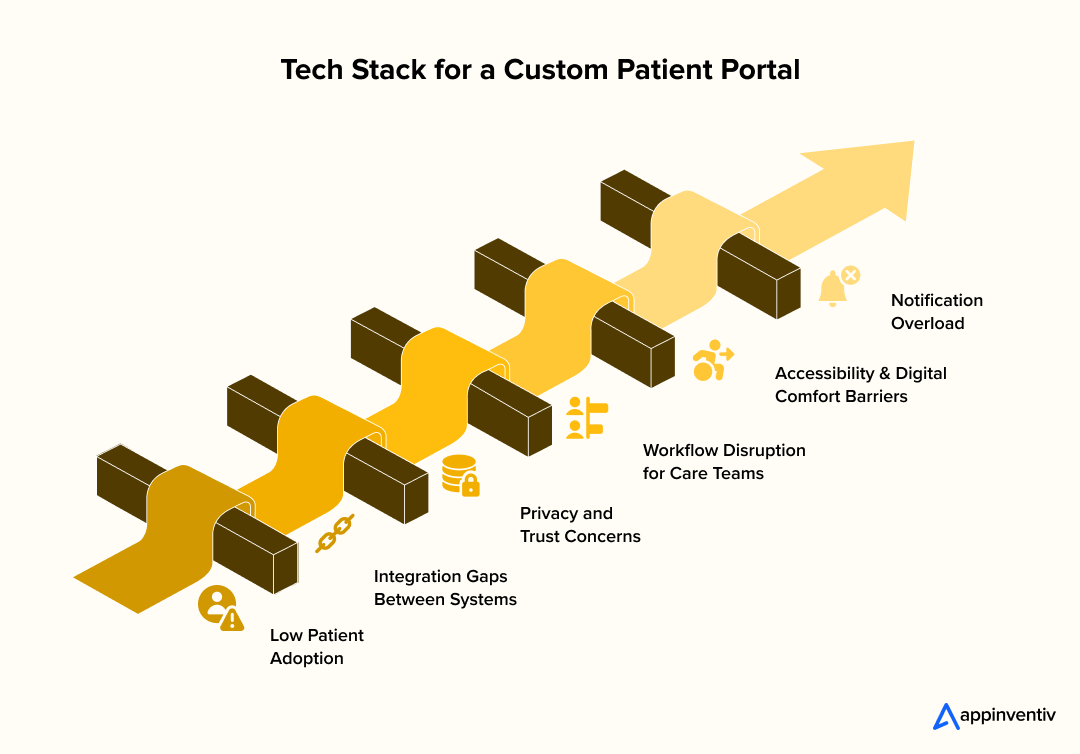
1. Frontend Layer: What Patients And Staff Interact With
This layer determines how easy the portal feels to use.
Common choices:
- React, Angular, or Vue for responsive web interfaces
- Flutter or React Native for mobile apps
- Progressive Web Apps (PWAs) for browser-based mobile experiences
Why it matters: fast loading, mobile-friendly navigation, and consistent usability across devices.
2. Backend And Application Layer: Where Logic And Workflows Run
The backend handles scheduling logic, messaging workflows, notifications, and data processing.
Common frameworks:
- Node.js for real-time communication and scalability
- .NET Core for enterprise-grade security and performance
- Java Spring Boot for complex healthcare environments
Why it matters: reliable performance and the ability to scale as usage grows.
3. Interoperability And Integration Layer
A portal must communicate with multiple healthcare systems to provide a complete patient view.
Key standards and tools:
- HL7 FHIR APIs for structured clinical data exchange
- SMART on FHIR for EHR integration
- API gateways for secure system communication
Why it matters: accurate, real-time data across records, labs, medications, and billing.
4. Data Storage And Cloud Infrastructure
Healthcare portals must store sensitive information securely while maintaining high availability. Common approaches:
- HIPAA-compliant cloud platforms such as AWS, Azure, or Google Cloud
- Encrypted databases like PostgreSQL or MongoDB
- Secure backup and disaster recovery systems
Why it matters: data protection, reliability, and uninterrupted access.
5. Security And Identity Management
Security is central to healthcare patient portal solutions, not an add-on. Core protections include:
- OAuth 2.0 and OpenID Connect for identity management
- Multi-factor authentication and biometric login options
- End-to-end encryption
- Role-based access control and audit logging
Why it matters: protects patient privacy and builds trust.
6. Monitoring, Performance And Reliability
Once live, the portal must remain stable under varying usage loads. Common tools:
- Performance monitoring platforms such as Datadog or Prometheus
- Load balancing and auto-scaling infrastructure
- Uptime monitoring and alert systems
Why it matters: prevents downtime and ensures consistent access.
A well-chosen stack supports more than functionality. It ensures the portal remains secure, responsive, and ready to evolve. In effective patient portal development, technology decisions are guided not by trends, but by reliability, interoperability, and long-term sustainability.
Trust, Privacy, and Consent Design for Patient Confidence
You’ll notice this during real use, not in demos. If patients aren’t sure who can see their data or how it moves, they hold back or drop off entirely.
- Make Access Clear: Show access history with timestamps and care team roles. Explain why access exists in the context of care delivery, not policy language.
Impact: reduces uncertainty, fewer trust-related drop-offs. - Give Patients Control: Implement granular, consent-based controls at the data level, not just the account level. Let patients adjust sharing preferences without navigating complex settings.
Impact: aligns with HIPAA compliant patient portal development while giving patients a real sense of ownership. - Support Caregiver Access Safely: Enable role-based proxy access with defined boundaries. For example, allow caregivers to manage scheduling and medications while restricting sensitive clinical notes.
Impact: improves care coordination without exposing unnecessary information. - Protect Data in the Background: Build continuous safeguards into the system: encryption across data flows, short-lived tokens, MFA, session timeouts, and anomaly detection.
Impact: strong protection without interrupting everyday use.
When these layers are built into patient portal development, the system feels predictable and secure. That consistency is what drives long-term usage, not just initial adoption.
Also Read: How to Build Patient Management Software: Process & Costs
Patient Portal Software Cost and Timeline
This comes up early. Teams want clarity on cost and rollout. Patient portal software development typically ranges from $40,000 to $400,000, depending on integrations, security, and workflow complexity.
Costs are driven by system connections and compliance, not just features. Basic portals are quicker to build, while enterprise setups require deeper integration and coordination.
Typical Cost Range
The cost of building a portal can vary widely based on scope, integrations, and security requirements.
| Portal Complexity | Scope & Capabilities | Estimated Development Cost |
|---|---|---|
| Basic Portal | Self-scheduling, secure messaging, results access, and basic patient profile | $40,000 – $90,000 |
| Mid-Level Portal | EHR integration, billing access, digital intake, mobile optimization | $90,000 – $250,000 |
| Enterprise Portal | Multi-system integrations, remote monitoring, advanced security, and custom workflows | $250,000 – $400,000+ |
More complex healthcare environments with multiple facilities, legacy systems, or extensive customization needs may increase overall costs.
What Drives Development Costs
Most costs sit behind the interface. The effort comes from connecting systems, protecting data, and fitting the portal into daily workflows.
- System integrations: Linking EHRs, labs, pharmacies, and billing systems requires careful data mapping and reliable patient matching to avoid duplicates or missing records.
- Security and compliance requirements: Encryption, secure login, audit trails, and access controls must be built in from the start to protect health information and meet compliance needs.
- User experience and accessibility design: Mobile usability, language support, and accessibility features improve adoption but require additional design and testing.
- Mobile app development: Native apps can improve convenience, though they add ongoing maintenance and updates.
- Customization and workflow alignment: Adapting the portal to match scheduling and communication routines often requires configuration and staff training.
Timeline Expectations
Timelines vary by complexity.
- Basic portal: 3-4 months
- Integrated portal: 4-7 months
- Enterprise deployment: 7-12+ months
Many providers roll out in stages, starting with core features and expanding as adoption grows.
Build vs Extend vs Buy
Healthcare organizations typically consider three approaches:
- Extend an existing EHR portal: Faster and less expensive, but limited flexibility.
- Adopt a third-party portal solution: Predictable deployment, but may require workflow adjustments.
- Custom patient portal development: Greater flexibility and control over patient experience, with higher upfront investment.
When evaluating patient portal solutions in healthcare, cost should be viewed alongside long-term value. A well-designed portal can reduce administrative workload, improve patient engagement, and streamline communication over time.
Also Read: Patient Waitlist Management Software Development
Challenges of Patient Portal Development and How to Address Them
Rolling out a portal can look straightforward in planning meetings: connect systems, give patients access, and switch it on. The real friction appears later, when it meets busy clinics, front-desk routines, and real patient behavior. If sign-up feels confusing, information looks incomplete, or staff suddenly face a flood of messages, usage drops fast. In many cases, the issue isn’t the technology. It’s how the portal fits into everyday care.
Understanding common roadblocks early makes adoption smoother.
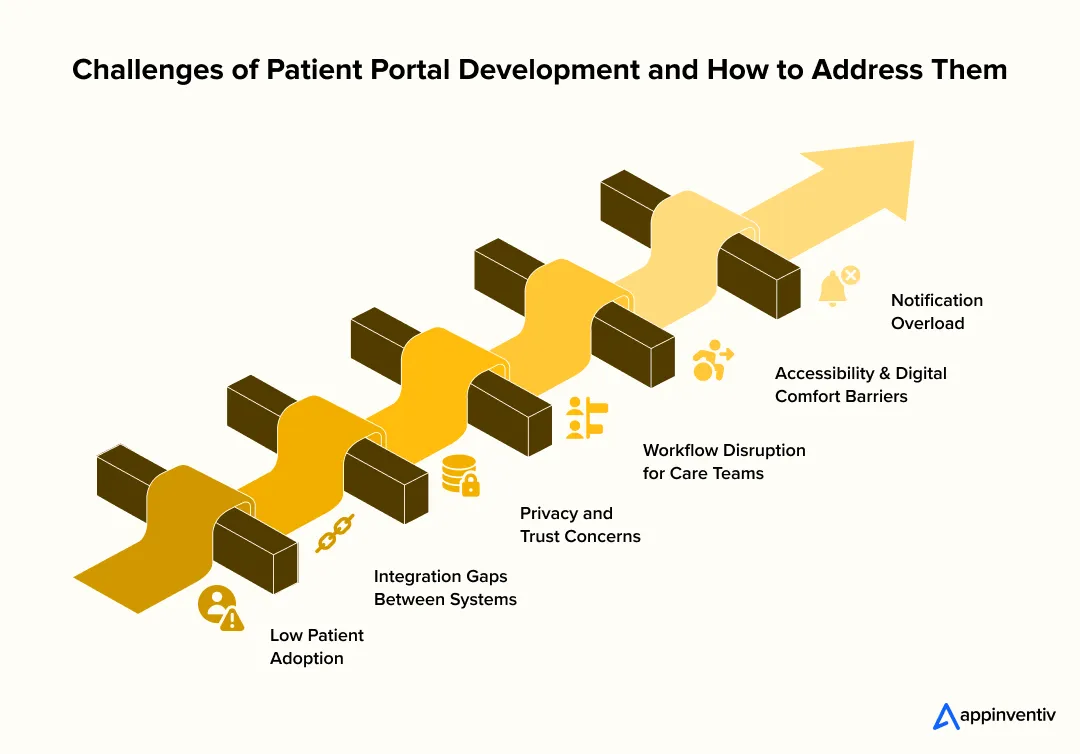
1. Low Patient Adoption
A portal only helps if people continue using it. Long registration steps, password confusion, or unclear navigation often cause drop-off after the first login.
What helps:
- Simple onboarding with clear first-time guidance
- Mobile access with biometric login options
- Prompts that show patients their next step
2. Integration Gaps Between Systems
Clinics rarely rely on a single system. Records, labs, billing, and pharmacy data often live in different platforms. Without strong patient portal integration, information can appear delayed or incomplete.
What helps:
- Standards-based exchange, such as HL7 FHIR
- Accurate patient identity matching
- Near real-time syncing for results, medications, and updates
3. Privacy and Trust Concerns
Patients want clarity about who can see their health information. If access rules feel vague, confidence drops quickly.
What helps:
- Role-based access with clear permission controls
- Consent-based sharing options
- Caregiver and proxy access with defined visibility
These safeguards support HIPAA compliant patient portal development and strengthen trust.
4. Workflow Disruption for Care Teams
When portal messages and refill requests arrive outside established workflows, staff can feel overwhelmed rather than supported.
What helps:
- Routing rules that direct requests to the right team
- Integration with existing clinical systems
- Response templates and triage protocols
5. Accessibility and Digital Comfort Barriers
Not every patient feels comfortable using digital tools. Dense layouts or unfamiliar medical terms can discourage use.
What helps:
- Plain-language instructions and intuitive navigation
- Multilingual support and accessibility-friendly design
- Short tutorials to guide first-time users
6. Notification Overload
Too many alerts can overwhelm both patients and providers, making it harder to notice what truly needs attention.
What helps:
- Customizable notification settings
- Priority alerts for urgent updates
- Concise summaries instead of fragmented messages
When these issues are addressed early, patient portal software development leads to a system people actually rely on. The goal isn’t just launching a portal. It’s creating a dependable channel that supports communication, clarity, and continuity of care.
Future Trends Shaping Human-Centric Patient Portals
You start noticing it after a follow-up visit. Instead of logging in once and leaving, patients come back because the portal actually helps them move things forward.
- From access to action: Portals are no longer just showing reports. They’re helping patients complete next steps, such as follow-ups, refills, or care plan tasks, without extra calls.
- Smarter handling of patient queries: It’s not just about routing messages anymore. Systems are starting to sort urgency and intent, so important queries don’t get buried, and teams aren’t stuck triaging everything manually.
- Care responds in real time: With better patient portal integration, things like missed meds or unusual readings can trigger alerts or reminders right away, instead of waiting for the next appointment.
- Less repetition for patients: If someone starts filling out a form or booking an appointment and drops off, they can pick up where they left off. Small detail, but it reduces frustration.
- One place for everyday tasks: Scheduling, billing, prescriptions and telehealth. It’s all gradually coming together, so patients don’t have to jump between systems.
Overall, patient portal development is moving closer to how care actually happens, ongoing, a bit unpredictable, and easier when everything connects properly.
Prepare your organization for connected care, remote monitoring, and AI-enabled patient engagement.

How Appinventiv Supports Patient-Centred Portal Development
A patient portal proves its worth during a busy clinic day, not in a demo. Patients may be trying to view a report before work or reschedule an appointment without waiting on hold, while staff manage phones, walk-ins, and schedules. As part of its broader healthcare software development services, Appinventiv approaches patient portal development with these everyday pressures in mind, focusing on eliminating small delays that frustrate both patients and care teams.
The emphasis stays on reliability and clarity. Portals must connect cleanly with clinical systems, work smoothly across common devices, and present privacy controls in language patients understand. The objective is simple: allow patients to book visits, review results, and contact their care team without repeating information or switching between multiple systems.
This practical mindset is reflected in solutions like the YouCOMM Health App, which supports communication with deaf and hard-of-hearing patients, and the Soniphi Vitality Health App, which explores voice-based wellness insights to encourage engagement. When access becomes easier and requests are clearer, providers see fewer interruptions, and patients feel more confident navigating their care.
Appinventiv works with providers to shape portals that fit existing workflows and support a more connected care experience. Let’s Talk!
FAQs
Q. What is a Patient portal system?
A. A patient portal system is a secure digital platform that gives patients access to medical records, appointments, lab results, billing, and communication with providers. Modern patient portal development connects clinical systems to create a unified, accessible care experience.
Q. How to create a patient portal?
A. To create a portal, providers define patient access goals, choose architecture (tethered, standalone, or hybrid), ensure secure identity management, and enable patient portal integration with EHR, labs, and billing systems. Successful patient portal software development also prioritizes usability, compliance, and real-world workflows.
Q. How to set up a patient portal?
A. Setting up a portal involves configuring secure access, connecting clinical systems, enabling digital intake and messaging, and training staff for workflow alignment. Many providers adopt custom patient portal development to ensure the portal fits existing operations and patient needs.
Q. How Patient Portals Can Help Optimize Expenses for Healthcare Providers
A. Effective patient portal solutions in healthcare reduce operational costs by lowering call volume, minimizing paperwork, decreasing no-show rates, and improving billing transparency. Automation and self-service tools allow staff to focus on higher-value clinical tasks.
Q. How Much Does It Cost to Develop a Patient Portal?
A. The patient portal software cost varies based on integrations, security, and customization. Basic portals may start around $40,000, while enterprise systems with advanced integrations and workflows can exceed $400,000. Costs increase with mobile apps, compliance requirements, and complex system connectivity.
Q. How do you ensure the security of patient portal data?
A. Security in HIPAA compliant patient portal development includes encryption, multi-factor authentication, role-based access control, audit logs, and secure messaging. Identity verification and consent-based access ensure sensitive information remains protected.
Q. How do patient portals affect the business process in healthcare?
A. Patient portals streamline workflows by automating intake, routing messages, improving scheduling efficiency, and reducing administrative workload. Effective healthcare patient portal solutions improve communication, enhance patient engagement, and support continuity of care.
Q. Why hire a patient portal development company?
A. A specialized patient portal development company brings expertise in compliance, interoperability, and workflow alignment. Experienced teams delivering healthcare patient portal development services ensure secure integrations, usability, and long-term scalability.
Q. How long does patient portal development take?
A. Timelines vary based on complexity. A basic portal may take 3–4 months, an integrated solution 4–7 months, and an enterprise deployment 7–12+ months. Projects involving advanced integrations and patient portal app development may require phased rollouts.


Fast 2-minute response, fully NDA-protected.

Wearable Data Integration: Connecting Multiple Devices to a Unified Health Platform
Key takeaways: Device support should reflect the measurements your service needs, the people using it, and the decisions those readings inform. A unified health data platform must preserve source, timing, and measurement context while resolving duplicate records. Phone health platforms, manufacturer APIs, and direct device connections serve different integration needs. Clinical workflows require agreed review…
Sleep Tracker App Development: Features, Wearable Integration, AI, and Compliance
Key takeaways: Sleep tracking presents opportunities across consumer wellness, fitness, healthcare, employee wellness, senior care, and infant-care markets. Successful products combine actionable insights, wearable connectivity, user-friendly reports, privacy controls, and clearly differentiated experiences. HealthKit, Health Connect, and direct device APIs provide different data depths, costs, limitations, and maintenance requirements. AI supports sleep-stage estimation and personalization,…

Diet and Nutrition App Development: Process, Features, Cost, and Technology Stack
Key Takeaways Diet and nutrition tracking app development goes past basic calorie counters with verified food databases, custom meal schedules, AI tools, wearable device links, and corporate manager tools. Structure database models around raw food items, serving portions, nutrient facts, recipes, software links, and regional diet rules. Pair computer vision models, recommendation algorithms, language engines,…