





























AI in the Restaurant Industry: Use Cases, Cost, and Development Guide

 Share -



- 01Key Use Cases of AI in the Restaurant Industry
- 02Future of AI in the Restaurant Industry
- 03Real-World Applications of AI in Restaurants
- 04How AI Improves Revenue and ROI in Restaurants
- 05Restaurant ROI Snapshot (What Operators Are Seeing)
- 06How AI Works in Restaurant Systems: Architecture
- 07AI-Powered Restaurant Management System Development
- 08Cost of AI Implementation in Restaurants
- 09Challenges and How to Overcome Them in Restaurant AI Implementation
- 10How Appinventiv Supports Restaurant Businesses
- 11FAQs

- AI in the restaurant industry integrates ordering, kitchen, inventory, and customer data into a single system, reducing waste, delays, and manual coordination.
- The biggest impact is seen in daily operations, such as faster service, better demand planning, and higher order value through smart recommendations.
- Restaurants typically see measurable gains, such as 10–25% labor savings, 15–30% waste reduction, and improved repeat-customer rates.
- Implementation works best when done step by step, starting with high-impact areas such as order flow or inventory, rather than with full system overhauls.
- Investment ranges from $40K to $400K+, depending on scale and integrations, but ROI comes from consistent operational improvements rather than from a single big change.
Walk into a busy restaurant around dinner rush, and you can feel the pace instantly. Orders piling up, staff moving quickly, customers expecting everything to be smooth. For a long time, most of this ran on experience and gut decisions. Now, that’s starting to shift.
Many restaurants lose 8–15% of revenue due to poor demand forecasting, food waste, and disconnected ordering systems. AI is helping restaurants fix these gaps by connecting ordering, kitchen operations, inventory, and customer data into one intelligent system.
Adoption is moving faster than expected. According to the National Restaurant Association’s 2026 report, 26% of operators are already using artificial intelligence in restaurants, with many more planning to follow. It’s becoming part of how modern restaurant businesses run, not just something experimental.
At a practical level, this shift is about making operations smoother and more predictable. Less waste, quicker service, and more relevant customer interactions. AI for restaurants is simply helping teams make better decisions without adding more pressure to already busy environments.
In the sections ahead, we’ll look at where this is actually being used, how it fits into day-to-day operations, and what it takes to bring it into a real restaurant setup.
Get a clear breakdown of gaps across ordering, kitchen flow, and customer experience before you invest in new systems

Key Use Cases of AI in the Restaurant Industry
Step into a restaurant during peak hours, and you’ll feel the pace right away. Orders stack up, staff move fast, and decisions happen in seconds. What’s changing now is that many of those decisions are backed by better data and systems working quietly in the background.
Here are the areas where AI in restaurants is making a real difference without changing how teams already work.
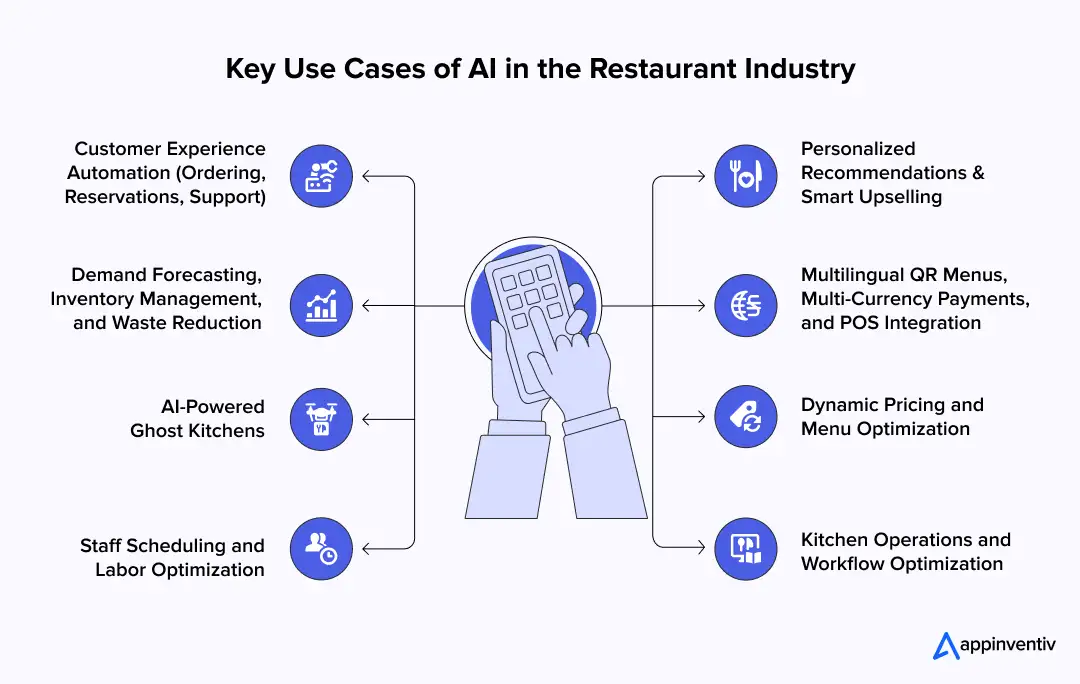
1. Customer Experience Automation (Ordering, Reservations, Support)
A lot of time goes into handling simple customer interactions. Calls for bookings, order updates, and common questions can pull staff away from service.
Restaurants are starting to simplify this layer to keep teams focused.
- Managing reservations and cancellations without delays
- Supporting online and app-based ordering
- Handling common queries quickly and consistently
This is one of the most visible AI applications in restaurants, especially in high-volume setups, where AI in customer experiences helps reduce wait time and keeps interactions smooth without adding extra pressure on staff.
2. Personalized Recommendations and Smart Upselling
When someone places an order, small suggestions can change the final bill. A combo or add-on often feels natural if it fits what they already want.
These suggestions come from patterns that have developed over time, using AI personalisation in consumer experience to make each interaction feel more relevant.
- Recommending add-ons that match customer preferences
- Highlighting dishes that sell more often
- Adjusting suggestions based on past orders
This is where restaurant AI starts increasing order value in a simple way.
3. Demand Forecasting, Inventory Management, and Waste Reduction
Stock management is one of the hardest parts of running a restaurant. Too much leads to waste, too little leads to missed sales.
Better planning helps teams stay balanced.
- Anticipating busy hours with more accuracy
- Matching inventory with actual demand
- Reducing spoilage and over-preparation
This is where automation in restaurants directly helps control costs.
4. Multilingual QR Menus, Multi-Currency Payments, and POS Integration
In busy locations, customers may come from different regions. Language gaps and payment confusion can slow things down.
Digital menus help remove that friction.
- Menus adjust to different languages automatically
- Supporting payments in multiple currencies
- Sending orders straight into POS systems
- Showing what items perform well over time
This improves both customer experience and internal planning.
5. AI-Powered Ghost Kitchens
Now think about a setup with no dine-in space. Just a kitchen handling delivery orders all day.
Everything depends on speed and accuracy.
- Running multiple virtual brands from one kitchen
- Adjusting menus based on demand trends
- Improving order flow and preparation time
This is where AI use cases in the restaurant industry become more visible in delivery-first models.
6. Dynamic Pricing and Menu Optimization
Menus don’t stay fixed anymore. Restaurants are adjusting their promotions based on what works.
- Pushing high-margin items during busy hours
- Refining combos based on customer behavior
- Improving or removing slow-moving dishes
Many teams now rely on menu engineering software to track item performance and make these changes with greater clarity rather than guesswork.
These small changes help improve both revenue and kitchen efficiency.
7. Staff Scheduling and Labor Optimization
Planning shifts is never easy, especially when demand changes throughout the day. Better forecasts help teams stay prepared.
- Matching staff schedules with expected demand
- Reducing extra labor during slow hours
- Avoiding gaps during peak time
This is another way AI for restaurants supports smoother operations.
8. Kitchen Operations and Workflow Optimization
Inside the kitchen, timing matters more than anything. Even small delays can slow down the entire service.
Clear order flow helps teams stay on track.
- Structuring prep based on incoming orders
- Reducing delays during busy periods
- Improving coordination between stations
Customers may not see this directly, but they feel it through faster service.
Better planning, smoother service, and fewer errors during peak hours. That’s where artificial intelligence in the restaurant industry starts showing real value without getting in the way of daily work.
Future of AI in the Restaurant Industry
Most changes won’t feel dramatic. They show up in small improvements that make daily work smoother and faster. Here’s what you’ll start seeing more often:
- Voice ordering becomes part of everyday service: Customers place orders by speaking at drive-thrus or over the phone. Staff spend less time repeating orders, and mistakes drop. This is where AI in restaurants is starting to fit naturally.
- Menus change based on what’s selling: Digital menus highlight items that move faster during certain hours. Teams don’t have to update boards manually during a rush.
- Kitchens run more smoothly and efficiently: Orders move in a clearer sequence. Prep stays consistent even when volume spikes. This helps reduce delays and keeps service steady.
- Offers feel more relevant to customers: Promotions and suggestions reflect what people usually order. This is how AI for restaurants supports repeat visits without extra effort from staff.
- Systems stay connected instead of isolated: Orders, payments, and inventory update together. Teams spend less time checking multiple systems and more time serving customers.
- More restaurants run on performance data: Delivery-focused setups adjust menus and operations based on what works. These are practical AI use cases in the restaurant industry that are already shaping how new restaurants operate.
Day-to-day work becomes more predictable. Fewer surprises during peak hours, fewer manual checks, and more consistent service. That’s how artificial intelligence in the restaurant industry will settle into normal operations over time.
Also Read: 5 Ways Restaurant Technology Is Transforming the Industry
Real-World Applications of AI in Restaurants
Spend a little time inside any major restaurant chain, and you’ll notice how smoothly things run compared to a few years ago. Orders move faster, menus feel more intuitive, and the kitchen seems better coordinated, especially during peak hours.
A lot of that improvement comes from better systems working quietly in the background. Here’s how it shows up in real-world scenarios.
1. Digital Ordering, Personalization, and Loyalty (KFC)
KFC focused on making it easier for customers to order directly, rather than relying on third-party platforms. The goal was simple. Give customers a faster, smoother way to order and come back again. Appinventiv built KFC’s mobile experience to fit naturally into how customers already place orders.
- Simple, fast ordering inside the app
- Real-time tracking so customers know exactly what’s happening
- Loyalty programs that encourage repeat visits
Impact:
- Over 50% of orders are coming through the app
- Around 60% increase in repeat purchases
- Stronger customer engagement overall
2. Conversion Optimization Through Better User Experience (Pizza Hut)
Pizza Hut worked on improving how customers move through the ordering process.
- Cleaner navigation across menus
- Faster, more straightforward checkout
- Less friction while placing orders
Impact:
- Up to 30% increase in conversion rates
- Better engagement across digital platforms
3. Multi-Brand Digital Ecosystems (Americana Group)
Americana manages multiple restaurant brands, so consistency and speed were key.
- Launching multiple apps across different markets
- Keeping the experience similar across brands
- Making it easier for customers to interact across platforms
Impact:
- Faster expansion into new regions
- Growth in digital revenue
- Improved customer retention
4. Smarter Order Flow and Kitchen Coordination
In a busy kitchen, timing is everything. Even a small delay can slow down the entire line.
- Organizing orders based on preparation time
- Improving coordination between kitchen stations
- Reducing delays during rush hours
This helps maintain consistency, especially when order volumes spike.
A strong example is Chipotle, which has been rolling out new kitchen technologies and operational systems to improve speed and consistency. These include tools that streamline the preparation and organization of digital orders, especially as online orders continue to grow.
- Menus That Adapt Based on Demand (McDonald’s Example)
Menus are starting to feel more dynamic, rather than staying fixed all day.
- Highlighting items based on time of day
- Promoting what’s selling the most
- Adjusting the visibility of items based on demand
McDonald’s, for example, has used drive-thru menus that change based on timing and customer behavior.
6. Customer Engagement and Repeat Visits (Starbucks & Domino’s)
Getting customers to come back is no longer just about good food. It’s about staying connected.
- Sending relevant offers based on past orders
- Personalizing app experiences
- Building strong loyalty programs
Starbucks uses personalized offers to keep customers engaged, while Domino’s has made ordering so simple that repeat usage becomes natural.
Across all these examples, the shift is simple. Restaurants are becoming more consistent, more responsive, and easier to manage at scale.
Faster ordering, smoother kitchen flow, and stronger customer relationships all add up. That’s where AI use cases in the restaurant industry start showing real, measurable impact without needing to be front and center.
How AI Improves Revenue and ROI in Restaurants
At a practical level, this isn’t about one big change. It’s a series of small improvements across ordering, operations, and customer experience that add up over time. That’s where AI in the restaurant industry starts showing real business value.
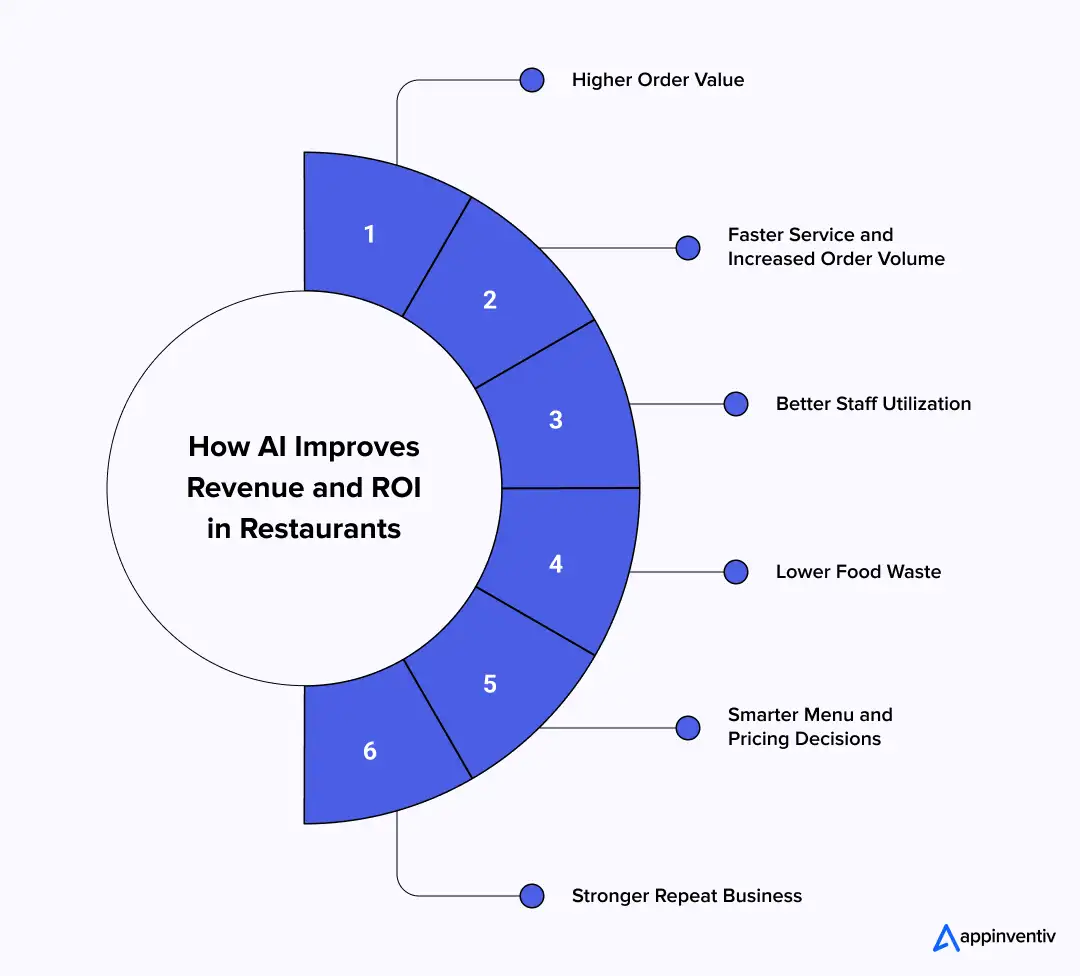
Here’s where restaurants are seeing the biggest impact:
- Higher order value: Suggesting relevant add-ons and combos at the right moment helps increase the average bill. This is one of the simplest AI use cases in the restaurant industry that directly impacts revenue
- Faster service and more orders handled: Better coordination between ordering systems and kitchen flow helps restaurants serve more customers during peak hours
- Better staff utilization: Smarter scheduling based on demand reduces idle time and avoids last-minute staffing issues in a busy restaurant environment
- Lower food waste: Planning inventory and preparation more accurately helps reduce losses. This is where intelligent automation in restaurants improves margins without extra effort
- Smarter menu and pricing decisions: Highlighting high-performing dishes and refining underperforming ones helps improve profitability across locations
- Stronger repeat business: Personalized offers and loyalty strategies encourage customers to return, which is where AI for restaurants supports long-term growth
Instead of relying only on experience, decisions become more consistent across the board. That’s how artificial intelligence in restaurants translates into steady revenue growth and better control over day-to-day costs.
Restaurant ROI Snapshot (What Operators Are Seeing)
Here’s a quick look at what many restaurant chains report after improving their systems and workflows. The numbers vary by setup, but the pattern stays consistent.
| Area | Typical Improvement Range | What Changed on the Floor after Implementing AI |
|---|---|---|
| Labor cost savings | 10% – 25% | Schedules match demand better. Fewer idle hours and fewer last-minute gaps during rushes. |
| Food waste reduction | 15% – 30% | Prep aligns with actual demand. Fewer unused ingredients at the end of the day. |
| Order accuracy | +15% – 25% | Fewer manual entries and clearer kitchen queues reduce mistakes. |
| Average order value (AOV) | +8% – 20% | Timely add-ons and combos increase ticket size without slowing checkout. |
| Service speed | +10% – 20% faster | Orders move through POS to the kitchen with less delay, especially at peak times. |
| Repeat customer rate | +10% – 25% | More relevant offers and smoother ordering bring customers back. |
Most gains come from small fixes across the day. Better scheduling, cleaner order flow, and tighter prep reduce costs and lift revenue simultaneously. This is where AI in the restaurant industry shows up as steady, measurable improvement rather than a one-time change.
See how improved order flow, reduced waste, and better scheduling can translate into measurable revenue gains

How AI Works in Restaurant Systems: Architecture
In most restaurants today, nothing runs on a single system. Orders come in from the POS, the mobile app, and delivery platforms. Inventory is tracked somewhere else. Customer data sits in another tool.
The real shift is how all of this is connected so teams don’t have to manually piece things together during a rush. That’s where AI in the restaurant industry comes in, acting more like a layer that helps everything stay in sync.
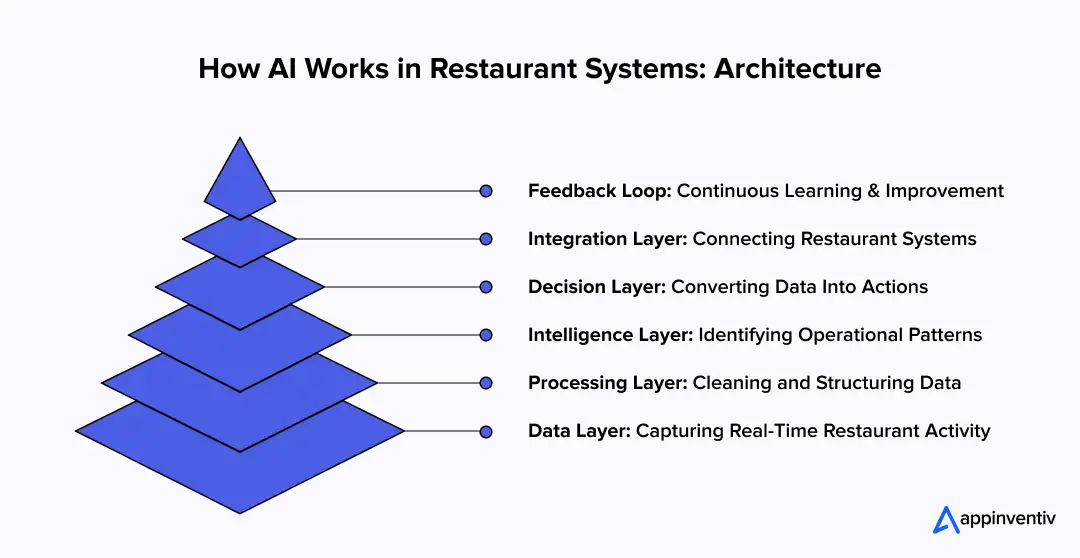
1. Data Layer: Capturing What’s Happening in Real Time
Every action inside a restaurant leaves a trail of data, even if it’s not visible.
- Orders from POS systems with item details, timing, and value
- App and website activity, like clicks, cart additions, and drop-offs
- Delivery orders with location and volume patterns
- Inventory usage showing what’s being consumed and when
Behind the scenes, this data is either stored in databases or streamed in real time using tools like Kafka or cloud services.
The goal here is simple. Bring everything into one place so it can actually be used.
2. Processing Layer: Cleaning and Organizing the Data
Raw data is messy. Different systems record things in different formats, and not everything lines up cleanly.
Before anything useful happens, the data is:
- Cleaned to remove duplicates or errors
- Standardized so systems can understand each other
- Structured into categories like items, orders, and locations
This usually runs through pipelines, often called ETL (Extract, Transform, Load), to ensure the data is consistent and reliable.
3. Intelligence Layer: Finding Patterns That Matter
Once the data is organized, the system begins to look for patterns. Not in a complicated way, but in ways that actually help operations:
- When does demand spike during the day?
- Which items are often ordered together?
- What do repeat customers usually pick?
- Where do delays happen in the kitchen?
Different models handle different tasks:
- Forecasting models to predict demand
- Recommendation systems to suggest items
- Classification models to understand customer behavior
This is where artificial intelligence in the restaurant industry starts turning data into something useful.
4. Decision Layer: Turning Insights Into Actions
This is the part that directly affects day-to-day operations. Instead of just showing reports, the system starts making small, helpful adjustments:
- Suggesting add-ons during ordering
- Prioritizing certain orders in the kitchen queue
- Flagging low stock before it becomes a problem
- Highlighting items to promote on digital menus
These actions are usually triggered through APIs that connect backend systems to what staff and customers actually see.
5. Integration Layer: Keeping Everything Connected
Restaurants already have multiple tools in place, so everything needs to work together without disruption.
- POS systems handling orders
- Payment gateways manage transactions
- Delivery platforms bringing in external demand
- CRM tools track customer interactions
These are connected via APIs and middleware, so data flows smoothly rather than staying stuck in silos. Most setups run on cloud infrastructure like AWS or Azure to handle scale.
6. Feedback Loop: Getting Better Over Time
One of the biggest differences is that these systems don’t stay fixed. Every order, every interaction, every update feeds back into the system.
- Predictions become more accurate
- Recommendations feel more relevant
- Operations become easier to manage
This is why AI in restaurants becomes more effective the longer it runs. It keeps learning from what’s actually happening.
From the outside, nothing looks dramatically different. Orders are placed, food is prepared, and customers are served. But underneath, everything is more connected. Less guesswork, fewer delays, and more consistency across the board.
That’s how AI solutions for restaurants move from being just another feature to becoming part of the core system that keeps operations running smoothly.
AI-Powered Restaurant Management System Development
When restaurants start scaling, one problem quickly shows up. Too many systems, not enough connections between them.
Orders come from POS, apps, and delivery platforms. Inventory is tracked somewhere else. Customer data sits in another tool. During a rush, teams end up switching between systems just to keep things moving.
The goal here isn’t to add more tools. It’s about building a connected system where everything works together without friction. That’s what AI-powered restaurant management system development is really about.
1. Core System Setup (The Backbone of Operations)
At the center, there’s usually a backend system that handles all core operations.
Instead of one large system, it’s broken into smaller services:
- Order service: Manages orders from POS, apps, and delivery platforms
- Menu service: Handles items, pricing, availability, and variations
- Customer layer: Stores order history, preferences, and behavior
- Inventory tracking: Keeps a live view of ingredient usage and stock
These are often built with a microservices architecture, so one part can scale or be updated without affecting the rest.
2. Real-Time Data Flow (Keeping Everything in Sync)
In a busy restaurant, delays are not an option. When an order comes in, every system needs to reflect it instantly.
That’s handled through event-based systems:
- Orders are pushed as real-time events
- Kitchen screens update immediately
- Inventory adjusts as items are used
Behind the scenes, this runs on streaming tools and cloud infrastructure. Data is stored across:
- Relational databases for transactions
- NoSQL systems for fast, flexible data handling
This is what keeps operations smooth during peak hours.
3. Decision Layer (Where Patterns Start Helping)
Once the system is connected, it begins to identify patterns in daily operations.
- What sells more during certain hours
- Which items are often ordered together
- When demand spikes or slows down
Based on this, small decisions start happening automatically:
- Suggesting items during checkout
- Highlighting what to prepare in advance
- Flagging low stock before it becomes a problem
This is where AI development for restaurant apps starts to support real operations rather than just collect data.
4. Integration Layer (Working With What Already Exists)
Most restaurants already use multiple tools. Replacing everything isn’t practical.
So the system is built to connect with existing setups:
- POS systems for order handling
- Payment gateways for transactions
- Delivery platforms for external orders
- CRM tools for customer data
APIs and middleware handle this communication, so everything stays in sync without manual effort.
5. Interfaces for Staff and Customers
All of this only works if the front-end is fast and simple, especially during busy hours.
- Customer apps and websites: For browsing, ordering, and payments
- Staff dashboards: For managing orders, inventory, and reports
- Kitchen display systems (KDS): Showing live order queues and priorities
Even small delays here can disrupt operations, so performance is critical.
6. Infrastructure That Handles Peak Load
Restaurants don’t have steady traffic. There are spikes during lunch, dinner, and weekends.
To handle this, systems are usually built on cloud platforms:
- AWS, Azure, or GCP for scalability
- Containers (Docker, Kubernetes) for flexible deployment
- Auto-scaling to handle sudden surges in orders
This ensures the system doesn’t slow down when demand increases.
7. Continuous Improvement Over Time
Once everything is live, the system continues to improve as more data comes in.
- Predictions become more accurate
- Suggestions become more relevant
- Operations become easier to manage
This is what makes AI-powered restaurant management system development different from traditional setups. It doesn’t stay fixed; it evolves with how the restaurant operates.
Cost of AI Implementation in Restaurants
In most cases, the cost of AI implementation in restaurants ranges between $40,000 and $400,000, depending on how simple or advanced the setup is.
Estimated Cost Breakdown:
| Level | Cost Range | Best For | What’s Included |
|---|---|---|---|
| Basic Setup | $40,000 – $80,000 | Small restaurants or single outlets | – Basic ordering system or chatbot – Limited POS or website integration – Simple dashboards and reporting |
| Mid-Level System | $80,000 – $200,000 | Growing restaurants or small chains | – Multi-channel ordering (app, web, POS) – Inventory tracking and demand planning – Customer data handling and basic personalization – Integration with delivery platforms |
| Advanced System | $200,000 – $400,000+ | Large chains or multi-location brands | – Full-scale system across locations – Real-time data flow across all systems – Advanced analytics and automation – Deep third-party integrations |
What Determines the Cost
The cost usually comes down to how simple or connected you want the setup to be. A small restaurant with one location will need far less than a chain handling orders across multiple channels.
- Scale of the restaurant: A single outlet is easier to manage. Multiple locations mean more coordination, more data, and a higher cost
- Number of systems involved: Connecting POS, mobile apps, delivery platforms, inventory, and customer data adds layers of work
- Level of customization: Ready-made tools cost less and work faster. Custom systems take more time but fit better into daily operations
- Real-time requirements: If everything needs to be updated instantly across systems, the setup needs a stronger infrastructure
The overall investment often depends on the scope of AI Development Services, including how many systems need to be connected and how customized the setup needs to be.
At a practical level, this is not just a system upgrade. It changes how the restaurant runs day-to-day.
Restaurants that start small, focus on one area, and expand gradually tend to achieve better results. That’s how AI in the restaurant industry becomes useful in daily operations instead of turning into something expensive that no one uses.
Also Read: Restaurant App Development Cost: Factors Explained
Challenges and How to Overcome Them in Restaurant AI Implementation
Bringing new systems into a restaurant changes how people work during a shift. The pressure shows up at the counter and in the kitchen, not in a meeting room. Most issues come from how things fit into daily routines.
Here are the common problems teams face and how they handle them.
- Systems don’t connect, so staff patch things together: Orders come from POS, apps, and delivery platforms in different formats. During a rush, staff jump between screens and recheck tickets. Mistakes go up, and service slows.
How to fix it: Route all orders into one queue. Convert them into a single format as they arrive. Push the same update to the kitchen and inventory so everyone sees the same thing simultaneously.
- Data feels off, so teams stop trusting it: the same dish can show up under different names or at different prices. Reports don’t match what the team sees on the floor. People fall back on guesswork.
How to fix it: Keep one master menu and price list. Map every system to that source. Clean duplicates early and fix naming. Add simple checks that flag mismatches before they affect decisions.
- Upfront cost slows decisions: Big projects feel risky when results don’t show up right away. Teams hold back or try to do too much at once.
How to fix it: Start with one area that pays back fast, like order flow or inventory. Track order time, accuracy, and waste over a few weeks. Use those numbers to decide the next step.
- New tools disrupt service at the wrong time: Staff work at speed during peak hours. Even one extra step can cause delays, so people switch back to old methods.
How to fix it: Roll out changes during quieter hours. Keep the first version simple and close to the current steps. Train with real tasks so staff can use it without slowing down.
- Too many features overwhelm the team: When everything is added at once, screens get crowded. Staff ignore what doesn’t help them finish orders quickly.
How to fix it: Add features in stages. Start with order flow, then inventory, then reporting. Show each role only what they need for their shift.
- Peak hours expose slow systems: Lunch and dinner bring sharp spikes. A few seconds of delay in order updates or kitchen screens can break the flow.
How to fix it: Keep order updates and kitchen displays up to date in real time. Use systems that handle spikes without slowing down. Track response time and fix delays early.
- Older tools make changes harder: Many restaurants still run on older POS systems that are hard to update. Replacing everything at once is risky and expensive.
How to fix it: Build around what already works. Add a layer that connects new features to existing tools. Replace older parts step by step once the new setup proves stable.
Start with the core flow, keep changes small, and expand step by step. Teams see fewer errors, faster service, and more consistent operations within weeks.
Connect your existing systems step by step and remove delays that affect speed, accuracy, and team efficiency

How Appinventiv Supports Restaurant Businesses
Running a restaurant today means keeping orders, kitchen flow, and customer data in sync without slowing things down. Appinventiv helps restaurant brands bring these pieces together into a single setup that teams can use during a busy shift.
The work starts on the floor, not in theory. The team looks at how orders move, where delays happen, and what staff deal with every day. Then they connect the POS, apps, and delivery platforms so everything updates in sync. As an Artificial intelligence consulting company, Appinventiv helps decide what to build first and how to expand step by step.
The results are clear. 150+ restaurant platforms launched, 94% customer satisfaction, presence across 15+ countries, and up to 40% improvement in efficiency.
If you want to simplify operations and grow steadily, working with the right team can help you move faster without unnecessary complexity. Let’s connect!
FAQs
Q. How to implement AI in restaurants?
A. Start small and pick one area that slows your team down, like ordering or inventory. Set up a simple system and connect it with your POS. Run it during real shifts and see what improves. Once it works, expand step by step. This is how most AI solutions for restaurants are rolled out without creating confusion.
Q. How is AI used in the restaurant industry?
A. You’ll see it in everyday tasks. Taking orders faster, suggesting items, tracking stock, and managing customer data. These AI use cases in the restaurant industry help restaurants stay consistent, especially when things get busy.
Q. How does AI improve restaurant operations?
A. It takes away small but time-consuming decisions. Orders move faster, prep becomes more accurate, and staff spend less time checking different systems. That’s where automation in restaurants helps keep things running smoothly during peak hours.
Q. What is the cost of AI in restaurants?
A. Most setups fall between $40,000 and $400,000. A smaller restaurant may start on the lower end with a basic system. Larger chains invest more to connect multiple locations and tools. The cost of AI implementation in restaurants depends on how many systems you want to connect and how advanced the setup needs to be.
Q. How does AI help reduce food waste in restaurants?
A. It tracks what actually sells and what doesn’t. Over time, this helps teams prepare the right amount of food and avoid overstocking. Less waste, better planning, and more control over daily costs.
Q. Can AI replace restaurant staff?
A. No. Restaurants still rely on people for service, quality, and customer experience. These systems handle repetitive tasks and reduce pressure, but the team remains at the center. That’s how AI in the restaurant industry supports staff instead of replacing them.


Fast 2-minute response, fully NDA-protected.
AI Data Integration: How to Connect, Clean and Prepare Data for AI
Key takeaways: AI initiatives fail when fragmented, poor-quality data reaches models without sufficient context, controls or ownership. AI-ready pipelines must connect, clean, enrich, govern and continuously monitor data across its lifecycle. Real-time processing matters when AI decisions depend on current transactions, events, inventory or operational conditions. Data architecture should follow the AI use case, balancing…
AI Agent Governance: How to Govern Autonomous AI Across Business Systems
Key takeaways: AI agents require controls at the action, identity, data, tool, and workflow levels. Every enterprise agent should have a registered owner, an approved purpose, and a defined risk tier. Access must be based on the agent’s task rather than inherited from a human user or shared service account. High-impact actions need real-time policy…

'I.D.E.A.S.' - The Five Pillar Framework to Ace AI-Native Enterprise Apps in 2027
Key takeaways: AI-native enterprise apps are moving beyond AI agents toward intelligent, adaptive, autonomous and context-aware digital capabilities that can operate across mobile, web, voice, wearables and emerging interfaces. The I.D.E.A.S. framework for AI enterprise apps in 2027 - Interactive Intent, Decisioning Autonomously, Experiential System Design, Adaptive Execution, and Security Layered. Context intelligence and reusable…