

































Chiropractor App Development: Complete Guide for Clinics


- What You’re Building and Who It’s For
- Types of Chiropractor Apps Based on Functional Architecture
- Step-by-Step Development to Create a Chiropractor Application
- Must-Have Features for an Enterprise Chiropractic App
- Advanced Clinical Features for a Chiropractic Mobile App
- What Integrations Do Chiropractor Clinics Usually Need?
- How Do Chiropractor Apps Handle Compliance and Data Security?
- What Does It Cost to Build a Chiropractor App and How Long Does It Take?
- Chiropractic Care App Monetization and Choosing the Right Partner
- Common Development Mistakes Clinics Should Avoid (and How to Fix Them)
- Advanced Technologies and Future Trends in Chiropractic Software
- Building for Scale With the Right Development Partner
- FAQs

Key Takeaways
- Chiropractor apps succeed when they solve real clinic workflows, not just scheduling and bookings.
- Choosing the right app type early prevents data silos, rework, and scalability issues later.
- MVP-first development helps clinics validate adoption before investing in full platforms.
- Compliance, integrations, and analytics must be built in from day one, not added later.
- Long-term value comes from retention, efficiency, and measurable ROI, not app downloads alone.
Chiropractic care is no longer a niche service operating on the margins of healthcare. It has grown into a structured, repeat-driven practice model that depends heavily on patient continuity and operational efficiency. An industry assessment by Mordor Intelligence estimates the global chiropractic care market at roughly USD 1.7 billion today, with projections pointing to nearly USD 3 billion by 2030. That growth signals steady demand, but it also puts pressure on clinics to scale operations without compromising care quality.
What clinics are experiencing on the ground is not just higher patient volume, but changing expectations around access and communication. Patients now judge their care experience by how easy it is to book appointments, receive reminders, follow treatment plans, and manage payments. For many chiropractic practices, manual workflows and disconnected systems are no longer sustainable at scale. This is where purpose-built digital tools, especially mobile applications, start to play a practical role in day-to-day operations.
In this blog, we focus on chiropractor app development from an execution standpoint. Rather than speaking in abstract terms, we walk through how clinics can approach custom chiropractor app development step by step, what to prioritize early, how compliance and cost shape technical decisions, and how a well planned chiropractic mobile app can support long-term clinic growth rather than quick fixes.
Signaling the right time for you to start your healthcare mobile app journey today.
What You’re Building and Who It’s For
Before starting chiropractor app development, clinics need clarity on one basic question: what problem is this app meant to solve, and for whom. In real projects, app development for chiropractors usually starts with one of three directions, not all at once.
- A patient-facing solution, often part of chiropractor mobile app solutions, focused on appointments, reminders, care plans, and payments
- An internal system that functions as a chiropractic practice management app, helping staff handle schedules, records, and billing
- A combined platform, where patient access and clinic workflows live in one system, separated by roles
The right approach depends on scale. A solo clinic typically benefits from a simpler build that removes friction at the front desk and improves patient follow-through. Multi-location practices, on the other hand, usually require chiropractic clinic app development that supports shared calendars, centralized reporting, and operational visibility across clinics.
The need for this clarity is grounded in the scale of chiropractic care itself. According to the American Chiropractic Association, more than 35 million Americans visit chiropractors each year, making chiropractic care one of the most commonly used forms of complementary healthcare in the US.
At this volume, even small improvements in intake, scheduling, or follow-up can have a meaningful operational impact.
That is why successful custom chiropractor app development efforts usually start with one clear goal:
- Reducing appointment no-shows
- Improving retention and care plan adherence
- Streamlining intake and paperwork
When the audience and objective are clear, building a chiropractic mobile app becomes a focused execution exercise rather than a guessing game.
Types of Chiropractor Apps Based on Functional Architecture
Chiropractor apps are best classified by the role they play in the clinic’s system landscape, not by surface features. Each category below maps to a different operational responsibility and growth stage. Choosing the right one depends on where friction exists today and how the clinic plans to scale.
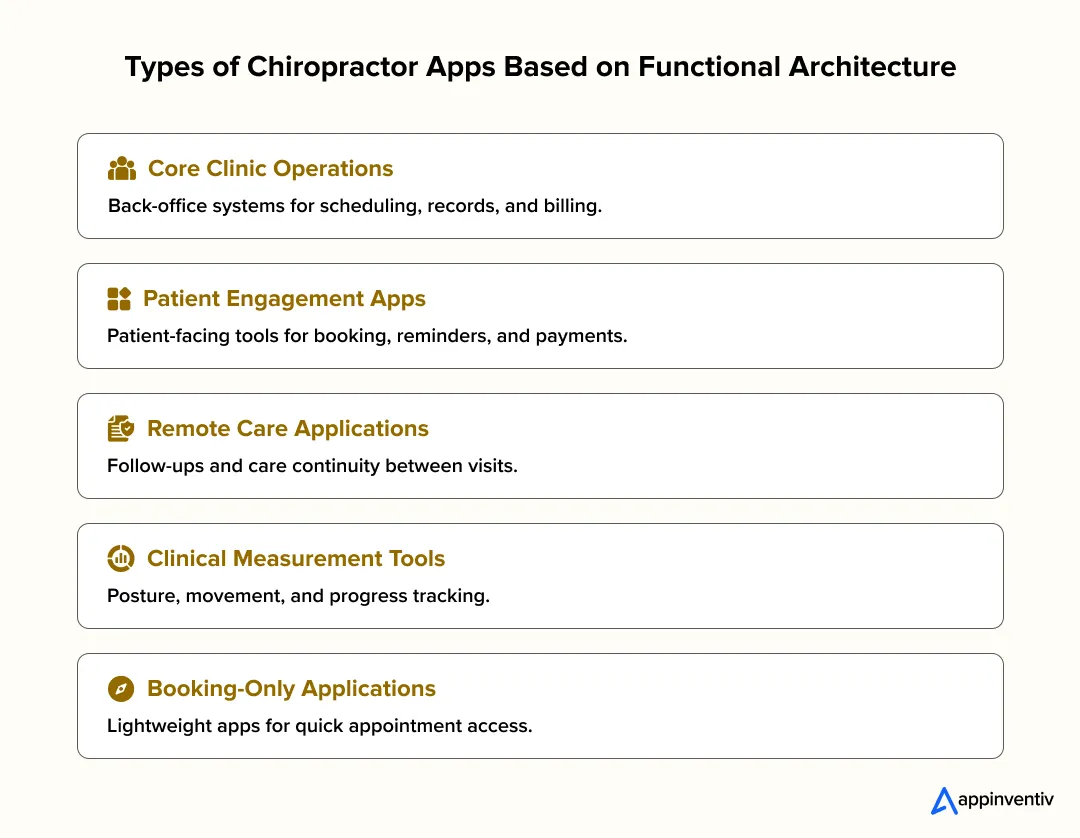
Core Clinic Operations Platforms
These applications sit at the center of clinic operations. They handle internal workflows that staff rely on throughout the day, often acting as the system of record.
Common use cases of chiropractic care apps in this category include:
- Scheduling across providers and rooms
- Storing and accessing patient records and visit history
- Standardizing clinical notes and documentation
- Automated billing, reporting, and staff access controls
- Supporting multi-location operations within one system
This category typically forms the backbone of long-term chiropractic clinic app development, especially for clinics prioritizing workflow stability and control.
Patient Interaction and Engagement Layers
These apps focus on how patients interact with the clinic outside the treatment room. They reduce dependency on front-desk staff while improving follow-through between visits.
Common use cases of chiropractic care apps in this category include:
- Self-service appointment booking and rescheduling
- Automated reminders to reduce no-shows
- Access to care plans, session summaries, and exercises
- In-app payments and invoice visibility
This layer is often the first visible step in digital transformation in chiropractic care and is frequently integrated with core systems rather than replacing them.
Remote Care Enablement Applications
These applications extend clinic workflows beyond physical visits. They are designed to support continuity of care rather than replace in-clinic treatment.
Common use cases of chiropractic care apps in this category include:
- Remote care for follow-ups and progress reviews
- Guided check-ins between visits
- Documentation of remote interactions within patient records
From a technical standpoint, these apps must integrate tightly with existing records to avoid fragmenting patient data.
Clinical Measurement and Diagnostic Modules
This category focuses on capturing objective data that supports diagnosis and progress tracking. These tools are often modular rather than standalone platforms.
Common use cases of chiropractic care apps in this category include:
- Posture and alignment tracking
- Range-of-motion measurement
- Visual comparison of patient progress over time
Their effectiveness depends on how well outputs are structured and pushed back into the main clinical record.
Booking and Scheduling Appointment Applications
These are narrowly scoped applications designed to solve immediate access problems. They typically focus on appointment booking and scheduling rather than long-term care management.
Common use cases of chiropractic care apps in this category include:
- Reducing inbound calls through online booking
- Supporting early-stage clinics or new locations
- Testing demand, pricing, or availability
While useful early on, clinics often outgrow this category if data cannot be reused across systems.
How Clinics Progress Across App Types
Clinics rarely stay in one category forever. Most evolve based on operational pressure.
Smaller practices often start with patient-facing or scheduling-focused tools. As volume increases, internal systems become critical. Clinics experimenting with hybrid care layer remote capabilities onto stable operational platforms.
This progression keeps Chiropractor App Development aligned with real clinic needs, not abstract feature sets.
Step-by-Step Development to Create a Chiropractor Application
This section breaks down Step-by-Step Development to Create a Chiropractor Application in the order clinics should actually follow. The goal is not to build fast, but to build right. This approach applies whether you are planning custom chiropractor app development for a solo practice or full-scale chiropractic clinic app development for multiple locations.

Step 1: Define What You Are Building and Lock the MVP Scope
Every successful Chiropractor App Development project starts with a tight MVP boundary. The MVP is not the smallest app possible. It is the smallest build that delivers one measurable clinic outcome.
Start by locking one goal:
- Reduce no-shows
- Improve retention and care plan adherence
- Streamline intake and front-desk workload
This step is critical in app development for chiropractors because clinics that skip it usually overbuild early and struggle with adoption later.
Step 2: Map Real Clinic Workflows Before Writing Requirements
Before feature lists, map how the clinic actually operates today. This is where many chiropractor mobile app solutions fail when they assume ideal workflows instead of real ones.
Document:
- How appointments are booked and changed
- What happens during check-in and intake
- How treatment notes and care plans are handled
- How follow-ups and reminders are triggered
- How payments are collected
This workflow mapping becomes the backbone of chiropractic practice management app design.
Step 3: Define User Roles, Permissions, and Data Access
Role clarity is foundational to building HIPAA compliant chiropractor app workflows and applies even outside regulated regions.
At minimum, define:
- Patient
- Front desk or receptionist
- Chiropractor
- Clinic admin or owner
For each role, specify access boundaries. This step directly supports compliances in chiropractic care app requirements and prevents data exposure risks later.
Step 4: Translate Workflows Into MVP Features
Now convert workflows into MVP Features for a Custom Chiropractor App. This is where discipline matters.
Typical MVP features include:
- Appointment booking, rescheduling, and reminders
- Digital intake forms and consent
- Care plan summaries and next-visit prompts
- Payment and invoice visibility
These features form the core of Build a Chiropractic Mobile App initiatives focused on operational efficiency.
Also Read: How to Build a Minimal Viable Product and Secure Funding
Step 5: Design Wireframes Before Final UI
Skipping wireframes almost always leads to rework. To build an app for chiropractor clinic projects, wireframes help validate speed and usability before design polish.
Wireframe key flows:
- Booking and rescheduling
- Intake and consent
- Appointment details
- Care plan view
- Clinic schedule and patient record views
Only after flow work should UI design begin.
Step 6: Select the Right Technology Stack and Architecture
This step defines the technology stack in chiropractic care application development and determines how well the app scales.
Key decisions include:
- Cross-platform vs native apps
- Backend and database structure
- Secure file storage for health records
- Notification systems for reminders
- Architecture support for future locations
This is also where chiropractic clinic software development decisions intersect with long-term scalability.
Step 7: Build Features in the Correct Sequence
Feature order matters in chiropractic clinic app development. Starting with scheduling alone often creates rework later.
Recommended build order:
- Authentication and role management
- Patient profiles and records
- Scheduling and availability
- Intake forms and consent
- Visit notes and care plans
- Notifications and reminders
- Payments and invoicing
- Admin dashboards and reports
This sequence supports both patient and clinic workflows without friction.
Step 8: Bake Compliance and Security Into the Build
Compliance is not a final checklist. It is part of building HIPAA compliant chiropractor app workflows from day one.
Core controls include:
- Data encryption
- Role-based access
- Audit logs
- Secure consent storage
- Backup and recovery planning
These measures also strengthen overall compliances in chiropractic care app standards.
Step 9: Test for Real Clinic Scenarios, Not Just Edge Cases
Testing for apps for chiropractors must reflect real clinic behavior.
Test scenarios such as:
- Schedule conflicts and double bookings
- Last-minute cancellations
- Incomplete intake forms
- Poor network conditions
- Payment failures
This step directly reduces post-launch issues in chiropractor mobile app solutions.
Step 10: Launch With Adoption in Mind
A technically sound app can still fail if adoption is weak. Launch planning is part of custom chiropractor app development, not an afterthought.
Effective rollout steps:
- Start with one location or provider
- Train staff on limited workflows
- Introduce the app during check-in
- Track early metrics like no-shows and intake completion
Step 11: Iterate Using Measured Outcomes
Post-launch improvements should be driven by data, not assumptions. This phase shapes long-term chiropractic clinic app development success.
Focus on:
- Drop-offs in booking or intake
- Reminder effectiveness
- Staff workflow bottlenecks
- Patient engagement patterns
This creates a solid base for advanced capabilities such as AI/ML Implementation in chiropractic care app in later phases.
Must-Have Features for an Enterprise Chiropractic App
As clinics scale, software stops being a convenience and starts becoming infrastructure. Features that worked for a small team often struggle once patient volume increases, providers multiply, or reporting needs grow. At this stage, chiropractor app development is less about adding more and more tools and more about keeping daily workflows stable.
| Feature Area | Patient Side (Experience & Convenience) | Clinic / Admin Side (Operations & Control) |
|---|---|---|
| Scheduling & Access | Self-service booking and rescheduling with real-time availability | Centralized provider calendars and conflict prevention |
| Intake & Consent | Digital intake forms and HIPAA-compliant consent completed before visits | Pre-populated clinical records and reduced front-desk data entry |
| Care Visibility | Visual care pathways showing progress across sessions | Linked care plans and visit summaries inside patient records |
| At-Home Engagement | Video-based exercise guidance between appointments | Fewer repeat explanations and better adherence tracking |
| Documentation | — | Chiropractic-specific SOAP note templates for faster charting |
| Multi-Location Support | Consistent experience across all clinic locations | Role-based access and centralized oversight across clinics |
| Retention & Follow-Ups | Timely reminders and personalized re-engagement messages | Automated identification of inactive patients and recovery workflows |
Patient Experience Features That Support Retention
Patients stay engaged when the app stays out of their way. Small improvements in how they book, prepare for visits, and follow care plans often have the biggest long-term impact.
- Intelligent Self-Scheduling: Real-time scheduling tied to provider availability helps prevent double bookings and last-minute changes, while giving patients the flexibility to manage appointments on their own.
- Digital Intake and Consent: HIPAA-compliant intake and consent flows that carry forward between visits reduce repetition, speed up check-ins, and lower documentation errors for both patients and staff.
- Visual Care Pathways: Clear views of progress, such as posture changes or range-of-motion improvements, help patients understand why continued care matters and encourage better follow-through.
- Exercise Libraries With Video Guidance: In-app exercise videos give patients consistent guidance between visits, improving adherence without adding to provider workload.
Clinic Operations Features That Improve Efficiency
On the clinic side, enterprise chiropractic clinic app development focuses on consistency and control as teams and locations expand.
- SOAP Note Automation: Templates built specifically for chiropractic adjustments help providers complete documentation faster without sacrificing accuracy or structure.
- Multi-Location Management With Role-Based Access: Role-based permissions allow owners and administrators to manage multiple clinics from a single system, while keeping workflows focused for staff and providers.
- Automated Patient Reactivation: Data-driven reactivation flows identify patients who have not returned within a defined period and trigger timely outreach, supporting retention without manual tracking.
When these features are built into the core platform, the app becomes part of how the clinic runs rather than another system to manage. That foundation makes it easier to grow without constantly reworking workflows.
Advanced Clinical Features for a Chiropractic Mobile App
Once the MVP is stable, clinics usually add features that deepen engagement and support growth. In Chiropractor App Development, these upgrades work best when introduced after core workflows are proven.
- Teleconsults for Follow-Ups: Used for progress checks and post-treatment reviews, teleconsults help clinics stay connected without increasing in-clinic load. This is a common next step in custom chiropractor app development.
- Progress Tracking With Photos or Posture Logs: Visual tracking helps patients see improvement and supports better follow-up conversations. Many chiropractor mobile app solutions use this to improve care plan adherence.
- Automated Reminders and Reactivation Flows: Automated follow-ups for missed visits or inactive patients reduce manual outreach and support retention in chiropractic clinic app development.
- Wearable Integrations Where Relevant: Selective wearable data can add context around movement and recovery, depending on the clinic’s care model.
- Referrals, Loyalty, and AI-Driven Insights: Referral programs and loyalty features support organic growth, while AI/ML implementation in chiropractic care app workflows can help identify drop-off risks and optimize follow-ups.
These features add value when layered onto a system that clinics and patients already use consistently.
What Integrations Do Chiropractor Clinics Usually Need?
Most clinics do not struggle because they are missing features. The real friction shows up when everyday systems fail to work together. In Chiropractor App Development, integrations often decide whether a product quietly supports daily operations or adds another layer of manual coordination for staff.
Strong app development for chiropractors starts by respecting what clinics already rely on. The goal is rarely replaced. It is continuity. When existing tools connect cleanly, teams spend less time reconciling data and more time focusing on care delivery.
Interoperability With Healthcare Systems (HL7 and FHIR APIs)
As clinics coordinate with imaging centers, specialists, and hospital networks, data exchange becomes unavoidable. Support for HL7 messaging and FHIR APIs allows patient information to move in structured, predictable ways across systems.
In practice, this enables:
- Reliable exchange of patient records with external providers
- Consistent documentation across referrals and follow-ups
- Fewer information gaps during transitions of care
For clinics moving through digital transformation in chiropractic care, interoperability prevents growth from creating fragmented patient histories.
Billing and Insurance Integration Using ICD-10-CM and CPT Codes
Billing workflows tend to break down under volume. Small inefficiencies compound quickly. Integrating ICD-10-CM and CPT codes directly into the application helps clinics bring structure to insurance processing.
Clinics typically see value through:
- Faster claim generation without repeated manual coding
- Quicker eligibility checks before appointments
- Fewer billing corrections and follow-up disputes
Within a chiropractic practice management app, this integration improves cash flow while reducing administrative strain.
Imaging and Diagnostic Access Through DICOM Viewers
Imaging plays a supporting role in many chiropractic decisions. When diagnostic data lives outside the core system, context gets lost. Integrating DICOM viewers brings imaging closer to the clinical workflow.
This approach allows:
- X-rays and MRIs to be reviewed inside the same application
- Faster clinical context during patient visits
- Clear links between imaging, notes, and care plans
For long-term chiropractic clinic software development, this reduces the risk of diagnostic data becoming isolated from treatment records.
Secure Payment Gateway Integration (PCI-DSS Compliant)
Payment handling is often the first operational bottleneck clinics try to fix. PCI-DSS compliant payment gateway integrations such as Stripe or PayPal provide a stable foundation for modern billing workflows.
Well-implemented payment integration supports:
- In-app payments for visits, packages, and memberships
- Acceptance of HSA and FSA cards where applicable
- Recurring billing with clear audit trails
In custom chiropractor app development, dependable payment flows build patient trust and reduce front-desk intervention.
How Do Chiropractor Apps Handle Compliance and Data Security?
Managing compliances in chiropractic care app is not something you “add later.” It quietly shapes every technical decision, even if patients never see it directly. Clinics deal with health records, consent, and payments every day. If the foundation is weak, problems show up when the clinic grows or when something goes wrong.
This is where most long-term risk lives, so it needs to be handled early and deliberately.
HIPAA Considerations for US Clinics
For US-based clinics, HIPAA affects how the app behaves behind the scenes. It is less about paperwork and more about discipline in how data moves through the system.
In practice, this means:
- Only the right people can see patient information
- Sensitive data is not exposed through notifications or exports
- Access is logged and traceable
- There is a clear plan for handling incidents, not just hoping they never happen
Even clinics outside the US often follow the same standards because they create a strong baseline for patient data protection.
Data Encryption and Access Controls
Most security issues do not come from hackers. They come from accidental access, shared devices, or poorly defined permissions. That is why encryption and access control matter so much in day-to-day clinic use.
Good implementations usually include:
- Encryption for stored data and data in transit
- Secure login flows for staff and providers
- Clear role-based access, so people see only what they need
- Automatic session timeouts on shared systems
These measures reduce risk without getting in the way of daily work.
Also Read: Healthcare Data Security: Challenges & Best Practices
Consent Storage and Audit Trails
Consent needs to be provable, not assumed. Clinics should be able to show when consent was given, what version was accepted, and who accessed patient records afterward.
This is usually handled by:
- Secure storage of signed consent forms
- Version control when consent language changes
- Audit logs that track access and edits over time
These records matter during audits, disputes, or internal reviews, even if they are rarely looked at day to day.
Payment Security and Compliance Basics
Payment data requires a different level of care. Clinics should never store raw card or bank details inside their systems. That responsibility belongs with payment providers.
A safe setup typically involves:
- Using trusted third-party payment gateways
- Tokenizing payment information instead of storing it
- Keeping payment data separate from health records
- Following basic PCI compliance practices
Handled correctly, payment security stays invisible to users while protecting both patients and the clinic.
When compliance and security are treated as part of the build, not an afterthought, they stop slowing projects down later. They give clinics confidence to scale, add locations, and introduce new features without reopening fundamental design decisions.
What Does It Cost to Build a Chiropractor App and How Long Does It Take?
Cost is one of the first questions clinics ask, and usually the hardest one to answer in a single number. Chiropractic app development pricing varies because clinics are not building the same thing. A simple patient app and a multi-location platform with integrations and compliance controls sit at very different levels of effort.
What helps is understanding what actually drives cost, and how those choices affect both timeline and long-term ownership.
What Actually Drives Development Cost?
The cost of custom chiropractor app development is shaped less by screens and more by complexity behind them. The biggest cost drivers usually include:
- Scope and depth of features: A basic booking and intake flow costs far less than a full chiropractic practice management app with reporting, roles, and integrations.
- Number of user roles: Patient-only apps are simpler. Adding front desk, chiropractor, admin, and owner roles increases logic, testing, and access control work.
- Integrations: Payments, messaging, calendars, existing clinic systems, and accounting exports all add effort, especially when reliability is critical.
- Compliance and security requirements: Building HIPAA-aligned workflows, audit trails, and secure data handling adds necessary complexity, particularly for US clinics.
- Scalability needs: A single-clinic app is very different from chiropractic clinic app development designed for multiple locations and providers.
How Do MVP and Full Platform Costs Compare?
Most clinics start with an MVP to validate adoption before investing further. The table below shows chiropractic care app development cost breakdown, keeping scope realistic.
| Build Type | What It Typically Includes | Cost Range | Timeline |
|---|---|---|---|
| MVP | Booking, intake forms, reminders, basic admin tools | $40K to $80K | 8 to 12 weeks |
| Mid-Scale App | Patient and clinic apps, payments, notifications, reports | $80K to $180K | 3 to 5 months |
| Full Platform | Multi-location support, deep integrations, advanced workflows | $180K to $400K | 6 to 9 months |
These ranges apply to Build a Chiropractic Mobile App projects developed as custom products, not off-the-shelf tools.
Also Read: Healthcare App Development Cost: A Complete Guide
What Should Clinics Expect After Launch?
The build is only part of the investment. Once the app is live, clinics need to plan for ongoing work to keep it stable and useful.
Typical ongoing costs include:
- Infrastructure and hosting
- Security updates and compliance changes
- Bug fixes and performance improvements
- Small feature enhancements based on real usage
- OS and device compatibility updates
As a rule of thumb, clinics usually budget 15–25 percent of the initial development cost per year for maintenance and iteration. This ensures the app continues to support clinic growth instead of slowly becoming outdated.
When cost and timeline are planned realistically, app development for chiropractors becomes far more predictable. Clinics can start lean, prove value, and then scale the platform with confidence rather than committing to everything upfront.
Chiropractic Care App Monetization and Choosing the Right Partner
Once adoption is established, clinics begin thinking about sustainability and returns. Chiropractic care app monetization is rarely about charging for app downloads. It is usually tied to how the app improves revenue flow, efficiency, and retention.
Most clinics use a mix of direct and indirect monetization methods.
- Care packages and memberships: Apps make it easier to sell prepaid plans and memberships, improving cash flow and retention.
- Paid virtual follow-ups: Teleconsults for progress reviews or guidance can be offered as paid services.
- Reduced revenue leakage: Fewer no-shows, better follow-ups, and smoother payments often generate more value than direct fees.
- Operational savings: Less manual work at the front desk and fewer billing errors translate into real cost savings.
In practice, monetization shows up in performance metrics rather than app revenue alone.
Also Read: App Monetization Guide: 7 Strategies and Models Overview
Common Development Mistakes Clinics Should Avoid (and How to Fix Them)
Most problems in Chiropractor App Development do not come from bad intentions. They come from building too quickly without understanding how a clinic actually runs. The good news is that these mistakes are predictable and avoidable when addressed early.
Below are the most common challenges and solutions for developing a chiropractor application.
Building Scheduling Only Without Workflow Depth
Many clinics start by building “just a scheduling app.” Bookings work, but everything else still happens manually. Staff re-enter data, chiropractors lack context, and the app quickly feels disconnected from daily operations.
How to fix it
- Design scheduling as part of a larger flow, not a standalone feature
- Connect bookings to intake, patient records, and visit status
- Ensure appointments trigger the next steps automatically
Scheduling should act as the entry point to the workflow, not the entire product.
Ignoring Staff Roles and Permissions
Treating all users the same is a common mistake in app development for chiropractors. When everyone sees everything, errors increase and accountability drops.
How to fix it
- Clearly define roles such as front desk, chiropractor, admin, and owner
- Limit access based on what each role actually needs
- Log changes to records, schedules, and payments
Role-based access keeps data safe and workflows clean as teams grow.
Poor Intake Flows That Create Manual Work
Digital intake loses its value if staff still need to chase patients or retype information. Long forms, unclear instructions, or poor mobile usability often cause drop-offs.
How to fix it
- Keep intake forms short and mobile-friendly
- Allow patients to save and complete forms later
- Trigger reminders automatically before appointments
- Make completed forms instantly visible to staff
A good intake flow should remove work, not shift it.
Weak Reminder Systems
Many clinics rely on basic reminders that are easy to ignore. When reminders fail, no-shows rise and schedules break down.
How to fix it
- Use SMS or WhatsApp instead of email alone
- Send reminders at the right moments, not just once
- Add follow-ups for missed or cancelled appointments
- Personalize messages with appointment details
Strong reminder systems are one of the simplest ways to improve attendance.
No Analytics to Track ROI
Clinics often build an app and then rely on gut feeling to judge success. Without data, it is hard to justify further investment or know what to improve.
How to fix it
- Track no-show rates before and after launch
- Monitor intake completion and booking drop-offs
- Measure repeat visits and care plan adherence
- Review time saved at the front desk
Even basic analytics give clinics clarity on what is working and what is not.
Avoiding these mistakes turns custom chiropractor app development into a structured process instead of trial and error. When clinics design with real workflows, clear roles, and measurable outcomes in mind, the app becomes a reliable part of daily operations rather than an unused add-on.
Advanced Technologies and Future Trends in Chiropractic Software
Chiropractic platforms are moving beyond basic digitization toward systems that actively support care delivery, operational reliability, and long-term growth. The focus is shifting from isolated features to technologies that improve continuity, insight, and adaptability across the clinic.
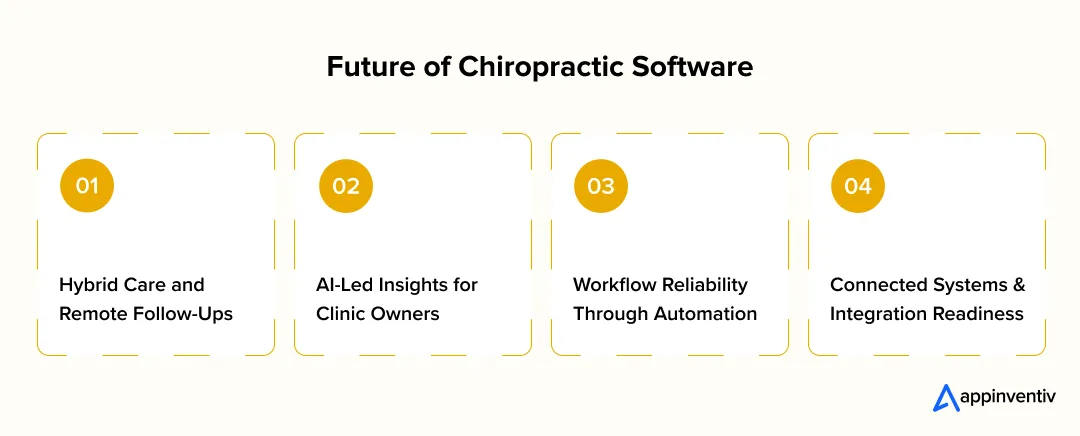
Hybrid Care and Remote Follow-Ups
Clinics are increasingly blending in-clinic treatment with telehealth integration for follow-ups and progress reviews. When these interactions are connected to cloud EHR systems, documentation stays centralized and traceable, which preserves continuity and avoids fragmented patient records.
- Keeps remote touchpoints part of the same clinical workflow
- Maintains audit-ready documentation
- Supports access without disrupting daily operations
Intelligence-Led Insights for Clinic Owners
Instead of relying on manual tracking, platforms are using artificial intelligence (AI) in healthcare to surface patterns that matter operationally. Through predictive analytics, clinics can spot early signs of missed visits or declining adherence. These insights flow into advanced reporting, improving visibility while strengthening engagement tracking over time.
- Highlights risks before they impact outcomes
- Provides trend-level insight across providers and locations
- Reduces guesswork in operational decisions
Workflow Reliability Through Automation
Routine tasks are no longer dependent on staff memory. RPA in healthcare enables automation of consistent follow-ups and reminders based on real patient behavior. This allows clinics to deliver personalized communication plans without increasing manual workload.
- Improves response rates without added staff effort
- Keeps outreach timely and consistent
- Reduces operational overhead
Connected Systems and Integration Readiness
As clinics adopt more tools, interoperability in healthcare becomes essential. Modern chiropractic software is expected to exchange data cleanly with other systems. Support for third-party integrations allows clinics to extend functionality gradually while avoiding data silos.
- Enables phased digital adoption
- Preserves data continuity
- Reduces future migration risk

Building for Scale With the Right Development Partner
Most clinics begin with off-the-shelf tools because they are fast to adopt. Over time, those tools start to feel restrictive. Workflows cannot be adjusted, integrations break easily, and reporting no longer reflects how the clinic operates. This is often when chiropractor app development becomes a strategic decision rather than a tactical one.
As clinics grow, long-term maintenance and compliance become unavoidable. Patient data volume increases. Security expectations rise. Systems need regular updates to stay stable and compliant. Clinics that plan for this early avoid costly rebuilds later. This is where experienced healthcare mobile app development services add real value, by designing platforms meant to evolve rather than stall.
Working with a healthcare-focused development partner also reduces execution risk. Teams with real domain experience understand compliance, integrations, and scale from day one. For example, Appinventiv has built large-scale platforms like the YouComm Health App, supporting modern care delivery and real-world patient engagement. With 500+ digital health platforms delivered, 450+ healthcare clients served, and 10+ years in HealthTech projects, this experience helps clinics move forward with clarity instead of assumptions.
If your clinic is thinking beyond basic tools and planning for long-term growth, we can help you make scaling far more predictable.
FAQs
Q. How Much Does It Cost to Build a Chiropractic App?
A. The cost to build a chiropractic app typically ranges from $40,000 to $400,000, depending on scope, complexity, and scale. A basic MVP with scheduling and intake sits at the lower end, while a full platform with integrations, compliance, and multi-location support moves toward the higher range. In chiropractor app development, cost is driven more by workflows, roles, and integrations than by screen count alone.
Q. How Long Does It Take to Create a Chiropractic App?
A. Timelines vary based on what is being built. A focused MVP usually takes 8 to 12 weeks, while a more complete system can take 3 to 9 months. The timeline extends when features like compliance controls, integrations, or scalability are introduced. Realistic planning early helps avoid delays later.
Q. How Should Clinics Approach the Build vs. Buy Decision?
A. The build vs. buy decision depends on how closely the app needs to match clinic workflows. Off-the-shelf tools work when needs are simple and standardized. Custom builds make sense when clinics require flexibility, integrations, or long-term scalability. A useful framework is to buy when speed matters more than differentiation, and build when workflows, data ownership, or growth plans demand control. Looking at existing chiropractor app examples often helps clinics understand where packaged tools fall short.
Q. How Does AI Help in Chiropractic Care Apps?
A. AI supports chiropractic care by identifying patterns that are hard to track manually. It can flag patients at risk of missing appointments, highlight drop-offs in care plans, and suggest better follow-up timing. AI can also support operational insights for clinic owners, helping them make data-driven decisions without adding staff workload.
Q. How Do You Hire a Chiropractor App Development Company?
A. Hiring the right partner starts with healthcare experience. Clinics should look for a chiropractic app development company that understands compliance, integrations, and long-term maintenance, not just app design. Evaluating past healthcare projects, asking about security practices, and understanding post-launch support are key steps in reducing risk and building for scale.
Q. How Can a Chiropractic App Support Both Insurance and Cash-Based Practice Models?
A. A well-designed platform uses dual-model architecture to handle insurance claims and cash-based maintenance side by side without mixing workflows. This means applying separate fee schedules, enforcing payer-specific documentation rules, and maintaining clean audit trails for compliance. For clinics offering episodic care models and multi-visit treatment plans, the system routes visits through the right billing and coding software, connects with chiropractic billing solutions, and manages payment processing accurately. When combined with chiropractic financial management software, clinics gain clear visibility across both revenue models while reducing operational friction.

- In just 2 mins you will get a response
- Your idea is 100% protected by our Non Disclosure Agreement.

Healthcare Kiosk Software Development – Benefits, Use Cases, Features, Costs, Process
Key takeaways: The healthcare kiosks streamline administrative processes, enhance patient flow, improve staff productivity, reduce costs, and enhance the patient experience. Healthcare kiosks enhance efficiency and personalized care through EMR/EHR-integrated kiosk software with AI, delivering real-time data updates. Scalable kiosk solutions lower operations expenses, enhance patient throughput and improve service delivery in healthcare organizations. Patient…

How To Develop a Sustainable Healthcare System?
Key Takeaways Rising costs and climate pressure make building a sustainable healthcare system a core business and risk strategy decision. Learn the key principles of sustainable healthcare system development, including prevention, efficiency, equity, and social sustainability. See how AI, data platforms, and a sustainable digital system in healthcare cut waste, improve outcomes, and stabilize workforce…

EHR Implementation for Healthcare Providers: Process, Features, and Total Cost Analysis
Key takeaways: A clear EHR implementation guide keeps teams on track and prevents delays. The full EHR implementation process includes planning, setup, moving data, training staff, and regular updates. The right features handle clinical work, billing, reports, and compliance for large healthcare organizations. EHR implementation costs vary based on design, integrations, data migration, training hours,…









