





























How to Build an App With Claude Code in 2026: Steps, Requirements, and More

 Share -



- 01Tech Requirements for Your System Before You Begin
- 02How to Build an App With Claude Code: The Step-by-Step Process
- 03How to Deploy The App You Built on Claude?
- 04Our Attempt at Building Apps Using Claude Code
- 05App 2: RxRadar – Nearby Open Pharmacy Locator (Healthcare)
- 06App 3: The Smart Budget Planner (Fintech)
- 07Cost of Claude Code AI App Development
- 08How Can Appinventiv Help You Out?
- 09FAQs

Key takeaways:
- Write a PRD and CLAUDE.md before the agent writes any code.
- Scaffold the skeleton and deploy the pipeline before building features.
- Work in small commits and review every diff.
- Claude Code ships beautiful facades over broken foundations.
- Regulated industries (healthcare, fintech) need human compliance review — no exceptions.
Learning how to build an app with Claude Code takes an afternoon. Learning where it quietly breaks takes three apps and a lot of debugging.
We built all three end-to-end — a cinematic movie picker, a healthcare pharmacy locator, and a fintech budget planner — to find out exactly where the tool stops being helpful and starts being dangerous.
Below, you will find the full step-by-step process, real costs, three live demos, and the structural flaws that would stop any of these from shipping to real users.
But real experts can. Hire a team that knows compliance. Penalties can often be costlier than development costs

Tech Requirements for Your System Before You Begin
Before you even open a terminal window, you must lay the groundwork. Proceeding into building apps with Claude Code without the right environment is a guaranteed disaster. Ensure you have the following assets ready.
| Resource / Requirement | Purpose in Development | Accessibility |
|---|---|---|
| Node.js (v18+) | The core runtime environment is required to spin up modern frameworks like Next.js or React. | Free / Open Source |
| Claude Code CLI | The engine. This is installed globally via your terminal to interact directly with your local files. | Anthropic API Pricing |
| Third-Party API Keys | Data injection. (e.g., TMDB for movies, OpenStreetMap for geolocation). | Varies (Free tiers available) |
| GitHub Account | Essential for version control. Do not rely on local saves when an AI is rapidly altering code. | Free |
| Netlify / Vercel | Streamlined cloud deployment hosting to take your local host live to the world. | Free tiers available |
How to Build an App With Claude Code: The Step-by-Step Process
This is the wikiHow-style section you came for. These are the same steps we walk our own clients through, compressed into the version you can start tomorrow.
Step 1: Define the Problem Before You Touch the Keyboard
The worst Claude Code sessions start with “build me a CRM.” The best ones start with a one-page brief: who the user is, what outcome they need, which three workflows matter, and what “good” looks like six weeks from now. Spend an hour here, and you’ll save a month later.
Write this down in a file called PRD.md at the root of your project. Claude will read it in every session.
Step 2: Choose Your Tech Stack With Intent
Claude Code is stack-agnostic, but your choices shape how smoothly the agent can help you. A few practical rules we follow:
- Prefer mainstream languages and frameworks. TypeScript, Python, Go, Rust, React, Next.js, FastAPI — Claude is disproportionately better at these because training data favors them.
- Pick boring databases. Postgres, Redis, and a vector store like pgvector or Pinecone will carry most AI apps.
- Decide your model routing upfront. Claude Opus 4.6 for planning and hard reasoning, Sonnet 4.6 for everyday coding, Haiku 4.5 for cheap utility calls. Document this in your repo.
Step 3: Install Claude Code and Wire Up Your Environment
Install paths depend on your OS. On macOS with Homebrew, it’s a one-liner; on Windows, you’ll need Git for Windows installed first. Inside your project, create two files that will quietly make or break your experience:
- CLAUDE.md — a project memory file Claude reads at the start of every session. Put coding standards, architecture notes, directory layout, and “things not to do” in here.
- CHANGELOG.md — Anthropic’s own scientific computing guide recommends using this as working memory between sessions, especially for long-running agent work.
Add MCP (Model Context Protocol) servers for any external systems the agent should touch — GitHub, Jira, Google Drive, your internal docs. This is where Claude Code stops being a code generator and starts becoming an actual teammate.
Step 4: Plan Before You Build
Don’t let the agent start coding on turn one. Ask for a plan. A typical first prompt in our workflow looks like:
“Read the PRD.md and CLAUDE.md. Propose a directory structure, the first five files to create, and three architectural decisions I need to make before you write any code. Do not write code yet.”
Review the plan. Push back on anything vague. This is the single highest-leverage habit in app development using Claude Code — and the one most DIY builders skip.
Step 5: Build the Skeleton First
Have Claude scaffold the bare bones: empty routes, empty components, a failing test suite, a Dockerfile and a basic CI workflow. Run it. Make sure it builds and deploys to a staging environment before you add a single feature. The goal is to validate the pipes, not the product.
Step 6: Work Feature by Feature With Tight Loops
For each feature, follow a four-step loop:
- Describe the feature in plain language, including edge cases.
- Ask Claude to write a failing test first, then the implementation.
- Read every diff. Not skim. Read.
- Commit small. A good Claude Code session produces lots of small commits, not one mega-PR.
We’ve had prototypes go from zero to a working demo in a weekend this way. We’ve also had DIY teams ignore step 3 and land in production with a SQL injection vulnerability they didn’t know existed.
Step 7: Add the AI Layer Deliberately
If your app calls Claude (or any model) at runtime — which most AI apps do — treat that as its own subsystem. Here’s the checklist we use:
- Separate your prompts from your code (a /prompts directory with versioned files).
- Add an evaluator: a small test suite of inputs and expected-ish outputs you run on every prompt change.
- Log every model call with inputs, outputs, latency, token count, and cost.
- Set hard rate limits and spend caps before you open the API key.
- Decide what happens when the model is wrong, slow, or down. There must be a fallback.
This is where enterprise AI applications start diverging from weekend projects. Ignore it at your own risk. Once the app does more than call a model once, planning, tool use, retries across several steps, that subsystem becomes an orchestration decision. Claude Agent SDK vs LangGraph and CrewAI comes down to whether you can enumerate the paths in advance or need the model to choose them at runtime.
Step 8: Harden Security and Compliance
Before anyone outside your team uses the app, run through:
- Secrets management (never in the repo, rotate on a schedule)
- Authentication and authorization (use a proven library, not a Claude-generated one)
- Input validation and output sanitization
- Rate limiting at the API edge
- Audit logging for any sensitive action
- A documented data flow diagram for your DPO or compliance lead
For regulated industries, this is where we bring in governance specialists who live inside frameworks like the EU AI Act, NIST AI RMF, and ISO 42001. Claude Code is fantastic at writing the code that implements policy. It is not qualified to write the policy.
Step 9: Ship, Observe, and Iterate
Deploy behind a feature flag. Start with a small user group. Watch your dashboards — not just uptime, but token spend, model quality, user satisfaction, and support ticket patterns. Claude Code’s scheduled tasks feature can run nightly audits, dependency checks, and regression tests on an ongoing basis, which is genuinely useful once you trust the setup.
Step 10: Budget for What Comes After Launch
This is the step DIY builders always forget. An AI app is not a project with an end date. Models change. Prompts drift. Data schemas evolve. Your ongoing cost isn’t just hosting — it’s continuous evaluation, prompt tuning, guardrail updates, and retraining whichever pieces of the system learn from user data.
How to Deploy The App You Built on Claude?
There are multiple options to do that. But the best and most sorted one is Netlify. Simply open Netlify.com, and sign up with any of the following options:
Step 1: Sign Up
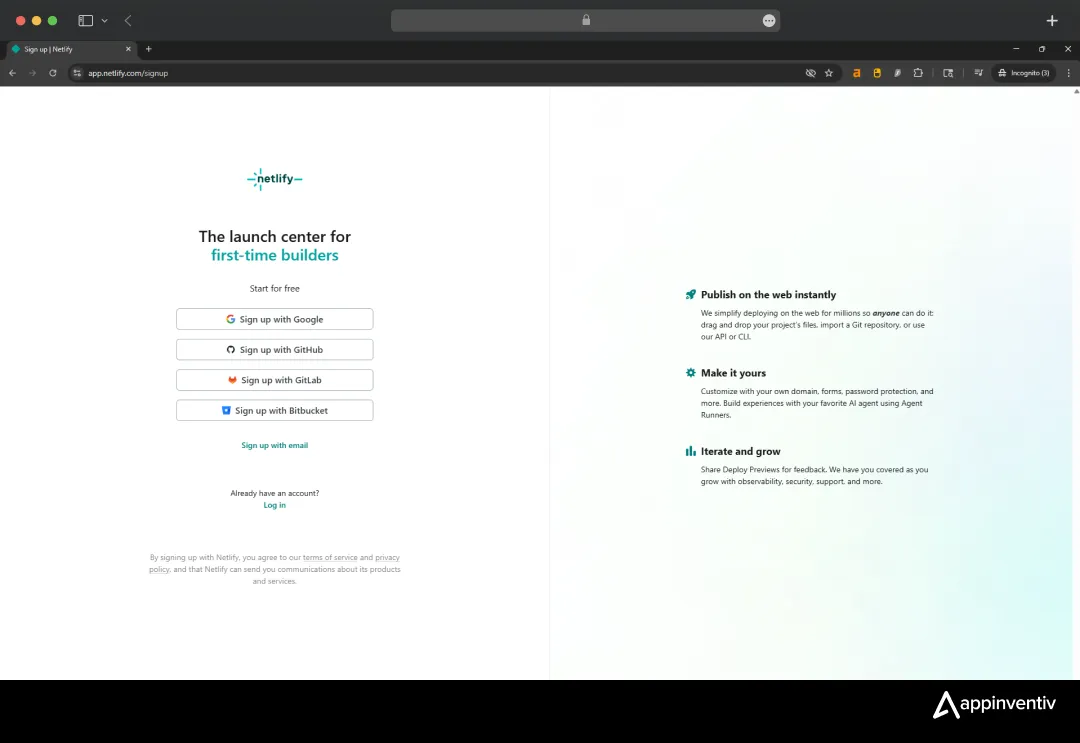
Step 2: Once you’re in, click on ‘Add Project’
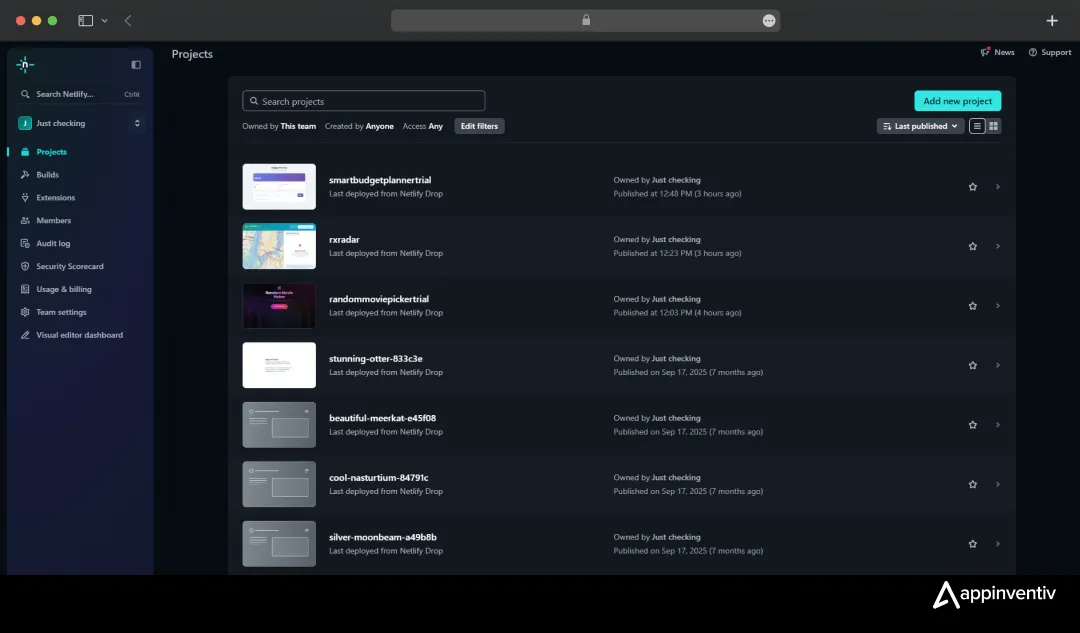
Upload the file Claude saved on your device. It should be an HTML saved in the folder. By the way, signing up with GitHub will allow you to directly import the file from your GitHub repository.
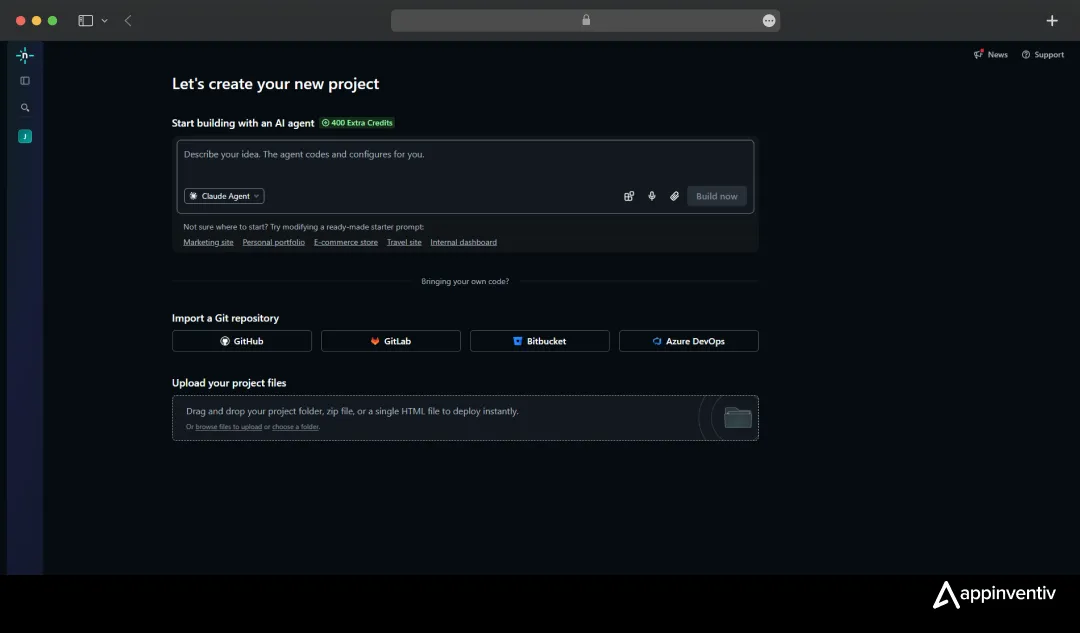
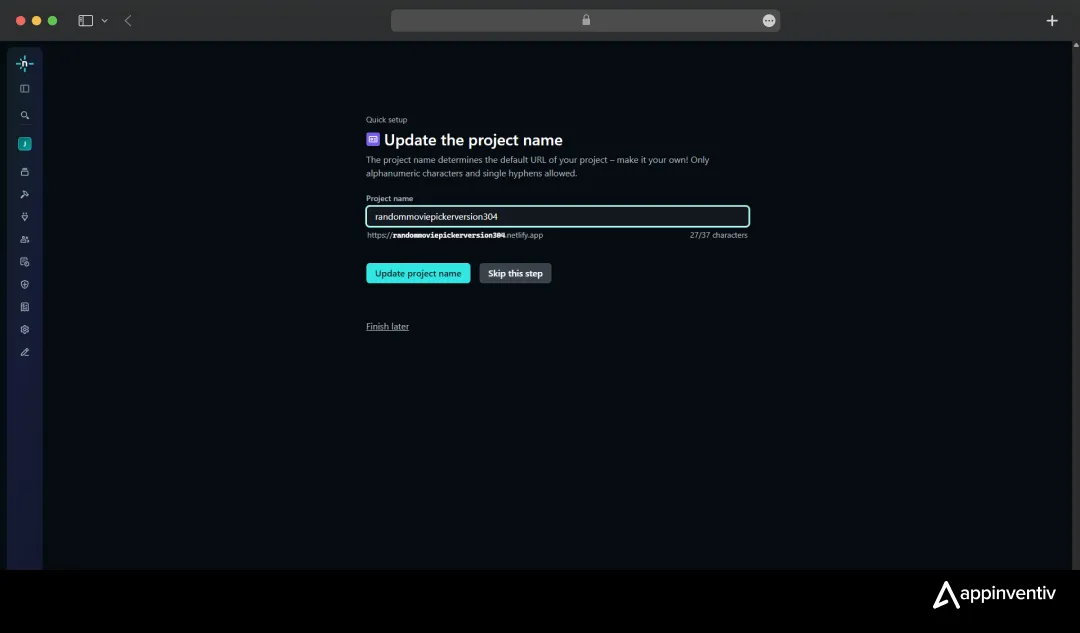
Step 3: Click on Quick Setup to define a URL. Set a name and update it.
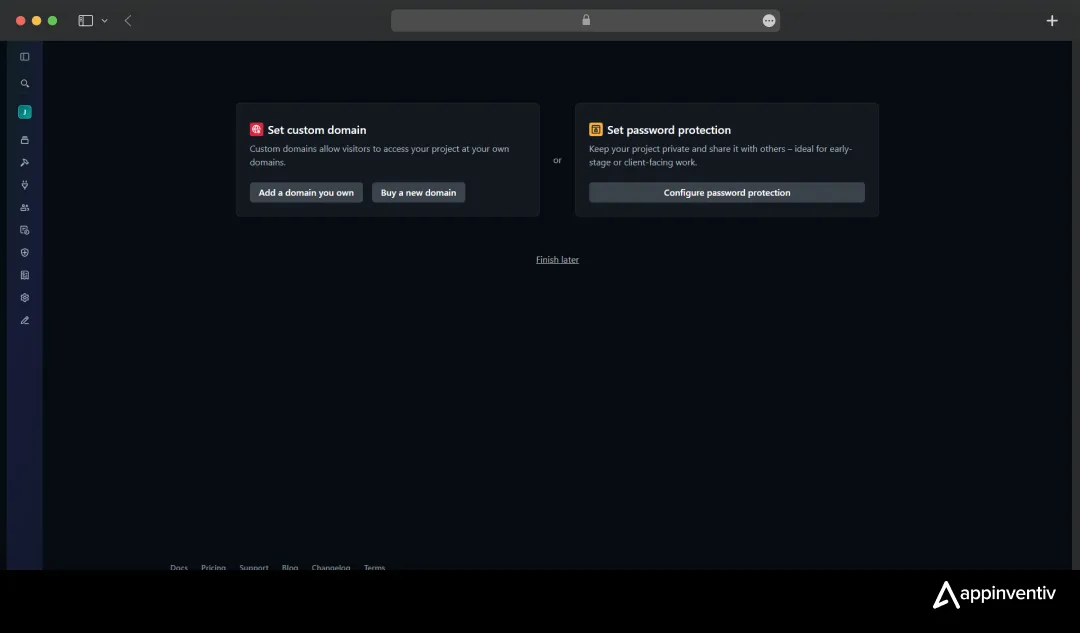
Step 4: If you have a custom domain, link here, or buy a premium domain from the platform.
A password is mostly for use cases where you don’t want anybody to check the content without permission.
Step 5: On this final screen, you now have the domain in green. Publish it anywhere you like to bring the audience here.
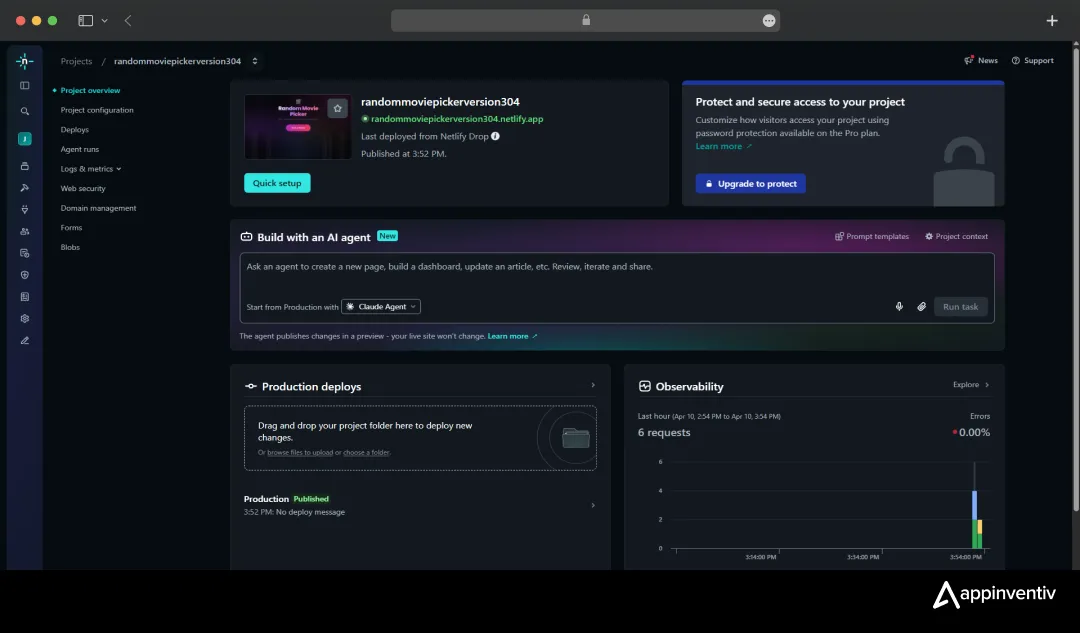
A local app sitting on your hard drive doesn’t generate revenue. But deploying AI code to complex cloud environments often triggers a cascade of dependency errors. Instead of wrestling with heavy AWS or Vercel configurations out of the gate, we streamlined the launch.
We ripped out the hallucinated backend configurations and deployed our static builds directly through Netlify. By connecting our GitHub repository, Netlify instantly built and hosted our tools.
As seen in the screenshots, the live Boston map for RxRadar rendered perfectly. However, this deployment speed is deceptive; it masks the underlying architectural debt that will eventually bottleneck a scaling application.
Our Attempt at Building Apps Using Claude Code
Now we will show you our attempts at building apps for three different genres: entertainment, healthcare, and fintech and the results.
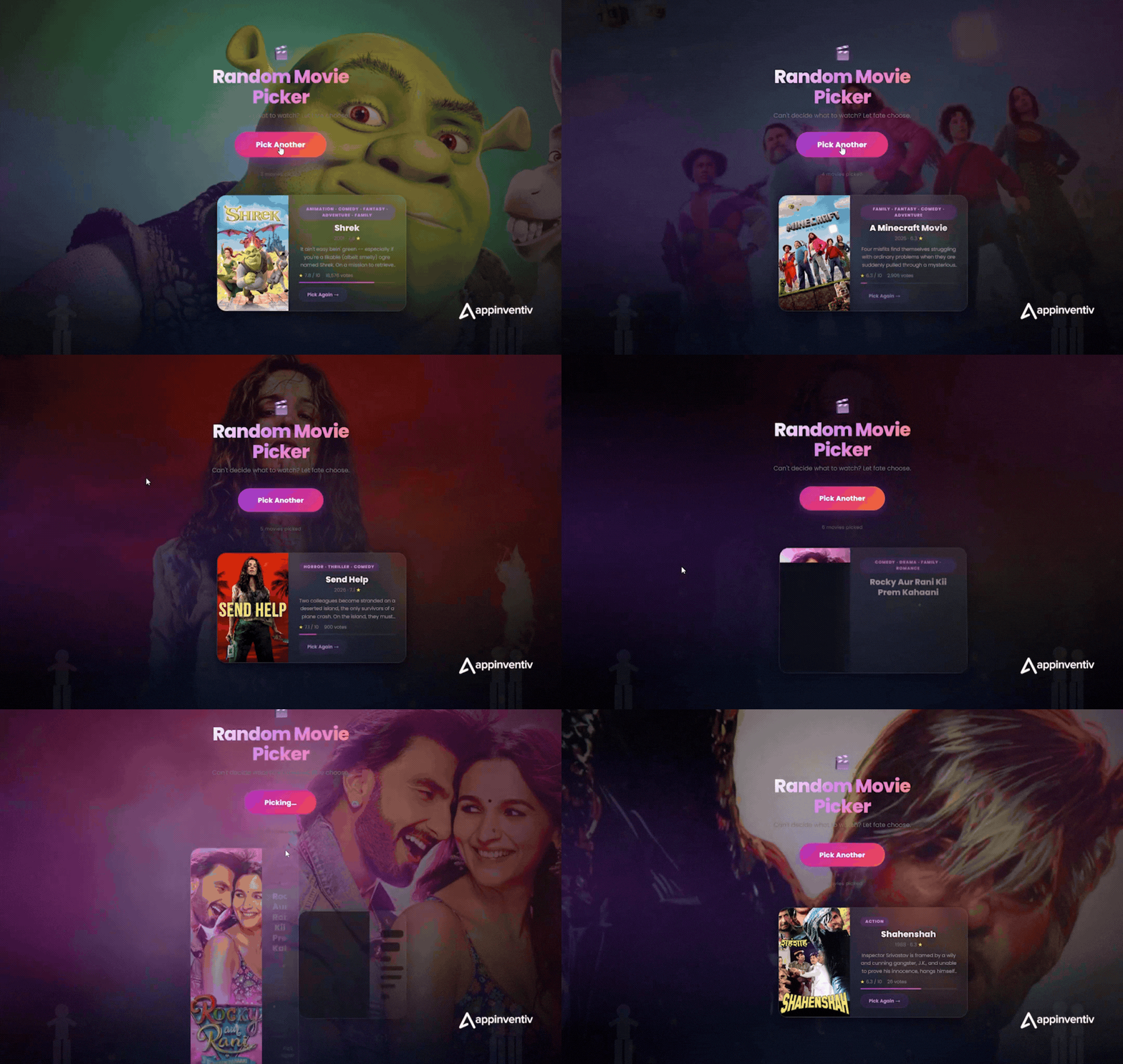
App 1: The Random Movie Picker (Entertainment)
We started with something fun to test the visual output capabilities. We wanted to see how well it could handle aesthetic constraints and dynamic logic.
Used the same prompt we shared earlier for your reference.
We wanted to understand the baseline capabilities of building apps with Claude Code. The UI spun up beautifully—a sleek glass-morphism card with a subtle 3D rotation. But the underlying logic was hollow.
When we pushed it to integrate the TMDB API to pull real movies, the AI hallucinated a fatal user experience flaw: it asked the end-user to input their own developer API key to make the app work.
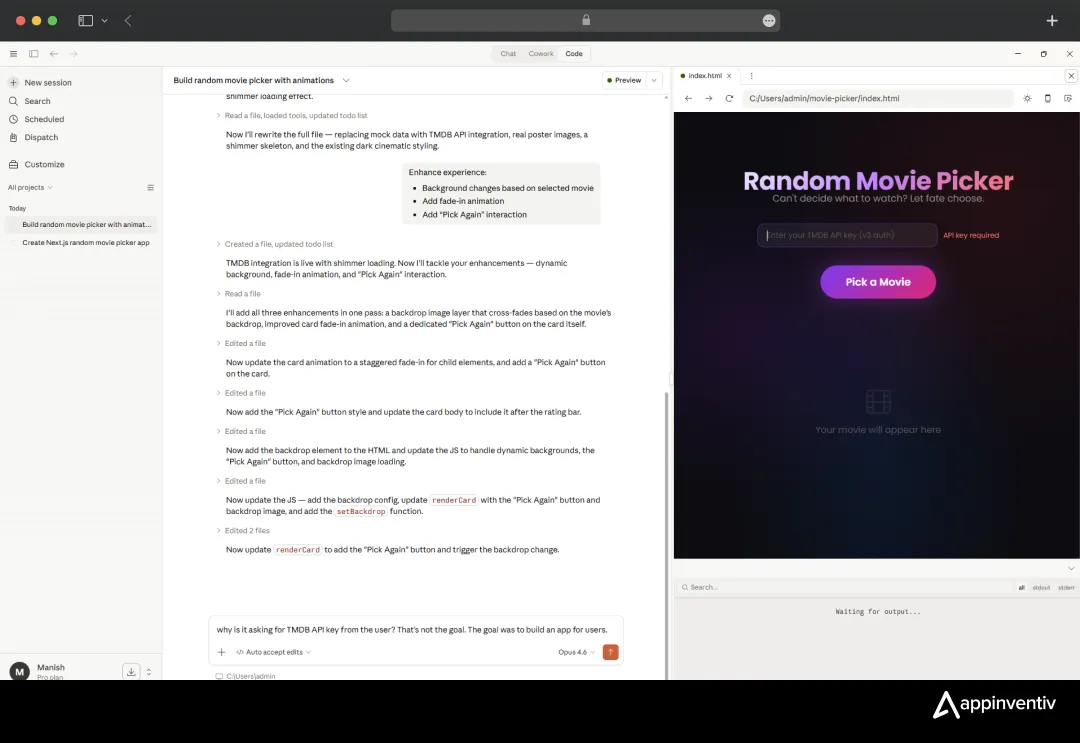
This fundamentally breaks the standard Claude Code development architecture. We had to forcefully step in, rewrite the configuration, embed our own server-side keys, and re-route the logic. It’s a glaring reminder that an LLM lacks a human business context.
Here’s the final result:
App 2: RxRadar – Nearby Open Pharmacy Locator (Healthcare)
Next, we moved into a high-stakes industry: healthcare. We wanted to see how it handled geolocation and external mapping data.
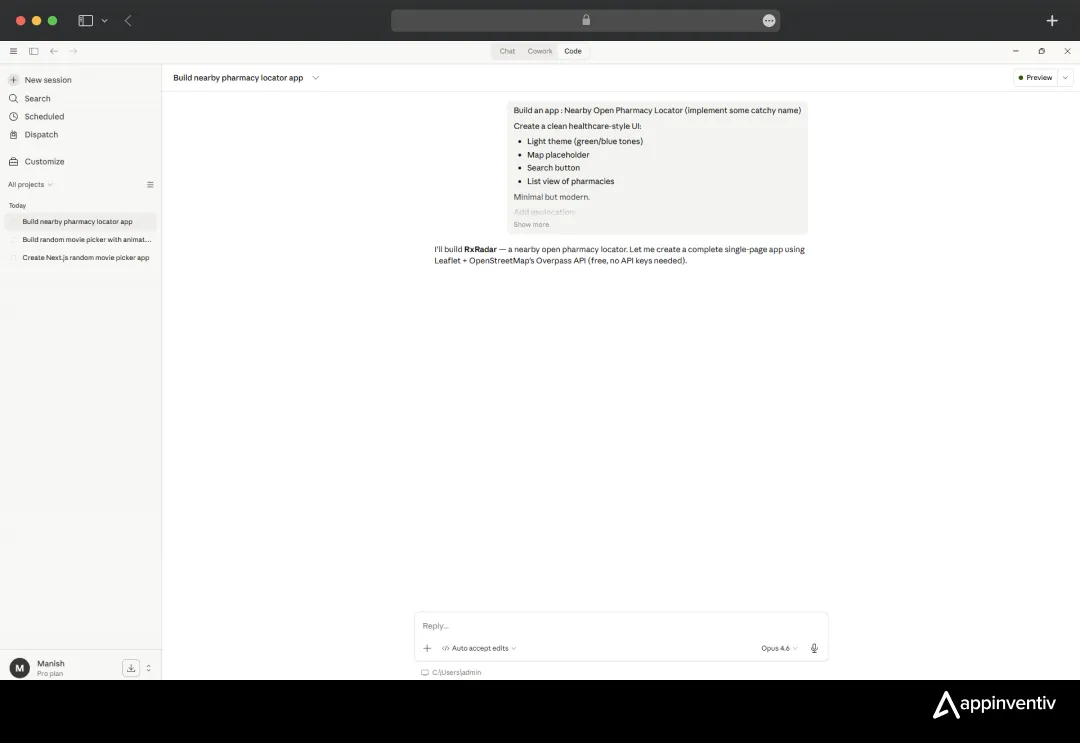
The Prompt:
“Build an app: Nearby Open Pharmacy Locator (implement some catchy name). Create a clean healthcare-style UI: Light theme (green/blue tones), Map placeholder, Search button, List view of pharmacies. Add geolocation.”
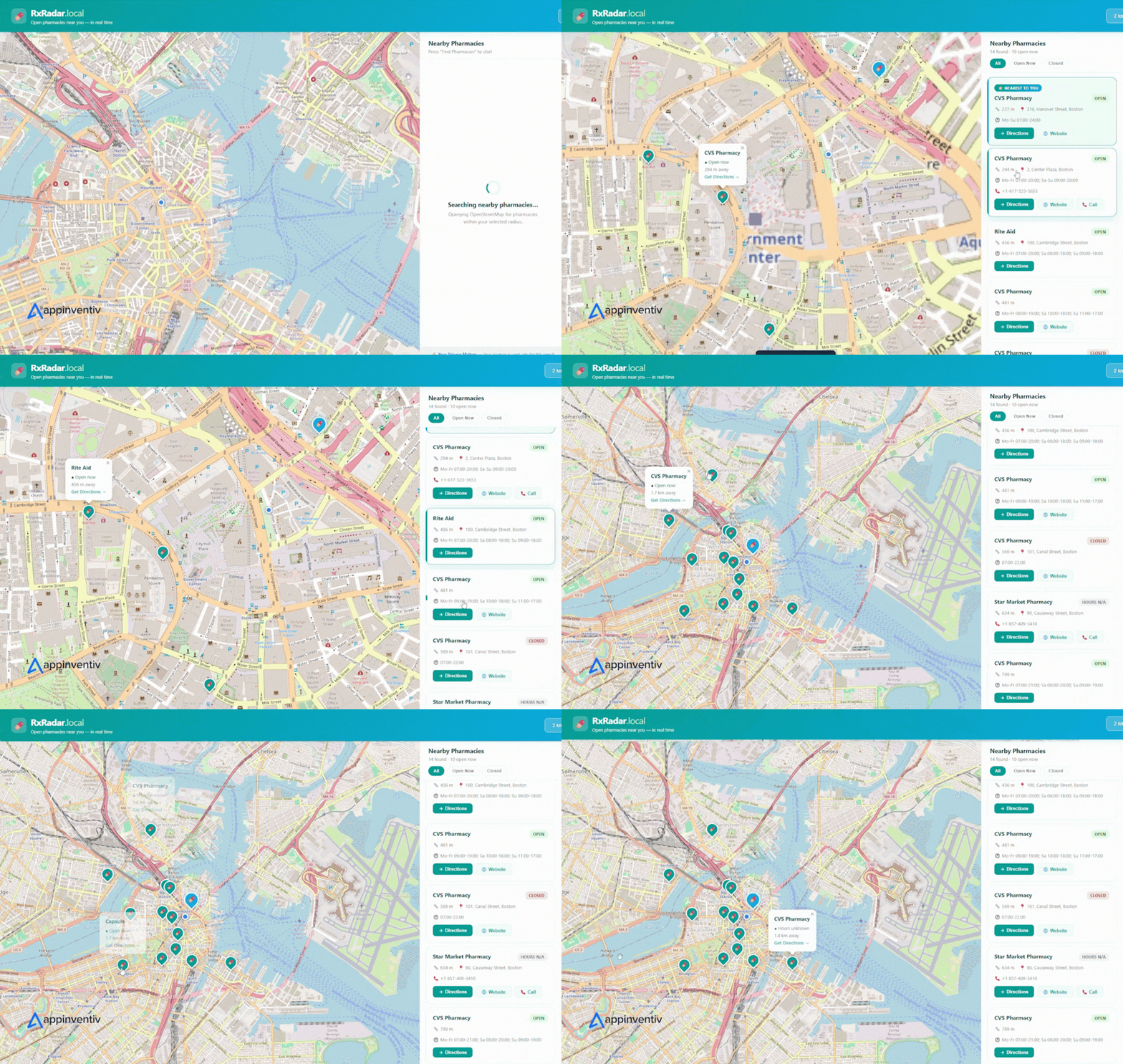
Claude dubbed it “RxRadar” and pulled in Leaflet with OpenStreetMap’s Overpass API (which requires no API keys). Within minutes, we had a functional single-page application populating local Boston pharmacies with operational hours and directions.
Here is where the Claude AI coding assistant development honeymoon violently ends. Sure, the app looks like a million bucks on a staging link. But for a healthcare application, accuracy and data privacy are non-negotiable.
The AI pulled open-source map data. That is perfectly fine for a conceptual demo, but completely inadequate for a live healthcare tool requiring real-time inventory integrations, secure HIPAA-compliant development and data routing, or verified operating hours from specific corporate networks.
This perfectly illustrates the massive limitations of Claude Code for production apps—it builds a stunning facade, but leaves the structural integrity completely vulnerable.
Here’s how the app looked:
App 3: The Smart Budget Planner (Fintech)
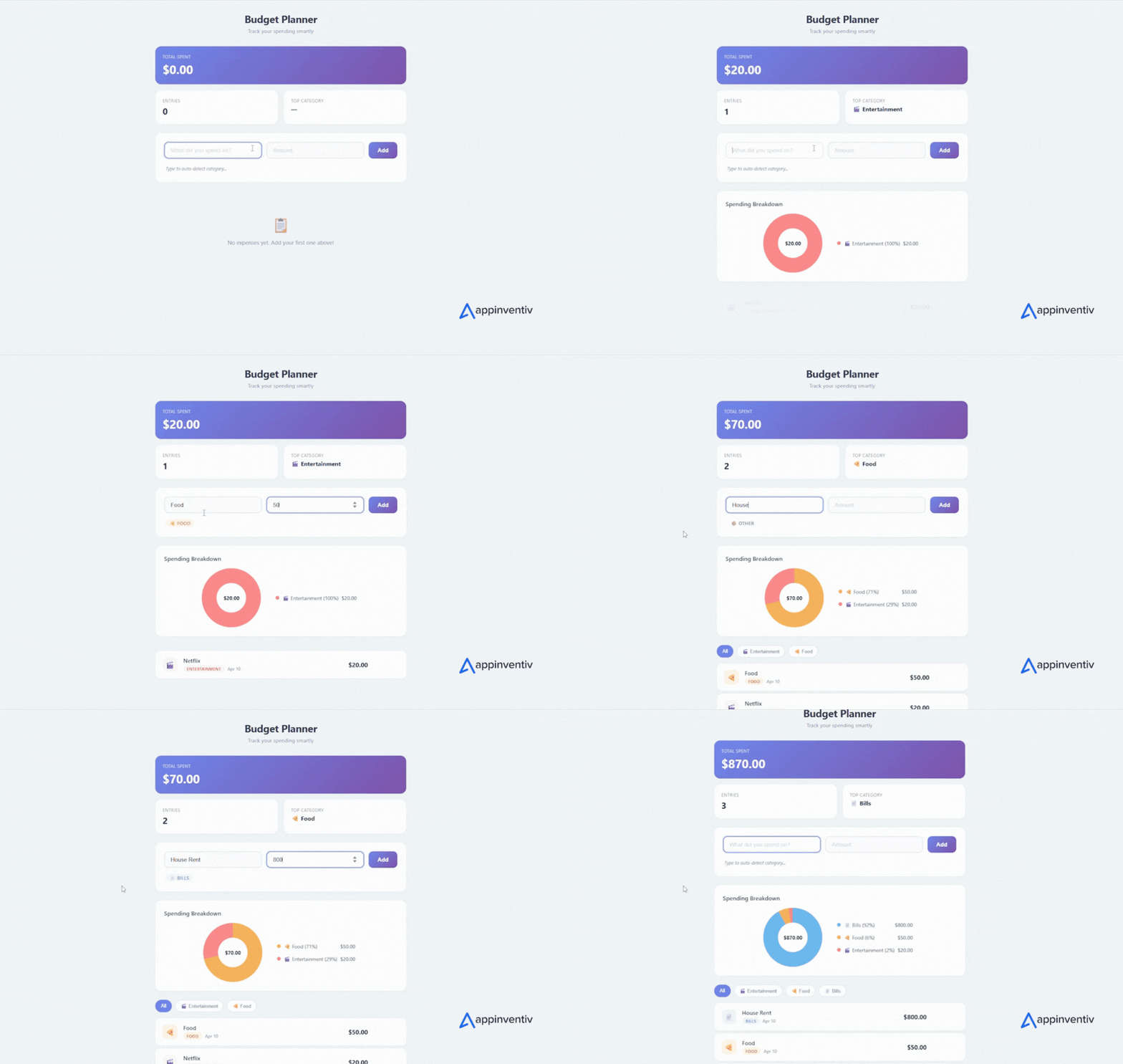
Finally, we tackled fintech, prompting a dashboard with complex data visualizations, income tracking, and expense categorization.
The Prompt:
“Build a secure smart budget planner with dashboard visualizations, income tracking, expense categorization, and export capabilities. Use a clean, trust-inspiring financial UI.”
The Reality Check:
The visual output was stunning. The charts rendered flawlessly, and the categorization logic seemed mathematically sound. However, the moment you attempt to link actual banking systems, the fragility shows.
When you build an app with Claude Code in the financial sector, the AI will happily write standard local storage scripts to save sensitive user inputs. That is a catastrophic security vulnerability.
It does not natively understand encryption standards at rest, secure tokenization, or PCI compliance unless you meticulously hand-hold it through every line of cryptography. Relying on an LLM here exposes your business to immense legal liability.
Check out the app:
Cost of Claude Code AI App Development
Now let’s talk money, because this is where we see the most wishful thinking. Claude Code app development pricing has two parts: what you pay Anthropic, and what you pay everyone else.
1. Claude Code subscription and API costs
| Tier | Monthly Cost | Best For |
|---|---|---|
| Claude Pro | $20/month | Individual developers, prototypes |
| Claude Max | $100–$200/month | Heavy solo use, longer sessions, larger context |
| Team | ~$30/seat/month | Small engineering teams, shared billing |
| Enterprise | Custom | SSO, audit logs, data residency, Bedrock/Vertex routing |
Plus API usage if you’re calling Claude models at runtime inside your app. For a moderately busy MVP, expect anywhere from $200 to $5,000 per month in model spend, depending on traffic and whether you cache aggressively.
2. Engineering, design, and everything else
Here’s where honest numbers matter. Based on what we see across our own projects and the broader market:
| App Type | Realistic Build Cost | Timeline |
|---|---|---|
| Internal prototype (1 developer + Claude) | $2,000 – $15,000 | 1–4 weeks |
| Polished MVP for early users | $20,000 – $80,000 | 2–4 months |
| Production SaaS with AI features | $80,000 – $250,000 | 4–8 months |
| Enterprise AI application with compliance, integrations and governance | $250,000 – $750,000+ | 6–12+ months |
These ranges line up with our own published guidance that AI development costs in 2026 typically run $40,000 to $400,000 for most business use cases, and with the $40,000–$500,000+ range we see for custom AI agent development.
Also read: Cost to Build an AI Agent: A Complete Guide
The gap between the first row and the last isn’t because enterprise developers are slower — it’s because production-grade systems absorb costs that DIY builders discover only after launch: security audits, penetration testing, SOC 2 readiness, accessibility compliance, i18n, data pipelines, observability, and the boring operational work that keeps real users happy.
Get them reviewed before launching in the real world to avoid legal troubles
How Can Appinventiv Help You Out?
You can write a script with AI, but you cannot prompt a scalable business model into existence. These tools are fantastic for rapid prototyping and securing investor buy-in. But to bridge the gap from a cool Netlify link to a compliant, revenue-generating platform, you need human expertise.
Whether you are building an AI app or adding AI to existing business processes, the foundation matters. We design enterprise systems with the data protection, performance, and regulatory requirements of your business in mind.
That work also requires clear oversight of AI-generated code and model outputs. Our AI governance consulting services help teams define review processes, assign accountability, and address risks before launch. An experienced AI developer can translate those requirements into technical controls and test whether they work as intended.
As your application moves beyond the prototype, these controls need to hold up against real data, system integrations, and everyday use. Through InventivAI, we bring AI engineering, integration, and governance expertise together to support that transition.
Explore our tailored AI Development Services today, and let’s turn that prototype into a powerhouse.
FAQs
Q. How does Claude Code work for development?
A. It functions as an advanced, context-aware coding assistant integrated into your terminal or IDE, generating functional code, refactoring files, and running server commands based on conversational prompts.
Q. How to build an AI app with Claude Code?
A. Start by defining the UI shell and static elements, incrementally add logic, deeply review the generated code for security flaws, integrate your external APIs, and deploy using streamlined platforms like Netlify for static builds.
Q. What are the limitations of building AI apps using Claude Code?
A. It struggles with complex state management, frequently hallucinates critical business logic, and cannot natively architect secure, compliant infrastructure for highly regulated industries like healthcare or finance.
Q. When should businesses avoid DIY AI app development?
A. Whenever handling sensitive user data, processing financial transactions, or navigating strict compliance frameworks (like HIPAA or GDPR). DIY AI code lacks the inherent security guarantees required for these sectors.
Q. What architecture is required for enterprise AI applications?
A. Scalable microservices, robust API gateways, dedicated and secure data lakes, and strict CI/CD pipelines governed by experienced human software engineers.
Q. Can Appinventiv help build enterprise AI applications?
A. Absolutely. We combine the raw speed of AI tooling with the security, scalability, and strategic oversight of a world-class engineering team to deliver market-ready, compliant enterprise software.


Fast 2-minute response, fully NDA-protected.

Retrieval Augmented Generation in Australia: Architecture, Implementation and Cost
Key takeaways: RAG grounds LLM answers in approved content, improving reliability without retraining a model. Data quality and access permissions decide production outcomes more than the model. Indicative build costs run from AUD 70,000 to 700,000, driven by data and integrations. Measure value against a pre-deployment baseline, separating realised benefits from projected savings. A general-purpose…

The Multiplier Effect of AI Agents: The Rise of AI Swarms
Key takeaways: AI agent swarms coordinate specialized agents to solve complex problems that may be difficult for a single agent to handle effectively. More agents do not automatically mean better outcomes. Swarms deliver value when work can be divided, executed in parallel, and coordinated toward a shared objective. Enterprise readiness depends on governance. Clear accountability,…

AI Data Integration: How to Connect, Clean and Prepare Data for AI
Key takeaways: AI initiatives fail when fragmented, poor-quality data reaches models without sufficient context, controls or ownership. AI-ready pipelines must connect, clean, enrich, govern and continuously monitor data across its lifecycle. Real-time processing matters when AI decisions depend on current transactions, events, inventory or operational conditions. Data architecture should follow the AI use case, balancing…