
































How to Build an AI Symptom Checker App in 2026?

 Share -


- 01Core Development Steps in AI Symptom Checker App Development
- 02Key Features of AI Symptom Checker App Development
- 03Healthcare Symptom Checker App Architecture
- 04How Enterprise Symptom Checker Architecture Is Structured in Layers
- 05Compliance, Risk, and Regulatory Frameworks
- 06Integration with Healthcare Ecosystems
- 07Cost of Developing an AI Symptom Checker App
- 08Use Cases of AI Symptom Checker App Development
- 09Challenges in Building AI Symptom Checker Apps
- 10Future Trends: Where AI Symptom Checkers Are Headed by 2030
- 11Why Appinventiv for AI Symptom Checker Development
- 12FAQs

Key takeaways:
- Enterprise symptom checkers shift from chat interfaces to clinical decision systems with measurable impact on triage efficiency and care routing.
- Data quality, model design, and integration depth directly define system accuracy, scalability, and real-world clinical usability.
- Triage-focused systems deliver faster ROI by reducing intake workload and improving patient flow across healthcare operations.
- Compliance, auditability, and EHR integration are not add-ons but core requirements for production-grade healthcare AI systems.
- Multi-layered architectures combining NLP, probabilistic models, and clinical logic drive safer and more reliable outcomes.
Healthcare systems face rising patient volumes and limited clinical staff. Many providers exploring AI symptom checker app development struggle to manage early-stage consultations and triage requests.
Early digital tools relied on static questionnaires and rule-based outputs. In practice, some systems showed diagnostic accuracy as low as 34%, compared to 58% for clinicians, which limited real clinical value.
That model has shifted. Enterprises now invest in AI symptom checker software development to build systems that support clinical decisions. These systems assist with triage, guide patients to the right care path, and reduce pressure on frontline teams.
Triage outcomes have shown more stable performance, often ranging between 49% and 90%, which makes them useful for patient routing.
Hospitals use these systems to filter non-critical cases. Telehealth platforms use them to route consultations with better context. This shift turns a simple intake tool into part of care delivery.
Many teams still design these systems as an AI medical chatbot symptom checker and focus only on conversation flow. This leads to weak reasoning and unsafe outputs. Clinical systems need structured logic, traceable decisions, and strong integration with existing healthcare systems.
This blog explains how to build such systems with clear steps, covering architecture, models, compliance, and cost.
Systems built with the right architecture and data strategy are already outperforming traditional intake methods at scale today

Core Development Steps in AI Symptom Checker App Development
Building an AI symptom checker takes more than model training. Each step affects safety, accuracy, and how the system behaves in real clinical use. Teams that skip depth at any stage face issues later in deployment.
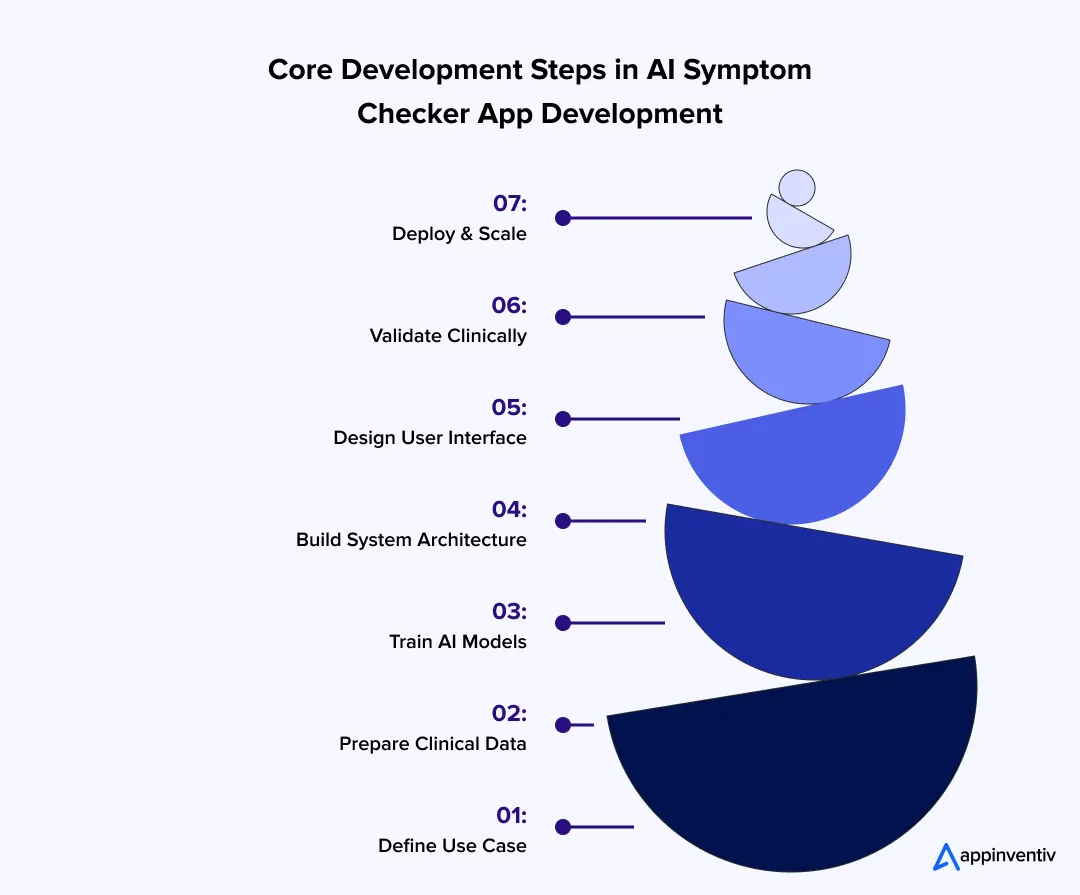
Step 1: Define Clinical Scope and Use Case
Start with a clear problem definition, as an AI medical diagnosis app development must stay within a fixed clinical boundary.
- Triage systems assign urgency levels such as low, medium, or critical
- Diagnostic systems list possible conditions with probability scores
- Monitoring systems track symptom changes across time
Define the user early:
- Hospitals investing in healthcare AI adoption need fast triage linked to intake systems
- Insurers focus on risk scoring and claim validation
- Telehealth platforms need structured patient intake
Step 2: Data Collection and Preparation
The system will only be as strong as the data behind it. Medical data needs structure and consistency.
- Use standard coding systems such as ICD-10 and SNOMED CT
- Combine clinical records, symptom datasets, and research sources
- Label data with symptom type, duration, severity, and outcomes
- Filter out incomplete or conflicting records
Most teams run cleaning and anonymization pipelines before training starts.
Step 3: AI Model Development
At this stage of AI symptom checker software development, the system learns how to read symptoms and connect them to conditions.
- NLP models extract key details from user input
- Entity recognition links symptoms to medical terms
- Multi-label models return more than one possible condition, which is central to how AI medical diagnosis tools are built.
- Probabilistic models assign likelihood scores
Many systems pair these models with rule-based logic for clinical decision support to control unsafe predictions.
Step 4: Backend and System Architecture
The backend defines how the system performs under real usage and load.
- Microservices split tasks such as input handling and inference
- APIs connect services and external systems
- Real-time processing handles user input without delay
- Caching helps speed up repeated queries
Most systems run on cloud infrastructure with container-based deployment.
Step 5: Frontend and Experience Layer
User input quality directly affects output accuracy. Poor input leads to weak predictions.
- Chat or voice interfaces guide symptom entry
- Follow-up questions adjust based on earlier responses
- Language support helps serve diverse users
- Simple flows reduce confusion and drop-offs
Clear interaction improves both data capture and trust.
Step 6: Testing and Clinical Validation
Before release, the system must be checked against real medical scenarios.
- Compare predictions with known case data
- Track error rates and false positives
- Use clinicians to review incorrect outputs
- Keep human review for high-risk cases
Testing across different populations helps detect bias.
Step 7: Deployment and Scaling
Once deployed, the system must stay stable as use grows.
- Run across cloud regions to meet data rules
- Monitor speed, errors, and prediction quality
- Log outputs for audit and review
- Update models as new data becomes available
Scaling depends on both system capacity and ongoing model updates.
Building the system in theory is part of it. The real test shows up when these steps are applied to a working product in a live setting.
How a Voice-Based AI Health System Moved Beyond Symptom Checkers
A global health platform worked with Appinventiv to build an AI system that reads voice inputs and detects early health signals. The system analyzes tone, frequency, and speech patterns to assess risk and guide next steps.
This reduced manual intake and gave users faster direction without long questionnaires. It also showed how AI can move beyond basic symptom forms into deeper health analysis. Explore the case study
Key Features of AI Symptom Checker App Development
Feature selection should stay focused on clinical use, clean data capture, and safe outputs. Each feature must support how the system collects symptoms, processes them, and guides the next step.
| Feature | Description |
|---|---|
| Symptom Input | Users describe symptoms in text, voice, or images with simple prompts |
| Triage | The system marks cases as low, medium, or high risk |
| Condition List | Shows a few possible conditions based on the input |
| Next Steps | Tells the user what to do next, such as rest or visit a doctor |
| Doctor Connect | Links high-risk cases to a doctor or teleconsultation |
| EHR link | Sends and reads patient data through FHIR or HL7 |
| Language Support | Accepts input in different languages |
| Dashboard | Shows basic usage and case data |
| Privacy | Handles consent and keeps data protected |
Healthcare Symptom Checker App Architecture
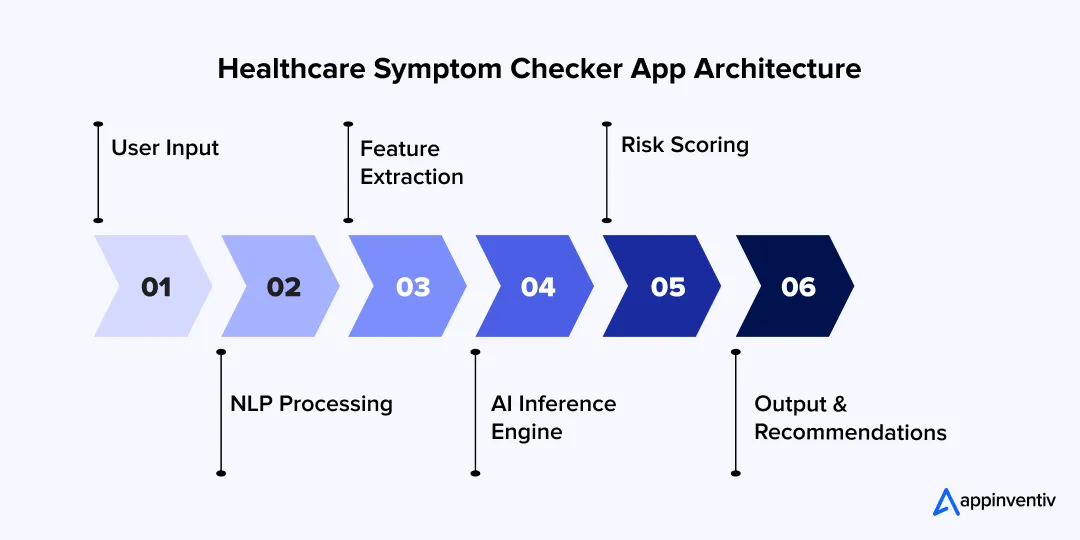
This stack shows how symptom input turns into a result on screen. Each layer handles a small part of the job. Systems that work at scale keep these layers separate.
Core Components
These parts handle data, logic, and system flow.
- Clinical Knowledge Base
Stores medical codes like ICD-10 and SNOMED CT. Many teams use graph storage to link symptoms with conditions. - AI/ML Engine
Runs models using tools like TensorFlow or PyTorch. This layer receives input and returns predictions with scores. Some teams add rule checks here to block unsafe outputs. - Data Processing Pipelines
Clean and prepare data before it reaches the model. Common setups use streaming tools and batch jobs to handle large volumes of data. - API and Integration Layer
Connects services through REST APIs. This layer also handles FHIR and HL7 calls with hospital systems.
System Architecture
This defines how data moves from user input to final output.
- Input Layer
Takes symptom data from apps or web forms. Voice input is converted to text first. - NLP Processing
NLP in healthcare works by breaking text into tokens and identifying medical terms. - Feature Extraction
Pulls key details like symptom type and duration. - Inference Engine
Runs models and combines results into a final prediction. - Output Layer
Send results with condition lists and next steps.
Most teams use microservices so each part can scale on its own. Systems usually run on cloud platforms such as Amazon Web Services, Microsoft Azure, or Google Cloud Platform.
AI Models
These models handle how the system reads symptoms and predicts conditions.
- NLP Models
Models like ClinicalBERT process medical text and extract symptoms. - Classification Models
Multi-label models return more than one possible condition with scores. - Bayesian Models
Use probability rules to adjust results as new symptoms are added. - LLM-Based Systems
Generative AI models use stored medical data to generate answers and reduce the number of incorrect outputs.
Most systems use more than one model. One reads input, another predicts, and another checks the result before it is shown.
AI in these systems is not limited to prediction. It drives multiple stages of the workflow:
- Intake → adaptive questioning based on responses
- Reasoning → mapping symptoms to conditions
- Risk detection → identifying high-risk patterns early
- Routing → deciding care path or escalation
- Feedback loop → improving models based on outcomes
How Enterprise Symptom Checker Architecture Is Structured in Layers
Enterprise systems are not built as one pipeline. Each layer handles a specific responsibility to keep outputs safe and traceable.
- Patient Experience Layer → symptom input, UI, language handling
- Identity and Consent Layer → user identity, permissions, data access
- Symptom Intake Layer → structured questioning and input validation
- Clinical Reasoning Layer → models, rules, probability scoring
- Care Routing Layer → triage decisions and escalation
- Clinical Summary Layer → structured output for doctors
- Integration Layer → EHR, telehealth, devices
- Governance Layer → logging, audits, monitoring
A system like this only works if all these layers connect without friction. That is often where most builds fail. This is how one platform handled that challenge in practice.
Building a Unified Health Data System Across Devices and Records
A healthcare platform needed a system that could pull patient data from different sources and make it usable in real time. Appinventiv built a setup that connects health records, user inputs, and device data into one view.
Care teams could access the full patient context during consultations, which reduced delays and improved decision speed. Read the case study.
Compliance, Risk, and Regulatory Frameworks
Healthcare systems built through AI medical diagnosis app development handle personal health data and influence care decisions. That places strict legal checks on how these systems are built and used.
- HIPAA
Building a HIPAA compliant app means following strict rules for patient data in the United States, covering storage, access control, and audit logs. - GDPR
Applies to personal data in Europe. It requires user consent, limited data use, and access rights. - FDA Software as a Medical Device
Covers software that supports medical decisions. Systems are grouped by risk level. Higher risk means stricter checks and validation. - EU Medical Device Regulation
Sets rules for medical software in Europe. It defines safety standards and risk classes.
Key Considerations
These points, often shaped with support from AI governance consulting services, guide how the system handles data and produces outputs.
- Data Protection
Encrypt data during storage and transfer. Restrict access to approved roles. - Traceability
Record how each output was generated. Keep logs for review and audits. - Risk Level
Triage tools pose a lower risk than systems that suggest diagnoses. This affects approval steps. - Consent and Control
Ask users before collecting data. Define storage limits and access rules.
Governance and Audit Controls
- Decision logs store how each output was generated
- Override tracking records when clinicians change system suggestions
- Audit-ready reports support regulatory reviews
- Monitoring tracks model drift and unusual outputs
Built-In Risk Controls in Symptom Checker Systems
- High-risk cases trigger immediate escalation
- Uncertain outputs default to safer recommendations
- Human review is required for critical decisions
- Systems avoid final diagnosis claims in high-risk scenarios
The real risk appears when compliant systems struggle to handle real-time data and clinical workflows together

Integration with Healthcare Ecosystems
This AI symptom-checker system needs to integrate with tools that hospitals and care teams already use. Without that, it stays separate from real workflows.
- EHR / EMR Systems: For seamless EHR integration, the app reads past records and writes new entries using FHIR and HL7. Data objects such as Patient, Observation, and Condition carry most of the exchange.
- Telehealth Platforms: The app sends a short case summary before the call starts. Doctors review symptoms and risk level instead of asking basic questions again.
- Wearables and Connected Devices: Devices send data like heart rate or steps through APIs. The system stores this data and links it with symptom input.
- Insurance Systems: The app shares risk data with claim systems. This supports early checks during the approval process and flags unusual cases.
System Analytics and Performance Monitoring
Track how the system performs in real use.
- Triage accuracy rates
- Escalation frequency
- User drop-off during intake
- Common symptom patterns
- Model confidence scores
Helps:
- Enterprise buyers
- AI overview ranking
- Product maturity perception
Cost of Developing an AI Symptom Checker App
Costs depend on how deep the system goes into clinical logic, data, and integrations. Simple builds stay on the lower end. Systems tied to hospitals and compliance move higher.
AI Symptom Checker App Development Cost Breakdown
| Complexity | Features | Cost Range |
|---|---|---|
| MVP | Basic symptom input, simple models, limited integrations | $50K–$120K |
| Mid-Level | Better models, structured data pipelines and EHR connection | $120K–$250K |
| Enterprise Grade | Full clinical logic, compliance layers, multi-system integration | $250K–$500K+ |
Ongoing and Hidden Costs
- Model retraining and validation
- Medical knowledge base updates
- Compliance audits and reporting
- Infrastructure scaling during peak loads
- Integration maintenance with external systems
Enterprise AI Symptom Checker App Development Cost Drivers
- Data acquisition and labeling, especially clinical datasets
- Model training and tuning, including NLP and multi-label prediction
- Compliance work, such as audit logs and data protection
- Integration with EHR, telehealth, and external systems
ROI Factors
Returns come from faster triage, lower workload, and better patient flow.
- Reduced triage time
- Lower operational cost
- Higher telehealth usage
- Improved patient engagement
- SaaS licensing to hospitals
- Integration with telehealth platforms
- Partnerships with insurers and payers
Use Cases of AI Symptom Checker App Development
AI symptom checkers are already in use across care delivery and payer systems. The focus stays on faster intake, clearer case context, and less manual work for clinical teams.
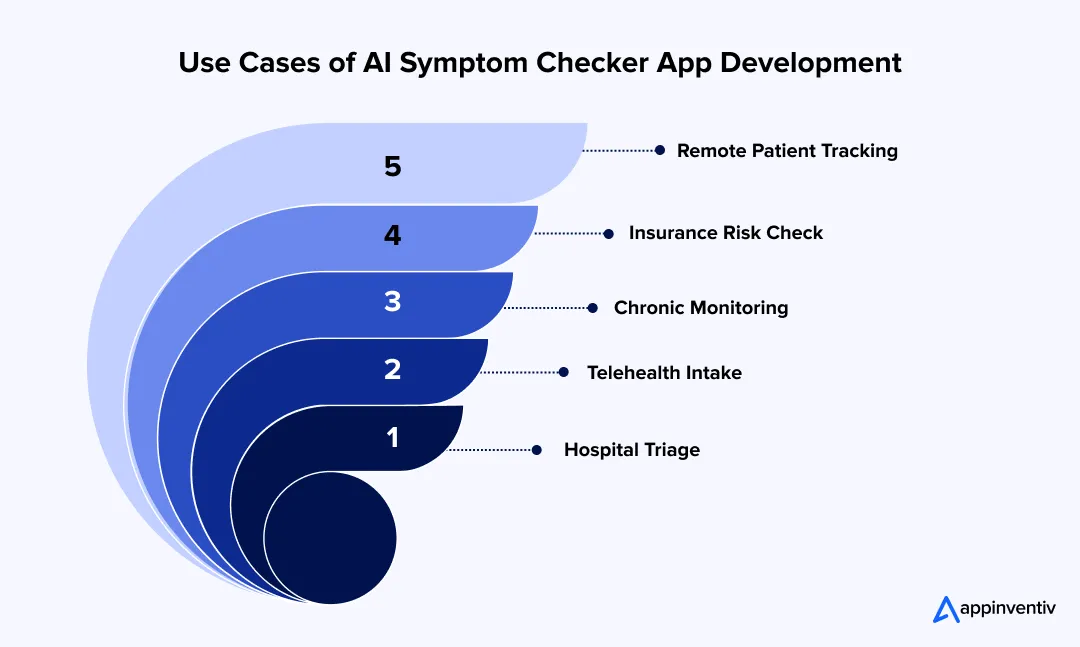
Pre-Diagnosis Triage For Hospitals
Hospitals use these tools at the first point of contact, often before a patient reaches a clinician. The system collects symptoms, checks severity, and assigns a priority level. This helps staff decide who needs immediate attention and who can wait.
- Example: Mayo Clinic uses digital intake tools to guide patients to the right care path.
- In practice: A patient reports chest pain. The system flags it as high risk and routes the case to urgent care. Low-risk cases move to general consultation.
Virtual Assistants In Telehealth Platforms
The role of AI in telemedicine is clearest here. Platforms place the symptom checker before booking or consultation. It acts as a structured intake layer that gathers symptoms and prepares a short case summary.
- Example: Babylon Health collects symptoms and shares a summary with the doctor. (This mirrors what good telehealth app development looks like)
- In practice: The doctor starts the session with key details already available, which reduces time spent on basic questions.
Also Read: Build HIPAA Compliant Medical Voice Assistant
Chronic Disease Monitoring
Patients with ongoing conditions use these tools between visits to log symptoms and track changes. The system reviews patterns over time and flags shifts that may require attention.
- Example: Ada Health allows users to log symptoms and update risk levels as new data comes in.
- In practice: A diabetes patient logs fatigue and dizziness over a few days. The system detects a pattern and suggests a follow-up.
Insurance Risk Assessment
Insurance providers use symptom data as part of claim review and underwriting checks. The system analyzes patterns and flags cases that need closer review.
- Example: UnitedHealth Group uses AI systems to review health data during claim processing.
- In practice: Claims with unusual symptom patterns or high-risk indicators are marked before approval.
Remote Patient Engagement Systems
Care providers use these systems to stay connected with patients outside of clinic visits. Patients can report symptoms from home, and the system keeps a record for review.
- Example: Teladoc Health tracks symptoms before and after consultations.
- In practice: Patients log updates between visits. Doctors review these changes before the next session, which provides better context for care decisions.
Challenges in Building AI Symptom Checker Apps
In AI symptom checker software development, most issues show up after launch, not during early builds. Real users, mixed data, and clinical checks quickly expose gaps.
- Accuracy vs ease of use: Long questionnaires improve results, but users quit halfway. Short flows feel easy, but miss key details.
- Fix: Start with a few core questions. Add follow-ups only when needed. Keep urgent paths detailed, keep simple cases short.
- Data gaps and labeling: Clean medical data is hard to get. Labeling symptoms and outcomes takes time and expert input.
- Fix: Use a mix of public datasets and partner data. Let models pre-label data, then have clinicians review and correct it.
- Data bias: Data often comes from limited regions or groups. The model then performs unevenly across users.
- Fix: Add data from different regions and age groups. Test outputs across segments before release.
- Compliance delays: Systems that suggest medical action face strict checks. Reviews and approvals slow release cycles.
- Fix: Build logs, validation reports, and documentation alongside development. Do not leave it for later stages.
- Legacy system integration: Older hospital systems do not always support clean APIs. Data formats differ across systems.
- Fix: Add a translation layer that maps data into FHIR or HL7. This avoids direct dependency on old formats.
Data Strategy Considerations
Data work does not stop after training. It continues as the system runs.
- Synthetic data: Rare cases are often missing from real datasets.
- Fix: Create synthetic samples to fill gaps and improve coverage.
- Federated learning: Hospitals do not share raw patient data easily.
- Fix: Train models across multiple locations without moving the data itself.
- Continuous validation: Medical patterns change, and models drift over time.
- Fix: Know how to retrain AI models regularly by reviewing new data and testing outputs.
Small gaps in data, architecture, or compliance grow into major blockers during later stages of system rollout

Future Trends: Where AI Symptom Checkers Are Headed by 2030
Over the past decade, working on healthcare systems, one pattern has stayed consistent. Tools that begin as simple intake layers slowly approach clinical workflows. Symptom checkers are following the same path.
What started as basic questionnaires now supports triage, routing, and early decision-making. The next phase will focus on better context, reduced manual steps, and faster, more reliable outputs.
Agent-Led Systems
Through AI health assistant app development, the tool will not stop at answering a query; it will guide the full flow. This is where agentic AI systems come in. A user shares symptoms, the system asks a few follow-ups, checks past data, and books a consultation if needed. The steps connect in one sequence.
Early Risk Detection
AI diagnostic app development is advancing to flag issues before symptoms become severe. This is the core premise of predictive health analytics: small changes in patterns, such as fatigue or sleep shifts, can trigger alerts. This helps move care from response to early action.
Voice and Mixed Input
More users prefer speaking over typing. Systems will handle voice, text, and images together. A user can describe pain, upload a photo, and answer a few prompts in one flow.
Deeper System Connections
These tools will sit inside larger hospital and care platforms. They will read past records and update new findings in the same system.
Automated Triage
First-level screening will run without manual review. The system will assign risk, guide next steps, and flag urgent cases for immediate care.
Also read: How to Build an AI Scheduling Assistant for Healthcare
Why Appinventiv for AI Symptom Checker Development
Most teams can build a working model. The real challenge starts after launch, when systems face real users, uneven data, and strict compliance checks. Appinventiv, offers best AI development services for healthcare, builds with these conditions in mind from day one.
How Appinventiv addresses core challenges:
- Data quality and bias
- Structured pipelines clean, label, and validate data over time
- Continuous updates improve model performance
- Clinical accuracy and safety
- Systems include validation layers and human review for critical cases
- Outputs follow clear, traceable logic
- Integration with healthcare systems
- Early planning for EHR, telehealth, and device connections
- Support for FHIR, HL7, and real-time data flows
- Compliance and risk control
- Built-in audit logs, access control, and data protection
- Aligned with global healthcare standards from the start
Delivery scale and outcomes:
- 500+ digital health platforms delivered
- 450+ healthcare clients served
- 10+ years in HealthTech projects
- 300+ connected medical devices integrated
System performance and impact:
- 99.90% uptime for critical systems
- Up to 45% improvement in hospital operations
- 90%+ clinical data accuracy
- 95% patient satisfaction in deployed apps
The focus stays on AI symptom checker app development that holds up in real clinical environments and improves with continued use.
FAQs
Q. How much does it cost to build an AI symptom checker app?
A. Costs can vary a lot when you build an AI symptom checker app solution. A small build with basic features may sit near $50K. Once you add better models and some integrations, the range moves closer to $120K–$250K. Larger systems used by hospitals or insurers can cross $500K. The jump usually comes from data work, compliance effort, and integration with existing systems.
Q. What factors affect AI symptom checker app development?
A. Several factors shape how complex the system becomes. The scope plays a big role, as a basic checker is easier than a clinical triage system. Data availability also matters, since clean and labeled medical data is hard to obtain. Model design, system integrations, and compliance needs add more effort. Large-scale deployments need stronger infrastructure and ongoing monitoring, which increases both time and cost.
Q. What technologies are used to develop AI symptom checker apps?
A. Most systems use a mix of language models and prediction models. NLP helps read what the user types or says. Machine learning models map symptoms to possible conditions. On the backend, cloud services handle traffic and storage. APIs like FHIR and HL7 are used to connect with hospital systems and patient records.
Q. How accurate are AI symptom checker applications?
A. Accuracy is not fixed. It changes with data quality and how the model is trained. Systems trained on broader datasets tend to perform better across users. Many platforms test outputs against real cases and keep a review layer for risky situations. The goal is not a final diagnosis, but a reliable direction and next step.
Q. Can Appinventiv build AI-powered healthcare apps?
A. Yes. The team helps clients develop app-like AI symptom checkers, telehealth systems, and integrations with hospital tools. Work usually covers model setup, backend systems, and data handling. Compliance and security are built into the process so the system can run in real clinical settings without rework.
Q. What are the benefits of AI symptom checker app development?
A. These systems reduce the load on the front desk and clinical teams by handling early intake. Patients get quick guidance and know where to go next. Hospitals can manage queues better, and telehealth platforms see smoother consultations. Over time, the data collected also helps improve care decisions and follow-up planning.
Q. What is an AI symptom checker?
A. To make an app like an AI symptom checker, it should ask about symptoms and process that input using trained models. Based on what the user shares, it suggests possible conditions and what to do next. Some tools also look at past inputs or health data to give better context. It is mainly used for early guidance, not final diagnosis.


Fast 2-minute response, fully NDA-protected.

The AI ROI Crisis: Why Enterprises Are Struggling to Prove Value and How to Fix It
Key takeaways: AI ROI is a capital-allocation question. Boards want payback periods and P&L impact. AI ROI challenges rarely have a single cause. Data, legacy systems, use-case choice, ownership and stalled pilots compound each other. Choose two or three outcome metrics per use case, set the baseline first, and report in dollars. Make every further…

Retrieval Augmented Generation in Australia: Architecture, Implementation and Cost
Key takeaways: RAG grounds LLM answers in approved content, improving reliability without retraining a model. Data quality and access permissions decide production outcomes more than the model. Indicative build costs run from AUD 70,000 to 700,000, driven by data and integrations. Measure value against a pre-deployment baseline, separating realised benefits from projected savings. A general-purpose…

The Multiplier Effect of AI Agents: The Rise of AI Swarms
Key takeaways: AI agent swarms coordinate specialized agents to solve complex problems that may be difficult for a single agent to handle effectively. More agents do not automatically mean better outcomes. Swarms deliver value when work can be divided, executed in parallel, and coordinated toward a shared objective. Enterprise readiness depends on governance. Clear accountability,…