
























AI in DevOps: Revolutionizing Software Development and Operations

 Share -


- 01Analyzing the Role of AI in DevOps
- 02Key AI Technologies Transforming DevOps
- 03Practical Applications of AI in DevOps
- 04Key Benefits of AI-Driven DevOps
- 05How Appinventiv Delivers These AI-Driven DevOps Benefits
- 06How to Implement AI in DevOps: Key Steps
- 07What is the Cost of Implementing AI in DevOps?
- 08Best Practices for Implementing AI-Driven DevOps
- 09Top-Rated AI Tools for DevOps That Streamline Software Development
- 10Challenges of Integrating AI in DevOps and How to Address Them
- 11AI-Driven DevOps vs Traditional DevOps: Which One Should You Choose?
- 12Future of AI in DevOps: Redefining Software Development
- 13How Appinventiv Implements AI-Powered DevOps for Enterprises

Key takeaways:
- AI in DevOps is revolutionizing software development by automating repetitive tasks, improving efficiency, and enabling faster, more reliable releases.
- Predictive Analytics powered by AI helps teams spot potential issues before they occur, minimizing downtime and preventing costly errors.
- AI-driven tools, such as automated code reviews and CI/CD optimizations, streamline workflows, allowing teams to focus on innovation rather than on manual tasks.
- AI enhances collaboration by reducing bottlenecks, improving visibility, and providing smarter insights into performance, risk, and resource allocation.
- Implementing AI in DevOps starts small but scales efficiently. Begin with key use cases like automated testing, then gradually expand to other areas for maximum impact.
In today’s fast-moving tech world, development teams feel the pressure to ship better products faster while still maintaining high quality. Traditional DevOps has helped for years, but it doesn’t always keep pace with the pace businesses expect now. That’s where AI in DevOps has started to change things in a meaningful way.
Instead of losing hours to repetitive checks or waiting for issues to surface late in the cycle, AI steps in and handles routine work. It catches problems early, smooths out busy stages in the pipeline, and reduces the back-and-forth that usually slows teams down. This shift isn’t just another trend. Teams are actually building and shipping software differently because of it.
From sharper monitoring to testing that runs quietly in the background, AI DevOps helps teams move faster, work together more easily, and avoid unnecessary rework. For many companies, bringing AI into DevOps isn’t a bonus anymore. It’s becoming the only realistic way to keep up without stretching teams too thin.
In this blog, we’ll walk through how AI is reshaping software development, the benefits you can expect in real projects, and the steps to bring AI into your own DevOps workflow.
Revolutionize your software development process with intelligent automation.
Analyzing the Role of AI in DevOps
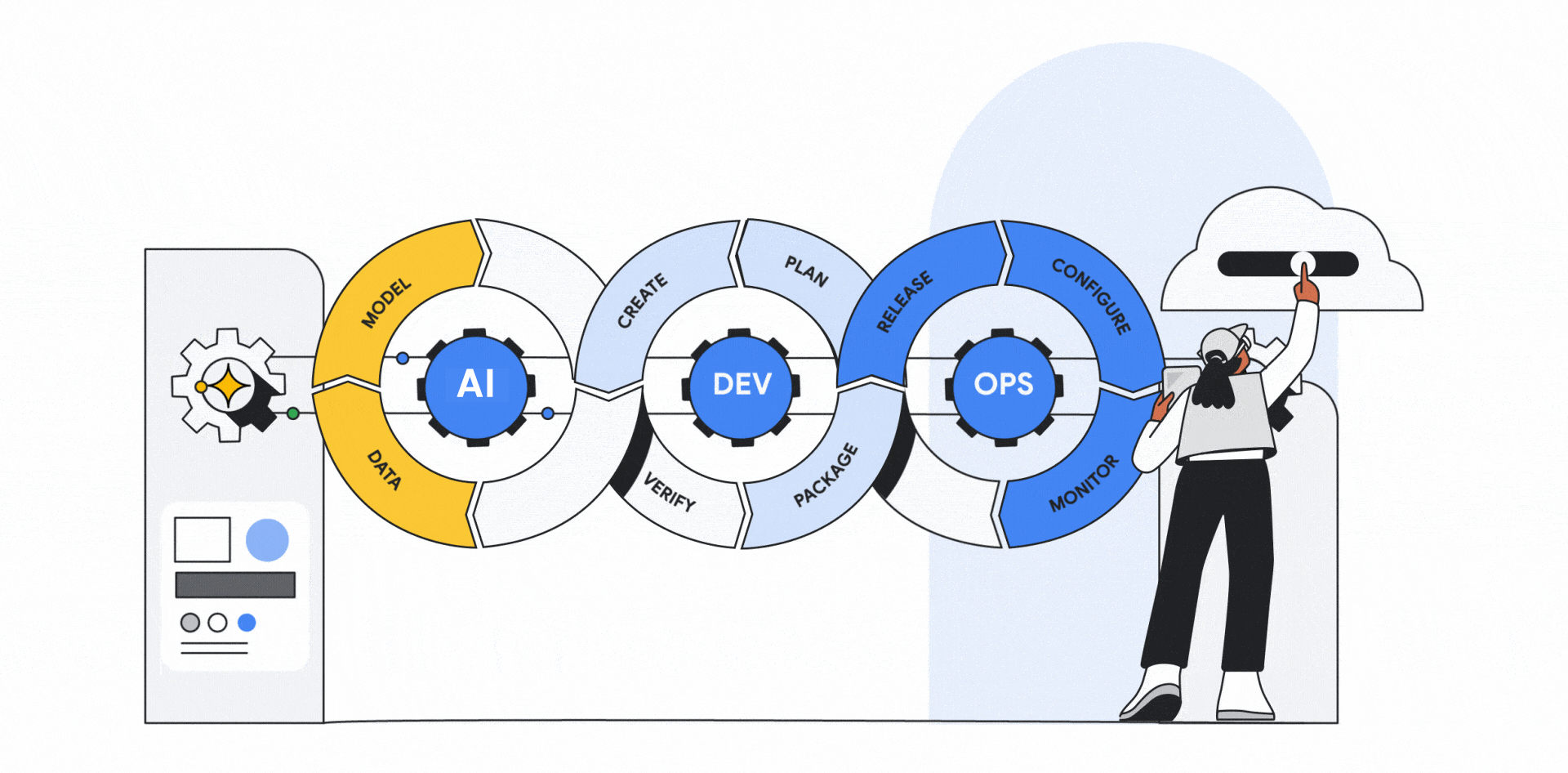
Most enterprise teams feel the pressure to ship faster, and the usual DevOps routines don’t always match that pace. AI has started helping, not by replacing people, but by taking some of the heavier, more predictable work off their plate.
- Automation of Repetitive Tasks: Think about all the small tasks that stack up during a release cycle. Test runs, basic checks, and the back-and-forth that slows everyone down. AI in business can handle much of that. When those chores run on their own, teams get more time to work on actual product improvements. The process naturally moves smoothly.
- Predictive Analytics for Early Problem Spotting: Instead of waiting for an outage or a broken build, AI analyzes past activity and flags signals that something might go wrong. It’s the kind of early warning that helps teams fix issues before users even notice.
- Clearer Decisions Through Better Insights: Rather than scrolling through multiple dashboards, teams get a clearer picture of what matters. AI surfaces patterns around performance, usage, and risk so decisions are based on what’s actually happening in the environment, not assumptions.
- Improvement That Builds Over Time: As systems run, AI continues to learn from real-world activity. It spots repeated slowdowns, small workflow gaps, or patterns that are often lost in the noise. Over time, this leads to steadier releases and fewer surprises.
AI in DevOps isn’t just about speeding things up. It gives teams more control, fewer last-minute emergencies, and a workflow that scales with the business rather than holding it back.
Key AI Technologies Transforming DevOps
Many DevOps teams are trying to move faster without burning out their people or drowning in routine work. AI has quietly become helpful here, not as some big overhaul but as a set of tools that smooth out the rough edges of daily operations. Most teams I talk to end up relying on a few specific technologies once they see what actually helps.
- Machine Learning for Predictive Analytics: ML is designed to identify patterns you don’t have time to sift through. It’ll pick up on early signs of trouble, things you’d normally miss until users start complaining. A small early warning can save a team from scrambling late in the day to fix something that’s been building up for hours.
- Natural Language Processing in Code Review: NLP tools operate in the background, flagging the small stuff during reviews. Nothing dramatic, just catching odd syntax, missed checks, or things that usually slip through when everyone is moving quickly. Developers still make the final call, but they start from cleaner code, which makes the whole review go smoother.
- AI-Driven Automation: A lot of the repetitive work in DevOps feels harmless at first, but it drains time when you add it up. Testing runs, deployment steps, system checks, they creep into the day. AI handles most of this quietly and gets more accurate the longer it runs. With that load lifted, teams finally get the breathing room they need for the work that actually matters.
- Intelligent Monitoring and Anomaly Detection: Modern monitoring tools don’t just shout whenever a metric moves. They learn what your system normally looks like and only nudge you when something feels genuinely off. If traffic climbs at a strange hour or a service slows down in a way that isn’t typical, the alert makes sense. Some tools even handle the minor issues on their own before anyone logs in.
When teams put these tools in place, work tends to feel steadier and less chaotic. AI isn’t replacing DevOps or changing what engineers do. It simply removes enough friction from the day that people can focus on decisions, not cleanup.
Practical Applications of AI in DevOps
AI has several applications in DevOps, transforming the way software is developed, tested, and deployed. Among the important applications are:

Automated Code Review
AI for DevOps transforms the software development process, enhancing it through automated code review. These kinds of AI-powered tools meticulously scrutinize code, identifying errors, security vulnerabilities, and deviations from coding standards.
AI helps developers make accurate, timely adjustments by providing thorough feedback, enhancing code quality and compliance with best practices. This automation improves the software’s security and reliability while quickening the development cycle.
Predictive Analytics
DevOps and AI-driven predictive analytics revolutionize development processes by leveraging historical data. These AI systems anticipate potential issues and bottlenecks, allowing teams to mitigate risks proactively. By identifying patterns and trends, teams can make informed decisions and optimize workflows for greater efficiency.
This predictive capability enhances project planning, resource allocation, and overall project management. Ultimately, DevOps and AI-driven predictive analytics enable teams to consistently and effectively deliver high-quality software.
Continuous Integration and Deployment (CI/CD)
Incorporating AI into DevOps workflows is a potent accelerator, boosting speed and efficiency. By using AI in DevOps to automate and enhance CI/CD procedures, software update delivery becomes more efficient, reducing the need for manual intervention. This automation ensures the software stays up to date with high-quality requirements while also accelerating the release of new features.
AI’s capacity to assess and improve CI/CD pipelines leads to faster software releases, thereby improving the entire development lifecycle.
Automated Testing
Automated testing is critical in DevOps and artificial intelligence. AI can automate every step of the testing process, including creating test cases, running them, and interpreting the outcomes.
This automation hugely reduces the time and effort needed for testing and increases test coverage and accuracy.
By utilizing AI in automated testing, organizations can expedite the development process and improve the quality of their software releases.
Security
Security is a critical aspect of the AI-powered DevOps environment. AI plays a vital role in improving security by locating and addressing vulnerabilities in code, infrastructure, and configuration. By leveraging sophisticated algorithms, AI can analyze large volumes of data and identify patterns that indicate potential security risks.
Artificial Intelligence enhances software systems’ overall security posture by proactively identifying and remedying vulnerabilities. By being proactive, security improves, and the risk of costly data breaches decreases. DevOps teams can incorporate AI into security procedures to ensure their systems are more resilient to cyber threats.
Infrastructure Management
Infrastructure management stands out as a critical area for improving AI use in DevOps. AI can optimize infrastructure utilization by identifying resource usage trends and dynamically allocating resources as needed. This proactive strategy lowers expenses while simultaneously increasing efficiency.
AI also enables real-time identification and addressing of problems, enhancing the system’s overall reliability and performance. By automating these processes, AI helps DevOps teams focus on key goals, which ultimately spurs innovation and improves business outcomes.
Workflow Optimization
When incorporating AI in DevOps, workflow optimization becomes a major area of interest. AI can thoroughly examine DevOps workflows, identifying inefficiencies and areas for improvement. Artificial Intelligence improves overall workflow efficiency by locating bottlenecks and simplifying procedures. This improvement reduces time to market for software releases while lowering operating costs.
Additionally, DevOps operations can be continuously improved owing to AI’s capacity to adapt and learn from data. By using AI to optimize workflows, DevOps teams may increase their productivity and agility, ultimately improving business results.
Also Read: DevOps Software Development Journey
Key Benefits of AI-Driven DevOps
Integrating artificial intelligence into DevOps is no longer about chasing a trend; it is about addressing the operational friction that slows engineering teams. The technology shifts the focus from managing routine maintenance to driving product innovation.
Here is the functional impact on the pipeline:
- Velocity Without Compromise: Usually, releasing faster means breaking things. AI changes that dynamic by absorbing repetitive grunt work, such as syntax verification and regression testing. This allows engineers to focus on complex architecture. The result is a rapid release cadence that maintains high standards of stability.
- Predictive Reliability: Downtime damages reputation, and reactive fixing is exhausting. AI moves the strategy from reaction to prevention. By analyzing historical data patterns, the system identifies anomalies, such as a slow memory leak, and flags them before they cause a service outage.
- Dynamic Efficiency: Static infrastructure burns budget on idle time. AI acts as an active resource manager, scaling computing power up during traffic surges and cutting it back immediately when demand drops. This keeps performance high while ensuring capital isn’t wasted on unused servers.
- Removing Collaboration Friction: The handoff between development and operations is often where momentum dies. AI automates the administrative bottlenecks, such as initial code triage and incident routing. This clears the noise, allowing teams to coordinate on solving actual engineering challenges rather than managing tickets.
- The Self-Correcting Pipeline: The most distinct capability is continuous evolution. The system audits its own performance, using operational data to identify process inefficiencies. It creates a feedback loop that suggests optimizations, effectively tightening the workflow over time without manual intervention.
This represents a fundamental maturity in software delivery. It is not merely a set of tools helping teams work harder; it is an intelligent framework that ensures the process becomes faster, cheaper, and more resilient with every deployment.
Get a clear, actionable evaluation of your workflows and uncover improvements you can implement right away.

How Appinventiv Delivers These AI-Driven DevOps Benefits
Most teams reach a point where their DevOps setup feels stretched. That is usually when they start looking for support that fits their workflow, rather than forcing them to change everything. That is the lens we use at Appinventiv. Your business has its own pace and challenges, so our job is to shape AI around the way your team already works and help you see real results.
- Custom AI Solutions for Your Workflow
We begin by understanding how your pipeline actually runs each day. After that, we design solutions to handle routine tasks, such as testing or system checks. This gives your team more room to focus on new ideas. If you need faster CI/CD cycles or smoother resource allocation, we make sure the AI is doing the heavy lifting for you.
- Predictive Analytics to Prevent Issues Before They Happen
No team wants to scramble during a sudden outage. To avoid that, we use AI to monitor your systems in real time. It studies earlier incidents and looks for early signs of trouble. You can take action before anything breaks, which helps you keep downtime under control.
- Seamless Integration with Existing Tools
Many teams worry about adding new technology when they already have a busy setup. We get that. At Appinventiv, we focus on making AI blend naturally with the tools you already use. There is no need to rebuild your stack. You keep your current setup, and AI starts adding value right from the start.
- Continuous Improvement and Optimization
Your systems evolve, and your AI should keep up. We update and refine our solutions as your needs grow. The AI learns from new patterns, finds fresh optimization opportunities, and helps your team stay flexible as demands shift.
- Proven ROI and Measurable Results
Our work is always tied to measurable outcomes. Clients often see lower costs, faster releases, and stronger reliability. When AI becomes part of your DevOps process, the benefits show up in both performance and long-term savings.
In the end, Appinventiv helps you turn AI into a steady partner for your DevOps team. You get faster processes, clearer decisions, and a pipeline that keeps you ahead in a competitive market.
How to Implement AI in DevOps: Key Steps
Teams usually start thinking about AI in DevOps when day-to-day work feels heavier than it should be. Maybe builds take forever, or you keep fixing the same issues over and over. Bringing AI in can help, but it works best when you approach it step by step.
1. Evaluate Your Current DevOps Practices
Begin by looking at how your team actually moves work from idea to release. Sit with a few engineers, watch a pipeline run, or review a recent incident. These little observations tell you far more than a slide deck ever will.
You’ll start noticing spots where things drag or break. Once you see those clearly, it becomes easier to decide where AI can help you work faster or cleaner.
2. Set Clear Objectives
Before choosing any tool, decide what you want to change. Some teams want quicker releases. Others wish for fewer manual checks or better visibility into security gaps. Your goals may be simple, and that’s fine.
These goals help you make better choices later. When you know what you’re trying to fix, you can actually measure progress instead of guessing.
3. Identify Use Cases
Now look at the tasks that eat up the most time or cause the most frustration. It might be predicting failures, managing infrastructure costs, catching bugs earlier, or reviewing code for risky patterns.
Picking just a few areas keeps the rollout manageable. Your team can focus on improvements that make a noticeable difference.
4. Choose AI Tools and Technologies
With your priorities set, compare tools that fit your needs. Check how easily they plug into your current stack and whether they can scale as your workloads grow. If you’ve ever tried replacing a core tool mid-project, you know why compatibility matters.
Thinking ahead saves headaches. The right tools remain useful as your processes evolve, rather than forcing constant rework.
5. Integrate AI in DevOps Workflows
Bring AI into your pipelines slowly and in places where it helps right away. Connect it to your tests, monitoring setup, or CI/CD flows.
When everything is wired correctly, you’ll see fewer repeated tasks and smoother decisions during releases. Over time, the workflow feels more relaxed instead of rushed.
6. Ensure Security and Compliance
Security needs attention from the start. Check how these tools handle access, data, and regulatory requirements. It helps to run a review with your security team early so everyone knows what’s changing.
Put strong protections in place to keep the system safe from attacks and misuse. When security is baked in from the start, the whole setup becomes easier to trust.
7. Monitor and Evaluate Performance
Once the system is running, keep track of what changes. Watch your release timing, the quality of updates, and how much manual work actually drops.
Use this information to fine-tune your approach. Some parts may need adjustment while others exceed expectations. Regular reviews help your team deliver steady value rather than one-time gains.
What is the Cost of Implementing AI in DevOps?
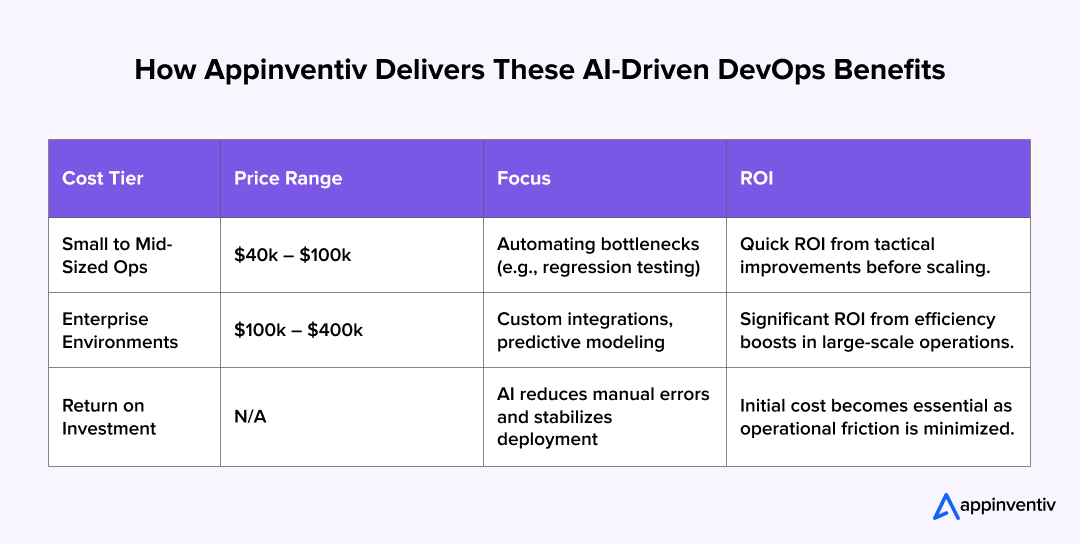
Estimating the bill for AI integration is rarely precise. The final cost fluctuates significantly based on the maturity of the current tech stack and the specific operational goals. While there is no standard menu price, most initiatives fall into two distinct financial tiers.
| Cost Tier | Price Range | Focus | ROI |
|---|---|---|---|
| Small to Mid-Sized Ops | $40k – $100k | Automating bottlenecks (e.g., regression testing) | Quick ROI from tactical improvements before scaling. |
| Enterprise Environments | $100k – $400k | Custom integrations, predictive modeling | Significant ROI from efficiency boosts in large-scale operations. |
| Return on Investment | N/A | AI reduces manual errors and stabilizes deployment | Initial cost becomes essential as operational friction is minimized. |
Best Practices for Implementing AI-Driven DevOps
When teams bring AI into DevOps, the shift usually goes more smoothly when the rollout feels grounded in real-day-to-day work rather than a big technical push. Most people just want clearer workflows and fewer surprises. Here are a few habits that tend to help.
- Start Small: Pick one small area and try it there first. Something simple, like speeding up a slow test step or adding a light layer of automation to your CI or CD pipeline. Get that stable, let the team get used to it, and then move on to the next thing.
- Focus on Data Quality: Before you plug anything in, clean up the data your systems rely on. Remove old logs, fix odd naming patterns, and make sure things are roughly consistent. AI works a lot better when it isn’t trying to make sense of messy leftovers.
- Keep Humans in the Loop: Even with good tools, someone on the team should still glance at alerts, recommendations, or odd decisions. A quick check from a human catches things the system might miss and keeps everything grounded in reality.
- Align AI with KPIs: Review the numbers your team already tracks. If you’re trying to cut downtime or ship updates faster, choose tools that help with those specific targets instead of adding features you don’t actually need.
- Invest in Training: Give the team a little time to get comfortable. A short walkthrough, a demo from someone who has used the tool before, or even a quick internal session helps everyone understand what’s changing and why.
Also Read: DevOps Automation Strategies for Business-Critical Success
Top-Rated AI Tools for DevOps That Streamline Software Development
Choosing tools for your DevOps setup shouldn’t feel like collecting features. It should address the day-to-day challenges your team faces. Here are a few platforms that use machine learning in practical, grounded ways to ease the pressure of modern release cycles.
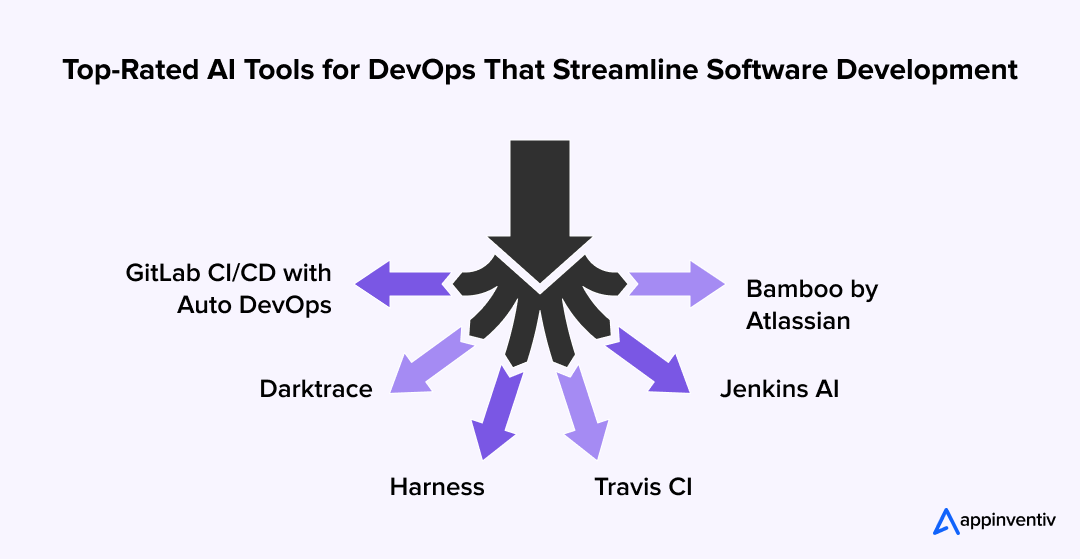
- GitLab CI/CD with Auto DevOps: If your team is tired of manually wiring pipelines, GitLab makes the early setup feel almost effortless. Auto DevOps picks up the language you’re working with and prepares the right environments on its own. You don’t spend hours crafting pipeline files. You push your code and get straight to running tests.
- Darktrace: Traditional firewalls often miss unusual behavior. Darktrace studies what “normal” looks like on your network and spots activity that feels off, like a sudden spike in outbound traffic late at night. It isolates the issue in real time, which is especially useful in environments where security reviews can’t slip.
- Harness: Rollbacks can get messy when deployments go sideways. Harness watches production health right after each release and flags issues before they reach users. If performance dips or error rates rise, it automatically rolls you back to a stable version. Your team stays focused on fixing the root cause instead of scrambling.
- Travis CI: Long waits for test results slow everyone down. Travis CI speeds things up by predicting which tests matter most for each change. It runs the high-impact ones first and gives your team quick feedback, instead of making them wait for a full test suite to finish.
- Jenkins AI: Standard Jenkins jobs don’t always spot trouble early. With AI plugins, the server reviews past failure patterns and warns you if a commit looks risky. Your team avoids wasting compute time on builds that are likely to break anyway.
- Bamboo by Atlassian: For teams already deep in the Atlassian ecosystem, Bamboo tightly integrates projects and deployments. It connects build rules with Jira tickets, so code moves across environments only when the work is actually ready. This keeps releases aligned with the project timeline.
Bringing these tools into your workflow shifts how your team operates. Instead of constantly watching pipelines and dashboards, you let the system catch issues early and correct itself. Your engineers focus more on solving real problems and less on babysitting releases.
Challenges of Integrating AI in DevOps and How to Address Them
While AI offers incredible benefits for DevOps, integrating it into existing workflows comes with its own set of challenges. But don’t worry, understanding these hurdles can help you navigate them more effectively.
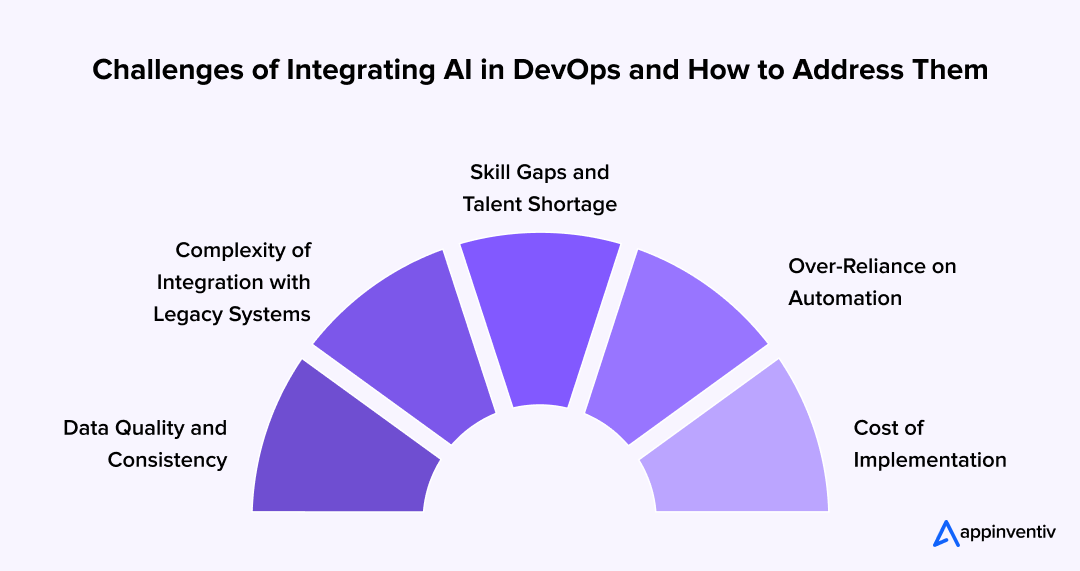
- Data Quality and Consistency: AI thrives on data, but not just any data. Poor-quality or inconsistent data can lead to inaccurate predictions and unreliable results.
How to Overcome: To make AI work for your DevOps pipeline, start by investing in clean, reliable data. Implementing data validation processes and ensuring proper data governance will give your AI models the foundation they need to perform well.
- Complexity of Integration with Legacy Systems: Many businesses rely on legacy systems that weren’t built with AI in mind. Integrating AI into these environments can be challenging and may require substantial overhauls.
How to Overcome: Begin with small, incremental changes rather than a complete overhaul of the system. Focus on AI solutions that can integrate with existing tools and workflows, gradually expanding AI’s role over time. This allows you to avoid disruption while still seeing the benefits.
- Skill Gaps and Talent Shortage: The demand for AI and data science talent often outpaces supply. Your DevOps team may lack the expertise to implement and manage AI-powered solutions effectively.
How to Overcome: Upskilling your existing team can be an excellent solution. Offer training on AI tools and platforms, or consider partnering with AI consultants who can guide your team through the integration process. Bringing in external expertise during the initial stages can also set you up for long-term success.
- Over-Reliance on Automation: AI promises to automate many aspects of DevOps, but over-reliance on it can create blind spots or reduce human oversight, leading to problems when the AI fails or misses anomalies.
How to Overcome: Ensure a healthy balance between AI and human oversight. While AI can handle repetitive tasks and predict issues, having humans in the loop for more complex decision-making ensures that AI complements rather than replaces your team’s expertise.
- Cost of Implementation: While AI offers tremendous value, the initial investment in AI technologies can be significant, especially for larger enterprises.
How to Overcome: Focus on ROI by starting with high-impact, low-cost AI applications (e.g., automating basic testing or monitoring). As you see results, gradually scale AI integration to areas that offer the most value, ensuring that your investment pays off over time.
Despite these challenges, integrating AI into your DevOps workflow is entirely achievable with the right strategy and mindset. By addressing these common roadblocks head-on, you can unlock the true potential of AI in DevOps, making your processes smarter, faster, and more reliable.
Let’s work together to address the unique challenges in your pipeline and unlock the full potential of AI.
AI-Driven DevOps vs Traditional DevOps: Which One Should You Choose?
When it comes to DevOps, you’ve probably heard a lot about AI and how it’s revolutionizing the field. But is it really the right fit for your organization? Let’s compare AI-driven DevOps with traditional DevOps to help you make an informed decision.
Traditional DevOps
In traditional DevOps, human teams handle the bulk of decision-making, from testing to deployment. While automation tools like Jenkins or Bamboo help speed things up, much of the work still requires manual intervention. Think of it as the tried-and-true method; it works, but there are often bottlenecks and inefficiencies that can slow teams down.
- Strengths: It’s simple, well-understood, and doesn’t require a huge shift in mindset. If you’re already using standard automation tools, traditional DevOps keeps things stable and reliable.
- Challenges: The reliance on human judgment for many tasks can lead to errors or slower response times. It can also become a challenge when scaling up or handling complex, multi-product systems.
AI-Driven DevOps
Now, AI takes DevOps to the next level. It’s about more than automating tasks; AI can predict issues, optimize resource use, and make data-driven decisions on its own. AI-powered tools continuously learn and adapt, making the process more efficient, faster, and proactive. From AI-based anomaly detection to predictive maintenance, AI is designed to enhance every part of the DevOps lifecycle.
- Strengths: Speed, accuracy, and predictive power. AI can help prevent issues before they occur, streamline workflows, and reduce manual intervention. It’s perfect for teams that need to scale quickly, manage complex systems, or maintain high reliability.
- Challenges: The initial setup cost can be higher, and there’s a learning curve involved. You also need a team with the right skills to leverage AI fully, and the integration with existing systems can be challenging.
Which One Should You Choose?
If you’re a smaller team with fewer complexities and want something easy to implement without a major shift, traditional DevOps might be the right choice. It’s a solid, dependable approach.
However, if you’re dealing with rapid growth, large-scale deployments, or need to stay ahead in a competitive market, AI-driven DevOps is the way to go. It’s designed to help teams get faster, smarter, and more efficient in a way traditional DevOps can’t match. The benefits, in terms of speed, reliability, and long-term cost savings, often outweigh the upfront investment.
In the end, the choice depends on your goals, budget, and readiness to evolve. For many businesses, a hybrid approach, using traditional DevOps with AI enhancements, might be the best of both worlds, gradually introducing AI where it can provide the most value without the risk of overhauling everything at once.
Also Read: DevOps Maturity Model 2025: AI-Driven, Secure & Scalable
Future of AI in DevOps: Redefining Software Development
The industry is moving past the era of simple scripting. The next iteration of DevOps isn’t merely about speed; it is about shifting from automated tasks to autonomous decision-making.
- From Automation to Agency: Current tools follow rules; future systems will execute judgments. The objective is “NoOps” scenarios where the infrastructure doesn’t just alert an engineer to a crash, it provisions a replacement, migrates the state, and re-routes traffic without a single pager going off.
- Context-Aware Pipelines: Rigid, one-size-fits-all workflows are obsolete. Intelligent CI/CD will recognize the commit context. It will distinguish between a low-risk text change and a critical database migration, dynamically adjusting the testing rigor to match the risk profile.
- Self-Healing Infrastructure: Optimization stops being a manual audit. The environment will continuously tune itself, adjusting memory allocation, database indexing, and caching strategies in real-time based on usage patterns. The system effectively maintains its own health in the background.
- Predictive Security: DevSecOps shifts from a gatekeeper to a forecaster. Instead of catching bugs at the end of the cycle, models will analyze architectural patterns to predict vulnerability vectors before code is even written, moving security to the absolute start of the lifecycle.
This evolution changes the fundamental role of the engineer. The focus shifts from managing the servers to managing the logic that governs them. It is the transition from maintaining a machine to designing a self-driving engine.
As generative AI matures within DevOps pipelines, teams exploring agentic coding systems for enterprise software teams can now delegate full end-to-end coding tasks (from ticket parsing to deployment) to orchestrated AI agents, well beyond what standard AI assistance offers.
How Appinventiv Implements AI-Powered DevOps for Enterprises
Many teams turn to Appinventiv, an artificial intelligence development company, to speed up their DevOps workflow without rebuilding their entire system. We integrate AI into your existing processes, automate routine tasks, and help your CI/CD pipeline run with fewer delays and greater predictability.
Our experience comes from real projects, not theory. We’ve delivered 300+ AI-powered solutions, deployed 150+ custom AI models, and completed 75+ enterprise AI integrations. Through our DevOps consulting services, we help teams predict failures earlier, reduce downtime, and make smarter decisions about resources and release timing.
At Appinventiv, the goal is long-term value. We refine models, adjust workflows, and put AI to work in ways that keep your organization moving quickly while maintaining quality. With AI-driven DevOps in place, your team works more efficiently, stays resilient, and adapts faster to a changing market.
FAQs
Q. How can DevOps take advantage of AI?
A. AI can help DevOps by automating repetitive tasks such as testing and monitoring, predicting issues before they occur, and optimizing workflows to enable faster, more efficient software delivery.
Q. How to use AI in DevOps?
A. Use AI to streamline your pipeline, automate testing, enhance monitoring, and leverage predictive analytics to spot problems early, freeing your team to focus on innovation.
Q. How to implement AI in DevOps?
A. Start small by integrating AI into one area, like automated testing or incident response. Gradually expand as you see results, ensuring AI complements your existing tools and processes.

Get Started with AI-Driven DevOps Today!

Fast 2-minute response, fully NDA-protected.
AI Coding Agent Development Cost: Enterprise Pricing, Architecture & ROI Guide (2026)
Key takeaways: Custom AI coding tools cost between $50K and $500K. Internal system design and software links drive the total price. Future running fees stem from token bills, server hardware, company rules, and tool tracking, not just initial construction. Multiple coordinated agents, data-search tools, and operational links deliver superior financial returns. These advanced features require…
Key takeaways: Regional hosting alone does not guarantee sovereign control over AI processing, logs, backups, encryption keys, or administrative access. Sovereign infrastructure creates the most value for regulated data, critical operations, proprietary knowledge, and AI agents connected to enterprise systems. Geopatriation brings sensitive AI workloads closer to their country of origin, reducing regulatory and geopolitical…
How to Build Custom AI Agents: Process, Architecture, Tech Stack, and Cost
Key takeaways: Production AI agents need more than LLMs: RAG, IAM, tool controls, trajectory evaluation, observability, and human approval. Start with the workflow, not the model: define business outcomes, autonomy boundaries, system access, and measurable acceptance criteria first. Single-agent architectures should remain the default: add multiple agents only for specialization, security boundaries, or parallel execution.…