






























Machine Learning App Development Cost: A Complete Guide


- Machine Learning Application Development Market Overview
- Understanding the Cost to Build a Machine Learning App
- Types of Machine Learning Apps and Their Cost Ranges
- Key Factors Influencing the Cost to Build a Machine Learning App
- Hidden Factors That Impact the Cost to Build a Machine Learning App
- How to Build a Machine-Learning App from Scratch?
- Core Development Lifecycle of a Machine Learning App
- Popular Technology Stack for Machine Learning App Development
- Common Use Cases of Machine Learning Apps
- Smart Ways to Optimize Machine Learning App Development Costs
- Common Challenges in ML App Development (and How to Handle Them)
- Future Trends in Machine Learning App Development
- Why Appinventiv Is the Perfect Partner for Your Machine Learning App Development
- FAQs

Key takeaways:
- Building a machine learning app typically costs $40,000 to $400,000+, with complexity, data, and infrastructure driving most of the variation.
- Data quality and model complexity matter more than features. Clean, well-structured data often saves more cost than adding new capabilities.
- Costs don’t stop at development. Hidden expenses like APIs, cloud storage, and model retraining can significantly impact long-term budgets.
- Starting with an MVP and modular architecture helps control costs while keeping room to scale as real user data comes in.
- Custom ML apps offer stronger long-term ROI compared to off-the-shelf tools, especially for products that need scalability, control, and differentiation.
Think about the last time an app just got things right, quick responses, relevant suggestions, no friction. That’s become the baseline. Speed, personalization, and real-time decisions aren’t extras anymore. Most users expect them without even noticing.
For teams building digital products, machine learning in mobile apps has moved from a “nice to have” to a practical reality. It’s often what separates apps that feel responsive and intuitive from those that start to feel slow or outdated. When businesses delay building machine learning apps, the gap shows up in user experience pretty quickly.
You can see this shift across industries. In healthcare, finance, eCommerce, and logistics, custom machine learning applications are helping teams manage data more effectively, automate decision-making, and improve product evolution over time. These systems don’t stay static. They learn from usage and adjust as things change.
At some point, the question becomes straightforward: what does it actually cost to build this? In most cases, the cost of machine learning app development ranges from $40,000 to $400,000+, depending on complexity, data, and infrastructure.
This machine learning app development guide breaks that down so you can plan it with clarity.
Let’s break it down—fast, clear, and tailored to your vision. Talk to our experts and get a custom quote today.

Machine Learning Application Development Market Overview
The demand for machine learning in mobile apps and enterprise-grade systems is soaring—and the market figures tell the story:
- According to Statista, the global machine learning market is projected to grow from $105.45 billion in 2025 to $568.32 billion by 2031, representing a staggering CAGR of 32.41%, underscoring how quickly adoption is picking up.
- Most companies have already started experimenting. About 71% of enterprises are using ML or generative AI somewhere in their operations.
- But very few have scaled it properly. Only 1% have taken AI across the business, so there’s still a lot of room to move ahead.
- The value is real, not theoretical. Estimates suggest $2.6–4.4 trillion in annual impact, especially in areas like customer operations and product development.
- Spending is only increasing. Around 92% of companies plan to invest more in AI, so momentum isn’t slowing down.
- The gap is getting wider. Teams that move early are already seeing results, while others are still figuring out where to start.
The competitive gap between early adopters and late movers is widening fast—those who delay risk being left behind. With infrastructure, tools, and talent more accessible than ever, there’s no better time to start building intelligent, ML-powered apps.
Understanding the Cost to Build a Machine Learning App
Building a machine learning app requires a thoughtful investment in time, expertise, and the right technological stack. As mentioned earlier, the cost to build a machine learning app typically ranges from $40,000 to $400,000 or more, depending on factors like app complexity, model sophistication, and infrastructure requirements. The cost can escalate as businesses move from simple predictive models to enterprise-level ML app development involving real-time learning, complex data pipelines, and multi-layered security.
When estimating your potential investment, a basic formula can guide you:
Development Time × Hourly Rate = Total Machine Learning App Development Cost
This formula helps project the budget based on the number of hours your development team will invest and the average hourly rate for ML developers.
Cost Analysis Based on App Development Stages
Let’s break down the cost to develop a machine learning app across key development stages:
| Development Stage | Duration | Estimated Cost |
|---|---|---|
| Research & Planning | 2–4 weeks | $8,000 – $25,000 |
| Design & Architecture | 1–2 months | $20,000 – $60,000 |
| Core Development (Data + Models + Backend) | 4–8 months | $120,000 – $220,000 |
| Testing & Validation | 2–3 months | $30,000 – $70,000 |
| Launch & Deployment | 2–4 weeks | $10,000 – $25,000 |
| Maintenance & Updates | Ongoing | $5,000 – $20,000/month |
At this stage, most teams start looking for a reliable estimate of a machine learning app project to understand how complexity affects both cost and delivery timelines.
Cost & Timeline Based on App Complexity
If you’ve ever tried estimating an ML project, you’ll know the jump in cost isn’t about adding one more feature. It usually comes when the system has to deal with messy data, real users, and decisions that can’t afford to be wrong.
Here’s a simpler way to look at how complexity affects both cost and timeline.
| App Complexity | What It Usually Looks Like | Estimated Cost Range | Typical Timeline |
|---|---|---|---|
| Basic ML MVP | One focused ML feature, a smaller dataset, a simple or pre-trained model, mostly cloud-based | $40,000 – $80,000 | 2 – 4 months |
| Mid-Level ML App | A couple of ML features, cleaner data pipelines, some model tuning and backend integrations | $80,000 – $160,000 | 3 – 6 months |
| Advanced ML App | Real-time predictions, larger datasets, performance tuning, early-stage automation | $160,000 – $280,000 | 5 – 9 months |
| Enterprise ML System | Full-scale pipelines, continuous retraining, scaling, security and compliance layers | $280,000 – $400,000+ | 6 – 12+ months |
At the start, things feel manageable. Data is limited, models are simpler, and you can move quickly.
As the system grows, more time is spent cleaning data, keeping models accurate, and ensuring everything runs smoothly as usage increases. That’s usually when both time and cost start to stretch out.
Types of Machine Learning Apps and Their Cost Ranges
Not all ML apps are created equal—some are lightweight and task-specific, while others require enterprise-grade infrastructure and deep learning capabilities. Below is a breakdown of common ML app types and their estimated development cost ranges based on feature complexity, data requirements, and platform compatibility.
| Type of ML App | ML Techniques Used | Estimated Cost Range |
|---|---|---|
| Recommendation Engines | Collaborative Filtering, Matrix Factorization | $40,000 – $80,000 |
| Predictive Analytics Tools | Regression, Time-Series Models | $40,000 – $90,000 |
| Chatbots & Virtual Assistants | NLP, Transformers (BERT, GPT) | $40,000 – $120,000 |
| Computer Vision Apps | CNNs, Image Segmentation | $60,000 – $150,000 |
| Voice & Speech Recognition Apps | RNNs, LSTMs, Transformer-based ASR | $50,000 – $130,000 |
| Fraud Detection Systems | Anomaly Detection, Random Forest, SVM | $70,000 – $180,000 |
| Healthcare Diagnostic Apps | CNNs, Ensemble Learning | $80,000 – $250,000+ |
| Personal Finance & Budgeting Apps | Rule-based + Supervised ML | $40,000 – $100,000 |
| Smart Marketplaces | Classification, Recommender Systems | $50,000 – $150,000 |
| Predictive Maintenance Apps | LSTM, ARIMA, Sensor Data Analysis | $90,000 – $220,000+ |
| Generative AI Apps | LLMs, GANs, Diffusion Models | $120,000 – $300,000+ |
Key Factors Influencing the Cost to Build a Machine Learning App
The cost to build a machine learning app is shaped by multiple variables that go beyond just development time. Each factor adds unique layers of complexity, effort, and budget considerations, especially when you aim to build custom machine learning applications with scalable, intelligent features.
1. Feature Complexity
The more advanced the features, the higher the cost. Basic apps with simple prediction models are cheaper to build, but apps that require deep learning for mobile applications, real-time personalization, image recognition, or complex decision-making will significantly raise both development time and cost.
2. Data Volume and Quality
The quality and size of your training dataset directly impact the ML app development cost. More extensive datasets require more storage, longer model training times, and additional data cleaning, driving up expenses.
3. Machine Learning Algorithms and Model Complexity
Using advanced machine learning algorithms for app development such as neural networks or reinforcement learning requires specialized expertise, larger computing power, and extensive testing, all contributing to higher costs.
4. Platform and Device Compatibility
Whether you’re building machine learning in Android, iOS, or web-based apps, adapting the app across multiple platforms and devices increases development efforts. Compatibility testing can add significant costs, especially in enterprise-level ML app development.
5. AI and Cloud Infrastructure
High-performance computing resources, GPU support, and cloud storage are required to manage data pipelines and run real-time models. The infrastructure for developing apps with machine learning models and deploying cloud-based predictions can heavily influence your budget.
6. ML App Development Framework
Choosing the right ML app development framework (like TensorFlow, PyTorch, or Apache MXNet) affects costs. Some frameworks are more resource-efficient, while others may demand more advanced engineering.
7. Data Security and Privacy Compliance
When handling sensitive data, especially in machine learning in mobile apps, the app must comply with security standards like GDPR. Implementing strong encryption, access controls, and privacy protocols increases the cost to build a machine learning app.
8. Over-the-Air (OTA) Model Updates
Integrating OTA update functionality ensures your ML models can evolve without forcing users to reinstall apps. This requires additional cloud setup and continuous monitoring, which adds to the ML app development cost.
9. Real-Time Processing Capabilities
If your app demands real-time decision-making (like fraud detection or instant recommendations), you’ll need edge computing and highly optimized code. Building custom machine learning applications with real-time processing raises engineering complexity and cost.
10. Cross-Industry Integrations
When your ML app must integrate with third-party systems like CRMs, IoT platforms, or payment gateways, the ML app development process becomes more complicated and resource-intensive.
Hidden Factors That Impact the Cost to Build a Machine Learning App
While most companies focus on visible cost drivers like development time and feature sets, several hidden factors can silently inflate the machine learning app development cost. Understanding these factors early can help you plan your budget more effectively and avoid costly surprises.
1. Data Collection and Labeling
For custom machine learning applications, raw data is not enough. Data must be cleaned, labeled, and categorized, which often requires manual effort or specialized data labeling services. This step is essential but can significantly increase the cost to build a machine learning app.
2. Data Storage and Management
As machine learning in mobile apps often involves handling large datasets, cloud storage and database management become ongoing expenses. Hidden costs can arise from scaling your storage, backup, and real-time access needs, especially when using cloud platforms like AWS or Google Cloud or Azure.
3. API and Third-Party Integration Costs
Many machine learning app features require external APIs for tasks like sentiment analysis, location tracking, or payment processing. These third-party services often charge per API call, adding hidden recurring costs to the project.
4. Hardware Costs for Model Training
Building intelligent apps with machine learning algorithms for app development may require access to GPU-based cloud servers or on-premises hardware, especially for deep learning models. These costs are easy to overlook during initial budgeting but can quickly escalate.
5. Unexpected Model Retraining Needs
Your ML models can drift over time as real-world data changes. The machine learning application development process may need to include frequent retraining cycles, which demand additional development hours, new datasets, and computing resources.
6. User Experience (UX) Optimization
For machine learning mobile app ideas to succeed, the app must provide a smooth, intuitive user interface. The UX optimization phase often demands extra design and testing cycles, especially when integrating complex ML features that need to feel natural to the end-user.
7. Compliance Audits and Data Privacy Costs
Apps handling personal data, particularly in machine learning in Android and iOS platforms, must comply with global data privacy regulations like GDPR or CCPA. Hidden costs may emerge from legal consultations, security audits, and implementing privacy features.
8. Cross-Platform Synchronization
When developing apps with machine learning models across both web and mobile platforms, ensuring seamless data synchronization and user experience can involve additional backend complexity and development time.
9. Vendor Lock-in Risks
Choosing specific ML platforms, cloud providers, or ML development frameworks can lead to vendor lock-in, forcing you to stick with costly services long-term or pay high migration fees if you decide to switch.
10. Post-Launch Model Monitoring
After deployment, machine learning application development costs can continue to rise due to the need for ongoing model performance tracking, bias detection, and maintenance of the prediction pipelines to keep the app functioning accurately.
Get a clear, tailored estimate based on your features, data, and scale.

How to Build a Machine-Learning App from Scratch?
During this phase, teams experiment with various approaches to identify the right machine learning algorithm for the problem, data type, and performance requirements. Building a successful machine learning app requires more than just coding; it demands a carefully planned, step-by-step approach.
Below is a complete guide to help you navigate each phase of the ML app development process efficiently.
1. Concept and Market Research
Start by clearly defining the purpose of your machine learning app and identifying the target audience. Explore the current market to uncover gaps, user pain points, and the most relevant machine learning mobile app ideas that can stand out. Study industry-specific competitors to understand how they are leveraging AI machine learning applications. Detailed market research helps you choose the right direction and predict what features users expect from intelligent apps.
2. Define Features and Requirements
List out the essential machine learning app features you need—like real-time predictions, recommendation engines, image recognition, or speech processing. This is where you decide whether to incorporate machine learning in Android, iOS, or cross-platform environments. You must also specify model requirements, data sources, and the expected accuracy levels to ensure your custom machine learning application meets real-world performance standards.
3. Choose the Right Technology Stack
Selecting the appropriate ML app development framework is critical for long-term success. Depending on your app’s complexity, you might choose TensorFlow, PyTorch, or Apache MXNet, which are popular for developing apps with machine learning models. Make sure your tech stack supports cloud integration, real-time processing, scalability, and over-the-air (OTA) model updates to future-proof your app and keep operational costs manageable.
4. UI/UX Design
Designing a seamless and user-friendly interface is essential for machine learning in mobile apps. The goal is to make complex ML features feel simple and intuitive to the end-user. The UI should visually display smart suggestions, predictions, or alerts without overwhelming the user. During this phase, you must also ensure accessibility, responsiveness, and that the app aligns with the benefits of ML in apps by delivering smoother user journeys.
5. System Development
The core ML app development process begins here, where your team codes the backend, integrates machine learning models, and sets up data pipelines. This is where you build features like automated personalization, real-time object recognition, or fraud detection, depending on your app’s focus. For enterprise-level ML app development, additional layers like API integrations and security protocols are added to support complex workflows.
6. Testing and Quality Assurance
Testing is one of the most critical phases in building intelligent apps with machine learning. It involves validating your algorithms using real-world and simulated datasets to ensure predictions are accurate and the app works across multiple devices. Quality assurance also checks for data security, system speed, and how well the app handles edge cases, especially when you develop machine learning apps in Android where devices vary greatly in hardware capabilities.
7. Launch
Once your machine learning app passes quality checks, it’s ready for a limited or staged launch. This could mean rolling it out to select regions, test markets, or beta users first to collect initial feedback. During this phase, it’s crucial to monitor how the app interacts with users and how well it handles real-time data. Preparing documentation and onboarding resources is also essential to ensure successful user adoption.
8. Feedback and Iteration
After the initial launch, you must continuously gather user feedback and system performance data. This phase helps you refine your machine learning algorithms for app development based on real-world conditions and user behavior. By iterating based on this data, you can enhance the app’s accuracy, improve user experience, and deliver better results aligned with the future of machine learning in apps.
9. Maintenance and Updates
Ongoing maintenance is required to update models, improve security, fix bugs, and adapt to new user needs. Using over-the-air updates, you can deploy new features and retrained models efficiently without disrupting the user experience. Regular maintenance also helps you scale your custom machine learning applications as your user base grows.
Core Development Lifecycle of a Machine Learning App
If you’re trying to build a machine learning app from scratch, this lifecycle becomes critical. It gives structure to what can otherwise feel like a trial-and-error process, especially when dealing with evolving data and model behavior.
Machine learning (ML) app development brings data-driven intelligence into software, allowing apps to learn from patterns and improve over time. Instead of fixed rules, these apps rely on trained models that analyze data and make predictions, which is why their behavior evolves as more real-world input comes in.
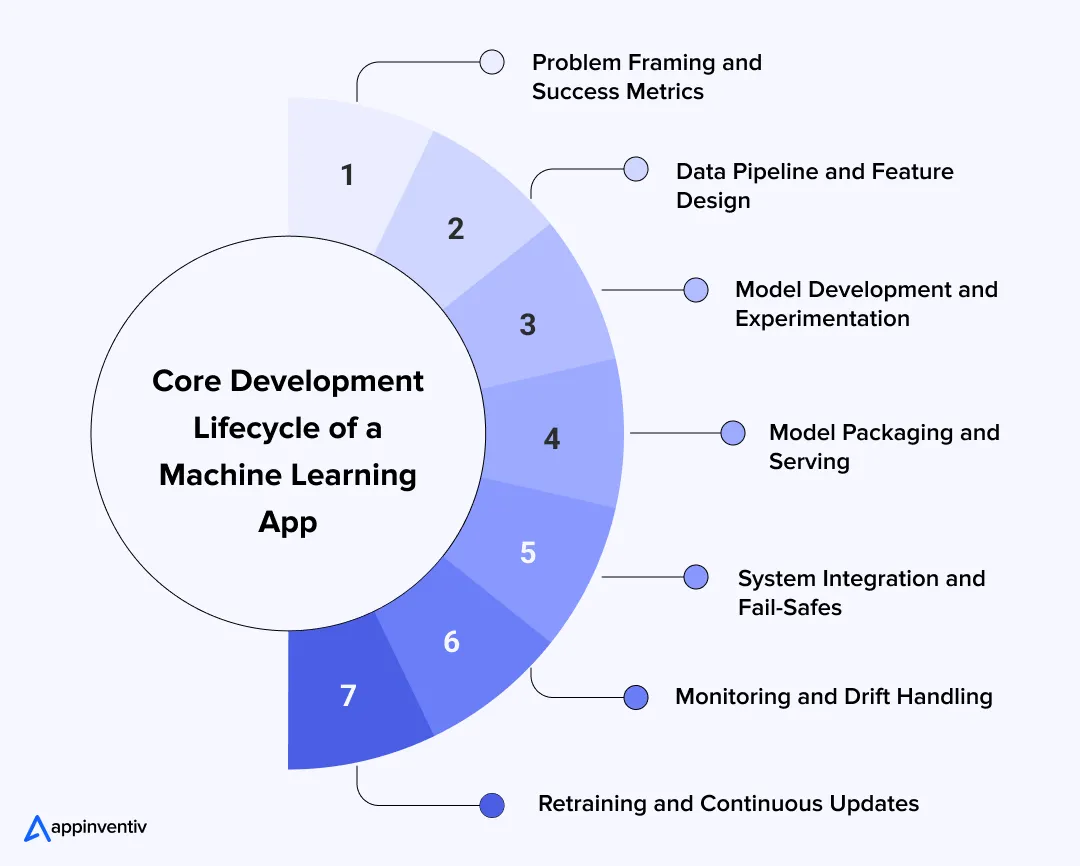
1. Problem Framing and Success Metrics
Before touching models, you need clarity on what the system is trying to solve.
That means defining:
- What exactly are you predicting
- When the prediction is needed (real-time vs batch)
- How success is measured
Accuracy alone doesn’t cut it. In many cases, business metrics like conversion lift, fraud detection rate, or false positives matter more. A vague problem leads to a model that technically works but delivers no real value.
2. Data Pipeline and Feature Design
This is where most of the time goes, and where most issues start. You’re not just collecting data. You’re building:
- Pipelines to ingest and clean data (batch or streaming)
- Feature transformations that turn raw data into usable signals
- Validation layers to catch missing or inconsistent inputs
One practical challenge here is keeping training and production data consistent. If the model sees different formats in production than it did during training, performance drops immediately.
Teams often solve this with shared feature pipelines or feature stores.
3. Model Development and Experimentation
This stage is more iterative than it looks. Instead of jumping to complex models, teams usually:
- Start with simple baselines to set a benchmark
- Add complexity only if there’s a measurable gain
- Track experiments to compare performance across versions
There’s always a trade-off between accuracy and latency. A slightly less accurate model that responds in milliseconds is often more useful than a heavy model that slows the system down.
4. Model Packaging and Serving
Once the model performs well, it needs to run reliably inside the app.
This involves:
- Converting the model into a deployable format
- Exposing it through APIs or embedding it on-device
- Containerizing it for consistent deployment
The main decision here is where inference happens:
- On-device (edge): faster, works offline, better for privacy
- Cloud: easier to update, more computing power
The choice depends on your use case, not just technology preference.
5. System Integration and Fail-Safes
This is where ML becomes part of the product.
The model has to:
- Work with APIs, databases, and existing workflows
- Handle delays, errors, or low-confidence predictions
In practice, you always need fallbacks. If a recommendation model fails, the system should still return a usable result. If confidence is low, it might be better not to show a prediction at all.
This layer also handles rollout strategies like A/B testing and version control.
6. Monitoring and Drift Handling
Once live, models don’t break; they slowly get worse. User behavior changes. Data shifts. What worked last month is starting to slip quietly.
Teams monitor:
- Changes in input data (data drift)
- Drop in prediction quality
- System performance, like latency and errors
Without this, you won’t notice degradation until it starts affecting business outcomes.
7. Retraining and Continuous Updates
An ML system isn’t a one-time build. You need:
- Scheduled or trigger-based retraining
- Validation before pushing new models
- Versioning to roll back if something goes wrong
In more mature setups, this is automated through custom MLOps pipelines. New data flows in, models update, and deployment happens with minimal manual effort.
At a surface level, it feels like building a feature. In reality, you’re building a system that depends on data, infrastructure, and constant tuning.
These phases also closely map to the steps to build a machine learning application, from defining the problem to monitoring model performance after launch.
Popular Technology Stack for Machine Learning App Development
Once you get past the planning stage and start building, the stack usually becomes clearer. Not because there’s one “best” setup, but because certain tools solve very specific problems around speed, scaling, and integration. Behind every scalable product is a well-defined machine learning app architecture. It’s not just about models; it’s about how data pipelines, APIs, and inference layers work together without slowing the system down.
Here’s a simpler, more practical breakdown of what teams actually use.
| Layer | Tech | Where It Fits | Why Teams Stick With It |
|---|---|---|---|
| Core Development | Python | Model training, data pipelines | Most ML work starts here. It’s fast to experiment, easy to find libraries, and almost every ML team already works in it. |
| Swift / Kotlin | iOS and Android apps | This is where the model meets the user. Needed to plug predictions into the app and control how they show up in real time. | |
| On-Device ML | TensorFlow Lite | Android, edge devices | Runs models directly on the phone. Helps avoid delays from API calls and works even with poor connectivity. |
| Core ML | Apple devices | Built for Apple hardware, so it’s fast and efficient. Also keeps user data on the device, which helps with privacy. | |
| ML Kit | Android apps | Useful when you need features like text scanning or face detection quickly without building models from scratch. | |
| Model Development | PyTorch / TensorFlow | Training and testing models | Teams usually try things quickly in PyTorch, then move to TensorFlow when they need more structured deployment. |
| Model Serving | FastAPI / Flask | APIs for predictions | This is how the app talks to the model. FastAPI is popular when response time really matters. |
| Cloud Platforms | AWS SageMaker | Training and scaling models | Takes care of infrastructure so teams don’t spend time managing servers. Easy to scale as usage grows. |
| Google Vertex AI | Data-heavy ML workflows | Works well if your data already sits in Google Cloud. Keeps pipelines connected. | |
| Azure ML | Enterprise environments | Fits better in setups where security, compliance, and integration with existing systems are priorities. | |
| Deployment | Docker + Kubernetes | Running models in production | Keeps everything consistent across environments and makes scaling or rolling back much easier. |
In most real-world AI and machine learning app development projects, this architecture determines how easily the system can scale, adapt, and handle real-time workloads.
What This Looks Like in a Real Build
If you step into an actual project, it usually settles into something like this:
- Models are built and tested in Python
- Cloud platforms handle training and scaling
- APIs connect the model to the app
- Mobile frameworks handle performance on the device
Nothing here is overly complex on its own. The real challenge shows up when everything needs to work together without slowing the app down or breaking under load.
Common Use Cases of Machine Learning Apps
Most ML applications fall into a few patterns. What separates average systems from high-performing ones is how well they handle data flow, timing, and real-world variability.
These machine learning app use cases often overlap in real products. A single app might combine recommendations, search ranking, and predictive models to deliver a seamless experience.
1. Personalization (Recommendation Systems)
Think of the last time a feed felt unusually relevant. That’s not luck. The system is tracking what you click, what you skip, how long you stay, and then reshaping what you see next.
Underneath, it’s usually a pipeline that filters options first, then ranks them. The hard part is keeping up with changing behavior. If the system reacts too slowly, recommendations start feeling repetitive, and users lose interest.
2. Computer Vision (Image and Video Processing)
This is used wherever the app needs to “understand” images, from AR filters to scanning documents or analyzing medical images.
In practice, inputs are messy. Different lighting, angles, or camera quality can affect results. So teams often run lighter models directly on the device for speed, and use heavier models in the cloud when they need higher accuracy.
3. NLP (Chatbots and Text Intelligence)
Anytime you type into a chatbot or search bar, there’s a system trying to figure out what you actually mean, not just what you typed.
Real conversations aren’t clean. People change topics, ask follow-ups, or phrase things oddly. That’s why most systems mix ML with some rule-based logic, especially in support flows where wrong answers can frustrate users quickly.
4. Predictive Analytics (Decision Systems)
This is where ML starts influencing decisions behind the scenes. It could be flagging a risky transaction, predicting churn, or estimating demand.
The challenge is getting the balance right. A wrong prediction isn’t just a number; it can block a user or lead to poor decisions. So teams usually add thresholds and checks before acting on model outputs.
5. Search and Ranking Systems (Relevance Optimization)
Search feels simple, but it’s doing more than matching words. It’s trying to understand intent and show the most useful results first.
All of this has to happen fast. Even a slight delay can hurt the experience. So models here are heavily optimized to keep response time low while still returning relevant results.
6. Anomaly Detection (Outlier and Risk Detection)
This is used when you don’t know exactly what to look for, but you know what normal behavior looks like. The system learns patterns and flags anything unusual.
Getting this right takes time. If it flags too many things, people start ignoring alerts. If it misses issues, risks go unnoticed. Most teams fine-tune this continuously in response to feedback.
7. Dynamic Pricing and Demand Forecasting
You’ll notice this in travel apps or marketplaces where prices and availability keep changing.
These systems look at past trends and current signals simultaneously. The tricky part is reacting quickly without making changes feel random or unstable to users.
What This Looks Like in a Real Product
Most apps combine a few of these at once. For example, a shopping app might recommend products, refine search results, and adjust pricing in the background.
The real effort isn’t building each piece separately. It’s about ensuring everything works together smoothly as usage increases.
Understanding these machine learning app use cases helps teams prioritize what to build first, rather than trying to implement everything at once.
Smart Ways to Optimize Machine Learning App Development Costs
Building intelligent apps doesn’t always require an unlimited budget. With the right strategies, businesses can build machine learning apps efficiently while managing costs.
1. Start with Core Features First
Begin by developing a minimum viable product (MVP) that focuses on essential features. Launching with basic prediction models or machine learning mobile app ideas allows you to enter the market quickly, collect user data, and improve intelligently over time.
2. Use Modular Architecture
Design your app using modular components so that you can build, test, and deploy individual features like user segmentation or recommendation engines separately. This lowers the cost to develop a machine learning app by avoiding complete system overhauls for future updates.
3. Leverage Open-Source AI Models and Toolkits
Adopt open-source AI machine learning applications and pre-built ML models to cut development time and engineering costs. According to McKinsey, 60% of companies already deploy open-source models to speed up production and lower total costs (McKinsey Report).
4. Automate Testing and Validation
Use automated testing tools to validate model performance and UI functionality across devices. Automated testing minimizes manual effort and reduces time-to-market in the ML app development process. Thus, helping in optimizing the overall cost to build a machine learning app.
5. Leverage Simulation Environments
Instead of depending solely on real-world user data, you can use simulated datasets to train your ML models. This can significantly cut data collection costs during the early development phase.
6. Utilize Transfer Learning
Transfer learning allows you to use pre-trained models for similar tasks, reducing the time and computational resources required for training from scratch. This is particularly valuable when building machine learning apps in Android or resource-constrained mobile environments.
7. Iterate Based on Real-World Data
Once deployed, continuously collect app usage data to optimize model performance and user experience. This helps prioritize which features to improve or remove, avoiding unnecessary investments.
Common Challenges in ML App Development (and How to Handle Them)
When an ML feature goes live, that’s when the real work starts. Things that looked stable during testing begin to behave differently once real data flows in. It’s rarely one big issue, more like small cracks that show up across data, latency, and system behavior.
Here’s how these challenges usually play out, and how teams handle them in practice.
| Challenge | What Usually Happens | How Teams Handle It |
|---|---|---|
| Data Quality Gaps | Data works in testing but breaks in production due to missing fields or mismatches. | Keep training and production pipelines consistent and add validation checks. |
| Works Offline, Fails Live | Models perform well in testing but struggle with real user behavior. | Use A/B testing and track real metrics like conversions, not just accuracy. |
| Slow Predictions | Even small delays hurt the user experience. | Optimize models, run lightweight logic on-device, and use async processing. |
| System Integration Issues | Models don’t fit smoothly with APIs or existing systems. | Wrap models in APIs and add fallback responses to avoid failures. |
| Model Drift | Accuracy drops over time as data and behavior change. | Monitor performance and retrain models regularly. |
| Tracking & Reproducibility | Hard to track what changed between model versions. | Log experiments, datasets, and parameters for easy comparison. |
| Scaling Challenges | Systems slow down and costs increase as data grows. | Move to cloud-based, distributed setups and separate workloads. |
These issues don’t show up all at once. They appear gradually as usage grows. Teams that handle this well don’t try to perfect everything early. They build something that works, monitor closely, and improve each layer step by step as real data comes in.
Get expert guidance to design, deploy, and scale your ML system without costly setbacks.

Future Trends in Machine Learning App Development
If you step into how ML apps are being built today, the shift is pretty noticeable. It’s less about adding smarter models and more about making sure they actually work fast, stay reliable, and don’t unnecessarily inflate costs. These machine learning trends are shaping how teams approach real-world systems.
Here’s what’s changing on the ground.
Hybrid Inference (Edge + Cloud Together)
Most apps aren’t choosing between device and cloud anymore. They use both. Quick decisions happen on-device, while more computationally intensive processing runs in the cloud.
This keeps things fast without losing depth, especially in use cases like recommendations or vision where timing matters.
Real-Time Data Pipelines
Waiting for batch updates is becoming a limitation. More systems now process data as it comes in, not hours later.
That means predictions update continuously, but it also makes the backend more complex to manage.
Feature Stores Becoming Standard
A common issue has been models behaving differently in production than in training. Feature stores help fix that by keeping data definitions consistent.
It sounds like a small change, but it removes many hidden errors.
Automated Model Lifecycle (MLOps)
Teams are moving away from manually updating models. Instead, retraining, testing, and deployment are getting automated.
This makes it easier to keep models accurate over time without constant manual effort.
Smarter Cost Control
Running ML at scale quickly becomes expensive. So systems are starting to decide when to use heavy models and when simpler logic is enough.
This keeps performance stable while avoiding unnecessary compute costs.
Better Monitoring Beyond Logs
It’s not enough to know if a system is running. Teams now track how well their predictions actually perform.
This helps catch issues early, especially when models start drifting without obvious failures.
ML apps are moving toward systems that can run continuously without constant fixes. The focus is shifting from building the model to making sure the entire system stays fast, stable, and reliable as it grows.
Why Appinventiv Is the Perfect Partner for Your Machine Learning App Development
We hope this machine learning app development guide has helped you understand the complete landscape and cost, including what drives those costs and how to monetize your solution effectively. Now that you’re considering development, choosing a trusted partner is critical—not just to build your app, but to build it right.
At Appinventiv, we specialize in delivering custom machine learning applications that aren’t just functional—they’re transformative. Our cross-functional teams of data scientists, ML engineers, UI/UX designers, and cloud experts collaborate to craft scalable, intelligent software that drives real-world results.
Whether you’re building intelligent apps with machine learning for Android, iOS, or cross-platform systems, we ensure your product can learn, adapt, and improve with every user interaction. From model training and real-time processing to seamless OTA model updates and data privacy compliance, our machine learning consulting services bring full-stack expertise to every project.
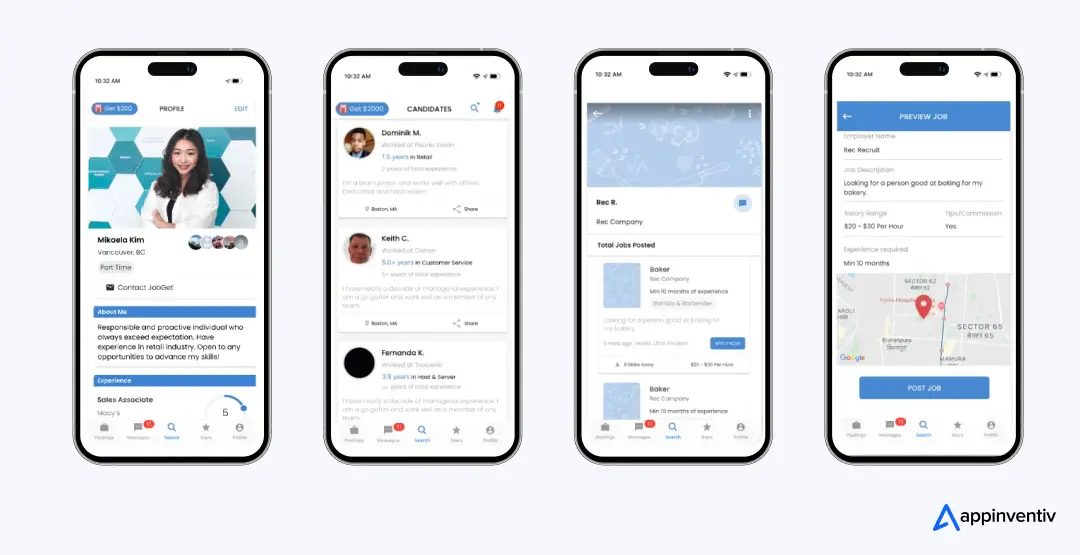
For instance, we recently developed an ML-powered employment platform—JobGet—that has revolutionized blue-collar hiring by providing smart, real-time job matches, resulting in over 2 million downloads and $52 million in Series B funding.
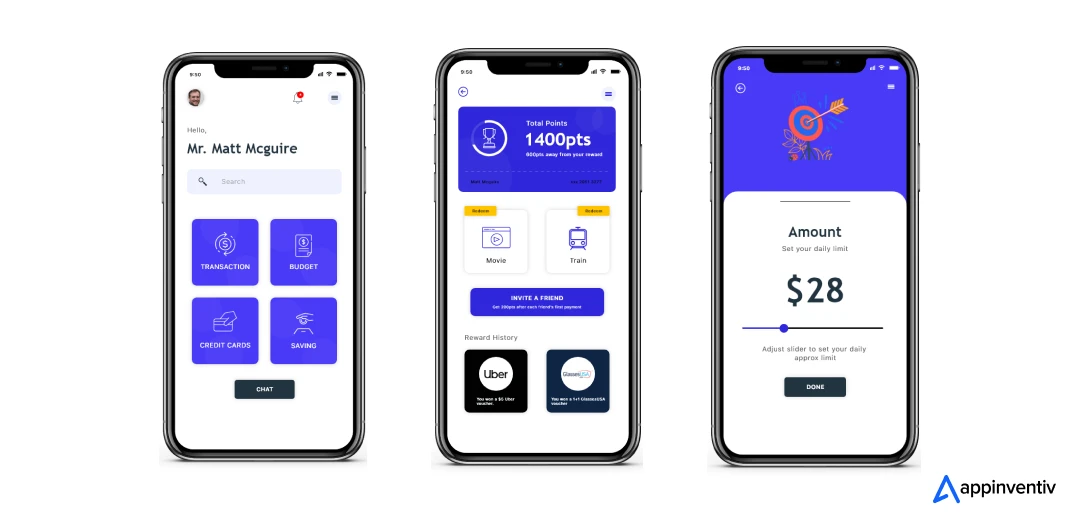
We also developed MUDRA, an AI-driven budget assistant that uses a chatbot interface and predictive analytics to help users track spending habits—now successfully launched across 12+ countries.
These success stories reflect our ability to build machine learning in mobile apps that don’t just work—they lead markets. Whether you’re building for Android, iOS, or enterprise, we help you develop apps with machine learning models that learn, adapt, and drive real impact.
If you’re ready to unlock the power of machine learning in mobile apps and deliver AI-powered value to your users, get in touch with us to make it happen.
FAQs
Q. What are the key steps in developing a machine learning app?
A. It usually starts simple and gets layered as you go. First, define the problem and use case. Then collect and prepare your data. From there, choose and train the right model, integrate it into your backend, and design a clean UI. Once built, test it with real scenarios, launch, monitor performance, and keep improving through regular retraining.
Q. What factors influence the cost of building a machine learning app?
A. Cost mostly depends on how complex your features are, how much data you’re working with, and the infrastructure required. At Appinventiv, the focus is on giving you a clear breakdown upfront, so you know exactly where your budget is going and how to optimize it.
Q. How can machine learning be integrated into a mobile app?
A. It’s a mix of backend and frontend work. The model is trained first, then integrated using APIs or SDKs. Some predictions run directly on the device for speed, while others use the cloud for heavier processing. The goal is to make it feel seamless for the user.
Q. How will machine learning help increase ROI for my app?
A. It helps you make better decisions automatically. Whether it’s personalization, smarter recommendations, or process automation, ML improves engagement, reduces churn, and helps drive more consistent revenue.
Q. What tools and platforms are used for machine learning app development?
A. Most teams rely on tools like TensorFlow or PyTorch for model building, Core ML or TensorFlow Lite for mobile apps, and cloud platforms like AWS, Google Cloud, or Azure for scaling. Python is still the go-to for development.
Q. What are the top machine learning models used in apps?
A. It depends on the use case, but common ones include regression models for predictions, decision trees for structured data, clustering for segmentation, CNNs for image tasks, and transformer models like BERT or GPT for text-based features.
Q. How much does it cost to build a machine learning app?
A. The cost to build a machine learning app typically ranges from $40,000 to $400,000 or more, depending on factors like app complexity, the volume and quality of training data, model sophistication, platform compatibility, and infrastructure. Apps with basic prediction models cost less, while those involving deep learning, real-time analytics, or multi-platform support require more resources and a higher budget. Planning for hidden costs like API usage, cloud storage, retraining, and data security is also essential.
Q. What is the average time frame to develop a machine learning app?
A. On average, it takes 4 to 12+ months to develop a machine learning app, depending on the project scope and functionality. The process includes stages like research, UI/UX design, model development, backend integration, testing, and deployment. Basic apps can be built in 4–6 months, while complex, enterprise-level ML apps may take up to a year or more due to additional tasks such as setting up continuous learning, cross-platform optimization, and compliance testing.
Q. What technologies are used to develop machine learning apps?
A. In most projects, teams start with Python since it’s easier to experiment and build models there. Frameworks like TensorFlow or PyTorch handle the training part. When it comes to apps, things shift a bit. Mobile apps use tools like TensorFlow Lite or Core ML to run models directly on the device, while cloud platforms like AWS or Google Cloud handle the heavy lifting, such as training and scaling.
Q. What are common use cases of machine learning apps?
A. You’ll usually see ML used where decisions need to adapt over time. Recommendations, chatbots, image recognition, or predictive analytics for things like fraud or demand. In real apps, it’s rarely just one use case. A single product might combine a few of these to make the experience feel smoother and more relevant.
Q. How does Appinventiv help businesses build machine learning applications?
A. Most teams need more than just a working model; they need something that runs smoothly once real users come in.
With 10+ years of experience and a team of 1,500+ engineers and AI specialists, Appinventiv supports the full journey, from identifying the right use case to building and scaling a reliable machine learning app architecture.
They’ve delivered solutions used by millions of users, so the focus remains on performance, stability, and ensuring the system holds up in real-world conditions.

- In just 2 mins you will get a response
- Your idea is 100% protected by our Non Disclosure Agreement.

Key takeaways: AI agents for cybersecurity are moving past triage assistance into autonomous decision-making across SOC, AppSec, and threat intelligence. Extensive AI use in security operations saves $1.9M per breach and cuts the breach lifecycle by 80 days (IBM, 2025). 97% of organizations hit by an AI-related security incident lacked proper AI access controls. The…

AI Voice Agent Challenges and How to Tackle Them
Key takeaways: Most AI voice agent challenges are architectural, not model-related: latency, context, integration, noise, and compliance. A modular pipeline with streaming ASR, a control layer, and strict data governance is what separates demos from production. Voice AI fails louder than other AI. The customer hears it and hangs up. Your voice agent demo was…

AI Outsourcing for Enterprises: How to Hire the Right Partner and Avoid Costly Implementation
Key Takeaways Don’t judge by demos alone. Real value shows in production, how the system handles scale, failures, and messy data. Data matters more than the model. If the partner isn’t strong on pipelines, validation, and data flow, problems will show up later. MLOps is not optional. Without monitoring, versioning, and retraining, even good models…









