



































How to Build a Warehouse Management System: A CIO’s Guide for Australian Enterprises

 Share -



- 01Why Warehouse Technology Has Become a Boardroom Priority
- 02What a Warehouse Management System Actually Does
- 03What Are Some Common Types of Warehouse Management Systems?
- 04WMS Architecture: How the System Is Actually Built?
- 05How to Build A Warehouse Management System: Step by Step Process
- 06What Are Some Common WMS Implementation Challenges and How to Avoid Them
- 07What Are the Core Features of Warehouse Management Systems
- 08How Much Does Warehouse Management System Development Cost in Australia?
- 09Build vs Buy: Which Warehouse Management System Approach Is Right for Your Business?
- 10What Are the Benefits (ROI) of the Warehouse Management System
- 11Tailoring WMS Architecture for Sector-Specific Workflows
- 12Compliance and Data Governance Obligations
- 13What Is the Future of Warehouse Management Systems?
- 14Why Businesses in Australia Choose Appinventiv for Warehouse Management System Development?
- 15FAQs

Key takeaways:
- A WMS is now a boardroom decision, not an ops line item with AU online retail hit $82.6B in 2025, up ~14% year-on-year.
- Success depends on integration and data quality first; AI, robotics, and automation only pay off once that foundation is solid.
- WMS development cost ranges between AUD 70,000 and 700,000 or more, depending on your unique project requirements.
- Pilot before scaling, and invest in change management; most WMS failures come from rushed rollouts, not weak technology.
Every enterprise operations leader in Australia is fighting the same three battles: freight and warehousing costs that keep climbing, a labour market that can’t supply enough skilled pickers and forklift operators, and customers who now expect same-day accuracy as standard. Spreadsheets and disconnected point solutions got most businesses through the last decade. They will not get you through the next one.
A Warehouse Management System (WMS) helps fix these issues. It shows you what’s happening right now in your warehouse, cuts down on manual tasks and makes sure orders go out correctly. In fact, it becomes an operational layer connecting warehouse workers, inventory, automation equipment and business systems.
For example, when an order arrives through an eCommerce platform, the WMS can:
Order received → inventory allocated → picking task created → worker directed to location → item scanned → order packed → carrier selected → shipment dispatched → inventory and ERP updated
That closed-loop workflow is what makes a WMS strategically valuable.
For organisations operating multiple distribution centres, high-volume fulfilment, regulated inventory or complex warehouse processes, the WMS becomes a system of operational control rather than another inventory database.
This distinction matters when evaluating warehouse management system development in Australia. This blog walks through how a warehouse management system in Australia actually gets designed, built, costed, and rolled out, and what decision-makers consistently get wrong along the way.
Legacy systems are costing your business time, money, and customer loyalty. Partner with a technology team that understands Australian enterprise logistics.
Why Warehouse Technology Has Become a Boardroom Priority
Online retail spending in Australia reached roughly $82.6 billion in 2025, up close to 14% year-on-year, and now accounts for about 12.7% of total retail turnover.
That shift alone would strain most legacy warehouse operations. Layer on rising commercial lease and labour costs, the tyranny of distance between capital cities and regional distribution points, and customer expectations shaped by same-day delivery leaders, and it’s clear why warehouse modernisation has moved from an operations line item to a board-level conversation.
The need is particularly unavoidable for organisations managing supply chains across major cities, regional centres and remote locations. A process that works in one facility may not scale cleanly across ten. A modern WMS can help such enterprises:
- Coordinate multiple warehouses
- Improve inventory accuracy at bin and location level
- Reduce unnecessary travel during picking
- Automate replenishment and task assignment
- Improve order fulfilment visibility
- Manage returns and reverse logistics
- Connect warehouse operations with ERP, eCommerce and transport systems
- Create auditable records of stock movements
- Prepare operations for intelligent automation, robotics and AI
The market is responding accordingly. Australia’s warehouse management system market was valued at roughly $96.9 million in 2025 and is forecast to reach $199.1 million by 2030, a compound annual growth rate of 15.5%.
Evidently, for enterprise leaders, the real question isn’t whether to invest in a WMS; most mid-market and large operations already run some form of one, even if it’s an ageing module bolted onto their ERP.
The real question is whether that system can actually keep pace with order volumes, integrate cleanly with the rest of the technology estate, and give the executive team the visibility they need to make supply chain decisions in real time rather than after the fact.
What a Warehouse Management System Actually Does
A warehouse management system is the software layer that governs everything happening inside your four walls (or across a network of distribution centres), receiving, put-away, inventory tracking, picking, packing, and dispatch.
Done well, it replaces manual stock counts and paper-based pick sheets with real-time, scan-verified data that flows straight into your ERP, transport management system (TMS) and eCommerce platform.
It’s worth being precise about the role of a warehouse management system versus adjacent systems, because businesses frequently conflate them.
- An ERP manages the financial and planning layer of the business.
- A TMS manages freight and carrier logistics once goods leave the building.
- A basic warehouse management system focuses specifically on what happens between the loading dock and the outbound trailer – inventory management accuracy, labour productivity, and order accuracy inside the facility itself.
Get this scope wrong during planning and you end up either duplicating functionality across systems or leaving a genuine gap that nobody catches until go-live.
What Are Some Common Types of Warehouse Management Systems?
Not every enterprise needs the same type of WMS deployment model. The right choice depends on data sovereignty requirements, the number of sites you’re running, your existing infrastructure, and how tightly regulated your sector is.
| Deployment Model | Best Suited To | Trade-offs |
|---|---|---|
| Cloud-based / SaaS WMS | Retailers, 3PLs and mid-market businesses scaling across multiple sites | Fast to deploy, lower upfront cost, vendor manages updates – less granular control over data residency |
| On-premise / licensed WMS | Regulated sectors (healthcare, cold chain, defence-adjacent manufacturing) needing full data control | Higher CAPEX and ongoing maintenance burden, but complete control over infrastructure and compliance posture |
| Hybrid / modular WMS | Enterprises scaling in phases or running mixed legacy and modern infrastructure | Flexibility to keep sensitive workloads on local servers while using cloud for analytics and integrations |
| Industry-specific WMS | Cold chain, pharma, fashion/retail, and third-party logistics (3PL) providers | Built-in templates cut setup time, but may require heavier customisation for unique workflows |
Selecting the right WMS ensures your warehouse stays efficient, compliant, and ready for future growth, no matter where your customers are in the nation.
WMS Architecture: How the System Is Actually Built?
Businesses rarely ask about architecture until something breaks, usually during a peak trading period. It’s worth understanding the layers up front, because each one carries its own cost, risk profile and vendor dependency.
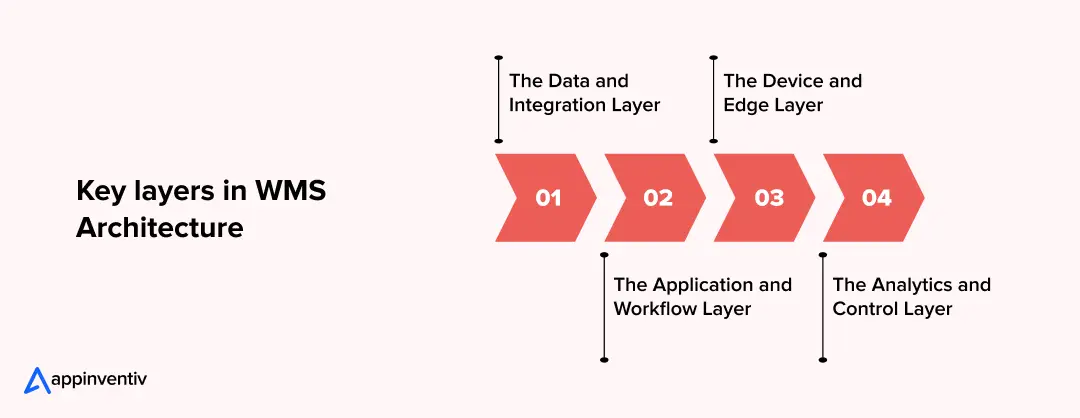
The Data and Integration Layer
This is the backbone: your inventory database, order data, and the APIs or middleware connecting the WMS to ERP, eCommerce and TMS platforms. Most integration failures trace back to this layer being under-designed at the outset as teams build the warehouse-facing features first and treat integration as an afterthought.
The Application and Workflow Layer
This is where picking logic, task allocation, and business rules live. It needs to be configurable without a developer re-writing code every time a new fulfilment channel or promotion changes how orders get processed.
The Device and Edge Layer
Barcode scanners, RFID readers, handheld terminals, and increasingly voice-picking headsets. For sites with patchy connectivity, common across regional distribution centres, this layer needs offline-capable functionality that syncs once connectivity returns.
The Analytics and Control Layer
Dashboards, reporting and, where relevant, predictive forecasting sit here. This is also where industrial automation and robotics integrations, conveyors, autonomous mobile robots (AMRs), pick-to-light systems, connect into the platform as the operation matures.
How to Build A Warehouse Management System: Step by Step Process
Warehouse management system development in Australia typically follows seven distinct phases. Businesses that skip or compress any of these, particularly discovery and piloting, are the ones most likely to end up in an expensive re-build a few months later.
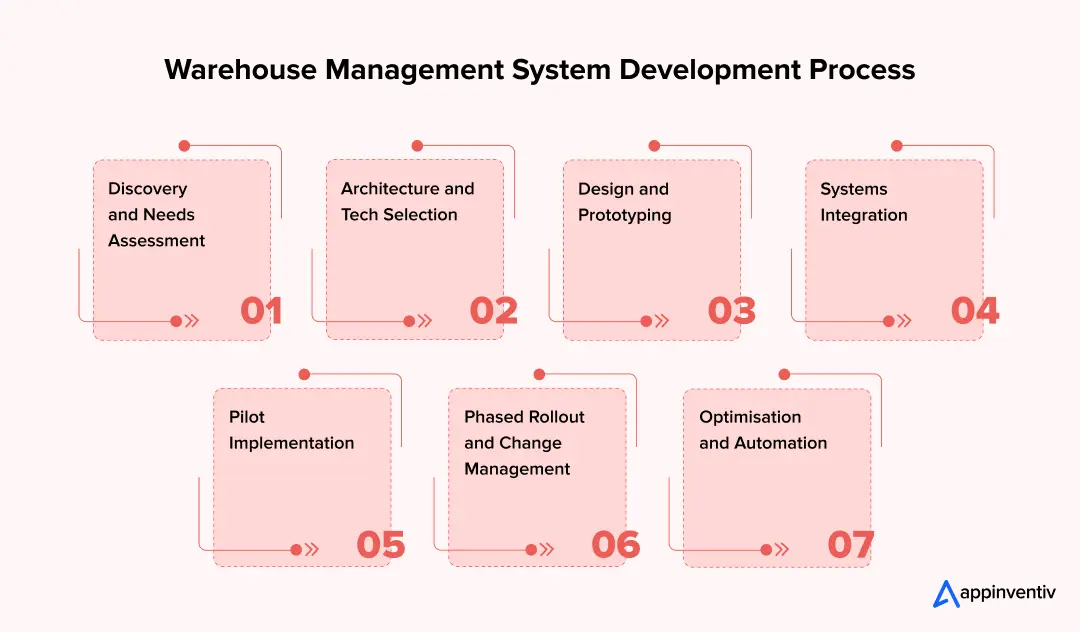
Phase 1: Discovery and Needs Assessment
Map every current process from goods-in to dispatch, and talk directly to warehouse managers, floor staff and logistics coordinators, not just their department heads. Document where inventory accuracy breaks down, where picking routes are inefficient, and what your fulfilment rate and order accuracy targets actually need to be.
For enterprises running multiple distribution centres across states, this phase should also account for regional freight lead times and how sites will stay synchronised.
Phase 2: Architecture and Tech Selection
Decide between cloud, on-premise or hybrid deployment based on your data governance obligations and existing infrastructure. Lock in your technology stack, backend framework, database, and integration approach, early, and make sure it can accommodate automation or robotics down the track even if you’re not deploying it at launch.
Phase 3: Design and Prototyping
Build a working prototype covering the core warehouse features like inventory tracking, picking, packing and shipping, before committing to full development. Design mobile-first screens that floor staff can use comfortably during a full shift, and test the prototype in a single, contained area of the warehouse to surface usability issues early.
Phase 4: Systems Integration
Connect the WMS to your ERP, eCommerce logistics platform, TMS, and barcode or RFID hardware. This is what enables true warehouse management system integration where a customer places an online order, stock updates instantly, and a picking task is generated without anyone touching a spreadsheet. Under-investing here is the single most common reason enterprise WMS projects under-deliver on ROI.
Phase 5: Pilot Implementation
Run the system in one warehouse, one department, or one product category first, with clearly measurable goals. For example, a defined percentage improvement in picking speed or a target of zero stock discrepancies during the pilot window. Use this phase to train staff properly and gather structured feedback before expanding further.
Phase 6: Phased Rollout and Change Management
Roll out core functionality like inventory and order tracking, before layering in advanced features. Run hands-on training with simple, role-specific guides, and keep a tight feedback loop open so issues get fixed quickly rather than accumulating into a list nobody addresses until the post-implementation review.
Phase 7: Optimisation and Automation
Once live, track order accuracy, picking speed and space utilisation, and use that data to decide where automation genuinely earns its cost. This is typically where AI-driven demand forecasting, autonomous mobile robots, or optimised slotting get introduced,layered on top of a system that’s already proven stable, not bolted onto one still finding its feet.
We’ve helped enterprise sequence multi-site WMS rollouts so peak trading periods are never put at risk.
What Are Some Common WMS Implementation Challenges and How to Avoid Them
Warehouse management system development can really improve operations, but the process comes with several challenges. Many businesses run into similar problems during setup.
Over-Customisation
Adding every conceivable feature slows deployment and complicates future upgrades.
Fix: Solve your core operational problems first. Layer in advanced modules only once the base system is stable and adopted.
Skipping the Pilot Phase
Deploying the full system across every site at once amplifies workflow problems instead of catching them early.
Fix: Pilot in one site or process area, gather structured feedback, and refine before wider rollout.
Weak Change Management
A new WMS changes how people work daily. Without hands-on training, adoption stalls regardless of how good the software is.
Fix: Involve warehouse teams from discovery onward, communicate the operational benefit clearly, and run role-specific training rather than generic sessions.
Poor Data Quality
Migrating inaccurate stock data into a new system just digitises the same errors.
Fix: Cleanse and validate data before migration, and set clear ongoing rules for scanning and data entry.
Neglecting Mobile Usability
A clunky interface on the warehouse floor gets worked around, not adopted.
Fix: Prioritise a mobile-first, intuitive interface tested with actual floor staff, not just IT stakeholders.
Building AI Before Fixing the Data Foundation
AI in the Australian WMS system cannot reliably solve poor SKU data or inconsistent transaction capture.
Fix: Establish clean operational data first, then introduce AI where the business case is clear.
What Are the Core Features of Warehouse Management Systems
A long features list looks impressive in a vendor pitch deck. What actually matters is whether the platform handles the handful of capabilities that drive accuracy, speed and compliance at enterprise scale.
| Feature | Why it matters |
|---|---|
| Real-time inventory tracking | Barcode, RFID or IoT-linked stock visibility updated the instant goods move – receiving, picking or shipping |
| Omnichannel order orchestration | Single view across online, marketplace and in-store channels, supporting BOPIS, ship-from-store and dropshipping |
| Advanced picking strategies | Wave, batch, zone and cluster picking, with voice or vision-assisted picking for high-volume peaks |
| Returns and reverse logistics | Structured inspection, quarantine and restock workflows so returned stock doesn’t silently re-enter circulation |
| System integrations | Native or API-based connections to ERP, POS, TMS, and eCommerce platforms; the single biggest determinant of ROI |
| Labour and task management | Skill-based task allocation, productivity tracking, and shift-load balancing across warehouse teams |
| Reporting, analytics and forecasting | Live dashboards on pick rates, order accuracy and fulfilment times, plus predictive demand forecasting |
| Security, audit trail and compliance | Role-based access, encrypted storage, and a full audit trail for every stock movement |
| Cloud and mobile access | Multi-site visibility for distributed teams, with mobile-optimised scanning for handheld and wearable devices |
If you’re weighing a warehouse management system with AI capability against a more conventional platform, the honest answer is that most enterprises don’t need AI-driven slotting or robotics integration on day one. What they do need is clean data and solid integrations; AI forecasting and automation deliver far more value once that foundation is in place.
How Much Does Warehouse Management System Development Cost in Australia?
Warehouse management system development cost in Australia varies significantly based on deployment model, integration complexity, and how much customisation your operation genuinely needs.
On average, the cost to build WMS ranges between AUD 70,000 and AUD 700,000 or more. For planning purposes, a custom WMS can broadly fall into these project bands:
| Project scope | Indicative development investment | Typical timeline |
|---|---|---|
| Basic WMS / MVP | AUD 70,000–150,000 | 4–6 months |
| Advanced multi-workflow WMS | AUD 150,000–300,000 | 6–9 months |
| Enterprise WMS | AUD 300,000–700,000+ | 9–12+ months |
These are planning ranges, not fixed market prices or vendor quotes. Actual costs depend on requirements, integrations, devices, data migration, automation, security, testing and implementation scope.
These figures represent the Total Cost of Ownership, which includes the combination of upfront setup (CAPEX) and ongoing licensing, support and maintenance (OPEX). Vendors that quote only the CAPEX figure are setting you up for a budget conversation with the CFO twelve months in.
Build vs Buy: Which Warehouse Management System Approach Is Right for Your Business?
Choosing between a custom-built and pre-built WMS depends on how closely your warehouse processes align with standard workflows.
A pre-built platform can offer faster deployment and lower upfront investment, while custom development gives greater control over workflows, integrations, data and long-term scalability.
The right choice depends on operational complexity, integration requirements, total cost of ownership and future growth, not just the initial software price.
| Factor | Custom-Built WMS | Pre-Built / SaaS WMS |
|---|---|---|
| Upfront cost | Higher (AUD 70,000 – 700,000+) | Lower (AUD 40,000–500,000) |
| Time to market | 4–12+ months | 1–3 months |
| Scalability and flexibility | Fully scalable to unique workflows | Constrained by vendor roadmap |
| Data ownership and control | Full ownership | Dependent on vendor terms |
| Best fit | Complex, multi-site or highly regulated operations | Startups, SMEs and fast-growing single-site operations |
If your operation runs standard retail fulfilment workflows, buy. If your workflows are genuinely unique, multi-tenant 3PL billing, cold chain batch tracking, mining parts logistics, custom development can provide greater control and flexibility over the long term.
What Are the Benefits (ROI) of the Warehouse Management System
How do you prove the business case? The true warehouse management system benefits are measured in operational velocity and cost reduction.
- Inventory Accuracy: Moving from nearly 60% to 99.9% accuracy eliminates costly “buffer” stock and prevents lost sales due to phantom inventory.
- Labour Productivity: Optimised picking paths and task interleaving typically yield a 20-30% increase in lines picked per hour (UPH).
- Fulfillment Speed: Automated order routing and cartonisation algorithms slash order-to-dispatch times, helping enterprises meet strict next-day delivery promises.
- Reduced Shrinkage and Spoilage: Particularly in F&B and healthcare, automated expiry tracking (FEFO) drastically cuts the financial write-offs associated with expired goods.
Tailoring WMS Architecture for Sector-Specific Workflows
The same WMS architecture can support different industries, but workflows and compliance requirements vary considerably.
| Industry | Key WMS Priorities | Compliance & Regulatory Focus |
|---|---|---|
| Retail & eCommerce | Omnichannel fulfilment, fast picking routing, reverse logistics (returns), real-time stock visibility. | Privacy Act 1988 (APPs) |
| Healthcare & Pharmaceuticals | Batch/lot traceability, quarantine zones, expiry management (FEFO), secure controlled access. | Therapeutic Goods Administration (TGA) |
| Food & Beverage | Automated temperature logging, batch tracking, expiry management, rapid recall traceability. | Food Standards Australia New Zealand (FSANZ) |
| Chemicals & Dangerous Goods | Hazmat separation logic, SDS (Safety Data Sheet) digital management, transport manifesting. | Australian Dangerous Goods (ADG) Code |
| Manufacturing | Raw material tracking, production staging, line-side inventory, direct MES/ERP integration. | ISO 9001 & Local OHS |
| Mining & Heavy Industrial | High-value spare parts tracking, remote-site replenishment, offline-capable mobile scanning. | WHS Act & ISO 55001 |
| Wholesale & Distribution | Cross-docking, automated route coordination, bulk replenishment, high-volume picking. | Chain of Responsibility (CoR) |
| 3PL (Third-Party Logistics) | Multi-client inventory separation, configurable workflows, automated billing, SLA tracking. | Cross-Industry Adaptability |
The takeaway for enterprise buyers is simple: industry requirements should influence the WMS data model and workflow design from the beginning, not be bolted on after development.
Compliance and Data Governance Obligations
A WMS holds detailed, granular data on stock movements, supplier relationships and customer and employee information. For Australian enterprises, that puts several regulatory frameworks directly in scope during design, not as an afterthought.
| Framework | Relevance to WMS Design |
|---|---|
| Privacy Act 1988 and the Australian Privacy Principles (APPs) | Governs how customer and employee data captured through the WMS, names, addresses, delivery details, is collected, stored and disclosed |
| Essential Eight | A widely adopted cybersecurity baseline; enterprise WMS deployments should map access controls, patching and backup practices against it |
| ISO 27001 / ISO 9001 | Common certification benchmarks businesses expect from technology partners handling operational and inventory data |
| Food Standards Australia New Zealand (FSANZ) | Cold chain and batch/expiry tracking obligations for food and beverage warehousing |
| Therapeutic Goods Administration (TGA) | Storage conditions and full product traceability for healthcare and pharmaceutical distribution |
| Australian Dangerous Goods Code | Applies to any warehouse storing or handling hazardous or regulated materials |
Practically, this means role-based access controls, encrypted data storage, and a complete audit trail aren’t optional extras; they’re what makes your WMS defensible during a regulatory audit or a customer data request. Build these into the architecture from Phase 2 onward rather than retrofitting them once the system is already live.
What Is the Future of Warehouse Management Systems?
For Australian enterprises, three trends are worth watching closely over the next few years:
- AI-driven demand forecasting and dynamic slotting, which reduce overstocking and free up warehouse space without manual intervention
- Deeper robotics integration, autonomous mobile robots and pick-to-light systems, as automation costs continue falling relative to Australia’s comparatively high labour costs
- Sovereign and hybrid cloud deployment models gaining preference among regulated enterprises balancing scalability against data residency obligations
None of this replaces the fundamentals covered above. An advanced warehouse management system built on poor data and weak integrations will underperform a simpler system built well. Get the foundation right first.
Why Businesses in Australia Choose Appinventiv for Warehouse Management System Development?
Appinventiv, a leading provider of logistics software development services in Australia, with 11+ years of APAC delivery experience, works with businesses and technology leaders who need warehouse management software development that holds up under real trading volumes, not just demo conditions.
Our team of 1700+ tech architects brings end-to-end product engineering, from discovery and architecture through integration, automation and long-term support; so the system you launch with is the one that still performs well three years of growth later.
Our Australian delivery proposition within the nation includes:
- Local delivery capability with 5+ agile delivery centers across the nation
- 3000+ digital products delivered for brands like Rapid Teachers, Multinail, Lite N’ Easy, Tribees, etc. with 90% client satisfaction rate
- Queensland Government procurement access, including the QLD Government ICTSS arrangements
- Local Buy LGA LB308 arrangement for ICT solutions, products, services and new technologies
- Delivery capability across Australia, with local project leadership and a sovereign-first approach to data residency and compliance where it matters most
- Enterprise consulting expertise spanning ERP, eCommerce and TMS integration; the layer that determines whether a WMS actually delivers ROI
- AI and cloud engineering capability to layer forecasting, automation and robotics integration onto the platform as your operation matures
So, whether you’re evaluating a custom warehouse management software build, weighing up a SaaS platform against a hybrid deployment, or planning a multi-site rollout across state lines, our team can walk you through the architecture, cost and compliance implications specific to your operation.
Ready to move from planning to a working system?
Bring us your current warehouse pain points and we’ll map out what a fit-for-purpose WMS build or rollout actually looks like for your operation. Schedule a deep-dive technical consultation and system architecture review with our logistics experts today.
FAQs
Q. What are the common challenges during a WMS implementation?
A. The most common challenges include poor master data, legacy integrations, over-customisation, weak user adoption, inadequate testing and big-bang deployment. The best mitigation is to establish clean data, involve warehouse users early, test integrations thoroughly and use a controlled pilot before wider rollout.
Q. How long does it take to build a Warehouse Management System?
A. A basic WMS may take around four to six months, while an advanced or enterprise-grade platform can take six to twelve months or longer.
Q. What is the cost of Warehouse Management System development?
A. There is no universal price. As an initial planning range, a basic custom WMS may require around AUD 70,000–150,000, an advanced platform AUD 150,000–300,000, and a complex enterprise implementation AUD 300,000–700,000 or more. These figures are indicative and should be validated through requirements discovery.
Q. How do I integrate a WMS with my ERP or eCommerce platform?
A. Start by defining which system owns each data domain. Then establish APIs, event flows and integration rules for orders, inventory, products, fulfilment, shipments and financial transactions. Avoid duplicating business logic across systems.
Q. Why is change management critical for successful WMS implementation?
A. A WMS changes how warehouse teams receive, move, pick and dispatch inventory. If staff do not understand or trust the new workflows, adoption suffers regardless of how good the software is. Change management should therefore begin during discovery rather than after development.
Q. What is the difference between a WMS and an inventory management system?
A. An inventory management system primarily focuses on what stock the business owns and where it is recorded. A WMS manages the physical movement and operational handling of that stock, including receiving, put-away, picking, replenishment, packing and dispatch.
Q. Can a WMS work with multiple warehouses?
A. Yes. A properly architected WMS can provide central visibility while maintaining site-specific warehouse rules, locations, workflows and inventory.
Q. Should an enterprise build or buy a WMS?
A. Buy when standard functionality meets the operating model. Build when the warehouse has strategically important processes that commercial platforms cannot support effectively. Extending an existing WMS or ERP is often the middle ground.
Q. What is a warehouse management system, and how does it work?
A. A warehouse management system (WMS) is software that runs your warehouse better. It counts stock, handles orders on its own, manages picking and packing, and updates inventory instantly.
With WMS software, you see all your stock at any time. You make fewer errors, spend less money, and send correct orders to customers.
Q. How to set up a warehouse management system?
A. First, look at how your warehouse runs today. Find where automation helps most. Pick between building custom software or using a cloud system. Then follow these steps: Write down what you need. Design the system. Connect it to your other tools. Test it. Train your workers.
Start small. Test in one warehouse. When it works well, add your other locations.


Fast 2-minute response, fully NDA-protected.

How AI Is Transforming the Logistics Industry: Use Cases & AI Adoption Challenges in 2026
Key takeaways: Use Cases: High-impact use cases of AI in logistics in Australia are concentrated in routing, warehousing, and demand forecasting, where decisions are frequent and cost-sensitive. Implementation: Successful adoption depends on sequencing—data readiness, integration with legacy systems, and embedding AI into real workflows. Cost: The cost to implement AI in logistics in Australia typically…

Computer vision is no longer a futuristic concept confined to sci-fi books and movies. The technology is everywhere, subtly reshaping the way users interact with technology. From facial recognition on smartphones to quality inspections on factory floors, computer vision helps machines interpret and understand images, videos, and other visual inputs. This powerful technology has proven…

Route Planner App Development - Costs, Benefits, Features
In the complex world of logistics, where cost-effectiveness and on-time delivery are crucial, route planning is a prominent challenge that can significantly impact the business's bottom line. For fleet managers and drivers alike, navigating the intricate web of roads, traffic, and constantly shifting variables can be an enormous undertaking. This is where route planner apps…