




























How to Build Custom Pharmacy Management Software in Australia


- What Is Happening in the Pharmacy Landscape in Australia Today?
- Benefits of Developing a Custom Pharmacy Management Software in Australia
- Step By Step Development Roadmap For Custom Pharmacy Software in Australia
- What Core Capabilities Should Pharmacy Software Include in Australia?
- What Advanced Features Create Long-Term Advantage?
- What Compliance and Legal Requirements Apply in Australia?
- How Should Pharmacy Software Be Architected for Australia?
- Cost to Develop a Custom Pharmacy Management Software in Australia
- Pharmacy Dispensing Software Development Challenges and Risks
- What Pharmacy Leaders Should Evaluate Before Selecting a Development Partner
- Why Appinventiv Is Trusted for Custom Pharmacy Software in Australia
- FAQs

- Custom pharmacy management software in Australia works best when built around real dispensing workflows, not generic templates.
- Early focus on architecture, interoperability, and compliance reduces long-term risk and rework.
- A phased roadmap from discovery to pilot and rollout helps avoid disruption at live pharmacy counters.
- Advanced features like AI forecasting, telehealth, and automation drive long-term efficiency and differentiation.
- Choosing the right development partner is as critical as the technology itself for scale, compliance, and cost control.
Australia is entering a period of accelerated digital health adoption, driven by the need for faster clinical workflows and stronger operational efficiency. The digital health market in Australia is projected to grow to USD 31.1 billion by 2034, expanding at a CAGR of nearly 15%. This signals a clear demand for platforms that improve data access, medication safety, and patient management.
Community pharmacies are a core part of this transformation, serving as first-line healthcare providers managing rising prescription volumes and chronic disease needs. Digital prescriptions continue to scale, supported by national infrastructure like My Health Record and government investment toward medication safety systems. These shifts are increasing interest in pharmacy software Australia that improves dispensing speed and inventory accuracy.
For pharmacy operators, developers, and IT leaders exploring how to build custom pharmacy management software in Australia, this article provides a complete step-by-step framework. It explains design workflows, compliance, technical architecture, integrations, and steps to create pharmacy management software in Australia that aligns with PBS claims, e-prescribing, and multi-location pharmacy networks.
This guide also details the cost to develop a custom pharmacy management software in Australia, benefits of investing in a tailored platform, and how custom systems outperform generic ERP software for the pharmaceutical industry when long-term scalability and compliance are considered.
Australia’s digital health market is projected to grow at ~15% CAGR through the next decade, driven by software-led care delivery.

What Is Happening in the Pharmacy Landscape in Australia Today?
Australia has more than 5,900 community pharmacies serving metropolitan and regional communities. Rising chronic disease and aging population trends continue to push prescription volumes higher, increasing pressure on operational workflows.
Patients expect faster, more convenient access to medication and pharmacy services. Many pharmacies now face demand for digital touchpoints such as:
- Online prescription requests
- SMS pickup reminders
- Home delivery scheduling
- Digital medication records
However, a significant portion of independent pharmacies still operate with fragmented tools. Common issues include:
- Manual PBS claim submissions
- Paper-based stock tracking
- POS systems that do not sync with dispensing software
- Limited reporting visibility across locations
These gaps continue to push pharmacy owners to develop pharmacy dispensing software that brings all workflows into a unified platform.
Benefits of Developing a Custom Pharmacy Management Software in Australia
The long-term benefits of developing a custom pharmacy management software in Australia go beyond automation and cost savings. Custom platforms give pharmacies control, stability, and flexibility as operations grow.
- Dispensing workflows tailored to real pharmacy operations rather than generic templates
- Stronger alignment with Australian compliance and audit requirements
- Deeper integrations with POS, accounting, and e-prescription systems
- Lower long-term operational cost compared to licensing-heavy tools
- Easier scaling across multiple locations without system replacement
Over time, these advantages reinforce the benefits of developing a custom pharmacy management software in Australia by improving accuracy, staff efficiency, and operational resilience.
Step By Step Development Roadmap For Custom Pharmacy Software in Australia
Building custom pharmacy management software development in Australia works best when it follows a structured roadmap. The goal is to reduce risk, avoid disruption to dispensing workflows, and ship a product that pharmacists actually use.
Below is a practical breakdown of how to build custom pharmacy management software in Australia without disrupting live dispensing operations.
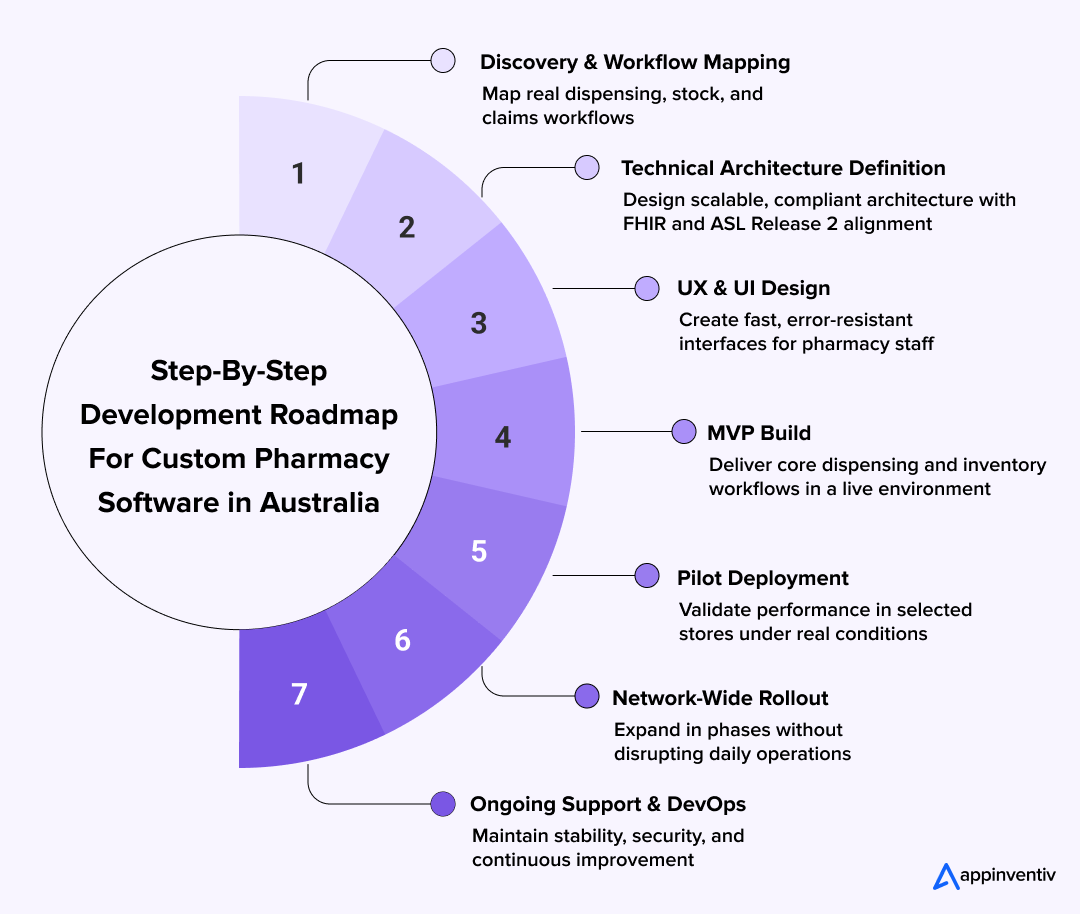
Discovery And Pharmacy Workflow Mapping
This phase uncovers how each store actually works day to day. The biggest reason software fails is because it is built for an assumed workflow rather than the real one happening behind the counter.
Key Activities
- Stakeholder interviews: pharmacists, technicians, managers, finance, IT
- Mapping workflows: script intake, dispensing, stock ordering, PBS claims, clinical services
- Reviewing systems: POS, accounting tools, Excel logs, SMS tools, robotics (if any)
Deliverables
- Workflow diagrams
- User journey map
- System dependency inventory
Success KPI: Clear agreement on what must be automated and what stays manual
Technical Architecture
Once workflows are clear, the tech stack to develop pharmacy dispensing software is defined. Architecture choices here prevent later surprises like performance bottlenecks, integration gaps, or security rework. In Australia, it also helps to plan interoperability early so the system can exchange clinical data safely as requirements evolve.
Decisions To Make
- Architecture style: modular monolith (simple chain) or microservices (multi-brand)
- Deployment: Australian cloud region for compliance, hybrid if robotics or on-prem systems are involved
- Database strategy: relational DB for scripts and claims, analytics store for reporting
Interoperability And Standards
- Use FHIR where clinical data exchange is required, especially when aligning with national digital health patterns and My Health Record-style interactions.
- Align security controls with ASL Release 2 expectations by designing strong identity, access control, audit logging, and secure API patterns from the outset.
Also Read: Interoperability in Healthcare – FHIR & EHR Integration
Technical Components
- API integrations for digital transformation
- Authentication and access control
- Audit logs and alerting foundation
Success KPI: A signed technical blueprint that engineering and pharmacy business both agree on, including a clear integration and interoperability plan.
UX And UI Design
UX design avoids cognitive overload. Pharmacists need to complete tasks in seconds, not navigate complex menus. If the interface slows them down, adoption fails.
Focus Areas
- Role-based screens for pharmacists, technicians, managers, and HO users
- One-screen prescription workflow (search, verify, dispense, label)
- Visual alerts for allergies, interactions, stock outs
Design Tools
- Wireframes for each role
- Clickable prototype tested with real pharmacy staff
- Keyboard-first shortcuts for high-volume stores
Success KPI: Staff can perform top 5 daily tasks 20% faster vs legacy system (tested in prototype)
MVP Build
The MVP is a working product that supports the most critical workflows. It is not a “demo.” It should run in a real pharmacy, even if limited.
What Must Be Included
- Prescription intake, validation, dispense, label
- Stock decrement and minimum reorder thresholds
- PBS claim initiation and rejection resolution basics
Build Method
- Sprints delivering vertical slices of real workflows
- Weekly reviews with pharmacists and store managers
- Immediate fix loop for UX friction
Success KPI: Staff can complete a full script-to-dispense cycle without external tools
Also Read: How to Build a Minimal Viable Product and Secure Funding
Pilot Deployment
A live pilot shows whether the software works under pressure. It is safer to discover issues in one store than in 40.
Pilot Setup
- Choose 1–3 stores with diverse workload profiles
- Train staff using short modules and cheat sheets
- Set up a dedicated support line for pilot days
Measure
- Average dispensing time before vs after
- Frequency of inventory discrepancies
- PBS claim error rates
- User sentiment survey after week 2
Success KPI: No critical workflow blocker after week 1 of live use
Network-Wide Rollout
Rollout must be controlled. If all stores switch at once, operational risk increases and staff become overwhelmed.
Rollout Strategy
- Wave 1: stores similar to pilot
- Wave 2: high-volume metro locations
- Wave 3: regional + specialty pharmacies
Change Management
- Weekly status sync
- Pharmacy champion per store
- Staff refresher training 24 hours before activation
Success KPI: 90% of stores using system without escalation within 30 days
Ongoing Support And DevOps
Once live, the focus shifts to stability, improvements, and long-term scaling. This is where pharmacy owners decide whether to manage support internally or hire pharmacy management software developers in Australia as a dedicated team.
Support Components
- Tiered helpdesk
- Incident response process
- Patch and upgrade calendar
DevOps Tasks
- Monitoring uptime, latency, and queue times
- Automated backups and DR tests
- Monthly feature releases based on feedback
Success KPI: Zero downtime during business hours and <2 hour resolution for high-priority issues.

What Core Capabilities Should Pharmacy Software Include in Australia?
Custom pharmacy management software development in Australia must support healthcare-grade accuracy while simplifying daily operations. These capabilities define what it takes to create software for pharmacy management that supports both clinical accuracy and operational efficiency.
Operational Core
The operational core is what keeps pharmacy workflows moving. It manages prescription intake, verification, and dispensing, while also keeping stock updated in real time.
Automated reorder triggers help prevent stock outs, and basic PBS claims automation ensures scripts move through the system with less manual effort.
POS And Finance
Pharmacies operate as both care providers and retail businesses. The software must synchronise cleanly with POS systems so pricing, discounts, and basket data stay accurate.
Integrations with accounting suites enable automated revenue and cost tracking, while head office reporting gives multi store operators a single financial view.
Clinical And Patient Experience
Patients expect continuity of care, not just a fast pickup. Software should store secure patient records, track medication history, and support consent.
Refill reminders and SMS touchpoints reduce missed doses, while loyalty and engagement tools support long-term patient retention.
Multi Location Management
Large chains and pharmacy groups need central governance. A strong multi location layer provides a single admin console, role-based permissions for staff, and shared stock insights across stores.
With this foundation, the head office can monitor trends and guide operational decisions without micromanaging individual branches.
What Advanced Features Create Long-Term Advantage?
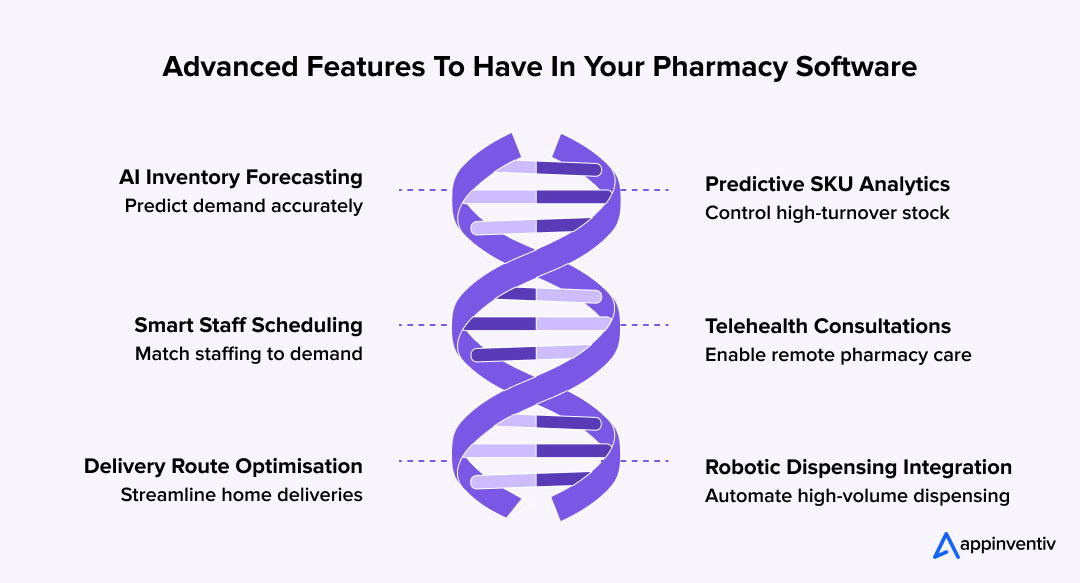
Once the operational foundation is in place, pharmacies often look for capabilities that create competitive differentiation. These features are not always required in the MVP, but they shape long-term ROI and separate basic retail software from enterprise-grade pharmacy software Australia platforms.
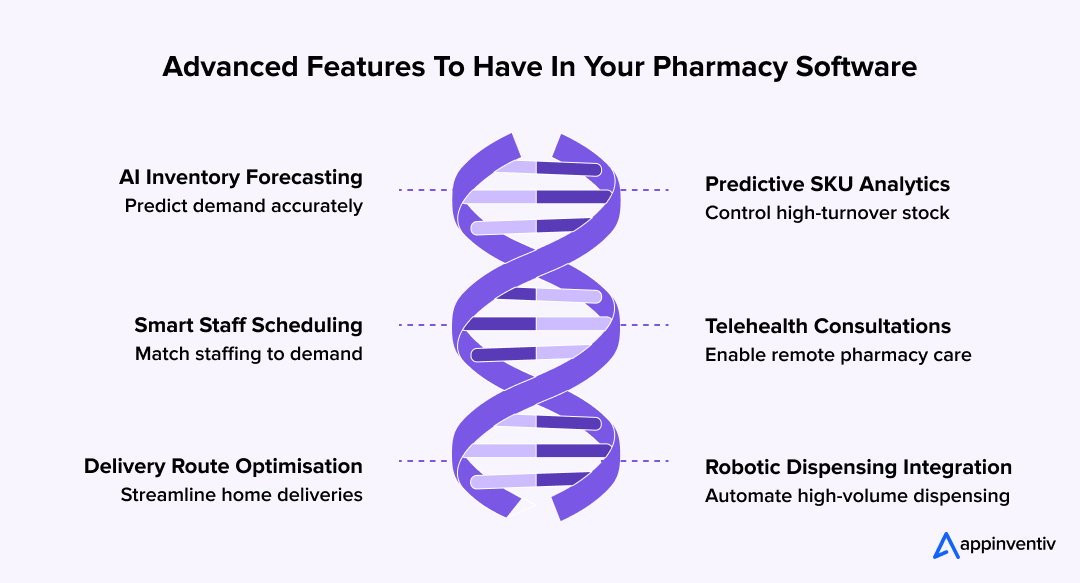
AI-Based Inventory Forecasting
Inventory is one of the biggest cost drivers and advanced pharmacy management software features. With AI demand forecasting, models can analyse seasonal trends, local climate patterns, PBS claim data, and SKU turnover to predict future stock requirements. This prevents both overstocking and life-critical shortages.
Typical AI model inputs include:
- Historic sales and dispensing data
- Supplier lead times
- Seasonal illness patterns (flu spikes, allergy cycles)
- Regional variance and population density
Technical layer
- Time-series forecasting algorithms
- Machine learning pipelines trained on local data
- Optional integration with automated reorder APIs
Predictive Analytics for High-Turnover SKUs
High-volume medications often dictate revenue and cash flow. Predictive analytics helps identify items likely to run out, produce slow-moving stock alerts, or flag price-sensitive inventory.
Use cases
- Identify SKUs trending upward based on real-time sales
- Generate automated promotions on items nearing expiry
- Notify store managers when demand deviates from expected patterns
Staff Scheduling and Workload Balancing
Pharmacies operate under staffing constraints, especially during weekends, late shifts, and vaccination seasons. Software can incorporate a scheduling engine linked to dispensing load.
How it works
- Pull script volume forecasts
- Recommend staffing per hour block
- Balance technician vs pharmacist roles
Technical considerations
- Role-based workload queues
- Calendar API integrations
- Shift-swap or leave request automation
Telehealth and Medication Consultations
Australian pharmacies are expanding clinical services with the help of growing telehealth trends such as medication reviews, chronic disease consultations, and remote advice. Integrating telehealth inside the platform allows pharmacists to join video or chat-based consultations directly through the software.
Capabilities
- Video consultation module
- Patient triage and digital form capture
- Documentation stored against patient record
Security
- Encrypted video and chat channels
- Audit trail for every clinical interaction
Route Planning for Home Delivery
With delivery demand increasing, pharmacies need logistics capability, not just dispensing workflows. Route-planning features optimise which orders can be grouped, delivery windows, and real-time driver tracking.
Technical features
- Map APIs and geolocation services
- Delivery batching engine
- Push notifications for patients on delivery ETA
Robotics and Automated Dispensing
Robotic dispensing machines are becoming more common in large or high-volume pharmacies. Custom systems can integrate directly with robotic hardware, reducing manual handling and dispensing times.
What integration enables
- Automatic retrieval and counting of medications
- Real-time sync of robotic inventory
- Hardware diagnostics and downtime alerts
Technical consideration
- Local on-prem agent to connect robotics with cloud software
- Fail-safe mode if hardware becomes unavailable
Also read: Where AI is delivering real impact across Australian healthcare
What Compliance and Legal Requirements Apply in Australia?
Compliance is not a layer added at the end of pharmacy software development. In Australia, legal and regulatory rules directly shape how data is stored, accessed, and audited. Any custom pharmacy management software must be designed with these requirements built in from day one.
| Regulatory Area | What It Covers | What the Software Must Support |
|---|---|---|
| Privacy Act 1988 and Australian Privacy Principles (APPs) | Governs how personal and health data is collected, stored, and disclosed | Role-based access control, consent tracking, encryption at rest and in transit, detailed access logs |
| My Health Record Framework | National shared health record system | Secure data exchange, identity verification, controlled data visibility, separation of clinical and operational data |
| Australian Digital Health Agency Expectations | Interoperability and security standards for digital health systems | Standards-aligned APIs, secure authentication, audit-ready system architecture |
| eRx & MediSecure | Electronic prescription transmission and storage | Token validation, repeat prescription handling, secure retrieval, prevention of duplication or loss |
| Therapeutic Goods Administration (TGA) | Regulation of medicines and controlled substances | Accurate dispense records, batch tracking, controlled drug monitoring, inspection-ready reports |
| State and Territory Prescription Rules | Local rules for prescription retention and audits | Tamper-proof audit trails, timestamped activity logs, long-term data retention policies |
- Privacy and data protection: In Australian pharmacies, privacy is not an abstract requirement. It shows up in everyday decisions about who can see patient information and how that data moves through the system. Compliance with the Privacy Act 1988 and the Australian Privacy Principles means the software must be deliberate about access, consent, and traceability.
In practice, that usually translates into role-based permissions, clearly recorded patient consent, encrypted storage, and audit logs that explain not just what happened, but who did it and when.
- National digital health alignment: Pharmacy systems are no longer standalone tools. They sit inside a broader national digital health ecosystem. When software connects with My Health Record, the expectation is controlled, secure interaction rather than open data sharing.
Alignment with Australian Digital Health Agency guidance requires careful identity handling and a clear boundary between clinical information and day-to-day operational data. This separation helps reduce risk while still enabling continuity of care.
- Electronic prescription infrastructure: Electronic prescriptions have moved from edge cases to the default. Integration with eRx and MediSecure needs to work quietly and reliably in the background.
Tokens must be validated correctly, repeats handled without confusion, and prescriptions retrieved exactly once. When this layer works well, pharmacists barely notice it. When it fails, it slows the counter and undermines trust almost immediately.
- TGA and controlled medicines: Record keeping around regulated medicines is an area where shortcuts simply do not exist. Pharmacies are expected to maintain accurate, detailed histories for medicines overseen by the Therapeutic Goods Administration.
Software plays a key role here by tracking dispense activity, monitoring controlled substances, and producing reports that are ready for inspection without last-minute reconciliation.
- State-level requirements and audit trails: On top of national rules, states and territories introduce their own expectations around prescription storage and retention. This adds complexity, particularly for multi-location operators.
Well-designed pharmacy software handles this quietly by maintaining tamper-resistant audit trails, time-stamped activity logs, and long-term data retention automatically. The goal is compliance without adding manual work for already busy staff.
Also read: A practical guide to IT compliance requirements for Australian businesses
How Should Pharmacy Software Be Architected for Australia?
Architecture decisions directly affect performance, compliance, and scalability. For pharmacy management system development in Australia, the system must handle daily dispensing volumes reliably while remaining flexible enough to adapt to regulatory and operational change.
Modular System Design
Most modern pharmacy software Australia platforms follow a modular architecture where core capabilities are separated into independent components. This reduces risk and allows features to evolve without disrupting live pharmacy operations.
Key architectural considerations
- Separate modules for dispensing, inventory, PBS claims, reporting, and patient engagement
- Loose coupling between modules to enable independent updates
- Clear service boundaries to simplify testing and compliance changes
Cloud Hosting And Data Residency
When planning the tech stack to develop pharmacy dispensing software, cloud-first deployment is often preferred. Hosting in Australian regions supports data residency expectations and ensures lower latency for in-store systems.
Technical choices
- Australian cloud regions for primary workloads
- Automated backups and disaster recovery
- Hybrid setup where robotics or local hardware is involved
- High availability configuration for peak trading hours
Integration And API Layer
To create software for pharmacy management that works in real environments, integration must be treated as a core layer, not an afterthought. Pharmacy platforms typically need to connect with multiple third-party systems.
Integration scope
- POS and accounting platforms
- Electronic prescription services
- PBS and claims-related services
- Delivery, SMS, and robotics systems
Design approach
- API-first architecture
- Secure authentication and rate limiting
- Versioned APIs to avoid breaking changes
Security And Access Control
Security underpins every layer of pharmacy dispensing software development. The architecture must protect sensitive patient and medication data while supporting efficient staff workflows.
Security foundations
- Role-based access control aligned to pharmacy roles
- Encryption for data at rest and in transit
- Centralised logging and audit trails
- Continuous monitoring and alerting
Also Read: How to Build a Secure App in Australia | Best Practices 2025
Cost to Develop a Custom Pharmacy Management Software in Australia
If you are thinking about building custom pharmacy software, cost is probably already on your mind. That is usually how these conversations start. Someone asks what the budget might look like, often before workflows or integrations are even fully discussed. That instinct makes sense, but it also hides the bigger picture.
In real-world projects, the cost to develop a custom pharmacy management software in Australia typically falls between AUD 60,000 and AUD 600,000 (USD 40,000 to USD 400,000). That range exists because pharmacies do not operate in neat, identical ways. A single suburban store replacing spreadsheets faces a very different challenge from a multi-location group trying to unify dispensing, reporting, and compliance across dozens of sites.
Typical Cost Ranges by Project Scope
At the lower end of the spectrum, a custom platform built for one pharmacy or a small cluster of stores usually sits between AUD 60,000 and AUD 120,000 (USD 40,000 to USD 80,000). These projects focus on stabilising the basics. Dispensing flows are streamlined, inventory is managed and tracked properly, and PBS claim handling is brought into one system so staff are not switching tools mid-shift.
As operations grow, the scope expands naturally. Mid-scale platforms for regional chains often land in the AUD 150,000 to AUD 300,000 (USD 100,000 to USD 200,000) range. At this point, the software needs to support multiple locations, stay aligned with POS and accounting systems, and give head office a clear view of what is happening across stores. More attention also goes into access controls and compliance, which adds to delivery effort.
Larger pharmacy groups tend to invest in enterprise-grade pharmacy software Australia platforms, typically in the AUD 450,000 to AUD 600,000 (USD 300,000 to USD 400,000) range. These systems are designed to handle complexity without slowing day-to-day dispensing. Automation, advanced reporting, robotics integration, and network-wide visibility become essential rather than optional.
What Drives the Cost Up or Down?
Cost expectations vary widely across pharmacy dispensing software Australia, and usually for reasons that only become clear once planning starts. It is rarely one feature that pushes a budget higher. More often, it is the combination of many small decisions.
The main factors that influence cost include:
- How many pharmacy locations and users the system must support
- The depth of PBS, e-prescribing, and claims integration
- The level of customisation required in dispensing and stock workflows
- Compliance obligations, audit readiness, and data retention rules
- Integrations with POS, accounting systems, robotics, or delivery services
- Whether analytics, automation, or AI forecasting are part of the scope
A common pattern is that costs rise quickly when teams try to mirror every existing process from day one. Pharmacies that start with a focused core system and then expand in stages tend to stay in control, both financially and operationally.
Also read: A detailed breakdown of software development costs in Australia
Why Choose Custom Build Over Off-The-Shelf Pharmacy Software?
While the upfront investment may appear higher than off-the-shelf ERP software for the pharmaceutical industry, custom platforms often reduce long-term operating costs. Fewer manual processes, lower error rates, and better inventory control contribute directly to margin protection.
For pharmacy owners planning scale, investing early in custom pharmacy management system development in Australia can prevent repeated migrations and costly system replacements later.
| Criteria | Off-The-Shelf Pharmacy Software | Custom Pharmacy Management Software |
|---|---|---|
| Feature Flexibility | Limited to predefined workflows. Changes usually depend on vendor roadmap and affect all customers equally. | Built around your exact dispensing, stock, and claims workflows. Features evolve as your pharmacy grows. |
| Integration Depth | Basic integrations only. Deep POS, accounting, robotics, or delivery integrations are often restricted or unavailable. | Designed for deep, API-level integrations with POS, PBS workflows, accounting systems, e-prescriptions, robotics, and third-party tools. |
| Compliance Alignment for Australia | Generic compliance support that may lag behind regulatory changes or state-specific requirements. | Architecture and workflows are designed specifically for Australian compliance, audit trails, and pharmacy operations. |
| Scalability Across Stores | Works best for single stores. Multi-location scaling often introduces workarounds and manual processes. | Built to support multi-store networks with central control, shared reporting, and role-based governance. |
| Long-Term Total Cost of Ownership | Lower upfront cost, but recurring licensing, add-ons, and limitations increase long-term spend. | Higher upfront investment, but lower long-term cost through reduced manual work, fewer workarounds, and no per-feature licensing. |
| Control and Ownership | Vendor controls roadmap, data structure, and feature availability. | Full ownership over roadmap, integrations, data, and future enhancements. |
In a Glance:
When Off-The-Shelf Tools Can Work?
Off-the-shelf pharmacy software can be suitable when:
- A pharmacy operates a single location with very simple workflows
- Budget is highly constrained and growth is not planned
- Minimal integration with external systems is required
For these cases, speed of setup matters more than flexibility.
When Custom Software Is the Strategic Choice?
Custom development becomes the better option when pharmacies:
- Operate or plan to expand across multiple locations
- Need tighter integration with dispensing, claims, finance, or delivery systems
- Want stronger control over compliance and audit readiness
- Aim to reduce long-term operational cost and manual effort
For growing operators, custom pharmacy management software development in Australia provides stability, control, and scalability that off-the-shelf tools cannot match.
Pharmacy Dispensing Software Development Challenges and Risks
Building custom platforms brings clear advantages, but it also introduces risks that must be planned for early. In pharmacy dispensing software development, most issues arise not from technology itself, but from underestimating operational complexity and regulatory expectations.
Underestimating Workflow Complexity
Pharmacy operations appear simple on the surface, but real workflows include exceptions, edge cases, and regulatory checks. If discovery is rushed, software may fail to reflect how dispensing, claims, and stock management actually work.
Common issues include:
- Incomplete mapping of PBS claim exceptions
- Ignoring regional or store-specific workflows
- Designing for ideal scenarios instead of real counter pressure
This risk is reduced by investing upfront in proper workflow mapping before development begins.
Integration Challenges With Existing Systems
Most pharmacies already rely on POS systems, accounting tools, e-prescription services, and sometimes robotics. Integrating these into a single platform is one of the hardest parts of pharmacy management system development in Australia.
Challenges often include:
- Poor documentation from legacy systems
- API limitations or version mismatches
- Data inconsistency across platforms
An API-first strategy and staged integration plan help prevent these issues from disrupting live operations.
Compliance and Regulatory Risk
Australian pharmacy software must comply with privacy, digital health, and medicine handling regulations. Missing even a small requirement can expose pharmacies to audit risk or operational disruption.
Typical compliance risks include:
- Inadequate audit trails
- Weak access controls
- Improper handling of electronic prescriptions
Custom platforms must embed compliance into architecture and workflows rather than adding it later.
Adoption and Change Management
Even well-built systems can fail if staff adoption is poor. Pharmacists and technicians work under time pressure and will resist tools that slow them down.
Adoption challenges usually stem from:
- Overly complex interfaces
- Insufficient training
- Abrupt system transitions
Phased rollouts and hands-on training significantly improve acceptance.
Scope Creep and Cost Overruns
Without a clear roadmap, custom projects can expand beyond their original scope. This pushes timelines and increases the cost to develop a custom pharmacy management software in Australia.
This risk is best controlled by:
- Defining a strict MVP scope
- Prioritising features by operational impact
- Scheduling enhancements in later phases
Managing Long-Term Support and Evolution
Custom systems require ongoing support, updates, and monitoring. Without a clear ownership model, performance and security can degrade over time.
Successful teams plan early for:
- Support and incident response
- Regulatory updates
- Continuous improvement cycles
When handled properly, these risks become manageable trade-offs rather than blockers.
What Pharmacy Leaders Should Evaluate Before Selecting a Development Partner
Choosing the right development partner has a long-term impact on compliance, operational stability, and total cost of ownership. Before you create software for pharmacy management, pharmacy leaders should validate compliance, integrations, and long-term ownership.
This checklist helps pharmacy leaders evaluate whether a vendor can deliver software that works in real Australian pharmacy environments, not just in demos.
| Area | What to Check |
|---|---|
| Domain Experience | Proven pharmacy or healthcare software delivery, clear understanding of dispensing, PBS claims, and e-prescriptions |
| Discovery Approach | Hands-on workflow mapping with pharmacists before development begins |
| Delivery Ownership | Named owners for architecture, security, and compliance decisions |
| Pre-Signing Deliverables | Workflow maps, defined MVP scope, phased delivery roadmap |
| Integration Readiness | API-first approach, experience with POS, accounting, eRx, and legacy systems |
| Compliance Alignment | Privacy Act 1988, APPs, My Health Record, TGA and audit readiness |
| Security Foundations | Role-based access, encryption, tamper-proof audit logs |
| Commercial Clarity | Transparent cost breakdown, assumptions, and change process |
| Long-Term Ownership | Clear IP ownership, support scope, and exit strategy |
Key Questions to Ask a Development Partner
Before committing, decision-makers should push beyond surface-level assurances and ask questions that reveal how the partner actually builds and supports pharmacy systems.
Experience and domain understanding
- Have you built pharmacy or healthcare software before, specifically for dispensing workflows?
- Can you explain how PBS claims, electronic prescriptions, and stock exceptions work in practice?
- How do you handle differences between single-store and multi-location pharmacy operations?
Delivery approach
- What does your discovery phase include, and who is involved?
- How do you validate workflows with pharmacists before development begins?
- How do you manage scope changes without inflating timelines and cost?
Team and accountability
- Who will be responsible for architecture, security, and compliance decisions?
- Will we have access to senior engineers or architects during critical phases?
- How is knowledge transferred if team members change?
These questions help assess whether the partner can reliably develop pharmacy dispensing software that aligns with daily operational realities.
Must-Have Deliverables Before Signing
A serious development partner should be able to commit to clear deliverables before contracts are finalised. Vague promises often lead to misalignment later.
Discovery and planning
- Detailed workflow maps covering dispensing, stock, claims, and clinical services
- A documented MVP scope with feature priorities
- A phased delivery roadmap with timelines
Technical clarity
- High-level system architecture overview
- Integration list covering POS, accounting, e-prescription, and third-party tools
- Hosting and data residency approach
Commercial transparency
- Clear cost breakdown aligned to milestones
- Assumptions and exclusions documented upfront
- Defined change request process
Without these artifacts, it becomes difficult to control risk in pharmacy management system development in Australia.
Compliance, Security, and Integration Confirmations
Compliance and security should be confirmed before development begins, not discovered during audits or go-live.
Compliance checks
- Alignment with the Privacy Act 1988 and Australian Privacy Principles
- Support for My Health Record interactions where required
- Electronic prescription handling via eRx and MediSecure
- Controlled medicines tracking and audit readiness
Security foundations
- Role-based access control tied to pharmacy roles
- Encryption for data in transit and at rest
- Tamper-resistant audit logs
- Incident response and breach notification process
Integration readiness
- API-first integration strategy
- Ability to handle legacy systems and partial documentation
- Plan for testing integrations before live rollout
Confirming these elements early protects pharmacies from regulatory exposure and operational disruption.
Long-Term Ownership and Support Considerations
Custom software is a long-term asset. Pharmacy leaders should be clear about ownership and support beyond launch.
- Who owns the source code and intellectual property?
- What does ongoing support include, and what is excluded?
- How are regulatory updates handled?
- What happens if the partnership ends?
Clear answers here ensure the platform remains viable and secure as pharmacy operations evolve.
Final Thought for Decision-Makers
When evaluated properly, custom pharmacy management software development in Australia is not just a technology decision. It is an operational and compliance strategy. A strong partner brings structure, transparency, and domain understanding that reduce risk and protect long-term value.

Why Appinventiv Is Trusted for Custom Pharmacy Software in Australia
Building regulated healthcare software requires more than technical skill. It demands experience delivering compliant systems at scale, across industries, and within Australia’s operating environment. This is where Appinventiv’s approach aligns well with pharmacy leaders evaluating how to build custom pharmacy management software in Australia.
Over the years, Appinventiv has deployed 250+ digital assets in Australia, supporting organisations across 35+ industries with systems designed for reliability, compliance, and long-term scalability. Our teams bring 10+ years of experience in APAC delivery, with a strong understanding of regional regulatory expectations and enterprise operating models.
Delivery capability matters as much as strategy. With 5+ agile delivery centers across Australia, Appinventiv works closely with local stakeholders while maintaining the engineering scale required for complex, multi-location platforms. This balance supports consistent delivery without compromising governance or quality.
Our growth has been recognised at a regional level. Appinventiv has been ranked among APAC’s High-Growth Companies by Statista and the Financial Times for two consecutive years, reflecting sustained performance across enterprise digital transformation work.
For pharmacy operators looking for a software development agency in Melbourne or across Australia, Appinventiv focuses on building systems that work in real operational environments, not just in theory.
If you are exploring options or simply want clarity on scope, risks, or cost, a short discussion with our team can help you assess whether custom pharmacy software is the right next step for your organisation.
FAQs
Q. How much does it cost to develop a pharmacy management software in Australia?
A. The cost typically ranges between AUD 60,000 and AUD 600,000 (USD 40,000 to USD 400,000), depending on scope, integrations, and compliance depth. When evaluating how to build custom pharmacy management software in Australia, pricing is influenced by factors such as the number of stores, dispensing workflow complexity, PBS and e-prescription integrations, and reporting requirements. Smaller builds focus on core dispensing and inventory, while enterprise platforms include analytics, automation, and multi-location governance.
Q. Why do Australian pharmacy businesses need dispensing software?
A. Australian pharmacies operate in a high-volume, regulated environment where accuracy and speed are critical. Manual processes increase the risk of errors, slow down dispensing, and make compliance harder to manage as prescription volumes grow.
Dispensing software helps pharmacies standardise workflows, improve stock accuracy, and reduce pressure on staff. It also supports digital prescriptions, patient reminders, and delivery coordination, which are now part of everyday expectations.
Common reasons pharmacies adopt dispensing software include:
- Faster and more accurate prescription handling
- Better stock visibility and fewer shortages
- Improved PBS claims processing
- Reduced reliance on manual or paper-based systems
Q. What features should a pharmacy management system include?
A. A pharmacy management system must first support safe and efficient dispensing. Core functionality should align with daily counter operations rather than generic retail workflows.
As pharmacies grow, the system should also provide operational visibility and control across stores, staff, and suppliers.
Essential features typically include:
- Prescription intake, validation, and dispensing
- Real-time inventory tracking and reorder alerts
- PBS claims automation and reporting
- Patient records and medication history
- POS and accounting integrations
- Role-based access and audit trails
Q. How long does it take to develop a pharmacy management software?
A. Development timelines depend on scope and rollout strategy. A basic system focusing on dispensing, inventory, and claims can often be delivered faster, while multi-location platforms require more planning, testing, and change management.
Most teams follow a phased approach, starting with a core MVP and expanding functionality after real-world validation.
Typical timelines include:
- 3 to 5 months for a focused MVP
- 6 to 9 months for multi-store or enterprise platforms
- Additional time for phased rollouts and enhancements

- In just 2 mins you will get a response
- Your idea is 100% protected by our Non Disclosure Agreement.

Maritime Insurance Claim Software Development for UAE Ports, Insurers, and Logistics Networks
Key takeaways: Manual claims management is too slow for the UAE’s high-volume ports; digital solutions streamline processes and reduce errors. Maritime insurance claim software centralizes data, automates workflows, and ensures compliance with UAE regulations and Takaful principles. Real-time integration with port and vessel systems enables faster claim registration, validation, and settlement. Advanced analytics and risk…

How to Build a Student Management System in Australia?
Key takeaways: Australia’s tightening regulatory landscape (TEQSA, ASQA, CRICOS) makes student management system development in Australia a compliance-driven necessity, not just a digital upgrade. Monetisation models such as SaaS subscriptions, institutional licensing, white-label partnerships, and hybrid pricing offer scalable commercial opportunities in Australia’s expanding EdTech market. Addressing challenges early - data privacy, legacy migration, multilingual…

Guide to Software Risk Management: Identifying and Mitigating Key Risks in Software Development
Key takeaways: Risk management is no longer a peripheral activity; it is a core component of Enterprise Risk Governance (ERG) that ensures software ROI. Successful projects define their risk appetite—the level of risk an organization is willing to accept—before the first line of code is written. By integrating risk assessment into the early discovery phase,…