






























Robotic Process Automation (RPA): A Comprehensive Enterprise Guide to Strategy, Architecture, Benefits, and Implementation

 Share -


- 01The Enterprise Shift Toward AI-Powered Robotic Process Automation
- 02Inside an Enterprise RPA Workflow
- 03Core Components of an Enterprise RPA Architecture
- 04Types of Robotic Process Automation
- 05RPA vs AI vs Intelligent Automation vs Agentic AI
- 06Benefits of Robotic Process Automation
- 07Which Enterprise Processes Should (and Shouldn't) Be Automated with RPA?
- 08Robotic Process Automation Use Cases Across Enterprise Functions
- 09Robotic Process Automation Challenges (and How Enterprises Overcome Them)
- 10Cost of Implementing Robotic Process Automation
- 11Measuring ROI and Business Impact of Robotic Process Automation
- 12Enterprise RPA Implementation Roadmap
- 13How to Choose the Right Robotic Process Automation Platform
- 14The Future of Robotic Process Automation
- 15How Appinventiv Helps Enterprises Build and Scale Robotic Process Automation Solutions
- 16Frequently Asked Questions

Key takeaways:
- Build an enterprise automation plan that expands past small tests and delivers clear financial value.
- See how RPA, AI, Intelligent Automation, and Agentic AI work together across daily business operations.
- Review platform designs, setup roadmaps, governance rules, and ROI math for company-wide deployment.
- Examine practical business examples across finance, healthcare, manufacturing, supply chain, HR, and customer service.
- Compare software platforms, project costs, and future technology trends prior to investing capital.
Company operations changed faster in the last five years than in the prior twenty. One customer order or payment now moves through dozens of separate systems. Old software cannot share data in real time. Operating costs are rising, and companies struggle to hire skilled people. Regulations grow stricter every year.
Board members now make automation a top priority. Artificial intelligence alone cannot finish daily tasks across disconnected systems. Smart code still needs a practical execution engine.
Robotic Process Automation fills this gap. It links business rules, databases, and AI models to complete routine work. This guide explains how the technology functions, where it cuts costs, common setup mistakes, and steps to grow your program.
Transform repetitive business processes into measurable operational savings with secure, AI-powered enterprise robotic process automation.
The Enterprise Shift Toward AI-Powered Robotic Process Automation
Recent RPA trends show generative AI changing content creation, data analysis, and decision-making, a shift also visible in AI in robotics, where intelligent systems increasingly guide physical and digital task execution.
It does not replace process execution. Companies still need tools to log into systems, move data, and trigger workflows. Fast and accurate task completion still requires execution tools. RPA remains central to enterprise robotic process automation.
The numbers tell the story
| Market & Adoption Trends | Business Impact |
|---|---|
| $35.8B projected RPA market by 2033 (29.0% CAGR) | 92% improved compliance |
| 78% of organizations plan to increase RPA investment | 90% improved process quality |
| Only 3% have successfully scaled enterprise-wide automation | 86% higher productivity |
| 30% to 50% of RPA initiatives fail to scale | 59% operating cost reduction |
With the robotic process automation market expanding rapidly, the main challenge is no longer proving worth. Leaders must build an automation program that spans departments, integrates with AI, and delivers clear financial results. The rest of this guide explains how leaders achieve that goal.
Inside an Enterprise RPA Workflow
Every bot follows a fixed order of steps. The bot starts work, runs preset rules across software, and logs every action. Modern robotic process automation tools add smart features, such as document processing, to read forms, emails, and PDFs.
Enterprise RPA Workflow
| Stage | What Happens |
|---|---|
| Trigger | A set schedule, an API call, an email, or a system event starts the bot. |
| Authentication | The bot retrieves encrypted passwords from a secure vault to log in to company software. |
| Process Execution | The bot operates within software tools via screen clicks or API calls, following fixed rules. |
| Document Understanding | Software reads invoices, forms, and emails. It extracts clean data and sends that data to the main process. |
| Exception Handling | Unexpected errors are moved to set review lists or to human managers for approval. |
| Logging & Monitoring | The system records every action and error. Audit teams use these logs to track work and meet regulations. |
Large setups do not rely on screen clicks alone. They blend screen actions, direct API links, rule engines, and human reviews. This design runs complex work across ERP, CRM, finance, HR, and old software.
Core Components of an Enterprise RPA Architecture
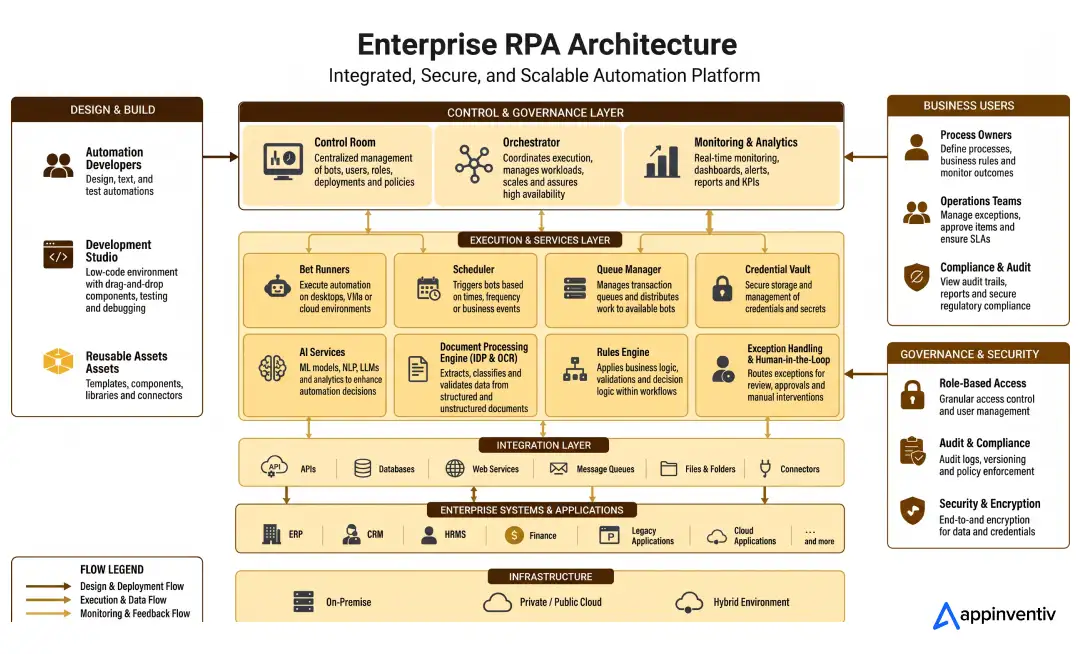
An enterprise robotic process automation platform is more than software bots. It plays a foundational role in broader digital transformation for business, connecting legacy systems with modern digital workflows. It integrates orchestration, execution engines, security controls, and AI tools into a single central system.
Each part handles a clear job. Together, these parts of the robotic process automation architecture support thousands of automated tasks across company software.
Development and Bot Design
Teams build and test every workflow in a development tool before launch. These environments offer visual tools, reusable parts, and code checkers. This setup speeds up build times and lowers repair work.
| Component | Description |
|---|---|
| Development Studio | Designs, tests, and publishes automation workflows. |
| Rules Engine | Applies set business rules during execution. |
| Reusable Libraries | Stores common workflows, connectors, and automation components. |
Bot Execution and Orchestration
After launch, bots move to the execution layer. This system schedules tasks and balances workloads across available machines. It handles errors without stopping daily business operations.
| Component | Description |
|---|---|
| Bot Runner | Executes automation tasks across desktops, virtual machines, or cloud setups. |
| Orchestrator | Assigns work, manages bot execution, and coordinates dependencies. |
| Queue Manager | Distributes transactions across multiple bots for parallel processing. |
| Scheduler | Starts bots at set times, during events, or in response to business triggers. |
Security, Governance, and Monitoring
Enterprise automation demands clear security controls. The system authenticates, tracks, and logs every bot action. Audit teams use these records to meet security rules and compliance standards.
| Component | Description |
|---|---|
| Credential Vault | Stores encrypted credentials, API keys, and service accounts. |
| Control Room | Serves as the central console for deployment, governance, user management, and workload monitoring. |
| Monitoring & Analytics | Tracks execution history, failures, performance metrics, and audit logs. |
AI and Enterprise Integration Layer
Modern platforms do not rely on screen actions alone. An RPA framework combines APIs, OCR, Intelligent Document Processing (IDP), and AI models. This layer increasingly reflects advances in AI in ERP systems, where predictive models are built directly into enterprise software This combination handles structured and unstructured data across software tools.
| Component | Description |
|---|---|
| Integration Layer | Connects ERP, CRM, databases, APIs, cloud services, and legacy systems. |
| AI Services | Adds document classification, prediction, natural language processing, and decision support. |
| Document Processing Engine | Extracts, checks, and formats data from invoices, forms, PDFs, and emails using OCR and IDP. |
Engineers use UI automation only without open APIs. Direct API connections for RPA integration deliver higher reliability, faster speed, and lower maintenance costs.
Typical Enterprise Technology Stack for RPA
Software setups vary by platform and company. Most setups use the following software stack:
| Technology Category | Examples |
|---|---|
| RPA Platforms | UiPath, Automation Anywhere, Blue Prism, Microsoft Power Automate |
| Programming Languages | C#, Python, Java, JavaScript, VB.NET |
| AI & Machine Learning | Azure AI, OpenAI, Google Vertex AI, AWS AI Services, TensorFlow |
| OCR & IDP | ABBYY, Google Document AI, Azure AI Document Intelligence, Amazon Textract |
| API & Integration | REST APIs, SOAP APIs, GraphQL, MuleSoft, Apache Kafka |
| Enterprise Applications | SAP, Oracle ERP, Salesforce, Microsoft Dynamics 365, ServiceNow, Workday |
| Databases | SQL Server, PostgreSQL, Oracle Database, MySQL, MongoDB |
| Cloud Platforms | Microsoft Azure, AWS, Google Cloud |
| Identity & Security | Active Directory, Microsoft Entra ID, OAuth 2.0, CyberArk, HashiCorp Vault |
| Monitoring & Observability | Splunk, Grafana, Azure Monitor, Datadog, Elastic Stack |
Types of Robotic Process Automation
Companies pick from three main types of RPA. Selection relies on human input, task steps, and team needs. Many teams combine models across different steps in a single workflow.
| Type | Human Involvement | Infrastructure | Best Suited For | Cost | Scalability |
|---|---|---|---|---|---|
| Attended RPA | Staff start or work with the bot. | Desktop or workstation | Customer service, call centers, staff support, front-office tasks | Low | Moderate |
| Unattended RPA | Runs on its own without user action. | Virtual machines, servers, or cloud setups | Invoice processing, payroll, claims, reports, batch jobs | Medium to High | High |
| Hybrid RPA | Mixes human decisions with automated work. | Desktop and server or cloud setups | Loan approvals, health tasks, insurance claims, KYC checks, purchase approvals | High | Very High |
Selection Guide
- Attended RPA: Use for staff tasks that need real-time interaction.
- Unattended RPA: Use for high-volume tasks with fixed business rules.
- Hybrid RPA: Use for tasks that need human approval during automated work.
Understanding the types of RPA helps companies automate front-office and back-office work without rebuilding whole business processes.
RPA vs AI vs Intelligent Automation vs Agentic AI
Companies group these systems in business plans, but each tool solves a different operational problem. Understanding this distinction is a core part of any broader business process automation strategy. RPA carries out set tasks. AI reads data and helps managers make decisions.
Intelligent Automation links both tools to perform the entire workflow. Hyperautomation connects software across whole companies. Agentic AI uses independent systems that plan, reason, and reach goals with little human help.
| Technology | Primary Capability | Decision Making | Best Fit | Enterprise Example |
|---|---|---|---|---|
| RPA | Automates repetitive, rule-based tasks | Rule-based | Large-volume business tasks | Invoice processing, payroll, data entry |
| Artificial Intelligence (AI) | Learns patterns and generates predictions | Data-driven | Analysis, classification, forecasting | Fraud detection, demand forecasting, chatbots |
| Intelligent Automation (IA) | Combines RPA with AI to run complete workflows | AI-assisted | Structured and unstructured data tasks | Claims processing, document checks, onboarding |
| Hyperautomation | Links multiple tools across the enterprise | Process-driven | Company-wide software efforts | Finance, HR, purchasing, IT automation |
| Agentic AI | Plans, reasons, and executes multi-step goals with light supervision | Goal-driven | Complex tasks needing flexible decisions | AI service agents, IT operations, multi-agent workflows |
Which option fits your business needs?
- Select RPA for fixed, rule-based tasks with high work volume.
- Select AI for prediction, classification, language processing, or decision support.
- Select Intelligent Automation for workflows with documents, emails, images, or staff decisions.
- Select Hyperautomation to connect systems across departments and software setups.
- Select Agentic AI for flexible workflows needing planning, reasoning, and direct task execution.
In practice, these tools work together rather than compete against each other. A modern enterprise workflow uses AI to read information, RPA to run business actions, and Agentic AI to direct complex steps across separate systems and teams.
Also Read: RPA in Wealth Management
Benefits of Robotic Process Automation
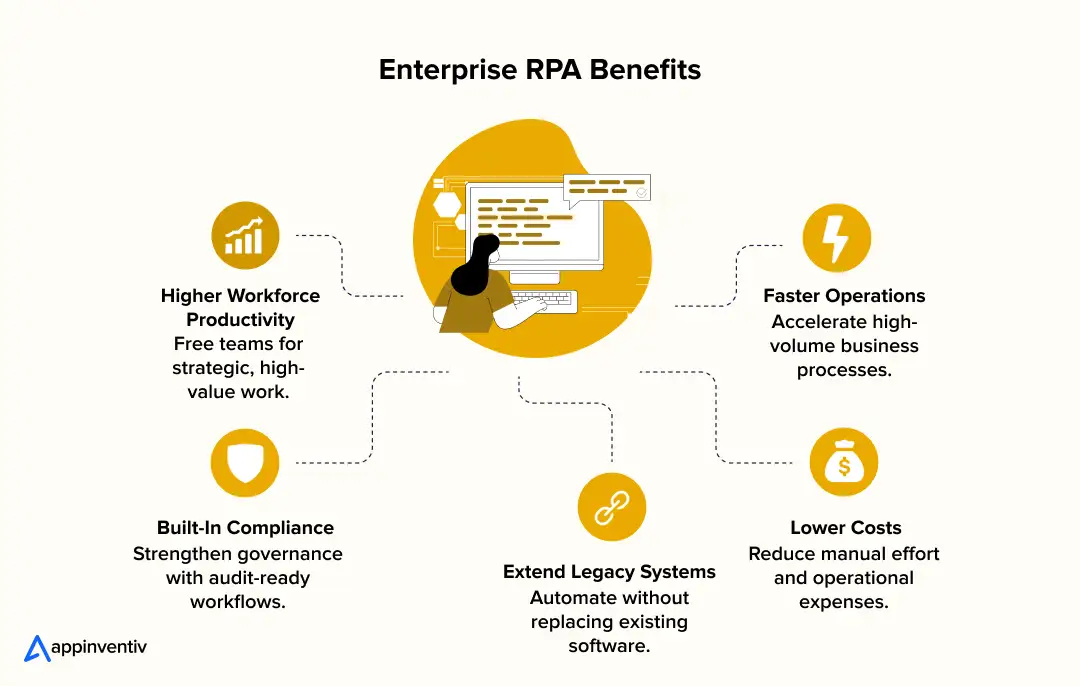
RPA builds value across operations, technology, compliance, and staff management. Its primary advantage goes beyond simple task automation. The software gives companies a reliable way to run business processes faster, reduce manual labor, and maintain control over daily operations.
Faster and More Reliable Operations
RPA completes routine tasks in seconds. Software bots work continuously without breaks, weekends, or shift changes. Operations teams process invoices, customer orders, payroll records, and purchase requests much faster.
Rapid execution shortens turnaround times and helps teams meet service levels. Rapid execution shortens turnaround times and helps teams meet service levels.
Research shows that 74% of automation users complete tasks faster after adopting robotic process automation technologies. Automation cuts manual mistakes, creating predictable operations across departments.
Lower Operating Costs and Higher Returns
High-volume tasks consume thousands of staff hours every month. RPA transfers those routine jobs to software bots. This operational shift lowers labor spending, limits costly rework, and cuts transaction costs.
Companies achieve rapid financial returns by increasing work volume without hiring additional workers. Organizations typically report first-year robotic process automation ROI between 30% and 200%, with mature automation programs achieving returns of up to 300%.
Better Use of Existing Technology
Replacing old legacy software costs money and takes years. RPA extends the total life of existing ERP, CRM, and core business software by linking systems through screen clicks and direct APIs. Companies standardize operations across teams without rebuilding full technology systems.
Stronger Governance and Compliance
The platform records every action with detailed logs, timestamps, and user activity records. Audit teams use these execution trails to satisfy regulatory checks and internal rules. Central credential vaults protect company data. Standardized workflows support robotic process automation risk management by eliminating compliance risks stemming from human error.
Higher Workforce Productivity
Employees spend less time copying data, switching software tools, or filling routine administrative forms. Staff redirect their attention to client relationships, complex business problems, and strategic growth projects.
Studies also show that 89% of employees are more satisfied with their jobs after automation, while 83% believe AI-powered automation helps reduce workplace burnout. Teams deliver greater business value without increasing total operational headcount.
Which Enterprise Processes Should (and Shouldn’t) Be Automated with RPA?
Not every business task fits RPA. Strong automation programs start with stable, routine processes that follow clear rules. Automating bad fits causes high repair costs, software errors, and poor returns.
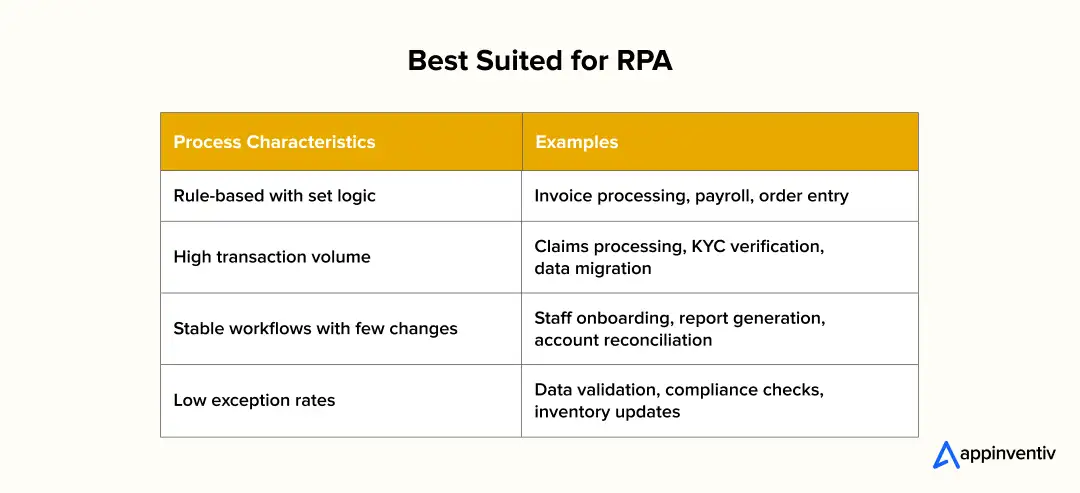
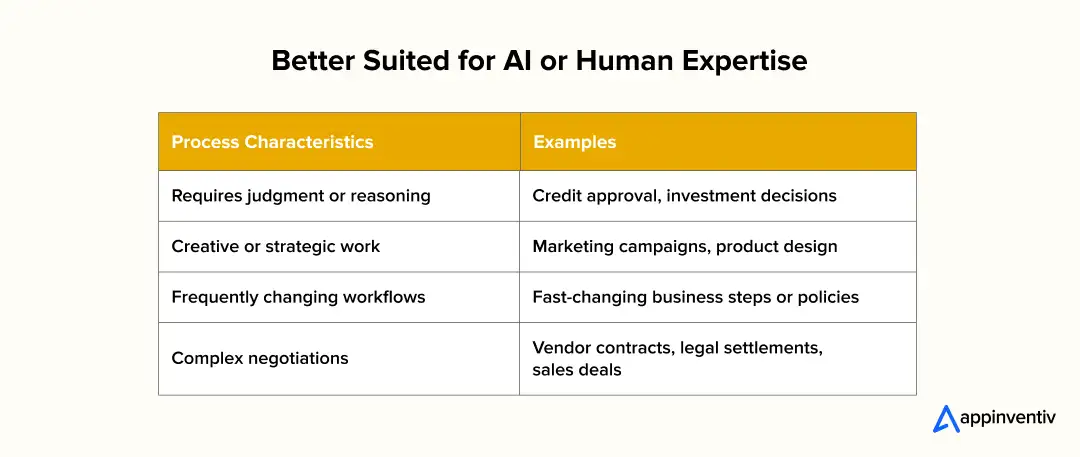
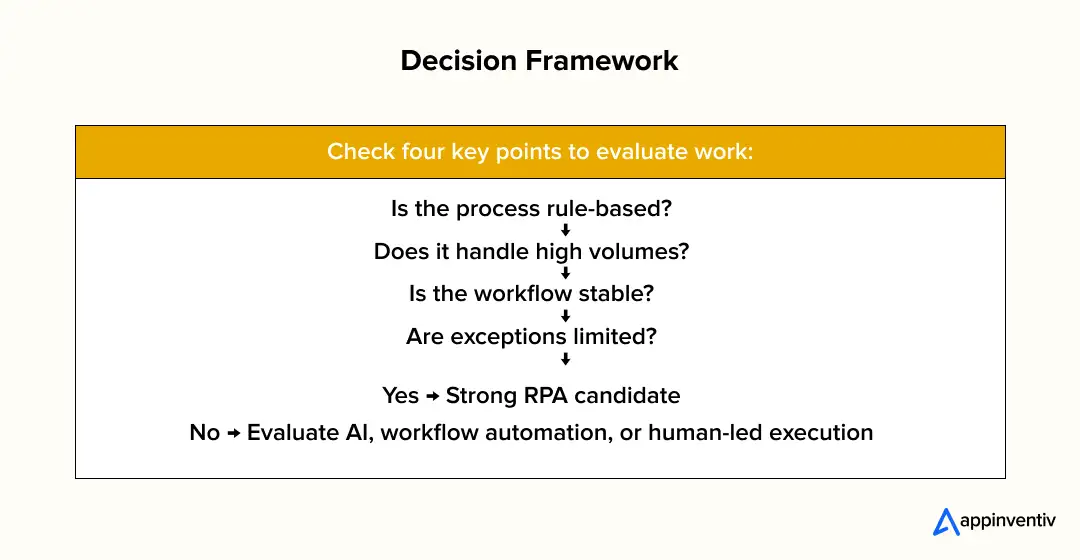
Picking good targets early helps teams achieve quick wins, reduce project risks, and build a foundation for company-wide automation.
Also Read: RPA in Real Estate
Robotic Process Automation Use Cases Across Enterprise Functions
Applications of robotic process automation create value by running routine, rule-based work across separate company systems. Modern platforms combine APIs, OCR, Intelligent Document Processing (IDP), and AI services. This software simplifies daily work across departments. It keeps data accurate and secure.
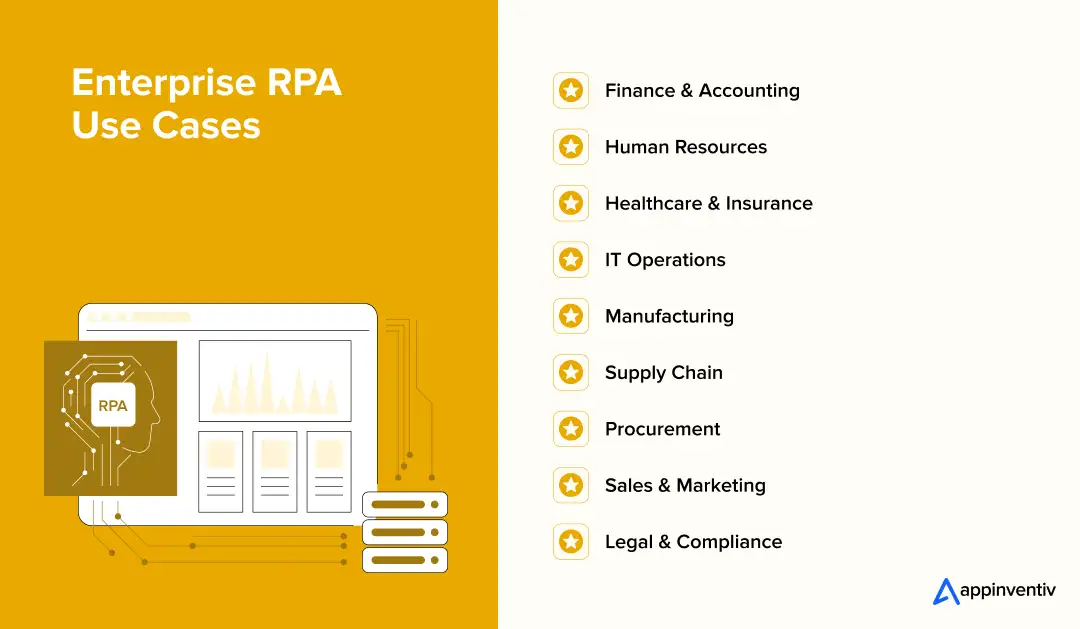
Finance & Accounting
Finance teams process thousands of invoices, account checks, and expense requests every month. This growing reliance on RPA in finance is reshaping how accounting departments operate. Reflecting this trend, 65% of financial services organizations plan to increase their investment in automation.
RPA inreads invoice data using OCR and IDP, checks purchase orders, posts transactions into SAP or Oracle ERP tools, and routes errors to managers. Similar workflow gains are reshaping RPA in banking operations.
- Business Process: Invoice processing, three-way matching, bank reconciliation, journal entry posting
- Automation Approach: OCR, Intelligent Document Processing (IDP), ERP connections, rule checks, approval workflows
- Business Outcome: Faster monthly closing, lower processing costs, fewer payment errors, better audit records
- Real Example: Unilever uses RPA to automate finance tasks across departments, reducing manual effort and costs.
Human Resources
HR teams spend hours onboarding new staff, checking payroll records, and updating files. RPA connects HR software, payroll platforms, and identity tools. It runs routine tasks to keep staff records identical across systems.
- Business Process: Employee onboarding, payroll validation, benefits management, staff record updates
- Automation Approach: HR software links, API data syncing, account creation, document checks
- Business Outcome: Quicker onboarding, fewer admin mistakes, better staff experiences, lower workloads
- Real Example: AT&T uses RPA to automate new hire onboarding and administrative HR tasks.
Healthcare
Healthcare providers manage thousands of patient records, appointments, insurance claims, and billing transactions every day. These use cases reflect the growing footprint of RPA in healthcare administration. RPA automates administrative workflows by integrating with Electronic Health Records (EHRs), billing platforms, and insurance systems while maintaining regulatory compliance.
Around 10% of healthcare organizations have already adopted robotic process automation in industry settings, with significant growth expected as providers continue to modernize administrative operations.
- Business Process: Patient registration, appointment scheduling, insurance verification, medical billing, claims processing
- Automation Approach: EHR integration, API connections, OCR and Intelligent Document Processing (IDP), workflow automation
- Business Outcome: Faster patient onboarding, fewer billing errors, improved claims accuracy, reduced administrative workload
- Real Example: Cleveland Clinic uses RPA to automate administrative and revenue cycle processes, improving operational efficiency and reducing manual effort.
Insurance
Insurance companies process large volumes of claims, policy updates, customer onboarding requests, and compliance documentation, reflecting the wider shift toward automation in insurance. RPA automates these repetitive workflows by integrating policy management systems, claims platforms, and document processing tools.
RPA can process insurance claims up to 75% faster than manual workflows, helping insurers improve operational efficiency and customer experience.
- Business Process: Claims processing, policy administration, customer onboarding, underwriting support
- Automation Approach: OCR, Intelligent Document Processing (IDP), workflow orchestration, policy system integration
- Business Outcome: Faster claims settlement, improved policy accuracy, lower processing costs, stronger regulatory compliance
- Real Example: Zurich Insurance uses RPA to automate claims processing and back-office operations, reducing turnaround times while improving service quality.
Customer Service
Service agents open multiple tools to check client details, issue refunds, and log tickets. RPA pulls client data from CRM systems, billing tools, and order databases. It finishes routine updates automatically without staff assistance.
- Business Process: Identity verification, refund processing, ticket tracking, account updates
- Automation Approach: CRM links, API orchestration, automated workflows, rule engines
- Business Outcome: Shorter response times, reliable service quality, higher agent output
- Real Example: Telefónica uses RPA development services to automate customer service requests, cutting response delays.
IT Operations
IT teams resolve thousands of routine requests, such as password resets and system access grants. RPA connects to tools like ServiceNow and Active Directory. It executes set tasks in accordance with strict security rules.
- Business Process: Password resets, user account creation, software installations, access grants
- Automation Approach: ITSM connections, Active Directory automation, API tasks, policy controls
- Business Outcome: Lower help desk ticket volumes, faster request fulfillment, stronger IT governance
- Real Example: Vodafone uses RPA to complete routine IT support tickets faster.
Procurement
Purchasing tasks require constant communication between vendors, finance teams, and ERP software. RPA completes vendor onboarding, purchase order generation, invoice matching, and approval routing. It checks supplier data against fixed company rules.
- Business Process: Vendor onboarding, purchase order creation, invoice matching, purchasing approvals
- Automation Approach: ERP connections, vendor data checks, workflow routing, rule approvals
- Business Outcome: Shorter purchasing cycles, fewer order errors, better vendor rule compliance
- Real Example: Siemens uses RPA in its purchasing departments to speed up order processing and vendor setup.
Manufacturing
Manufacturers coordinate procurement, inventory management, production scheduling, and quality reporting across multiple enterprise systems. This is especially visible in RPA in automotive production lines, where scheduling and quality checks run continuously
RPA in manufacturing automates repetitive operational tasks by integrating ERP, manufacturing execution systems (MES), and supply chain platforms.
Today, robotic process automation in industry is widespread: 43% of manufacturers use RPA, another 43% plan to implement it, and more than 50% of manufacturing tasks are considered suitable for automation.
- Business Process: Production scheduling, inventory updates, procurement, quality reporting, work order processing
- Automation Approach: ERP integration, MES connectivity, API automation, workflow orchestration
- Business Outcome: Faster production planning, improved inventory accuracy, reduced operational costs, higher manufacturing efficiency
- Real Example: Bosch uses RPA to automate finance, procurement, and manufacturing support processes across its global operations.
Supply Chain
Supply chain operations require accurate stock levels and tracking numbers. These gains illustrate the broader value of supply chain automation across logistics networks. RPA integration facilitates data exchange among ERP systems, warehouse management tools, and carrier platforms. It removes manual updates across fulfillment steps.
This efficiency translates into stronger financial performance, with U.S. logistics companies earning approximately $12 to $20 in profit for every $100 of e-commerce sales, compared with $3 to $5 in traditional retail.
- Business Process: Inventory tracking, shipment monitoring, warehouse log updates, order fulfillment
- Automation Approach: ERP and warehouse system links, direct APIs, automated data updates
- Business Outcome: Clearer stock tracking, faster order shipping, fewer operational delays
- Real Example: Walmart uses automation across supply chain systems to track stock and support high order volumes.
Sales Operations
Sales representatives spend time updating CRM files, drafting quotes, and building reports instead of selling. RPA runs these administrative steps by syncing customer data across CRM, ERP, and sales tools.
- Business Process: Lead qualification, CRM updates, quote generation, sales reporting
- Automation Approach: CRM connections, quote software links, ERP updates, workflow tools
- Business Outcome: Higher sales output, accurate client records, shorter sales cycles
- Real Example: Cisco uses automation to clean up CRM records and build sales reports across global teams.
Legal
Legal teams review contracts, compliance logs, and court records that demand complete accuracy. RPA with Intelligent Document Processing extracts contract clauses, sorts documents, updates legal databases, and routes agreements to managers for sign-off.
- Business Process: Contract review, document sorting, compliance checks, case file updates
- Automation Approach: IDP, OCR software, legal workflow tools, record system links
- Business Outcome: Faster contract reviews, lower regulatory risk, higher file accuracy
- Real Example: Deloitte uses RPA and document processing software to speed up contract reviews for clients.
Marketing
Marketing teams gather campaign metrics from ad platforms, CRM software, and analytics dashboards. RPA collects performance stats, enriches lead files, segments customer lists, and updates databases without manual work.
- Business Process: Campaign performance reports, lead updates, audience grouping, database syncing
- Automation Approach: CRM links, marketing software tools, analytics APIs, workflow rules
- Business Outcome: Faster reporting schedules, clearer campaign tracking, accurate market data
- Real Example: Coca-Cola uses marketing automation to build campaign reports and support customer outreach.
Turn proven enterprise RPA use cases into measurable business outcomes with a secure, scalable automation implementation strategy.
Robotic Process Automation Challenges (and How Enterprises Overcome Them)
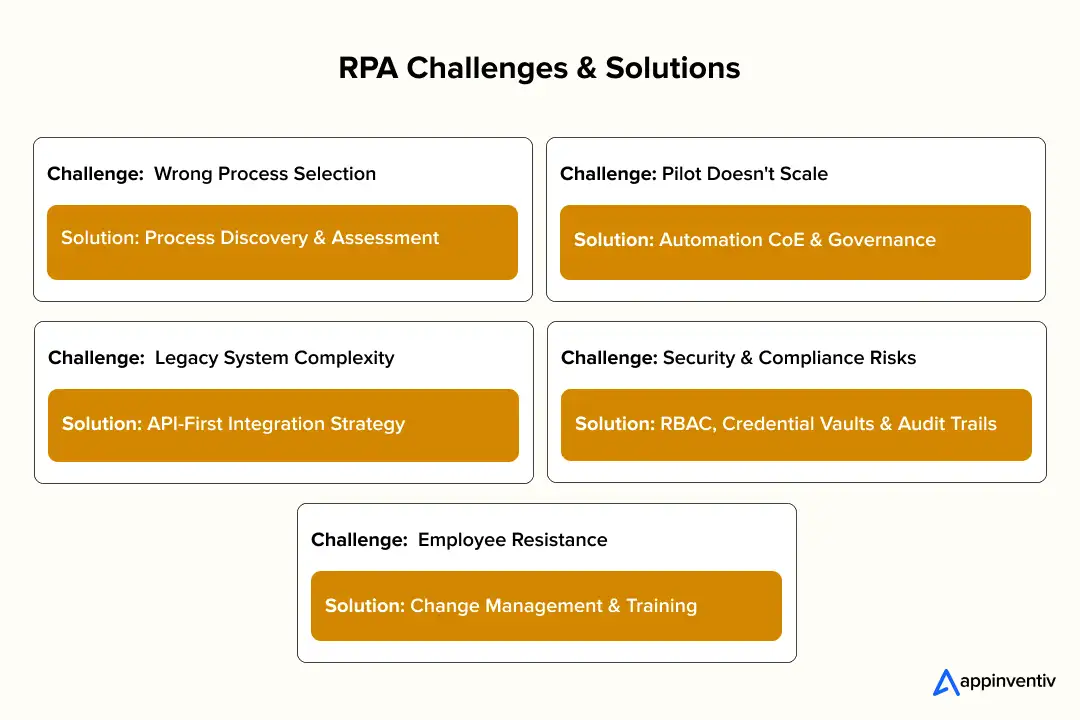
RPA transforms business operations. Following RPA best practices, successful rollouts require more than software selection alone. Automation projects struggle for clear reasons. Teams pick bad processes, ignore security rules, or fail to expand past early tests. Fixing these problems early helps companies build programs that deliver lasting financial value.
Choosing the Wrong Processes
Projects fail most often when tasks are automated that change frequently or require subjective human judgment. Bots perform best on stable, rule-based, repetitive work. Automating changing work causes frequent software crashes and high maintenance costs.
Action: Process checks to pick tasks with fixed rules, high transaction counts, and rare errors. Test each workflow first, rather than assuming every manual task is automatable.
Expanding Beyond Initial Tests
Companies automate a few tasks successfully but struggle to expand across departments. Bot counts grow. Unmatched coding standards, duplicate work, and weak oversight increase operational confusion.
Action: Build an Automation Center of Excellence. Standardize build rules, store reusable code, and control bot deployments from one central dashboard.
Handling Errors and Process Changes
Company tasks change paths unexpectedly. Updated business rules, software updates, or missing data stop automated work. Unprepared bots lose reliability quickly.
Action: Add error rules to every process. Set bots to retry failed tasks, record detailed log files, alert support teams, and send hard cases to human managers.
Connecting Old Software Systems
Companies rely on old applications without modern APIs or simple integration options. Automating these systems can cause issues during screen changes or software slowdowns.
Action: Use direct API links first. Apply screen clicks only without open APIs. Run regular tests on old software scripts to catch interface updates early.
Protecting Security and Governance
Bots access sensitive financial records, customer details, health data, and payroll files. Poor management introduces data leaks and compliance failures. This is why understanding automation and compliance is essential before scaling bot deployments.
Action: Give bots the exact security rules used for human workers. Set user access limits, store passwords in encrypted form, track action logs, and conduct regular compliance reviews.
Building Team Adoption
Software alone cannot guarantee project success. Employees resist new workflows without clear information on how automation improves their daily work.
Action: Treat RPA like a business program, not an IT experiment. Involve department heads early, run staff training, share clear financial results, and update workflows based on direct worker feedback.
RPA best practices show that successful companies focus on governance, process design, and team alignment. Fixing these issues early expands automation beyond single projects into company-wide programs that create lasting value.
Cost of Implementing Robotic Process Automation
RPA costs depend on the number of processes, integration complexity, software choice, and the required AI tools. Teams deploy simple rule-based workflows in weeks. Company-wide rollouts with ERP connections, AI models, and security oversight require larger capital investments. Clear budget ranges help leaders plan spending and rank automation projects.
| Implementation Scope | Estimated Cost (USD) |
|---|---|
| Single rule-based workflow | $10K to $30K |
| Department-level automation | $30K to $100K |
| Enterprise RPA implementation | $50K–$500K+ |
| AI-powered Intelligent Automation | $250K to $1 million+ |
Key Factors That Influence Implementation Costs
Technical and business choices shape total project spending.
- Number of business processes: Automating multiple workflows increases development and testing hours.
- System integrations: Linking ERP, CRM, legacy software, and external services increases build complexity.
- Process complexity: Workflows with approval chains, error branches, and decision points require more code.
- AI capabilities: Adding OCR, Intelligent Document Processing (IDP), and LLMs raises development and server costs.
- Deployment model: Cloud, on-premises, and hybrid setups require different server capacity and software licenses.
- Security and compliance: Meeting standards such as GDPR, HIPAA, PCI DSS, or SOC 2 requires tight access controls.
- Platform licensing: Software vendor fees vary based on bot counts, user licenses, and deployment scale.
Measuring ROI and Business Impact of Robotic Process Automation
Measuring robotic process automation ROI means bot counts alone do not mark enterprise success. Real business value determines true results. Companies track financial gains and direct operational progress to confirm spending cuts and strategic targets.
Measure Both Hard and Soft ROI
Hard ROI tracks direct money gains. Soft ROI captures operational improvements supporting long-term performance.
Hard ROI includes:
- Full-Time Equivalent labor savings
- Direct labor spending cuts
- Lower operational and server costs
- Fewer processing errors and less rework
- Faster task processing speeds
Soft ROI includes:
- Higher staff output and job satisfaction
- Better customer experience
- Faster business decisions
- Clearer process logs and reports
- Stronger compliance and audit readiness
Track the Right Performance Metrics
Clear metrics evaluate software performance and highlight improvement targets.
- Bot utilization: Percentage of active bot processing time.
- Straight-through processing (STP): Percentage of tasks finished without human intervention.
- Error rate: Reduction in manual or software processing errors.
- Processing time: Average time needed to complete a business process.
- Cost per transaction: Operational cost to process one item.
- SLA compliance: Percentage of tasks completed within agreed service timelines.
- Payback period: Time required to recover the initial investment.
Calculate RPA ROI
Calculate financial returns with this simple formula:
ROI (%) = ((Total Benefits − Total Implementation Costs) ÷ Total Implementation Costs) × 100
Example: A company invests $200,000 in software automation. The project returns $500,000 in annual operational savings. The resulting ROI is 150%, and the team recovers the full costs in under 12 months.
While results vary across the robotic process automation market, many enterprise RPA initiatives achieve between 30% and 200% ROI during the first year, with long-term returns reaching up to 300% as automation scales.
Enterprise RPA Implementation Roadmap
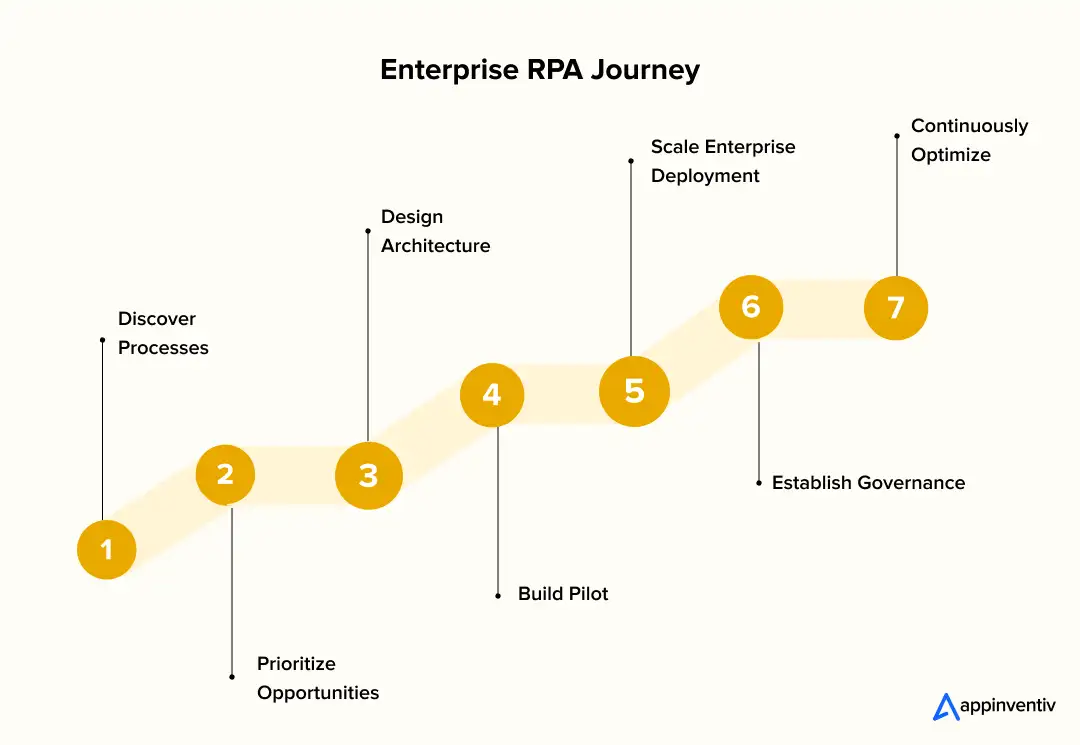
An effective RPA implementation roadmap takes step-by-step planning. Successful companies test the business value of small projects before expanding across departments. They combine process analysis, system design, security rules, and ongoing improvements.
Step 1: Process Discovery
Teams start by finding repetitive tasks across the company. Process mining and other robotic process automation tools, alongside team workshops, spot high-volume jobs with clear rules. Engineers record process maps, error cases, software links, run times, and compliance rules. This information proves suitability for task automation.
Step 2: Process Prioritization
Teams rank candidate tasks following discovery. They score tasks by financial return, setup effort, and process stability. Most companies target high-value, low-effort work first. They save complex tasks involving AI or multiple applications for later stages.
Step 3: Architecture Design
Next, technical teams design the robotic process automation architecture. They define business rules, error handling, password vaults, and software links. Architects choose direct APIs, screen clicks, Intelligent Document Processing (IDP), or Large Language Models (LLMs). They plan bot management, event logging, and backup systems to ensure stable enterprise execution.
Step 4: Pilot Development
A test project validates software performance and financial goals. Developers build bot scripts and connect them to ERP, CRM, HR, or legacy tools. Teams run tests to check speed, system links, and error handling. Managers measure run times and accuracy rates before expanding the project.
Step 5: Enterprise Deployment
Companies expand automation across departments following a successful test project. Central management tools direct bot workloads across available servers. Secure vaults protect passwords, and direct APIs link systems. These controls keep operations reliable as transaction volume grows.
Step 6: Governance Framework
Growing automation programs require strict oversight. Companies establish an RPA framework via an Automation Center of Excellence (CoE) to set coding standards and manage bot schedules. The CoE tracks performance metrics, controls system updates, and enforces compliance with regulations such as GDPR, HIPAA, and SOX.
Step 7: Continuous Optimization
Automation programs adapt with changing business needs. Teams track key metrics like bot active time, run speeds, error counts, and service deadlines. Leaders update existing workflows and add new tasks. They connect AI tools, such as Intelligent Document Processing and LLMs, to expand automation coverage.
How to Choose the Right Robotic Process Automation Platform
Selecting an RPA platform demands more than checking features or license fees. The software must support immediate goals and scale across teams later. Early checks prevent costly software moves later.
- Scalability: Choose software that manages hundreds of bots across departments without performance degradation.
- Security: Look for user role limits, encrypted credential vaults, action logs, and support for GDPR, HIPAA, or SOC 2 standards.
- AI Capabilities: Check support for OCR, Intelligent Document Processing (IDP), and Large Language Models (LLMs) to read forms and unstructured files.
- API Ecosystem: Target platforms with REST APIs, pre-built connectors, and code tools to link ERP, CRM, and cloud services.
- Governance: Central bot management, version control tools, and approval steps help maintain quality across teams.
- Analytics and Monitoring: Real-time dashboards, run logs, and metrics track bot active time and catch errors.
- Cloud Deployment Options: Select cloud, on-premises, or hybrid setups based on server infrastructure and data storage rules.
- Developer Experience: Visual tools, reusable parts, and code checkers reduce development work.
- Citizen Development: Test no-code builders and approval steps if non-technical staff build automations.
- Licensing Model: Review cost structures for attended bots, unattended bots, user access, and server fees to estimate total spending.
- Vendor Support: Review implementation support, partner networks, training files, and long-term product plans.
The best platform matches technical standards, security rules, and long-term business goals.
Future-proof enterprise operations with AI-powered RPA designed for governance, scalability, and long-term business growth.

The Future of Robotic Process Automation
RPA trends point to a new era for the technology. Advances in AI make robotic process automation technologies adaptive and autonomous without replacing them. Future platforms combine fixed rules with smart decisions to complete complex work.
Agentic AI Will Extend What RPA Can Do
Traditional RPA follows set rules to finish simple tasks. Agentic AI adds independent reasoning. Smart software agents evaluate goals, plan steps, and coordinate with other tools. An AI agent analyzes an email request and selects software tools for updates. It assigns tasks to RPA bots across ERP, CRM, and finance systems.
Multi-Agent Systems Will Automate Complete Processes
Future work will rely on specialized AI agents working alongside RPA bots. One agent checks documents. Another evaluates compliance risks. RPA bots update software applications and finish transactions. This structure simplifies insurance claims, loan setups, and supply chain exceptions.
Hyperautomation Will Become the Enterprise Standard
Companies move past single tasks to automate entire business operations. RPA connects with process mining, task mining, Intelligent Document Processing (IDP), rule engines, and AI models. This combination forms connected automation systems.
Self-Healing Automation Will Reduce Maintenance
Traditional bots crash after user interface changes or workflow updates. Modern tools add AI object recognition and automated testing. Bots detect screen updates and recover without manual fixes. This capability cuts repair work for technical teams.
Generative AI Will Expand Document Automation
Large Language Models (LLMs) help RPA process emails, contracts, invoices, and policy files. Future bots extract meaning, summarize facts, classify files, and draft replies before running software tasks.
Governance Will Become Priority Work
Deploying thousands of bots and AI agents makes governance a priority. Companies build central bot controls, AI rules, human approval steps, and active tracking. These tools keep automated decisions secure and compliant.
RPA Will Continue to Evolve, Not Disappear
Claims that AI replaces RPA ignore how company software operates. Business tools require reliable execution and exact audit trails. AI provides reasoning, and RPA delivers execution. Together, both tools support autonomous enterprise operations.
How Appinventiv Helps Enterprises Build and Scale Robotic Process Automation Solutions
With 72% of organizations now strongly supporting intelligent automation strategies, the challenge is no longer whether to automate, but how to implement automation successfully at enterprise scale. Enterprise robotic process automation goes beyond launching a few software bots.
Projects require a clear strategy, reliable infrastructure, AI integrations, security policies, and performance tracking to deliver financial value. Appinventiv helps companies automate complex tasks, modernize legacy tools, and build robotic process automation solutions that grow with the business.
Our robotic process automation consulting teams assist during every step of the project. We support process checks, platform choices, software links, and AI development services, including Intelligent Document Processing (IDP) and AI hyperautomation rollouts. We build secure, reliable automation systems tailored to company goals.
Proven Delivery at Enterprise Scale
- 500+ Enterprise processes digitized
- 1000+ Enterprise software builds delivered
- 300+ AI tools delivered
- 200+ Data scientists and AI engineers
- 35+ Industries served
Appinventiv’s robotic process automation consulting delivers the technical skills, industry knowledge, and execution track record required to build, scale, and future-proof your automation plans.
Let’s connect and build future-ready robotic process automation solutions.
Frequently Asked Questions
Q. What is Robotic Process Automation (RPA)?
A. Robotic Process Automation uses software bots to run routine, rule-based business tasks across enterprise tools. These bots interact with screens, APIs, databases, and forms to support applications of robotic process automation such as invoice tracking, employee onboarding, claims processing, and report generation. Modern platforms link with AI to handle complex data tasks.
Q. Can RPA Connect With Legacy Systems Without Replacing Software?
A. Yes. RPA connects with existing applications without requiring expensive software replacements. Bots complete work through user screens, APIs, databases, or terminal tools. This capability extends the lifespan of legacy ERP, CRM, and mainframe tools, reducing manual work and accelerating digital upgrades.
Q. What Security Controls Should Companies Review Before Launching RPA?
A. Enterprise deployments require role access controls, encrypted password vaults, audit logs, bot identity rules, and secure API links. Companies must set management rules for bot updates and active tracking. For regulated sectors, platforms support standards such as GDPR, HIPAA, SOX, and PCI DSS to maintain clear audit records.
Q. What Are the Key Stages of an RPA Project?
A. Implementation starts with process discovery and task checks. Teams rank processes, design technical architecture, build pilot tests, and roll out software across departments. Clear oversight and continuous updates keep bot networks running smoothly. This step-by-step method reflects strong robotic process automation risk management, limiting project risks and building reliable automation across business units.
Q. Can Generative AI Support Robotic Process Automation Workflows?
A. Yes. Generative AI expands RPA past basic rule-based tasks. It helps bots read unstructured text in emails, contracts, invoices, and customer forms. Combined with Intelligent Document Processing (IDP) and Large Language Models (LLMs), bots classify files, extract key facts, draft replies, and complete complex operations.
Q. Why Choose Appinventiv for RPA Implementation?
A. Appinventiv builds, launches, and scales secure robotic process automation implementations tailored to business needs. Our team handles process checks, platform choices, software links, oversight, and intelligent automation. We bring experience from 500+ digitized processes, 1000+ enterprise projects, and 300+ AI builds. Our team of 200+ AI engineers works across 35+ industries to deliver measurable financial value.


Fast 2-minute response, fully NDA-protected.

Retrieval Augmented Generation in Australia: Architecture, Implementation and Cost
Key takeaways: RAG grounds LLM answers in approved content, improving reliability without retraining a model. Data quality and access permissions decide production outcomes more than the model. Indicative build costs run from AUD 70,000 to 700,000, driven by data and integrations. Measure value against a pre-deployment baseline, separating realised benefits from projected savings. A general-purpose…

The Multiplier Effect of AI Agents: The Rise of AI Swarms
Key takeaways: AI agent swarms coordinate specialized agents to solve complex problems that may be difficult for a single agent to handle effectively. More agents do not automatically mean better outcomes. Swarms deliver value when work can be divided, executed in parallel, and coordinated toward a shared objective. Enterprise readiness depends on governance. Clear accountability,…

AI Data Integration: How to Connect, Clean and Prepare Data for AI
Key takeaways: AI initiatives fail when fragmented, poor-quality data reaches models without sufficient context, controls or ownership. AI-ready pipelines must connect, clean, enrich, govern and continuously monitor data across its lifecycle. Real-time processing matters when AI decisions depend on current transactions, events, inventory or operational conditions. Data architecture should follow the AI use case, balancing…