
































How Much Does It Cost to Build a Weather App like WillyWeather?

 Share -


- 01A Comprehensive Analysis of WillyWeather-like App Development Cost
- 02Factors Influencing the Cost of App Development like WillyWeather
- 03Hidden Elements Influencing WillyWeather-like App Development Cost
- 04How to Optimise Weather App Development Costs?
- 05How Do Weather Apps like WillyWeather Make Money?
- 06How to Develop an App Like WillyWeather
- 07How to Outperform Popular Weather Apps Like WillyWeather
- 08How Appinventiv Helps Build the Most Accurate Weather Apps for Australian Businesses
- 09FAQs

Key takeaways:
- Development costs for weather platforms in Australia typically range from AUD 70,000 for basic MVPs to AUD 700,000+.
- To compete with WillyWeather, apps must pivot from general forecasts to AI-powered nowcasting.
- Success in the AU market requires strict adherence to the proposed 2026 Privacy Act reforms and ASD Essential Eight security maturity.
Weather apps have evolved from simple temperature displays into sophisticated Data-as-a-Service (DaaS) platforms. Today, users expect hyperlocal forecasts, marine and tide data, storm alerts, radar maps, and real-time accuracy they can trust.
Platforms like WillyWeather, with over a million downloads on Google Play and the Apple App Store, have set a strong benchmark by combining rich meteorological data with a clean, intuitive user experience. That’s exactly why entrepreneurs, startups, and enterprises are increasingly exploring what it takes to build a weather app with similar capabilities and reliability.
But one question comes up early in every discussion. How much does it actually cost to build a weather app like WillyWeather? The answer is not a flat number. WillyWeather-like app development cost in Australia depends on multiple factors, including data sources, API integrations, platform choice, UI complexity, real-time processing, scalability, GIS (Geographic Information System) overlays and long-term maintenance.
On average, the cost to develop a weather app like WillyWeather ranges from AUD 70,000 to 700,000+ or more. While this range might seem steep initially, understanding the key cost drivers and adopting a strategic development approach can help you optimise the WillyWeather-like app development cost.
Let’s break it all down so you can get a clear picture of what goes into building a top-tier weather app. This will help you budget smarter and plan the project with confidence.
Discuss your project requirements with us and get a more precise cost estimate.

WillyWeather: Raising the Standard for Australian Weather Forecasting
WillyWeather excels because it isn’t a generic global wrapper; it is optimised for the Australian Bureau of Meteorology (BOM) infrastructure. What sets it apart is its focus on local accuracy rather than generic forecasts. WillyWeather is built for Australian weather patterns and coastal environments, making it especially useful for people who rely on precise, real-time information to plan their day or manage outdoor activities.
Core WillyWeather features include:
- Hyperlocal hourly, daily, and extended forecasts
- Live rain radar using data from 70+ Australian radar stations
- Short-term nowcasting for rain and storm movement
- Tide times, swell, and marine forecasts for coastal locations
- Wind, UV index, and sun exposure data for local conditions
- Location-based search covering suburbs, beaches, and remote regions
By combining real-time radar data with predictive modelling, WillyWeather delivers one of the most accurate weather app experiences available in Australia. Its clear interface and practical feature set make it a trusted choice for everyday users, outdoor enthusiasts, and professionals alike.
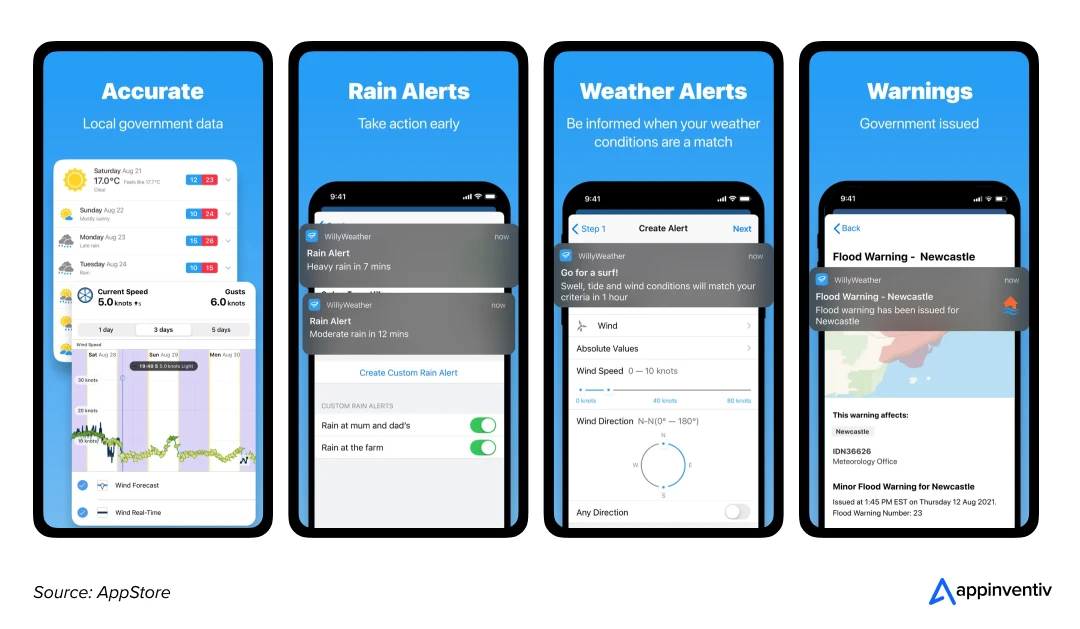
In short, WillyWeather is not just another best weather app in Australia; it is a powerhouse of weather prediction, serving users across major Aussie cities like Brisbane, Sydney, Darwin and Perth, as well as regional and remote locations where reliable forecasts matter even more. To compete, your app must handle:
- BOM Data Ingestion: Real-time synchronisation with 70+ Australian radar stations.
- Hyperlocal Nowcasting: Using AI in Australian weather apps to predict rain movement within a 1km to 5km radius.
- Marine Intelligence: Integrating swell and tide data specifically for the Aussie coastline (Sydney, Perth, Brisbane, and beyond).
A Comprehensive Analysis of WillyWeather-like App Development Cost
The cost to build a weather app like willyweather typically relies on three core components: app complexity levels, development stages, and timeline. Understanding these vital elements in depth will help you estimate the overall budget and make strategic decisions for cost optimisation.
Detailed Cost Breakdown by Technical Complexity
The complexity of your weather app significantly impacts development costs. A basic weather app with standard features costs comparatively less than an advanced app with AI-driven forecasting and real-time alerts. To provide a transparent estimate, we categorise development by the “Data Depth” required.
| Complexity Level | WillyWeather-like app features | Estimated Cost (AUD) | Timeline |
|---|---|---|---|
| Tier 1: Basic | Standard API pulls (OpenWeather), 5-day forecasts, basic GPS. | $70,000 – $150,000 | 4-6 Months |
| Tier 2: Mid-Range | BOM Radar integration, tide/swell charts, push alerts, interactive maps. | $150,000 – $350,000 | 6-9 Months |
| Tier 3: Enterprise | AI-driven nowcasting, IoT sensor integration, proprietary GIS overlays, 99.99% uptime. | $350,000 – $700,000+ | 9-12+ Months |
Cost Breakdown by Development Stages
Making a weather app like WillyWeather is a complex and challenging process that involves several steps. Each step significantly contributes to the total budget. Thus, before you set a budget for weather app development, explore the stage that brings your app idea to life.
| Development Stage | Key Actions | Estimated Costs (AUD) |
|---|---|---|
| Planning & Research |
| AUD 5,000 – 30,000 |
| UI/UX Design |
| AUD 10,000 – 60,000 |
| Development |
| AUD 50,000 – 300,000+ |
| Testing & Deployment |
| AUD 5,000 – 30,000 |
| Post-Launch Maintenance |
| AUD 7,500 – 30,000/year |
How to Estimate Weather App Development Costs?
There is a simple formula to calculate the overall cost to develop a weather app like WillyWeather. All you need to do is multiply the total development hours by the developers’ hourly rates to get the actual cost of app development.
For example, if a development team in Australia charges AUD 60/hour and the project takes 2,500 hours, the cost to build a mobile app in Australia would be AUD 150,000, excluding post-launch maintenance and updates.
| AUD 60/hour ($40/hour) x 2,500 hours = AUD 150,000 |
Factors Influencing the Cost of App Development like WillyWeather
Developing an accurate weather app like WillyWeather involves multiple factors that impact the overall cost. From UI/UX design and backend development to third-party integrations and compliance, each element plays a crucial role in determining the budget. Here is a detailed breakdown of the key factors influencing the cost of developing a weather app.
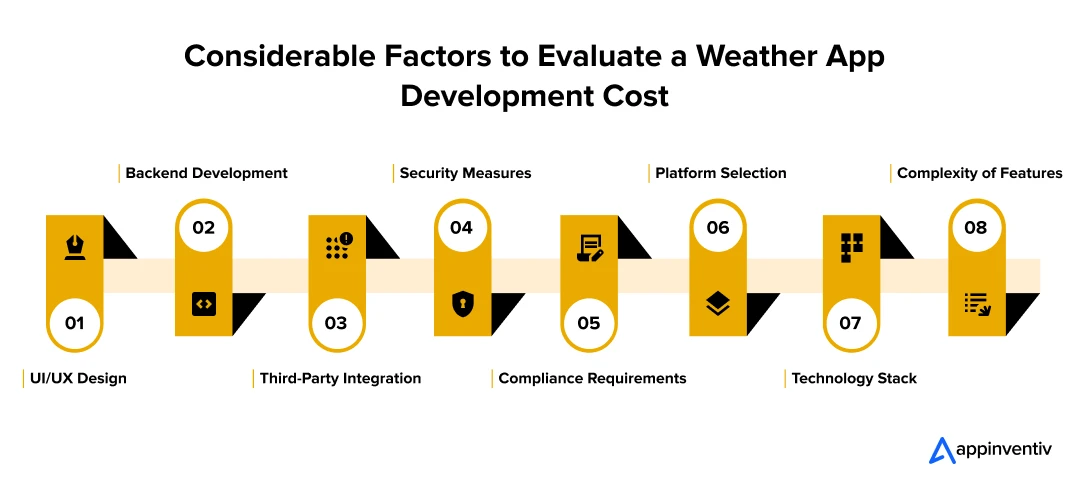
UI/UX Design
A well-designed weather app is not just about looking good; it is about making sure users can access critical weather data effortlessly. Smooth navigation, intuitive design, and visually appealing elements enhance user engagement but also add to the cost.
Cost Breakdown for UI/UX Design
| UI/UX Design | Estimated Cost (AUD) |
|---|---|
| Basic UI/UX | 7,500 – 15,000 |
| Advanced UI with animations | 15,000 – 60,000 |
Backend Development
The backend handles API integrations, data storage, and user management. The more complex your app, the stronger the backend infrastructure needs to be, which directly affects development costs.
Cost Breakdown for Backend Development
| Backend Complexity | Estimated Cost (AUD) |
|---|---|
| Basic backend setup | 7,500 – 45,000 |
| Advanced backend (real-time data processing) | 45,000 –,100,000+ |
Third-Party Integrations
Weather apps rely on external services like meteorological APIs, mapping tools, Geolocation services, and push notifications to provide real-time data. The cost of these integrations varies based on usage limits and the number of third-party services required.
Cost Breakdown for Third-Party Integrations
| Third-Party Integration | Estimated Cost (AUD) |
|---|---|
| Basic API Integration | 7,500 – 15,000 |
| Premium API Integration | 15,000 – 45,000 |
Cyber Resilience & Security Measures
Weather apps handle sensitive, high-precision location data. The security model in the Australian weather app must follow the ASD Essential Eight maturity framework, shifting from simple “protection” to proactive AI-driven resilience. However, ensuring these security measures adds to the cost but is essential for protecting user data and maintaining trust.
Cost Breakdown for Security Implementation
| Security | Key Implementations | Estimated Cost (AUD) |
|---|---|---|
| Foundational | AES-256 encryption at rest and TLS 1.3 in transit. | $15,000 – $30,000 |
| Advanced | Essential Eight (Level 2), DDoS mitigation, and Penetration Testing. | $30,000 – $80,000 |
| High-Resilience | Zero-Trust Architecture, AI Threat Detection, and 24/7 SOC integration. | $80,000 – $180,000+ |
Compliance Requirements
For the best Australian weather app, compliance is no longer just about generic privacy; it’s about Data Sovereignty and adhering to the Proposed 2026 Privacy Act Reforms, which carry penalties of up to AUD 50 million for serious breaches. Thus, adhering to Australian data protection laws, such as the APP and the Privacy Act 1988, is essential. These regulatory compliances ensure your app operates legally and avoids hefty fines but add to the development costs.
Cost Breakdown for Compliance Standards
| Compliance Level | Strategic Requirements | Estimated Cost (AUD) |
|---|---|---|
| Basic (Startup) | Standard APP compliance, local privacy policy, basic SSL, and SSL/TLS encryption. | $10,000 – $25,000 |
| Intermediate (Growth) | NDB (Notifiable Data Breaches) scheme readiness, multi-factor authentication (MFA), and BOM licensing audits. | $25,000 – $60,000 |
| Enterprise (Government/Corporate) | Full Data Sovereignty (AU Hosting), IRAP or ISO 27001 alignment, automated consent logs for 2026 reforms, and quarterly penetration testing. | $60,000 – $150,000+ |
Platform Selection
Deciding whether to build for iOS, Android, or both can greatly impact the cost to build a weather app like WillyWeather. Native apps provide top-notch performance and seamless user experience but come at a higher cost. On the other hand, cross-platform frameworks like Flutter or React Native can save money by using a single codebase.
Cost Breakdown by Platform
| Platform | Estimated Cost (AUD) |
|---|---|
| iOS App Development | 7,500 – 45,000 |
| Android App Development | 7,500 – 45,000 |
| Cross-Platform Development | 45,000 – 75,000 |
Technology Stack
Your app’s technology stack determines its performance, scalability, and security. Choosing the ideal tech stack increases initial development costs but ensures smooth operations in the long run.
Cost Breakdown by Technology Stack
| Technology Layer | Tech Stack for Weather App Development | Estimated Cost (AUD) |
|---|---|---|
| Frontend | Native apps using Swift (iOS) and Kotlin (Android) for high performance, or Flutter for faster cross-platform delivery | 12,000 – 35,000 |
| Backend | Node.js or Python (FastAPI) to manage asynchronous weather APIs, alerts, and real-time data requests | 10,000 – 30,000 |
| Data Processing | AWS Lambda for serverless processing and auto-scaling during high-traffic weather events | 8,000 – 25,000 |
| Database & Geo Data | PostgreSQL with PostGIS to handle location-based forecasts, radar zones, and spatial queries | 7,000 – 20,000 |
| Data Visualisation | D3.js or Canvas API for rendering radar layers, tide charts, and swell graphs | 6,000 – 18,000 |
Complexity of Features
The more advanced the features, the higher the development cost. Basic apps with limited functionalities focus on standard weather forecasts, while advanced and accurate weather apps like WillyWeather integrate real-time radar maps, AI-driven predictions, and functionalities that increase cost.
Cost Breakdown by Feature Complexity
| Feature Type | Features | Estimated Cost (AUD) |
|---|---|---|
| Basic Features | BOM Data Sync: 7-day forecasts, “Feels Like” temp, wind speed/direction (knots/kmh), daily rainfall (since 9 AM), sunrise/sunset. | 7,500 – 30,000 |
| Advanced Features | The “Safety Suite”: Real-time Rain Radar (90-min loop), Fire Danger Ratings (AFDRS), UV Index & Sun Protection alerts, Tide/Swell charts for marine safety, and Push Notifications for BOM Weather Warnings. | 30,000 – 60,000 |
| Complex Features | Hyper-Local Intelligence: AI-based “Nowcasting” (rain in the next 15 mins), Bushfire Smoke/Air Quality overlays, Tropical Cyclone path tracking, IoT/Smart Home integration (Pool/Farm sensors), and Offline Mode for remote regional areas. | 60,000 – 90,000+ |
Hidden Elements Influencing WillyWeather-like App Development Cost
Building the app is only 40% of the journey. To maintain an enterprise-grade platform like WillyWeather, you must account for the ongoing “Data & Resilience” tax. Overlooking these Australian-specific operational costs is the primary reason many weather startups fail to scale.
1. BOM Data & Commercial Licensing
While basic weather data is free, a commercial app like WillyWeather requires Registered User Access or Premium Data Feeds for high-frequency radar and tide updates. In 2026, the BOM has updated its commercial tiers to reflect the high bandwidth of AI-driven nowcasting.
- Hidden Cost: AUD 5,000 – AUD 25,000+ per year (depending on data frequency and commercial revenue).
2. High-Availability Hosting (The “Storm Spike” Budget)
Weather apps don’t have linear traffic. During a Sydney hailstorm or a Queensland cyclone, your traffic can spike by 2,000% in minutes. You aren’t just paying for hosting; you are paying for Auto-Scaling Infrastructure and Edge Caching (via AWS Sydney or Azure Melbourne).
- Hidden Cost: AUD 8,000 – AUD 30,000+ per year.
3. Hyper-Local ASO & Geo-Targeted Marketing
To compete in the AU market, App Store Optimisation (ASO) must be localised. You need to rank for suburb-specific searches (e.g., “Tide times Cronulla” or “Rain radar Glen Waverley”). This requires a specialised local SEO strategy that global agencies often miss.
- Hidden Cost: AUD 20,000 – AUD 80,000+ per year.
4. Technical Debt & API Maintenance
Meteorological APIs are not static. The BOM and international providers frequently update their data schemas. “App maintenance” in this context isn’t just fixing bugs, it’s the constant re-engineering of data pipelines to ensure your radar map doesn’t go blank during a critical update.
- Hidden Cost: 15–20% of initial development cost annually.
Pro-Tip for Aussie Innovators
If you are making a weather app like WillyWeather for internal logistics or insurance, the “Legal & Compliance” bucket is your biggest risk. Under the 2026 Privacy Act Reforms, a failure to disclose how you use a driver’s background location for weather safety can lead to administrative fines of up to AUD 330,000 even without a data breach.
How to Optimise Weather App Development Costs?
Creating an app like WillyWeather requires significant investment, but the good news is that you don’t have to break the bank. With the right approach, right development partner and the strategic planning, you can reduce your “Total Cost of Ownership” (TCO) by up to 40% over three years.
Let’s explore some effective cost-saving strategies that help keep development expenses under control without sacrificing quality:
- The “Lean” MVP Approach: Focus on a “Single-Utility MVP” (e.g., just high-precision rain radar for a specific region). Launching with a focused feature set reduces initial spend by 30-50% and allows for data-driven scaling based on actual AU user feedback.
- Architectural Modularisation: Use a microservices architecture for your data ingestion layer. This allows you to swap weather data providers or update BOM integration modules without rebuilding the entire app, drastically lowering long-term maintenance costs.
- Hybrid Platform Strategy: For 90% of weather apps, Flutter or React Native is the optimal choice. It offers a single codebase for iOS and Android, reducing development and QA costs by 30% while maintaining the smooth, high-60fps animations required for radar maps.
- Offshore-Hybrid Team Model: Leverage the cost efficiencies of offshore development for core coding while maintaining local AU Project Management and Solutions Architecture. This ensures your app meets Australian meteorological standards and compliance laws while saving 40-60% on hourly engineering rates.
How Do Weather Apps like WillyWeather Make Money?
In 2026, weather app monetisation models have shifted from intrusive advertising to contextual value. Leading platforms leverage a multi-layered revenue model that turns high-precision meteorological data into a sustainable business. By diversifying revenue streams, you ensure your app remains profitable even as cloud and data-ingestion costs scale.
Here is a table outlining the key monetisation strategies for weather apps:
| Strategy | Implementation for the AU Market | Revenue Potential |
|---|---|---|
| Freemium & Subscription | Basic forecasts are free. Premium ($4.99 – $14.99/mo) unlocks ad-free high-res radar, tide/swell graphs, and AI-driven “Nowcasting” alerts. | High (LTV-driven) |
| B2B API Licensing | Selling hyper-local data feeds to logistics, construction, and insurance firms. Enterprises pay for “Street-Level” precision to mitigate operational risks. | Enterprise-Grade |
| Weather-Triggered Ads | Displaying contextual ads based on current conditions (e.g., umbrella ads during rain, hay fever medication during high pollen counts). | Dynamic CPM |
| Data Syndication | Aggregating anonymised user-reported weather observations (crowdsourced data) and licensing it to climate researchers or hedge funds. | Passive Income |
| White-Label Solutions | Licensing your weather engine to local councils or government bodies for regional disaster preparedness portals. | Contract-Based |
How to Develop an App Like WillyWeather
Building a platform like WillyWeather is a high-precision engineering project. The process focuses on Meteorological Data Orchestration, ensuring that from the moment a BOM radar pulse is sent, it is processed and rendered on a user’s device in under two seconds. Let’s explore the essential steps to build a weather app in Australia:
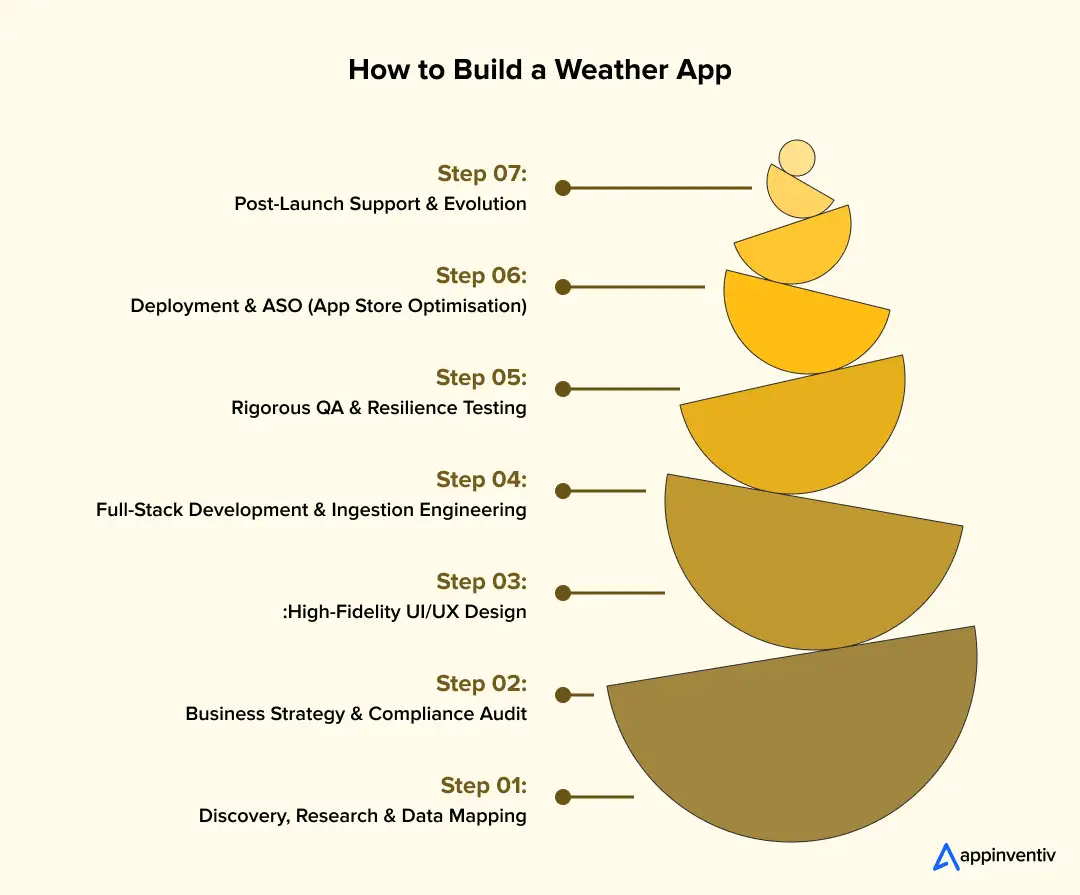
1. Discovery, Research & Data Mapping
A weather app is only as good as its source. This phase identifies the specific BOM Registered User Data Feeds required (e.g., IDV60901 for Victoria) and maps out the integration of secondary sources like WAVEWATCH III for swell or AFDRS for fire danger.
2. Business Strategy & Compliance Audit
The next step is to define the monetisation roadmap alongside a strict compliance audit. This includes aligning with the Australian Privacy Principles (APPs) for location tracking and ensuring the architecture supports Data Sovereignty by hosting sensitive user data on AU-based nodes.
3. High-Fidelity UI/UX Design
Weather data is high-density and requires a sophisticated Information Hierarchy. Thus,the UI/UX design of the app focuses on ensuring critical alerts, such as “Rain in 10 mins,” are visible at a glance, while complex tide and UV charts remain accessible via intuitive navigation. Figma is typically used for rapid prototyping of interactive GIS map layers.
4. Full-Stack Development & Ingestion Engineering
This is the core build phase, split into three critical streams:
- Frontend: Building low-latency, 60fps map interfaces using Swift/Kotlin or Flutter.
- Backend: Developing a Python/FastAPI ingestion engine to sanitise raw GRIB2/XML files.
- Integration: Establishing WebSocket connections for “Live” radar updates and Firebase Cloud Messaging (FCM) for severe weather alerts.
5. Rigorous QA & Resilience Testing
After development, you must thoroughly test your app. The testing and quality assurance process extends beyond bug fixes to include Extreme Weather Surge Testing. Systems simulate 10x traffic spikes to verify that auto-scaling infrastructure remains stable when a major storm hits metropolitan areas like Sydney or Melbourne.
6. Deployment & ASO (App Store Optimisation)
Launching on the App Store and Google Play requires meticulous technical documentation for Location Permissions. The store listing is optimised for high-volume Australian search terms such as “Rain Radar,” “Tide Times,” and “BOM Weather.”
7. Post-Launch Support & Evolution
A modern weather app is a living platform. Ongoing support addresses API schema changes, OS updates, and the rollout of new features like AI-based activity suggestions or wearable integrations for devices such as Apple Watch and Garmin.
Leverage AI-driven nowcasting and ASD Essential Eight security for your weather app project.

How to Outperform Popular Weather Apps Like WillyWeather
Beating WillyWeather requires a focus on Information Gain, providing the specific data points that WillyWeather omits or fails to prioritise for the 2026 Australian climate.
1. Shift from Forecasting to “Live Nowcasting”
WillyWeather is excellent at historical and predicted data, but it often lacks minute-by-minute precision. By leveraging AI and 5G low-latency data streams, an app can offer Street-Level Nowcasting:
- The “Rain in 4 Minutes” Alert: Using 60-second update cycles from 70+ BOM radar stations to tell a user exactly when to bring the washing in.
- Microclimate Tracking: Integrating data from private IoT weather stations to provide precise temps for specific suburbs (e.g., “It’s 4°C cooler in the Dandenongs than in Melbourne CBD”).
2. Hyper-Local Safety & Environmental Overlays
WillyWeather’s marine focus is its strength. To beat it, an app must master the “Australian Safety Suite”:
- Bushfire & Smoke Intelligence: Real-time integration with the AFDRS (Australian Fire Danger Rating System) and satellite smoke-plume overlays.
- Heatwave Resilience: With 2026 seeing record temperatures, “Extreme Heat” notifications with cooling-centre locations or “Sun Protection” windows based on live UV peaks are essential for AU families.
3. Contextual UI: Beyond the Graph
WillyWeather is “data-heavy,” which can be overwhelming. A superior UX solves for “App Fatigue” by using a modular, “Quiet Super App” approach:
- The Activity-First View: Instead of just showing “25 knots,” show “Safe for Fishing” or “Danger: High Swell” based on user profiles (boaties, surfers, farmers).
- Voice-Enabled Field Commands: Allowing tradespeople or agricultural workers to get hands-free weather updates while on-site.
4. Integrate Advanced Features
To outperform leading weather apps like WillyWeather, you must go beyond basic functionalities and integrate gamification elements, like weather prediction challenges and advanced features. This will enhance user engagement and provide deeper insights.
Here’s a comparison:
| Feature Category | WillyWeather like App Features | Advanced Weather App Features |
|---|---|---|
| Weather Forecasting | Daily and hourly forecasts | AI-driven hyperlocal nowcasting and real-time microclimate tracking |
| Weather Alerts | Standard severe weather alerts | Personalised weather notifications based on user preferences |
| Maps and Visualisation | Static weather maps | Interactive radar, satellite, and storm tracking maps with real-time overlays |
| Data Sources | Single-source weather data | Multi-source aggregation with AI-enhanced accuracy |
| Interactivity | Basic search and location selection | Crowdsourced weather reports, live user contributions, and community-driven insights |
| Additional Insights | Temperature, humidity, wind speed | Air quality index, pollen levels, wildfire, and UV index monitoring |
| Personalisation | Default location and basic settings | AI-driven recommendations, activity-based weather insights, and historical weather trends |
| Integration and Connectivity | GPS-based location tracking | Wearable and IoT integration (smart home, car dashboards, etc.) |
Building an app in Australia like WillyWeather typically costs AUD 70,000 – AUD 300,000 for BOM-integrated apps, while AI-driven nowcasting platforms exceed AUD 300,000 – AUD 700,000 due to radar ingestion, GIS processing, and compliance overhead.
How Appinventiv Helps Build the Most Accurate Weather Apps for Australian Businesses
Developing a premier weather platform like WillyWeather requires more than just mobile coding; it necessitates a sophisticated orchestration of Meteorological Engineering, GIS mapping, and Big Data analytics. From sub-second radar synchronisation to AI-driven “Nowcasting,” every architectural layer must be optimised for the unique Australian climate.
As a leading mobile app development company in Melbourne, Australia, Appinventiv specialises in bridging the gap between raw BOM data and high-utility user experiences. We navigate the complexities of local data licensing, AU-based hosting requirements, and the 2026 Privacy Act mandates, ensuring your platform is both innovative and fully compliant.
With a global force of 1,700+ tech experts and a portfolio of 3,000+ successful deployments, we build scalable weather intelligence platforms for the Aussie climate.
Whether you just want to know the cost to build a weather app like WillyWeather or turn your app vision into a seamless reality, contact us today, and we will be happy to help you.
FAQs
Q. How much does it cost to develop a weather app like WillyWeather in Australia?
A. The cost of developing a weather app like WillyWeather varies depending on various factors like the app’s features, platform, third-party integrations, and the location of the app development company.
On average, the cost to build a weather app like WillyWeather ranges between AUD 70,000–700,000+, with ongoing maintenance and updates adding to the overall expenses.
Q. How long does it take to build a weather app like WillyWeather?
A. The timeline for developing a weather app varies based on the app’s complexity, features set, tech stack used, and app developers’ expertise.
For instance, a basic app with standard features can take 4–6 months, while an advanced app with real-time data processing and interactive maps takes 6–12+ months for full-scale development and deployment.
Q. What are the challenges with weather app development in Australia, and how can we overcome them?
A. Here are some of the most common challenges and strategies to overcome them:
Ensuring Data Accuracy
- Challenges: Weather predictions rely on real-time data from multiple sources, and inaccuracies can affect user trust.
- Solution: Integrate reliable APIs and implement AI-based predictive analytics to enhance forecasting precision.
Managing Large Data Sets
- Challenges: Processing vast amounts of weather data from satellites, radars, and IoT sensors can be overwhelming.
- Solution: Utilise cloud computing and big data technologies to store, analyse, and deliver real-time weather updates.
Compliance and Security
- Challenges: Handling user location data comes with privacy concerns and regulatory requirements.
- Solution: Implement robust data encryption and adhere to relevant data privacy laws to overcome security and compliance challenges.
Overcoming these obstacles efficiently turns your vision into reality and ensures the promising future of weather app development. By addressing these challenges early, you can truly leverage the benefits of developing a weather app like WillyWeather that stands out in the market and captures a loyal user base.
Q. Are there ongoing costs after launching a weather app?
A. Yes. You should expect annual operational costs of 15–20% of your initial investment. Key expenses include:
- Data Licenses: BOM commercial feeds or premium APIs
- Cloud Hosting: AWS/Azure scaling to handle “storm spikes”
- Maintenance: 2026 Privacy Act compliance and OS updates
Q. Is building a weather app profitable in Australia?
A. Yes. Profitability comes from high-value niches rather than general forecasts:
- B2B Licensing: Selling precision data to AU construction, logistics, and insurance firms.
- Premium Subscriptions: Charging AUD 5–15/month for AI-nowcasting and fire/tide safety features.
- High Retention: Australia’s extreme climate ensures daily active usage, driving consistent ad and subscription revenue.


Fast 2-minute response, fully NDA-protected.

How Much Does It Cost To Build a Chat App Like Arattai?
Key takeaways: Creating a chat app like Arattai will cost you anywhere from $40,000 to $400,000, depending on how complex you want it to be. The essential features you need are real-time messaging, multimedia sending, and user authentication. Layering advanced features such as voice/video calls, group messaging, AI-driven bots, and end-to-end encryption takes the app…

How Much Does It Cost to Build a Car Rental App like Hertz?
Key takeaways: The cost to build a Hertz-like app ranges roughly $40,000–$300,000+. Complexity, automation, and scale matter more than just the number of features. Real costs continue after launch: infra, maintenance, support, and compliance. Smart planning and MVP-first approach help keep budgets under control. Revenue comes from rentals, add-ons, subscriptions, partnerships, and fleet sales. You…

How Much Does It Cost to Build a Route Planning App Like Komoot
Europe doesn’t just love the outdoors- it thrives on it. From the Alps to Amsterdam’s bike lanes, cycling and hiking fuel an industry worth $53.3 billion in 2024, projected to grow at nearly 11% CAGR through 2033, as reported by GrandViewResearch. And leading this charge is Komoot, the route-planning app trusted by 40+ million users.…