





























How To Build A Product Scanner App Like Yuka – Explore Features, Cost, Case Studies


- What Is a Product Scanner App Like Yuka
- Why US Consumers Are Adopting Scanner Apps Rapidly
- Step by Step Guide: How to Build a Product Scanner App Like Yuka
- Key Features to Include in a Yuka Style App
- Development Cost Breakdown for a Yuka Style App
- What Does the Complete Architecture and Technology Stack for a Yuka Style Product Scanner Look Like?
- Regulatory and Compliance Requirements in the US
- Challenges and Considerations in Yuka Like App Development
- Monetization Models for a Yuka Like App
- How Appinventiv Helps Build Yuka Like Apps for the US Market
- FAQs

- A basic Yuka-style product scanner costs between $40,000 and $80,000, while advanced builds with AI and large databases can reach $400,000 or more.
- The real work is not scanning barcodes, but managing accurate ingredient data, scoring logic, and compliance with FDA and CCPA rules in the US.
- Successful apps begin with core features such as fast barcode detection, ingredient explanations, allergen alerts, and simple scoring, then expand to optional AI and personalization.
- Hidden costs include third-party data licensing, ongoing database updates, cloud hosting, and monthly maintenance that can run up to $10,000 per month.
- Monetization works best through a mix of freemium upgrades, affiliate product recommendations, retailer partnerships, and white-label licensing rather than one single revenue source.
Picture a shopper in a Target aisle who picks up a snack, opens an app, scans the barcode, and immediately understands what they are really about to buy. Most days, it is not about calories or marketing claims. People just want to know what they are putting into their bodies. That simple moment captures why apps like Yuka have become familiar tools for many American households.
Over the past year, the clean label movement has pushed even higher. Reports published in early 2025 show a clear shift toward food and cosmetic products with short ingredient lists and fewer additives. Nearly one in three new food launches now includes clean label claims, which shows how strongly transparency is guiding purchase habits.
This shift has encouraged many founders to explore how to build an app like Yuka. The idea sounds straightforward at first. You scan a product, the app reads the ingredients, and users get a simple score. The real work happens behind the scenes. A product scanner needs a reliable database, accurate classification rules, a strong compliance framework, and an experience that users can trust every day.
This guide breaks the entire journey into clear steps so you can see what goes into product scanner app development like Yuka for the US market and what a realistic investment looks like.

What Is a Product Scanner App Like Yuka
A product scanner app is a simple tool that helps people make sense of what they are buying. You point your phone at a barcode and the app pulls up the ingredients, nutrition details, and a quick explanation of whether the product fits your needs. That is the core idea behind apps like Yuka.
To build the same experience, teams usually develop mobile barcode scanners like Yuka that picks up barcodes quickly and delivers clear answers.
When you create an app like Yuka, you usually bring together a few familiar pieces:
- A camera based scanner that picks up barcodes quickly
- A product and ingredient database that stays updated
- A scoring or insight system that tells users what the information actually means
Some well known examples of apps like Yuka include Fooducate, INCI Beauty, and Think Dirty.
Most users open these apps when they want a quick check, not a long lesson. That is why food and cosmetic scanner app development like Yuka often focuses on a clean layout and simple language. Read our guide on designing minimal apps.
The experience usually includes:
- Short explanations for unfamiliar ingredients
- Alerts for allergens or sensitive additives
- A basic product score
- Suggestions for healthier or safer alternatives
- A small history of scanned items
It sounds straightforward, yet the value comes from how easily people understand the results. Once you see how this flow works, the next step is understanding the real effort that goes into developing a product scanner app like Yuka.
Why US Consumers Are Adopting Scanner Apps Rapidly
In the past few years, many shoppers in the US have become more deliberate about what they buy. You can see it in small moments. People take a second look at ingredient lists, compare two similar products, or search for quick information on their phones. Most of them are simply trying to avoid guesswork. A scanner app helps them get that clarity without slowing down their routine.
Several things are shaping this shift:
- Wellness has become part of everyday life. McKinsey’s Future of Wellness report notes that Americans are placing more value on transparency in the products they use.
- Concerns around allergies and ingredient reactions are more common now.
- Cosmetic safety is something people talk about often, especially when new ingredients trend online.
- Most shoppers prefer short, clear explanations instead of reading long labels in the aisle.
- Social platforms highlight “cleaner” or “safer” choices, which encourages people to double check products.
All of this has increased interest in apps like Yuka, since they offer a simple way to understand what is inside a product. As more users look for a dependable guide during everyday shopping, the opportunity for product scanner app development like Yuka continues to grow in the US market.
Step by Step Guide: How to Build a Product Scanner App Like Yuka
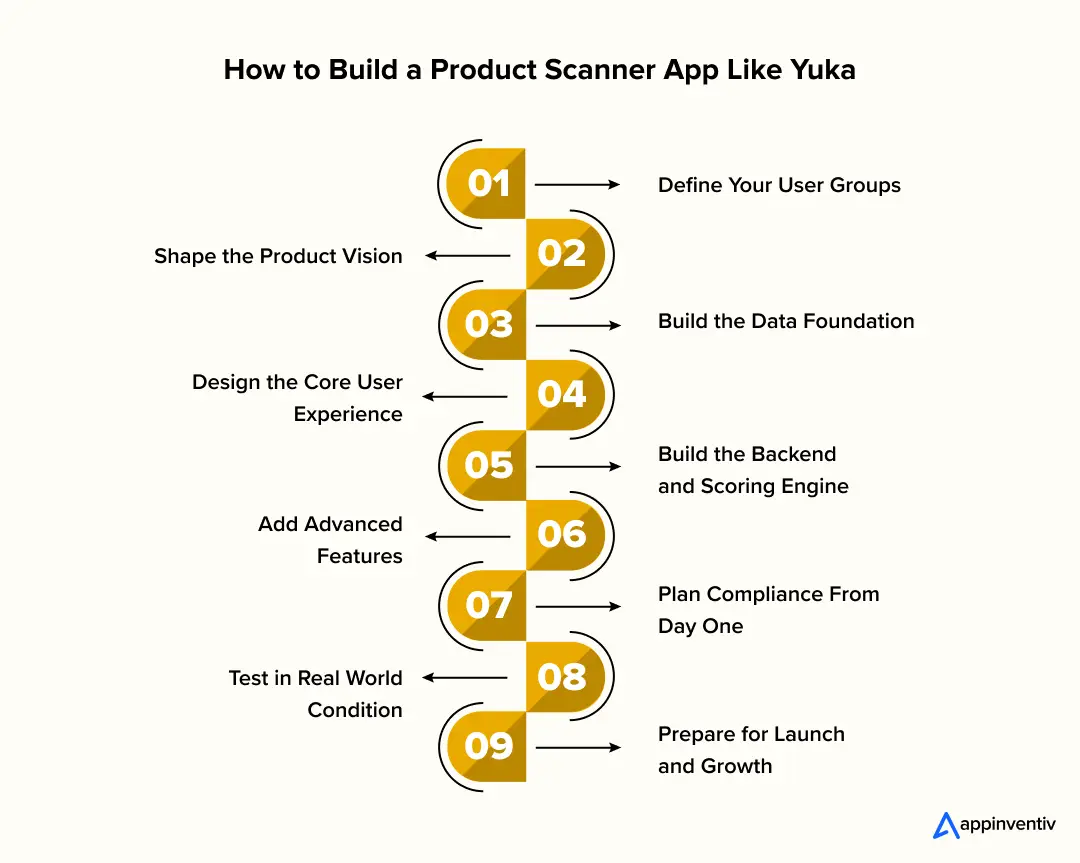
Building a reliable scanner app requires more than a barcode reader. It involves product data, scoring logic, compliance workflows, and a user experience that feels trustworthy from the first scan. This step-by-step guide shows how to build an app like Yuka. Each step highlights what teams should prioritize when they plan, design, and develop a product scanner app like Yuka.
Step 1: Define Your User Groups and Their Value Triggers
Understanding the user is the first step when you create an app like Yuka. User groups often look similar at first, but each group has different priorities, and these priorities influence data selection, scoring rules, and feature depth.
- Consumers focused on clean label choices: They want simple ingredient explanations, easy scoring, and fast scans. They rarely explore deep analytics, so the experience must be simple.
- Parents buying food for children: They want allergen alerts, safety notes, and clear alternatives. Their trust depends on reliable data and transparent information.
- Allergen aware or diet specific users: Accuracy matters the most for them. A strong foundation for food and cosmetic scanner app development like Yuka is essential, because even a small mismatch can break trust.
- Skincare and cosmetic buyers: They want quick reviews of ingredient safety, claims, and sensitivity indicators. They also respond well to recommendations for safer alternatives.
Defining these groups early helps the entire engineering team decide which features to prioritize during product scanner app development like Yuka.
Step 2: Shape the Product Vision
A common mistake during early planning is trying to support food and cosmetic scanning at the same time. When you develop a product scanner app like Yuka, choosing a niche first reduces complexity and improves time to market.
- Food scanning niche: Focus on nutrition data, FDA rules, allergen lists, and ingredient explanations. The design must support clear labeling and fast comparison between similar products.
- Cosmetic scanning niche: This requires a strong ingredient dictionary because cosmetics have thousands of variations for similar compounds. Teams working on apps like Yuka for cosmetics often begin with a smaller, verified dataset.
- Combined food and cosmetic scanner: This requires the highest engineering effort because the app supports two different data models and scoring rules. Personalization becomes more complex. Database enrichment also takes more time and cost.
A clear product vision helps reduce scope creep and aligns the development team on what to launch in the first version.
Step 3: Build the Right Data Foundation
Strong data is the core of food and cosmetic scanner app development like Yuka. The user experience depends entirely on how accurate and complete the product information is.
Key data sources include:
- FDA food datasets for nutrient facts and ingredient information
- GS1 barcodes for standardized product identification
- Cosmetic ingredient libraries for safety notes and claims
- Retailer APIs for pricing and availability
- Internal enrichment for updated ingredient notes and corrections
Development considerations:
- Map all incoming data to a single unified structure
- Create a system that identifies missing or outdated entries
- Store ingredient variants to avoid mismatches
- Plan for frequent updates to keep entries accurate
A reliable data model supports the entire journey of how to develop an app like Yuka and ensures scoring accuracy.
Step 4: Design the Core User Experience
UX plays a major role when you develop mobile barcode scanner like Yuka because users scan products during real shopping moments. Fast scanning and clear results shape trust from day one.
- Scanner UI: The camera must open quickly and detect barcodes in different lighting conditions. Low latency is essential because users scan products while shopping.
- Results screen: Show the product image, score, ingredient notes, allergen alerts, and quick explanations. These elements form the baseline features of a food scanning app like Yuka.
- Ingredient explanations: Use short notes that help people understand unfamiliar terms. Long descriptions reduce engagement inside stores.
- Scoring explanation: Explain how scores are calculated. Show which ingredients improved or reduced the score.
- Interaction design: Avoid clutter. Use guided flows for scanning, reviewing, saving, and comparing products.
This stage determines the clarity and simplicity that users expect from apps like Yuka for food and cosmetics.
Step 5: Build the Backend and Scoring Engine
Once the UX is set, the backend handles the logic that powers the flow. Strong backend design is essential for product scanner app development like Yuka.
Backend responsibilities:
- Product lookup and verification
- Ingredient mapping and classification
- User accounts and saved items
- Scan history
- Data enrichment
- API orchestration
Scoring engine options:
- Rule based model: Uses static rules for ingredients, allergens, and nutrients. Faster to build and ideal for early versions or Yuka app clone development.
- AI based scoring model: Learns from patterns in ingredients, sensitivity indicators, or cosmetic compounds. Requires more data, more testing, and ongoing tuning.
Development priorities:
- Keep the scoring logic modular
- Support revisions without full redeployments
- Allow admin teams to update rules and ingredient tags
This ensures the app scales as new categories and ingredients appear.
Step 6: Add Advanced Features Smartly
Advanced features improve long term value but add complexity. When you develop a product scanner app like Yuka, these features usually come after the core experience is stable.
- AI scoring: Helps interpret complicated ingredient lists and identify risk factors.
- Computer vision: Detects products when barcodes are damaged or missing.
- Offline mode: Lets users scan in low connectivity areas. Requires local caching and optimized storage.
- Personalization: Creates tailored alerts based on diet, allergies, or skin sensitivities.
- Smart alternatives engine: Suggests better or safer options from the database.
Each advanced feature increases backend complexity. Add them in planned phases to avoid delays during development.
Step 7: Plan Compliance From Day One
Compliance affects how you design data workflows, scoring explanations, and disclosures. This is a core step of how to build an app like Yuka for the US market.
Key US requirements
- FDA labeling rules for food products
- Cosmetic safety and claim restrictions
- CCPA privacy requirements
- Rules for handling user preferences and sensitive categories
- App Store and Play Store guidelines for wellness related content
Development tasks
- Add consent flows for data collection
- Store user data securely
- Use clear disclaimers for scoring logic
- Avoid medical claims
- Document compliance steps for future audits
Strong compliance reduces product risk and increases trust among users.
Step 8: Test the App in Real World Conditions
Testing the scanner in controlled settings is not enough. Testing in real environments is essential for accurate product scanner app development like Yuka.
Scenarios to test
- Low light
- Glare from glossy packaging
- Curved barcodes on bottles
- Damaged or partial barcodes
- Multi pack items
- Similar looking variants
What the development team should validate
- Speed of detection
- Accuracy of data retrieval
- Correct mapping of variants
- Graceful fallback to manual search
- Clarity of error messages
Real world testing improves reliability and reduces support tickets after launch.
Step 9: Prepare for Launch and Growth
A successful launch is not the end. It marks the start of a long lifecycle.
Pre launch activities
- App Store and Play Store optimization
- Beta testing with niche user groups
- Clear onboarding screens
- Load testing for expected traffic
Post launch activities
- Feedback loops built into the app
- Regular database updates
- Monitoring scoring accuracy
- Analytics to understand what users scan
- A roadmap for adding features over time
This phase decides how well the app moves from MVP to a scalable platform that can compete with apps like Yuka for food and cosmetics.
Key Features to Include in a Yuka Style App
A strong feature set is the backbone of product scanner app development like Yuka. Users rely on fast scanning, clear ingredient explanations, and accurate scoring. These features shape the core experience when you create an app like Yuka or plan a full scale build that supports both food and cosmetic data. This section highlights essential features, advanced upgrades, and trust building elements that influence long term retention.
| Essential Features | Advanced and Optional Features | Trust and Retention Features |
|---|---|---|
| Barcode and QR Scanner | AI Based Ingredient Analysis | Transparent Scoring Logic |
| Ingredient and Nutrition Database | Computer Vision for Product Identification | Ingredient Variants and Mapping |
| Simple and Transparent Scoring System | Offline Scanning | Regular Database Updates |
| Allergen and Sensitivity Alerts | Personalized Recommendations | Safe Alternative Suggestions |
| Search and Product History | Smart Filters and Comparison Tools | Clear Disclaimers and Compliance Notes |
| Clean Ingredient Explanations | Retailer API Integration | Fast Load Times and Smooth Scans |
Essential Features for a Yuka Style App
These are the must-have components required to develop a product scanner app like Yuka. They define the basic flow from scanning to understanding the score.
- Barcode and QR Scanner: A fast, reliable camera based scanner is the foundation. Teams working on developing mobile barcode scanners like Yuka optimize camera access, detection speed, and error handling for curved or glossy packaging.
- Ingredient and Nutrition Database: Users want clear details without reading long labels. This forms the core data layer for food and cosmetic scanner app development like Yuka and powers all downstream scoring features.
- Simple and Transparent Scoring System: A rule based or AI based score helps users understand if a product fits their needs. This is a primary feature in all apps like Yuka for food and cosmetics.
- Allergen and Sensitivity Alerts: Parents, diet focused users, and skincare buyers depend on quick alerts. This feature increases both trust and repeat usage.
- Search and Product History: Users often compare items. Saved history and quick search improve convenience and keep the app relevant during shopping.
- Clean Ingredient Explanations: Short descriptions for unfamiliar ingredients help the app stand out. This is one of the defining features of a food scanning app like Yuka.
Advanced and Optional Features
These features take the platform beyond basic scanning and help teams compete with leading apps like Yuka. They are ideal for scaling, personalization, or deeper product intelligence.
- AI Based Ingredient Analysis: AI models classify ingredients, identify risk factors, and improve scoring consistency. This upgrade is common in later stages of yuka app clone development.
- Computer Vision for Product Identification: Useful when barcodes are damaged or missing. Computer vision maps packaging patterns to product records.
- Offline Scanning: Supports users in low connectivity areas. The app stores essential product data locally and syncs updates automatically.
- Personalized Recommendations: Diet preferences, allergy profiles, and skin sensitivity notes influence recommendations. This is a major differentiator in modern food and cosmetic scanner app development like Yuka.
- Smart Filters and Comparison Tools: Users can sort products by score, allergen category, skin safety rating, or nutritional value.
- Retailer API Integration: Shows price ranges, variants, and availability. This helps users make decisions faster inside stores.
Features That Improve Trust and Retention
Trust is the real currency for scanner apps. These features help users rely on your platform daily, which increases lifetime engagement and user referrals.
- Transparent Scoring Logic: Users stay loyal when they understand how scores are generated. Clear explanations also reduce support queries.
- Ingredient Variants and Mapping: Many skincare and food ingredients appear under different names. Accurate mapping builds credibility and strengthens product scanner app development like Yuka.
- Regular Database Updates: Brands change formulas often. Consistent updates prevent misinformation and reduce churn in apps like Yuka for cosmetics and food.
- Safe Alternative Suggestions: Showing better or cleaner options helps users discover new products and keeps them engaged.
- Clear Disclaimers and Compliance Notes: Users trust platforms that communicate responsibly. This is important for compliance aligned yuka app clone development.
- Fast Load Times and Smooth Scans: Performance drives retention. If scans lag or the results page loads slowly, users abandon the app.
These trust building features strengthen the foundation for teams exploring how to develop an app like Yuka at scale.
Development Cost Breakdown for a Yuka Style App
Cost is an important part of planning, but it is no longer the main focus for teams exploring how to build an app like Yuka. The goal here is to understand the broad budget range and the factors that influence it. Most projects fall between 40 thousand dollars and 400 thousand dollars, depending on scope, data depth, and feature complexity. These ranges give a realistic starting point for anyone evaluating the cost to build an app like Yuka or planning long-term product scanner app development like Yuka for food and cosmetic use cases.
Cost Ranges by Complexity
Different product visions lead to different levels of investment. Below are typical ranges seen when teams develop a product scanner app like Yuka.
- Basic MVP build: Suitable for early validation, basic scanning, simple scoring, and a small product database. (Approx: $40K to $80K)
- Mid-level build: Supports larger datasets, improved UX, allergen alerts, and more detailed scoring. This level often appears during Yuka app clone development or niche-focused launches. (Approx: $80K to $200K)
- Advanced platform build: Includes AI scoring, computer vision, personalization features, retailer integrations, and a scalable backend required for more mature apps like Yuka. (Approx: $200K dollars to $400K)
These ranges vary based on data licensing needs, design expectations, and engineering complexity.
To get more details, you can read our guide on how much it costs to build an MVP.
Stage-Wise Cost Distribution
Teams exploring how to develop an app like Yuka often break cost into development stages. This helps plan budgets for both initial build and future enhancements.
- Planning and discovery: User journeys, feature mapping, technical feasibility. (Cost range: $5K to $15K)
- UI and UX design: Scan UI, ingredient layouts, transparent score screens. (Cost range: $8K to $40K)
- Mobile development: Barcode scanner, search flow, alerts, user accounts. (Cost range $20K to $180K)
- Backend and database work: Ingredient mapping, data enrichment, admin tools. (Cost range: $15K to $120K)
- AI or scoring engine work: Rule based or AI based scoring models for food and cosmetic products. (Cost range: $5K to $80K)
- Third party integrations: FDA datasets, GS1 barcodes, cosmetic ingredient APIs. (Cost range: $2K to $30K)
- QA and compliance: Functional testing, privacy checks, accuracy reviews. (Cost range: $8K to $40K)
This distribution shows how different components shape the final Yuka app cost.
What Increases or Reduces Development Cost
The final budget depends on product vision and technical choices. Below are the main drivers that influence the cost to build an app like Yuka.
Factors that increase cost:
- Large product and ingredient datasets
- AI-scoring or computer vision
- Offline scanning architecture
- High UI motion or custom animations
- Frequent updates for changing product formulas
- Broad niche covering both food and cosmetics
- US-based or Europe-based engineering teams
Factors that reduce cost:
- Narrow niche focus
- Rule-based scoring instead of AI
- Limited design complexity
- Smaller initial dataset
- Phased development roadmap
- Hybrid engineering model
Understanding these factors helps founders budget accurately when starting product scanner app development like Yuka.

What Does the Complete Architecture and Technology Stack for a Yuka Style Product Scanner Look Like?
A product scanner app depends on a strong technical foundation because every scan triggers several operations in the background. The system needs to identify the product, fetch data, analyze ingredients, generate insights, and display results within a few seconds. When teams explore how to build an app like Yuka, they often start by mapping the architecture to ensure it supports both accuracy and speed.
A solid architecture usually includes the following components:
| Layer | Purpose | Key Responsibilities |
|---|---|---|
| Mobile App | User experience and interaction | Scanning, product search, navigation, insights display |
| Backend Services | Core logic and data flow | Score calculation, ingredient mapping, account management |
| Database | Store structured product data | Barcodes, ingredients, allergens, nutrition profiles |
| AI or Scoring Engine | Advanced analysis | Image recognition, custom scoring, recommendations |
| Integrations | External data connections | FDA, GS1, cosmetic APIs, retailer feeds |
| Security Layer | Data protection | Encryption, access control, CCPA compliance |
| Admin Dashboard | Internal management | Data updates, product moderation, analytics |
- Mobile App Layer: This is the part users interact with. It handles scanning, search, navigation, and displaying product insights. The performance of the scanner depends heavily on how the mobile layer accesses the camera and processes barcode data.
- Backend Services: The server manages product lookups, ingredient mapping, score calculation, and user preferences. A clean and scalable backend is essential for any large scale product scanner app development like Yuka.
- Product and Ingredient Database: This stores food and cosmetic information, nutrition facts, barcodes, safety notes, and scoring rules. A flexible schema helps support different types of products and future updates.
- AI or Scoring Engine (Optional): Advanced apps use machine learning, computer vision, or custom scoring logic. This engine interprets ingredient lists, identifies patterns, and provides personalized suggestions.
- Integration Layer: This handles connections to third party datasets such as FDA food data, GS1 barcodes, cosmetic ingredient APIs, and retailer systems.
- Security and Compliance Layer: This protects user data and ensures the app stays aligned with CCPA, platform rules, and industry standards.
- Admin Dashboard: Useful for managing product data, verifying entries, monitoring user activity, and making updates without deploying new builds.
The technology stack to develop product scanner apps like Yuka usually includes secure cloud hosting, product mapping logic, and scalable APIs.
Regulatory and Compliance Requirements in the US
Any product scanner app that deals with food, cosmetics, and user data must follow the right rules. US shoppers trust these apps because they expect the information to be safe, accurate, and compliant. When teams work on product scanner app development like Yuka, compliance becomes a key early consideration.
Key areas to address include:
- FDA regulations for food products: Ingredient lists, nutrition facts, and labeling standards need to match official guidelines.
- Cosmetic ingredient rules: Cosmetic claims have to be handled carefully to avoid misleading users.
- Data privacy laws: Apps that collect personal data must follow CCPA requirements for transparency and consent.
- Disclaimers and safety notes: Health scores or ingredient warnings should be presented responsibly, without implying medical advice.
- Store policies: Both the App Store and Play Store have strict rules for apps that reference health, wellness, or sensitive data.
Building compliance into the early stages reduces the risk of later changes and helps maintain user trust. For anyone planning to create an app like Yuka for the US market, this part deserves serious attention.
Challenges and Considerations in Yuka Like App Development
Every scanner app looks simple from the outside, but the real work shows up once you start dealing with thousands of products, ingredient names that never end, and users who expect quick, accurate results each time they scan something. Below are the challenges teams usually face while working on product scanner app development like Yuka, along with the practical solutions that normally keep things on track.
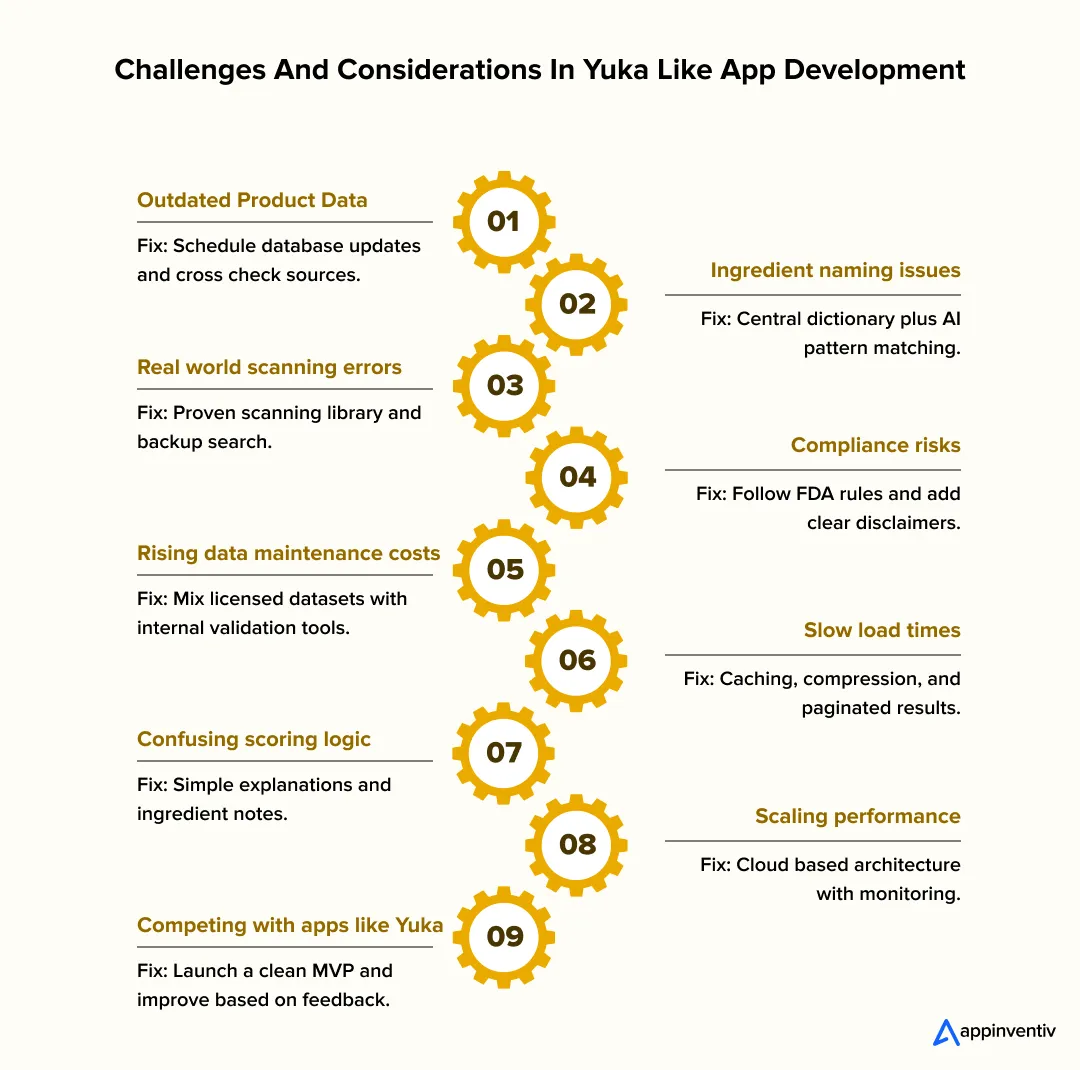
1. Missing or outdated product data
This is one of the first problems teams notice. A product you added months ago may now have a new formula, new label, or a slightly different ingredient list.
Solution: Use scheduled database updates, cross check multiple public datasets, and keep a small internal team or reviewer to validate changes in sensitive categories like baby care or skincare.
2. Ingredient names that don’t match
One ingredient can appear under five different names. Sometimes the names are scientific, sometimes abbreviated, and sometimes written differently by region.
Solution: Create a central ingredient dictionary and keep adding variations as you find them. A mix of rules and light AI classification helps pick up new patterns over time.
3. Scanning issues in real settings
Scans fail when the barcode is curved on a bottle, the lighting is poor, or the packaging is glossy. Users usually blame the app, not the environment.
Solution: Choose a proven scanning library, test with common household products, and provide a fallback search option for tricky items.
4. Navigating legal and compliance boundaries
A scanner app deals with food, cosmetics, and ingredient safety. If the wording sounds too medical or too definitive, it becomes a compliance risk.
Solution: Follow FDA guidelines, keep the tone informational, include disclaimers, and conduct periodic audits. Make sure all claims are phrased responsibly.
5. The cost of maintaining a growing database
The more products you add, the more effort goes into cleaning, updating, and checking them. Costs start to rise slowly every month if you do not plan for it.
Solution: Use licensed datasets for large categories and enrich them with your own verified entries. An internal dashboard helps teams manage updates without relying on developers every time.
6. Slow responses with heavy ingredient lists
If the backend sends too much data at once, the results page loads slowly, especially for products with long ingredient lists.
Solution: Use caching, compress images, paginate data where possible, and return only the information needed for each screen.
7. Users not understanding the score
People trust the app only if they understand how the score was created. Confusion leads to uninstalling.
Solution: Explain the scoring logic in simple wording. Add short ingredient descriptions and show which items helped or lowered the score.
8. Scaling issues as the app grows
Once traffic increases, database queries and product lookups start slowing the entire system.
Solution: Set up scalable cloud infrastructure from the early stages. Use monitoring tools so the team can catch slowdowns before users feel them.
9. Competing with well known apps like Yuka
Users compare every new scanner app with established apps like Yuka. They expect similar speed and a polished feel right from the start.
Solution: Start with a clean MVP, focus on one strong value (for example, allergy alerts or clean cosmetics), gather feedback, and improve steadily instead of trying to match everything in the first version.
These are the major challenges and considerations in Yuka like app development that teams should address early. Solving these common problems early helps shape the future of food and cosmetic scanner apps in the US.
Monetization Models for a Yuka Like App
Most people expect a scanner app to be free, so choosing the right revenue model becomes a careful balancing act. You want the app to stay useful and honest, while still earning enough to cover data, hosting, and ongoing updates. When teams explore how to build an app like Yuka, they usually test a few approaches before deciding what fits the audience.
Below are practical monetization strategies for Yuka like app founders to explore.
1. Freemium plan with optional upgrades
Many apps start with a free version that covers the basics. Scanning works, users get ingredient details, and they can check a few product scores. Extra features sit behind a small subscription.
Why this feels natural: People try the app without commitment. If they like the experience, they pay for more depth such as advanced insights or personalized recommendations.
2. Affiliate revenue from product alternatives
When the app suggests a cleaner or safer product, it can offer a link to a retailer. If a user purchases through that link, the app receives a commission.
Why it works well: Users already look for alternatives, so this does not interrupt the flow.
3. Partnerships with brands or retailers
Some brands want more visibility inside comparison apps, especially in skincare, snacks, or supplements. As long as it stays transparent, this becomes a stable revenue source.
Why teams choose it: It supports the business without charging every user directly.
4. Paid add on tools
Features like allergy tracking, pregnancy safe filters, or ingredient education guides can be offered as one time purchases.
Why it makes sense: Not everyone needs these tools, but those who do are often willing to pay.
5. Licensing anonymized insights
Large platforms sometimes share general shopping trends or ingredient usage data with research groups or retailers. This must be handled with strict privacy controls.
Why it is valuable: It gives businesses a clearer view of what consumers care about.
6. White label or enterprise versions
Some companies want their own branded version of a scanner app. Offering a white label solution creates another revenue stream.
Why it helps: You earn from your technology, not just your user base.
Most successful apps mix two or three of these models. The goal is to keep the experience clean and trustworthy while creating steady income. Choosing the right model early helps guide the entire product scanner app development like Yuka journey.
Our team can walk you through your first steps in minutes.

How Appinventiv Helps Build Yuka Like Apps for the US Market
Developing a product scanner app takes more than clean code. It requires a clear understanding of ingredients, user behavior inside stores, and the right technology choices. At Appinventiv, teams begin by mapping the experience from a shopper’s point of view. This approach has shaped how we think about how to build an app like Yuka, from the first scan screen to the moment a user finds a safer alternative product. The idea is to keep every step simple, quick, and trustworthy.
A major strength comes from experience delivering large consumer products. Over the years, Appinventiv has worked with brands like IKEA, Adidas, KFC, and Pizza Hut. These projects have taught the team how to combine reliable performance with familiar everyday interactions. The same thinking carries over to our mobile app development services, especially when working with ingredient data, compliance checks, and scan based workflows. Each project moves in small milestones so decisions can be tested early and refined before launch.
Data accuracy is one of the most important parts of a scanner app. Ingredient lists change, formulas evolve, and new categories appear every month. Appinventiv helps clients plan for these updates from the beginning by setting up backend tools and admin panels. This makes it easier to correct product details, update scoring logic, and refresh entries without rebuilding the app. Teams also explore optional features like AI driven scores, personalized alerts, and retailer integrations once the core experience feels stable.
If you are exploring how to build an app like Yuka for the US market and want a partner that brings both strategy and execution, a short conversation can help you see what is possible. Reach out to learn how Appinventiv’s mobile app development services support product scanner ideas from concept to launch.
FAQs
Q. What is the Yuka app?
A. Yuka is a popular product scanner that lets users check ingredients in food and cosmetic items by simply scanning a barcode. The app shows a score, explains each ingredient, and suggests safer alternatives. Many shoppers look at the pros and cons of the Yuka app before trying similar tools, and that interest has created demand for new apps like Yuka for cosmetics and food.
Q. Which tech stack is best for developing apps similar to Yuka?
A. A reliable tech stack usually includes React Native or Flutter for mobile development, Node.js or Python for backend services, and a secure cloud platform such as AWS or Google Cloud. Teams also add barcode libraries, structured databases, and AI models for scoring and ingredient classification. These choices offer a strong foundation when planning How to Build an App Like Yuka.
Q. How much time does it take to develop an app like Yuka?
A. A basic MVP version can take around four to six months. More advanced features such as personalized scores, offline scanning, or retailer integrations can extend the timeline to eight to ten months. The schedule depends on design expectations, database size, and compliance checks during development.
Q. How much does it cost to create an app like Yuka?
A. The total Yuka app cost depends on complexity, data sources, and feature depth. A simple version may start around $40,000, while a full scale build with AI scoring and large ingredient databases can reach $400,000 or more. Understanding the expected scope early helps estimate the cost to create an app like Yuka more accurately.
Q. How to earn money through apps similar to Yuka?
A. Scanner apps often use a mix of revenue models. Options include freemium subscriptions, affiliate earnings from safer alternatives, paid add on features, and retail partnerships. These models keep the experience user friendly while supporting long-term growth. Building a clear monetization plan is an important step in How to Build an App Like Yuka that remains sustainable over time.

- In just 2 mins you will get a response
- Your idea is 100% protected by our Non Disclosure Agreement.

How to Build a Forex Currency Trading App for Multi-Currency Trading in the UAE
Key Takeaways: In the UAE, regulation comes first. Your licensing choice will shape how the entire platform is built. A forex app here needs more than charts. It needs a solid trading engine, strong liquidity connections, and reliable risk controls. AED funding, USD settlement, Islamic swap-free accounts, and Arabic support are practical requirements, not optional…

A Guide on How to Choose the Right Mobile App Development Company in Iraq
Key Takeaways Define business goals, integrations, compliance needs, and success metrics before engaging a development partner. Prioritise teams experienced in Arabic/Kurdish localisation, RTL UX, and testing on low-spec Android devices common in Iraq. Evaluate architecture maturity, security standards (SOC2/ISO), and CI/CD practices rather than focusing only on development cost. Ensure the application is designed for…

How Much Does It Cost to Build a Calorie Counting App Like Cronometer in Australia
Key takeaways: Building a calorie counting app with Cronometer-level accuracy in Australia typically costs between AUD 70,000 and AUD 700,000+, depending on data depth, compliance posture, and analytics sophistication. Underestimating compliance, data licensing, and post-launch governance is the most common cause of budget overruns for Australian nutrition platforms. The hard cost driver is not screens.…









