































How to Successfully Implement CRM: A Step-by-Step Guide

 Share -


- 01Step-by-Step CRM Implementation Process
- 02Cost of CRM Implementation: What to Budget Beyond the Software
- 03Benefits of CRM Implementation
- 04CRM Implementation Challenges: What Can Slow Things Down
- 05Real-World Examples of Successful CRM Implementation
- 06How to Measure CRM Software Implementation Success
- 07CRM Integration & Ecosystem: Making the System Part of Daily Work
- 08Common Mistakes to Avoid During CRM Implementation
- 09Emerging Trends Shaping CRM Software Implementation
- 10How Appinventiv Supports CRM Implementation and Customization
- 11FAQs

Key Takeaways
- A CRM only delivers value when it is tied to a specific business problem. Without clarity on what needs fixing, adoption stays weak.
- Data quality matters more than features. Teams lose trust quickly when records are outdated or inconsistent, and that trust is hard to win back.
- Automation works best when it removes friction, not when it dictates behavior. It should assist teams, not replace judgment.
- Context changes customer conversations. Access to past interactions and account history leads to more confident, consistent engagement.
- CRM success is long-term. Systems that are not reviewed and adjusted over time slowly fall out of sync with how the business actually operates.
Most organizations don’t adopt a CRM just to manage another system; they aim to streamline customer information. Leaders want pipeline clarity and trust in what they see. Sales teams seek more time to close deals, not to fill out fields, while support teams need context before engaging with customers.
When CRM expectations aren’t met, trust fades. Teams revert to old methods, and the system becomes a burden. The real issue isn’t the technology, but unclear processes and ownership.
Successful CRM implementation starts with alignment. When CRM fits into existing workflows, adoption feels natural, and it becomes a trusted tool for understanding customers, especially as the CRM software market is projected to grow from $287 billion in 2025 to over $334 billion in 2026, as reported by Business Research Company.
In this blog, we’ll walk you through the steps to implement CRM effectively, highlight common challenges, and show how CRM can transform your business. By the end, you’ll be ready to make CRM a valuable asset for your organization.
With the CRM software market set to grow over $334 billion in 2026, now is the perfect time to transform your customer relationships.

Step-by-Step CRM Implementation Process
Rolling out a CRM changes how information moves through the business. When done well, it reduces guesswork, improves visibility, and makes collaboration easier. When rushed, it becomes another system people avoid. A practical customer relationship management implementation focuses on clarity, usable data, and habits that fit daily work. Leveraging software consulting services ensures that the CRM system aligns with your business processes, enhancing its effectiveness and driving smoother adoption across teams. Working with CRM implementation companies can provide the expertise needed to navigate the complexity of CRM adoption.
Below is a grounded approach teams can follow as part of their CRM implementation plan:
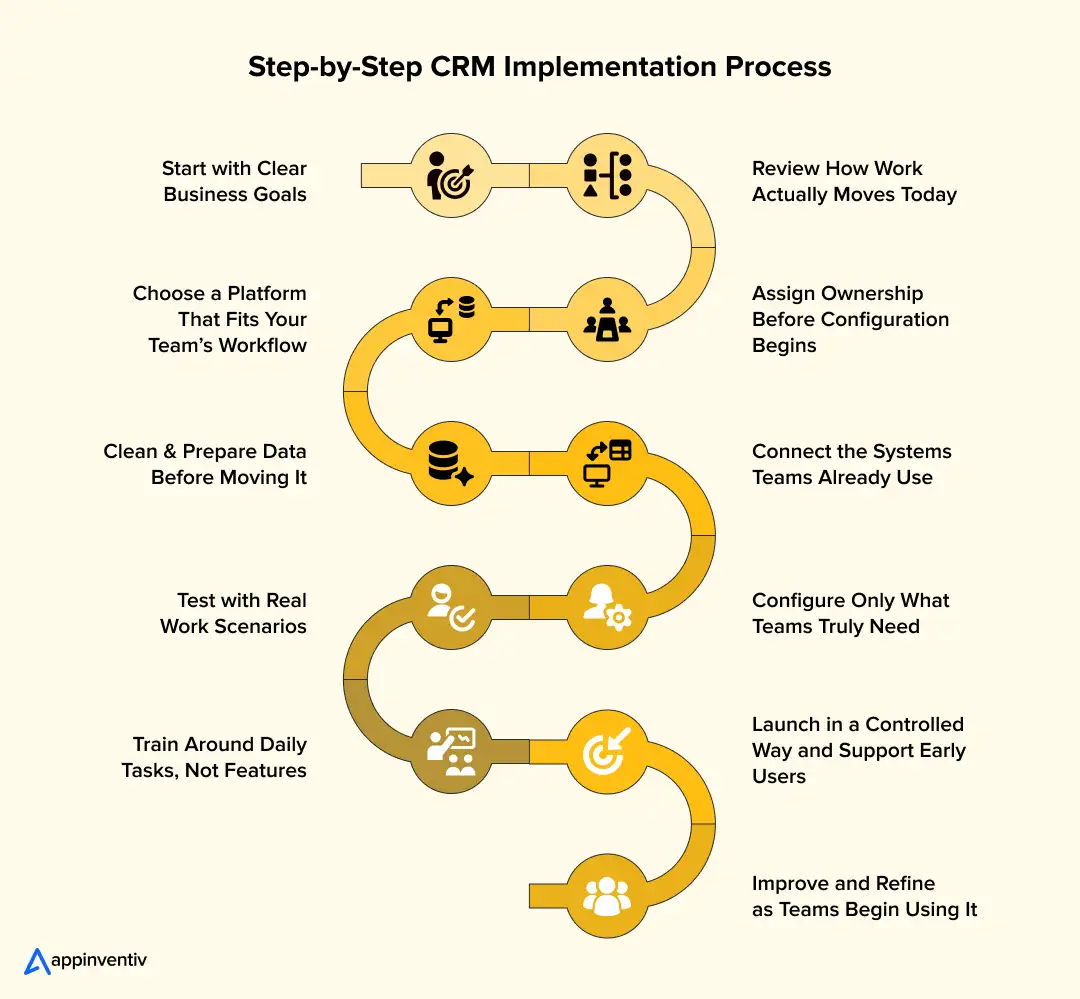
1. Start with Clear Business Goals
Before touching the system, decide what needs to improve. Some organizations want better pipeline visibility. Others need faster response times or improved retention.
Define outcomes such as:
- Clearer pipeline health
- Improved follow-up consistency
- Better customer retention
- More reliable forecasts
Track simple usage indicators:
- Active users logging work
- Completeness of records
- Timely updates to deals
These markers keep the customer relationship management implementation process tied to real results.
2. Review How Work Actually Moves Today
A CRM should reflect reality, not an idealized flowchart. Walk through how leads arrive, how deals progress, and where handoffs break down.
Look for:
- Duplicate steps and manual work
- Unclear ownership between teams
- Gaps in follow-ups
- Inconsistent stage definitions
Standardizing these basics prevents confusion once the system goes live.
3. Assign Ownership Before Configuration Begins
Systems lose reliability when no one owns them. Clear accountability keeps things clean and usable.
Establish roles:
- Executive sponsor for direction
- CRM owner to manage priorities
- Admin support for setup and updates
- Data steward for quality control
Agree on:
- How changes are requested
- Who approves new fields or workflows?
- When updates are released
Strong ownership supports long-term success and aligns with CRM implementation company best practices.
4. Choose a Platform That Fits Your Team’s Workflow
The best system is the one people will actually use. Ease of use often matters more than feature depth.
Evaluate:
- Usability for daily tasks
- Integration with existing tools
- Scalability as teams grow
- Security and compliance needs
Selecting the right platform early reduces friction during implementing a CRM system.
5. Clean and Prepare Data Before Moving It
Importing messy data recreates old problems. Clean data builds trust from day one.
Before migration:
- Remove duplicate contacts and accounts
- Standardize formats and naming
- Define required fields
- Archive outdated records
Reliable data is the foundation of any CRM system implementation.
6. Connect the Systems Teams Already Use
A CRM becomes valuable when it connects workflows rather than creating another silo.
Common integrations:
- Email and calendar tools
- Marketing platforms
- Billing or ERP systems
- Support ticketing tools
- Reporting dashboards
Integration approaches:
- Native connectors for speed
- Middleware for scalability
- Custom APIs for complex environments
Planning integration early supports a sustainable customer relationship management implementation strategy.
7. Configure Only What Teams Truly Need
More fields and automation do not always mean better results. Keep the setup practical.
Focus on:
- Clear pipeline stages
- Automated reminders and tasks
- Dashboards tailored to roles
- Alerts for stalled deals
Avoid heavy customization early. Simplicity helps adoption.
8. Test with Real Work Scenarios
Testing should reflect real tasks, not theoretical flows.
Include:
- Moving deals through stages
- Logging service requests
- Validating reports and dashboards
- Confirming integrations sync correctly
Realistic testing reduces surprises at launch.
9. Train Around Daily Tasks, Not Features
Training works when people see how the system helps them finish work faster.
Effective enablement includes:
- Role-based walkthroughs
- Real examples from active deals
- Quick reference guides
- Early champions who support peers
Practical training encourages consistent use.
10. Launch in a Controlled Way and Support Early Users
Whether rolling out in phases or all at once, early support matters.
During the first weeks:
- Monitor usage and data accuracy
- Answer questions quickly
- Correct workflow issues early
Quick support builds trust and confidence.
11. Improve and Refine as Teams Begin Using It
The work doesn’t end at launch. Systems evolve as teams grow and needs change.
Regularly:
- Review usage and adoption trends
- Remove unused fields and steps
- Adjust dashboards and reports
- Gather feedback for improvements
Organizations that treat CRM as a living system see stronger returns from their CRM software implementation.
A thoughtful customer relationship management implementation unfolds in steps. With clean data, clear ownership, and practical workflows, the system becomes part of everyday work rather than another tool people bypass.
Also Read: How to Build a Customer Experience Management Software?
Our experts ensure your implementation of CRM is seamless, efficient, and aligned with your business objectives for long-term value.

Cost of CRM Implementation: What to Budget Beyond the Software
When CRM comes up, the first number most people think of is the subscription cost. It’s simple and easy to compare, but that’s just one part of the picture. The real costs come from setting up everything, organizing your data, and getting everyone on board with the system.
What you end up spending depends on factors such as how well-organized your data is, how many systems need to connect, and how much customization the CRM requires. Understanding the full customer relationship management implementation cost breakdown early on helps avoid surprises and keeps expectations in check.
Here’s a breakdown of what most businesses typically invest in CRM.
Typical CRM Implementation Cost Breakdown
| Business Size / Complexity | Estimated Cost Range | What This Usually Covers |
|---|---|---|
| Small teams / basic rollout | $40,000 – $75,000 | Core setup, essential configuration, limited integrations, basic onboarding |
| Growing businesses | $75,000 – $150,000 | Workflow adjustments, data migration, integrations, dashboards, training |
| Mid-sized organizations | $150,000 – $250,000 | Multi-team rollout, automation, reporting, security controls |
| Enterprise environments | $250,000 – $400,000+ | Complex integrations, advanced automation, compliance controls, change management, and ongoing optimization |
These ranges reflect the full rollout effort rather than licensing alone.
What Actually Drives CRM Implementation Costs
No two rollouts cost the same because every organization starts from a different place. Clean data and simple workflows reduce effort. Scattered records and disconnected systems increase it.
Factors that have the biggest impact include:
- Number of users and departments involved
- Effort required to clean and migrate existing data
- Integrations with ERP, marketing, billing, or support tools
- Workflow customization and automation needs
- Security, privacy, and compliance requirements
- Training and adoption support
A custom CRM implementation that involves complex workflows and multiple integrations will naturally require more time and investment. This makes understanding custom CRM development cost essential before defining the project scope.
Benefits of CRM Implementation
At first, a CRM can feel like just another system to manage. It takes time to see the real value, but over time, it helps you keep track of conversations, follow-ups, and updates without the extra work. Eventually, it becomes part of your daily workflow.
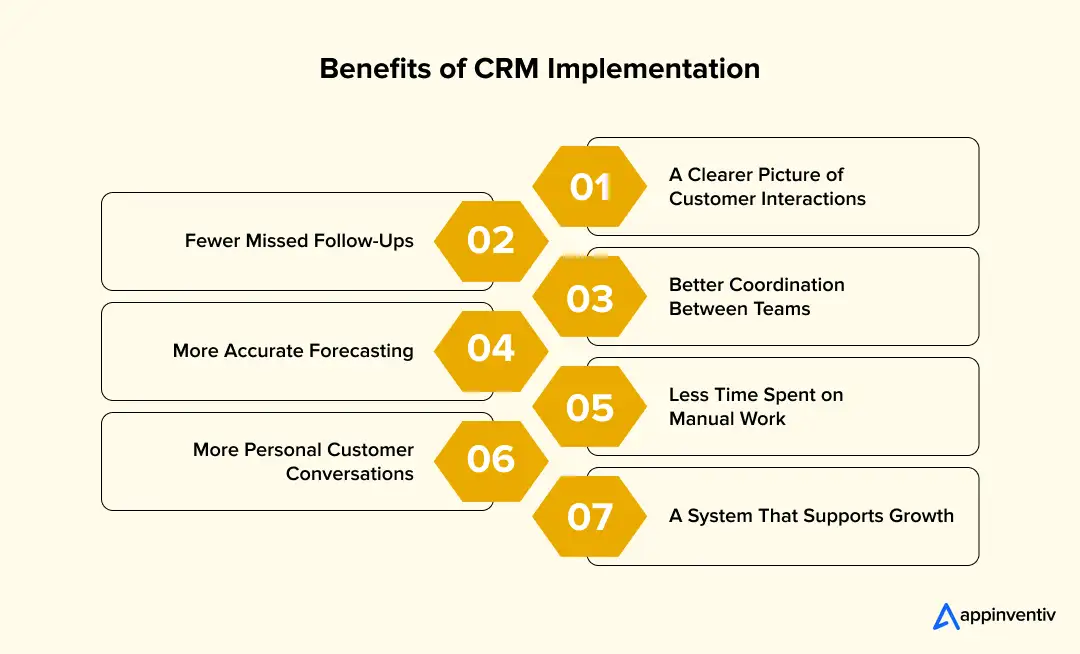
Here’s what teams notice once the CRM is up and running.
1. A Clearer Picture of Customer Interactions
Instead of flipping through emails and notes, everyone can see customer information in one place. This makes it easier to:
- Understand where each deal is
- Review past conversations quickly
- Avoid repeating questions to customers
Everyone stays aligned with a shared view of the customer.
2. Fewer Missed Follow-Ups
With reminders built into the CRM, follow-ups are timely. You’ll see:
- Fewer missed calls and emails
- Faster responses
- Deals are progressing more smoothly
The more consistent your follow-ups, the better the results.
3. Better Coordination Between Teams
Without a CRM, teams can work in silos. But when everyone shares the same customer data, it leads to:
- Smoother handoffs between departments
- Better understanding of customer needs
- More aligned communication
Customers get a more connected experience.
4. More Accurate Forecasting
When updates are made regularly, leaders get a clearer picture of upcoming deals. This means:
- More accurate revenue predictions
- Early identification of issues
- Better planning and resource allocation
Reliable data makes decision-making easier.
5. Less Time Spent on Manual Work
Manual tracking can take up too much time. With CRM, you get:
- Automatic reminders
- Fewer duplicate entries
- Faster access to customer details
This leaves more time to focus on the important stuff.
6. More Personal Customer Conversations
Having all the details before you talk to a customer makes conversations smoother. It means:
- Fewer repetitive questions
- More relevant discussions
- Faster issue resolution
This builds trust and strengthens relationships.
7. A System That Supports Growth
As your business grows, a CRM helps you stay organized. It allows your team to:
- Onboard new members faster
- Keep processes consistent
- Scale efficiently
It’s easier to grow with a CRM that adapts to your needs.
The benefits of CRM implementation take time to show, but once the system is trusted, it becomes a vital tool for everyone. It goes from being a task to a necessary part of how work gets done.
Also Read: Enterprise CRM Systems Benefits, Features.
CRM Implementation Challenges: What Can Slow Things Down
Even with good planning, a CRM rollout rarely feels smooth all the way through. The system might be ready, but people are adjusting to new routines, new expectations, and a different way of tracking work. If the experience feels cumbersome or the data seems unreliable, teams quietly drift back to old habits. Spotting these friction points early makes it easier to keep things moving.
Below are common CRM integration process challenges and practical ways teams work through them.
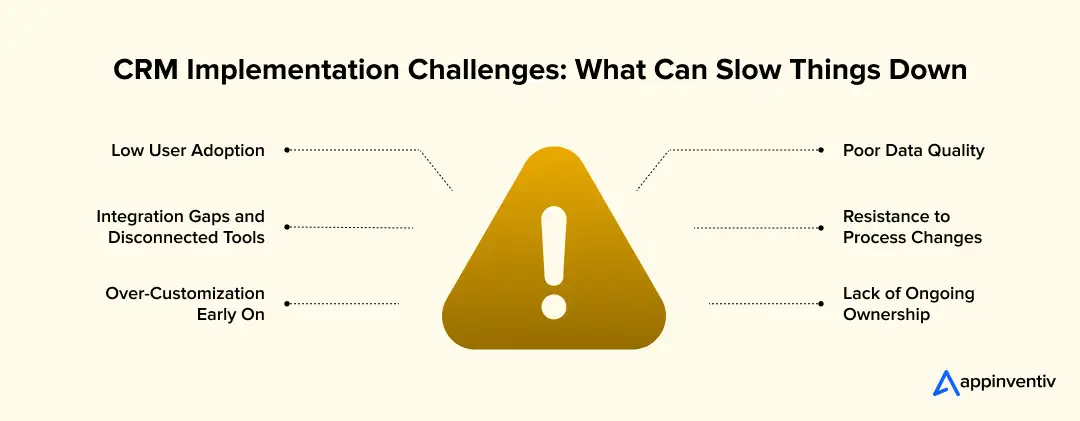
1. Low User Adoption
If the system feels like extra admin work, people will avoid it. Adoption drops when workflows don’t reflect how teams actually work.
Warning signs:
- Deals updated right before pipeline reviews
- Incomplete records missing key details
- Personal trackers used alongside the CRM
What helps:
- Simplify required fields and steps
- Show how updates reduce follow-up confusion
- Leadership is reinforcing consistent usage
When the system saves time instead of adding steps, usage improves naturally.
2. Poor Data Quality
Trust disappears quickly when teams encounter duplicate contacts or outdated information.
Common causes:
- Migrating messy legacy data
- Unclear responsibility for record updates
- Inconsistent naming or entry formats
What helps:
- Assign ownership for data quality
- Standardize required fields and formats
- Schedule periodic cleanup reviews
Reliable data is the foundation of a dependable crm system implementation.
3. Integration Gaps and Disconnected Tools
When the CRM doesn’t connect with existing tools, teams end up re-entering information or switching between systems.
Typical friction points:
- Manual data syncing between tools
- Inconsistent customer details across platforms
- Delayed reporting due to fragmented data
What helps:
- Prioritize integration with essential systems
- Automate syncing wherever possible
- Verify workflows across connected tools
Connected systems make any CRM integration strategy more practical.
4. Resistance to Process Changes
Even small workflow adjustments can feel disruptive. People revert to familiar methods when they don’t see the purpose behind changes.
Resistance often shows up as:
- Reluctance to update deal stages
- Inconsistent data entry habits
- Parallel use of old tracking methods
What helps:
- Explain the reason behind the new workflows
- Involve users early in shaping processes
- Roll out changes gradually
Understanding the “why” makes change easier to accept.
5. Over-Customization Early On
Trying to replicate every legacy process inside the new system can make it complicated and harder to maintain.
Common outcomes:
- Complex workflows that confuse users
- Increased maintenance effort
- Slower system performance
What helps:
- Start with simple configurations
- Refine workflows after real usage begins
- Add fields only when they serve a clear purpose
Simplicity makes adoption easier and keeps the system flexible.
6. Lack of Ongoing Ownership
After launch, the system still needs attention. Without clear ownership, clutter builds and usage declines.
Warning signs:
- Unused fields are accumulating over time
- Inconsistent adherence to workflows
- Declining usage across teams
What helps:
- Assign long-term system ownership
- Review usage and workflows regularly
- Maintain a clear process for updates
Ongoing care ensures the custom crm implementation continues to deliver value.
Most obstacles aren’t caused by the software itself. They come from habits, data discipline, and unclear processes. Addressing these early helps ensure the CRM integration process becomes a system that teams rely on rather than one they work around.
Real-World Examples of Successful CRM Implementation
CRM isn’t just about the software; it’s how it helps businesses improve customer relationships and decision-making. When teams trust the system and use shared data, they see real improvements that stack up over time.
Here are some examples of companies doing CRM right.
1. Amazon: Personalizing Customer Experiences
Amazon uses customer data to create personalized shopping experiences. Every interaction, click, search, or purchase helps them refine recommendations and streamline the buying process.
What stands out:
- Personalized product recommendations
- Seamless experience across devices
- Fast checkout with saved preferences
This level of personalization shows how CRM can turn data into stronger customer connections.
Also Read: AI Personalization in Consumer Experiences for Business
2. MBNA Europe: Using Data to Drive Profit
MBNA used customer behavior data to move from broad marketing to targeted offers based on spending habits. This strategy focused on high-value relationships.
Key takeaways:
- Targeted marketing improved response rates
- Data insights drove better retention strategies
- Loyalty programs focused on profitable customers
By using CRM to focus on valuable customers, MBNA increased both profits and loyalty.
3. B2B & Manufacturing: Breaking Down Silos
Many B2B and manufacturing companies use CRM to connect sales, service, and operations teams. By sharing the same customer data, communication improves, and response times drop.
What happens:
- Sales shares accurate timelines with operations
- Service teams access the full customer history
- Faster responses due to shared visibility
This shared data keeps teams aligned and improves the customer experience.
These examples show that CRM works best when it’s used to connect teams, personalize interactions, and make smarter decisions. It’s not just about tracking data, it’s about improving every part of the business.
How to Measure CRM Software Implementation Success
Once the system is live, success isn’t defined by how many people log in. It becomes visible in everyday work. Teams stop searching for information, follow-ups happen on time, and managers trust what they see in the pipeline. These signals reveal whether a CRM integration process is delivering real value.
- Adoption and usage show up first. People update records as they work, customer profiles contain meaningful details, and side spreadsheets slowly disappear.
- Sales performance becomes easier to interpret. Deals move without long periods of inactivity, follow-ups happen more consistently, and forecasts feel realistic instead of optimistic guesses.
- Customer experience improves in small but noticeable ways. Teams respond faster because context is readily available, customers aren’t asked to repeat information, and relationships feel more continuous over time.
- Operational efficiency becomes easier to spot. Less time is spent hunting for information, teams access history quickly, and handoffs between departments feel smoother.
- Data trust is often the clearest indicator. Duplicate records decrease, entry habits become consistent, and teams begin referencing CRM data during planning and decision-making.
When these patterns begin to feel normal, the custom CRM implementation has moved beyond deployment and has become part of how the business operates day to day.
CRM Integration & Ecosystem: Making the System Part of Daily Work
A CRM usually struggles for one simple reason. It lives outside the tools people actually use. Sales teams stay in their inbox. Support lives in ticketing systems. Finance trusts the ERP. If the CRM depends on manual updates, it slowly becomes outdated. Once that happens, no one relies on it.
The real work is not in turning on the CRM. It is in connecting it properly so that information moves without extra effort. That requires deliberate software integration services design and realistic expectations about how systems behave in production.
- Start with email and calendar sync: Automatic capture of emails and meetings reduces dependency on manual logging. Sync logic should handle retries and avoid creating duplicate records when systems reconnect.
- Bring conversations into a shared timeline: Marketing responses, ticket updates, and chat interactions provide useful context. CRM implementation consultants can help with API-based ingestion or webhook triggers to surface these signals without forcing teams to switch tools.
- Link billing or ERP data when it affects decisions: Subscription status, renewal cycles, usage data, or payment history often explain account behavior better than notes. Pulling structured financial data into the CRM reduces guesswork.
- Choose the integration method carefully: Native connectors are fine for common SaaS stacks. Middleware makes sense when several systems need state consistency. Custom integrations are sometimes unavoidable when workflows are specific or regulated.
- Expect sync issues and plan for them: Background jobs can fail, APIs may change, and data schemas evolve. Monitoring, logging, and clear ownership rules help prevent minor sync issues from escalating into system-wide inconsistencies.
When integrations are stable, people stop thinking about the CRM as a separate system. They use it because it reflects what is actually happening. It becomes a reference point, not an extra task.
Common Mistakes to Avoid During CRM Implementation
Most CRM rollouts don’t struggle because the technology fails. They struggle because small decisions made early create friction later. Avoiding these pitfalls can save months of rework and help teams get value from the system sooner.
Below are mistakes frequently seen during the CRM integration process and what to watch for.
1. Implementing Technology Before Fixing Processes
Installing a system without aligning workflows simply digitizes existing confusion.
What often happens:
- Teams follow different pipeline stages
- Handoffs remain unclear
- Reporting stays inconsistent
Clarifying processes first strengthens the CRM implementation services process.
2. Migrating Messy or Incomplete Data
Importing outdated or duplicate records quickly erodes trust in the system.
Common issues include:
- Duplicate contacts and accounts
- Missing customer history
- Inconsistent naming formats
Cleaning data early improves confidence and supports smoother CRM system implementation.
3. Over-Customizing too Early
Trying to replicate every legacy process can make the system complicated and difficult to maintain.
Typical outcomes:
- Complex workflows that confuse users
- Increased maintenance effort
- Slower future updates
Starting simple allows a custom CRM integration process to evolve based on real usage.
4. Ignoring User Adoption Planning
Assuming teams will “figure it out” often leads to inconsistent usage.
Warning signs:
- Updates delayed until review meetings
- Continued use of spreadsheets
- Incomplete activity tracking
Adoption planning is a critical part of any CRM implementation guide.
5. Failing to Integrate Key Systems
When the CRM doesn’t connect with essential tools, teams must re-enter information, leading to gaps and inconsistencies.
This can result in:
- Duplicated effort
- Fragmented customer views
- Delayed insights
Integration planning strengthens the overall CRM integration strategy.
6. Treating CRM as a One-time Project
Once the system goes live, it still needs attention. Without ongoing review, clutter builds and usage declines.
What helps prevent this:
- Regular workflow reviews
- Removing unused fields
- Updating dashboards as needs change
A continuous improvement mindset ensures the custom CRM implementation continues delivering value. Avoiding these common missteps helps teams move from rollout to real usage faster. With clean data, clear processes, and steady refinement, the CRM becomes a tool people rely on rather than one they work around.
Also Read: How to Choose the Right CRM for Your Business
Emerging Trends Shaping CRM Software Implementation
CRM systems have come a long way from being simple contact databases. Today, they help teams understand customers, spot opportunities sooner, and respond more effectively. As buying journeys become less predictable, organizations are rethinking how to implement CRM to support insight and coordination.
- AI is helping teams focus faster: Modern platforms can highlight at-risk deals, surface high-priority leads, and flag customers at risk of disengagement. Companies exploring custom AI in CRM integration processes are starting to use these signals to guide everyday decisions.
- CRM is becoming the single customer view: Instead of scattered data across tools, interactions, purchases, and support history are coming together in one place. This strengthens CRM system implementation by giving teams context before every conversation.
- Automation is reducing routine work: Reminders, task creation, and workflow triggers can run automatically. Teams introduce automation gradually as part of a practical CRM integration process strategy to avoid overwhelming users.
- Personalization now shapes everyday interactions: Sales and support teams use past interactions to guide conversations. With better context, interactions feel more relevant, one of the clear advantages of implementing a CRM system.
- Low-code tools make change easier: Teams can adjust workflows and fields without heavy development effort, supporting ongoing CRM integration best practices.
CRM is shifting from a record system to a working layer of insight. Organizations that adapt gain clearer visibility and respond more effectively.
Stay ahead of the curve by integrating cutting-edge CRM trends like AI and automation. Let’s help you optimize your CRM for sustained growth.

How Appinventiv Supports CRM Implementation and Customization
Selecting a CRM is rarely the hard part. The challenge comes when teams try to fit it into their everyday routines. Appinventiv works closely with organizations to shape the system around how their teams actually sell, support, and manage relationships, so it feels useful from the start rather than forced.
When standard features don’t cover specific needs, our custom CRM development services help fill the gaps. This can involve connecting the CRM with ERP or billing tools, simplifying approval steps, or creating dashboards that reflect how leadership reviews performance and progress.
With 2000+ software products delivered, 500+ legacy processes transformed, and a 95% client satisfaction rate, Appinventiv brings practical experience from real-world implementations. If you want a CRM that improves visibility and keeps teams aligned, our specialists can help you build a system that aligns with your business’s operations.
FAQs
Q. What is CRM implementation, and why is it important for my business?
A. CRM integration strategy refers to the process of setting up and integrating a Customer Relationship Management system into your business operations. It involves configuring the system, migrating data, and training your team to use it effectively. CRM integration is essential because it streamlines customer interactions, improves sales processes, enhances customer service, and boosts overall efficiency by centralizing customer data.
Q. How much does CRM implementation cost?
A. The cost of CRM integration can vary depending on several factors, including the size of your business, the complexity of the system, and the level of customization needed. Typically, businesses can expect to spend anywhere from $40,000 to $400,000+ for the full implementation, including software costs, integrations, data migration, and training. A custom CRM integration with advanced features will naturally cost more.
Q. What is the typical CRM implementation timeline?
A. The CRM integration timeline usually ranges from a few months to up to a year, depending on the complexity of your business needs. A simple CRM system implementation can be completed in 2-3 months, while more complex setups with heavy customization and multiple integrations may take 6-12 months to fully implement.
Q. How to implement a CRM system?
A. To successfully implement a CRM system, you’ll need to follow these key steps:
- Assess your business needs to select the right CRM system.
- Plan the CRM integration by mapping workflows and required integrations.
- Migrate your data into the new CRM system and clean up any discrepancies.
- Train your team to ensure everyone is comfortable using the system.
- Test and optimize the CRM system for performance and efficiency.
- Monitor ongoing usage to ensure smooth adoption and make necessary adjustments.
Q. Should I hire a CRM implementation partner?
A. Hiring a CRM integration partner can be a smart move if your business lacks the in-house expertise to manage the project. Reliable crm implementation partners brings experience, knowledge, and technical skills to handle complex integrations, data migration, and customization. This ensures a smoother implementation and faster ROI on your CRM system.
Q. What are the common CRM implementation challenges?
A. Some common challenges during CRM integration include:
- Data migration issues are especially problematic when moving data from old systems.
- User adoption among employees may be hindered by resistance to change or by feelings of overwhelm with the new system.
- Customization needs that can add to the project’s complexity and cost.
- Integration difficulties, especially if your existing systems aren’t compatible with the CRM.
- Lack of clear processes, which can make the system harder to implement without proper planning.
To avoid these challenges, it’s essential to work with a CRM integration partner and develop a clear strategy and timeline.


Fast 2-minute response, fully NDA-protected.

Distributed Energy Resource Management System: Use Cases, Development and Implementation Costs
Key takeaways: Australian grids require robust software to manage minimum system load events effectively. DER integration software aggregates, monitors, and dispatches varied grid edge hardware securely. CSIP-Aus and AEMO compliance dictate strict architectural and cybersecurity software foundations. DERM development and implementation costs typically range from AUD 70,000 to 700,000 +. Successful DER programmes start with…

Custom CRM Development Cost in 2026: Complete Guide to Pricing, Features, and TCO
Key Takeaways Building custom CRMs costs $40,000 to $500,000+, while enterprise complexity, security, integrations, and AI push overall budgets higher. Calculating three-year TCO reveals hidden costs beyond initial coding, including hosting, maintenance, upgrades, and subscriptions. A seven-factor risk calculator identifies scope creep, migration obstacles, external connections, regulatory compliance, mobile access, and billing risks. Itemized feature…

CRM for Real Estate: A Practical Guide to Features, Integrations, and Platform Selection
Key takeaways: Real estate CRM connects customer enquiries, property information, agent activities, documents, and transaction progress within one system. Brokerages, developers, leasing companies, investment firms, and property managers need CRM workflows suited to their operating models. Lead capture, inventory management, pipeline tracking, communication, mobility, analytics, and security form the core CRM foundation. Advanced AI capabilities…