


























Ecommerce CRM Software: Real-Time Customer Data for Higher Lifetime Value


- Core Capabilities That Make an Ecommerce CRM System Valuable
- Ecommerce CRM Integration Architecture
- Ecommerce CRM Platforms and Solutions
- How to Implement Ecommerce CRM Successfully
- How Ecommerce CRM Improves Customer Retention and Revenue
- Key Benefits of Adopting Ecommerce CRM
- Challenges in Ecommerce CRM Adoption (and How Businesses Solve Them)
- Risks of Delaying CRM Implementation in Ecommerce
- How Appinventiv Supports Ecommerce CRM and Platform Development
- FAQs

Key takeaways:
- CRM for ecommerce centralizes customer data from storefronts, marketing tools, and support systems to create a unified view of the customer journey.
- Ecommerce CRM integration connects platforms like Shopify and Magento with marketing tools, allowing businesses to track customer behavior and engagement in real time.
- CRM software for ecommerce improves segmentation, automation, and personalization, helping businesses run more effective marketing campaigns.
- Successful ecommerce CRM implementation depends on clean customer data, strong integrations, and adoption across marketing, support, and operations teams.
- The right ecommerce CRM solutions help businesses increase retention, improve customer experience, and grow lifetime customer value.
You’re already collecting customer data. Orders sit in your storefront platform, marketing tools track engagement, and support systems hold customer conversations. The challenge is bringing all of it together.
That’s where a CRM for ecommerce actually earns its place. Not as another system, but as the layer that brings all those moving pieces together.
In one recent project, the real issue wasn’t missing data; it was the way the systems were wired. Customer activity flowed in from the storefront, marketing platform, payment gateway, and ERP, each on its own timeline. The result was conflicting profiles and delayed decisions. The fix wasn’t adding another tool. It was redesigning the integration layer with real-time event-based sync, so every customer action showed up consistently across systems.
That’s the difference most teams underestimate. CRM is not just software; it’s an architecture.
And the business impact is hard to ignore. Bain & Company reports that increasing customer retention by just 5% can boost profits by 25% to 95%.
In this blog, we’ll walk through what it actually takes to build a CRM setup that works, from integrations and platforms to implementation decisions that hold up as your ecommerce operations scale. .
A 5% increase in retention can raise profits by 25–95%. Build a CRM strategy that strengthens customer relationships.

Core Capabilities That Make an Ecommerce CRM System Valuable
In most ecommerce setups, your customer data is spread across tools. Orders in one place, campaigns in another, support somewhere else. The issue isn’t data. It’s that nothing connects.
From what Appinventiv teams typically see, this comes down to structure. Once your systems start working together, a crm for ecommerce becomes far more useful; you can actually see patterns and act on them.
Here are the capabilities that make that possible:
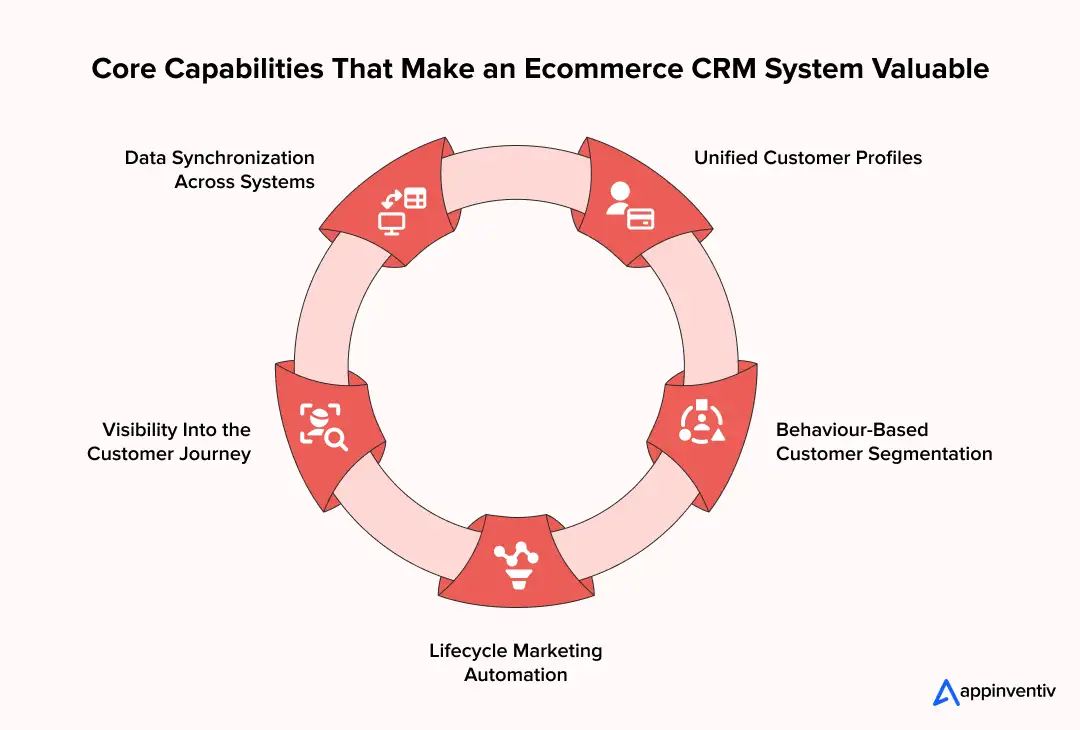
Below are some capabilities that typically make an ecommerce CRM genuinely useful.
1. Unified Customer Profiles
One of the most noticeable benefits of a CRM is the ability to view customer history in one place. Instead of switching between tools, teams can open a single profile and quickly understand what has happened with that customer before.
A typical profile may show:
- Past purchases and order values
- Products the customer has browsed or searched for
- Engagement with marketing campaigns
- Previous support interactions
With all this information visible together, teams can respond with better context.
2. Behavior-Based Customer Segmentation
Not every customer behaves the same way. Some shoppers buy frequently; others take time to explore the catalog before making a decision; and some place one order and never return.
A CRM for ecommerce helps businesses notice these differences and group customers based on
how they interact with the store. Businesses often work with segments such as:
- Repeat buyers who return regularly
- High-value customers who contribute significant revenue
- First-time shoppers exploring the brand
- Customers who haven’t returned in a while
Once these patterns are visible, marketing teams can tailor campaigns more effectively.
3. Lifecycle Marketing Automation
Certain moments happen repeatedly in ecommerce. A shopper abandons a cart. Another completes a purchase. A returning buyer qualifies for a loyalty reward.
CRM systems allow businesses to automate responses to these situations. Instead of sending messages manually, teams can create workflows that trigger automatically.
Examples include:
- Cart abandonment reminders
- Follow-up emails after purchases
- Loyalty rewards for returning customers
- Re-engagement campaigns for inactive shoppers
Intelligent automation helps maintain communication without increasing the marketing team’s workload.
4. Visibility Into the Customer Journey
Another advantage of CRM is the ability to see how customers move from discovery to purchase. When browsing activity, marketing engagement, and transaction data are connected, patterns start becoming clearer.
Teams can begin answering questions like:
- Which channels attract customers who eventually buy
- Where shoppers leave the checkout process
- What encourages customers to return and purchase again
These insights help businesses adjust both marketing strategies and product presentation.
5. Data Synchronization Across Systems
For a CRM to remain reliable, it needs to stay connected with the other systems used in ecommerce operations. Orders, marketing interactions, and customer activity should update automatically rather than being entered manually.
Through ecommerce CRM integration, businesses connect the CRM with storefront platforms and other tools. Proper CRM integration with ecommerce ensures that events such as new orders, returns, or campaign clicks update customer records in real time.
When these integrations work well, CRM for ecommerce becomes more than a simple contact database. It becomes the place where businesses understand how customers interact with the brand and how those relationships develop over time.
Ecommerce CRM Integration Architecture
Your CRM becomes useful only when it integrates with the rest of your ecommerce stack. Customer activity happens across your storefront, marketing tools, and other systems, not inside the CRM.
With proper API or webhook integration, every action is updated in real time. That way, your CRM always reflects what your customers are actually doing.
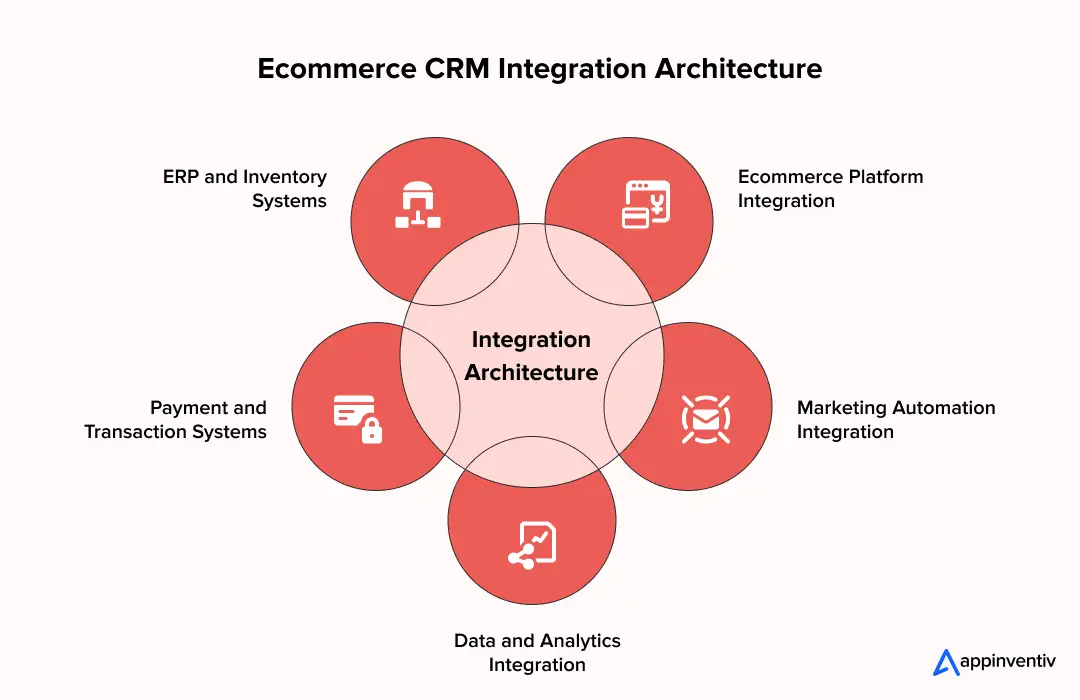
1. Ecommerce Platform Integration
The storefront platform is usually the first system connected to the CRM. Platforms like Shopify, Magento, BigCommerce, and WooCommerce manage product pages, shopping carts, and checkout processes. Naturally, they account for a large share of customer activity.
Once the connection is in place, the CRM can receive information such as:
- New customer registrations
- Order history and purchase values
- Product browsing or cart activity
- Refunds and returns
For a CRM for ecommerce setup, this data becomes the foundation for understanding buying patterns and identifying repeat customers.
2. Marketing Automation Integration
Marketing platforms add another layer of insight. Email campaigns, promotional offers, and engagement tools reveal how customers interact with a brand outside the storefront.
Most CRM environments connect with:
- Email marketing tools
- Customer engagement platforms
- Campaign management systems
This way, campaign activity flows back into the CRM. Over time, teams can see which campaigns drive purchases and which ones simply generate clicks.
3. Data and Analytics Integration
Customer behavior often becomes clearer when CRM data is combined with analytics tools. That’s why many ecommerce companies connect their CRM with analytics platforms and reporting systems.
These integrations typically involve:
- Web analytics platforms track browsing behavior
- Customer data platforms (CDPs) that unify customer identity
- Business Intelligence tools used for reporting and dashboards
The goal here is simple. Instead of looking at isolated reports, teams can analyze behavioral data alongside CRM records.
4. Payment and Transaction Systems
Payment systems are another important source of customer information. They process transactions and keep track of how customers actually spend.
When integrated with the CRM, they usually provide:
- Completed transactions and order values
- Refunds or chargebacks
- Recurring subscription payments
This information helps businesses understand spending patterns and identify customers who generate the most revenue.
5. ERP and Inventory Systems
Larger ecommerce companies often run ERP software or inventory systems to manage fulfillment and logistics. When these systems connect with the CRM, customer-facing teams gain additional operational context.
For example, CRM profiles might show:
- Order fulfillment status
- Delivery updates
- Product availability
Once these systems start working together, CRM integration with ecommerce platforms creates a much smoother data flow. Instead of switching between tools, teams can rely on CRM for ecommerce as the place where customer activity, orders, and engagement history come together.
Connect your ecommerce platform, marketing tools, and analytics systems through a scalable CRM architecture.
Ecommerce CRM Platforms and Solutions
Choosing the right CRM for ecommerce isn’t just about features. It’s about how well the platform connects with your storefront, marketing stack, and data flows as you scale.
Here’s a clearer breakdown of the platforms most teams evaluate:
| Platform | Best Fit For | What It Does Well | Where It Falls Short |
|---|---|---|---|
| Salesforce CRM | Large enterprises with complex ecommerce ecosystems | Highly customizable, handles large data volumes, strong integrations across ecommerce, analytics, and marketing tools | Requires higher investment, longer implementation time and needs technical expertise |
| HubSpot CRM | Growing ecommerce brands looking for quick adoption | Built-in marketing automation, easy to use, fast setup, good visibility into customer engagement | Limited flexibility for highly complex workflows or large-scale operations |
| Microsoft Dynamics 365 | Businesses already using the Microsoft ecosystem | Seamless integration with Azure and Power BI, strong analytics and enterprise scalability | Can feel complex to configure, may require a Microsoft-heavy infrastructure |
| Zoho CRM | Startups and mid-sized ecommerce businesses | Cost-effective, quick deployment, solid automation features for engagement | Limited scalability for very large or highly customized ecommerce setups |
| Custom Ecommerce CRM Solutions | Businesses with multi-storefronts or unique workflows | Fully tailored integrations align exactly with internal systems, and flexible data handling across channels | Higher upfront investment requires ongoing technical ownership and planning |
Most teams start with a platform. It’s faster and works well early on. As systems grow more complex, the focus shifts to flexibility, integrations, and how well the CRM fits your actual workflows. That’s often when custom solutions start to make more sense.
In the end, the right choice isn’t just about features. It’s about how well the system fits into your ecommerce ecosystem and continues to work as you scale.
Also Read: How to Choose the Right CRM for Your Business
How to Implement Ecommerce CRM Successfully
Implementing crm for ecommerce isn’t plug-and-play. Your data is already spread across tools, orders in your store platform, campaigns in marketing tools, and conversations in support systems.
A successful ecommerce CRM implementation is about connecting these pieces. Start by understanding how your data flows today, then focus your crm integration with ecommerce on making those systems work together, not just adding another tool.
1. Start by Understanding Where Customer Data Lives
The first step is simple but often overlooked: figure out where customer data already exists. Ecommerce businesses usually discover that customer information is spread across several tools.
At this stage, teams often focus on:
- Identifying systems that already store customer records
- Understanding how order data and engagement data are captured
- Deciding which data should move into the CRM
This exercise helps avoid migrating unnecessary or incomplete data.
2. Connect the CRM With Key Ecommerce Systems
Your CRM only becomes useful once it connects with the rest of your ecommerce ecosystem. On its own, it is just another database. Once integrated, it reveals patterns in customer behavior.
A typical CRM integration with ecommerce connects with:
- Ecommerce platforms such as Shopify, Magento, or WooCommerce
- Email marketing or automation platforms
- Analytics tools used to track user activity
These connections allow customer information to move between systems automatically.
3. Prepare and Clean Customer Data
Before data is moved into the CRM, it usually needs some cleanup. Ecommerce systems often contain duplicate profiles or inconsistent customer information.
During ecommerce CRM software development, businesses typically:
- Remove duplicate customer records
- Standardize fields such as email or purchase history
- Merge profiles that belong to the same customer
Although this step can take time, it prevents confusion once the CRM goes live.
4. Make the CRM Part of Daily Workflows
Technology alone will not improve customer relationships. A CRM only becomes valuable when teams actually use it in their daily work.
In many ecommerce businesses, this means:
- Marketing teams using the CRM for segmentation and campaigns
- Support teams reviewing customer order history during conversations
- Managers using CRM insights to understand retention trends
When the CRM becomes part of everyday processes, the system starts delivering real insights.
5. Consider Expert Help for Complex Systems
Some ecommerce businesses run fairly simple setups, while others operate across multiple storefronts and integrated platforms. In larger environments, implementation can become technically demanding.
That is where ecommerce CRM consulting often becomes helpful. Specialists can guide system architecture, integrations, and workflow design to ensure the CRM integrates smoothly with the rest of the technology stack.
When ecommerce CRM implementation is approached carefully, the CRM gradually becomes more than a customer database. It becomes the system that helps businesses understand customer behavior, improve engagement, and build stronger long-term relationships.
Also Read: How to Successfully Implement CRM: A Step-by-Step Guide
How Ecommerce CRM Improves Customer Retention and Revenue
As your ecommerce business grows, your data doesn’t disappear; it just gets scattered. Orders in one place, campaigns in another, support somewhere else. The problem isn’t that you don’t have data. It’s that you can’t see it together.
A well-set-up crm for ecommerce fixes that. It pulls everything into one place so you can actually understand how customers behave over time and respond in a way that makes sense.
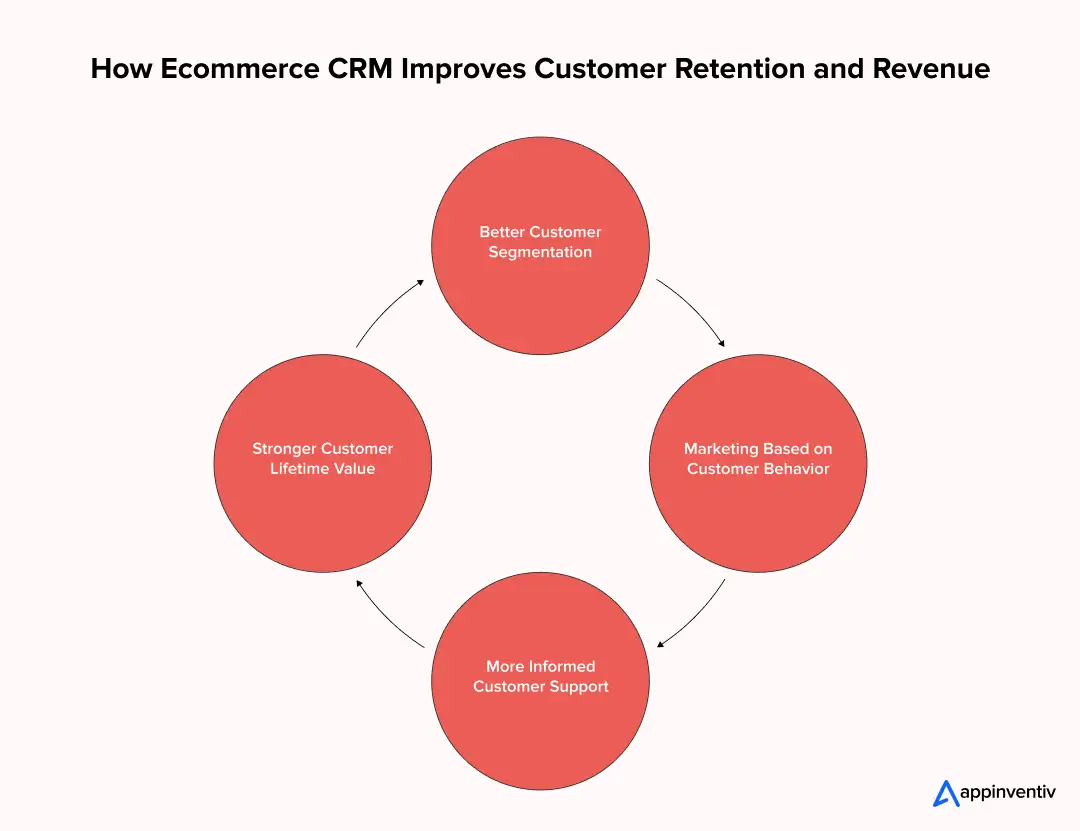
- Better Customer Segmentation: You stop treating everyone the same. Instead, you start grouping customers based on what they actually do. You can see who keeps coming back, who bought once and never returned, and who engages but doesn’t convert. That alone makes your targeting sharper.
- Marketing Based on Customer Behavior: Your campaigns stop feeling generic. You’re not guessing anymore, you’re reacting to real actions.
- You recommend products based on past purchases, follow up when someone drops off, and send offers that actually feel relevant.
- More Informed Customer Support: Support gets easier when your team has context. Instead of asking customers to repeat everything, you can see their history, what they bought, what went wrong, and respond faster with better answers.
- Stronger Customer Lifetime Value: This is where it starts to show up in numbers. When you understand your customers better, you engage them at the right time. That leads to more repeat purchases, better relationships, and higher value over time.
For many of you, this is where ecommerce CRM solutions create the most impact. The CRM becomes more than just a database. It becomes the system that helps teams understand customers and build lasting relationships.
Key Benefits of Adopting Ecommerce CRM
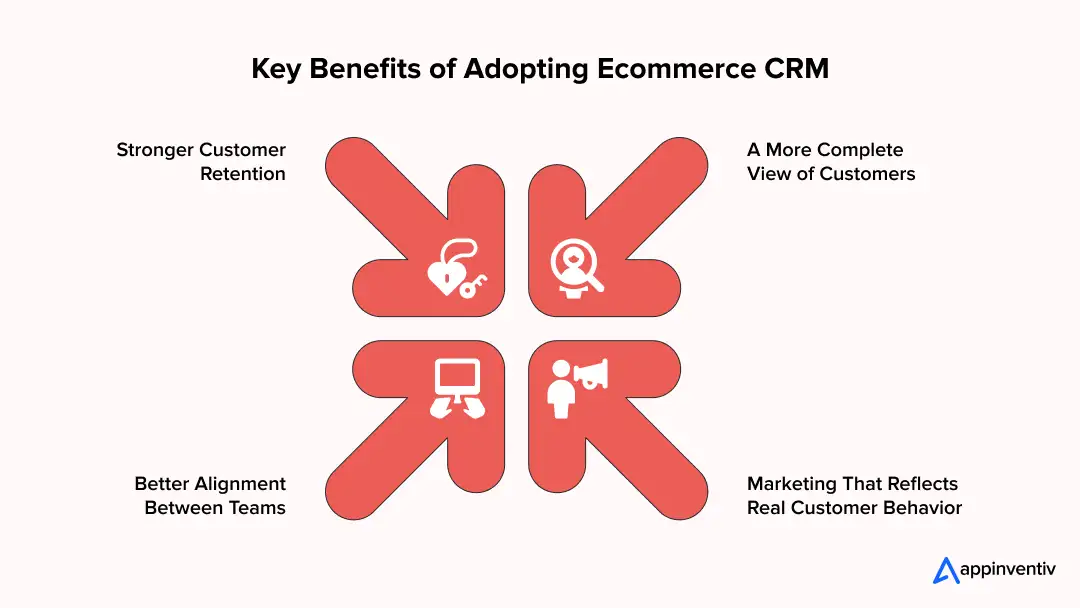
As your ecommerce store grows, customer activity spreads across tools. Orders, campaigns, and support interactions sit in different systems. A crm for ecommerce brings this together so you can finally see what’s happening end-to-end and act on it with confidence.
- A More Complete View of Customers: You get a single, unified view of the customer rather than piecing together information across tools. You can quickly identify repeat buyers, one-time shoppers, and users who engage but don’t convert, so your decisions are grounded in real behavior rather than assumptions.
- Marketing That Reflects Real Customer Behavior: Your campaigns become more precise by responding to what customers actually do. You can recommend products based on past purchases, trigger cart reminders at the right time, and personalize offers that feel relevant rather than generic.
- Better Alignment Between Teams: Your marketing, support, and operations teams start working with the same context. Everyone sees the same customer history, purchases, interactions, and issues, which helps you deliver a more consistent and informed experience.
- Stronger Customer Retention: You start catching early signs of drop-off and act before it impacts revenue. Over time, this leads to more repeat purchases, stronger relationships, and a higher lifetime value from each customer.
When these benefits come together, your CRM stops being just a backend system. It becomes the place where you understand your customers and make better decisions every day.
Challenges in Ecommerce CRM Adoption (and How Businesses Solve Them)
Most ecommerce companies do not struggle with the idea of CRM. They struggle with what happens after the system is introduced.
On paper, implementing CRM for ecommerce sounds straightforward. Connect the CRM to the store, import customer data, and start running campaigns. In reality, the moment you begin the process, a few practical problems show up. None of them is unusual, but they can slow things down if they are ignored early.
Let’s look at some of the issues teams commonly run into when adopting CRM, and how businesses typically work through them.
1. Customer Data Is Spread Everywhere
One of the first things you’ll notice is that your customer data isn’t stored in one place. Orders sit inside the ecommerce platform. Marketing tools store campaign engagement. Support teams keep customer conversations in separate systems.
When a CRM is introduced without properly integrating these systems, it shows only part of the customer story.
What businesses usually do:
Instead of treating CRM as a standalone system, companies focus on ecommerce CRM integration across their technology stack. That often means connecting the CRM with:
- The ecommerce storefront platform
- Marketing automation tools
- Analytics platforms tracking user behavior
Once those connections are working, the CRM gradually becomes the place where the full customer journey is visible.
2. The Data Itself Is Messy
Another challenge arises when businesses begin importing their customer data. Over time, ecommerce databases accumulate duplicates. A customer might appear three different times with slightly different email addresses or purchase records.
If that data goes straight into the CRM, segmentation and reporting quickly become unreliable.
What businesses usually do:
Before completing ecommerce CRM software development, teams often pause to clean their data. That process usually includes:
- Removing duplicate customer profiles
- Standardizing important fields like email and purchase history
- Merging records that belong to the same person
It is not glamorous work, but it makes a huge difference once the CRM starts running campaigns or generating reports.
3. Teams Don’t Always Use the System
Sometimes the technology works perfectly, yet the CRM still feels underused. Marketing teams might continue using the tools they are familiar with, and support teams may not consistently update customer interactions inside the CRM.
When that happens, the system never becomes the central source of customer insight.
What businesses usually do:
Successful e-commerce CRM implementation usually involves changing daily workflows.
Companies often:
- Integrate CRM into marketing campaign processes
- Give support teams access to customer purchase history through the CRM
- Create dashboards that highlight useful customer insights
When employees begin relying on the system in their everyday work, adoption improves naturally.
4. Integration Gets Complicated in Larger Systems
Small ecommerce stores often run only a few tools. Larger businesses are different. A typical setup might include the storefront platform, marketing automation tools, analytics systems, and, sometimes, an ERP system to manage orders or inventory.
Connecting all of those systems to the CRM can become technically complicated.
What businesses usually do:
In these situations, companies often rely on ecommerce CRM consulting specialists. Their job is usually to:
- Design how systems should connect through APIs
- Map how customer data flows between platforms
- Make sure integrations stay stable as the system grows
This kind of planning prevents the CRM from turning into another isolated platform.
5. Growth Eventually Changes the Requirements
A CRM that works well for a small ecommerce business may struggle as the company handles higher customer volumes and more campaigns.
Data grows, and integrations increase. Workflows become more complex.
What businesses usually do:
To avoid problems later, businesses often focus early on:
- Choosing scalable CRM platforms
- Using a cloud infrastructure capable of handling larger datasets
- Designing integrations that can adapt as new tools are added
When these decisions are made early, the CRM continues working even as the business grows.
In the end, most companies realize that adopting CRM solutions is less about installing software and more about connecting systems, cleaning data, and helping teams work differently. When those pieces come together, the CRM stops feeling like another tool and starts becoming the place where businesses truly understand their customers.
Risks of Delaying CRM Implementation in Ecommerce
Most ecommerce businesses don’t intentionally ignore CRM. It usually gets pushed down the priority list while teams focus on growth, campaigns, or platform upgrades. But over time, the absence of a structured CRM layer becomes evident in ways that directly affect revenue, customer experience, and operational efficiency.
Here’s what that typically looks like in practice.
- Fragmented Customer Data: In most teams, data doesn’t disappear; it just lives in too many places. Orders in one tool, campaigns in another, support in a third. Without a proper CRM for ecommerce, you never really get a complete picture of the customer. You’re always working with pieces.
- Declining Marketing Efficiency: When data isn’t connected, campaigns start to feel like guesswork. You target broad segments, repeat messages, and hope something clicks. Over time, this shows up as lower conversions and rising acquisition costs, even when your spend stays the same.
- Inconsistent Customer Experience: A customer browses a product, clicks an email, then reaches out to support. But your systems don’t talk to each other. So they end up repeating themselves. Marketing sends irrelevant messages. The experience feels disconnected, even if each team is doing its job well.
- Missing Early Signs of Churn: Most customers don’t leave suddenly. They just stop engaging little by little. Without visibility across touchpoints, these signals are easy to miss. By the time you notice, bringing them back is already harder and more expensive.
- Slower Operations as You Scale: What works when you’re smaller starts breaking as things grow. More orders, more campaigns, more tools. Teams spend more time switching between systems and less time actually acting on insights. Execution slows down, even when the business is growing.
- Higher Effort Later: Putting off CRM doesn’t remove the work; it stacks it up. More data to clean, more integrations to figure out, more processes to untangle later. What could have been a structured setup early on turns into a much heavier lift.
Where the Right Implementation Makes the Difference
This is exactly where many ecommerce businesses bring in experienced partners. Not just to implement a CRM, but to design how it fits into the broader ecosystem.
At Appinventiv, teams typically approach this by:
- Mapping how customer data flows across platforms
- Designing scalable ecommerce CRM integration architectures
- Aligning CRM workflows with marketing, support, and operations
- Ensuring the system evolves as the business grows
Because in practice, CRM is not just a tool decision. It’s an operational shift that affects how every team interacts with customer data.
Align your systems, clean your data, and scale with confidence.

How Appinventiv Supports Ecommerce CRM and Platform Development
If you’re dealing with scattered customer data, orders in one system, campaigns in another, support somewhere else, the issue usually isn’t the tools. It’s how they’re connected.
This is where teams like Appinventiv step in. As a CRM development company, the focus isn’t on adding another tool; it’s on fixing how your data flows across your ecosystem so everything starts working together.
In practice, this comes down to a structured approach. You can think of it as a 3-layer CRM architecture:
- Data Unification Layer: You bring together customer data from storefronts, marketing tools, and support systems into one consistent view.
- Real-Time Sync Layer: You ensure every customer action updates instantly across systems, so you’re not working with outdated or mismatched data.
- Activation Layer (Marketing & Retention): You use that unified data to drive segmentation, automation, and personalized engagement that reflects real customer behavior.
This is usually the shift. You move from managing disconnected tools to working with a system that gives you a clear, reliable view of your customers.
Across projects, this approach has been applied at scale, spanning 35+ industries, 3,000+ solutions, and 500+ legacy transformations. It also aligns closely with how teams approach ecommerce platform development, ensuring your CRM evolves alongside your core commerce systems.
If you’re exploring ways to connect your CRM with a stronger ecommerce platform, Appinventiv can help you map out the right approach and build a system that grows with your business.
FAQs
Q. How much does an ecommerce CRM cost?
A. The cost of implementing CRM for ecommerce depends on how simple or customized your setup needs to be. For ready-made ecommerce CRM platforms, businesses typically spend $500 to $5,000 per month, depending on features, users, and integrations.
If your setup involves deeper integrations, multiple systems, or custom workflows, ecommerce CRM development usually falls between $40,000 and $ 400,000 as a one-time investment. Ongoing costs may apply for maintenance, scaling, and optimization.
Most teams start with a platform and gradually invest more as their data, integrations, and operational complexity grow.
Q. How to integrate CRM with an ecommerce platform?
A. Integrating a CRM with an online store usually involves connecting the CRM with the storefront through APIs or middleware tools. This CRM integration with ecommerce allows customer profiles, order data, and engagement activity to flow between systems automatically.
A typical ecommerce CRM integration setup connects the CRM with:
- Ecommerce platforms such as Shopify, Magento, or WooCommerce
- Marketing automation tools are used for campaigns and customer engagement
- Analytics platforms that track browsing behaviour and conversions
When done properly, CRM integration with ecommerce ensures that customer data stays consistent across the entire commerce ecosystem.
Q. What challenges do businesses face during ecommerce CRM implementation?
A. A common challenge during ecommerce CRM implementation is dealing with fragmented customer data. In many ecommerce environments, customer records are stored across multiple tools, which makes migration difficult. Another issue appears when systems are poorly connected, limiting the value of CRM solutions.
You can solve this by planning your integrations early instead of treating CRM as a standalone tool. and using ecommerce CRM consulting to design the system architecture before launching the CRM.
Q. What mistakes should businesses avoid when adopting ecommerce CRM?
A. One of the most common mistakes during CRM in ecommerce adoption is selecting a platform without considering how it will connect with the rest of the technology stack. Some companies also underestimate the importance of data preparation before ecommerce CRM implementation.
Businesses often see better results when they:
- Define clear goals before choosing a CRM
- Ensure strong CRM integration with ecommerce platforms
- Prepare customer data before migration
- Train teams so the CRM becomes part of daily workflows
Avoiding these mistakes helps companies get more value from CRM software and build stronger customer engagement strategies.

- In just 2 mins you will get a response
- Your idea is 100% protected by our Non Disclosure Agreement.

Key takeaways: Real-time AML systems detect and act on suspicious transactions within seconds, reducing financial risk across high-volume, cross-border environments in the UAE. Event-driven architectures with AI models improve detection accuracy while reducing false alerts, enabling faster investigations and better operational efficiency. UAE compliance demands audit-ready systems with explainable decisions, real-time reporting, and alignment across…
Maritime Insurance Claim Software Development for UAE Ports, Insurers, and Logistics Networks
Key takeaways: Manual claims management is too slow for the UAE’s high-volume ports; digital solutions streamline processes and reduce errors. Maritime insurance claim software centralizes data, automates workflows, and ensures compliance with UAE regulations and Takaful principles. Real-time integration with port and vessel systems enables faster claim registration, validation, and settlement. Advanced analytics and risk…

How to Build a Student Management System in Australia?
Key takeaways: Australia’s tightening regulatory landscape (TEQSA, ASQA, CRICOS) makes student management system development in Australia a compliance-driven necessity, not just a digital upgrade. Monetisation models such as SaaS subscriptions, institutional licensing, white-label partnerships, and hybrid pricing offer scalable commercial opportunities in Australia’s expanding EdTech market. Addressing challenges early - data privacy, legacy migration, multilingual…









