


























AI Voice Receptionist Development: Business Use Cases, Technology Architecture, and Cost

- Step-by-Step Guide to Build an AI Voice Receptionist
- Build vs Buy: Choosing the Right Approach
- Technology Architecture and Production Design of AI Voice Receptionist Systems
- Cost of AI Voice Receptionist Development
- Key Capabilities and Features of AI Voice Receptionists
- Key Challenges in AI Voice Receptionist Development and How to Overcome Them
- Security and Compliance Considerations for Voice AI Systems
- Future Trends in AI Voice Receptionist Technology
- How Appinventiv Builds Enterprise-Grade AI Voice Receptionist Solutions
- FAQs

Key takeaways:
- Start with real call use cases, not tech. Define high-frequency intents, workflows, and escalation paths before building anything.
- Build a low-latency voice pipeline. Reliable telephony and real-time audio streaming make conversations feel natural.
- Set up the core AI loop. STT→LLM→TTS should handle intent, context, and responses in near real time.
- Ground responses with your data. Use RAG and system integrations so the AI responds with verified, business-specific information.
- Design for real-world chaos. Handle interruptions, edge cases, and always include a fallback human handoff.
It usually plays out the same way. Someone calls your business, listens to a long list of options, gets confused, and either presses the wrong key or hangs up. By then, the intent is gone and so is the opportunity.
That’s where AI voice receptionist development is starting to make a real difference. Instead of rigid call flows, an AI receptionist can understand what a caller needs and respond naturally. If you’re considering an AI receptionist for your business, the value shows up in faster responses and fewer missed interactions.
What’s changed is how capable these systems have become. A modern AI virtual receptionist can check availability, pull information, and handle routine queries without bouncing the caller around. In many setups, an AI phone receptionist already handles everyday interactions while teams focus on more complex work.
As businesses begin adopting AI receptionists, the goal is no longer just automation; it’s to make conversations smoother and more useful.
In this guide, you will understand how these systems work, where they add value, and what it takes to build one that performs reliably in real scenarios.
Avoid annoying them by speeding up your customer service. Deploy an AI voice receptionist.

Step-by-Step Guide to Build an AI Voice Receptionist
In most teams, this doesn’t start as an AI project. It starts with a simple observation: too many calls are getting dropped, or agents are repeating the same answers all day. From there, the goal becomes clear: build something that can handle real conversations, not just route them.
Here’s how teams typically approach AI voice receptionist implementation with the right technical depth.
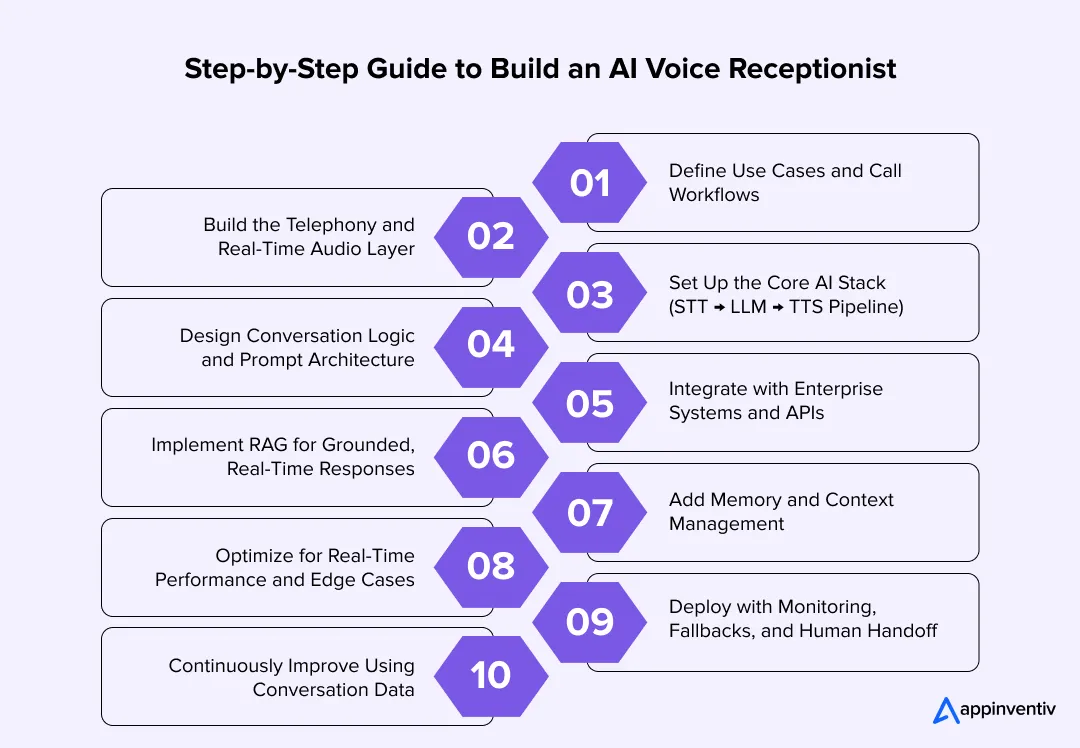
1. Define Use Cases and Call Workflows
Before touching any technology, you need clarity on what the system is expected to do and how decisions should flow during a call.
- Identify high-frequency intents (appointments, queries, routing)
- Define structured workflows: input → decision → action
- Design fallback paths and escalation logic
At this stage, you’re essentially designing a decision system, not just a voice interface.
2. Build the Telephony and Real-Time Audio Layer
Once workflows are defined, the next step is setting up how calls will be received, processed, and streamed into your system.
- Use SIP or cloud telephony APIs to handle call routing
- Enable real-time audio streaming (WebRTC / RTP pipelines)
- Ensure bidirectional streaming for continuous conversation
Low latency here is critical. Any delay breaks the conversational experience.
3. Set Up the Core AI Stack (STT → LLM → TTS Pipeline)
With the audio pipeline in place, you need a processing loop that can convert speech into understanding and then back into speech.
- Speech-to-Text (STT): Converts live audio into text (with noise handling and speaker detection)
- LLM Layer: Performs intent classification, entity extraction, and response generation
- Text-to-Speech (TTS): Synthesizes natural, low-latency voice output
Most modern systems use streaming inference, so responses begin before the full sentence is processed.
4. Design Conversation Logic and Prompt Architecture
Now that the core stack is ready, the focus shifts to structuring how the system thinks and responds during a conversation.
- Use system prompts to define tone, behavior, and boundaries
- Implement intent-based routing + tool calling logic
- Handle interruptions (barge-in), silence, and ambiguity
A strong conversational virtual receptionist is not just reactive; it proactively manages the flow.
5. Integrate with Enterprise Systems and APIs
At this point, the system can converse, but to make it useful, it needs to interact with your business systems in real time.
- Implement CRM software for customer context
- Integrate scheduling, billing, or ticketing systems
- Enable real-time API calls during conversations
This is what transforms an AI receptionist into an operational system.
6. Implement RAG for Grounded, Real-Time Responses
To ensure accuracy and avoid hallucinations, responses should be tied to verified business data rather than relying solely on model knowledge.
- Retrieve relevant data from internal systems (CRM, KB, databases)
- Inject the retrieved context into the LLM prompt
- Apply validation layers and access controls
This ensures responses are accurate, auditable, and aligned with business data. This approach is critical in regulated industries, where responses must be traceable, validated, and tied to real system data instead of model-generated assumptions.
7. Add Memory and Context Management
As conversations become more complex, the system needs to retain context within and sometimes across interactions.
- Maintain session-level memory within a call
- Store structured context (intent, entities, history)
- Use vector embeddings for contextual recall when needed
This is where an AI virtual receptionist starts to feel consistent across interactions.
8. Optimize for Real-Time Performance and Edge Cases
Before going live, the system needs to be tested under realistic conditions, with inputs that are unpredictable.
- Keep latency ideally under 300–500 ms per response turn
- Handle noisy environments and partial inputs
- Design fallback strategies for low-confidence responses
Testing here should simulate real-world conditions, not just ideal scenarios.
9. Deploy with Monitoring, Fallbacks, and Human Handoff
Once deployed, maintaining control and visibility becomes critical to ensure reliability and continuous improvement.
- Set up observability (logs, traces, call analytics)
- Implement confidence scoring and escalation triggers
- Enable seamless transfer to human agents when needed
This ensures reliability without compromising user experience.
10. Continuously Improve Using Conversation Data
After deployment, the real optimization begins by learning from actual user interactions.
- Analyze transcripts for drop-offs and friction points
- Refine prompts, workflows, and integrations
- Retrain or fine-tune models where necessary
Over time, this is what turns an automated AI voice receptionist into a high-performing business asset.
In practice, to build an AI phone virtual receptionist that actually works, the focus has to stay on aligning technology with real workflows. The systems that perform well aren’t the most complex ones; they’re the ones designed around how conversations actually happen.
Build vs Buy: Choosing the Right Approach
This is usually where the discussion gets a bit more real. You’ve seen what’s possible, now it’s about deciding how to actually move forward. Do you build something that fits your setup, or pick a platform and get started quickly?
There’s no fixed answer here. It really depends on how your business works today and how much you expect things to change over time, especially when deciding between a custom build or the best platform for an AI receptionist based on your use case.
Here’s a simple way to look at it:
| Factor | Build (Custom Development) | Buy (Using Platforms) |
|---|---|---|
| Time to Launch | Takes time since you’re building it step by step | Faster since most things are already set up |
| Customization | Built around your workflows | You adjust to how the platform works |
| Scalability | Can grow the way you need it to | Limited by the platform’s setup |
| Integration Depth | Easier to connect deeply with your systems | Usually limited to basic integrations |
| Cost (Initial) | Higher upfront effort | Lower starting cost |
| Cost (Long-Term) | More stable as you scale | Costs can increase with usage |
| Control & Ownership | You control the system and your data | You depend on the provider |
| Maintenance Effort | Needs ongoing support | Mostly handled externally |
| Use Case Fit | Works better for complex or changing needs | Works fine for simpler setups |
| Flexibility | Easier to change and extend later | Changes depend on platform updates |
Why building often makes more sense over time
Platforms work well when you just want to get something live and see how it performs. That part is helpful. But once your requirements start getting specific, small gaps begin to show up. The platform you buy can’t always align with your specific goals. Moreover, it also requires you to share your sensitive data with third-party vendors (folks selling the platform).
With a custom build, however, you’re not adjusting your process to match a tool. The system is shaped around how your team already works. And when things change, which they usually do, you’re not stuck waiting for a feature or workaround. You can simply extend what you’ve already built and keep moving. The custom approach is also safer, given how your data remains always in your control.
This is where custom AI agent development services become relevant, helping teams build systems that adapt to evolving workflows instead of working around platform limitations.
Appinventiv Insight
At Appinventiv, after delivering 300+ AI solutions and 75+ enterprise integrations, one pattern stands out.
Custom-built systems consistently lead to:
- 25–35% faster call resolution
- 20–30% less manual handling
- Better fit with real workflows
- More flexibility as needs grow
The difference is control. The system adapts to your business, not the other way around.
Technology Architecture and Production Design of AI Voice Receptionist Systems
Spend a few minutes listening to real call recordings, and one thing becomes obvious. No one speaks in perfect sentences. People pause, backtrack, interrupt themselves, and still expect the system to keep up. That’s the reality this setup has to handle.
In production environments, this architecture is typically deployed as a set of distributed microservices with streaming pipelines to ensure low latency, fault tolerance, and horizontal scalability under high call volumes.
A conversational AI receptionist for your business works only when the foundation underneath can deal with that kind of unpredictability. It’s not one big system doing everything. It’s a set of layers, each handling a specific job so the conversation feels smooth from the outside.
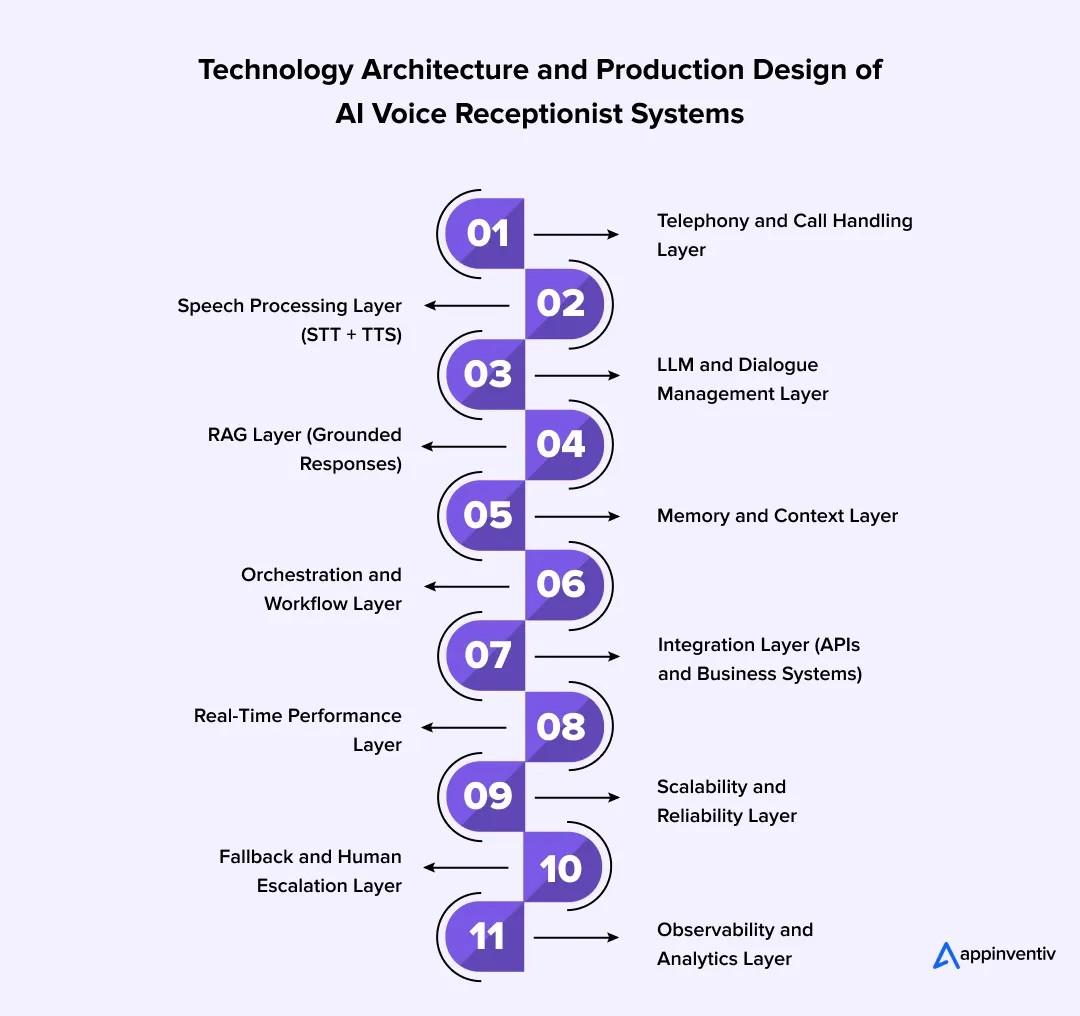
- Telephony and Call Handling Layer: This is where every call starts. It receives the call, routes it, and keeps track of what’s happening as the interaction moves forward. In the background, telephony systems manage call signaling while audio is streamed right away, so nothing gets delayed. It also handles events like transfers or dropped calls so the conversation doesn’t break unexpectedly.
- Speech Processing Layer (STT + TTS): This is where voice turns into something the system can work with. It captures speech as it’s happening, even if the caller pauses or speaks over noise, and converts it into text. Then it turns responses back into voice quickly enough that it feels like a natural reply, not something lagging behind.
- LLM and Dialogue Management Layer: Once the system has the text, this layer figures out what the caller actually means. It picks up intent, pulls out useful details, and decides how to respond. It also keeps track of where the conversation is, so things don’t restart or go in circles.
- RAG Layer (Grounded Responses): Instead of relying only on pretrained knowledge, this layer retrieves real-time data from internal systems like CRM, databases, or knowledge bases. The retrieved data is injected into the LLM context with validation rules and access controls, ensuring responses are accurate, auditable, and compliant with enterprise policies.
- Memory and Context Layer: Conversations build as they go. This layer keeps track of earlier inputs so the system doesn’t forget what was already said or ask for the same detail again. It helps the interaction feel connected instead of broken into pieces.
- Orchestration and Workflow Layer: This is where things move beyond talking. It handles the steps needed to get something done, checking details, confirming inputs, and completing actions like bookings. Each step follows the last without interrupting the flow of the conversation.
- Integration Layer (APIs and Business Systems): For the system to be useful, it needs access to your actual tools. This layer connects with CRM, scheduling platforms, and other systems so it can read and update data during the call instead of relying on guesses.
- Real-Time Performance Layer: In voice, timing matters a lot. Even a short pause can feel off. This layer keeps everything moving quickly by processing inputs as they come in and reducing delays across the system.
- Latency and Streaming Optimization Layer: In voice systems, response delay directly impacts user experience. Most production-grade systems use streaming inference and partial response generation, allowing replies to begin within 300–500 ms. Techniques like chunked audio processing and edge inference help maintain conversational flow even under load.
- Scalability and Reliability Layer: Whether there are a few calls or a sudden surge, the system should behave the same way. This layer makes sure multiple calls can run at once without slowing down or mixing things up.
- Fallback and Human Escalation Layer: Not every call will be straightforward. When the system isn’t sure, it needs a safe way to respond or pass the call to a human. This layer handles that without making the experience awkward.
- Observability and Analytics Layer: This is where teams see what’s actually going on. It tracks conversations, shows where things drop off, and helps identify what needs to be improved over time.
When all of this is set up well, the caller doesn’t see any of it. They just speak and get what they need. Underneath, each layer is doing its part to keep that interaction steady and reliable, even when the conversation isn’t.
A strong architecture should do more than handle calls. Let Appinventiv help you connect conversations to real workflows and outcomes.

Cost of AI Voice Receptionist Development
Let’s be honest, this is the part most teams care about once the idea starts feeling real. You might already see the value, but the question sitting in the room is, what’s the actual investment to get this live?
The range is wide for a reason. A setup that just answers basic queries is relatively quick to build. But once you start adding real workflows, system integrations, and scale, the effort and cost both go up.
In most practical scenarios, the cost lands somewhere between $40,000 and $400,000.
| Component | What It Includes | Estimated Cost |
|---|---|---|
| MVP (Basic Setup) | Handles a few common call types like queries or routing | $40,000 – $80,000 |
| AI Stack (STT, LLM, TTS) | Listens, processes, and responds in a natural voice | $20,000 – $60,000 |
| Integrations & Workflows | Connects with tools like CRM or scheduling systems | $20,000 – $80,000 |
| RAG & Context Handling | Uses real data and keeps conversations consistent | $15,000 – $50,000 |
| Scaling & Infrastructure | Supports more calls without slowing things down | $20,000 – $70,000 |
| Enterprise System (End-to-End) | Covers complex use cases with stronger reliability | $100,000 – $400,000+ |
For enterprises, the focus is less on initial cost and more on long-term operational efficiency. Systems that reduce manual handling and improve call resolution typically recover investment within 6–12 months, depending on call volume.
What usually changes the number isn’t anything surprising:
- How many use cases do you want to handle from day one
- How many systems does it need to connect with
- How much call volume do you expect it to deal with
Most teams don’t jump straight to a full build. They start small, get a few use cases working, and then expand once they see it working in real calls. It’s a more practical way to approach it and avoids overbuilding too early.
Also Read: Cost of developing an AI Voice and TTS app like Speechify
Key Capabilities and Features of AI Voice Receptionists
Picture a quick call during a busy hour. The caller starts explaining, pauses, adds something else, then asks a follow-up. The system still needs to keep up and move things forward without making it feel slow or awkward. That’s where these capabilities actually show up.
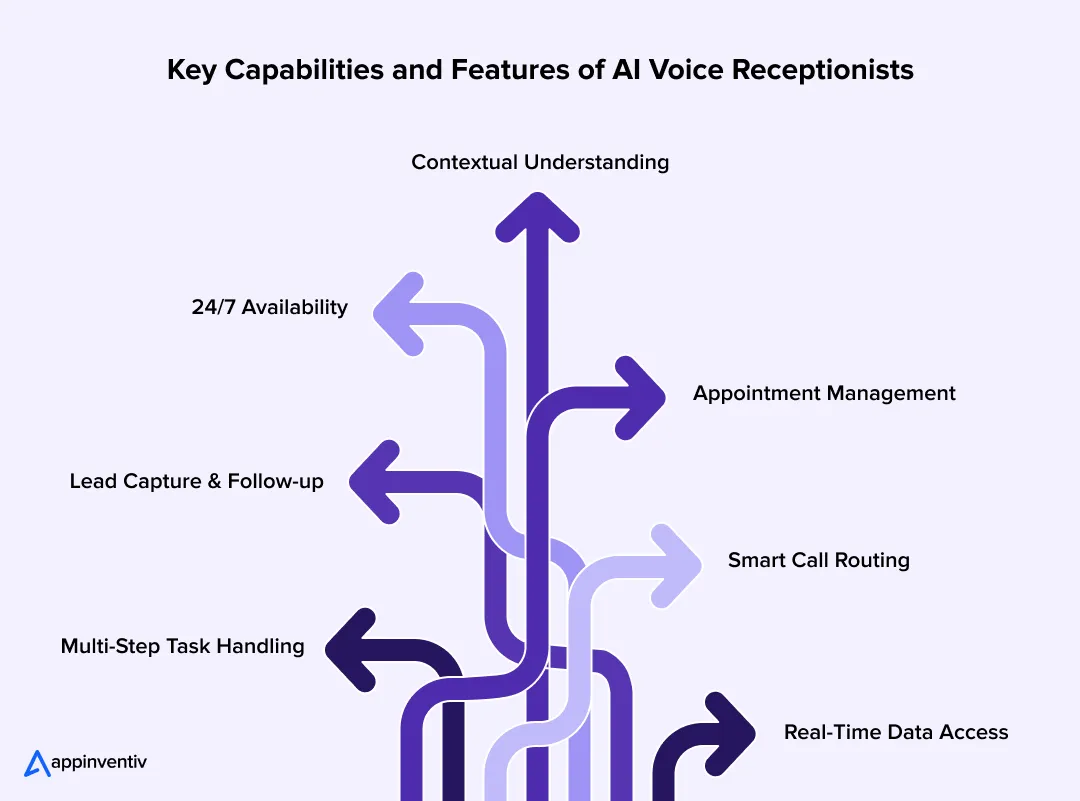
- 24/7 Availability: Picks up every call right away, even after hours. It can handle more than one call at a time, so no one gets pushed to voicemail or left waiting.
- Contextual Understanding: Remember what the caller has already said at that moment. So it doesn’t go back and ask the same thing again or lose track halfway.
- Appointment Management: Checks what slots are open and confirms the booking while the caller is still on the line. No need to take details and call back later.
- Lead Capture & Follow-up: Picks up basic details during the conversation and sends a quick confirmation once the call ends. It happens in the background without extra effort.
- Smart Call Routing: Listens to what the caller needs and sends them to the right place. If it passes the call, it shares the context so things don’t restart.
- Multi-Step Task Handling: Some requests need a few steps. The system walks through them one by one without breaking the flow or confusing the caller.
- Real-Time Data Access: Pulls information directly from your systems while the call is happening, so responses reflect what’s actually current.
These are the parts that make an AI receptionist for your business feel practical during real calls, not just something that works in a controlled setup.
Key Challenges in AI Voice Receptionist Development and How to Overcome Them
This is where things usually get real. The system works fine in testing, but once actual calls start coming in, things get messy. People interrupt, speak unclearly, or ask something completely unexpected. That’s when most issues in AI voice receptionist implementation start to show up.
Here are the common challenges teams run into while trying to build an AI voice receptionist, and how they deal with them:
| Challenge | What It Looks Like on Real Calls | What Teams Do About It |
|---|---|---|
| Latency and Slow Responses | There’s a slight pause before the system replies. The caller repeats “hello?” or just hangs up. | Process audio in real time and start responding mid-input, rather than waiting for full sentences. |
| Understanding What the Caller Means | People don’t speak clearly. They mix questions, skip details, or switch topics midway. | Pull in real data during the call, and confirm important actions before moving ahead. |
| Interruptions and Broken Flow | The caller talks over the system or changes direction suddenly. The flow resets or gets awkward. | Let the system handle interruptions and continue from where it left off, rather than restarting. |
| Integration with Existing Systems | The AI can talk, but it can’t actually do anything because backend systems don’t sync properly. | Start with the key integrations first. Build a simple API layer and expand step by step. |
| Handling High Call Volumes | Everything works fine in testing, but it slows down when multiple calls come in together. | Design for parallel calls from day one with scalable infrastructure. |
| Unexpected Questions | Someone asks something outside the flow. The system guesses or gives a wrong answer. | Add fallback responses and pass the call to a human when confidence is low. |
| Losing Context Mid-Call | The system forgets what the caller already said and asks the same thing again. | Track key details during the session to keep the conversation consistent. |
| Trust and Overall Experience | The response sounds slightly off or robotic, and the caller quickly loses confidence. | Keep responses simple, relevant, and grounded in real data, rather than overcomplicating things. |
Security and Compliance Considerations for Voice AI Systems
Think about a quick customer call during a busy hour. Someone shares their number or booking details without hesitation. Behind the scenes, that data is moving fast across systems. That’s why security here isn’t optional. It has to be built in from the start.
Here’s a tighter, more practical view:
| Area | What It Looks Like in Real Calls | How Teams Handle It |
|---|---|---|
| PII Handling | Callers share personal details casually. | Mask sensitive data early and store only what’s necessary. |
| Encryption | Data moves across multiple systems in seconds. | Encrypt data in transit and at rest using standards like TLS and AES-256. |
| Access Control | Too many components can access sensitive data if unchecked. | Limit access by roles and secure APIs properly. |
| Zero-Trust | Internal systems can still become weak points. | Verify every request instead of assuming trust. |
| Compliance | Different data types bring different regulations. | Align with GDPR, HIPAA, PCI-DSS, or SOC 2 as needed. |
| Integrations | Risks often show up when systems connect. | Use secure layers and validate data before sharing. |
| Monitoring | Issues are hard to trace without visibility into them. | Keep audit logs of calls, access, and system actions. |
| Deployment | Infrastructure impacts control and compliance. | Use private or hybrid environments when required. |
In practice, it’s not one big control that keeps things safe. It’s a series of small, consistent safeguards working together while the caller just experiences a smooth conversation.
Future Trends in AI Voice Receptionist Technology
If you sit with a team that’s been using these systems for a while, the shift becomes obvious. It’s no longer about answering calls better. It’s about letting the system handle more of the work that usually happens after the call. What’s emerging now is a shift toward agentic AI systems, in which voice assistants don’t just respond but also plan, decide, and autonomously execute multi-step workflows.
To put that into perspective, research from Gartner shows how quickly this is moving. By 2026, up to 40% of enterprise applications will include AI agents, reshaping how workflows are executed across systems.
Here’s how that’s shaping up:
- Complete tasks, not just respond: Instead of stopping at answers, systems will carry the request through to completion. That includes validating inputs, checking real-time data, and executing actions such as bookings or updates, all within a single call, without a follow-up.
- Handle end-to-end workflows: Conversations will map directly to workflows. The system will manage multiple steps in sequence, collecting inputs, calling different systems, confirming outcomes, and finishing the task without losing context midway.
- Carry context across interactions: Calls won’t feel disconnected anymore. Systems will retain key details from earlier interactions, like user preferences or past requests, so repeat callers don’t have to start from zero each time.
- Voice becomes a direct interface for actions: Instead of navigating dashboards or filling forms, users will speak what they need. The system will translate that into structured actions behind the scenes, making voice a faster way to interact with systems.
- Deeper connection with business systems: These systems will move closer to core operations. They won’t just fetch data; they’ll update records, trigger workflows, and sync changes across systems in real time during the call.
- More natural handling of conversations: Systems will improve at managing interruptions, pauses, and changes in direction. They’ll adjust mid-conversation without restarting, which makes interactions feel smoother and less scripted.
- Continuous improvement from real usage: Performance won’t stay fixed. Teams will use call transcripts and interaction data to refine prompts, improve workflows, and fix gaps, making the system better with actual usage.
- Hybrid model with human teams: Most setups will continue to balance both. The system handles high-volume, repetitive calls, while more complex or sensitive cases are passed to human agents with full context already available.
Over time, an AI virtual receptionist will move beyond being a front layer. It will become part of how work flows through the system, handling conversations, decisions, and actions together without adding extra steps.
Don’t just answer calls. Let Appinventiv help you build systems that complete tasks, adapt to users, and scale with your business.
How Appinventiv Builds Enterprise-Grade AI Voice Receptionist Solutions
When teams partner with Appinventiv, the focus isn’t just on building a system that answers calls. It’s about shaping something that fits into how your team already works. That usually starts with understanding where calls slow things down today and where automation can actually make a difference.
Here’s how that approach plays out in real scenarios:

myExec AI Business Consultant


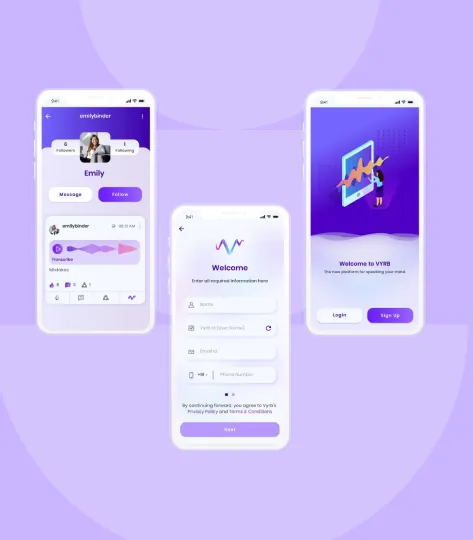
Vyrb Social Media App
Along with performance, compliance is treated as a baseline rather than something added later. Depending on the use case, Appinventiv aligns systems with standards such as GDPR, HIPAA, PCI-DSS, and SOC 2, ensuring sensitive data is handled properly without complicating the user experience.
If you’re planning to build an AI voice receptionist, the real challenge isn’t getting it to respond. It’s making sure it can handle real conversations, connect with your systems, and scale as your business grows.
That’s where working with an experienced AI software development company makes the difference. You move beyond a basic setup and toward something that actually holds up in production.
That’s where the difference between a demo and a production-ready system becomes clear. Let’s build something that actually works in the real world. Let’s connect!
FAQs
Q. How smart businesses are replacing call centers with 24/7 AI assistants?
A. Most businesses aren’t replacing everything at once. They start by shifting repetitive, high-volume queries to an automated AI voice receptionist. Things like basic support, appointment booking, or lead capture are handled instantly, without queues.
Over time, this reduces dependency on large support teams while improving response time. The result is a hybrid setup where AI handles routine calls and human agents focus on more complex conversations. That’s where the real efficiency comes in when comparing AI Receptionists vs Human Call Centers.
Q. How long does it take to launch an AI receptionist?
A. It depends on how complex your setup is.
- A basic version can go live in 3–6 weeks
- A more complete setup with integrations and workflows can take 8–16 weeks
If you’re planning to build an AI phone virtual receptionist with deeper integrations and custom workflows, timelines can extend further. Most teams start small and expand once things are stable.
Q. How to choose the right AI receptionist platform for businesses?
A. The right choice depends on your use case and how much control you need.
Look for:
- Strong voice capabilities (part of the best ai virtual receptionist voice technology)
- Easy integration with your existing systems
- Flexibility to scale beyond basic use cases
If your workflows are simple, a platform can work. But for more control and customization, teams often move toward custom AI receptionist solutions over time.
Q. How quickly can I launch my AI receptionist and connect it to my existing systems?
A. If you’re using a platform, you can get started fairly quickly, sometimes within a few weeks.
For custom setups, integration takes a bit longer because systems like CRM or scheduling tools need to be connected properly. This is where AI voice receptionist implementation requires planning, especially if you’re working with legacy systems.
Q. Can the AI receptionist book and manage appointments automatically?
A. Yes, that’s one of the most common use cases. A well-built ai phone receptionist connects with your calendar or scheduling system, checks availability, and confirms bookings during the call. It can also handle rescheduling or cancellations without manual effort.
Q. Which industries get the most benefit from AI voice receptionist?
A. Industries with high call volume and repetitive queries see the most value.
This includes:
- Healthcare (appointments and patient queries)
- Banking and financial services
- Retail and eCommerce support
- Real estate and service-based businesses
For many of these, a 24/7 AI receptionist for small businesses or enterprises helps reduce missed opportunities and improve response time.
Q. How do AI voice receptionists handle voice customization and audio quality?
A. It’s not just about what the system says; it’s how it sounds on a real call. You can choose the voice, adjust tone, accent, and speaking pace so it feels natural for your audience. On the technical side, features like noise suppression and better speech-to-text accuracy help the system understand callers even with background noise.
For output, HD audio and wideband codecs make the voice clearer and less robotic. The idea is simple: keep the conversation easy to follow, even when the call isn’t perfect.
Q. Why are AI voice receptionists growing rapidly in 2026?
A. The shift is happening for a few clear reasons.
- Businesses want faster response times without increasing team size
- Voice technology has improved significantly, making conversations more natural
- Integration with backend systems allows real actions, not just responses
As a result, more companies are investing in AI-powered receptionist development to handle conversations, workflows, and customer interactions in a more efficient way.

- In just 2 mins you will get a response
- Your idea is 100% protected by our Non Disclosure Agreement.
Key takeaways: Generative AI specialises in content synthesis and creation, while Agentic AI focuses on autonomous reasoning and multi-step task execution. Targeted benefits of generative AI and agentic AI in Australia include nearly a 35% reduction in operational bottlenecks and 70% faster workflows. Prioritise Gen AI for workforce augmentation and Agentic AI for high-stakes, autonomous…
How Much Does It Cost to Build a Conversational AI Chatbot in the UAE?
Key Takeaways AI chatbot development in the UAE typically costs AED 150,000–1,470,000 ($40K–$400K), based on complexity. Backend integration and compliance drive cost more than the chatbot interface itself. Arabic NLP, UAE hosting, and PDPL requirements increase budget and engineering effort. LLM + RAG enterprise chatbots sit at the higher end due to integration and infrastructure…
AI Inventory Management in Australia: Benefits, Use Cases, and Implementation Strategies
Key takeaways: Traditional ERP planning reacts to history; AI predicts demand shifts, reallocates stock dynamically, and prevents costly stockouts across distributed Australian networks. AI in inventory management in Australia typically reduces inventory levels 20–40% while maintaining service targets, unlocking significant working capital across multi-state operations. Enterprise implementations usually range from AUD 70,000 to AUD 700,000+,…









