



































How to Recover From a Failed App Project: Enterprise Guide

 Share -



- 01How to Tell If Your App Project Needs Recovery
- 02Why App Development Projects Fail
- 03How to Recover From a Failed App Project: 8-Step Recovery Process
- 04How to Take Over a Failed App Project From Another Development Vendor
- 05How Much Does It Cost to Recover a Failed App Project?
- 06How to Measure Whether Your App Recovery Is Working
- 07Common Mistakes to Avoid During App Project Recovery
- 08How Appinventiv Helps Enterprises Recover Failed App Projects
- 09FAQs

Key takeaways:
- Secure iOS and Android repositories, store accounts, signing credentials, cloud infrastructure, APIs, and intellectual property before changing vendors.
- Audit native code, cross-platform modules, SDKs, APIs, device compatibility, security controls, testing, and mobile release pipelines.
- Classify mobile components as retain, refactor, replace, replatform, rebuild, or retire based on technical and business value.
- Fix crashes, ANRs, authentication issues, payment failures, critical workflows, and release blockers before restarting feature development.
- Measure recovery through crash-free sessions, ANRs, app startup time, API latency, release reliability, adoption, and business outcomes.
Knowing how to recover from a failed app project does not always require rebuilding iOS and Android from scratch. Existing app code, APIs, databases, and cloud services can still hold value.
Recovery starts by securing the mobile app ecosystem. Take control of source code, Apple Developer, App Store Connect, Google Play Console, signing credentials, cloud accounts, databases, and third-party services. Then audit the iOS and Android codebases, backend APIs, security controls, device compatibility, and release pipelines.
Teams reset the project scope and fix critical workflows. Development restarts only after the foundation stabilizes. Automated tests, quality gates, and staged releases protect against future launch failures.
This guide outlines how to recover from a failed app project, covering the process from technical audit to production launch.
Get your codebase, architecture, security, and cloud infrastructure audited before hidden defects consume another development cycle.

How to Tell If Your App Project Needs Recovery
This mobile app project rescue guide starts with one clear point: one missed deadline does not mean a project failed. Problems start with continuous delays. The team lacks a realistic recovery plan.
Watch for these warning signs:
- Rising costs: Spending grows, but core iOS and Android workflows remain incomplete.
- Unstable builds: Builds fail, apps crash, or features behave differently across supported devices and OS versions.
- Mobile technical debt: Native modules, cross-platform code, SDKs, and dependencies make releases harder to maintain.
- Weak release health: TestFlight or Google Play builds fail repeatedly, and production releases require manual fixes.
- Mobile security gaps: Hardcoded secrets, insecure local storage, weak API authentication, or excessive app permissions create risk.
- Missing mobile documentation: Teams lack release configurations, signing details, API specifications, device matrices, or SDK documentation.
- Vendor problems: The development partner controls source code, signing certificates, App Store Connect, Google Play Console, or critical backend accounts.
Repeated schedule, cost, workload, and quality deviations signal the need for a formal recovery assessment. Many of these patterns show up clearly in real mobile app failures and what they teach future teams.
Why App Development Projects Fail
Failed app project recovery starts with root-cause analysis, since problems rarely stem from one mistake. Issues grow across planning, code quality, security, and team management.
| Root Cause | What It Looks Like in a Mobile App | Business Impact |
|---|---|---|
| Unclear scope | iOS, Android, backend, and UX requirements keep changing | Budget overruns and delayed releases |
| Poor mobile architecture | Native modules, cross-platform layers, and APIs become tightly coupled | Slow releases and expensive maintenance |
| Weak mobile testing | Limited OS, device, UI, regression, and real-device testing | Crashes and poor app ratings |
| Weak release management | Signing, provisioning, build pipelines, or store submissions fail | Missed release windows |
| Mobile security gaps | Hardcoded secrets, insecure storage, weak API controls, or excessive permissions | Data exposure and compliance risk |
| Team knowledge loss | Key engineers leave with knowledge of native modules or release configuration | Recovery delays and rework |
| Vendor misalignment | Vendor controls code, store accounts, certificates, or backend access | Takeover risk and delivery delays |
| Unrealistic expectations | Leadership expects simultaneous iOS, Android, backend, and integration delivery | Rushed releases and quality failures |
Also Read: Challenges That Mobile App Startups Face After App Launch
How to Recover From a Failed App Project: 8-Step Recovery Process
Fixing a failed application requires clear facts about its technical state, which is the foundation of understanding how to recover from a failed app project successfully. Do not add programmers or start rewriting code right away. Secure all system assets first, then audit the engineering infrastructure and find components worth saving. These findings shape the recovery plan.
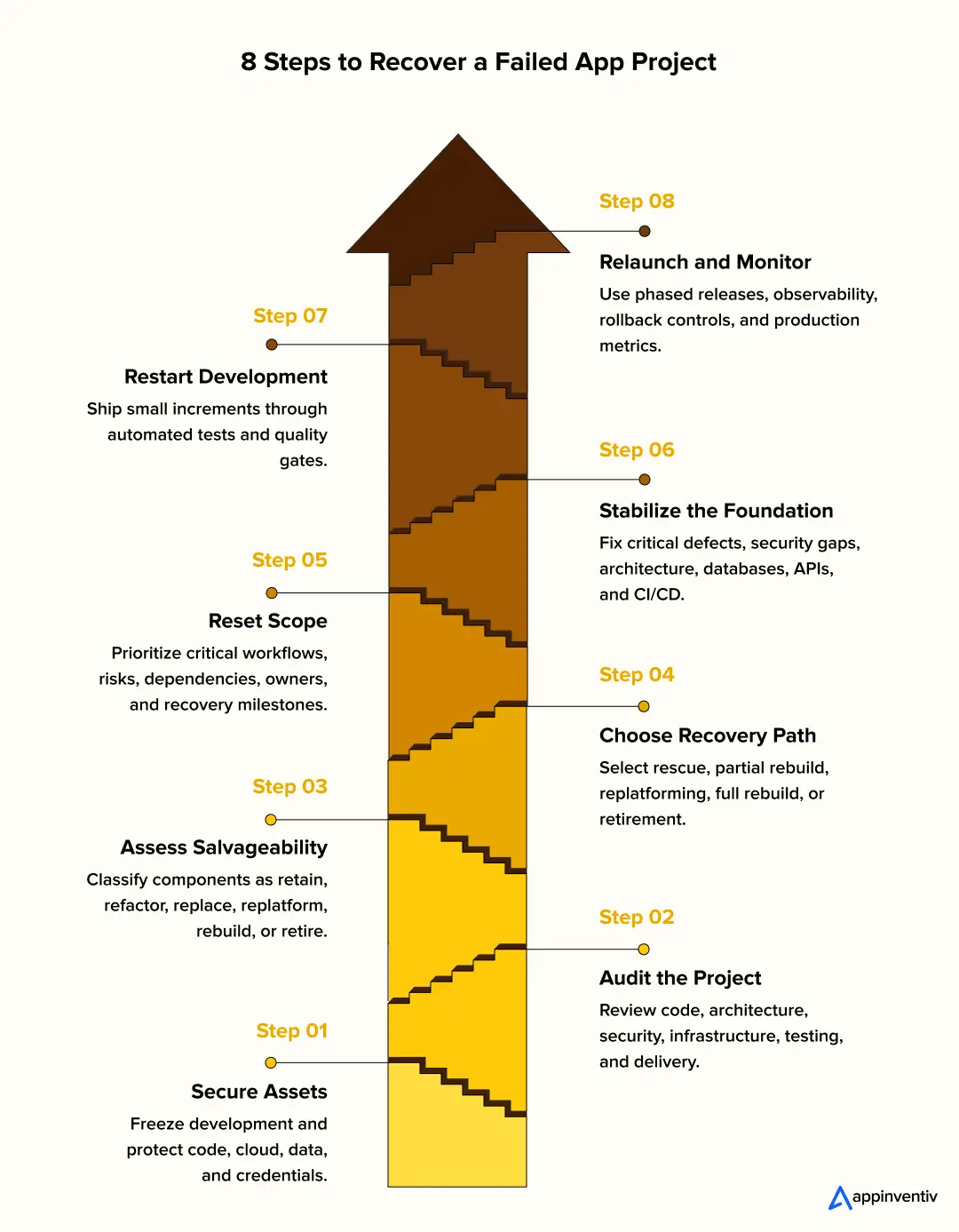
Step 1: Stop Development and Secure Project Assets
App development project rescue begins by freezing feature development immediately, since new code additions create technical debt and mess up unverified codebases.
Freeze non-critical feature development first. Then establish administrative control over every asset required to build, release, and operate the mobile app.
- Mobile assets: iOS and Android repositories, Apple Developer, App Store Connect, Google Play Console, bundle IDs, package names, signing certificates, provisioning profiles, Android keystores, TestFlight, and Play testing tracks.
- Platform assets: Cloud accounts, production APIs, databases, backups, Firebase, APNs, FCM, CI/CD pipelines, DNS, TLS certificates, monitoring, and third-party SDK accounts.
Rotate API keys, signing credentials, SSH keys, access tokens, database passwords, and environment secrets. Revoke previous vendor access after verifying ownership and backup integrity.
Review Identity and Access Management policies, and revoke excessive permissions, following the same mobile app security discipline used to protect production systems long after recovery ends.
Test database restores directly. Do not assume automated cloud snapshots work. Review source code copyright, open-source app licenses, and intellectual property terms.
Step 2: Conduct a Technical and Business Audit
App development project recovery never works from isolated code samples. Inspect the complete application and its release process with the same rigor as during a full quality assurance process long before failure sets in. Sonar found about 2,100 reliability issues per million lines across 7.9 billion lines of analyzed code.
The audit should give leadership a clear view of what is safe to preserve, what needs remediation, and what should be rebuilt. Engineers assess the iOS and Android codebases, including native or cross-platform modules, frameworks, dependencies, crashes, and Android ANRs. They review the mobile architecture and data layer for navigation, state management, local storage, offline sync, and API dependencies. The assessment covers APIs and third-party SDKs across authentication, payments, maps, analytics, and push notifications. It also examines mobile security, including secrets, permissions, certificates, and API controls.
The audit then tests device and OS compatibility, app startup, memory usage, battery consumption, network behavior, and real-device coverage. Engineers review release engineering, including workflows for signing, provisioning, CI/CD, TestFlight, and Google Play. Finally, they assess the backend, cloud infrastructure, logs, traces, crash data, ANRs, API metrics, and production alerts that affect mobile reliability. The output should connect each finding to business risk, recovery cost, release impact, and the recommended action.
Extend the audit beyond engineering. Review the project charter, Work Breakdown Structure (WBS), critical project documentation, resource requirements, and current risk register. Run stakeholder interviews and a process audit to find unclear ownership, workflow gaps, and hidden dependencies.
Automated apps speed up this evaluation. SonarQube flags complex code patterns. Snyk identifies vulnerable app packages. OWASP ZAP reveals web security bugs. Postman tests API endpoint responses. k6 measures application limits under heavy load. Datadog and Grafana display live production performance.
Software tools cannot replace expert engineering analysis. In fact, 38% of developers say AI-generated code takes more effort to review than human-written code. Senior architects must trace failures across message queues, APIs, databases, and servers.
Link technical findings using a clear chain:
Symptom → Root Cause → Business Impact → Priority
A mobile checkout failure can originate in the payment SDK, API timeout, local state handling, or backend response. Trace the full mobile-to-backend flow before rebuilding any layer.
Step 3: Determine What Is Worth Salvaging
A solid mobile app turnaround strategy starts once the audit exposes technical defects, and executives identify components with real business value. Evaluate the iOS and Android codebases alongside the backend services they depend on. Review native modules, navigation flows, authentication, local storage, API clients, push notifications, analytics, payment integrations, and third-party SDKs.
Score each component against code quality, security, performance, OS compatibility, testability, business criticality, compliance, technical debt, and replacement effort.
Sonar found that 53% of developers encounter AI code that looks correct but proves unreliable, while 40% report unnecessary or duplicated code.
Assign one action to every system component:
- Retain: The module works well and meets current targets.
- Refactor: Core logic works, but internal code needs cleanup.
- Replace: Component risk exceeds replacement costs.
- Replatform: Application logic remains good, but cloud hosting requires updates.
- Rebuild: Current code cannot support business growth.
- Retire: The component no longer serves a business purpose.
A failed mobile front end can still sit on healthy APIs and databases. Replacing the app does not justify rebuilding backend components that already work.
Step 4: Choose a Strategic Recovery Path
Component findings determine whether the iOS and Android apps need rescue, partial rebuilding, replatforming, or a full rebuild.
- Rescue: Keep the existing mobile architecture and repair critical defects.
- Partial rebuild: Replace broken mobile modules, native bridges, SDK integrations, or backend APIs.
- Replatform: Move the mobile or backend technology layer when the current platform blocks reliability or release velocity.
- Full rebuild: Replace the mobile codebase when architecture, dependencies, security, or maintainability make remediation uneconomical.
- Retire: Stop the app when user demand or the business case no longer supports investment.
Evaluate each option using ongoing maintenance costs, security risks, delivery time, and future business value. Do not let sunk costs dictate technical decisions. Base the decision on future cost, risk, and business value.
A $2 million codebase carries zero value with high maintenance costs. A total rewrite often costs less than patching broken foundations, which is why leadership should compare rescue budgets against typical app development cost ranges before deciding.
Step 5: Reset Scope and Build a Roadmap
Build a new recovery project plan instead of carrying the failed backlog forward. Re-baseline scope, schedule, budget, resource requirements, and risk assumptions against the audit findings. Then divide work into short iterations with clear change control. Sort features into four plain categories, rebuilding the product backlog from scratch rather than dragging the old one forward:
| Must retain | Must repair | Can defer | Should remove |
|---|
Order technical tasks using clear priority levels:
- P0: Security vulnerabilities, data corruption, crashes, ANRs, broken authentication, and payment failures.
- P1: Broken core mobile workflows such as login, search, checkout, booking, messaging, or account management.
- P2: App startup delays, API latency, memory issues, battery usage, reliability, and device compatibility.
- P3: Mobile code refactoring, SDK upgrades, test automation, and technical debt.
- P4: New features and non-critical UX improvements.
Break large milestones into measurable checkpoints for tracking schedule progress, dependencies, risks, and blockers.
Assign every task an engineering owner, target deadlines, and clear completion metrics. Vague goals like “improve API speed” fail. For example, reduce checkout API latency from 1,800 ms to 400 ms and bring app startup time below the agreed threshold.
Reset Recovery Ownership and Team Structure
Audit team capacity alongside the mobile codebase. Assign one recovery lead and clarify ownership across product, iOS, Android, backend, QA, security, and DevOps. Make platform ownership explicit for native modules, SDK upgrades, release signing, store submissions, device testing, and production incidents. Reallocate overloaded contributors and fill critical skill gaps with recovery specialists where needed. Set a fixed planning cadence and prioritization process so teams work against the same recovery baseline.
Also Read: How to Hire a Dedicated Development Team? All You Need to Know
Step 6: Stabilize the Technical Foundation
How to fix a failed app project starts with critical engineering fixes. Patch security exploits, repair data issues, fix broken APIs and integrations, upgrade outdated SDKs, and resolve app-level failures.
Stabilization starts with the failures users see. Fix critical crashes, Android ANRs, memory leaks, broken navigation, authentication failures, payment errors, API timeouts, and device-specific defects.
Review native modules, cross-platform bridges, SDK compatibility, offline behavior, local storage, API error handling, and app startup performance. Repair backend bottlenecks only where they affect mobile workflows.
Standardise development, staging, and production environments. Use Infrastructure as Code tools like Terraform to automate cloud configurations. Document and test disaster recovery procedures directly, since strong DevOps automation is what keeps these processes repeatable at scale. Harness found that 78% of developers spend at least 30% of their time on manual, repetitive work, strengthening the case for delivery automation.
Enforce strict quality gates across delivery pipelines:
Commit → Build → Static Analysis → Unit Tests → UI Tests → Device Testing → Security Scan → TestFlight/Play Testing → Phased Release → Monitoring → Rollback
CI/CD pipelines must execute automated tests across every code change. Static Application Security Testing (SAST) and Dynamic Application Security Testing (DAST) catch security flaws early. Feature flags, blue-green deployments, and canary releases prevent wide production outages, all coordinated through disciplined CI/CD pipelines built for recovery-grade reliability
Add structured logging, metrics, traces, and automated alerts across all services. Good telemetry lets engineers isolate bugs without manual reproduction.
Step 7: Resume Development in Controlled Iterations
Resume feature development only after hitting stability and security metrics. Resume mobile feature development only after the agreed crash, ANR, performance, security, and release metrics are stable.
Test each recovery build across supported iOS and Android versions and priority devices. Use TestFlight for controlled iOS releases and Google Play testing tracks for Android validation. Demo working apps every two weeks rather than showing task lists.
Log temporary fixes, skipped tests, and deferred upgrades with their risks, owners, and cleanup dates. Enforce strict scope controls. Send new feature requests through cost-impact assessments before entering development sprints.
Also Read: A Strategic Framework for Proof of Concept Software Development
Reset Communication and Stakeholder Reporting
Set one recovery owner and define contacts across product, iOS, Android, backend, security, QA, and business teams. Use shared planning views for mobile release dependencies, device coverage, store submissions, production incidents, and weekly executive reporting.
Run regular app demos and escalate stakeholder conflicts through a defined resolution path. This gives leaders direct visibility into blockers, delivery risk, and completed work.
Step 8: Relaunch Gradually and Monitor Production
Deploy the recovered iOS and Android apps through phased rollouts, feature flags, or controlled store releases. Set rollback thresholds for crashes, Android ANRs, API failures, failed transactions, and abnormal latency.
Use crash reporting, centralized logs, distributed tracing, and API monitoring to trace failures across the mobile app, backend services, and third-party integrations.
Compare crash-free sessions, crash-free users, Android ANR rate, app startup time, p95 API latency, uptime, failed transactions, and customer incidents against pre-recovery baselines.
Recovery is complete when the iOS and Android apps can be released, operated, monitored, and updated predictably.
Also Read: Unlocking Synergies and Efficiency by Harnessing DevOps for Business
How to Take Over a Failed App Project From Another Development Vendor
Vendor transitions create mobile-specific risks. Losing control of source code, app signing, store accounts, push notifications, analytics, or third-party SDKs can block an otherwise usable app from reaching users.
Once leadership approves the vendor transition, protect knowledge first, a decision that often ties back to the original choice of offshore software development partner. Plan an overlap period with direct access to outgoing developers, comprehensive documentation, ownership transfer, and verified knowledge transfer.
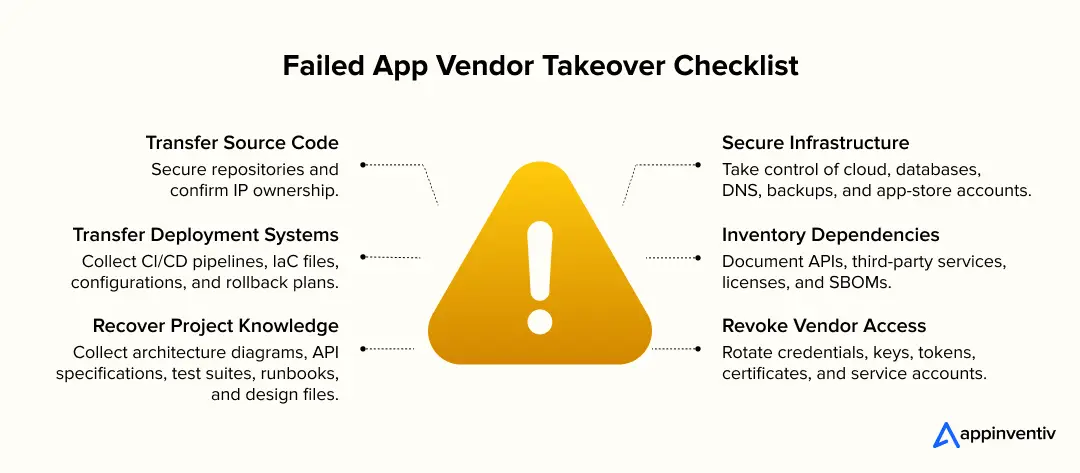
Transfer Source Code and IP Ownership
Move GitHub, GitLab, or Bitbucket repositories under company control. Verify branch history, release tags, build scripts, and submodules, the exact records that good version control practices are meant to preserve during any handoff. For mobile apps, verify iOS bundle IDs, Android package names, native modules, platform-specific configurations, and release builds. Check contracts to confirm ownership of source code, designs, and documentation.
Secure Infrastructure and Database Access
Transfer administrative access for cloud accounts, databases, and DNS records. Obtain TLS certificates, backup storage, monitoring platforms, and app-store profiles. Run test restores on database backups before sign-off.
Verify Apple Developer, App Store Connect, Google Play Console, Firebase, APNs, and FCM access. Confirm that production push notifications, analytics, authentication, and other mobile services remain under enterprise control.
Transfer Deployment Pipelines
Document development, staging, and production environments. Transfer automated CI/CD pipelines and Infrastructure as Code files. Collect deployment scripts, configuration files, and rollback plans. Verify mobile build signing, provisioning, TestFlight distribution, Google Play testing tracks, and production release configurations.
Inventory APIs and Third-Party Services
Catalog all APIs, app libraries, and external integrations. Audit the Software Bill of Materials. Check for vulnerable code packages or restricted open-source licenses. Pay particular attention to mobile SDKs for payments, maps, authentication, analytics, push notifications, crash reporting, and attribution.
Collect Documentation and System Knowledge
Gather architecture diagrams, API specifications, automated test suites, and data models. Collect design files and operational runbooks. Schedule knowledge transfer sessions to cover unwritten business rules. Recover mobile-specific documentation covering supported iOS and Android versions, device matrices, SDK dependencies, app permissions, signing configuration, release procedures, and store submission history.
Rotate Credentials and Revoke Vendor Access
Change all passwords, API keys, SSH keys, and system tokens. Replace security certificates and service account logins. Revoke previous vendor permissions upon validating the full system transfer. Rotate Apple and Google credentials, signing keys, Firebase credentials, APNs and FCM keys, analytics tokens, and third-party SDK credentials.
Bring in recovery engineers to stabilize architecture, DevSecOps, observability, security, and deployment controls before another production release.

How Much Does It Cost to Recover a Failed App Project?
Understanding how to recover from a failed app project starts with cost. Recovering a failed app project costs between $40,000 and $400,000. The final figure depends on iOS and Android code health, architecture, backend dependencies, technical debt, security exposure, testing, and remaining scope.
Complex enterprise platforms with old systems, strict compliance rules, and heavy data migrations cost more. Harness estimates manual engineering work can cost a 250-developer organization about $8 million in lost productivity each year. Technical audit findings set the exact price.
- iOS and Android code health: Native or cross-platform codebases with poor documentation require deeper assessment and rework.
- Mobile architecture: Tightly coupled modules, outdated frameworks, and weak API boundaries increase recovery effort.
- Device and OS coverage: Supporting more iOS and Android versions increases compatibility testing.
- SDK dependencies: Payment, analytics, maps, authentication, push, and crash-reporting SDKs may require upgrades or replacement.
- Backend and API complexity: Mobile recovery often depends on repairing authentication, APIs, databases, and third-party integrations.
- Testing requirements: Missing UI, regression, performance, and real-device testing increase engineering effort.
- Security and compliance gaps: Vulnerabilities and regulatory gaps demand dedicated engineering fixes.
- Infrastructure changes: Cloud, network, and server updates add engineering labor.
- Recovery strategy: Quick fixes cost less upfront than full app rebuilds.
- Engineering team mix: Specialists and senior architects increase project rates.
Leaders must evaluate future costs instead of past spending. Compare rescue costs directly against partial or total rebuild expenses.
| Total Recovery Investment = Code Repair + Infrastructure Updates + Data Migration + Testing + Security Compliance + Operational Disruption. |
|---|
How to Measure Whether Your App Recovery Is Working
Real app project recovery progress appears in clear engineering, operational, and financial data. Compare a key set of metrics against baseline numbers taken during your audit.
| Focus Area | Core Metrics to Track | What Progress Proves |
|---|---|---|
| Mobile engineering | Build success rate, release cycle time, change failure rate, regression defects, test coverage | Releases become faster and more predictable |
| Mobile reliability | Crash-free sessions, crash-free users, Android ANR rate, app startup time, API latency | The app becomes more stable across users and devices |
| Production health | Uptime, error rate, MTTR, failed transactions, push notification failures | Mobile and backend operations recover faster |
| Business outcomes | Budget variance, milestone accuracy, feature adoption, checkout completion, app ratings, customer incidents | Recovery produces measurable business value |
Define clear numerical goals for every metric instead of watching general trends. Set measurable thresholds for crash-free sessions, Android ANRs, app startup time, p95 API latency, uptime, change failure rate, and critical transaction failures.
Executive updates must emphasize lowered technical risks, restored system features, live operational health, total spend, and completed roadmap milestones.
Also Read: Enterprise Mobile App Development: How It Can Accelerate Your Business Growth
Common Mistakes to Avoid During App Project Recovery
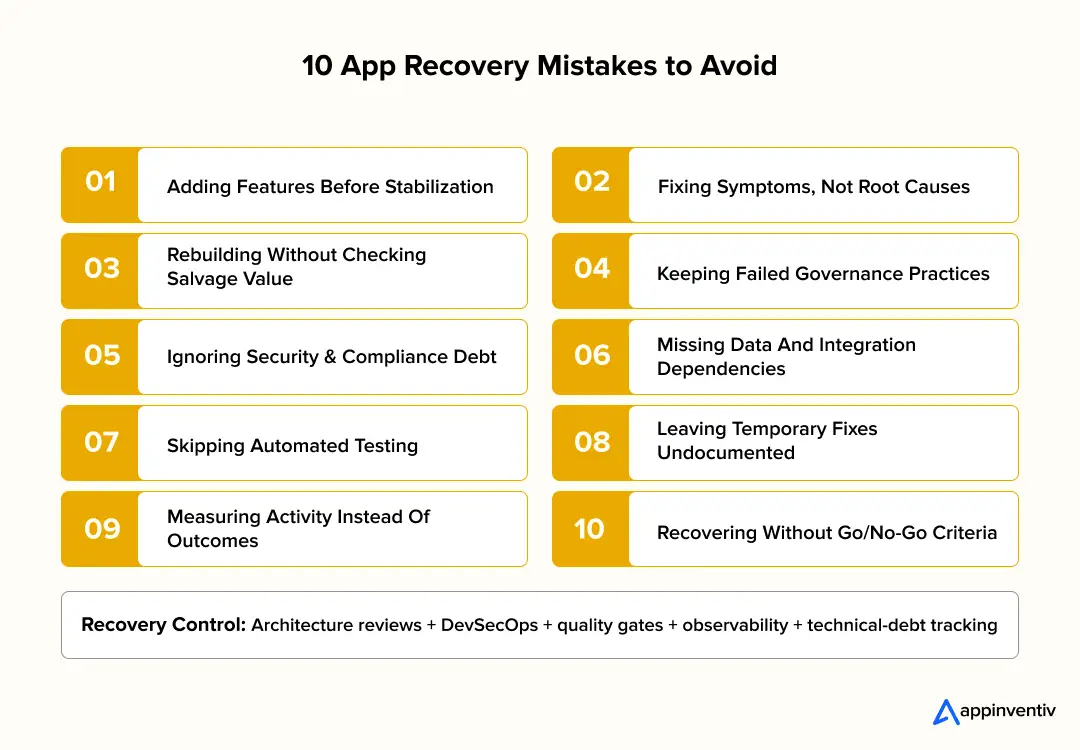
Trying to fix a failing app project the wrong way costs far more than lost engineering hours; a second failure destroys leadership trust. Teams must address project risks directly during recovery.
Adding Features Before System Stability
New features introduce rapid code changes, complex dependencies, and system risks. Unstable apps become hard to diagnose. Freeze non-critical feature work. Fix P0 and P1 security bugs, database errors, outages, and core workflow breaks first. Restart feature work once target stability metrics are met. For mobile apps, stabilize crashes, ANRs, authentication, payments, navigation, and critical API workflows before adding features.
Fixing Symptoms Instead of Root Failures
Quick bug patches hide deep structural defects inside databases, application programming interfaces, or cloud servers. Connect every major defect to its root cause and financial cost. Use application logs, request traces, dependency maps, incident reports, and architecture reviews to locate root failure sources. Trace mobile failures across the device, app code, SDKs, APIs, and backend services before changing the affected screen or workflow.
Rebuilding Systems Without Checking Salvage Value
Full rewrites can discard working mobile modules, APIs, data models, business rules, SDK integrations, and cloud services. Score every component on code health, security standards, architecture fit, testability, and rebuild effort. Keep or refactor existing assets that satisfy technical targets.
Keeping Unclear Governance Models
Recovered mobile apps fail under vague platform ownership, uncontrolled scope expansion, weak testing, and unreliable release controls. Assign clear decision owners, change-control rules, acceptance standards, escalation paths, and measurable recovery milestones, essentially rebalancing the same tradeoffs described in the project management triangle.
Ignoring Security, Data, and Technical Debt
Recovery teams often focus on visible mobile defects while leaving risks inside permissions, SDKs, local storage, APIs, dependencies, and backend services. Hidden risks stay inside access permissions, dependency trees, data pipelines, interfaces, and legacy systems. Run security scans, dependency checks, data validations, interface tests, and compliance controls across every single recovery phase.
Skipping Automated Test Coverage
Manual testing makes frequent app releases dangerous and lets old defects return. Write automated unit, UI, integration, regression, and security tests around critical mobile workflows. Test them across supported iOS and Android versions and priority devices. Place testing gates directly into deployment pipelines. SonarQube users were 24% more likely to report fewer vulnerabilities, 20% fewer defects, and 16% lower technical-debt impact from AI-assisted code — numbers that echo the value of a disciplined QA testing process built into recovery from day one
Allowing Temporary Fixes to Become Permanent
Short-term engineering shortcuts create fresh technical debt. Record each temporary fix with its risk level, owner, engineering reason, and cleanup date. Review this backlog during sprint planning and architecture meetings.
Measuring Activity Instead of Recovery
Closed tickets, code commits, and developer hours do not prove mobile app health. Track crash-free sessions, ANRs, release failures, app startup time, API latency, uptime, defect rates, and restored business workflows.
Running Recovery Without Exit Criteria
Recovery projects waste money without clear success rules and can do that indefinitely. Set firm review points tied to technical health, spend, timelines, and business goals. Leadership can continue, adjust plans, or stop work based on clear evidence.
Building an Early Warning System
Set thresholds for schedule variance, budget spikes, crash growth, ANRs, release failures, defect rates, app-store rejection risks, and team capacity. Add these metrics directly into your project control system and risk register. Run app demos, architecture reviews, and quality checks during every planning cycle. Escalate breached thresholds before they trigger another failed iOS or Android release.
Regular mobile architecture reviews, automated build controls, device testing, observability, documentation, and technical-debt reviews help keep recovered apps stable following normal engineering restarts.
Get a technical and financial assessment before technical debt turns another recovery budget into recurring engineering spend.

How Appinventiv Helps Enterprises Recover Failed App Projects
Failed mobile app projects need technical leadership across iOS, Android, backend APIs, cloud infrastructure, security, and release engineering. Appinventiv helps enterprises assess, stabilize, rebuild, and relaunch mobile apps without assuming a full rewrite is necessary.
Through our mobile app consulting services, senior engineers audit source code, architecture, cloud platforms, integrations, and security controls. We identify what code to keep, refactor, or rebuild, protecting working capital.
Appinventiv supports complex mobile vendor takeovers, application modernization, cloud replatforming, DevSecOps, security engineering, quality engineering, and custom app development. Our staff of 1,600 engineers has delivered 2,000 applications across 35 industries, reaching 100 million total downloads globally.
Our performance metrics set the industry benchmark:
- 95% client satisfaction rating
- 90% repeat client rate
- 2x deployment speed
- 99.90% uptime SLA
If your vendor has stalled, connect with Appinventiv to learn how to recover from a failed app project the right way. We evaluate existing code, save working features, and create a clear path back to production.
FAQs
Q. How do you recover a failed app project?
A. Here is how to recover from a failed app project: Secure the iOS and Android source code, Apple Developer and Google Play accounts, signing credentials, cloud infrastructure, databases, APIs, and intellectual property first. Audit the mobile codebases, architecture, SDKs, security, device compatibility, backend services, and release pipelines. Use the findings to decide what to retain, refactor, replace, or rebuild. Stabilize crashes, ANRs, critical workflows, and release processes before restarting feature development.
Q. How long does app recovery take?
A. Recovery takes a few weeks to several months based on code health, architecture, security gaps, and remaining work. Technical audits start the process. Enterprise systems with legacy dependencies and complex data flows require more remediation time than apps with simple code bugs. Supporting multiple iOS and Android versions, devices, SDKs, and app-store release requirements can extend the recovery timeline.
Q. How do engineers perform an app audit?
A. An audit inspects iOS and Android source code, native or cross-platform architecture, SDK dependencies, local storage, APIs, cloud services, device compatibility, app security, release configuration, and test coverage. Engineers inspect deployment pipelines, test coverage, system logs, and documentation. Engineers then map technical findings to financial impact and fix priorities. The assessment marks components to retain, refactor, replace, replatform, rebuild, or retire.
Q. Can you recover an app without starting over?
A. Yes. Failed projects often contain working code, APIs, database models, infrastructure, and business rules. A technical audit finds these assets before redevelopment. Teams save working components and rebuild broken parts. Complete restarts make sense only where repair costs exceed total rebuild costs. This often means preserving healthy APIs, databases, authentication services, native modules, SDK integrations, or platform-specific components while rebuilding only the defective parts.
Q. Can engineers fix poor code quality and technical debt?
A. Engineers can refactor tightly coupled mobile modules, remove duplicated logic, upgrade outdated SDKs and libraries, add automated tests, and repair security defects. Heavy technical debt requires component audits first. Engineers refactor some modules and replace broken ones.
Q. Can engineers take over apps built with AI tools?
A. Yes. Teams manage AI-generated code like human-written code bases. Sonar found 96% of developers do not fully trust AI-generated code, yet only 48% always verify it before committing. Senior engineers inspect architecture consistency, duplicated logic, security bugs, and test coverage. Audits evaluate code against enterprise production standards rather than generation sources like Cursor, Claude, or Codex. For mobile projects, the review should cover native platform conventions, SDK dependencies, permissions, signing configuration, API integration, and device-specific behavior.


Fast 2-minute response, fully NDA-protected.

How Much Does It Cost to Develop a Remote Patient Monitoring App in the UAE?
Key takeaways: Feature scope and system integrations, not the app itself, determine your final development cost. DHA, DOH, and MOHAP compliance must be built into your architecture from day one. Wearables, EHRs, and health information exchanges are the biggest technical cost drivers. A successful RPM platform combines continuous monitoring, clinical workflows, and secure interoperability. Early…

How Much Does It Cost to Develop an App Like Herfy in 2026?
Key takeaways: Herfy-like app development costs SAR 150,000 to SAR 1,500,000 ($40,000 to $400,000). Costs rise with rider tracking, POS sync, kitchen displays, loyalty, and branch controls. Saudi apps need Arabic UX, Mada, STC Pay, VAT, and ZATCA-ready invoice flows. Peak loads during Ramadan, Eid, and weekends need strong backend and load testing. A phased…

Key takeaways: The operating model determines survival. The code does not. Compliance under PDPL in the UAE and SDAIA in Saudi Arabia must be engineered into architecture, not added before launch. A serious build costs between AED 147,000 and AED 1,470,000 (USD 40,000 to USD 400,000), depending on scope. The single largest cost most operators…